















 0 comments





Most Salesforce projects don’t fail because someone wrote bad code; they fail because someone wrote code that shouldn’t have existed. A trigger where a Flow would have done, a custom screen where a page layout was fine, an integration built point-to-point that now breaks every release.
Salesforce development is less about knowing Apex syntax than knowing when to reach for it.
This guide covers both, and it’s the hub for every development guide we publish.
TL;DR: Salesforce development means extending the platform through declarative tools (Flow, App Builder) and code (Apex, Lightning Web Components). It runs on a multi-tenant, metadata-driven architecture, which is why governor limits exist and why bulkification isn’t optional. The average US Salesforce developer earns $95,814 (PayScale, 2026), and IDC projects the ecosystem will create 11.6 million jobs between 2022 and 2028.
What Is Salesforce Development?
Salesforce development is the practice of extending the Salesforce platform beyond its standard configuration using declarative tools, custom code, or both. It differs from general software development in one decisive way: you build inside a shared, governed runtime rather than on your own infrastructure.
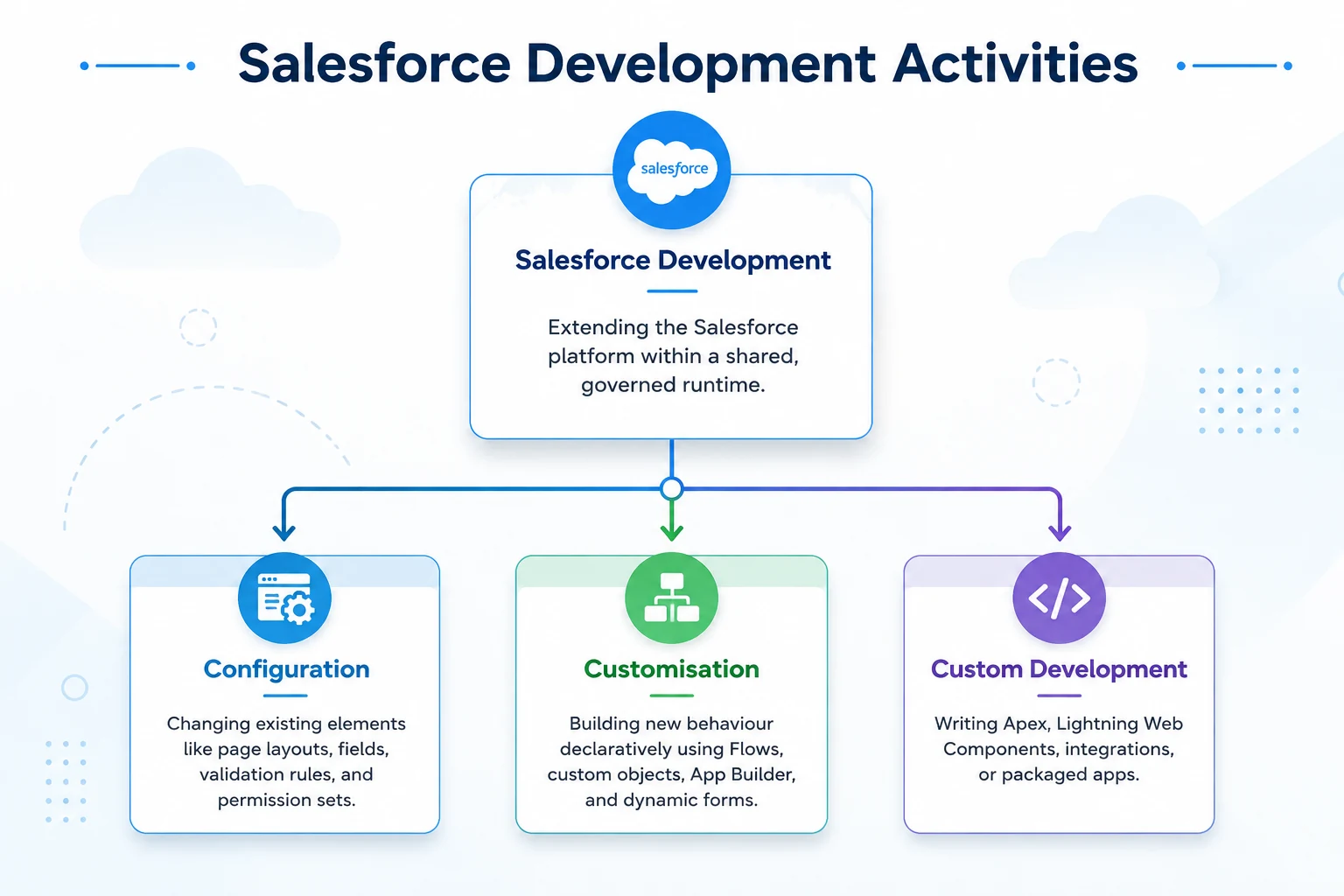
It splits into three activities that get lumped together and shouldn’t be.
- Configuration: Changing what already exists. Page layouts, fields, validation rules, permission sets. No code, no deployment risk, any trained admin can do it.
- Customisation: Building new behaviour declaratively. Flows, custom objects, App Builder pages, dynamic forms. Still no code, but you’re now designing systems and can absolutely design them badly.
- Custom development: Writing Apex, Lightning Web Components, integrations, or packaged apps. Full control, full responsibility, mandatory test coverage.
The distinction is commercial as much as technical. Configuration is measured in hours; custom development in sprints. We break the boundary down in configuration versus customisation.
What Does a Salesforce Developer Actually Do?
A Salesforce developer translates business requirements into platform solutions, writing Apex for logic the declarative tools can’t express, building Lightning Web Components for custom interfaces, integrating external systems through APIs, and maintaining code quality across three annual platform upgrades.
The day-to-day, honestly:
- Requirements Translation: Deciding whether a request needs code at all. This is the highest-leverage part of the job and the least visible.
- Building: Apex classes and triggers, LWC components, Flows, integrations.
- Testing: Unit tests with real assertions, not coverage padding.
- Deploying: Source control, CI/CD pipelines, sandbox strategy.
- Debugging: Reading debug logs, tracing governor limit exceptions, diagnosing why an automation fired twice.
- Release management: Regression testing against Spring, Summer, and Winter releases you didn’t schedule.
The line against the admin role: an administrator manages what Salesforce is configured to do; a developer changes what it’s capable of doing. In small orgs, one person does both. Full comparison in admin vs developer vs architect vs consultant.
How Does the Salesforce Platform Architecture Work?
Salesforce runs as a multi-tenant platform: your org shares infrastructure with thousands of others, and the platform enforces per-transaction resource limits so no tenant can degrade the rest. This single constraint shapes every design decision you’ll make.
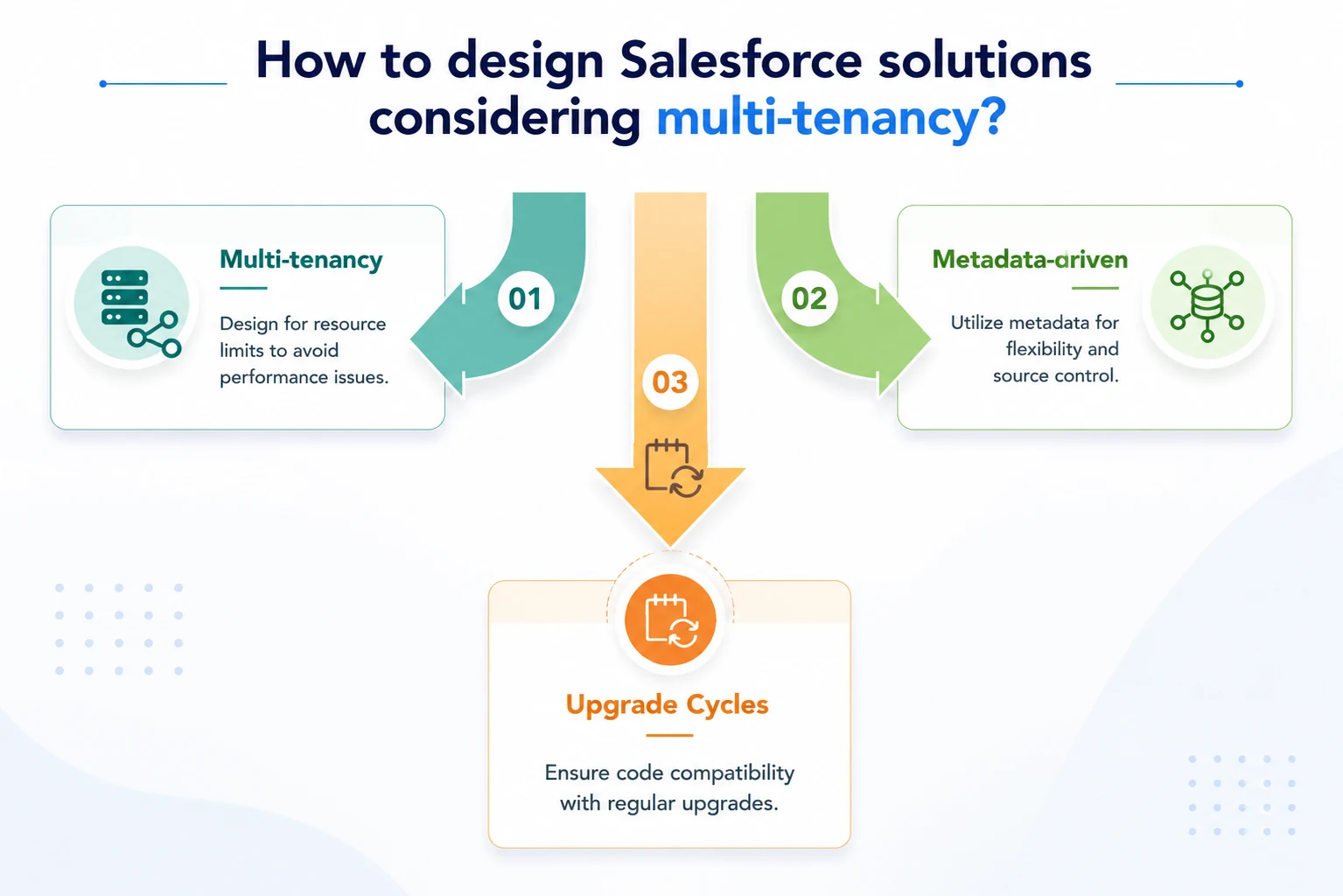
Three properties, each with direct consequences:
- Multi-tenancy: You don’t get a server; you get a governed share of one. This is the origin of every governor limit, and the reason code that works on ten records fails on fifty thousand.
- Metadata-driven: Your customisations are stored as metadata, not compiled binaries. Objects, fields, Apex classes, Flows all metadata. That’s what makes source control, sandboxes, and packaging possible.
- Three upgrades a year: Spring, Summer, Winter. You don’t choose when. Anything you build must survive an upgrade you didn’t schedule, which is why unsupported hacks eventually break.
The platform layer beneath the CRM apps is covered separately in what the Salesforce Lightning Platform is, including the Platform licence, which costs meaningfully less than full CRM for custom apps that never touch Sales or Service objects.
Declarative or Code: How Do You Decide?
Start declarative. Salesforce’s guidance is clicks before code, and the market has moved that way decisively; developer demand declined 12% in 2025 as low-code absorbed routine Apex work, while Technical Architect demand rose 27% against only 4% supply growth (SyncGTM, 2026).
That shift is the practical answer: routine automation is now declarative, and what’s left for code is the hard part.
- Reach for Flow: When logic is record-triggered, linear or lightly branching, and an admin will maintain it.
- Reach for Apex: When you need callouts with retry logic, complex bulk processing, recursion control, transactional rollback, or logic that must be unit-tested to a standard Flow can’t reach.
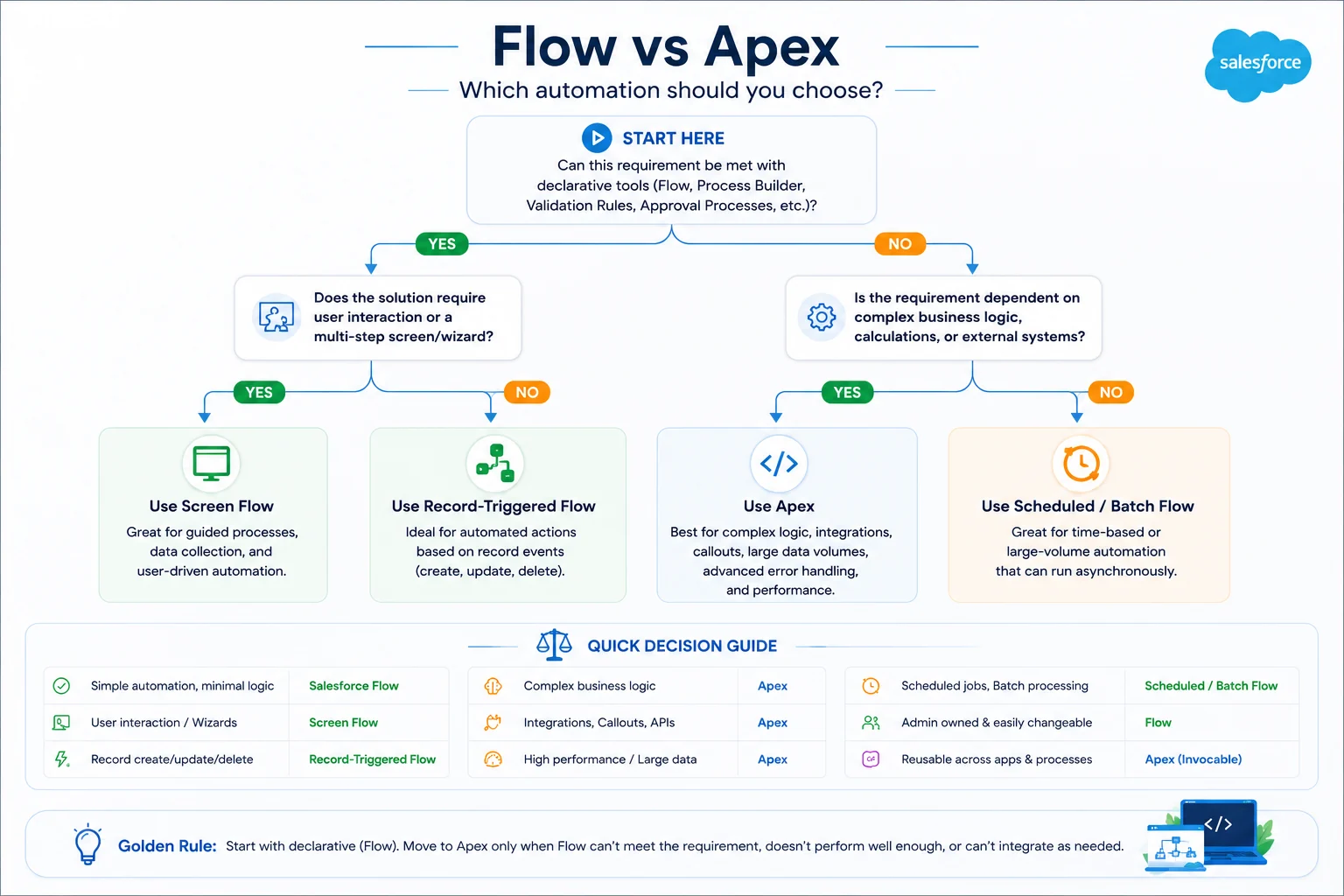
The honest test: who maintains this in two years? If the answer is an admin, build it declaratively even when code would be marginally faster today.
Not sure whether your requirement needs code or configuration?
We rebuilt Freshworks’ entire Freshdesk–Salesforce app in Lightning Web Components (LWC) and have also advised businesses against unnecessary custom development when declarative solutions were the better choice.
Deeper: Flow vs Apex · Salesforce low-code development
Apex, LWC, Flow and Visualforce: What Does Each Do?
Four building blocks, four jobs; confusing them is where architectural debt starts.
Apex
- Salesforce’s server-side language: Java-like, running inside governor limits, and handles triggers, batch and async processing, REST callouts, and logic reusable across Flow, LWC, and integrations.
- Non-negotiables: Bulkify everything, keep SOQL and DML outside loops, one trigger per object delegating to a handler class, business logic in service classes rather than the trigger.
→ Apex programming guide · SOQL and SOSL · Governor limits
Lightning Web Components
The modern UI framework, built on web standards rather than a proprietary abstraction. Faster than Aura and the default for anything custom-facing.
→ LWC complete guide · LWC vs Aura vs Visualforce · Lightning Experience
Flow
The declarative automation engine, and now the primary one; Workflow Rules and Process Builder are both retired. Before-save Flows for same-record updates, after-save for related records, fault paths on every element that can fail.
→ Salesforce Flow guide · Flow Orchestration
Visualforce
Not deprecated, despite what you’ll read. It remains the only native way to render PDFs via renderAs=”pdf”, which is why quote, invoice, and contract requirements still land on it in 2026.
→ What is Visualforce
What Tools Do Salesforce Developers Use?
The modern toolchain is VS Code plus the Salesforce CLI, with the Developer Console reserved for quick debugging rather than real work.
| Tool | Purpose | When to skip it |
|---|---|---|
| VS Code + Salesforce Extensions | Primary IDE for authoring, deploying, and debugging | Never |
| Salesforce CLI (sf) | Scripting, CI/CD, org management, data loads | Never on team projects |
| Developer Console | Anonymous Apex, log inspection | Anything you’d commit |
| Code Builder | Browser-based VS Code, zero local setup | If local setup works |
| Scratch orgs | Disposable, source-tracked environments | Small teams on org-based dev |
| PMD / Apex Code Analyzer | Static analysis in CI | Never with a pipeline |
Still deploying with change sets? That’s the first thing to fix.
See Salesforce DevOps: CI/CD and release management, sandboxes explained, and Code Builder.
How Should You Design the Data Model?
Design the data model before anything else; every automation, report, and integration you build afterwards inherits its mistakes. Relationship errors are the most expensive category on the platform because fixing them requires migrating live data.
Master-detail or lookup?
Master-detail gives cascading delete, roll-up summaries, and inherited sharing, at the cost of a hard dependency. Lookup keeps records independent. Converting later means data migration.
- Junction Objects: Model many-to-many with two master-detail relationships. Standard pattern; no clever alternatives needed.
- Watch for Skew: One account owning millions of child records, or one user owning millions of records, degrades performance through record locking during bulk operations. Invisible in a sandbox, painful in production.
- Fewer Objects Beats More: Every custom object fragments reporting and adds maintenance. Model the business, not the org chart.
→ The Salesforce data model explained
What Are Governor Limits and How Do You Design Around Them?
Governor limits are per-transaction resource caps that keep the multi-tenant platform stable. For a synchronous transaction: 100 SOQL queries, 150 DML statements, 10,000 records per DML operation, 6MB heap, 10 seconds CPU time. Asynchronous contexts get roughly double on most.
Nearly every limit exception traces to one of three mistakes:
- A Query Inside a Loop: 200 records, 200 queries, blown at 100.
- DML Inside a Loop: Same pattern, lower ceiling.
- Logic Assuming One Record: Trigger.new[0] is a bug waiting for a data load.
The fix is always the same shape: collect into a Map or Set, query once outside the loop, operate on collections, write once.
| Limit | Value |
|---|---|
| SOQL queries | 100 |
| DML statements | 150 |
| Records per DML operation | 10,000 |
| Heap size | 6 MB |
| CPU time | 10 seconds |
Source: Salesforce Developer Documentation Apex Governor Limits, 2026. Asynchronous contexts get roughly double on most of these.
→ Governor limits: full reference and workarounds
How Do You Test and Deploy Salesforce Code?
Salesforce requires 75% Apex code coverage to deploy to production, a compliance floor, not a quality target. Coverage measures which lines are executed, not whether your assertions proved anything. A test that runs your code and asserts nothing passes the gate and catches no bugs.
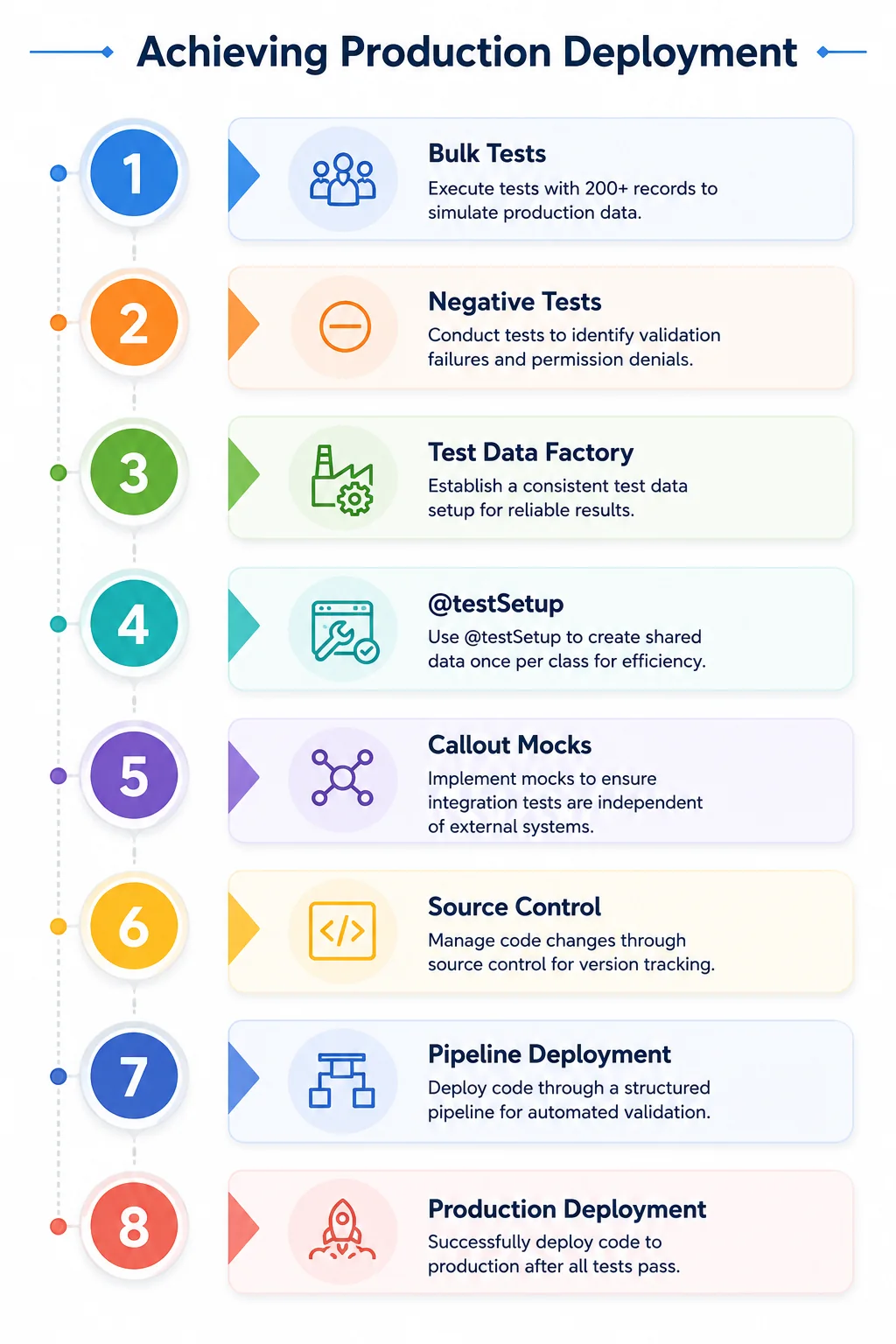
What actually protects you:
- Bulk tests with 200+ records, because that’s what production sends
- Negative tests for validation failures and permission denials
- A test data factory so setup stays consistent
- @testSetup to create shared data once per class
- Callout mocks so integration tests don’t depend on someone else’s uptime
Deployment should move through source control and a pipeline: scratch org or dev sandbox → integration → UAT → production, with automated validation and a rollback plan.
→ Salesforce DevOps and CI/CD · Agile delivery for Salesforce
Salesforce Development Best Practices
Best practices reward discipline in specific, expensive ways. The gap between a well-built org and a poorly built one usually doesn’t show for eighteen months; then it shows all at once, during a data migration or a peak trading period.
| Discipline | The rule that matters most |
|---|---|
| Bulkification | Assume 200 records. Always. |
| Trigger design | One trigger per object, delegating to a handler |
| Logic placement | Service classes, not triggers or controllers |
| Queries | Selective filters on indexed fields, outside loops |
| Security | with sharing by default; enforce CRUD/FLS explicitly |
| Secrets | Named Credentials or protected Custom Metadata, never hardcoded |
| Error handling | Catch specific types, log context, never swallow silently |
| Naming | Type_Object_Purpose for Flows; PascalCase nouns for classes |
| Automation | One Flow per object per context, so order stays predictable |
| Documentation | Comment why, not what |
From our delivery work: the fastest diagnostic on an unfamiliar org is counting triggers per object. More than one on any object and you’re almost certainly looking at unpredictable execution order, recursive updates, and a team that has quietly stopped trusting its own automation.
The 15 Mistakes That Cost the Most
- SOQL or DML inside a loop
- Logic that assumes a single record
- Recursive triggers with no guard
- Hardcoded IDs that break across orgs
- Without sharing as a default rather than a documented exception
- Missing CRUD/FLS checks in custom controllers
- God classes nobody can test
- Multiple triggers on one object
- Overlapping Flow and Apex on the same event
- Testing only the happy path
- Chasing 75% coverage instead of meaningful assertions
- No error handling on integration failures disappear silently
- Designing against sandbox data volumes
- No source control
- Generic naming (Flow1, TempClass) nobody can search
Recognise your org in that list?
Most Salesforce orgs we inherit have five or more of these issues. We cleaned up Freshworks’ legacy Salesforce architecture and rebuilt it using Lightning Web Components (LWC) without disrupting production. We can do the same for your organization.
How Is AI Changing Salesforce Development?
AI now handles the boilerplate, not the judgment. A developer can describe a requirement in natural language and get a working Apex class or LWC as a starting point, then review, test, and correct it. What AI doesn’t do is design governor-limit-safe architecture, decide whether something needs code at all, or define the boundaries of an agent.
The credential market has shifted with it; Salesforce introduced the Agentforce Specialist certification in 2025, and by early 2026 it had become one of the most in-demand credentials in developer job descriptions alongside Platform Developer II.
Practically, this means the skill that’s appreciating is architectural judgement, which is exactly what the 27% rise in Technical Architect demand reflects.
→ What is Agentforce · Building custom agents with Agent Builder
What Skills and Certifications Do You Need?
Technical: Apex · SOQL and SOSL · Lightning Web Components and the Lightning Design System · Flow · REST and SOAP APIs · data modelling · debugging via debug logs · Git and CI/CD
Non-Technical: Requirements gathering, communication with non-technical stakeholders, and knowing when to say a requirement doesn’t need code.
The certification path:
| Certification | What it signals |
|---|---|
| Platform Developer I (PD1) | Foundational Apex, LWC, data model |
| Platform Developer II (PD2) | Advanced Apex, async, performance, testing |
| Agentforce Specialist | Agent topic and action design, prompt templates, guardrails, now among the most requested |
| Platform App Builder | Declarative build capability |
| Application / System Architect | Design across a full org |
→ 40 Salesforce developer interview questions
Salary and Career Path
The average US Salesforce developer salary is $95,814, ranging from $72,000 to $141,000 depending on experience, location, and specialisation (PayScale, 2026). Developers holding Agentforce Specialist alongside PD2 are commanding a premium in the current market.
Table 2: US Salesforce Developer Salary (2026)
| Percentile | Salary |
|---|---|
| 10th percentile | $72,000 |
| Median | $95,814 |
| 90th percentile | $141,000 |
Source: PayScale, Salesforce Developer salary data, 2026.
The path: Admin fundamentals → PD1 → junior developer → PD2 and async Apex → senior developer → architect. Skipping the admin stage is the most common mistake; it produces developers who write code for problems configuration has already solved.
The talent market is globally distributed; India supplies 42% of certified developer talent and North America 30% (SyncGTM, 2026).
The Learning Path
- Beginner: Declarative tools, standard object model, SOQL basics, and a conceptual grasp of governor limits before writing Apex.
- Intermediate: Trigger frameworks, asynchronous Apex, LWC fundamentals, unit testing patterns, REST callouts with Named Credentials.
- Advanced: Service and selector architecture, Platform Events, performance tuning at volume, security design.
- Architect: Multi-cloud solution design, org strategy, governance, mentoring.
Is it hard? Six to twelve months to productivity if you already know an object-oriented language. Governance limits and the sharing model are what trip up experienced developers from other platforms; the syntax is the easy part.
Should You Build In-House or Work With a Partner?
It depends on whether your Salesforce work is continuous or project-shaped. Senior talent is genuinely scarce; architect demand grew 27% in 2025 against 4% supply growth, which makes hiring at the top of the market slow.
- In-house: Works with a steady backlog and domain knowledge that takes months to acquire. A half-utilised senior developer is an expensive way to buy availability.
- A Partner: Works when the work is project-shaped, you need several skill sets at once, or you need capacity now rather than after a four-month hiring cycle.
- Hybrid: In-house architect owning design and standards, partner delivering build is where most mid-market organisations land.
→ Salesforce development cost · Hiring a Salesforce developer · In-house vs outsourced
Rather discuss scope than read another guide?
We rebuilt Freshworks’ Salesforce app using Lightning Web Components (LWC) and helped Sinch launch its communication platform on the Salesforce AppExchange. If you’re unsure whether your project needs custom development or simply better platform administration, we’ll give you an honest recommendation.
Go Deeper: The Full Development Cluster
Foundations: Lightning Platform · Lightning Experience · admin vs developer vs architect · Salesforce Functions retirement
Code: Apex · SOQL & SOSL · governor limits
UI: Lightning Web Components · LWC vs Aura vs Visualforce · Visualforce
Automation: Flow · Flow vs Apex · low-code · Flow Orchestration
DevOps: CI/CD · sandboxes · agile delivery · Code Builder
Beyond the platform: Heroku for Salesforce
Career: Interview questions
Where to Start
If you’re deciding whether you need custom development at all, begin with configuration versus customisation; a good portion of what gets scoped as development turns out to be configuration.
If your org already feels fragile, Salesforce DevOps is usually the highest-leverage fix.
If you’re learning, start with Apex fundamentals and governor limits together; understanding the constraint before the syntax is what separates developers who scale from developers who firefight.
Looking for more details on how we work?
Discover how we rebuilt Freshworks’ Freshdesk–Salesforce integration using Lightning Web Components (LWC), modernized the legacy architecture, and delivered a scalable solution without disrupting production.
 0 comments










Your email address will not be published. Required fields are marked *