















 0 comments





Key Takeaways:
- Build new Salesforce components in LWC, while keeping Aura and Visualforce where they still solve specific requirements better.
- Visualforce remains essential for native PDF generation, while Aura can still make sense for stable components that are not causing problems.
- Avoid blanket Aura-to-LWC rewrites and migrate opportunistically when components are slow, blocking changes, or already being rebuilt.
- Migration is a rebuild, not a direct translation, with testing often requiring more effort than teams initially expect.
The short answer is LWC, and most comparisons stop there.
The useful answer is that none of the three is deprecated, all three are still supported, and there are specific things the older two do that LWC still can’t. That’s why a fifteen-year-old org runs all three at once and why “migrate everything to LWC” is expensive advice that’s often wrong.
Quick Answer: Build everything new in LWC, only keep Visualforce where you need PDF generation (renderAs=”pdf” has no LWC equivalent) and complex dynamic email templates. Leave working Aura alone unless you’re already touching it, it’s slow on a high-traffic page, or it’s blocking a change. Migration is a cost, not automatically an upgrade.
The Three-Way Comparison
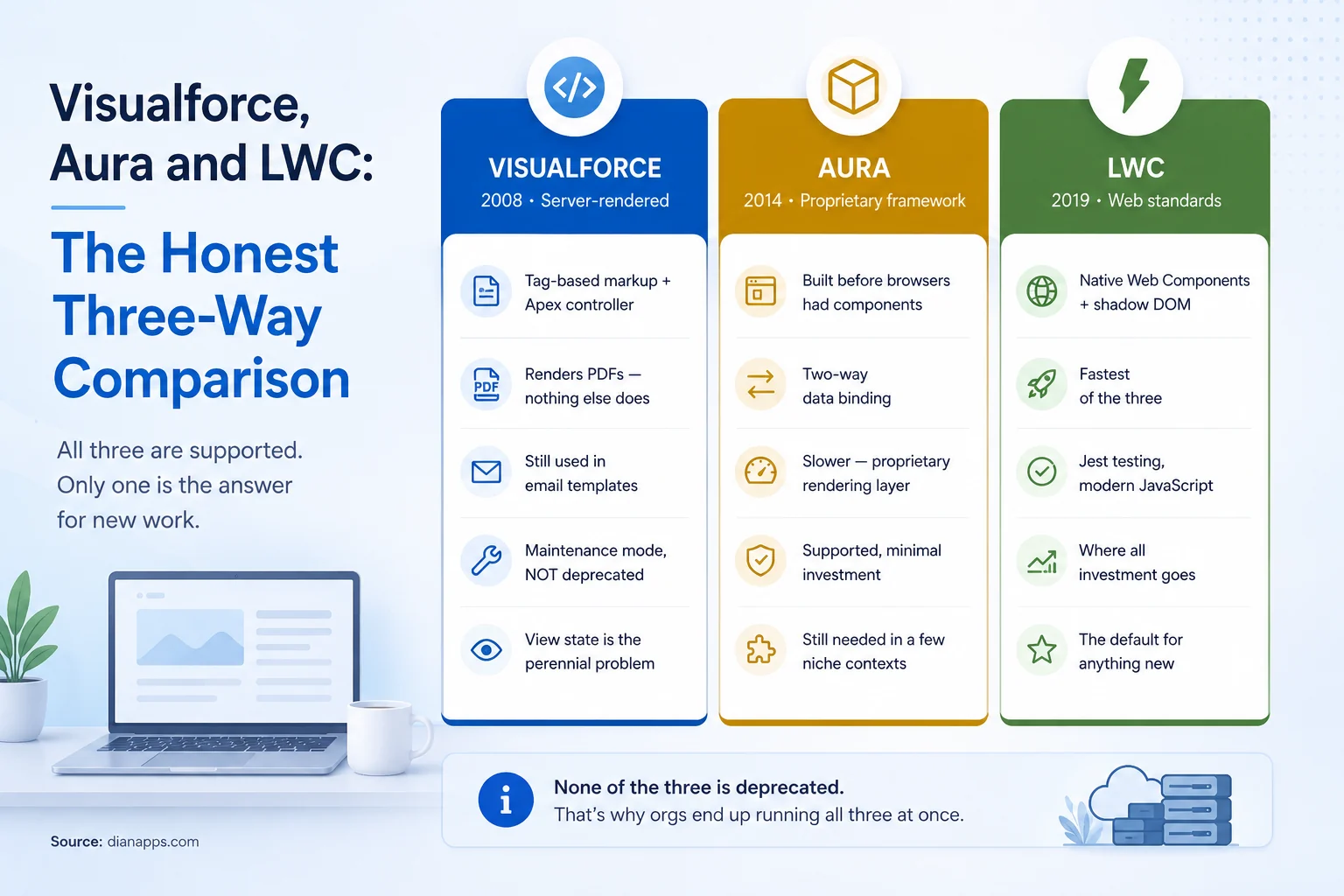
Side-by-side comparison of Visualforce from 2008, Aura from 2014, and LWC from 2019, showing architecture, strengths, and current status of each
| Visualforce | Aura | LWC | |
|---|---|---|---|
| Released | 2008 | 2014 | 2019 |
| Rendering | Server-side | Proprietary client framework | Native browser (shadow DOM) |
| JavaScript | Optional, ES5-era | ES5 | Modern ES6+ |
| Data binding | Postback model | Two-way | One-way, reactive |
| Styling | Custom CSS | SLDS + Aura styles | Scoped CSS in shadow DOM |
| Testing | Apex tests only | Difficult, Aura-specific | Jest, standard tooling |
| Performance | Slowest - full page reloads | Middle | Fastest |
| Learning curve | Apex-centric | Steep, proprietary | Transferable web skills |
| Salesforce investment | Maintenance only | Maintenance only | All of it |
| Status | Supported | Supported | Recommended |
On performance, Salesforce’s own DreamHouse sample app was migrated from Aura to LWC and recorded Experience Page Time reductions in the range of 2–60% depending on the component. That spread matters: simple components gain little, complex data-heavy ones gain a lot. It’s a useful sanity check before you promise anyone a speed improvement.
When You Genuinely Still Need Visualforce or Aura
Visualforce: PDF generation
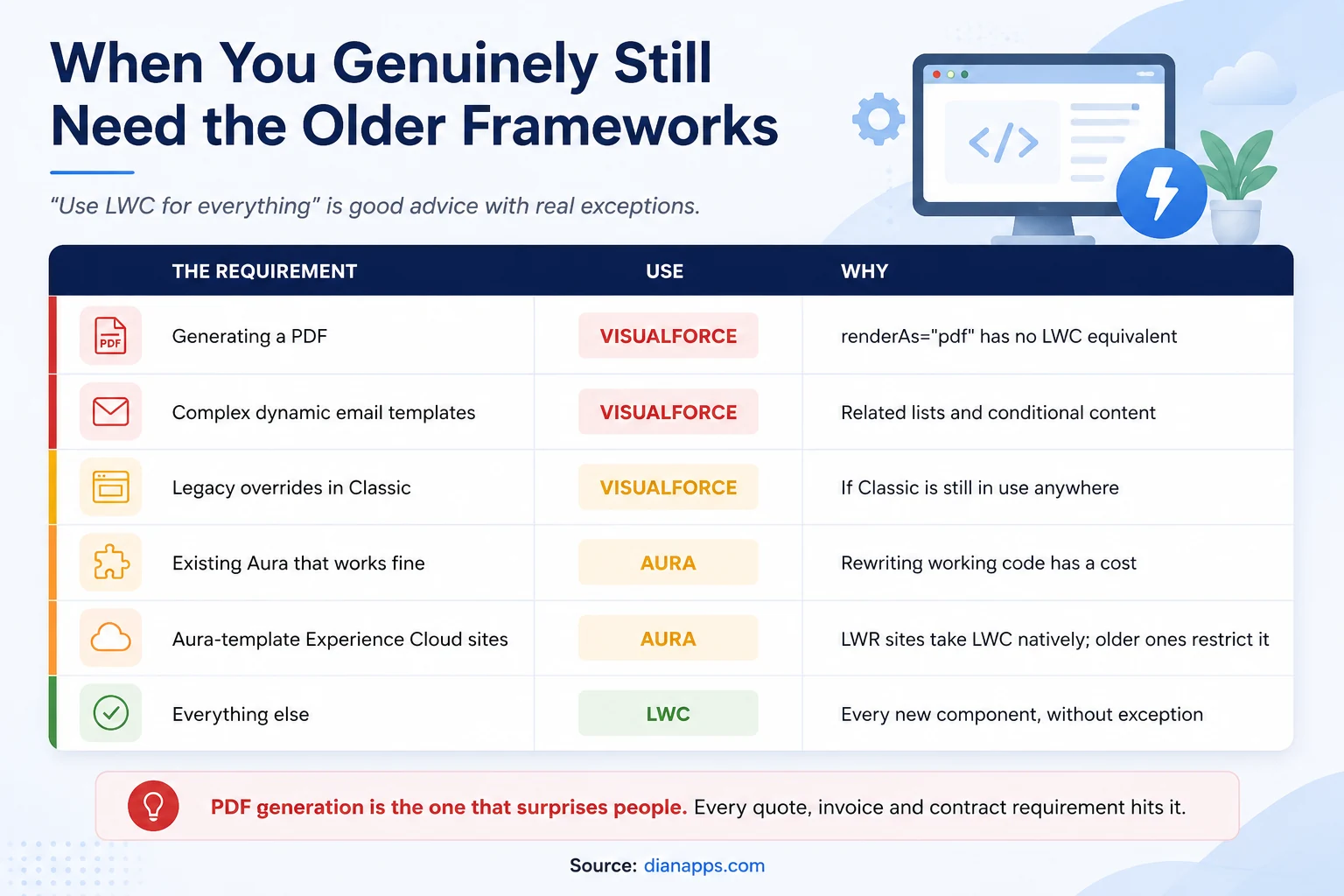
This is the one that surprises people: renderAs=”pdf” is still the only native way to generate a PDF in Salesforce, and LWC cannot do it.
Every quote, invoice, contract, statement, or certificate requirement eventually reaches this. Your options are Visualforce or a paid third-party tool like Conga or DocuSign Gen. That’s why Visualforce is still being written in 2026, not merely maintained.
Visualforce: complex email templates
Visualforce email templates handle related lists, conditional content, and dynamic merge logic that Lightning email templates can’t express. If your template needs to loop over child records, you’re in Visualforce.
Visualforce: Salesforce Classic remnants
If any part of your org still runs Classic, Visualforce overrides and buttons are what work there; LWC doesn’t render in Classic.
Aura: existing components that work
The strongest case for Aura is inertia, and it’s a legitimate one. Rewriting a functioning component consumes budget and introduces regression risk in exchange for a performance gain users may not notice.
Aura: Experience Cloud template constraints
Check your site template before promising anything; LWR-based Experience Cloud sites support LWC natively. Older Aura-based site templates have restrictions on where and how LWC can be used. This catches teams out mid-project.
Related: Visualforce guide · Lightning Web Components guide
Is Aura Deprecated? Is Visualforce?
Neither is deprecated, and neither is on a published retirement schedule.
What’s true is that both are in maintenance mode – supported, receiving bug fixes and security updates but not new capabilities; all framework investment goes to LWC.
The Practical Read: You’re not facing a deadline; you’re facing a slow accumulation of technical debt, where each year the talent pool shrinks slightly, and the gap between what LWC can do and what Aura can do widens.
That’s a very different problem from a migration deadline, and it calls for a different response – opportunistic migration rather than a rewrite project.
Should You Migrate? A Decision Framework
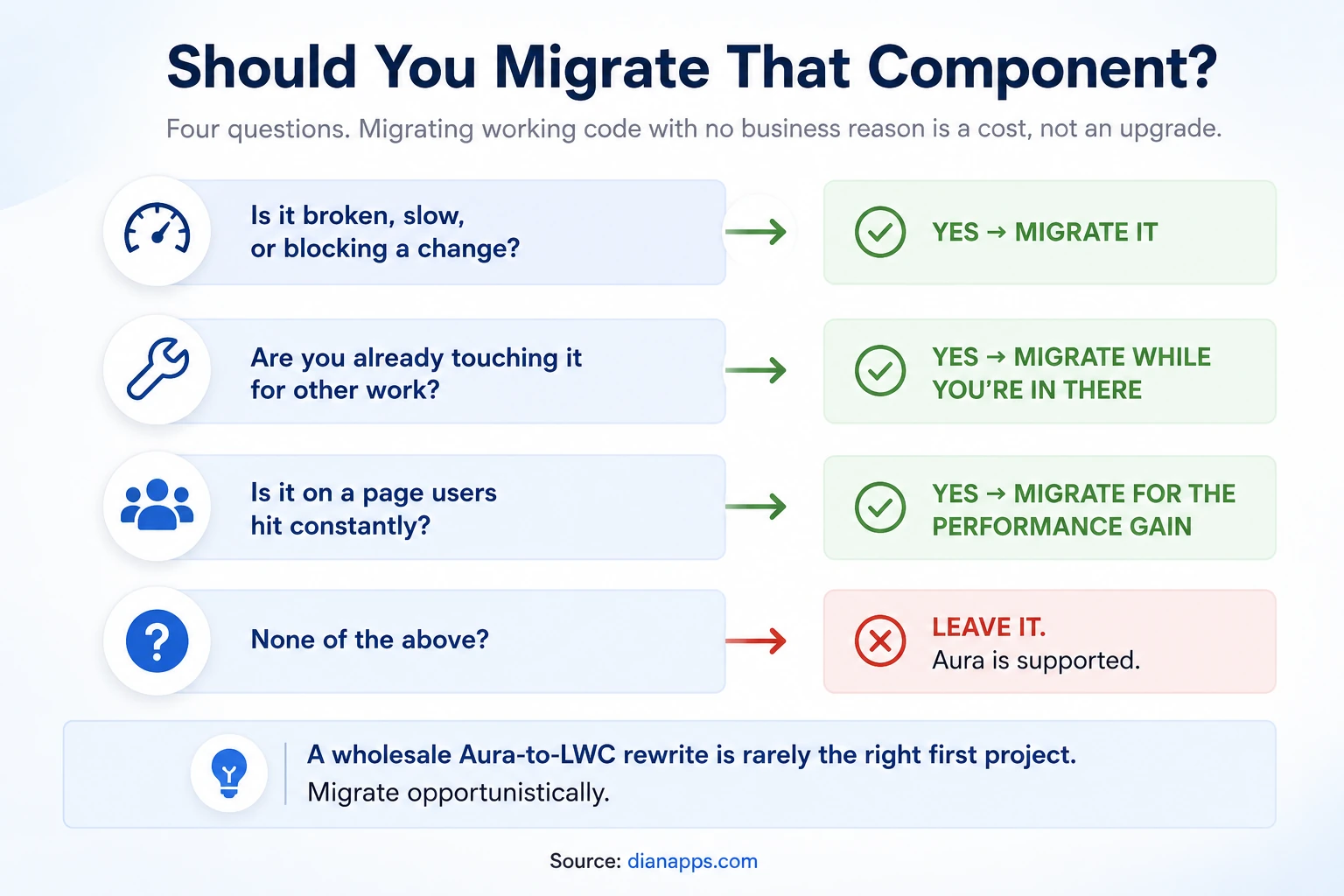
- The Honest Position: A wholesale Aura-to-LWC rewrite is rarely the right first project. It consumes a quarter of engineering capacity, delivers nothing users asked for, and introduces regressions in code that previously worked.
- Migrate Opportunistically Instead: When you’re already in a component for a feature change, rebuild it in LWC. Over two years, most of your estate converts, at no additional cost, with regression risk spread thin.
Migrate Deliberately When:
- The component is on a page users load constantly, and it’s measurably slow
- It’s blocking a change you need to make
- You’re rebuilding that area of functionality anyway
- The Aura component depends on something being retired
What Migration Actually Involves
Aura and LWC aren’t syntactically similar enough for mechanical conversion, so expect a rebuild rather than a translation. Salesforce Development Services can help manage that rebuild end to end, from component assessment and LWC architecture to Apex integration, Jest testing, and incremental deployment.
What Has To Change:
| Aura | LWC equivalent |
|---|---|
| .cmp markup with aura: tags | HTML template with standard elements |
| aura:attribute | @api public properties |
| Two-way binding (v.value) | One-way binding plus explicit event handlers |
| component.get() / set() | Direct JavaScript property access |
| Aura events (application/component) | CustomEvent and Lightning Message Service |
| $A.enqueueAction() | @wire or imperative Apex with Promises |
| Aura-specific init handler | connectedCallback() |
| Helper files | Standard JavaScript modules |
Rough effort per component, assuming the Apex behind it doesn’t change:
- Simple Display Component: Half a day to a day
- Form With Validation: One to three days
- Complex Component With Multiple Children And Events: One to two weeks
The Part People Underestimate Is Testing: Aura components typically have no automated tests, so migration means writing Jest coverage that never existed. That’s often more effort than the rebuild itself – and it’s also the main reason the migrated version is more maintainable.
Aura and LWC interoperate, which makes incremental migration viable. An Aura component can contain an LWC child; the reverse isn’t true. That asymmetry shapes migration order: migrate leaf components first, work upward.
Related: Salesforce development cost · Salesforce DevOps
Plan Your Aura-to-LWC Migration
Get expert help assessing your existing components, prioritizing migration opportunities, and modernizing Salesforce without unnecessary rewrites.
Recommendation by Scenario
| Your situation | Use this |
|---|---|
| Any new component | LWC, without exception |
| Generating a PDF | Visualforce - no alternative |
| Complex dynamic email template | Visualforce |
| Any part of the org still on Classic | Visualforce for those overrides |
| Working Aura component, no issues | Leave it |
| Aura component that’s slow on a busy page | Migrate to LWC |
| Building on an LWR Experience Cloud site | LWC |
| Building on an Aura-template Experience site | Check constraints first |
| Hiring for the skill | LWC - the talent pool is going one way |
Need Developers for Your Salesforce Migration?
Add experienced Salesforce developers to handle LWC builds, Aura modernization, testing, and incremental migration alongside your existing team.
Where to Go Next
For building in the recommended framework, see the Lightning Web Components guide.
For the framework you’ll still need for PDFs, what is Visualforce?
For the platform beneath all three, Lightning Experience and the Lightning Platform.
For the Apex behind your components, the Apex programming guide.
For budgeting a migration, Salesforce development cost.
The Complete Salesforce Development Guide is the hub.
Before You Commit to a Rewrite
The most common thing we’re asked to quote is a full Aura-to-LWC migration. The most common thing we recommend afterwards is a smaller one.
Not every component earns its rebuild. Some are on pages nobody visits. Some will be replaced by functionality Salesforce ships natively next year. Some are genuinely slowing down a page users hit fifty times a day, and those are worth doing first.
We’re a certified Salesforce Consulting Partner, and inventorying an Aura estate and scoring it for migration value is routine work for our team – usually finishing with a shorter list than the client expected.
Not Sure What to Migrate First?
Tell us about your Salesforce environment, and we’ll help you identify which components are worth rebuilding, which can stay, and where to start.
 0 comments










Your email address will not be published. Required fields are marked *