















 0 comments





Ask a Java team about DevOps, and they’ll talk about pipelines; ask a Salesforce team, and they’ll talk about why the deployment failed again.
That difference isn’t incompetence; standard CI/CD was built for files in a repository, while Salesforce is metadata behind an API changed by developers and admins with dependencies that aren’t declared anywhere and a platform that upgrades three times a year whether you’re ready or not.
This guide covers what actually works on this platform and where the standard advice breaks down.
TL;DR: Salesforce DevOps means version control, automated testing, and repeatable deployments for metadata rather than files. Move from org-based to source-driven development, keep Git as the source of truth, validate dependencies before deploying, and plan rollback as forward-deployment because Salesforce has no native undo. Start with the free tooling that matches your team’s Git literacy; buy a paid tool when the pain is specific.
What Is Salesforce DevOps?
Salesforce DevOps is the practice of applying version control, automated testing, and repeatable deployment to Salesforce metadata – so changes move between environments predictably instead of being rebuilt by hand each time.
It’s a culture more than a toolchain: version control, testing, collaboration and continuous delivery, applied to a platform that wasn’t originally designed for any of them.
Why Salesforce DevOps Is Harder Than Standard DevOps
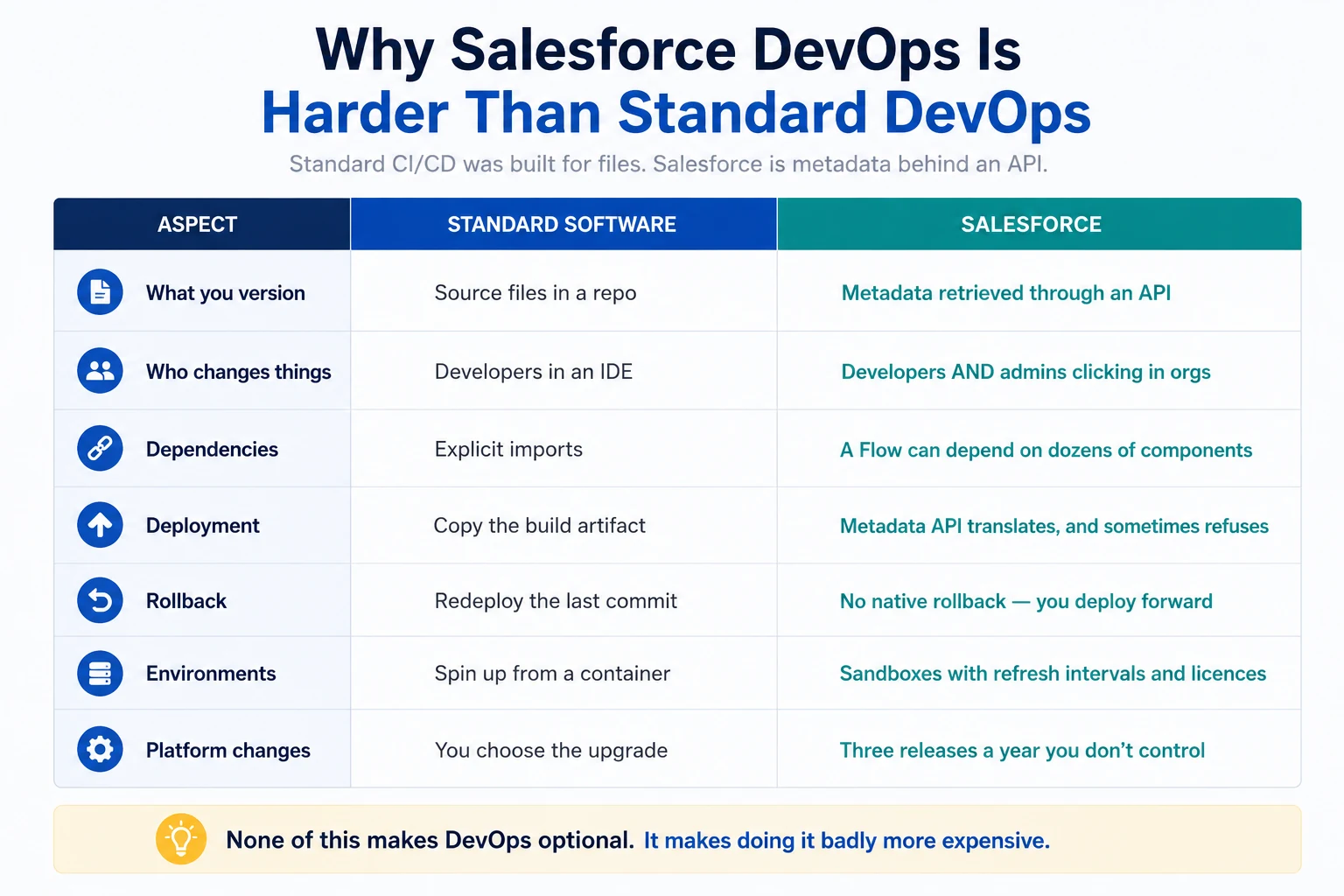
Five things make this genuinely different, and understanding them is most of the battle.
- Metadata Isn’t Source Code: In a Java or Node project, you version files that behave predictably in Git. In Salesforce, “code” also means configuration and interdependent components that behave more like a web of relationships than neat files. You’re versioning an export of your org, not the org itself.
- Admins Are Part Of The Pipeline: Half your changes come from people clicking in Setup, not committing to a branch. Telling an admin to master Git, branching strategies, and CI pipelines isn’t a skills gap – it’s a paradigm shift, and it’s the most-cited reason DevOps adoption stalls.
- Dependencies Are Implicit: A Single Flow or validation rule can depend on dozens of other components, none of them declared. Deploy a Flow that references a field you didn’t include, and the whole deployment fails.
- The Metadata Api Has Quirks: Profiles, permission sets, Flows, communities, and page layouts are all notoriously awkward to move. Page layouts on packaged objects return names without their namespace, so you have to reinsert it manually. Standard objects and tabs often can’t be retrieved at all.
- Coverage Is A Gate, Not A Goal: You cannot deploy to production without 75% Apex coverage. Fall short and the release stops – which turns test maintenance into a release-blocking activity rather than a quality practice.
- And It’s Uneven Across Products: Newer additions like Data Cloud aren’t fully covered by the same metadata and DevOps tooling that the core platform relies on, which means your pipeline may simply not reach parts of your org.
Org-Based vs Source-Driven Development
This is the single most important decision on the page.
Org-based development treats production as the source of truth; you build in a sandbox, then push changes forward with change sets. It’s how most orgs start, and it has hard limits:
- Change Sets Are One-Way And One-Time: You rebuild them from scratch for every environment – sandbox to UAT to production, three times.
- They Can’t Delete Anything: Only add or modify. Removing a component means doing it manually in every environment.
- There’s No Version History: Comparing two environments means eyeballing them.
- Changes Get Overwritten: When two people work on the same components with no merge step.
Source-driven development makes Git the source of truth. Metadata lives in a repository, environments are built from it, and every change has an author, a date, and a reason.
Start by putting your existing metadata in Git as a read-only record, then move one team or one object type to source-driven then extend; teams that attempt a big-bang switch usually revert.
Git Branching Strategies That Work on Salesforce
Standard Git Flow is often too heavy for Salesforce teams; what holds up in practice:
Feature branches per work item, named after the ticket, short-lived – days, not weeks. Long-lived branches on Salesforce diverge painfully because metadata merges badly.
One integration branch that maps to your integration sandbox, plus a main branch that maps to production.
Release branches only if you batch releases. If you deploy continuously, they’re overhead.
The rule that matters most on this platform is to keep branches short; two developers editing the same Flow or page layout in parallel for three weeks produces a merge conflict in XML that nobody wants to resolve by hand.
Related: Sandboxes and environment strategy · Agile delivery for Salesforce
Scratch Orgs and Package Development
Scratch orgs are disposable, source-tracked environments created from a definition file – spun up in minutes, thrown away when the feature launches. They enforce source-driven discipline, because anything not in your repo doesn’t exist in the org.
They suit per-feature isolation and reduce how many developer sandboxes you need. They don’t replace Partial or Full copies because they contain no production data.
Unlocked packages group metadata into versioned, deployable units with explicit dependencies. Genuinely useful for large orgs wanting modular architecture and a significant shift in how the team works, so don’t adopt them mid-project.
The Honest Caveat: Scratch orgs and packaging assume a source-driven, developer-led team. Admin-heavy orgs often get more value from getting change sets out of the workflow first.
What a CI/CD Pipeline Actually Looks Like
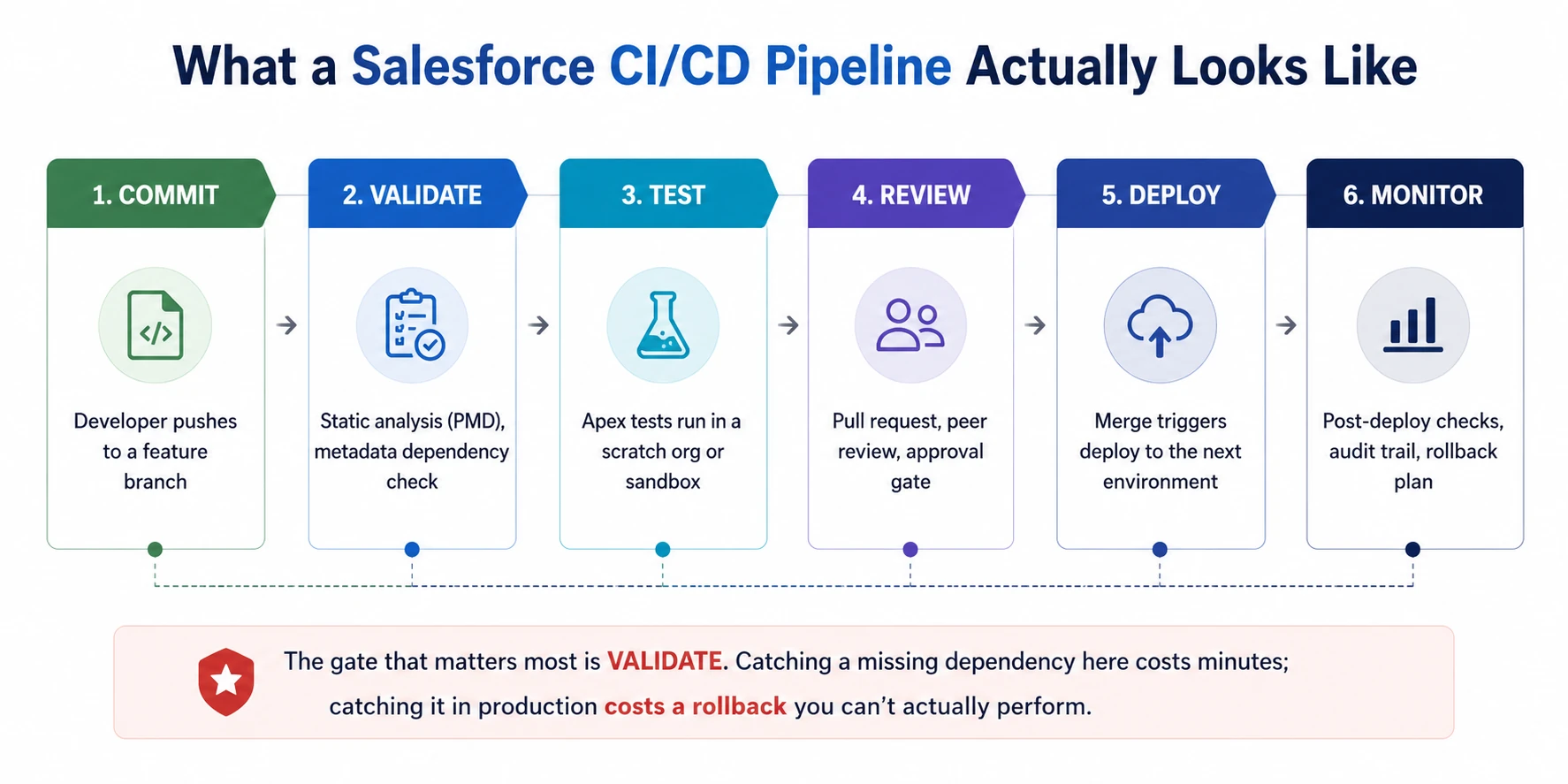
Validation is the stage that earns its keep. Catching a missing dependency there costs minutes. Catching it in production costs a rollback you can’t actually perform.
What to run at each gate:
- On Commit: Static analysis. PMD with the Apex ruleset catches SOQL in loops, missing null checks, hardcoded IDs, and unsafe sharing declarations before a human reads the code.
- On Pull Request: Apex tests in a scratch org or dedicated CI sandbox, plus a metadata dependency check.
- Before Deploy: A validation-only deployment against the target org. This runs the full deployment without committing it, which is the closest thing Salesforce gives you to a dry run.
- After Deploy: Smoke tests and an audit trail entry explaining why the change was made, not just what and when.
Deployment notes are worth mandating; most teams record who deployed and when; almost none record why. Six months later, that’s the only field anyone wants.
Deployments failing more often than they succeed?
That’s usually a pipeline design problem, not only a tooling problem. Our Salesforce development services team can review how metadata moves between environments, identify missing validation gates, and recommend a practical CI/CD workflow for your org.
We can help with source control, Apex and Flow testing, dependency validation, deployment automation, and release governance without forcing your team into a toolchain it is not ready to maintain.
Salesforce DevOps Tooling Compared
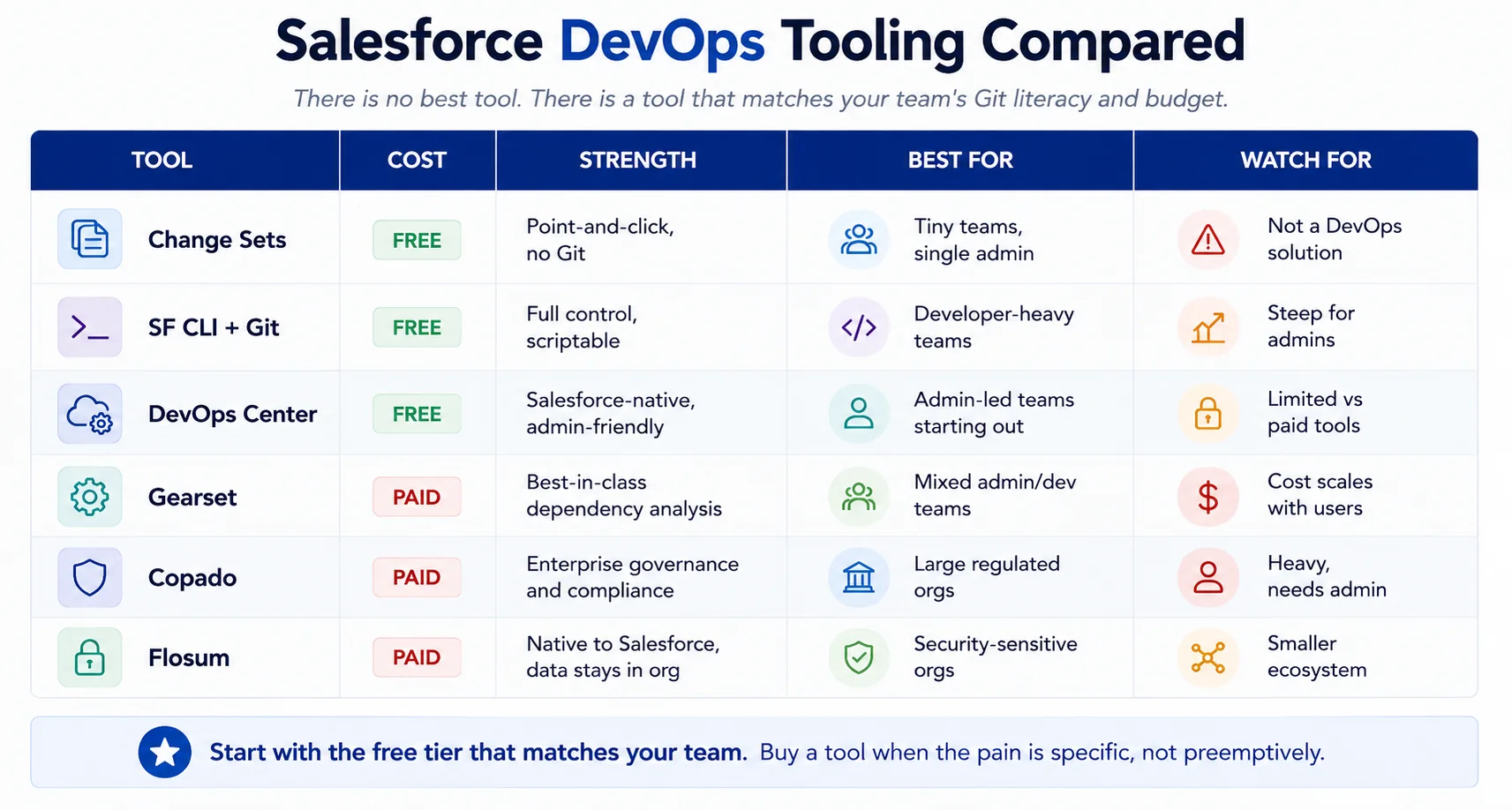
There’s a tool that matches your team’s Git literacy and budget.
- DevOps Center is Salesforce’s free, native answer for admin-led teams. It puts a work-item UI over Git so admins never see a command line. Good starting point; limited against paid tools on dependency analysis and complex branching.
- SF CLI plus Git and your existing CI server costs nothing and gives full control. Right for developer-heavy teams already comfortable with pipelines. Steep if your changes come mostly from admins.
- Gearset is generally regarded as the strongest on the problem that actually breaks Salesforce deployments – dependency detection and metadata comparison. Its problem analyzers catch missing components before you deploy.
- Copado is the enterprise choice: governance, compliance, multi-team orchestration. Heavy and it needs someone to own it.
- Flosum is native to Salesforce, meaning your metadata never leaves the platform. That matters in security-sensitive and regulated orgs.
- On “Gearset vs Copado” specifically – the honest answer is that Gearset tends to win on deployment reliability and ease of adoption; Copado on enterprise governance and scale. Teams under about 20 people rarely need what Copado adds.
Testing and Static Analysis
The 75% coverage requirement is a deployment gate, not a quality measure. Coverage records which lines executed, not whether the assertions proved anything. A test that runs your code and asserts nothing passes the gate and catches nothing.
What to automate:
- Apex tests on every pull request, not just before release
- PMD / Apex Code Analyzer in the pipeline, failing the build on critical rules
- Bulk tests with 200+ records, because that’s what production sends
- Lightning Flow Scanner for declarative automation – it finds DML in loops, missing fault paths, and hardcoded IDs in Flows
Static analysis is the highest-return thing most teams aren’t doing; it catches the failures that cause production incidents, and it runs in seconds.
Related: Apex guide · Governor limits · Salesforce Flow
Rollback: The Uncomfortable Truth
Salesforce has no native rollback; you cannot revert a deployment. What you can do is deploy forward to a previous known-good state – which only works if that state is in version control.
That single fact is the strongest argument for source-driven development, and it’s why teams running on change sets are exposed in a way they usually don’t realise until the first bad release.
A workable rollback plan:
- A tagged, known-good commit for every production deployment
- Metadata backup before release – separate from your Git history
- Data backup, because metadata rollback doesn’t undo data changes
- A tested restore path. Untested backups aren’t backups.
- Feature flags via custom metadata so you can disable behaviour without deploying at all
That last one is underused and worth adopting; turning a feature off with a custom metadata switch takes seconds, deploying a fix takes hours.
Related: Backup and recovery · Sandbox strategy
Release Cadence and Change Management
Match cadence to team maturity; weekly releases with no automated testing produce weekly incidents. Monthly releases with a proper pipeline are usually the right starting point, moving to fortnightly or weekly as confidence builds.
Plan around Salesforce’s three annual releases; each release includes an API version change that can cause metadata mismatches and deployments to fail. Preview sandboxes let you test early; use them.
See: Managing Salesforce Releases.
Freeze windows before major business events, quarter-end, peak trading, month-end close.
A change advisory step doesn’t have to be bureaucratic; for most mid-market orgs, it’s one person reviewing what’s going out and confirming someone tested it.
Common Deployment Errors and What Causes Them
| Error | Cause | Fix |
|---|---|---|
| Missing dependency | Component references something not in the package | Dependency analysis before deploy |
| Coverage below 75% | Tests not maintained alongside code | Enforce coverage in the pipeline, not at release |
| API version mismatch | Source and target on different versions after a release | Pin or override the API version deliberately |
| Profile or permission set failure | These metadata types deploy awkwardly by design | Deploy permission sets over profiles where possible |
| Component not found in target | Something was deleted in the target org | Compare environments before building the package |
| Test failures in unrelated code | Your change broke someone else’s assumption | Run the full test suite, not just your class |
The Pattern: Almost all of these are caught by a validation-only deployment before the real one. That step takes minutes and prevents most bad release days.
How to Start: A Realistic Sequence
For a team currently on change sets:
- Get metadata into Git, even as a read-only record. This alone gives you history and a rollback target.
- Add static analysis to catch quality issues early. Cheap, fast, immediate value.
- Automate Apex tests on pull requests.
- Introduce validation-only deployments before every production release.
- Move one team or one change type to source-driven delivery.
- Adopt a tool once you know exactly which part hurts most.
- Extend to the whole org as confidence and skills grow.
Do not start at step 6; buying a tool before you understand your process gives you an expensive version of the same problem.
Where to Go Next
For the environments your pipeline moves changes between, see Salesforce sandboxes.
For the three annual platform releases your pipeline has to survive, see managing Salesforce releases.
For the code quality standards a pipeline should enforce, see the Apex guide and governor limits.
For declarative automation, which needs the same discipline, see Salesforce Flow.
For the delivery methodology around all of it, see agile for Salesforce.
The complete Salesforce development guide is the hub for everything above.
When Deployment Becomes the Bottleneck
There’s a recognisable stage where releases start taking longer than the work they contain. Deployments fail on dependencies nobody mapped. Nobody’s certain what’s in production. Every release needs the one person who knows the org.
That’s not a tooling gap. It’s a process that grew without anyone designing it.
We’re a certified Salesforce Consulting Partner, and building pipelines for orgs in exactly that state is routine work for our team – getting metadata into source control, adding validation gates, setting up static analysis, and leaving your team with something they can run without us.
Or if you need a hand through a specific migration, our Salesforce development team can pair with your admins and developers.
 0 comments











Leave a Comment
Your email address will not be published. Required fields are marked *