















 0 comments
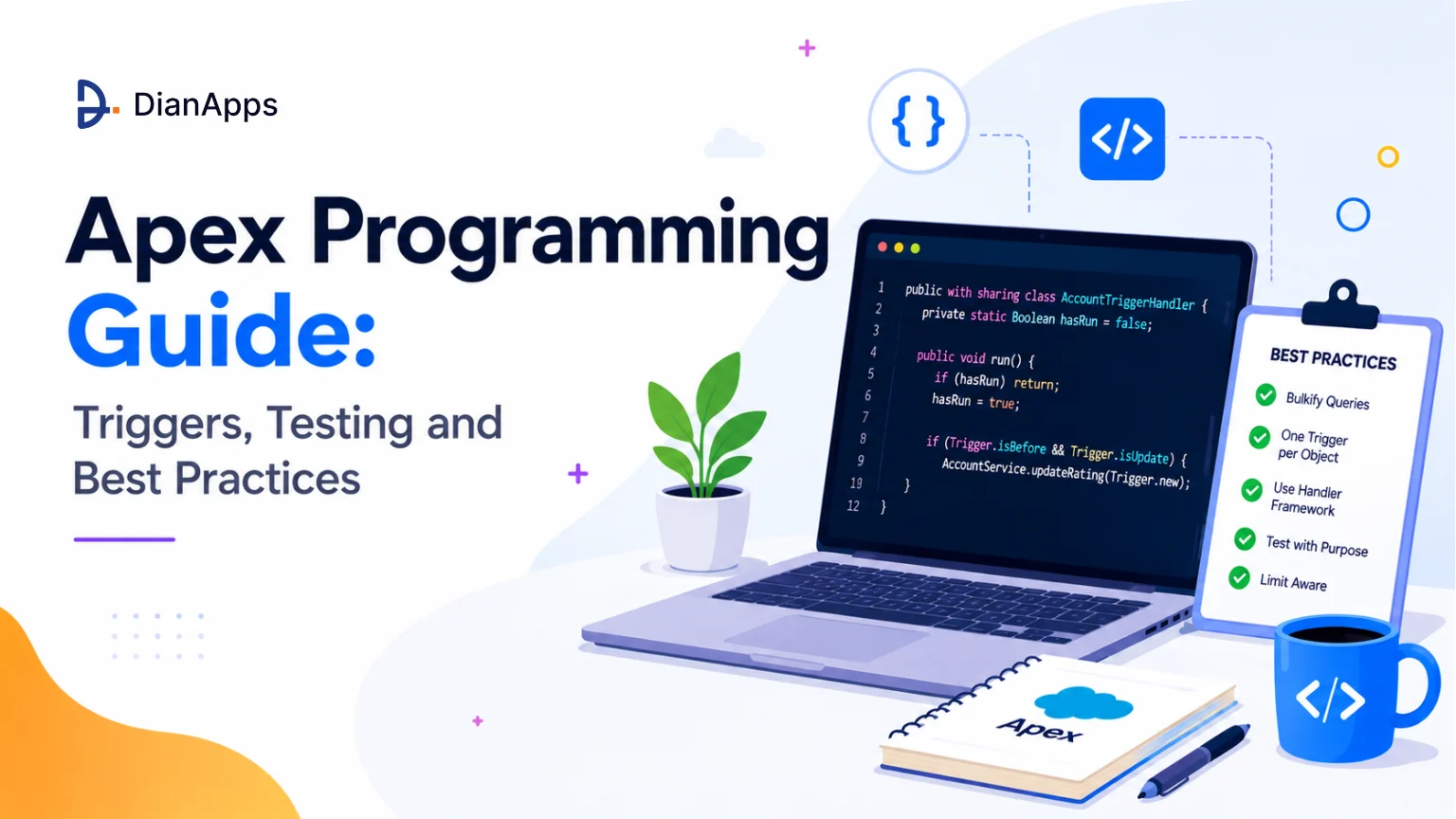





Apex is easy to learn and hard to write well, as the syntax takes about a week while the constraints take a quarter.
Most Apex problems in production aren’t syntax errors; they’re code that worked perfectly against ten records and collapsed against fifty thousand, or a trigger that fires twice because nobody added a recursion guard, or a class that passes 78% coverage while asserting nothing at all.
This guide covers the language and then the parts that actually break.
Quick Answer: Apex is Salesforce’s server-side language: Java-like syntax running inside hard per-transaction limits. Bulkify everything and assume 200 records. One trigger per object, delegating to a handler. Use Queueable as your default async option. Enforce security with WITH USER_MODE rather than manual FLS checks. And treat 75% coverage as a deployment gate not a quality target.
What Is Apex?
Apex is Salesforce’s proprietary, strongly typed, object-oriented programming language. It runs on Salesforce servers, executes in the context of a database transaction, and has SOQL and DML built directly into the syntax rather than bolted on through a driver.
You reach for it when the declarative tools can’t express what you need – complex bulk processing, callouts with retry logic, recursion control, transactional rollback, or logic that has to be unit-tested to a standard Flow can’t reach. See Flow vs Apex for where that line sits.
Apex Looks Like Java. It Doesn’t Behave Like Java.
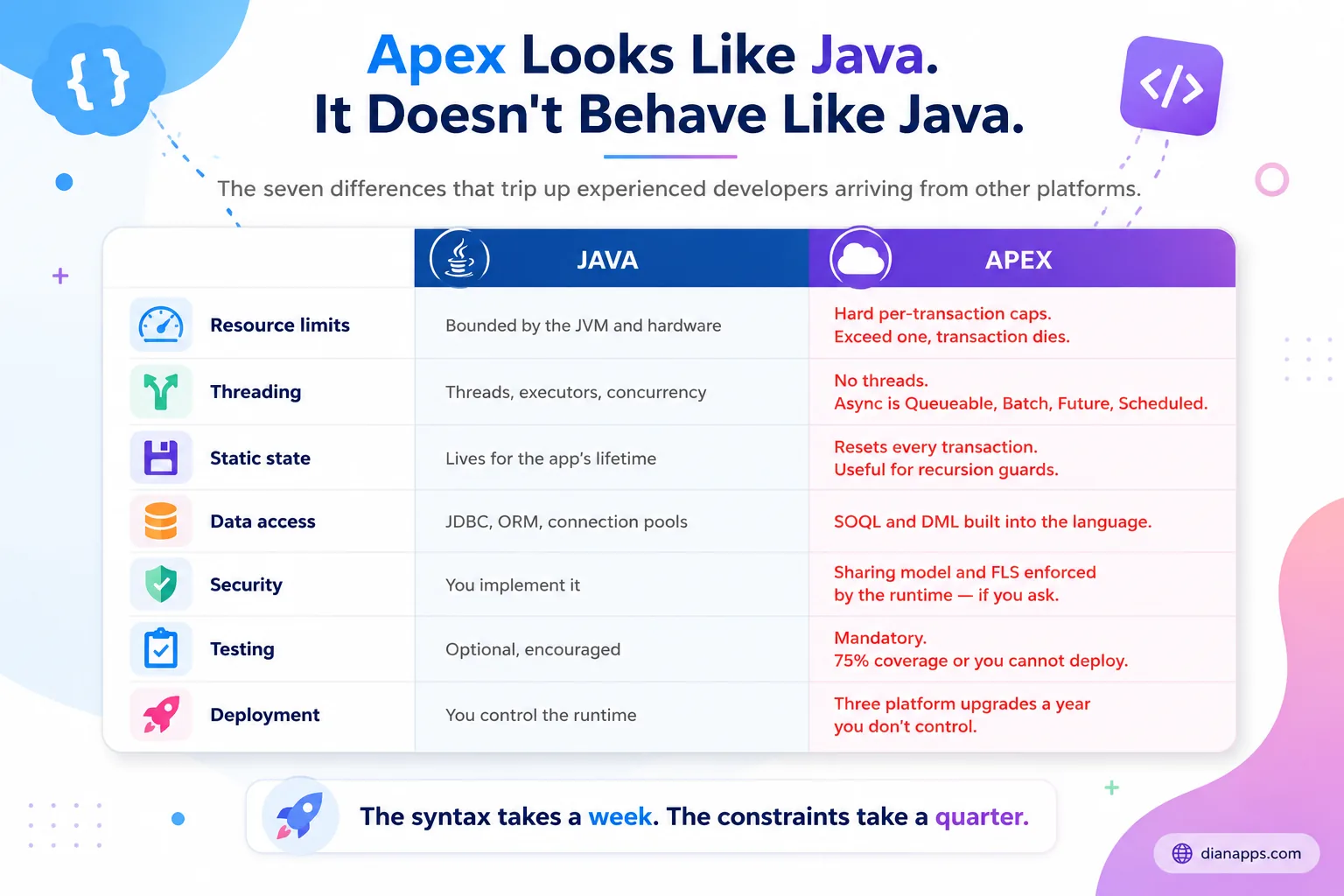
The three that catch experienced developers hardest:
- Static State Resets Every Transaction: In Java, a static variable lives as long as the application. In Apex, it’s wiped when the transaction ends. That sounds limiting until you realise it’s exactly what makes the static recursion guard pattern work.
- There Are No Threads: Asynchronous work means Queueable, Batch, Future, or Scheduled – four specific mechanisms with different rules, not a thread pool you control.
- Governor Limits Aren’t Performance Guidance: They’re hard caps. Exceed one and the entire transaction rolls back immediately. There’s no degradation, no warning, and no partial success.
Full reference: Salesforce governor limits
Apex Syntax Essentials
public with sharing class AccountService
|
1 2 3 4 5 6 7 8 9 10 11 12 13 14 15 16 |
<span style="font-weight: 400;">{</span> public static void updateRating(List<Account> accounts) { List<Account> toUpdate = new List<Account>(); for (Account acc : accounts) { if (acc.AnnualRevenue > 1000000) { acc.Rating = 'Hot'; toUpdate.add(acc); } } if (!toUpdate.isEmpty()) { update toUpdate; } } } |
Four things in that snippet worth naming:
- With sharing: Enforces the running user’s record access. Make it your default. without sharing is a deliberate, documented exception – never a habit.
- Collections over singletons: List, Set, and Map are the working vocabulary of Apex. A Map<Id, SObject> is the single most useful structure you’ll write.
- DML outside the loop: One update on a collection, not 200 updates inside a loop.
- The isEmpty() guard: DML on an empty list still consumes a statement against your limit.
Triggers and the Trigger Handler Framework
A trigger is Apex that fires on a database event – before or after insert, update, delete, or undelete.
|
1 2 3 4 |
trigger AccountTrigger on Account (before insert, before update, after insert, after update) { new AccountTriggerHandler().run(); } |
That’s the whole trigger, and the logic belongs elsewhere.
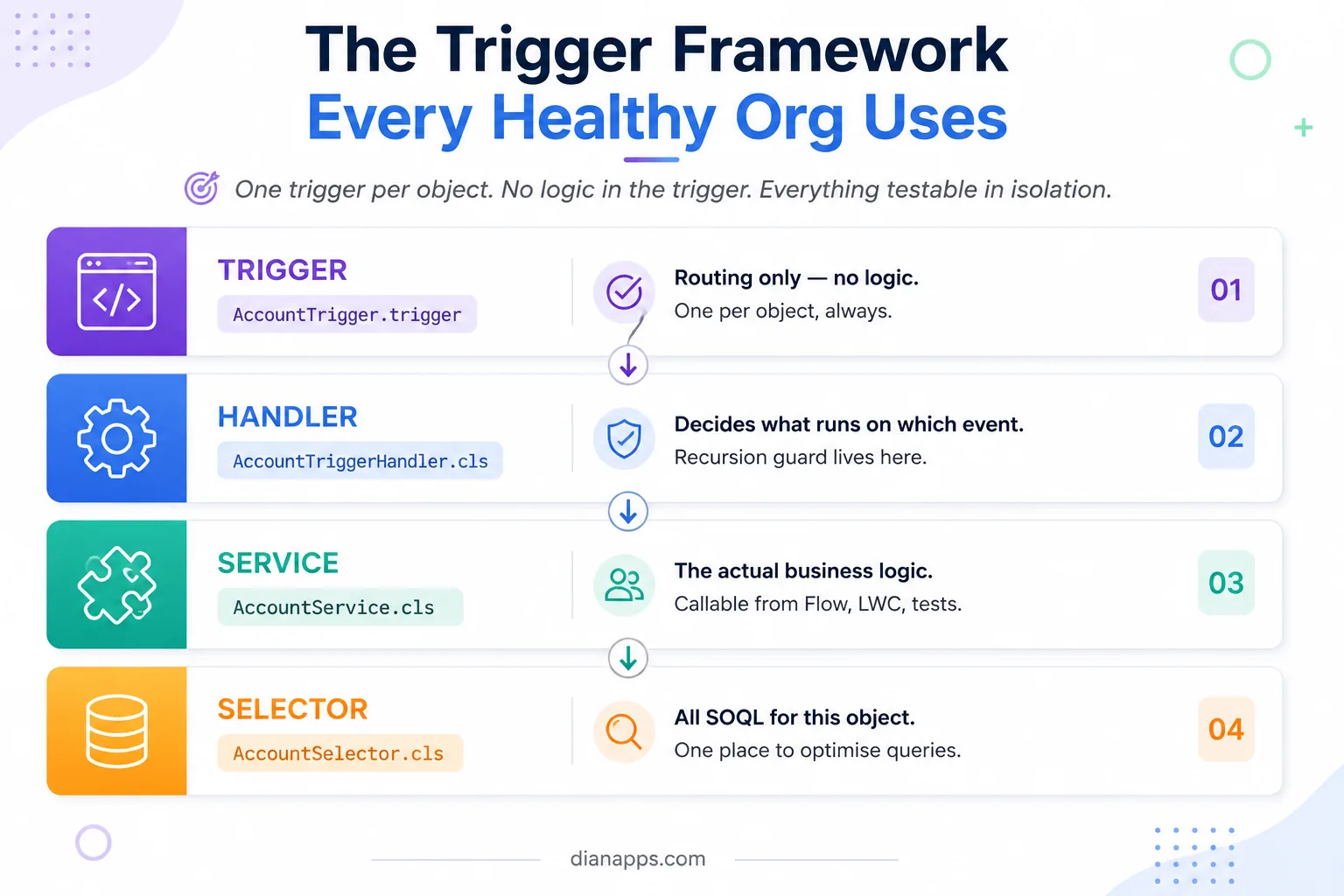
Why One Trigger Per Object Matters: If you have three triggers on Account, Salesforce decides the order they execute in and doesn’t tell you. You get non-deterministic behaviour that appears only under specific conditions. One trigger, one handler, explicit ordering.
The recursion guard, which lives in the handler:
|
1 2 3 4 5 6 7 8 9 10 11 12 |
public class AccountTriggerHandler { private static Boolean hasRun = false; public void run() { if (hasRun) return; hasRun = true; if (Trigger.isBefore && Trigger.isUpdate) { AccountService.updateRating(Trigger.new); } } } |
This works precisely because static state resets between transactions. Without a guard, an update inside a trigger re-fires the trigger, and you get cascading updates that hit governor limits in ways that are genuinely difficult to trace.
- Context Variables You’ll Use Constantly: Trigger.new, Trigger.old, Trigger.newMap, Trigger.oldMap, plus isBefore, isAfter, isInsert, isUpdate.
Before or after? Before, for modifying the record that fired the trigger – no DML needed; the values are written as part of the same save. After for related records and for anything needing the record ID on insert.
Bulkification: The Single Most Important Habit
This is the difference between code that works and code that works in production.
|
1 2 3 4 5 6 7 8 9 10 11 12 13 14 15 16 17 18 19 20 21 |
// ✗ Fails at 100 records for (Contact c : Trigger.new) { Account a = [SELECT Name FROM Account WHERE Id = :c.AccountId]; c.Description = a.Name; } // ✓ One query, any volume Set<Id> accountIds = new Set<Id>(); for (Contact c : Trigger.new) { if (c.AccountId != null) accountIds.add(c.AccountId); } Map<Id, Account> accounts = new Map<Id, Account>([ SELECT Id, Name FROM Account WHERE Id IN :accountIds ]); for (Contact c : Trigger.new) { if (accounts.containsKey(c.AccountId)) { c.Description = accounts.get(c.AccountId).Name; } } |
- The Pattern Never Changes: Collect IDs into a Set, query once outside the loop into a Map, loop again to apply. Learn it once, apply it everywhere.
- Never Assume One Record: Trigger.new[0] is a bug waiting for a data load. A trigger receives up to 200 records per batch, and Data Loader will find that out for you.
Related: SOQL and SOSL guide
The Order of Execution
When a record saves, Salesforce runs a defined sequence – and misunderstanding it causes the most confusing bugs in the platform.
The simplified order: system validation → before triggers → custom validation rules → duplicate rules → record saved but not committed → after triggers → assignment rules → auto-response rules → workflow rules → escalation rules → record-triggered Flows (after-save) → roll-up summaries → criteria-based sharing → commit.
Two Important Consequences:
Validation rules run after before-triggers, so a before-trigger can set a value that a validation rule then rejects.
Workflow field updates re-fire before and after triggers, which is one of the main reasons recursion guards exist.
If a field is being set by something and you can’t find what, the order of execution is where to look – and the culprit is frequently a Flow rather than Apex. See Salesforce Flow.
Asynchronous Apex
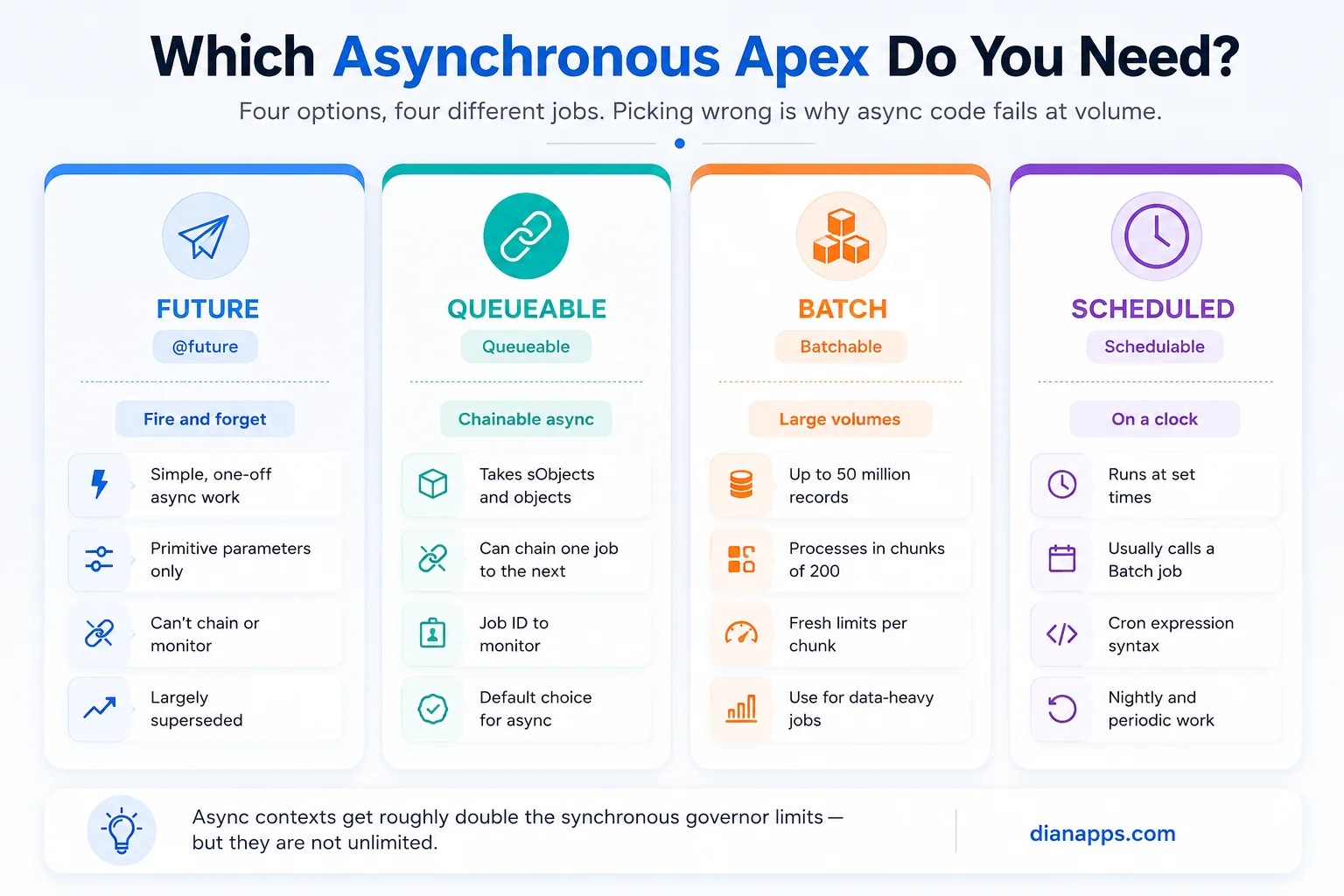
- Use Queueable by default: It accepts sObjects and complex types as parameters, returns a job ID you can monitor, and chains to the next job. @future is the older approach with primitive-only parameters and no chaining – largely superseded.
- Use Batch for volume: Up to 50 million records, processed in chunks of 200, with fresh governor limits per chunk. That last part is why Batch is the answer to “I need to process everything.”
- Use Scheduled to trigger Batch: Scheduled Apex is a timer, not a processor – the pattern is a Schedulable class that enqueues a Batch job.
public class AccountUpdateQueueable implements Queueable,
|
1 2 3 4 5 6 7 8 9 10 11 12 |
Database.AllowsCallouts { private List<Id> accountIds; public AccountUpdateQueueable(List<Id> accountIds) { this.accountIds = accountIds; } public void execute(QueueableContext context) { // work here // System.enqueueJob(new NextJob()); // chaining } } |
One rule that catches people: you cannot make a callout directly from a trigger. Callouts must be asynchronous – use Queueable with Database.AllowsCallouts.
Exception Handling
|
1 2 3 4 5 6 |
try { update accounts; } catch (DmlException e) { Logger.error('Account update failed', e); throw new AccountServiceException('Unable to update accounts', e); } |
Catch specific exception types, not bare Exception. DmlException, QueryException, CalloutException, and NullPointerException each tell you something different.
- Never swallow silently: An empty catch block converts a loud failure into a silent data problem, which is strictly worse.
- Log with context: record IDs, the operation, the user. “Update failed” tells the next developer nothing.
Custom exceptions are just a class extending Exception, and they make failures readable:
public class AccountServiceException extends Exception {}
Database.update(records, false) performs a partial save, letting good records through while returning per-record results for the failures. Useful in bulk contexts where one bad record shouldn’t fail 199 good ones.
Security: What Most Apex Guides Still Get Wrong
Apex runs in system context by default. It ignores the running user’s object permissions, field-level security, and sharing rules unless you tell it not to.
The modern approach is one clause:
|
1 2 3 4 5 |
List<Account> accts = [ SELECT Id, Name, AnnualRevenue FROM Account WITH USER_MODE ]; |
WITH USER_MODE enforces object permissions, field-level security, and sharing rules in a single clause. It’s clearer and more complete than the older WITH SECURITY_ENFORCED, which covered CRUD and FLS but not sharing.
For DML, use the AccessLevel parameter:
|
1 |
Database.insert(accounts, AccessLevel.USER_MODE); |
For stripping inaccessible fields rather than throwing:
|
1 2 3 |
SObjectAccessDecision decision = Security.stripInaccessible( AccessType.READABLE, accounts); List<Account> safe = decision.getRecords(); |
Class-Level Sharing: with sharing respects record access, without sharing ignores it, inherited sharing takes the caller’s context. Default to with sharing and document any exception.
Related: Salesforce compliance and data security
Testing Beyond the 75% Rule
Salesforce requires 75% Apex coverage to deploy to production. That’s a gate, not a quality measure – coverage records which lines executed, not whether your assertions proved anything. A test that runs your code and asserts nothing passes.
|
1 2 3 4 5 6 7 8 9 10 11 12 13 14 15 16 17 18 19 20 21 22 |
@isTest private class AccountServiceTest { @testSetup static void setup() { TestDataFactory.createAccounts(200); } @isTest static void ratingSetForHighRevenueAccounts() { List<Account> accounts = [SELECT Id, AnnualRevenue FROM Account]; Test.startTest(); AccountService.updateRating(accounts); Test.stopTest(); List<Account> updated = [SELECT Rating FROM Account WHERE AnnualRevenue > 1000000]; Assert.areEqual('Hot', updated[0].Rating, 'High-revenue accounts should be rated Hot'); } } |
What matters more than coverage:
- @testSetup builds shared data once per class rather than per method
- A test data factory keeps setup consistent and maintainable
- 200+ records in bulk tests, because that’s what production sends
- Negative tests for validation failures and permission denials
- Test.startTest() / stopTest() resets governor limits and forces async work to complete
- Callout mocks via HttpCalloutMock, so your tests don’t depend on someone else’s uptime
- Never SeeAllData=true. It makes tests dependent on org data, and they’ll fail in a fresh sandbox.
- Assert class methods with meaningful messages – the newer Assert.areEqual() is preferred over System.assertEquals()
Build Better With Salesforce Development Expertise
Get expert support for Apex development, modernization, testing, and complex Salesforce engineering needs.
Apex Anti-Patterns
- SOQL or DML Inside A Loop – The most common cause of production failure
- Multiple Triggers On One Object – Non-deterministic execution order
- Logic In The Trigger Body – Untestable in isolation
- No Recursion Guard – Cascading updates that are hard to trace
- Trigger.new[0] – Assuming a single record
- Hardcoded IDs – Works in the sandbox, breaks in production
- Without Sharing As A Default – A security decision made by accident
- Empty Catch Blocks – Silent failure, the worst kind
- God Classes – One class doing everything, testable by nobody
- Chasing Coverage Instead of writing assertions
- SeeAllData=true – Tests that depend on org data
- Ignoring Null Returns From Get/Query Results – A query that finds nothing returns an empty list, not an error
Need Salesforce Developers for Your Team?
Add experienced Salesforce developers to your team for ongoing development, technical debt, and project delivery.
Apex in 2026: Invocable Methods and Agentforce
Apex is increasingly the backend for declarative and AI features rather than the front line.
Invocable methods expose Apex to Flow and now to Agentforce as custom agent actions:
|
1 2 3 4 5 6 7 8 |
public class OrderActions { @InvocableMethod(label='Calculate Discount' description='Applies tiered discount logic') public static List<Decimal> calculateDiscount(List<Id> orderIds) { // logic return new List<Decimal>(); } } |
That single annotation makes your business logic callable from a Flow, from an Agentforce agent action, and from an LWC without rewriting it. It’s the reason the service-layer pattern matters more now than it did five years ago: logic in a service class is reusable everywhere; logic in a trigger body isn’t.
Related: What is Agentforce · Lightning Web Components
Where to Go Next
For the queries inside your Apex, see the SOQL and SOSL guide. For the limits shaping every design decision, see governor limits.
For when to use code at all, Flow vs Apex and configuration vs customization.
For the front end calling your Apex, Lightning Web Components.
For deploying it safely, Salesforce DevOps and sandboxes.
The complete Salesforce development guide is the hub.
When the Apex Is the Problem
There’s A Recognisable State an Org Reaches: Nobody wants to touch the Apex. Coverage sits just above 75%. Changes break things nobody predicted. The person who wrote it left in 2022.
That’s remediation work, and it’s routine for our team. Our Salesforce Development Services can help map what the code actually does, add meaningful test coverage, restructure triggers into a proper framework, and leave your team with code they can safely maintain and extend.
We’re a certified Salesforce Consulting Partner with developers and architects across the US, UK, Australia, Canada, UAE, and India.
Have an Apex Challenge to Solve?
Tell us what you’re working on and our Salesforce experts will help you determine the right next step.
 0 comments












Leave a Comment
Your email address will not be published. Required fields are marked *