















 0 comments





Key Takeaways :
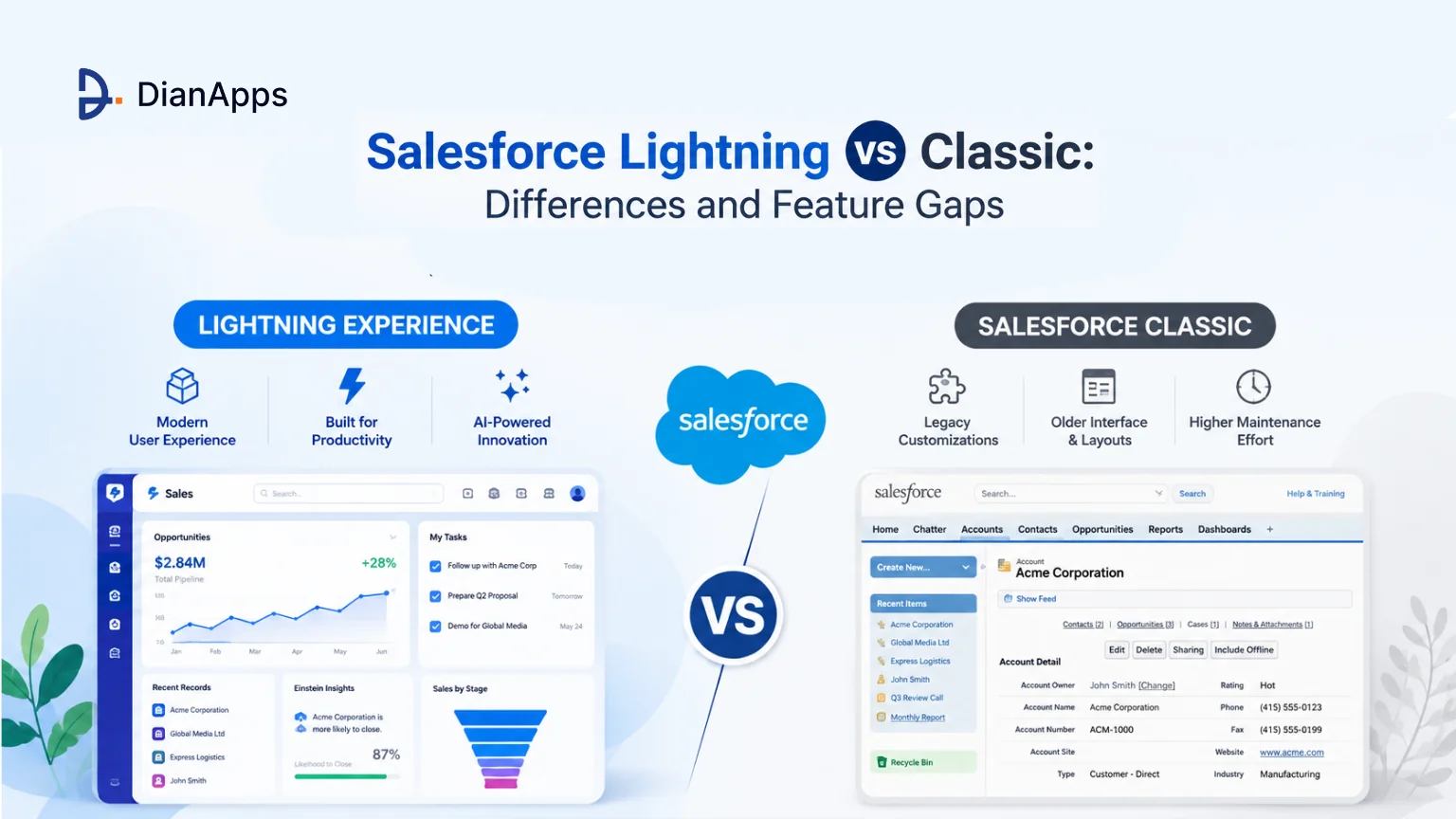
- Lightning Experience is Salesforce’s current interface, with Dynamic Forms, Dynamic Actions, Lightning App Builder, Einstein and Agentforce, while Classic has received no new features since 2023.
- Salesforce Classic is not being retired on a published deadline, so switching is a strategic decision based on capability gaps, adoption, and business needs rather than a forced migration.
- Some legacy customizations still need attention when moving to Lightning, particularly JavaScript buttons, Visualforce pages, older AppExchange packages, and page layouts that need redesigning.
- The best migration decision starts with your own org, using the Lightning Experience Readiness Check and adoption data instead of relying on outdated feature-gap lists or generic migration claims.
Quick Answer: Lightning Experience is the user interface. It’s included on all editions at no extra cost and Classic has received no new features since 2023; all innovation goes to Lightning, including Einstein and Agentforce. Classic isn’t retired and there’s no published deadline, so this isn’t urgent in the way vendors suggest. It’s a change-management project with a technical component, not the reverse.
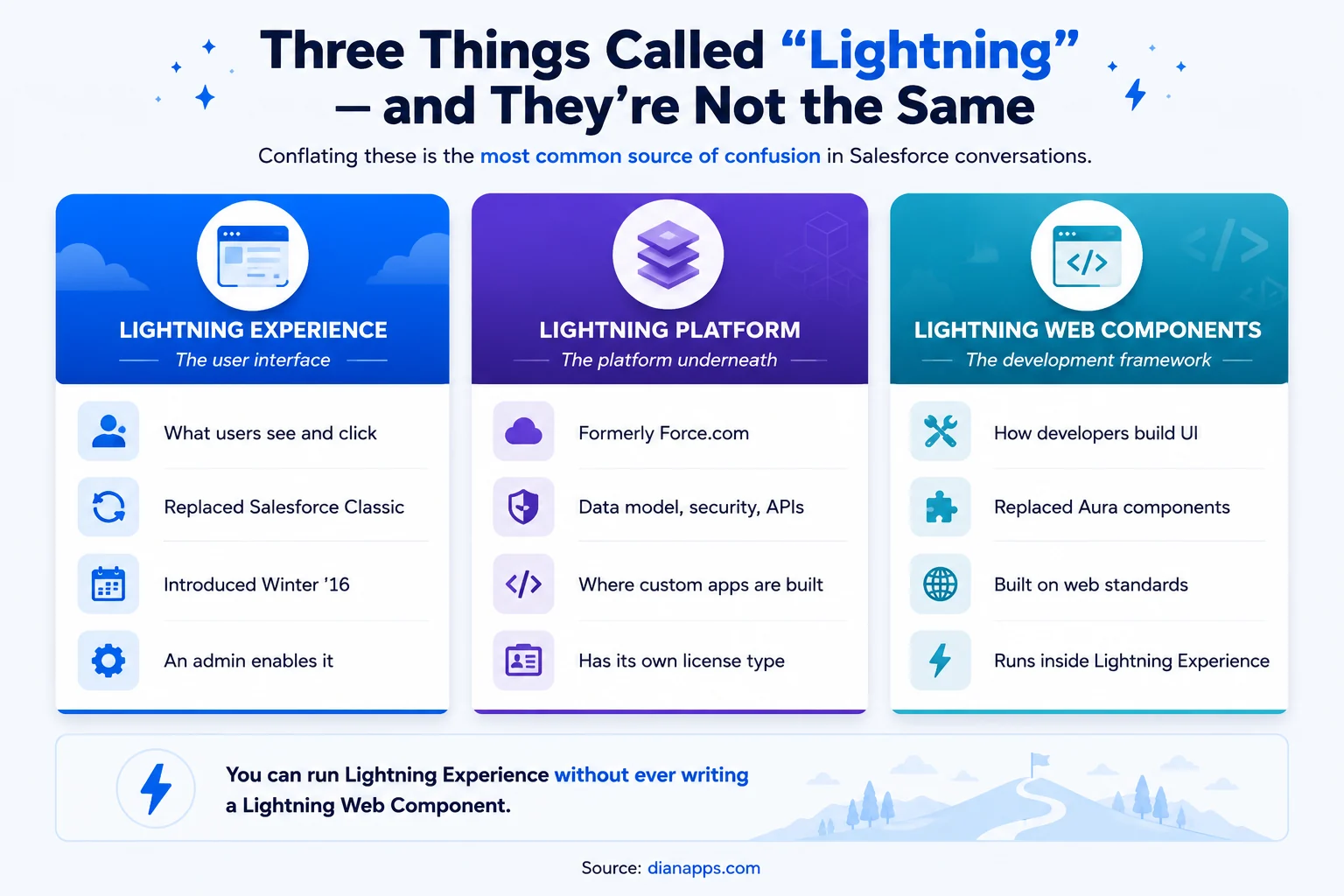
Before comparing anything, one clarification that resolves more confusion than the comparison itself: there are three different things called “Lightning,” and most articles use the names interchangeably.
Once that’s straight, the actual question becomes answerable: what does Lightning Experience give you, what does it still not do, and is it worth the disruption of moving?
Three Things Called “Lightning”
Comparison of Lightning Experience as the user interface, Lightning Platform as the underlying platform, and Lightning Web Components as the development framework
Lightning Experience is the interface. It’s what users see, and it replaced Salesforce Classic.
Lightning Platform is the platform beneath the CRM apps, formerly Force.com. Data model, security, APIs, and where custom apps get built. It also has its own licence type, which costs meaningfully less than a full CRM licence for apps that never touch Sales or Service objects. See the Lightning Platform explained.
Lightning Web Components is the development framework for how developers build custom UI. It replaced Aura. See the LWC guide.
You can run Lightning Experience without ever writing a Lightning Web Component; most orgs do.
If you’re deciding whether an existing custom interface should stay on Aura, move to LWC, or continue using Visualforce, see LWC vs Aura vs Visualforce for a framework-level comparison.
What Lightning Experience Adds Over Classic
Nine capabilities available only in Lightning Experience, including Lightning App Builder, Dynamic Forms, Dynamic Actions, Path, Kanban, Einstein, and in-app guidance
The Two That Matter Most Day-to-Day And That Most Comparisons Skip:
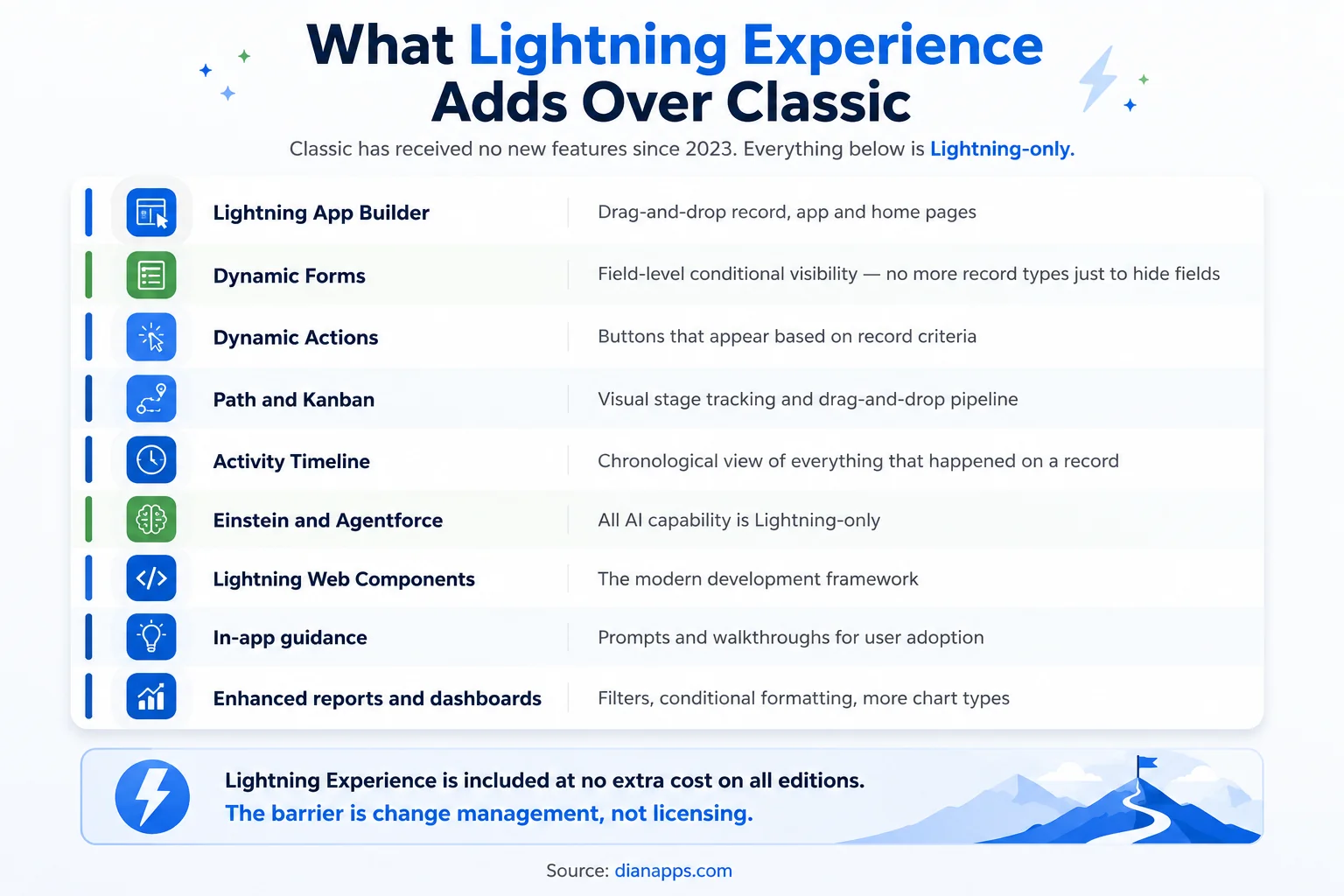
Dynamic Forms lets you place individual fields on a record page and control visibility with conditional rules. If you’ve been creating record types purely to show or hide fields, this replaces that approach entirely, and the maintenance savings are substantial in orgs with a lot of record types.
Dynamic Actions does the same for buttons, showing them based on record criteria rather than page layout.
Features such as Dynamic Forms, Dynamic Actions, and Lightning App Builder are part of the broader Salesforce low-code development approach, allowing teams to improve the user experience without custom code for every change.
And the Strategic One: Every AI capability Salesforce ships – Einstein, Prompt Builder, Agentforce – is Lightning-only. That gap widens with every release, and it’s the reason the “no deadline” framing understates the cost of staying. See what Agentforce is.
What Classic Still Does Better
An honest comparison needs this section, and most don’t include one.
- Some Legacy Customisations Only Work In Classic: JavaScript buttons, certain Visualforce overrides, and older AppExchange packages built before 2016 may not have Lightning equivalents.
- Muscle Memory Is Real: Long-tenured users are genuinely faster in Classic for the first few weeks after switching. That productivity dip is temporary, and it’s also the single biggest source of resistance.
- Reporting Parity Has Largely Closed But Isn’t Identical: Check the specific report types and features your team relies on before assuming.
- Verify Rather Than Assume: Salesforce has closed most historical gaps release by release, and much of the “Lightning can’t do X” advice circulating online is several years old. Run the Lightning Experience Readiness Check against your own org; it inventories what will and won’t carry over, which is more reliable than any article, including this one.
Is Salesforce Classic Being Retired?
No, and there’s no published retirement date.
What’s true is that Classic has received no new features since 2023 and all development investment goes to Lightning. That’s a slow accumulation of disadvantage rather than a deadline, a different problem requiring a different response.
- The Practical Read: You’re not racing a clock; you’re deciding when the gap between what your org could do and what it does becomes worth the disruption of closing.
Signals You Should Move Now
Six adoption signals indicating it is time to migrate from Classic to Lightning Experience
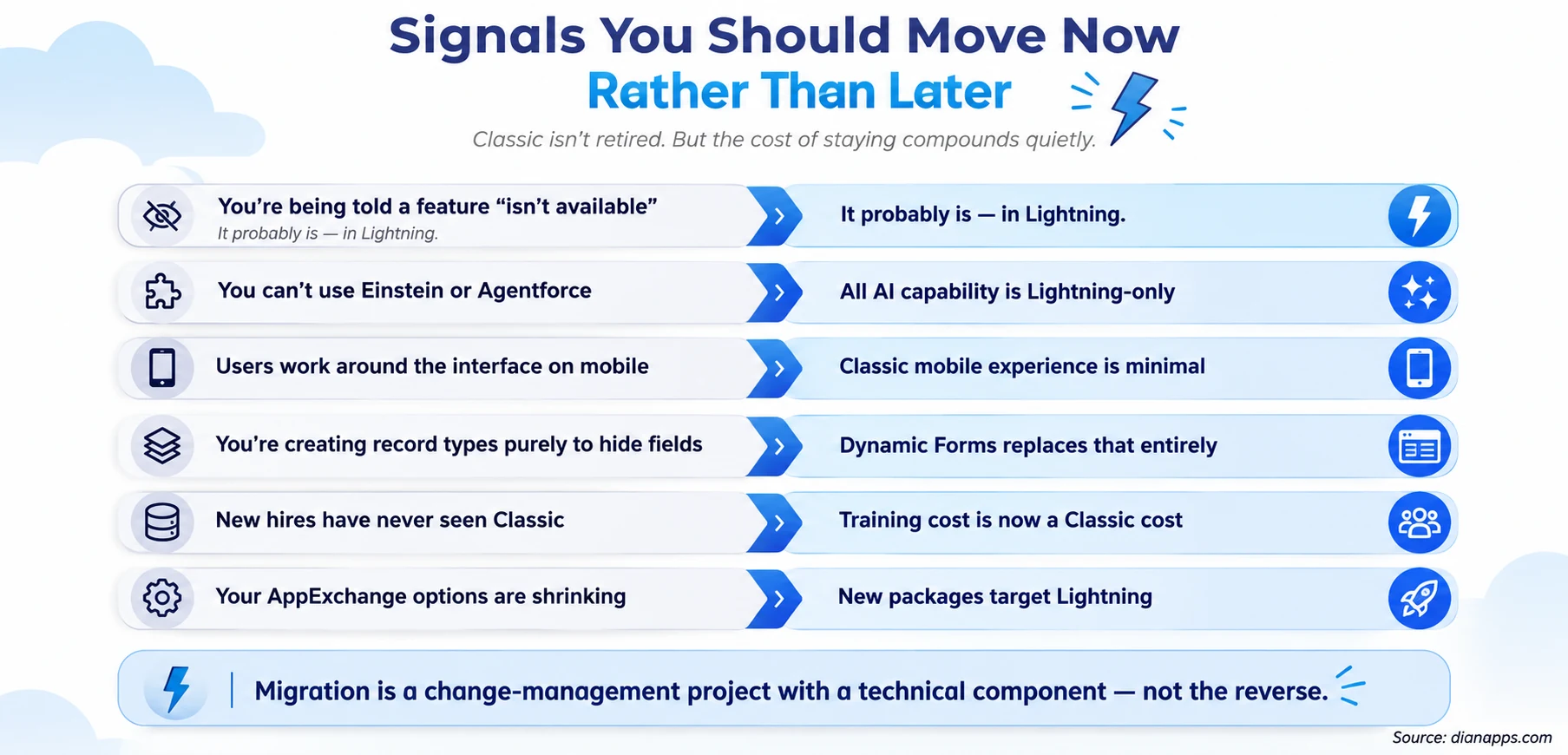
- The One That Surprises People: New hires have never used Classic; every year, training on an interface nobody outside your org uses gets more expensive, and the talent pool that finds it familiar gets smaller.
- And The One That’s Easiest To Check: If someone has told you a feature “isn’t available in Salesforce,” verify whether they mean it isn’t available in Classic. That distinction accounts for a surprising share of the requests that reach a backlog labelled impossible.
What Breaks When You Switch
- JavaScript Buttons Don’t Work in Lightning: They need rebuilding as Quick Actions, Screen Flows, or Lightning components. This is usually the largest single item in a migration.
- Some Visualforce Pages Need Adjustment: Most render inside Lightning, but the iframe boundary breaks navigation and some styling. The lightningStylesheets attribute helps. See Visualforce in Lightning Experience.
These changes are where Salesforce Development Services can be useful, particularly when legacy JavaScript, Visualforce, Apex controllers, and page layouts need to be assessed and rebuilt for Lightning rather than simply carried over.
Custom links and older AppExchange packages may need replacements.
- Page Layouts Don’t Automatically Become Good Lightning Pages: A direct port produces a working but underwhelming experience; the value comes from rebuilding key pages in Lightning App Builder with Dynamic Forms.
- User Productivity Dips For Two To Four Weeks: Plan for it rather than being surprised by it.
- Run the Lightning Experience Readiness Check First: It produces a report of what needs attention, and it’s free.
Full detail: Salesforce Classic to Lightning migration playbook
Know What Your Lightning Move Will Take
Get a readiness assessment, migration roadmap, and technical guidance before committing your Salesforce team to a larger transition.
Performance and Adoption
Lightning is heavier in the browser than Classic; more happens client-side. On modern hardware and connections, that’s imperceptible; on older machines or poor connections, it can be noticeable.
Use the Lightning Usage App in Setup to see actual adoption, switch-back rates, and per-page performance. Switch-back rate is the metric worth watching: users returning to Classic are telling you something specific about a page or a task.
The Lightning Experience Performance tool and EPT (Experience Page Time) identify slow pages. Slow Lightning pages are almost always caused by too many components on one page or an inefficient Apex controller behind them, not by Lightning itself.
On Adoption: The most effective interventions are rebuilding the two or three pages users spend most of their day in and using in-app guidance to surface what’s changed. Blanket training sessions consistently underperform both.
Need Developers for Your Lightning Upgrade?
Add experienced Salesforce developers to rebuild legacy customizations, optimize Lightning pages, and handle the technical work behind a smoother transition.
Where to Go Next
For the full migration process, see the Classic to Lightning Migration Playbook.
For the platform beneath the interface, see The Salesforce Lightning Platform Explained.
For the development framework, Lightning Web Components and LWC vs Aura vs Visualforce.
For what you can build without code, Salesforce Low-Code Development and Salesforce Flow.
For the AI capability that’s Lightning-only, What Is Agentforce.
The Complete Salesforce Development Guide is the hub.
Before You Commit to a Migration
The organisations that struggle with this move aren’t the ones with the most JavaScript buttons. They’re the ones who treated it as a technical project.
The technical inventory is a few days of work. Rebuilding the pages people live in and bringing along users who’ve done their job the same way for eight years is the part that determines whether adoption sticks.
We’re a certified Salesforce Consulting Partner, and Classic-to-Lightning transitions are routine work for our team – usually starting with a readiness assessment that tells you honestly how big the job is.
Still Deciding Between Classic and Lightning?
Tell us about your current Salesforce org, and we’ll help you understand the technical gaps, adoption risks, and practical next steps.
 0 comments










Your email address will not be published. Required fields are marked *