















 0 comments






Most bad Salesforce hires aren’t bad developers. They’re the wrong role, hired for a problem that didn’t need code.
That’s the expensive mistake, and it happens before you’ve screened a single CV. A company with a backlog of “we need custom development” requests brings in a developer, and six months later discovers most of that backlog was configuration an admin could have cleared in a fortnight.
So this guide starts somewhere unusual for a hiring article: whether you should hire a developer at all.
TL;DR: Decide the role before the person. Salesforce work splits across admin, developer, architect, and consultant, and picking the wrong one costs more than picking a weak candidate. Once you know the role, expect $100,000-$150,000 annually in North America or $45-$90 per hour on contract, screen on real production work rather than certifications, and budget three to six months to full productivity.
Do You Actually Need a Salesforce Developer?
Probably not for as much of your backlog as you think. In our experience reviewing client backlogs at DianApps, roughly 60-70% of tickets labelled “development” turn out to be configuration or declarative automation, work an experienced admin handles without writing a line of Apex.
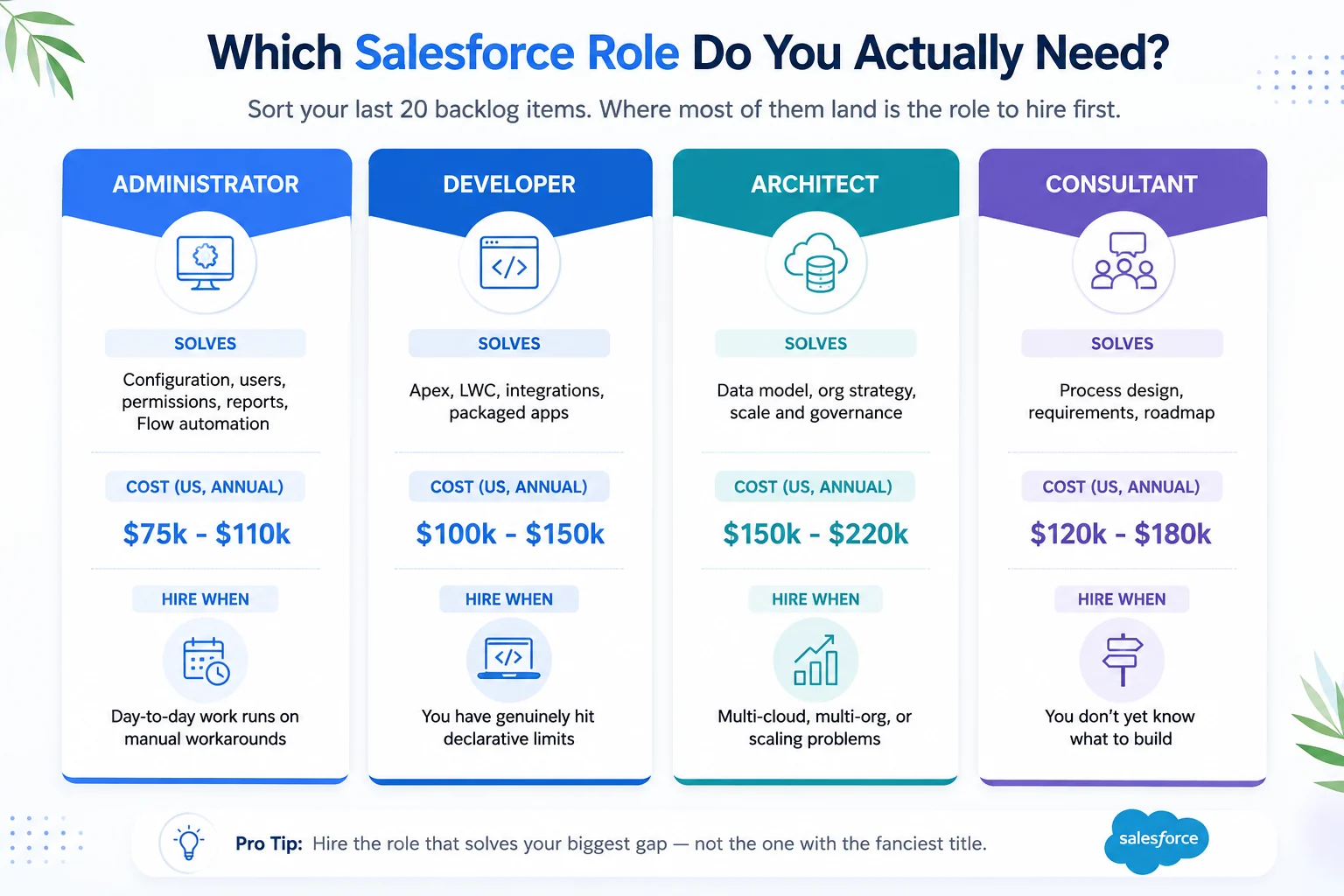
The Practical Test: Take your last twenty requests and sort them:
- Can this be done with a field, validation rule, permission set, or Flow? → Admin work
- Does it need Apex, an LWC, or an external system? → Developer work
- Are we asking because the data model is wrong? → Architect work
- Are we unsure what the process should even be? → Consultant work
If fewer than eight of twenty land in the developer column, hire an admin first and you’ll get more delivered per pound.
Full comparison: Salesforce admin vs developer vs architect vs consultant · Configuration vs customisation
Not sure which side your backlog falls on?
Send us your last twenty tickets, and we’ll tell you which genuinely need a developer, which need an admin, and which need neither, before you spend anything on hiring. Get a free backlog review from our Salesforce development team
What Does a Salesforce Developer Actually Do?
A Salesforce developer translates business requirements into platform solutions, writing Apex where declarative tools run out, building Lightning Web Components for custom interfaces, integrating external systems through APIs, and keeping all of it working across three annual platform releases.
Day-to-day:
- Deciding What Needs Code: The highest-leverage part of the job, and the least visible.
- Building: Apex classes and triggers, LWC components, complex Flows, integrations.
- Testing: Unit tests with real assertions, not coverage padding to clear the 75% gate.
- Deploying: Source control, CI/CD, sandbox strategy.
- Debugging: Reading debug logs, tracing governor limit exceptions, finding why an automation fired twice.
- Release Management: Regression testing against Spring, Summer, and Winter releases they didn’t schedule.
Background on the work itself: The complete Salesforce development guide
Types of Salesforce Developers
Asking for a generalist when you need a specialist wastes an entire hiring cycle; these are the profiles worth knowing before you write the job spec:
| Type | Builds | Hire when |
|---|---|---|
| Core platform developer | Apex, LWC, triggers, custom objects, APIs | General custom development and integrations |
| CPQ developer | Pricing rules, product bundles, quote templates, approvals | Complex quoting, discounting, or subscription billing |
| Marketing Cloud developer | AMPscript, SSJS, SQL queries, journey automation | Marketing Cloud or Account Engagement work |
| Service Cloud developer | Omni-Channel routing, case automation, console builds | Contact centre or support transformation |
| Integration developer | Middleware, API design, error handling, event architecture | Salesforce sits between several core systems |
| Health / Financial Services Cloud developer | Regulated data models, compliance workflows | HIPAA, KYC or similar regulatory constraints |
| Agentforce specialist | Agent topics, actions, prompt templates, guardrails | Deploying AI agents on the platform |
| Full-stack Salesforce developer | All of the above plus front-end and DevOps | Smaller teams needing one person to cover breadth |
A CPQ developer and a Marketing Cloud developer are not interchangeable, and neither will be productive in the other’s domain quickly.
Salesforce Developer Skills Checklist by Level
Screen against the level you’re hiring, not a generic list; the most common vetting failure is applying senior criteria to a mid-level budget, or accepting mid-level answers for a senior role.
| Skill area | Junior (0-2 yrs) | Mid (2-5 yrs) | Senior (5+ yrs) |
|---|---|---|---|
| Apex | Syntax, simple triggers, basic SOQL | Trigger frameworks, async Apex, bulkification | Service/selector patterns, performance at volume |
| Governor limits | Knows they exist | Designs around them instinctively | Diagnoses limit exceptions from logs |
| LWC | Builds simple components | Wire service, events, Jest tests | Performance, reusable component libraries |
| Flow | Builds record-triggered Flows | Knows when Flow beats Apex | Sets automation standards for the org |
| Integration | Calls a REST endpoint | Named Credentials, error handling, retries | Designs patterns, chooses middleware |
| Data model | Understands objects and relationships | Designs custom objects properly | Prevents skew, plans for scale |
| DevOps | Uses a sandbox | Git workflow, CI/CD pipeline | Owns branching and release strategy |
| Testing | Writes tests to hit 75% | Bulk and negative tests, mocks | Test data factories, regression suites |
| Business | Follows a spec | Challenges a bad requirement | Translates strategy into architecture |
The Senior Signal That Matters Most: a genuinely senior developer will push back on requirements. Someone who accepts every ticket as written is a mid-level developer with more years, not a senior one.
Deeper: Apex guide · LWC guide · Governor limits · SOQL vs SOSL · DevOps and CI/CD · Sandboxes
Which Salesforce Certifications Actually Matter?
Certifications prove exposure, not delivery ability; use them just to filter, never to decide.
| Certification | Verdict | What it actually tells you |
|---|---|---|
| Platform Developer I | Baseline | Genuine minimum. Absence on a mid-level CV is a question worth asking. |
| Platform Developer II | Strong signal | Requires a practical assessment, not just multiple choice. Harder to fake. |
| JavaScript Developer I | Useful | Real signal for LWC-heavy roles. |
| Integration Architect | Strong for integration roles | Meaningful if your work is systems-heavy. |
| Agentforce Specialist | Rising fast | Now among the most requested credentials alongside PD2. Commands a premium. |
| Platform App Builder | Mixed | Declarative-focused. Good for admins, weak evidence of coding ability. |
| Administrator | Context only | Useful history, tells you nothing about development skill. |
| Technical Architect (CTA) | Exceptional | Rare, expensive, almost certainly beyond a developer-role budget. |
The Honest Caution: A candidate with eight certifications and no production experience is a worse hire than one with PD1 and three years of shipped work. Certifications are cheap to accumulate and expensive to mistake for capability.
What To Ask Instead: “Tell me about the last thing you shipped that broke in production. What happened, and what did you change?” Nobody can revise for that.
Engagement Models: Which Way Should You Hire?
The model determines your speed, your risk, and how much knowledge stays with you when the engagement ends.
| Model | Cost | Speed to start | Control | Knowledge retention | Best for |
|---|---|---|---|---|---|
| In-house full-time | Highest | 2-4 months | Full | Full - until they leave | Continuous backlog, deep domain knowledge |
| Freelance / contract | Low-medium | Days | Moderate | Poor | Defined, short, well-specified work |
| Staff augmentation | Medium | 1-3 weeks | High | Moderate | Extending an existing team |
| Dedicated team (partner) | Medium-high | 2-4 weeks | Moderate-high | Good if documented | Ongoing programme, multiple skill sets |
| Fractional | Low-medium | 1-2 weeks | Moderate | Moderate | Steady but part-time need |
| Project / fixed scope | Variable | 3-6 weeks | Low | Poor unless contracted | One-off, clearly bounded builds |
Three things to weigh honestly:
- Utilisation: A full-time senior developer needs roughly 30 hours a week of genuine development work to justify the cost. Below that, you’re paying for availability. Most mid-market orgs never reach it – which is why fractional and dedicated-team models exist.
- Knowledge retention: The real risk with contractors isn’t quality; it’s that the reasoning behind decisions leaves with them. Make documentation a contractual deliverable, not a hope.
- Ramp time: Any hire needs three to six months to reach full productivity in your org. A partner team that already knows Salesforce still needs to learn your Salesforce.
Deeper: In-house vs outsourced Salesforce development · Choosing a development partner · Signs you need a development partner
What Does It Cost to Hire a Salesforce Developer?
Salary in North America runs $100,000-$150,000 annually for a mid-to-senior developer, with contract rates between $45 and $90 per hour depending on seniority. Regional variation is substantial.
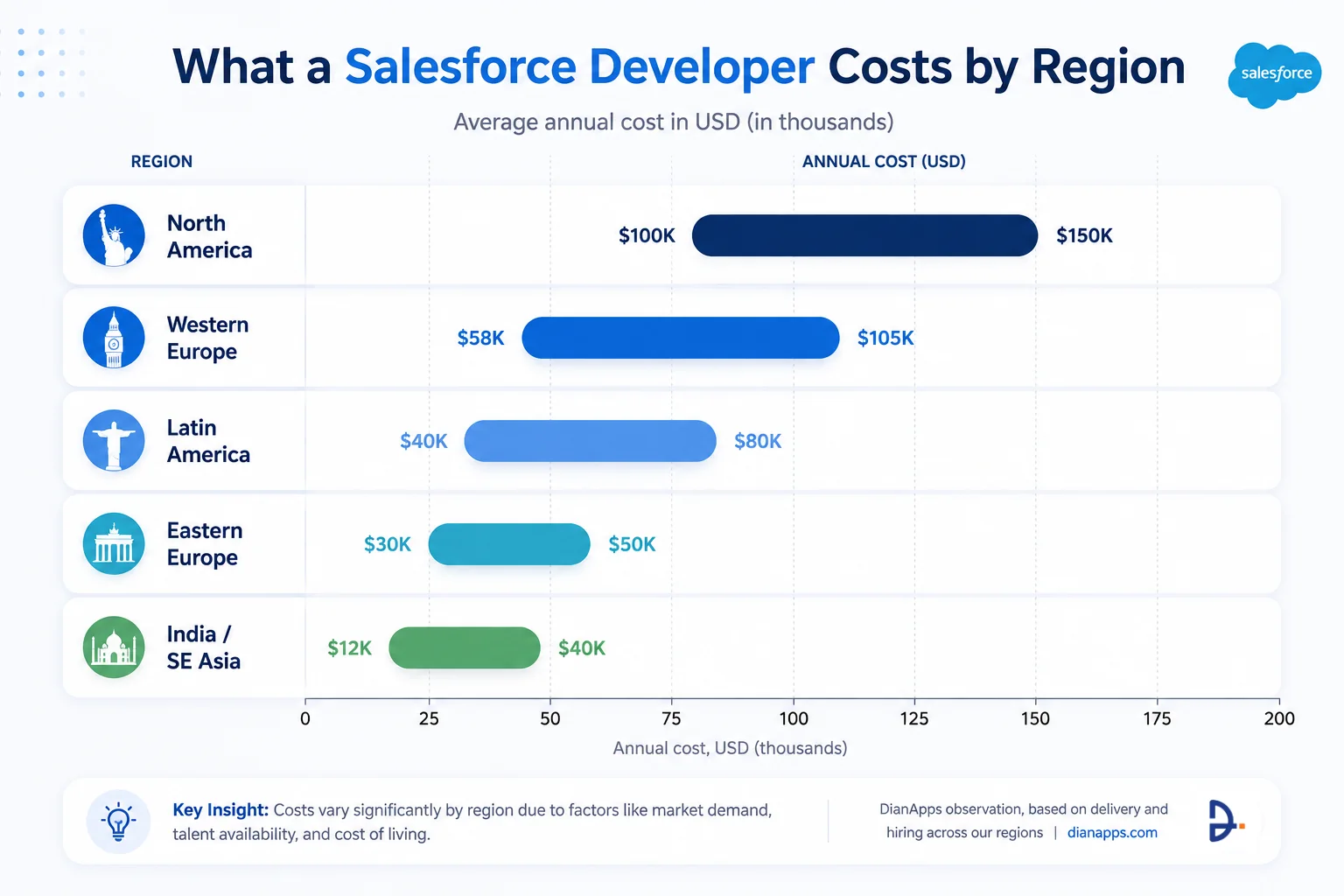
The costs people forget
Salary is only part of the picture. Across our own hiring at DianApps, base salary consistently works out at roughly 65-75% of the true first-year cost.
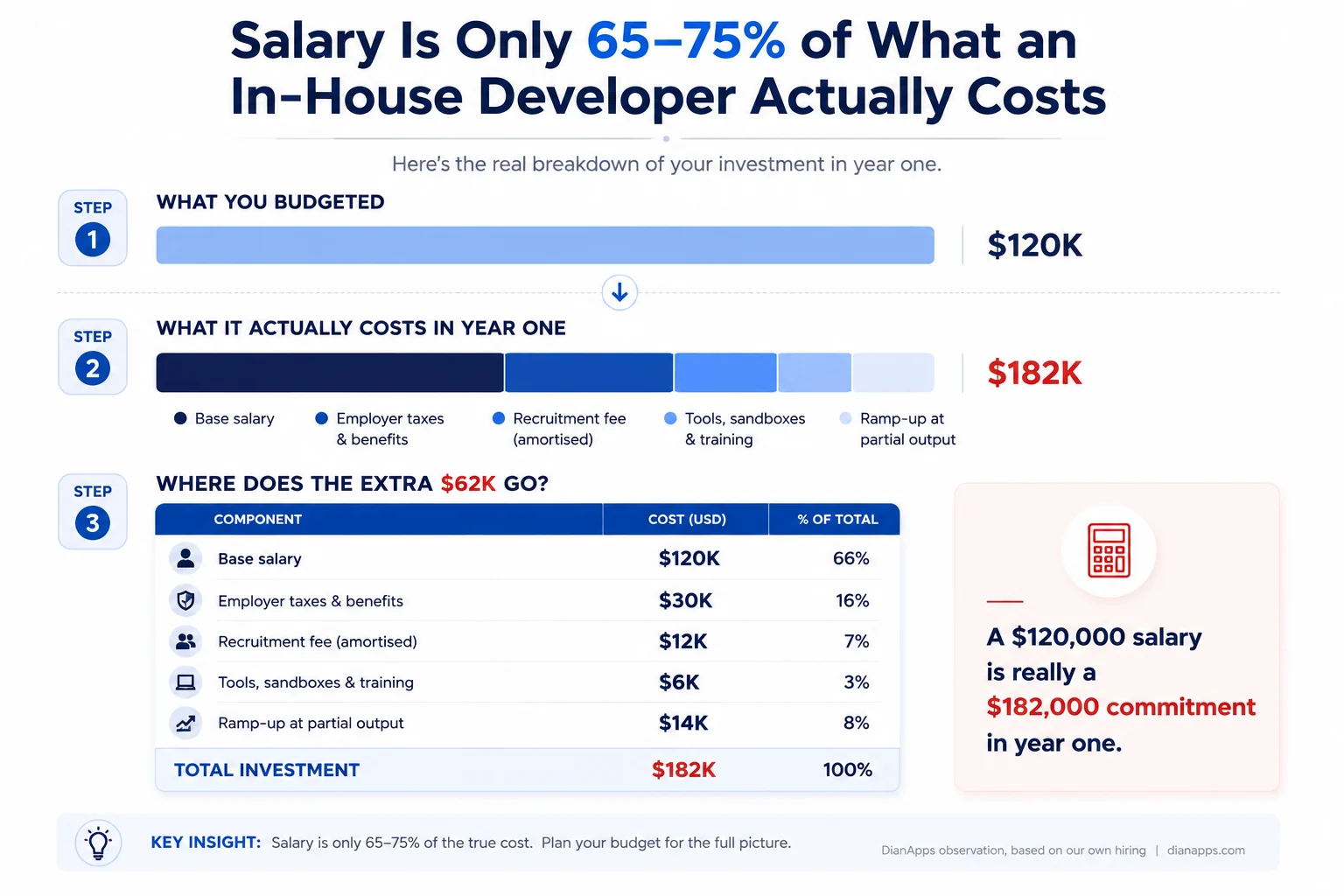
The additions that catch teams out:
- Employer taxes, benefits, and pension – typically 20-30% on top
- Recruitment fees – 15-25% of first-year salary if agency-sourced
- Sandbox, tooling and licence costs
- Certification and training budget, because the platform ships three times a year
- Ramp-up: three to six months at partial productivity
Turnover: In our observation, attrition in high-demand Salesforce roles runs high enough that many teams find themselves re-hiring for the same seat roughly every 18 months.
Full breakdown: Salesforce development cost · Developer hourly rates by region
Want a real number for your actual scope?
We’ll estimate the effort for your backlog honestly – including telling you which items don’t need a developer at all.
Where to Find Salesforce Developers
Sourcing channels shape candidate quality more than most teams expect.
| Channel | Best for | Watch out for |
|---|---|---|
| Experienced permanent hires | High volume, heavy competition for good profiles | |
| Trailblazer Community & Salesforce Talent Alliance | Genuinely engaged platform people | Skews toward admins and career-changers |
| Upwork / Toptal / freelance marketplaces | Short, well-defined tasks | Verifying real production experience is hard |
| Specialist Salesforce recruiters | Senior and niche roles | 15-25% placement fee |
| Development partners | Full teams, immediate capacity | Confirm who specifically will do the work |
| Referrals from your admin or consultant | Often the highest hit rate | Small pool |
| Salesforce user groups and Dreamforce | Passive candidates already invested | Slow, relationship-led |
For Evaluating Firms Rather Than Individuals: Top Salesforce development companies · Top development companies in India
How can I hire a skilled Salesforce developer quickly?
To hire a skilled Salesforce developer quickly, businesses must bypass traditional 30-day recruiting funnels and deploy a fast-track sourcing framework. The fastest method to onboard vetted talent involves utilizing specialized Salesforce talent networks or staff augmentation partners, which can cut your time-to-hire down to 24 to 48 hours.
To accelerate the hiring process without sacrificing technical quality, follow this compressed 3-day vetting timeline:
- Day 1: Automated Vetting & Sourcing: Avoid broad job boards. Programmatically filter candidates using code challenges (like automated Apex or Lightning Component testing tools) to immediately filter out unverified resumes.
- Day 2: Live Technical Review: Conduct a single, hyper-focused 45-minute technical interview. Focus exclusively on hands-on project portfolio reviews and live architecture problem-solving rather than generic Q&A.
- Day 3: Agile Trial & Onboarding: Offer a paid, 10-hour micro-project or “test sprint.” Evaluating real-world code delivery in a non-production sandbox environment is the fastest indicator of true project compatibility.
Accelerated Salesforce Staffing Models Compared
Depending on your project’s urgency, selecting the right contractual framework dictates how fast you can scale:
| Hiring Model | Average Sourcing Time | Best Used For | Vetting Overhead |
|---|---|---|---|
| Staff Augmentation | 24–48 Hours | Urgent project scaling, bridging immediate skill gaps. | Zero (pre-vetted by partner) |
| Freelance Platforms | 3–5 Days | Isolated fixes, small integrations, micro-tasks. | Medium (self-vetting required) |
| Direct Full-Time Hire | 30–45 Days | Core long-term architecture, permanent systems team. | High (full HR screening) |
How to Write a Salesforce Developer Job Description
Vague job descriptions attract volume, not quality; specific ones attract quality.
- Lead with the problem, not the company. “You’ll rebuild our quote-to-cash automation, which currently takes four manual steps” beats “we are a fast-growing company.”
- Name the actual stack. Apex, LWC, Flow, the clouds you run, the systems you integrate with, your DevOps tooling. Candidates self-select accurately when they can see the work.
- State the seniority honestly. If they’ll work unsupervised, say so. If there’s an architect above them, say that too – it changes who applies.
- List certifications you genuinely require. “PD1 required, PD2 preferred” is useful. A wall of acronyms signals you don’t know what you need.
- Define measurable first-six-month outcomes. “Ship the CPQ integration and reduce quote errors” tells a good candidate whether they’ll succeed.
- Be honest about the org. If it’s a fifteen-year-old org with technical debt, say so. Strong developers are often attracted to that; discovering it after joining is why they leave.
Also include: Reporting line · team size and shape · sandbox and release process · remote or hybrid policy · salary band.
What are the key responsibilities of a Salesforce developer?
The core responsibility of a Salesforce developer is to design, code, and implement custom programmatic solutions that extend Salesforce beyond its out-of-the-box, low-code capabilities. Unlike traditional software engineers, a Salesforce developer must balance writing scalable code (such as Apex and Lightning Web Components) with strong business logic to optimize CRM workflows.
To help hiring managers build accurate job descriptions, a developer’s day-to-day responsibilities should be categorized by experience level and technical specialization:
Core Responsibilities by Seniority Level
- Junior Salesforce Developer (0–3 Years Experience): Focuses primarily on execution under guidance. Key tasks include writing localized Apex triggers and classes, building basic Lightning Web Components (LWC), running unit tests (minimum 75% code coverage), troubleshooting application bugs, and supporting the internal Salesforce Administrator with complex validation rules.
- Senior Salesforce Developer (5+ Years Experience): Takes ownership of platform architecture and release lifecycles. Responsibilities expand to designing large data volume (LDV) management strategies, managing CI/CD deployment pipelines (Salesforce DevOps), optimizing code for governor limits, and custom configuring Agentforce AI autonomous agents and prompts.
Technical & System-Wide Responsibilities
Beyond code generation, a modern Salesforce developer is responsible for cross-system harmony and release stability:
| Responsibility Domain | Key Technical Output |
|---|---|
| API & System Integrations | Building secure REST/SOAP integrations to connect Salesforce with ERPs, accounting software, and external web portals. |
| Data Architecture | Designing clean object relationships, schema modifications, and script-based data migration workflows. |
| DevOps & Release Management | Overseeing sandbox deployments and staging environments using version control systems like GitHub and CLI tools. |
| Technical Documentation | Authoring detailed architecture blueprints, ERDs (Entity-Relationship Diagrams), and user training guides. |
How to Vet a Salesforce Developer
Screen in four stages, and put the technical test before the deep interview so leadership time is spent only on candidates who can code.
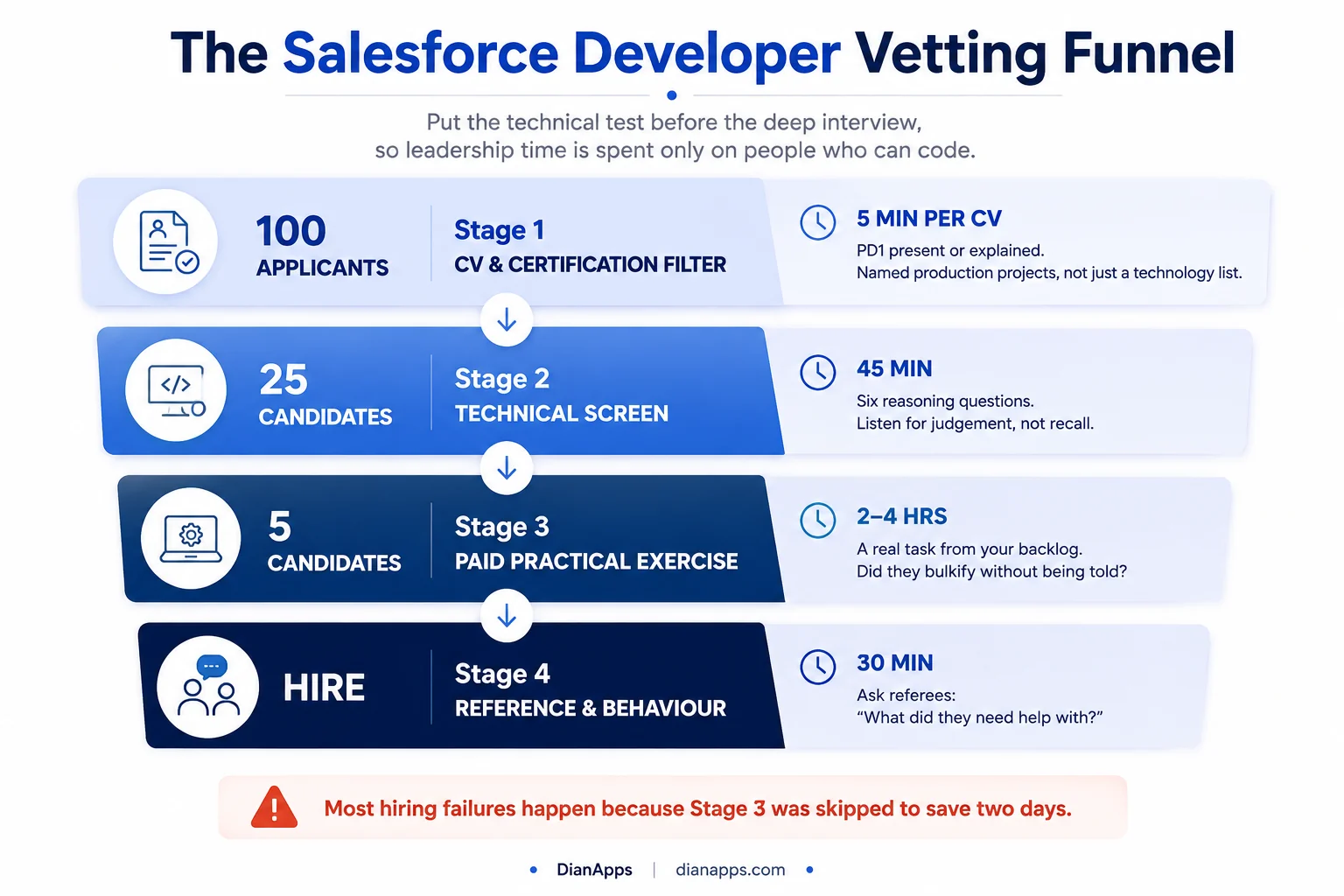
Stage 1: CV Screening. Eliminate The Wrong Candidates Quickly
Before you invest engineering or leadership time in interviews, filter out candidates who don’t meet the baseline requirements. A good CV won’t prove someone is a great Salesforce developer, but it can quickly identify who isn’t ready for the role.
Look for these signals:
- Relevant Salesforce Experience: Have they worked on projects involving Apex, Lightning Web Components (LWC), Flow, integrations, or the specific Salesforce Cloud you’re using?
- Real Production Work: Strong candidates describe business outcomes and technical responsibilities, not just a list of Salesforce features.
- Version Control and DevOps Exposure: Git, CI/CD pipelines, sandbox management, and deployment tools are standard expectations in modern Salesforce teams.
- Certifications That Match the Role: Platform Developer I is a solid baseline. PD2 or cloud-specific certifications are valuable but shouldn’t outweigh real delivery experience.
- Career Progression: Look for increasing ownership, larger implementations, or evidence that they solved more complex problems over time.
Quick rejection criteria:
- Lists many certifications but no production projects.
- Uses only generic Salesforce buzzwords with no measurable achievements.
- No mention of Apex, LWC, integrations, or testing for a developer position.
- Cannot clearly explain their individual contribution versus the team’s work.
- Frequent short-term roles without any explanation or completed projects.
The goal of Stage 1 isn’t to identify the best developer, but to reduce your applicant pool to candidates who are genuinely worth interviewing. A disciplined CV screen saves hours later in the hiring process and ensures your technical interviews focus only on qualified applicants.
Stage 2 – The Six Questions That Actually Work
- “You have a trigger that queries inside a loop. Walk me through what happens with 200 records, and how you’d fix it.” – tests bulkification, the single most important concept.
- “When would you use Flow instead of Apex, and when would you refuse to use Flow?” – tests judgement, not syntax.
- “How do you handle a callout that fails halfway through a batch?” – tests real integration experience.
- “Your test class hits 80% coverage. Is that good?” – the right answer is “it depends entirely on whether the assertions prove anything.”
- “How do you enforce field-level security in an Apex controller?” – separates people who’ve been through a security review from people who haven’t.
- “Tell me about a Salesforce release that broke something you’d built.” – anyone with real experience has a story.
Assessment tools worth using before deeper interviews: platform-specific assessments on iMocha or Adaface, or a Trailhead superbadge as a lightweight proxy. Treat all of them as a filter, not a decision.
Stage 3 – The Practical Exercise
Give a small, realistic task from your actual backlog and pay for their time. Look at four things: did they bulkify without being told, do the tests assert anything meaningful, did they ask clarifying questions, and can someone else read the code.
Stage 4 – References
One question does most of the work: “What did they need help with?” Vague answers usually mean vague performance.
More screening material: 40 Salesforce developer interview questions
Red Flags When Hiring a Salesforce Developer
In candidates:
- Certifications with no production work behind them
- Can’t explain governor limits without prompting
- Describes every problem as needing custom code
- No source control experience – a genuine disqualifier in 2026
- Can’t name anything they’ve built that failed
- Vague about what they personally did versus what their team did
In agencies and partners:
- Won’t name the specific people who’ll do the work
- CVs arrive faster than any real screening could have happened
- No discovery before quoting a fixed price
- Rates far below market with no explanation
- Won’t commit to documentation or handover as a deliverable
- Can’t produce a reference in your industry or at your project size
In your own process:
- Hiring before defining what the role owns
- Screening on certifications because it’s easier than technical assessment
- Skipping the practical exercise to move fast
- No named internal owner for onboarding
Onboarding: The First 90 Days
Developers take three to six months to reach full productivity in an unfamiliar org; most of that delay isn’t Salesforce – it’s your Salesforce.
| Period | Focus | What “done” looks like |
|---|---|---|
| Days 1-30 | Access and orientation | Sandbox and repo access, org walkthrough, first small ticket shipped |
| Days 31-60 | Contribution | Working unsupervised on medium tickets, contributing to code review, documenting what they find |
| Days 61-90 | Ownership | Owns a feature area, joins release planning, has improved something nobody asked them to |
Five things that halve the ramp:
-
- Grant sandbox, Git, and tooling access before day one
- Assign a named internal buddy who knows the business context
- Hand over an architecture document – if none exists, their first task is writing one
- Give a real ticket in week one, not a fortnight of reading
- Set explicit expectations on code review, testing and documentation standards
The Five Most Expensive Hiring Mistakes
- Hiring a developer when you needed an admin. The most common and most costly.
- Screening on certifications instead of production work.
- Skipping the paid practical exercise to save two days, only to lose six months.
- Not defining who owns the architecture. Two developers with no architect produce two architectures.
- Treating documentation as optional. It’s the difference between a hire and a dependency.
Where to Go Next
If you’re still deciding what you need, start with admin vs developer vs architect and configuration vs customisation.
If you’re building a budget, Salesforce development cost and developer hourly rates by region have the details.
If you’re evaluating firms rather than individuals, see how to choose a Salesforce development partner and the top Salesforce development companies.
For platform background, the complete Salesforce development guide covers what developers actually work with day to day.
Hire a Certified Salesforce Developer from DianApps
We’re a certified Salesforce Consulting Partner with a bench of certified developers, architects and consultants across our US, UK, Australia, Canada, UAE and India teams-and we’ve delivered Salesforce and product engineering work for various organisations.
What that means practically:
- Certified Developers, Not CVs: You meet the specific engineer who’ll do the work before you commit.
- Start In Weeks, Not Months: No four-month hiring cycle, no recruitment fee, no fully-loaded salary overhead.
- Scale Up And Down: Full-time, fractional, or project-based, changed as your backlog changes.
- Documentation As A Deliverable: The reasoning stays with you when the engagement ends.
- An Honest Scope First: We’ll tell you if you need an admin instead of a developer. It happens more often than you’d think.
Hire a Salesforce developer from DianApps →
Or send us your backlog, and we’ll tell you what it actually needs – no charge, no obligation. You can also learn more about our Salesforce development services.
 0 comments










Leave a Comment
Your email address will not be published. Required fields are marked *