















 0 comments





Key Takeaways :
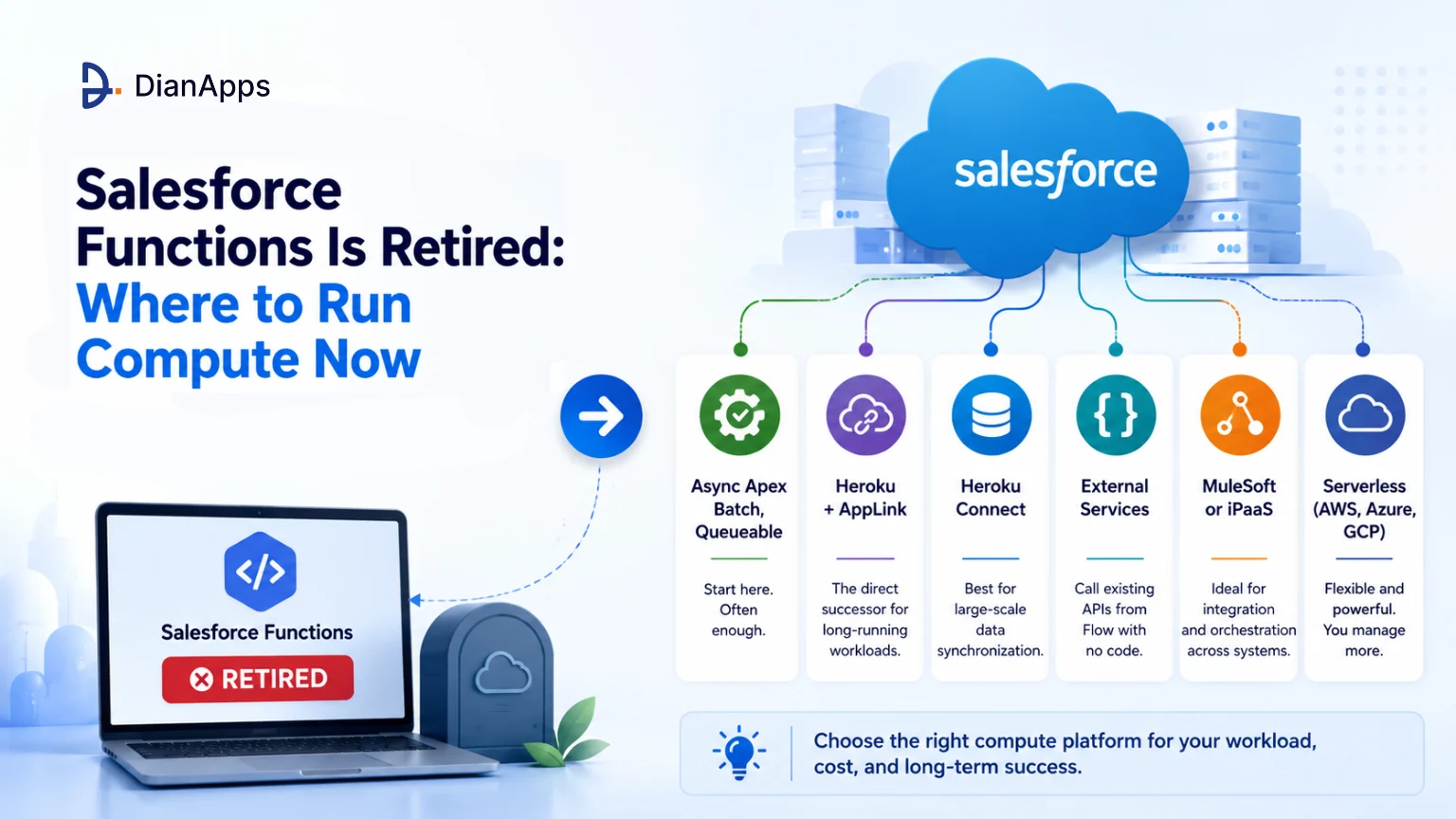
- Salesforce Functions reached end of life on January 31, 2025, so the migration deadline has already passed.
- Heroku with AppLink is the direct successor, but it is not automatically the best choice for every workload.
- Batch Apex and Queueable Apex should be evaluated first, since many workloads that once needed Functions can now run within Salesforce’s asynchronous capabilities.
- Heroku + AppLink is better suited to long-running processes, unsupported programming languages, and workloads that exceed Salesforce governor limits.
- Heroku Connect is more appropriate when the challenge is large-scale data synchronization, rather than compute.
- External Services works well for calling existing REST APIs from Flow, while MuleSoft or another iPaaS fits broader multi-system orchestration.
- Third-party serverless platforms such as AWS Lambda, Azure Functions, and Google Cloud Functions provide another option but require teams to manage more of the surrounding infrastructure.
- When migrating old Functions code, the business logic is largely portable, while the Apex invocation, deployment, and authentication layers need to change.
Quick Answer: Salesforce Functions is retired, and Heroku AppLink is its direct successor. However, the first question should be whether you actually need an external runtime. Batch Apex and Queueable Apex can handle many compute-heavy workloads without additional infrastructure. Use Heroku + AppLink for long-running or language-flexible workloads that genuinely exceed Salesforce’s limits, and consider Heroku Connect, External Services, MuleSoft, or third-party serverless platforms based on the specific workload.
Salesforce Functions reached end of life on 31 January 2025. It doesn’t run; this isn’t a migration deadline article; that deadline passed months ago.
If you’re here because you found a reference to Functions in old documentation, a Stack Exchange answer, or an architecture diagram nobody has updated: it’s gone, and the useful question is the one underneath it. Where do you run code that doesn’t fit inside governor limits?
What Salesforce Functions Was
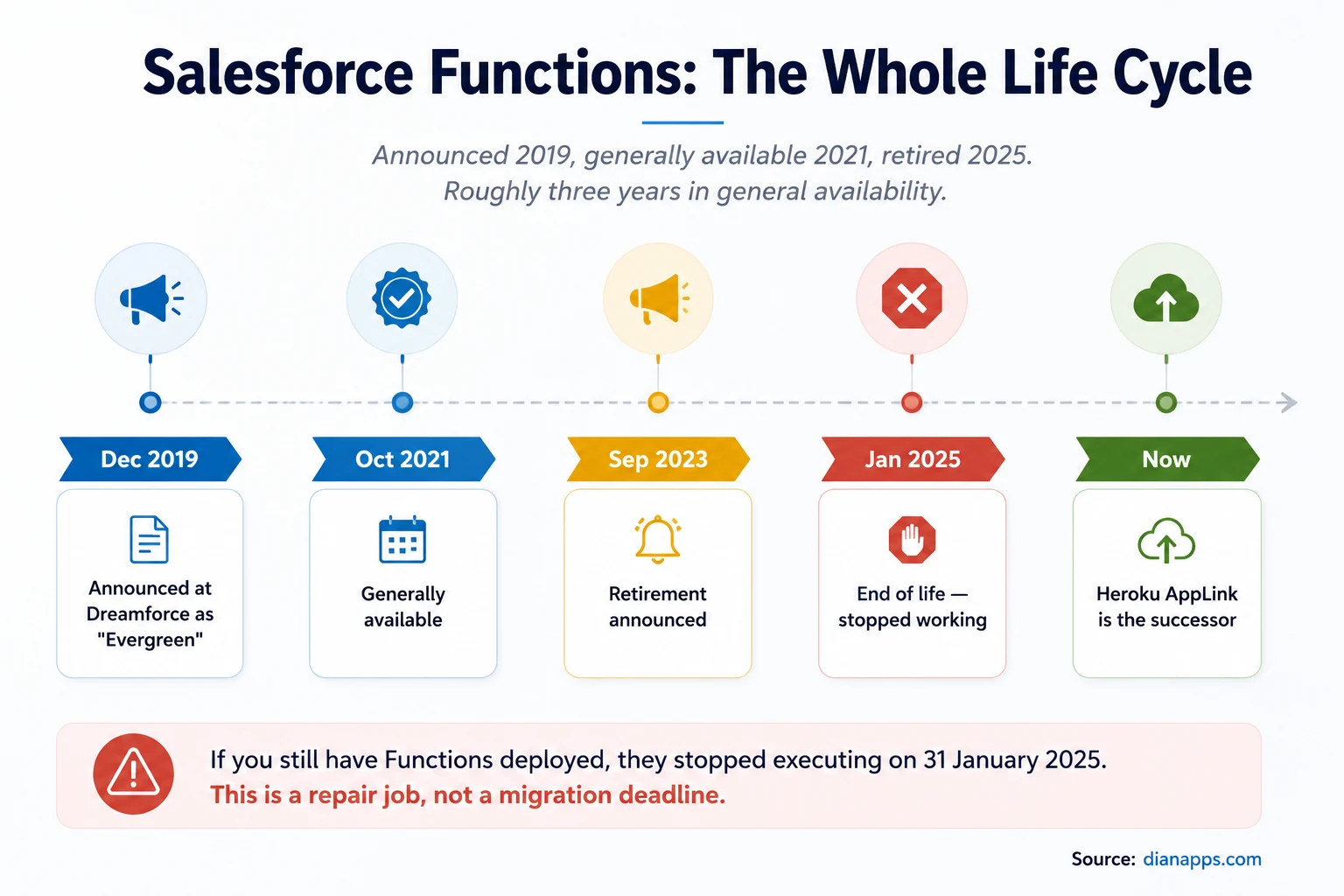
Functions – also called Salesforce Elastic Services and originally Evergreen – let you write serverless code in Java, JavaScript or TypeScript, invoke it from Apex or Flow, and run it outside Salesforce governor limits on elastically scaling compute.
- The Pitch Was Genuinely Appealing: Keep your business logic close to your Salesforce data, but escape the Salesforce governor limits when you needed to.
- Why It Was Retired: Salesforce hasn’t published a detailed rationale, but the pattern is visible. It was generally available for barely three years, adoption stayed low, and Heroku, the technology powering it, was already a more capable product for the same job. Rather than maintain a constrained wrapper around Heroku, Salesforce pointed customers at Heroku directly.
Where to Run Compute-Heavy Work Now
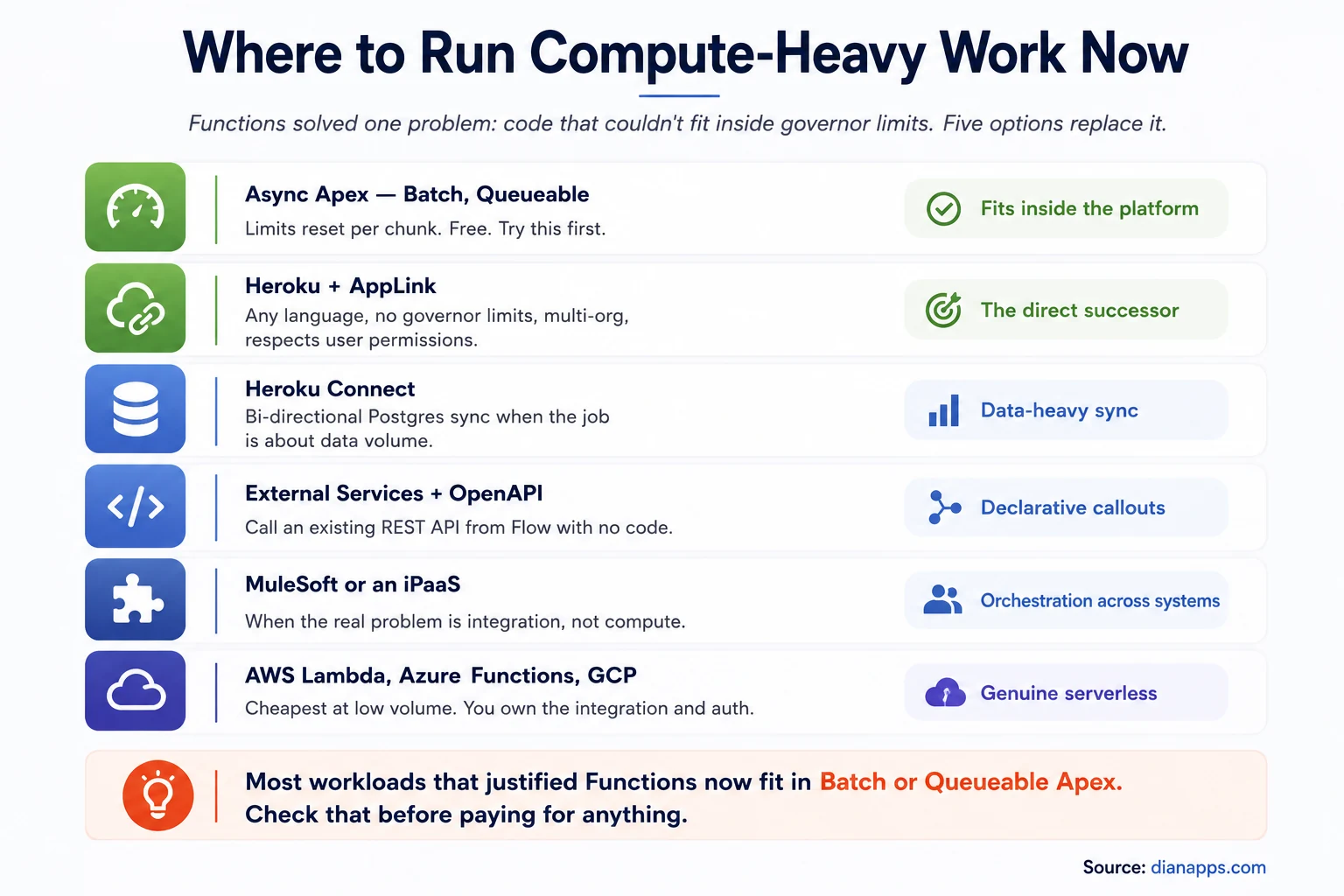
Six options for running compute-heavy work: async Apex, Heroku with AppLink, Heroku Connect, External Services, MuleSoft, and third-party serverless platforms
Need to Move Compute Outside Salesforce?
Get help deciding whether your workload belongs in Apex, Heroku AppLink, an integration platform, or another compute environment.
Start with async Apex
This is the answer more often than people expect: batch Apex resets governor limits for every chunk of 200 records, which is why it handles up to 50 million records. Queueable Apex gets 60 seconds of CPU and 12MB of heap rather than 10 seconds and 6MB.
A workload that felt like it needed Functions in 2022 frequently fits inside Batch Apex today – particularly since the platform’s async capabilities have improved. It costs nothing extra, and it stays inside your existing security and deployment model.
Check this before paying for anything: the Apex programming guide explains the async patterns that can solve many of these workloads without external compute.
Heroku with AppLink – the direct successor
Heroku AppLink is what Salesforce now points Functions customers at, and it’s a genuine upgrade rather than a sideways move. It adds multi-org connectivity and enforces Salesforce user permissions, neither of which the original Functions runtime did as cleanly.
You get any language, no governor limits, long-running processes, and invocation from Apex, Flow, or an Agentforce agent action.
What changes versus Functions and it matters:
| Salesforce Functions | Heroku app | |
|---|---|---|
| Trust boundary | Managed by Salesforce | You own it - the app is internet-exposed unless you use Private Spaces |
| Scaling | Automatic | Manual by default; autoscaling on some dyno types and Private Spaces |
| Invocation time | Fixed limit | Can run indefinitely |
| Cost | Bundled | Per-dyno, per-add-on |
| Deployment | Salesforce metadata | Git push to Heroku |
The trust boundary is the one teams underestimate. A Heroku app is a separate system with its own security posture. See Heroku for Salesforce.
The other three
Heroku Connect if the real problem is data volume rather than compute – bi-directional Postgres sync.
External Services if you just need to call an existing REST API from Flow. Import an OpenAPI spec, and it becomes a declarative action. No code, no infrastructure.
MuleSoft or another iPaaS if the actual problem is orchestrating across several systems rather than raw computation. See Salesforce integration.
AWS Lambda, Azure Functions, or Google Cloud Functions if you want genuine serverless and are comfortable owning the integration, authentication, and monitoring yourself. Usually cheapest at low volume and the most work to set up.
Choosing by Workload
If the workload spans several of these options, Salesforce Development Services can help design the boundary between Apex, external compute, integrations, and the Salesforce platform rather than treating every problem as a code-runtime decision.
| Your workload | Use |
|---|---|
| Bulk record processing, any volume | Batch Apex |
| Moderate async work that can chain | Queueable Apex |
| Long-running processing, minutes or hours | Heroku + AppLink |
| Needs a language Apex doesn’t support | Heroku + AppLink |
| Heavy data sync with an external database | Heroku Connect |
| Calling an existing REST API from Flow | External Services |
| Orchestrating across multiple systems | MuleSoft or iPaaS |
| Genuinely spiky, low-volume compute | Third-party serverless |
| Customer-facing web app | Heroku |
Need Salesforce Engineering Expertise?
Bring in Salesforce developers who can design, build, and maintain Apex, integrations, Heroku-based services, and production compute workflows.
If You Still Have Functions Code
Unlikely at this point, but if an old repository or a dormant project surfaces:
- Your Apex Invocation Layer Needs Replacing: The functions. Function classes no longer resolve. Replace with a callout to a Heroku endpoint or invoke via AppLink.
- The Function Body Itself Is Mostly Portable: Java, Node, and TypeScript code that did the actual work transfers to a Heroku app with modest changes – it’s the wrapper and deployment model that change, not the logic.
- Authentication Changes Shape: Functions inherited context from the invoking org. A Heroku app needs explicit authentication, which AppLink handles if you use it.
- Salesforce Published A Migration Repository: With sample code and Apex patterns when the retirement was announced. It’s still the best starting reference if you’re doing this now.
What This Should Change About How You Adopt New Products
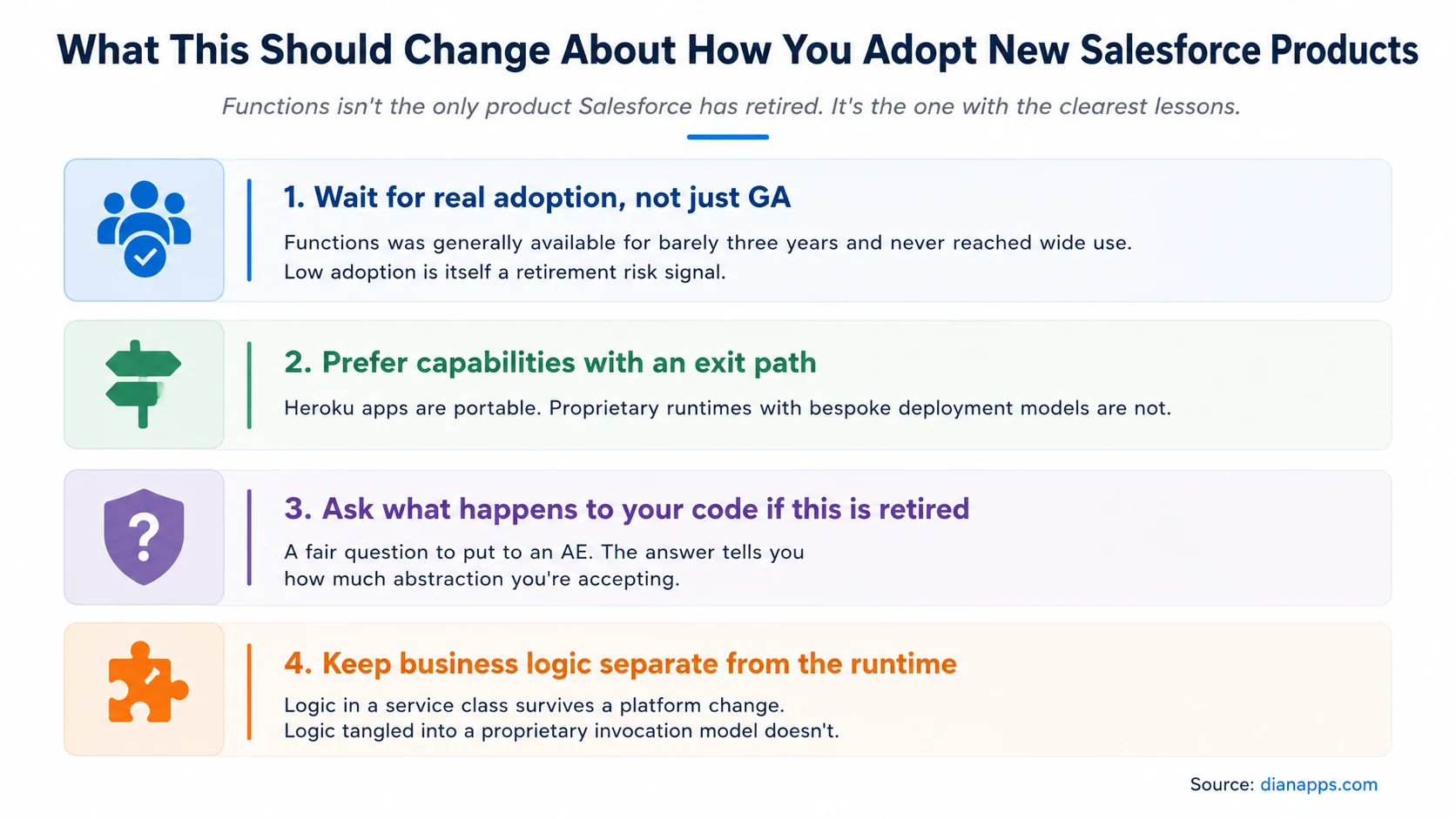
Four lessons about adopting new Salesforce products: wait for real adoption, prefer capabilities with an exit path, ask what happens if it’s retired, and keep business logic separate from the runtime
- The Most Portable Version Of This Lesson: Keep business logic in a service class not tangled into a proprietary invocation model. Logic that lives in a well-structured Apex service survived this retirement untouched – only the plumbing around it had to change.
That’s the same argument for the service-layer pattern we make in the Apex guide, and it’s worth more than any specific product recommendation here.
Where to Go Next
For the limits Functions existed to escape, see Salesforce governor limits – and the async patterns in the Apex programming guide that solve most of them.
For the successor platform, Heroku for Salesforce.
For integration-shaped problems rather than compute-shaped ones, Salesforce integration.
For the platform beneath all of it, the Salesforce Lightning Platform.
The complete Salesforce development guide is the hub.
When You Inherit an Architecture Nobody Documented
Retired products are rarely the real problem. The real problem is finding out what else in your org depends on something that stopped working eighteen months ago and nobody noticed – because the process it supported was quietly worked around instead of fixed.
That’s a recognisable state, and it’s usually cheaper to audit than to keep discovering piecemeal.
We’re a certified Salesforce Consulting Partner, and mapping what’s actually running in an org – versus what the documentation claims – is routine work for our team.
Inherited a Salesforce Architecture Nobody Documented?
We’ll map what’s actually running, identify retired dependencies, and help you determine what needs to be rebuilt, replaced, or left alone.
 0 comments










Leave a Comment
Your email address will not be published. Required fields are marked *