















 0 comments





You can learn LWC syntax in an afternoon, but what actually takes longer is knowing which of four ways to pass data between components, why renderedCallback keeps firing, and when @wire will quietly serve you stale data.
This guide covers the framework properly, with code you can paste into a scratch org and the current details most LWC content still hasn’t caught up with.
Quick Answer: LWC is Salesforce’s modern UI framework, built on web standards rather than a proprietary abstraction. Three files per component. Use @wire for displaying data, imperative Apex for doing things. Pass data down with @api, up with CustomEvent and sideways with Lightning Message Service – not the old pub/sub module. Guard renderedCallback and know that Lightning Web Security has replaced Locker Service.
What Are Lightning Web Components?
Lightning Web Components are Salesforce’s UI framework, built on native web standards, Web Components, custom elements, shadow DOM, and modern JavaScript. Where Aura wrapped everything in a proprietary layer, LWC leans on what browsers already do, which is why it’s faster and why what you learn transfers to any modern JavaScript work.
- Why LWC Replaced Aura: Browsers caught up; Aura existed because the web platform lacked components, modules, and templating in 2014. Once browsers gained those natively, a proprietary framework became overhead rather than an advantage.
- Aura’s Status: Still supported, not deprecated but no longer receiving meaningful investment. Build new work in LWC. See LWC vs Aura vs Visualforce.
Component Anatomy and Lifecycle
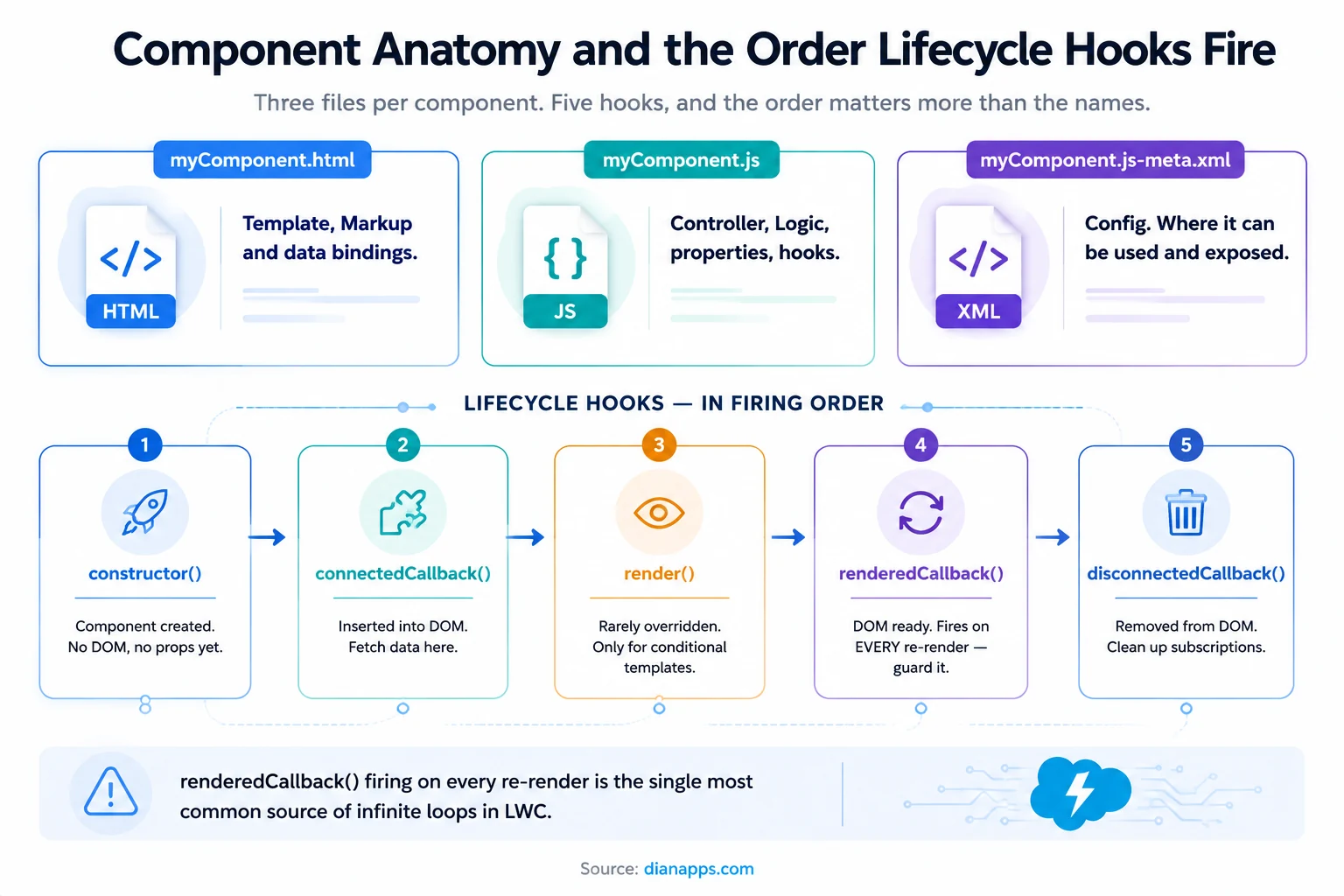
A Minimal Component:
|
1 2 3 4 5 6 7 8 9 10 11 12 13 14 15 16 17 18 19 20 21 22 23 24 25 26 27 28 29 30 31 |
<!-- accountList.html --> <template> <lightning-card title="Accounts"> <template for:each={accounts} for:item="acc"> <p key={acc.Id}>{acc.Name}</p> </template> </lightning-card> </template> // accountList.js import { LightningElement, api, track, wire } from 'lwc'; export default class AccountList extends LightningElement { @api recordId; accounts = []; connectedCallback() { // component is in the DOM - safe to fetch } } <!-- accountList.js-meta.xml --> <?xml version="1.0" encoding="UTF-8"?> <LightningComponentBundle xmlns="http://soap.sforce.com/2006/04/metadata"> <apiVersion>63.0</apiVersion> <isExposed>true</isExposed> <targets> <target>lightning__RecordPage</target> <target>lightning__AppPage</target> </targets> </LightningComponentBundle> |
The meta XML is not optional boilerplate; if your component doesn’t appear in Lightning App Builder, isExposed or targets is almost always why.
The hook that causes the most trouble
renderedCallback() fires after every render, not just the first. Change a reactive property inside it, and you’ve built an infinite loop:
|
1 2 3 4 5 |
renderedCallback() { if (this.hasRendered) return; // guard it this.hasRendered = true; // one-time DOM work here } |
Decorators and Reactivity
Three decorators and the rules changed at Spring ’20 in a way plenty of tutorials still get wrong.
@api makes a property public so a parent can set it; public properties are reactive by default.
@track is mostly unnecessary now. Since Spring ’20, all fields are reactive automatically. You only need @track when you mutate an object’s internal property or an array’s contents rather than reassigning the whole thing:
|
1 2 3 4 5 6 |
// Reactive without @track - reassignment this.account = { ...this.account, Name: 'New' }; // Needs @track - internal mutation @track account = { Name: '' }; this.account.Name = 'New'; |
- Prefer Reassignment Over Mutation: It’s cleaner, it works without @track, and it avoids a class of bug that’s genuinely hard to spot.
@wire connects a property or function to a Salesforce data service.
Have an LWC Project in Mind?
Let us know what you’re building, improving, or troubleshooting, and our Salesforce experts can help you determine the right technical approach.
Getting Data: @wire vs Imperative Apex
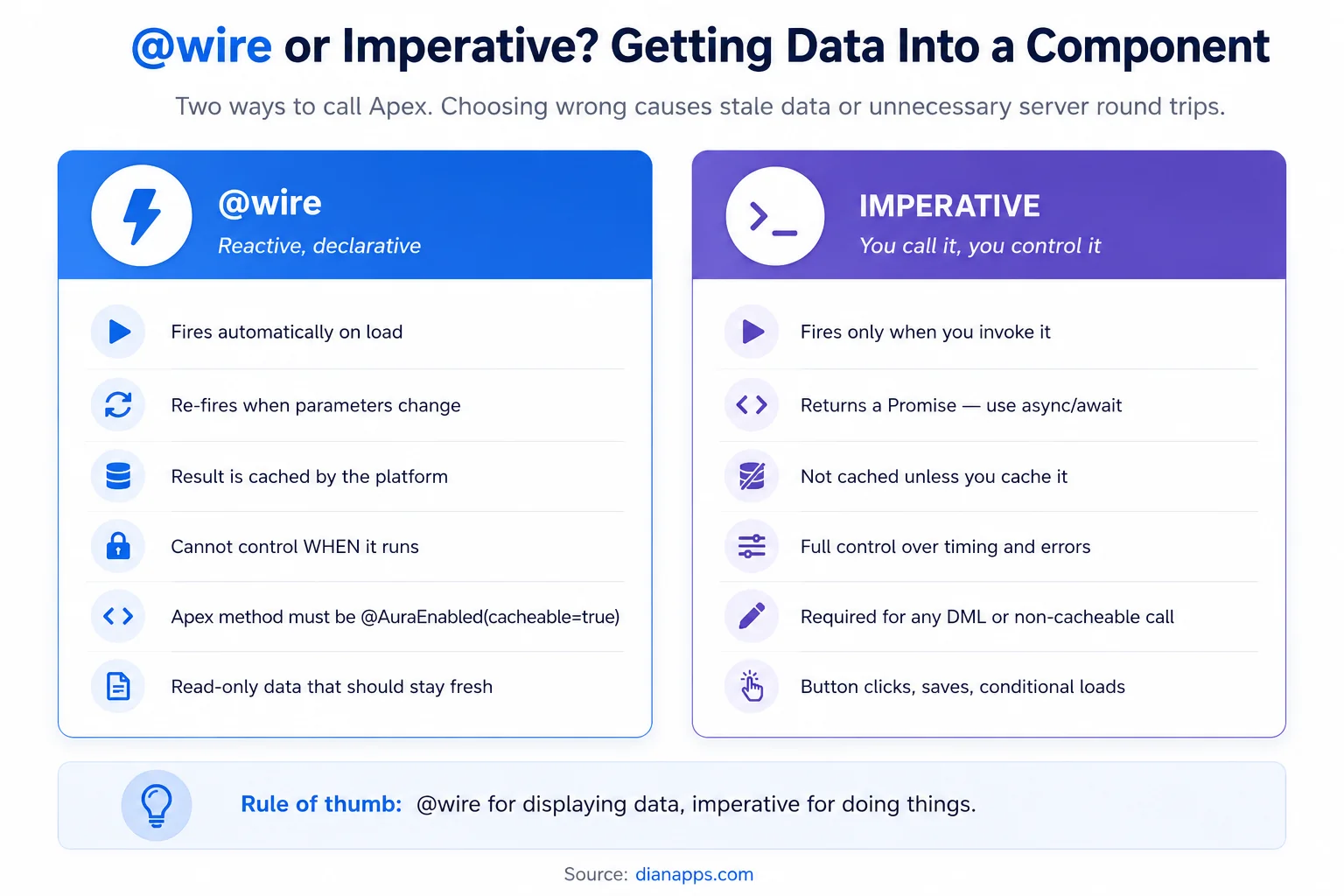
@wire – reactive and cached:
|
1 2 3 4 5 6 7 8 9 |
import { wire } from 'lwc'; import getAccounts from '@salesforce/apex/AccountController.getAccounts'; export default class AccountList extends LightningElement { @api industry; @wire(getAccounts, { industry: '$industry' }) accounts; // { data, error } } |
The $ prefix makes the parameter reactive – change industry and the wire re-fires automatically.
Imperative – you control it:
import getAccounts from ‘@salesforce/apex/AccountController.getAccounts’;
|
1 2 3 4 5 6 7 |
async handleClick() { try { this.accounts = await getAccounts({ industry: this.industry }); } catch (error) { this.error = error.body.message; } } |
The Apex Side Matters: A method is only wireable if it’s marked cacheable=true:
|
1 2 3 4 5 |
@AuraEnabled(cacheable=true) public static List<Account> getAccounts(String industry) { return [SELECT Id, Name FROM Account WHERE Industry = :industry WITH USER_MODE]; } |
And cacheable=true means it cannot perform DML, so any save, update, or delete must be a separate, non-cacheable method called imperatively.
- Don’t forget Lightning Data Service: For single-record work, getRecord and updateRecord from lightning/uiRecordApi need no Apex at all, respect FLS automatically, and share a cache across components:
|
1 2 3 4 |
import { getRecord } from 'lightning/uiRecordApi'; @wire(getRecord, { recordId: '$recordId', fields: ['Account.Name'] }) account; |
Related: Apex programming guide · SOQL guide
Component Communication
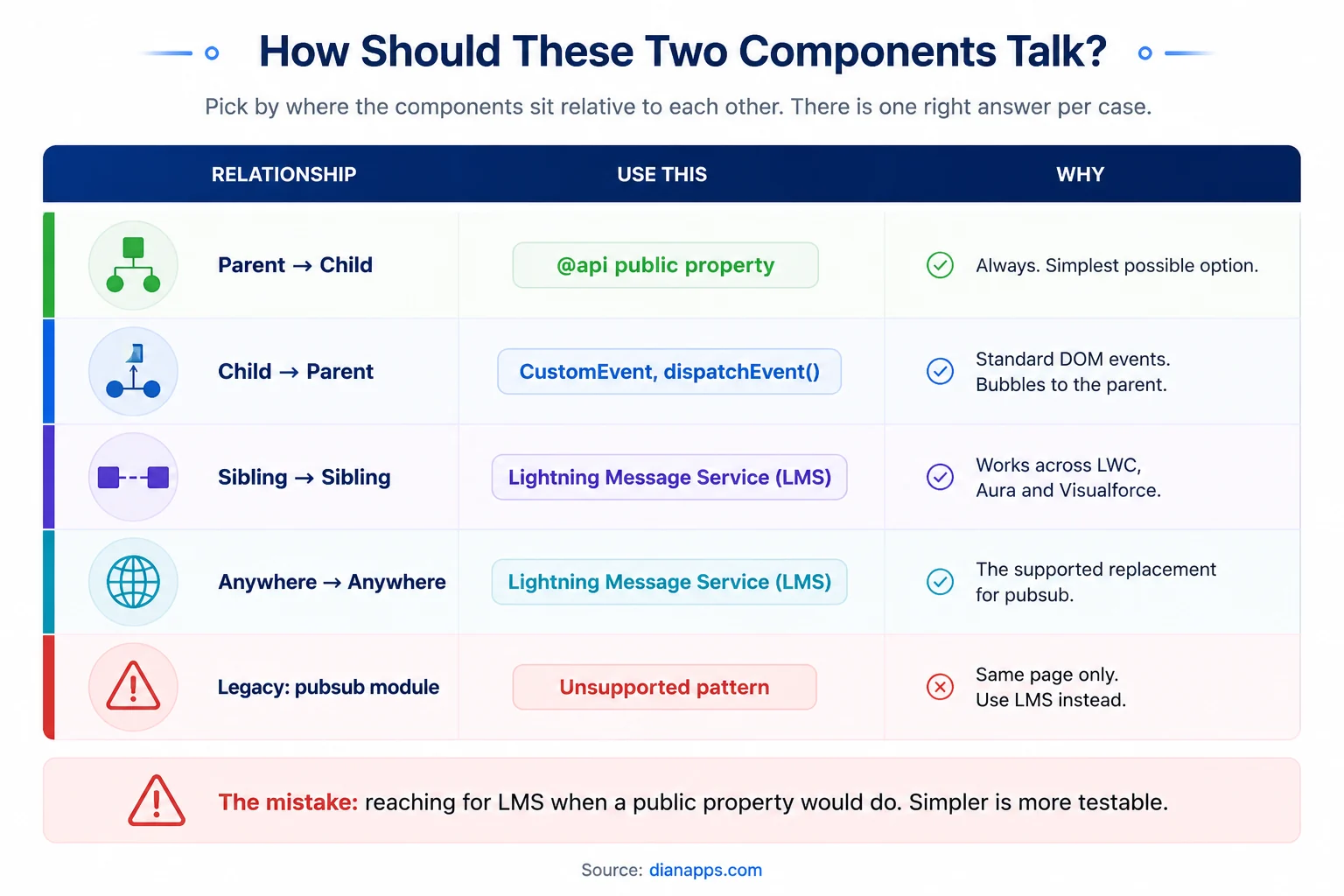
Table showing which communication method to use for parent-to-child, child-to-parent, sibling, and cross-page component communication
Parent to child – A public property:
|
1 2 3 4 5 |
// child.js @api message; <!-- parent.html --> <c-child message={parentValue}></c-child> |
Child to parent – a CustomEvent:
|
1 2 3 4 5 6 7 |
// child.js this.dispatchEvent(new CustomEvent('selected', { detail: { recordId: this.recordId } })); <!-- parent.html --> <c-child onselected={handleSelected}></c-child> |
Event names must be lowercase with no hyphens. onmyEvent won’t bind; onmyevent will. This costs people an hour the first time.
Sibling Or Unrelated – Lightning Message Service:
|
1 2 3 4 5 6 7 8 9 |
import { subscribe, MessageContext } from 'lightning/messageService'; import RECORD_CHANNEL from '@salesforce/messageChannel/RecordChannel__c'; @wire(MessageContext) messageContext; connectedCallback() { this.subscription = subscribe(this.messageContext, RECORD_CHANNEL, (message) => this.handleMessage(message)); } |
LMS is the supported answer, and it works across LWC, Aura, and Visualforce on the same page. The old pubsub module was always a sample pattern rather than a supported API – if you have it in your org, migrate.
The common mistake is over-engineering; if a public property would do, use a public property.
Navigation
|
1 2 3 4 5 6 7 8 9 10 |
import { NavigationMixin } from 'lightning/navigation'; export default class MyComponent extends NavigationMixin(LightningElement) { navigateToRecord() { this[NavigationMixin.Navigate]({ type: 'standard__recordPage', attributes: { recordId: this.recordId, actionName: 'view' } }); } } |
NavigationMixin works across Lightning Experience, Experience Cloud, and the mobile app – which hardcoded URLs do not.
Testing With Jest
Jest is the standard, and LWC testing is genuinely straightforward once the setup exists.
|
1 2 3 4 5 6 7 8 9 10 11 12 13 14 15 16 17 18 19 20 21 |
import { createElement } from 'lwc'; import AccountList from 'c/accountList'; describe('c-account-list', () => { afterEach(() => { while (document.body.firstChild) { document.body.removeChild(document.body.firstChild); } }); it('renders account names', async () => { const element = createElement('c-account-list', { is: AccountList }); element.accounts = [{ Id: '001', Name: 'Acme' }]; document.body.appendChild(element); await Promise.resolve(); const items = element.shadowRoot.querySelectorAll('p'); expect(items[0].textContent).toBe('Acme'); }); }); |
Three things that trip people up:
- Always clean up in afterEach: Leftover DOM between tests causes failures that look random.
- await Promise.resolve() before asserting: LWC renders asynchronously; assert too early, and the DOM isn’t there yet.
- Query through shadowRoot: Components are encapsulated – document.querySelector won’t find inside them.
Jest tests aren’t counted in your 75% Apex coverage and aren’t required to deploy. That’s exactly why most orgs have none and why the ones that do have noticeably fewer front-end regressions.
Related: Salesforce DevOps and CI/CD
Lightning Web Security
Locker Service is being replaced by Lightning Web Security (LWS), and a lot of LWC content still references Locker as current.
The practical difference: Locker restricted access to standard JavaScript APIs fairly aggressively. LWS is less restrictive, permits more standard JavaScript, and gives better third-party library support – while still enforcing namespace isolation between components.
- What It Means For You: Libraries that failed under Locker often work under LWS. If you shelved a third-party JS library because of Locker restrictions, it’s worth re-testing. Check your org’s setting in Setup → Session Settings.
Performance Patterns
- Prefer @wire Where It Fits: Platform caching means fewer server round trips.
- Use Lightning Data Service for single-record reads and writes – shared cache, no Apex.
- Never Query Inside A Loop In Your Apex Controller: The LWC will look slow when the problem is server-side. See governor limits.
- Guard renderedCallback.
- Use lightning-datatable: Rather than building your own table. It handles virtualisation and accessibility.
- Lazy-load with if: true so hidden components don’t mount at all.
- Debounce user input before firing server calls – a keystroke-per-query search box is the classic mistake.
Where LWC Runs
- Lightning Experience: record pages, app pages, home pages, Quick Actions.
- Experience Cloud: with a caveat. LWR sites support LWC natively; older Aura-based sites have restrictions. Check which template your site uses before promising a component will work.
- Mobile: via the Salesforce mobile app or Mobile Publisher. Design for touch and test on a real device; the desktop layout rarely survives contact with a phone.
- Outside Salesforce: LWC Open Source runs anywhere JavaScript does, though the base components and platform services don’t come with it.
Related: Salesforce mobile app development · Experience Cloud
Turn LWC Problems Into Better Experiences
Get expert support for LWC development, performance optimization, component modernization, and Salesforce front-end engineering.
Common LWC Mistakes
- Not guarding renderedCallback – Infinite re-render loops
- Using @track unnecessarily – Reactivity has been automatic since Spring ’20
- Camel-Case Event Names – onmyEvent never binds
- Reaching for LMS when a public property would do
- Forgetting cacheable=true on wired Apex methods
- Attempting DML In A Cacheable Method – it will fail
- Missing isExposed Or Targets in the meta XML
- Querying the DOM outside shadowRoot
- No Jest Tests, because nothing forces you to write them
- Hardcoded URLs instead of NavigationMixin
- Ignoring error On A Wired Property – Silent failures
- Building Custom Tables instead of using lightning-datatable
Need More Salesforce Development Capacity?
Bring experienced Salesforce developers into your team to build, improve, and maintain LWC applications without slowing down your roadmap.
Where to Go Next
For the Apex behind your components, see the Apex programming guide and the SOQL guide.
For choosing between frameworks, LWC vs Aura vs Visualforce and Lightning Experience.
For deploying components safely, Salesforce DevOps and sandboxes.
For components on phones, Salesforce mobile app development.
The complete Salesforce development guide is the hub.
When the Front End Is the Symptom
Slow components are usually slow queries; fragile components are usually untested ones. Components nobody will touch are usually components nobody documented.
We’re a certified Salesforce Consulting Partner, and front-end remediation is routine work for our team. Our Salesforce Development Services can help with profiling what’s actually slow, adding Jest coverage, and restructuring components so the next developer can change them safely.
 0 comments











Leave a Comment
Your email address will not be published. Required fields are marked *