















 0 comments





Key Takeaways:
- Salesforce certifications cover its infrastructure, not your organisation’s compliance obligations.
- HIPAA coverage depends on named services in your current Business Associate Agreement (BAA).
- GDPR requires you to manage lawful basis, consent, DSARs, and data erasure.
- Apex and record-triggered Flows can expose regulated data when system-mode access is unchecked.
- Data masking, access reviews, audit trails, and third-party app assessments help close compliance gaps.
Quick Answer: Salesforce provides platform security, encryption, compliance certifications, and tools that support GDPR, HIPAA, and SOC 2 requirements, but your organisation must configure and maintain its own controls. This includes managing user permissions, enforcing field-level security in Apex and Flow, documenting consent and lawful basis, handling data subject access and erasure requests, masking sandbox data, and assessing third-party applications. For HIPAA, verify which services your current BAA covers rather than assuming your Salesforce edition is eligible. Compliance depends on how your org is configured, monitored, and documented, not simply on Salesforce’s certifications.
Salesforce holds SOC 1, SOC 2, and ISO 27001 certifications, and will sign a BAA for HIPAA. None of that makes your org compliant.
The certifications cover Salesforce’s infrastructure. What determines whether you pass an audit is your configuration, who can see which records, whether your Apex enforces field-level security, whether real patient data is sitting unmasked in a sandbox.
The phrase worth remembering: a signed BAA without correct configuration is a paper shield. It documents who’s responsible; it doesn’t prevent anything.
This guide covers the split honestly, what Salesforce genuinely handles, and the specific things that are yours.
The Shared Responsibility Model
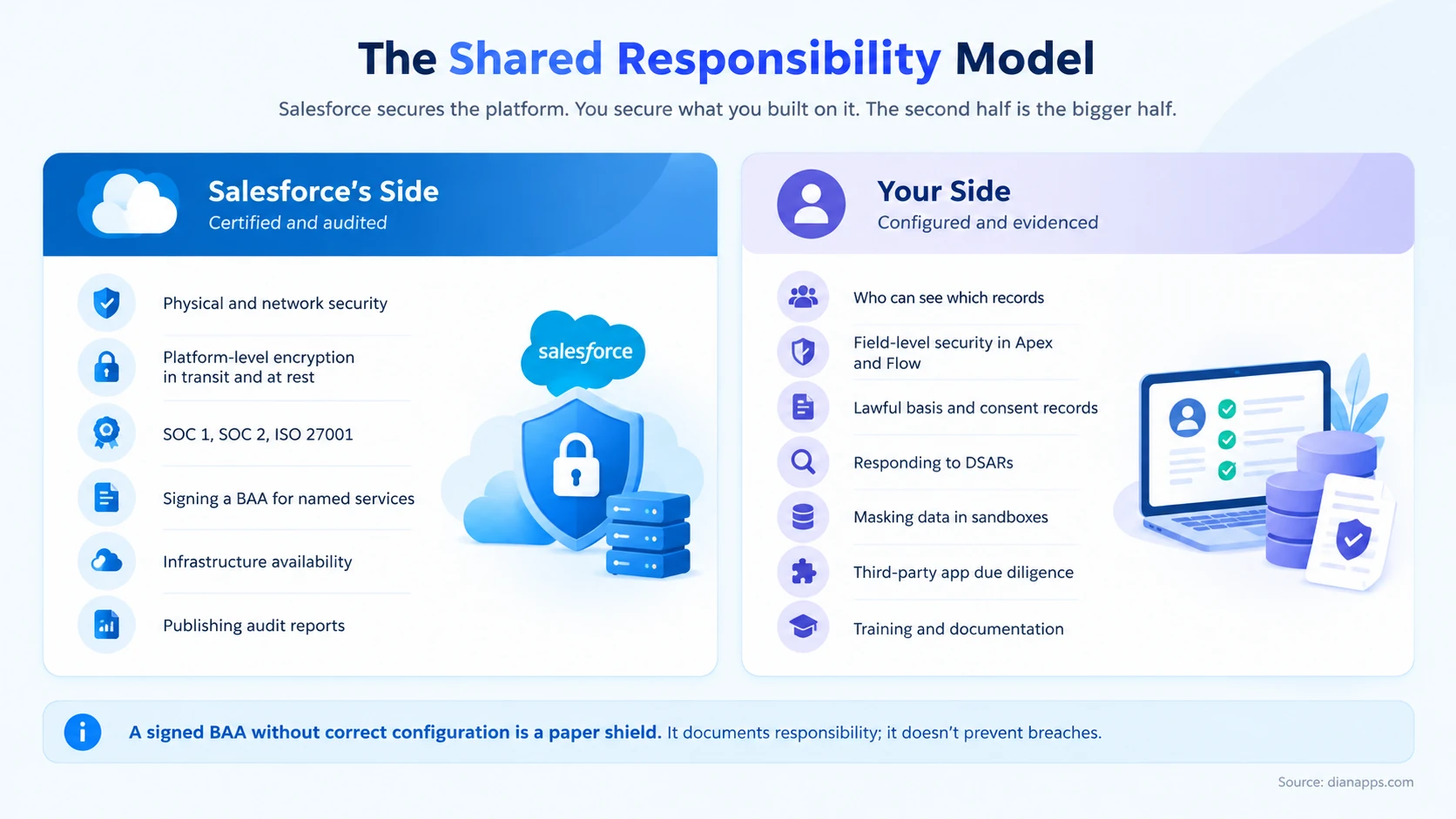
Salesforce’s side is genuinely strong: physical and network security, encryption in transit and at rest, SOC 1, SOC 2 and ISO 27001, published audit reports, and a BAA for named services.
While Salesforce provides the tools needed to support regulatory compliance, configuring them correctly requires a clear understanding of your organisation’s security and data protection requirements. Salesforce consulting services can help businesses review access permissions, assess automation risks, strengthen data governance and identify configuration gaps before they become compliance issues.
- Your side is bigger, and it’s where audits fail: Access design, field-level security in Apex and Flow, consent records, DSAR processes, sandbox data masking, third-party app assessment, training and documentation.
- The pattern across every regulation below is the same: Salesforce provides the capability, and you provide the implementation. A vendor certification is a prerequisite, not an outcome.
The cost of maintaining these controls also matters when assessing your CRM’s overall value, and our guide to Salesforce ROI explains how to evaluate returns against your platform investment.
HIPAA: The Gate Is the Service, Not the Edition
This is the detail that catches organisations out most often.
Salesforce publishes a BAA Restrictions document that lists HIPAA Covered Services by name. Coverage is determined by which service you’re using, not which edition you bought.
Two practical consequences:
- Services not on the list must not store, process, or transmit PHI. That includes newer capabilities that haven’t been added yet, and it’s the reason to check the list rather than assume.
- The BAA also restricts how covered services may be used. You may need to disable specific features or apply additional controls when handling PHI on an otherwise-covered service.
Five Gaps Salesforce Doesn’t Close
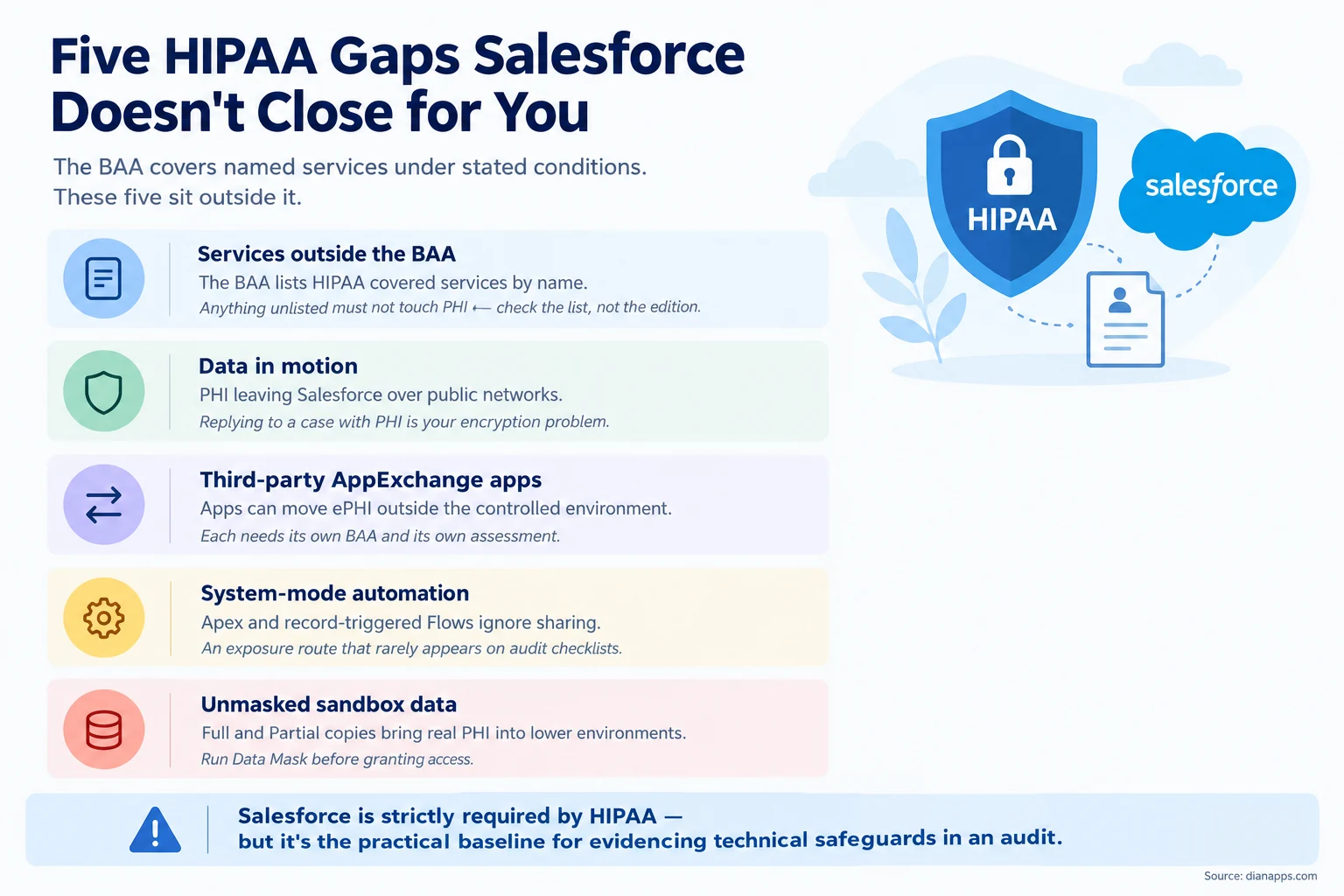
- Data in motion is the one most people miss: Salesforce encrypts PHI at rest and in transit within its ecosystem. When a support agent replies to a case containing PHI and that message travels over the public internet to a patient, encrypting it is your problem.
- Third-party apps need their own BAAs: An AppExchange app that touches PHI can move it outside Salesforce’s controlled environment. Each one needs a separate agreement and its own security assessment.
- System-mode automation is the technical gap: Apex and record-triggered Flows run in system mode by default, ignoring the sharing model entirely. In an org holding PHI, that’s a genuine exposure route, and it rarely appears on a compliance checklist because it looks like a development concern rather than a security one.
Is Your Salesforce Org Compliance-Ready?
Identify gaps in access controls, automation, and third-party security before they become compliance risks. Get expert guidance to strengthen your Salesforce security setup.
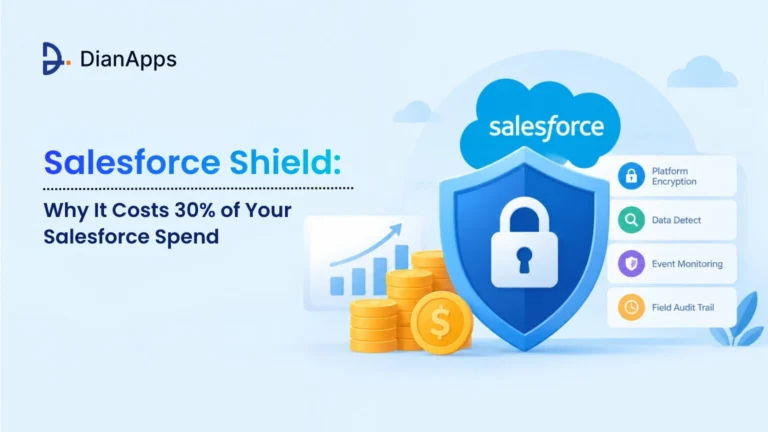
On Shield: It isn’t strictly required by HIPAA. What it provides: platform encryption, Event Monitoring, Field Audit Trail- satisfies the Security Rule’s technical safeguards in a way that’s straightforward to evidence during an audit. For most healthcare deployments, it’s the practical baseline rather than an optional extra.
Related: Salesforce Shield explained · Salesforce for healthcare
GDPR in Salesforce
Salesforce is a data processor; you’re the controller. That distinction determines almost everything.
| Obligation | What Salesforce provides | What you must do |
|---|---|---|
| Lawful basis | Fields and objects to record it | Decide it, capture it, evidence it |
| Consent management | Individual object, consent fields | Design the model, keep it current across channels |
| Right of access (DSAR) | Data Privacy Manager, APIs | Find every record, including in integrations |
| Right to erasure | Deletion APIs, Data Privacy Manager | Define what “delete” means across sandboxes and backups |
| Data minimisation | Field-level control | Stop collecting what you don’t need |
| Breach notification | Event Monitoring, audit logs | Detect, assess and report within 72 hours |
The erasure requirement is the hard one, and it’s where most organisations are weakest. Deleting a contact in production doesn’t remove them from a Full Copy sandbox, an integrated marketing platform, or a backup. Define the scope of deletion before you receive a request, not after.
And DSARs get harder the more integrated you are. A subject access request covers everywhere their data lives, which means your integration architecture is a privacy question, not just a technical one.
If you’re also evaluating which CRM best fits your organisation’s needs, our Salesforce vs HubSpot comparison examines the differences in pricing, customisation, and ongoing administration.
Related: Salesforce sandboxes explained · Salesforce integration
What Each Regulation Requires
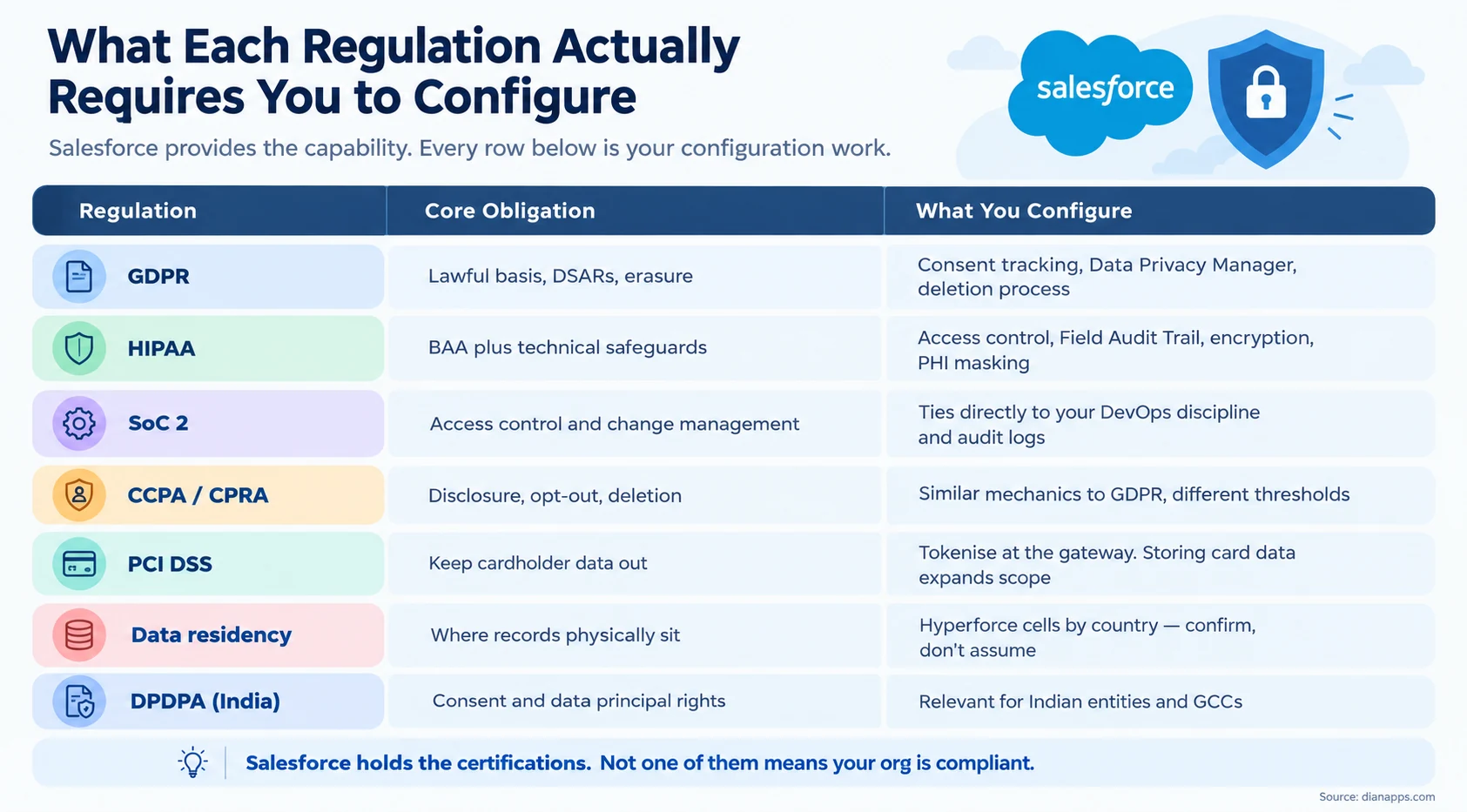
- On PCI DSS specifically: the cheapest compliance strategy is to keep cardholder data out of Salesforce entirely. Tokenise at the payment gateway and store only the token. Organisations that store card data “temporarily” for a business reason expand their audit scope substantially for very little benefit.
- On SOC 2: Salesforce’s own SOC 2 report covers Salesforce. Your SOC 2 covers your controls, and the Salesforce-related ones tie directly to your DevOps discipline, change management, access reviews, and audit logging. See Salesforce DevOps.
- On DPDPA: India’s Digital Personal Data Protection Act creates obligations for India-headquartered enterprises and Global Capability Centres. If you’re a Western buyer using Indian delivery, your obligation is more likely GDPR, but confirm how your data is handled either way.
Encryption: Classic vs Shield
| Classic Encryption | Shield Platform Encryption | |
|---|---|---|
| Cost | Included | Paid add-on |
| Field types | Custom text fields only | Standard and custom fields, files, attachments |
| Search | Not searchable | Searchable |
| Key management | Salesforce-managed | Bring your own key supported |
| Functionality impact | Significant restrictions | Fewer, but real |
Shield’s practical value isn’t only the encryption. It’s Field Audit Trail and Event Monitoring, the ability to show an auditor who accessed what and when, and to retain field history far longer than the standard 18 months.
- The Honest Caveat: Encryption restricts functionality. Encrypted fields have limitations in formulas, filters, and some integrations. Encrypt what genuinely needs it rather than everything, and test the impact before rolling out.
Related: Salesforce Shield explained
Data Residency
Hyperforce changed this materially. Salesforce infrastructure now runs on public cloud in an expanding number of countries, deployed as cells, which means data residency is a configuration choice rather than a compliance blocker.
Two things to do if residency matters:
Confirm where your org actually sits. Don’t assume. Check, and get it in writing if it’s contractual.
Remember that residency and access are different questions. Data stored in the EU can still be accessed from elsewhere. If your obligation is about access as well as storage, that’s a separate control.
If compliance requirements are also prompting you to reassess CRM costs, our Salesforce vs Zoho CRM comparison explains the differences in pricing, reporting, integrations, and scalability.
Related: how Salesforce works, architecture and Hyperforce
A Practical Compliance Checklist
- Access and permissions – Org-wide defaults set to the most restrictive workable level – Profiles and permission sets reviewed quarterly, not annually – No user holding “View All Data” without a documented reason – Deactivation tied to HR offboarding, same day
- Code and automation – WITH USER_MODE on queries touching regulated data – AccessLevel.USER_MODE on DML – Every record-triggered Flow reviewed for system-mode exposure – Fault paths on data operations
- Environments – Data Mask run before any developer accesses a Full or Partial Copy sandbox – Sandbox refresh process documented, including who gets access
- Evidence – Field Audit Trail enabled on regulated objects – Event Monitoring in place if you need to show access history – Retention periods defined and configured, not assumed
- Third parties – Every AppExchange app touching regulated data assessed and covered by its own agreement – Integration endpoints reviewed for what they transmit and where
- Governance – Named owner for compliance configuration – Quarterly access review, documented – Training records kept
Close Your Salesforce Compliance Gaps
From permission reviews to audit trails and data masking, find out what your org needs to meet its compliance obligations. Get a clear plan to address the gaps that matter most.
Where to Go Next
For the encryption and monitoring layer, Salesforce Shield explained.
For enforcing security in code, the Apex programming guide and Salesforce Flow Guide.
For protecting lower environments, Salesforce sandboxes explained.
For where data physically sits, how Salesforce works.
For regulated industries specifically, Salesforce for healthcare · Salesforce for financial services · Salesforce for education · Salesforce for nonprofit
For change management and audit evidence, Salesforce DevOps.
For the platform context, what is Salesforce and Salesforce pricing.
Certifications Are the Starting Line
Every vendor page in this category leads with the certification list. It’s the least useful information available, because it describes what Salesforce did rather than what you need to do.
The work that determines whether you pass an audit is unglamorous: access reviews, masked sandboxes, USER_MODE in your Apex, a documented deletion process, and someone whose job it is to keep all of that current.
Is Your Salesforce Setup Ready for Regulatory Scrutiny?
We’ll review access design, code-level enforcement, environment handling, and third-party exposure, and give you the gaps in priority order.
 0 comments










Leave a Comment
Your email address will not be published. Required fields are marked *