















 0 comments





Key Takeaways:
- Salesforce Shield can cost 20% to 30% of net Salesforce licence spend.
- Its four components cover encryption, sensitive data discovery, event monitoring, and extended field history.
- Encryption can restrict formulas and sorting, so scope sensitive fields carefully.
- Free tools and standard features may cover some audit and monitoring requirements.
- Assess compliance obligations before paying for the full Shield bundle.
Quick Answer: Salesforce Shield is a paid security and compliance add-on commonly priced at 20% to 30% of net Salesforce licence spend for the full bundle. Its four components provide platform encryption, sensitive data discovery, event monitoring and extended field history. However, not every organisation needs all four. Assess your regulatory obligations, existing security controls and audit requirements before deciding whether to purchase the full bundle or negotiate a narrower scope.
Shield is priced as a percentage of your total Salesforce spend, commonly 20% to 30% for the full bundle.
That structure matters more than the number; there’s no meter and no per-user charge; the price simply tracks the size of your org. On a $4 million net contract, a 25% Shield bundle costs around $1 million a year, and it grows automatically every time your Salesforce contract does.
That makes Shield one of the largest add-on decisions a regulated Salesforce estate will make, and it’s why the percentage rate and the scope are the two numbers worth negotiating hardest.
One correction before we start: Shield now has four components, not three. Data Detect was added, and most guides still describe the original bundle.
The Four Components of Salesforce Shield Pricing
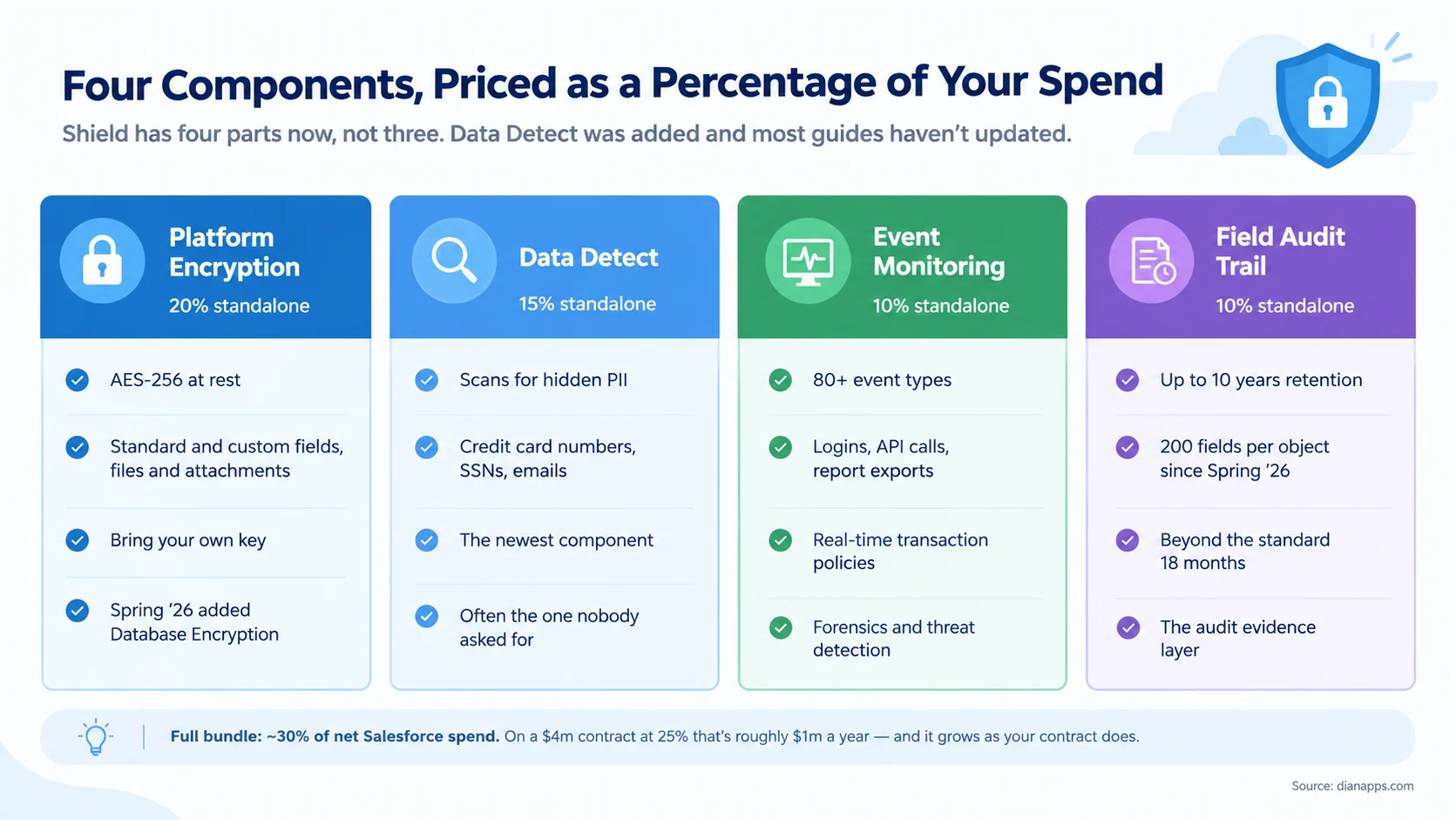
Platform Encryption encrypts data at rest with AES-256, covering standard and custom fields, files, and attachments with bring-your-own-key support.
Data Detect scans your org for sensitive data you didn’t know was there: credit card numbers, national insurance or social security numbers, email addresses sitting in free-text fields. It’s the newest component and frequently the one nobody asked for.
Event Monitoring logs 80+ event types, logins, API calls, report exports, page views. It’s what lets you answer “who downloaded that report and when”, which is a question that only ever gets asked at a bad moment.
Field Audit Trail retains field history for up to 10 years across up to 200 fields per object since Spring ’26, against the standard 18 months and 20 fields.
- On Buying Components Separately: The standard offering is the bundle. Sources differ on how readily Salesforce will unbundle, but it’s negotiable rather than routine, and a component-level case is your strongest argument for it.
What Encryption Actually Breaks
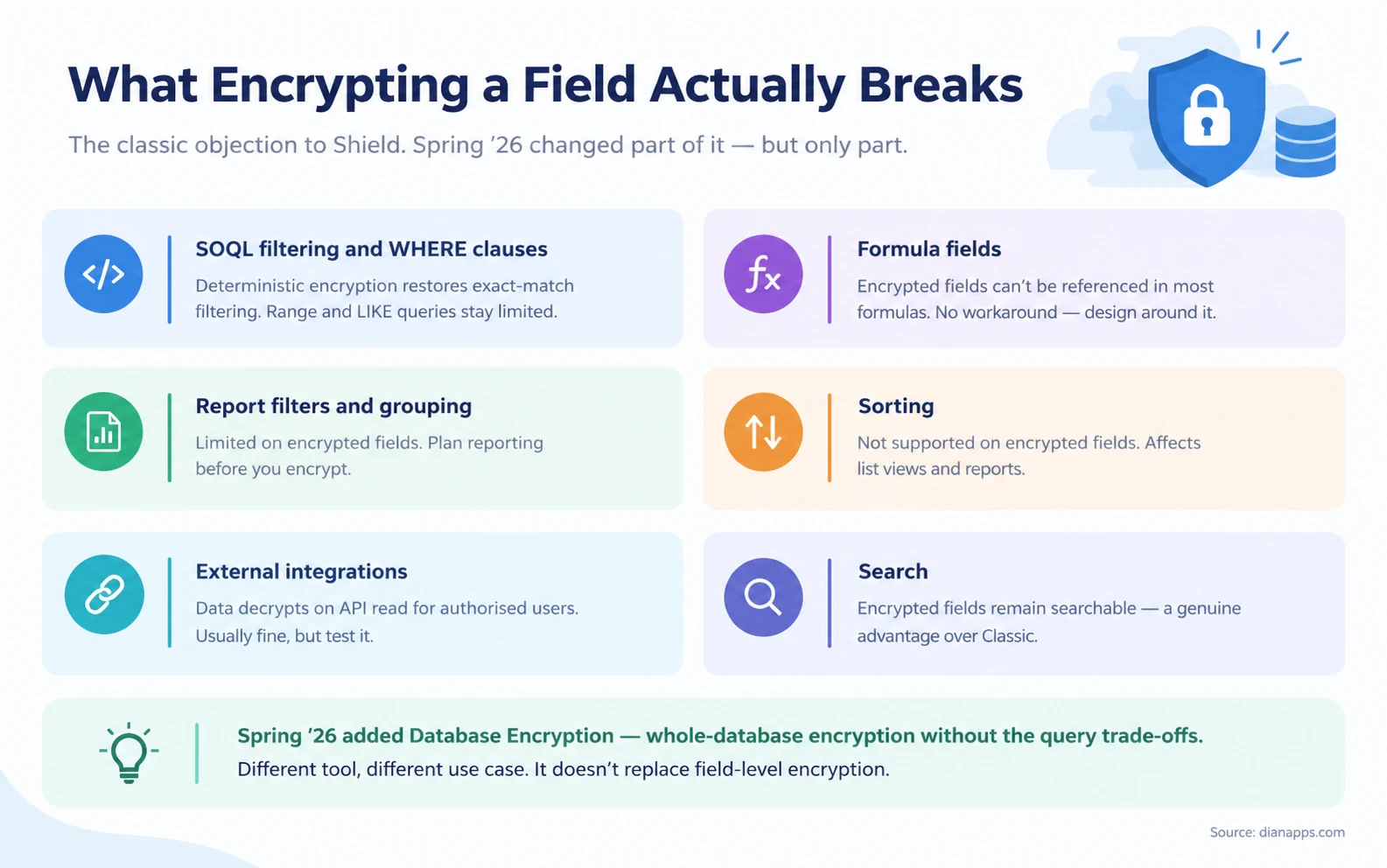
This is the honest objection to Shield, and it’s why “encrypt everything” is bad advice.
- The Two That Hurt Most: encrypted fields can’t be referenced in most formula fields, and they can’t be sorted. There’s no workaround for either; you design around them.
- Filtering Is More Nuanced: Deterministic encryption restores exact-match filtering, which covers a lot of real use cases. Range queries and LIKE searches remain limited.
- Search Still Works: Which is Shield’s main advantage over Classic Encryption.
- And Spring ’26 Changed the Picture: Salesforce added Database Encryption, whole-database encryption without the query trade-offs of field-level encryption. It’s a different tool for a different purpose rather than a replacement, but it materially weakens the “encryption breaks everything” objection.
The Practical Rule: encrypt what genuinely requires it. Ten sensitive fields encrypted properly beats two hundred encrypted indiscriminately, and it costs you far less functionality.
Salesforce Shield vs Classic Encryption
| Classic Encryption | Shield Platform Encryption | |
|---|---|---|
| Cost | Included | Paid add-on |
| Field types | Custom text fields only | Standard and custom fields, files, attachments |
| Searchable | No | Yes |
| Key management | Salesforce-managed | Bring your own key supported |
| Encryption | 128-bit | AES-256 |
| Field history | Standard | Extends with Field Audit Trail |
Classic Encryption is genuinely limited, custom text fields are not searchable, and it breaks more than Shield does. It exists, it’s free, and for most regulated use cases it isn’t sufficient.
Related: Salesforce compliance and security
The Ten-Field Test
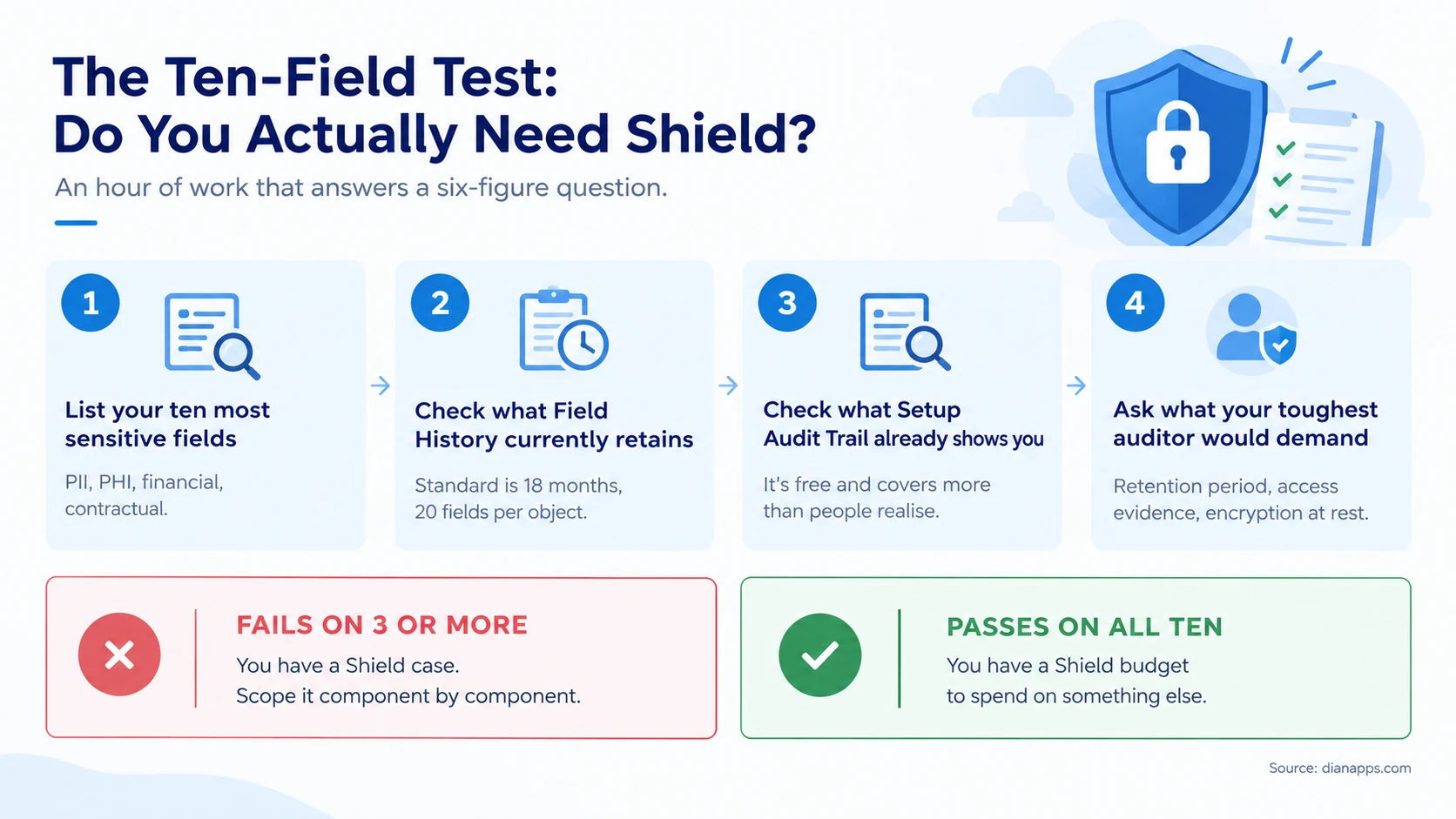
This takes about an hour and answers a six-figure question.
Work through your ten most sensitive fields. For each one, check what Field History currently retains, what Setup Audit Trail already shows you for free, and what your toughest auditor would actually demand.
Salesforce consulting services can help assess these existing controls against your compliance requirements, identify gaps in audit coverage, and determine whether you need the full Shield bundle or only specific components.
Fail on three or more, and you have a genuine Shield case. Scope it component by component rather than accepting the bundle.
Pass on all ten, and you have a Shield budget to spend on something more useful.
Two things people miss during this exercise:
- Setup Audit Trail is free and covers more than most admins realise: configuration changes, permission changes, who modified what in Setup. It doesn’t cover record data access, which is Event Monitoring’s job, but it closes part of the gap at no cost.
- Standard Field History tracking gives you 18 months across 20 fields per object. If your retention requirement is two years in five fields, you’re closer than you think.
The Salesforce Shield Cost Structure and How to Negotiate It
The percentage applies to net license spend on your CRM clouds: Sales, Service, Experience. It doesn’t always apply cleanly to industry clouds, and Data 360 Shield is a separate SKU with its own pricing. For a broader breakdown of Salesforce plan costs and pricing structures, see our Salesforce pricing guide.
Five things worth knowing before the conversation:
The rate is negotiable, particularly as part of a larger commitment. Published ranges run from about 20% to 35%.
Scope is negotiable too. You can argue to exclude low-risk user populations from the pricing base; that’s often a bigger lever than the percentage itself.
Do compliance-led scoping first. Establish which components have a documented regulatory mandate before any negotiation. A component-level case is the strongest counter to a full-bundle proposal.
Pilot Event Monitoring on a limited org before committing enterprise-wide.
Tie the Shield renewal to your base Salesforce renewal date so both are negotiated together rather than on separate cycles.
- And know the Trap In The Pricing Model: Because Shield tracks contract size rather than usage, every seat you add increases your Shield bill automatically. Growing the org grows the add-on with no additional decision.
Because Shield costs increase alongside your Salesforce contract, reviewing Salesforce licence costs can help identify unused seats, unnecessary add-ons, and other expenses worth addressing before renewal.
Who Genuinely Needs Salesforce Shield
Strong case:
- Regulated industries, healthcare with PHI, financial services under FINRA or SEC recordkeeping, anything with a statutory retention requirement beyond 18 months
- Contractual obligations, an enterprise customer whose contract requires encryption at rest with customer-managed keys
- A real audit requirement for who accessed which records, which nothing else provides
- Organisations where a breach cost or regulatory fine would exceed the annual Shield fee, which is the honest calculation
Weak case:
- “We want to be more secure.” That’s not a scope. Shield is a compliance tool, not a security posture.
- You haven’t configured what you already have. Sharing rules, field-level security, MFA, and permission set hygiene are free and matter more.
- One component would do. Paying 30% for four when you need Field Audit Trail at 10% is the most common expensive mistake here.
The honest framing: Shield is genuinely excellent at what it does, and it is also frequently sold to organisations that need one of its four capabilities.
Before purchasing additional security capabilities, review your Salesforce editions and their included features to understand what your current plan already provides.
Two Things That Catch People Out
Sandboxes aren’t Shielded by default. If you need Platform Encryption or Event Monitoring in a Full sandbox, that’s an additional sandbox license or a data-masking workaround. Budget for it or plan to use Data Mask instead.
Real-Time Event Monitoring transaction policies count against Apex governor limits when they execute as Apex. In a high-volume org, that’s a genuine design consideration rather than a footnote.
Cheaper Paths to the Same Goal
Before committing to 30%, check whether these cover your actual requirement:
| Requirement | Free or cheaper option | Limitation |
|---|---|---|
| Audit configuration changes | Set up Audit Trail | Doesn’t cover record data access |
| Track field changes | Standard Field History | 18 months, 20 fields per object |
| Encrypt a few text fields | Classic Encryption | Custom text only, not searchable |
| Monitor logins | Login History | Far less detail than Event Monitoring |
| Detect sensitive data | Third-party scanning tools | Less integrated than Data Detect |
| Long-term record retention | Archive to external storage | You own the retrieval process |
None Of These Matches Shield. The question is whether they match your requirements, which is a different and much cheaper question to answer.
If the cost of Salesforce licensing and security add-ons no longer fits your requirements, comparing Salesforce alternatives and their switching costs can help you assess whether another platform is a practical option.
Implementation Sequence
If you’re proceeding, the order matters.
- Scope the fields. Identify what genuinely needs encryption. Resist the temptation to encrypt broadly.
- Test in a sandbox first; Shield is free in Developer Edition for testing. Check what breaks in your formulas, reports, and integrations before touching production.
- Decide deterministic vs probabilistic per field. Deterministic preserves exact-match filtering; probabilistic is stronger but more restrictive.
- Plan key management. Bring-your-own-key is a genuine operational commitment; losing a key means losing the data.
- Enable Field Audit Trail before you need it. It doesn’t retroactively create history. Turning it on the day you receive an audit request gives you nothing.
- Configure Event Monitoring dashboards. The raw logs are close to unusable without them, and this is where implementations stall.
Related: Salesforce sandboxes explained · Salesforce DevOps
Where to Go Next
For the wider compliance picture, Salesforce security and compliance.
For protecting lower environments, Salesforce sandboxes explained.
For the cost context, Salesforce pricing and how to reduce license costs.
For regulated industries, Salesforce for healthcare · Salesforce for financial services
For the technical constraints, governor limits and the Apex programming guide.
For change management evidence, Salesforce DevOps.
Most Orgs Need One Component, Not Four
Shield is a well-built product solving real problems. It’s also priced as a bundle and sold as insurance, which means a lot of organisations pay 30% for capability they use a quarter of.
The hour it takes to run the ten-field test is the highest-return hour in this entire decision.
Want the scoping done before you’re quoted?
We’ll work out which Shield components your compliance obligations actually require and tell you if the answer is none.
 0 comments











Leave a Comment
Your email address will not be published. Required fields are marked *