















 0 comments





Key Takeaways:
- Zoho and Pipedrive offer lower entry pricing, while HubSpot provides a usable free tier.
- Switching CRM involves migration, integrations, automation, retraining, and temporary productivity losses.
- Open-source CRMs reduce licensing costs but require hosting, security, and technical resources.
- Small teams with simple processes may benefit from leaving Salesforce.
- Licence audits, data cleanup, and org optimisation can solve many Salesforce cost and performance issues.
Quick Answer: The best Salesforce alternative depends on why you want to leave. Zoho suits cost-conscious teams, HubSpot works well for marketing-led organisations, Pipedrive fits simple sales pipelines, and Dynamics 365 suits businesses already invested in Microsoft. However, switching can cost more than the first year of licence savings, so auditing and fixing your existing Salesforce org should come first.
A disclosure before anything else: we’re a Salesforce consulting partner, and that gives us an obvious interest in you staying, and you should read the rest of this page knowing it.
Here’s why we’re writing it anyway. Almost every “Salesforce alternatives” article ranking today is written by a competing CRM vendor or an affiliate site earning a commission on the switch. Their conclusion was decided before the research started.
Ours is decided too, and it’s this: most organisations searching for Salesforce alternatives have a fixable org, not a wrong platform. That distinction is easier to make when you understand what Salesforce is actually designed to do and where its broader platform capabilities become relevant.
Entry Pricing, and Why It Misleads
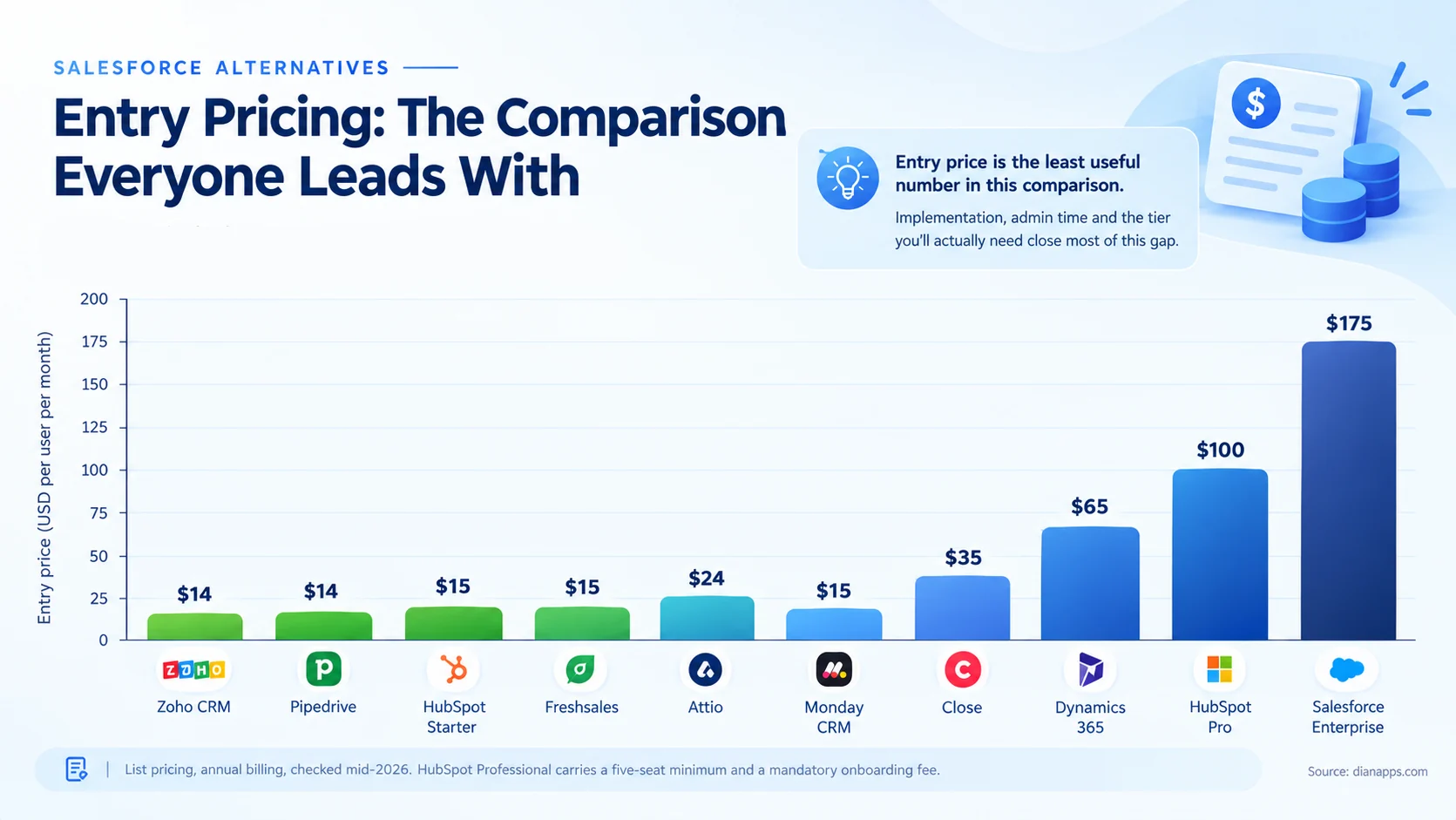
The gap looks enormous, and it narrows considerably in practice.
The entry tier isn’t the tier you’ll need. HubSpot’s Sales Hub Professional, the tier where sequences, forecasting, and custom reports live, is $100 per seat with a five-seat minimum and a mandatory onboarding fee. That’s a very different number from the $15 Starter price most comparisons quote.
Implementation isn’t free anywhere. Salesforce implementation is expensive; so is a serious HubSpot or Dynamics rollout. The cheap platforms are cheaper to implement, not free to implement.
And a warning about published figures generally. Several currently ranking comparison articles quote Salesforce Professional at $80 and Enterprise at $165. Both are out of date; the current figures are Pro Suite at $100 and Enterprise at $175 following a late-2025 increase. If a comparison has stale numbers on one platform, check the others.
Related: Salesforce pricing 2026
The Twelve, Compared
| CRM | From | Best for | The honest catch |
|---|---|---|---|
| HubSpot | Free / $15 | Marketing-led teams wanting one ecosystem | Professional at $100/seat, 5-seat minimum, onboarding fee |
| Zoho CRM | $14 | Best features per pound | Interface and setup less polished than newer tools |
| Pipedrive | $14 | Straightforward visual pipeline | Reporting limits and paid add-ons stack up |
| Freshsales | Free / $15 | CRM plus built-in phone and support | Smaller ecosystem than the leaders |
| Microsoft Dynamics 365 | ~$65 | Organisations already deep in Microsoft | Complexity approaches Salesforce’s |
| Monday CRM | ~$15 | Teams already using Monday for work management | Weak as a standalone CRM choice |
| Close | ~$35 | High-volume inside sales calling | Narrow, it’s a sales tool, not a platform |
| Attio | $24 | AI and automation built into the core | Newer, smaller ecosystem |
| Creatio | Quote | No-code process automation, mid-market | Less familiar to hire for |
| SugarCRM | Quote | Customisation without Salesforce pricing | Smaller partner network |
| Keap | ~$100 | Small business sales plus marketing automation | Best for very small teams only |
| SuiteCRM / Odoo | “Free” | Open source, full data control | See the open-source section below |
Two entries worth expanding.
- Zoho Is The Most Common Right Answer: For organisations genuinely leaving Salesforce for cost reasons. At $14–52 per user it overlaps considerably with platforms costing three to five times more. What you give up is interface polish and ecosystem depth, not core capability.
- Dynamics 365 Is The Enterprise Alternative: The honest note is that it isn’t simpler. If Salesforce felt complex, Dynamics will too. The genuine argument is Microsoft estate integration, not ease.
Deeper: Salesforce vs HubSpot · Salesforce vs Zoho · Salesforce vs Dynamics 365 · Salesforce vs Pipedrive and Monday
Open Source: The True Cost
SuiteCRM and Odoo are free to license and not free to run.
What you take on: hosting, security patching, upgrades, backups, and a developer who knows the platform. That last one is the constraint; the talent pool is a fraction of Salesforce’s, and it shows in hiring time and day rates.
Where it genuinely works: organisations with real data-sovereignty requirements, in-house engineering capacity, and processes stable enough that the system won’t need constant change.
Where it doesn’t: almost everywhere else. “Free” software with a full-time engineer attached costs more than $14 per user per month.
Related: Salesforce vs custom CRM
What Switching Actually Costs
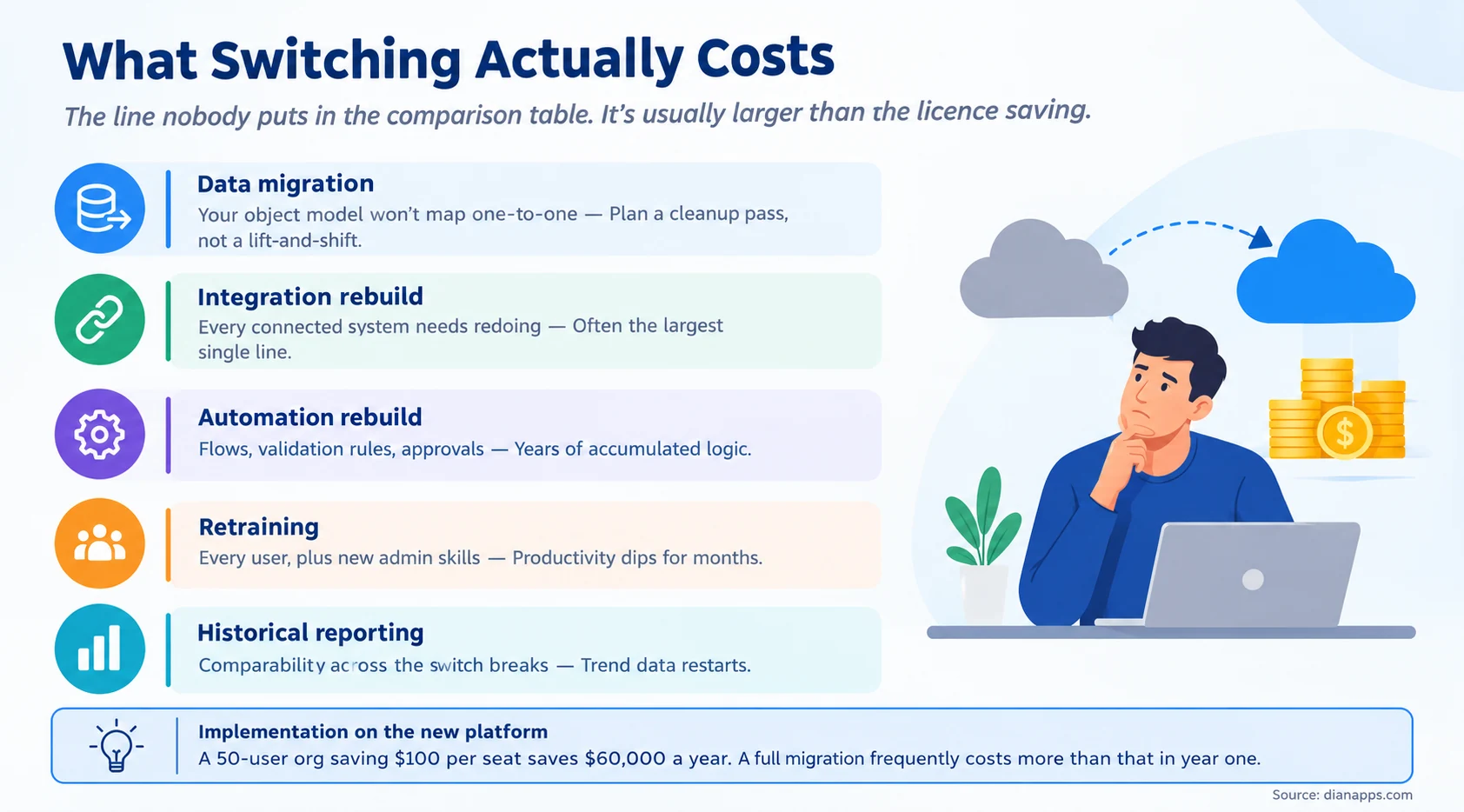
This is the line nobody puts in the comparison table, and it’s usually larger than the licence saving.
Your data model won’t map one-to-one. Every migration needs a cleanup pass rather than a straight lift-and-shift, because the new platform’s object model is different. That’s a project, not an export.
Every integration gets rebuilt. Whatever connects to Salesforce today- marketing, finance, support, your website- needs redoing against a new API.
Years of automation go with it. Flows, validation rules, approval processes, assignment logic. Some of it nobody documented, so you have to rediscover the requirements before rebuilding.
And productivity dips. Every user learns a new system, and someone learns to administer it.
The arithmetic worth doing: a 50-user org saving $100 per seat saves $60,000 a year. A full migration frequently costs more than that in year one, before counting the disruption.
That doesn’t mean don’t switch. It means the payback period is longer than the price comparison suggests, and a two-year view is the honest one.
Leave, or Fix What You Have?
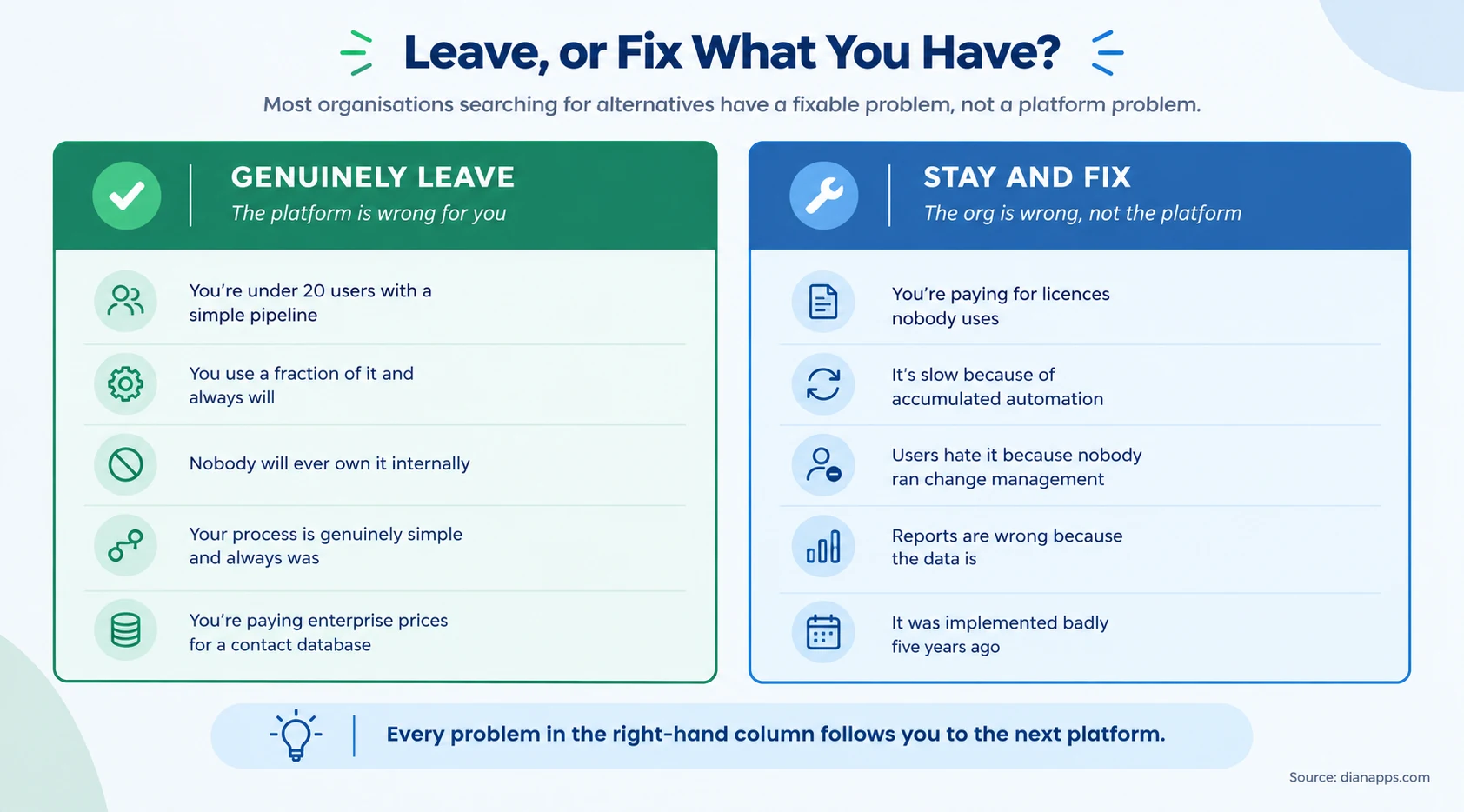
Every problem in the right-hand column follows you to the next platform.
Bad data becomes bad data in HubSpot. Users who weren’t trained on Salesforce won’t be trained on Zoho either. Automation nobody understands gets rebuilt as automation nobody understands.
Three specific things worth checking before you shortlist anything:
Are you paying for licences nobody uses? Industry estimates put shelfware at 20–30% of a typical Salesforce estate. Cutting that is faster and cheaper than migrating. See how to reduce Salesforce licence costs.
Are you on the right licence type? A Platform licence costs roughly a sixth of a full CRM seat for users who never touch Leads or Opportunities. In most organisations, that’s more people than expected.
Is it slow because of the platform or because of your org? Ten years of accumulated automation firing on every save is an org problem with an org solution.
This is also where Salesforce consulting services can be useful, because an experienced review can separate genuine platform limitations from configuration, automation, licensing, and implementation issues before you commit to a migration.
The same distinction applies when people blame Salesforce but the real problem is choosing or configuring the wrong cloud for the business process. Comparing Salesforce clouds can help determine whether the platform itself is the problem or whether the existing setup simply isn’t aligned with the organisation’s requirements.
And the genuine reasons to leave, which are real: you’re under twenty users with a simple pipeline, you use a fraction of the platform and always will, or nobody is ever going to own it internally. Those aren’t fixable, and paying enterprise prices for a contact database is a bad trade.
Not Sure Whether to Stay or Switch?
Let’s assess your Salesforce costs, usage, and org setup before you commit to a migration.
Best Alternative by Scenario
| If you are… | Look at | Why |
|---|---|---|
| Under 10 people, simple pipeline | Pipedrive or HubSpot Free | Salesforce is genuine overkill |
| Cost-driven, need real features | Zoho CRM | Best capability per pound by a distance |
| Marketing-led | HubSpot | Strongest unified marketing and sales |
| Deep in Microsoft | Dynamics 365 | Estate integration, not simplicity |
| High-volume calling | Close | Purpose-built for that workflow |
| Already on Monday for projects | Monday CRM | Only if you’re already there |
| Data sovereignty required | SuiteCRM or Odoo | With engineering capacity budgeted |
| Complex process, no CRM fit | Custom build | A different question entirely |
If You Do Switch
- Audit before you migrate: Move what you use, not everything you have. A migration is the one moment you can legitimately leave the clutter behind, and most organisations waste it.
- Map the object model first: Not during. The mismatch between your Salesforce structure and the new platform’s is where migrations overrun.
- Budget implementation on the new platform properly: It isn’t free anywhere, and underbudgeting it is how organisations end up disappointed with the cheaper tool too.
Keep a read-only Salesforce org temporarily if your contract allows, so historical data remains accessible while people adjust. Plan for a productivity dip of a few months, and staff for it.
And be honest about why you’re leaving. If the answer is “the implementation was poor”, the risk is repeating it.
Before You Switch, Let’s Look at Your Salesforce Org
Compare the real cost of fixing Salesforce with the cost and disruption of moving elsewhere.
Where to Go Next
For head-to-head detail, Salesforce vs HubSpot · vs Zoho · vs Dynamics 365 · vs Pipedrive and Monday · Salesforce vs custom CRM
For fixing rather than leaving, how to reduce Salesforce licence costs and compare Salesforce editions.
For understanding what you’re paying for, Salesforce pricing 2026 and Salesforce ROI.
For whether you’ve genuinely outgrown your current CRM, 10 signs you’ve outgrown your CRM.
For the market context, CRM market share 2026 and CRM statistics.
For smaller organisations specifically, Salesforce for startups and SMBs and Pro Suite explained.
We’d Rather Tell You to Leave Than Sell You a Rescue
We implement Salesforce, so the commercially obvious move is to argue you should stay.
But a rescue project on a platform that genuinely doesn’t fit fails, and a failed project is worse for us than a client we didn’t take. If you’re twelve people with a simple pipeline paying $175 a seat, the honest advice is Pipedrive, and we’ll say so.
Where we’re genuinely useful is the other case: organisations whose Salesforce is expensive and frustrating because of how it was implemented rather than what it is.
Find Out What Your Salesforce Org Really Needs
We’ll help you identify whether the right move is optimisation, cost reduction, or a different CRM.
 0 comments










Your email address will not be published. Required fields are marked *