















 0 comments





Key Takeaways:
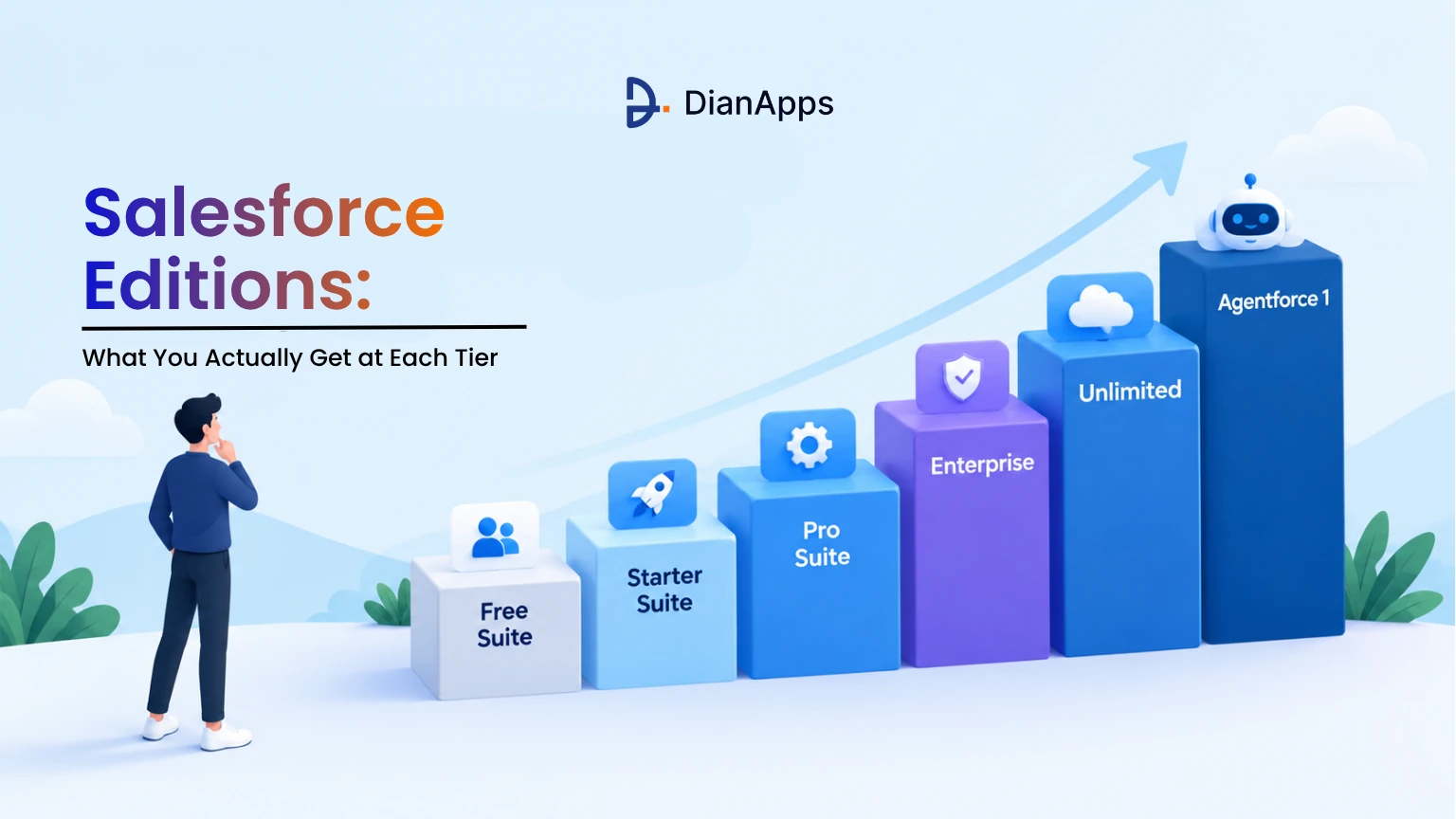
- Six Salesforce editions now range from Free Suite to Agentforce 1.
- Enterprise is the key tier for API access and deeper customization.
- Unlimited mainly adds scale, sandboxes, and support.
- Some limits cannot be fixed by upgrading your edition.
- Identify the exact limit before paying for a higher tier.
Quick Answer: Salesforce editions differ mainly in limits, customization, API access, sandboxes, and support. Starter and Pro Suite suit smaller, simpler teams, Enterprise adds broader customization and API access, while Unlimited and Agentforce 1 are built for greater scale and advanced capabilities. Before upgrading, identify the exact limit causing the problem because some constraints require an add-on, configuration change, or technical fix rather than a higher edition.
Most edition comparisons list features. The decision is almost always driven by a limit. Nobody upgrades from Pro Suite to Enterprise because they read a feature matrix. They upgrade because an integration failed with REQUEST_LIMIT_EXCEEDED, or because API access turned out to be an add-on, or because they needed record types to run two different sales processes. If you’re still getting familiar with how the platform itself is structured, understanding what Salesforce is makes the differences between these editions easier to put into context.
And the most expensive mistake in this decision is upgrading to fix a limit the edition doesn’t control. Governor limits are identical on every edition. So is the 3,000 custom object cap. Upgrading won’t touch either.
A Note on Names
The ladder changed, and a lot of published comparisons haven’t caught up.
| You may have read | Current name | Status |
|---|---|---|
| Essentials | Starter Suite | Replaced |
| Professional | Pro Suite | Renamed |
| Einstein 1 | Agentforce 1 | Renamed |
| - | Free Suite | New - $0, up to 2 users |
If a comparison article mentions Essentials as current, it predates the change. That’s a quick way to date what you’re reading.
Salesforce’s product naming has changed repeatedly as the platform has expanded, including through acquisitions that brought new technologies and products into its ecosystem. That broader history is useful context when older Salesforce comparisons still use names that no longer exist. You can see the wider timeline in the guide to Salesforce acquisitions.
Related: Salesforce pricing 2026
What Actually Changes Between Editions
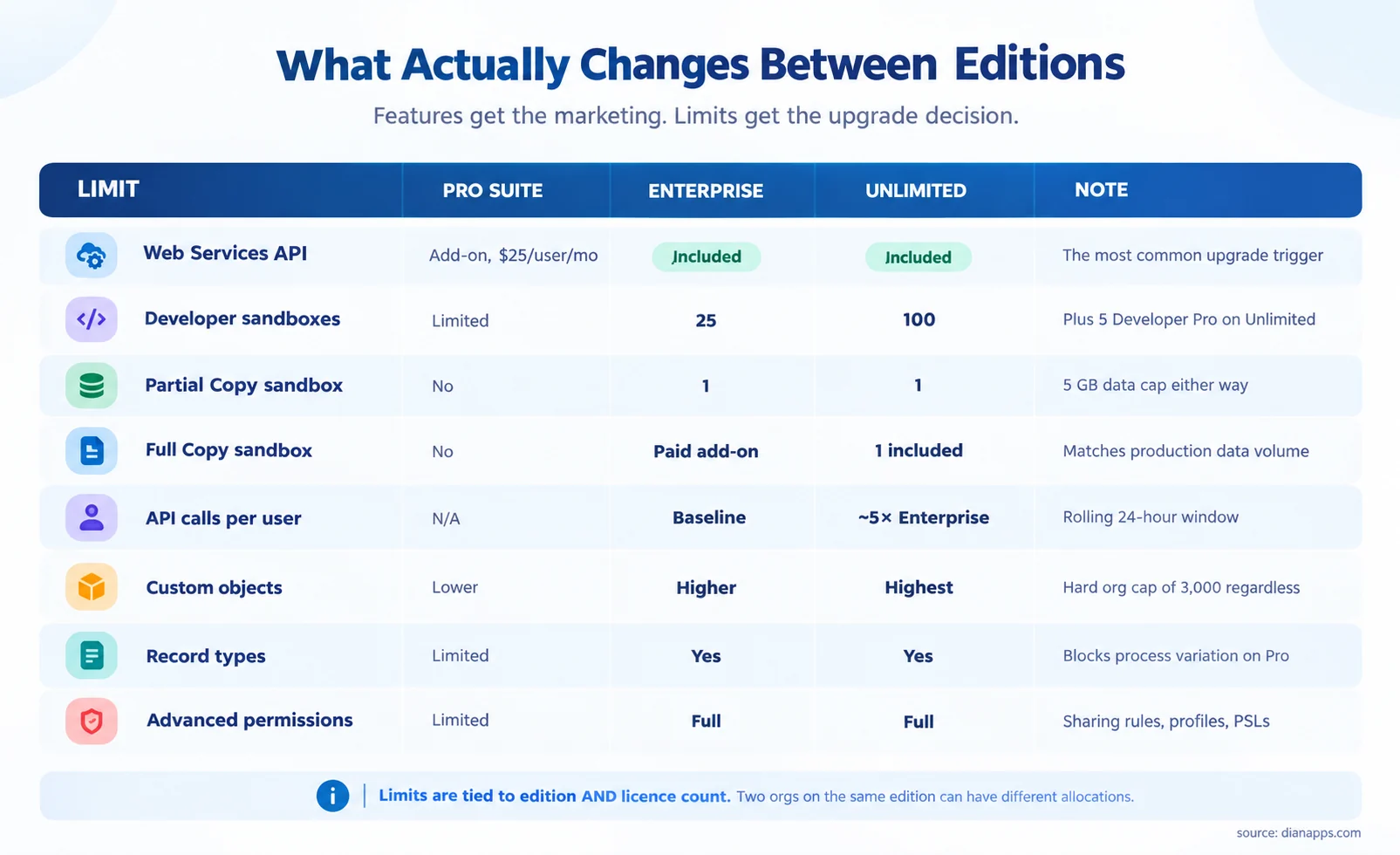
Enterprise is the real dividing line, and API access is why. But the edition is only one part of the Salesforce ecosystem. The platform also includes a wide range of products and clouds, so understanding Salesforce products helps explain why an edition decision can affect more than the core CRM functionality.
On Pro Suite and below, the Web Services API costs $25 per user per month as an add-on. From Enterprise, it’s included. That makes Pro-plus-API roughly $125 against Enterprise at $175, and Enterprise brings record types, full permission control, and considerably more sandbox capacity with it.
If you need integrations, Pro rarely makes sense. That single fact resolves most of the Pro-versus-Enterprise question.
- One Thing The Table Can’t Show: Limits are tied to edition and licence count. Two organisations on Enterprise with different seat counts have different API allocations. Check your own org’s limits in Setup rather than assuming the published figures apply.
Need Salesforce Expertise?
Get expert Salesforce consulting to choose the right edition and avoid unnecessary costs.
Sandboxes by Edition
The difference technical teams care about most.
| Enterprise | Unlimited | |
|---|---|---|
| Developer sandboxes | 25 | 100 |
| Developer Pro | - | 5 |
| Partial Copy | 1 | 1 |
| Full Copy | Paid add-on | 1 included |
Partial Copy caps data storage at 5 GB. Full Copy replicates production data volume, which is what you need for realistic performance testing and complex integration scenarios.
- The Practical Version: If the only reason you’re considering Unlimited is a Full Copy sandbox, price the add-on on Enterprise first. It’s frequently cheaper than upgrading every seat in the org.
Related: Salesforce sandboxes explained
Which Limit Is Forcing the Upgrade?
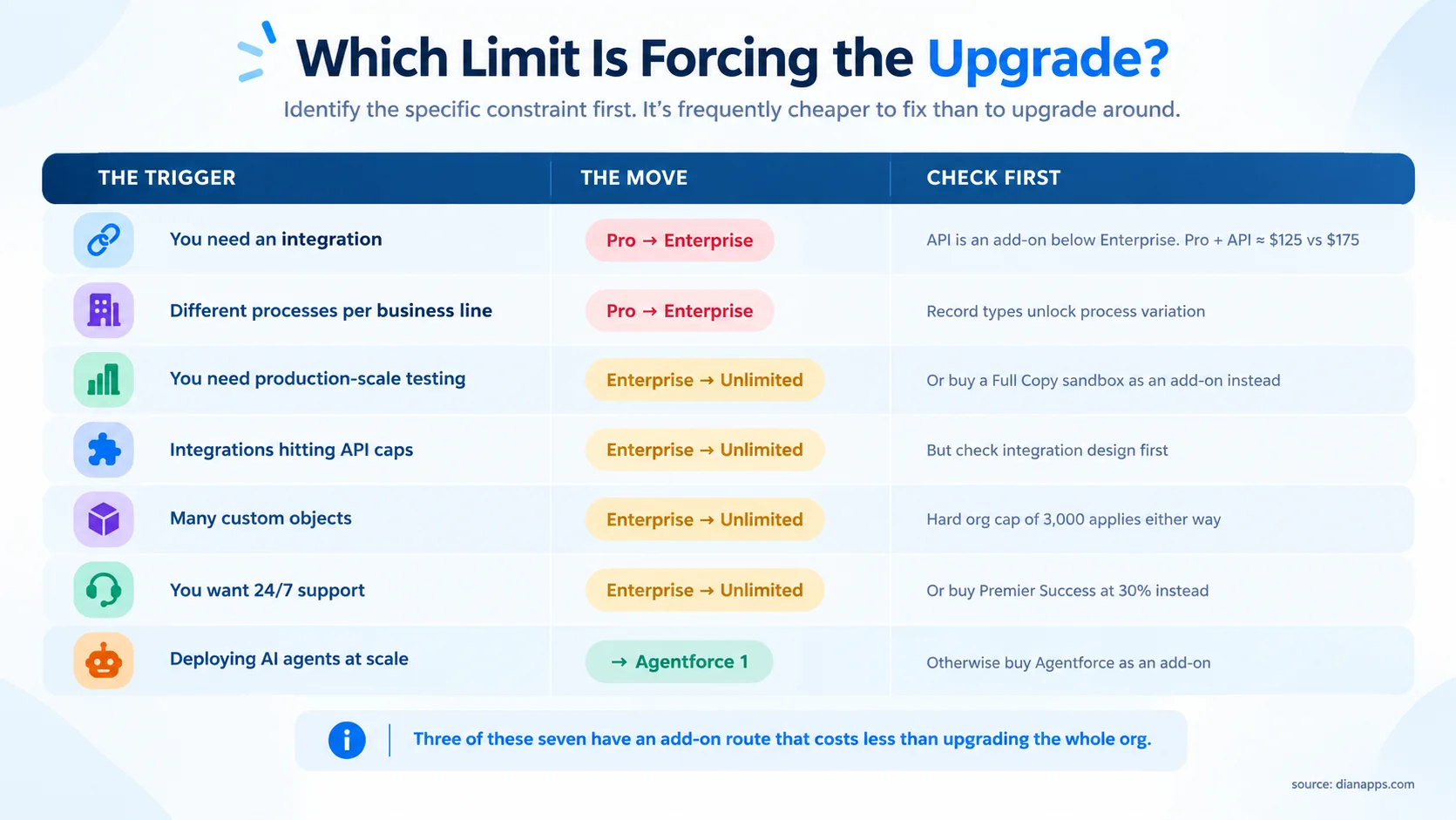
Three of the seven common triggers have an add-on route that costs less than upgrading the whole org:
- Full Copy Sandbox: Buy it as an Enterprise add-on rather than moving to Unlimited.
- 24/7 Support: Premier Success at 30% of licence fees may cost less than an Unlimited upgrade for the whole org, depending on your seat count. Model both.
- AI Agents: Agentforce is available as an add-on below Agentforce 1. If only part of your team needs it, that’s the cheaper path.
The two that genuinely justify moving up a tier are API access (Pro → Enterprise) and record types, because there’s no add-on route for either. This is where Salesforce consulting services can help, particularly when the requirement involves multiple limits, integrations, add-ons, or technical dependencies rather than a straightforward edition upgrade.
Related: how to reduce Salesforce licence costs
About to upgrade an entire org for one feature?
That’s usually more expensive than the add-on route, and sometimes the limit isn’t edition-controlled at all. We’ll identify the actual constraint first.
Limits an Upgrade Won’t Fix
This is the section that saves money.
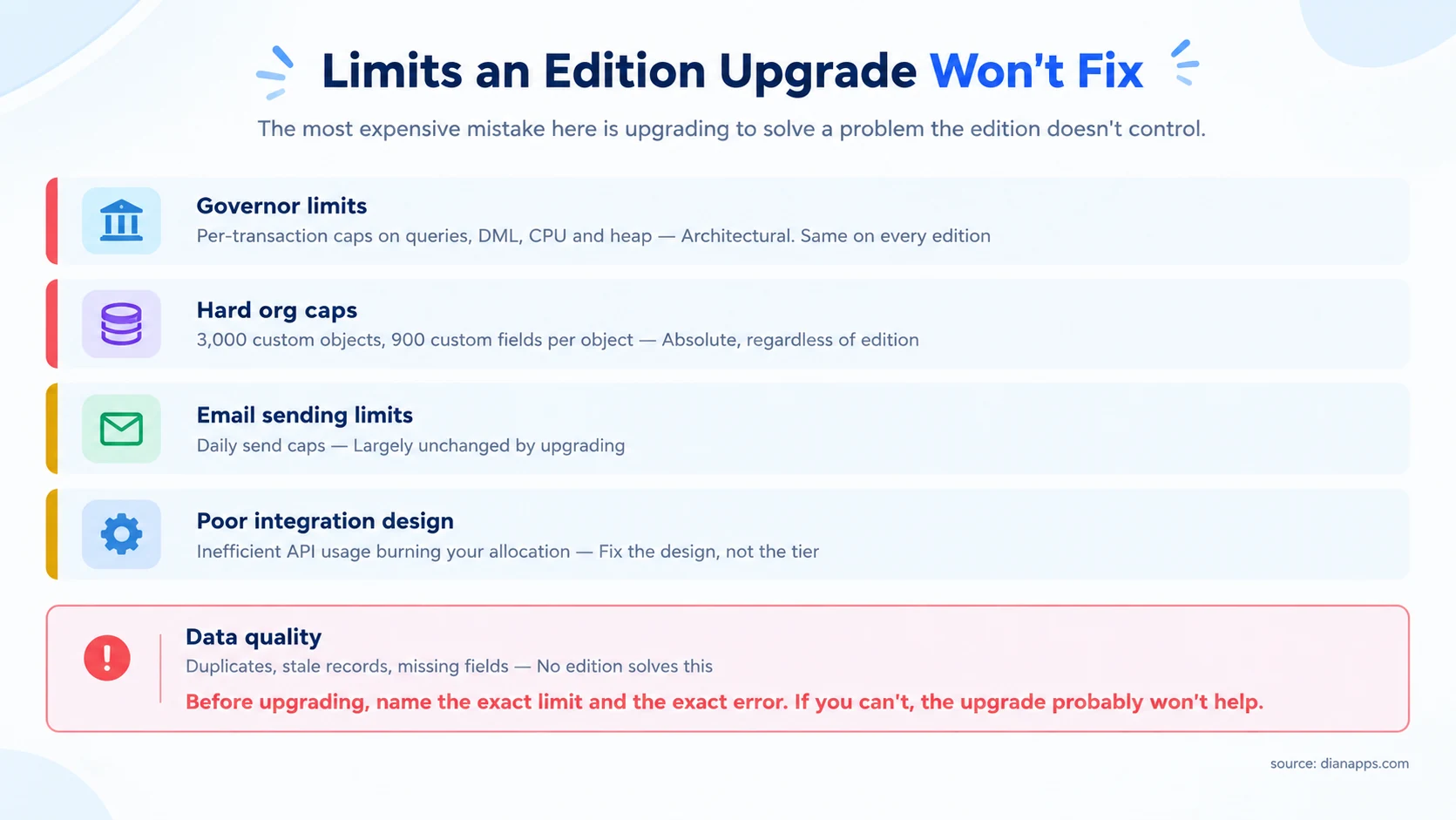
Governor limits are architectural. Per-transaction caps on queries, DML, CPU time, and heap are identical on Enterprise and Unlimited. They come from multi-tenancy, not from your contract. See governor limits.
Hard org caps apply regardless of edition. 3,000 custom objects total across any org, and 900 custom fields per object, including those from AppExchange packages. No edition raises either.
Poor integration design burns API allocation faster than any edition raises it. Before upgrading for API headroom, check whether an integration is polling when it could subscribe, or pulling full records when it needs three fields. That’s frequently a week of work against a permanent licence increase.
And no edition fixes data quality. Duplicates, stale records, and missing fields survive every upgrade.
- The Test: Name the exact limit and the exact error message. If you can’t, the upgrade probably isn’t the answer.
When Each Edition Is Genuinely Right
- Free Suite: Evaluating the interface. Two users, no card, permanent. Not a business tool.
- Starter Suite: Genuinely small teams with a simple pipeline. It’s the only tier with monthly billing, so there’s no annual lock-in. Expect to outgrow it if you’re scaling.
- Pro Suite: A narrow window: you need customisation and record-level control but no integrations at all. If anything needs to talk to Salesforce, price Enterprise instead.
- Enterprise: Where most mid-market organisations land, and correctly. Full customisation, API included, adequate sandbox capacity, record types. The choice can also depend on which Salesforce cloud you actually need, since the capabilities and use cases vary across Sales, Service, Marketing, Commerce, and other clouds. A Salesforce clouds comparison can help clarify that before you commit to an edition.
- Unlimited: Justified by scale rather than features. Many integrations, large user counts, multiple business units sharing one org, or a genuine need for a Full Copy sandbox plus 24/7 support together. That additional scale also brings more administration and architecture considerations. If you’re deciding who should own that complexity internally, understanding the different Salesforce certifications can help you identify the skills required for administration, development, architecture, and implementation.
- Agentforce 1: Deploying agents across the organisation rather than in one team. Below that scale, buy Agentforce as an add-on.
Upgrading and Downgrading
Upgrading is straightforward. New capabilities become available; existing configuration continues working. The commercial conversation is usually harder than the technical one.
Downgrading is not. This catches organisations out badly.
Moving from Enterprise to Pro, or Unlimited to Enterprise, means operating within tighter limits on objects, automation, API access, and sandboxes. Configuration that exceeds the lower edition’s limits has to be removed first, which can mean deleting custom objects, disabling automation, or rebuilding integrations that relied on API access.
Three things to check before agreeing to a downgrade:
Count what you’d exceed. Custom objects, record types, active automations, API consumption.
- Check Contractual Minimums: Some agreements set a floor on seat count or edition that limits what you can reduce.
- Do It At Renewal: Mid-term edition changes are rarely permitted, and renewal is where you have leverage anyway.
Need Salesforce Experts?
Get experienced Salesforce developers to handle your edition and technical requirements.
Contract Traps to Watch
- Edition Mixing: You generally can’t run different editions in one org. If part of your team needs Enterprise features, everyone in that org is on Enterprise, which is a real cost multiplier and the reason Platform licences exist for non-CRM users.
- Add-On Pricing After Upgrade: Negotiate the price of future add-ons at the same time as the edition, not later when you have no leverage.
- Uplift on the higher tier: A percentage increase at renewal costs more on Unlimited than Enterprise. Cap it in writing.
- Sandbox add-ons: A Full Copy sandbox on Enterprise is priced separately and recurs annually. Include it in the comparison when weighing against Unlimited.
Shield and other percentage-based add-ons are calculated on your net licence spend. Upgrading your edition automatically increases your Shield bill with no separate decision. See Salesforce Shield.
Where to Go Next
For what each edition costs and the hidden lines beyond it, Salesforce pricing 2026.
For reducing spend without downgrading, how to reduce Salesforce licence costs: the Platform licence is usually the bigger lever.
For the limits that editions don’t control, governor limits and how Salesforce works.
For the sandbox question, Salesforce sandboxes explained.
For percentage-based add-ons affected by your edition, Salesforce Shield.
For what you’re licensing, Salesforce clouds compared and every Salesforce product.
For whether Salesforce fits at all, Salesforce for startups and SMBs and Salesforce alternatives.
Name the Limit Before You Name the Edition
Salesforce sells editions. Account executives are structurally inclined to answer “we’re hitting a limit” with “move up a tier”, and sometimes that’s right.
Often it isn’t because the limit is architectural, or because an add-on covers it, or because the real problem is an integration polling every ninety seconds when it could subscribe to events instead.
Hitting a limit and unsure whether the edition is the answer?
Tell us the error message. We’ll tell you whether it’s edition-controlled, fixable in configuration, or architectural before you commit to a bigger contract.
 0 comments










Leave a Comment
Your email address will not be published. Required fields are marked *