















 0 comments





Key Takeaways :
- Salesforce Platform is the current name for what was previously Force.com and Lightning Platform, so older documentation may refer to the same product under different names.
- Platform Starter and Platform Plus provide Salesforce capabilities without requiring full Sales or Service Cloud licences, making them useful for internal applications that do not need core CRM objects.
- The custom object limit is contractual rather than technical, so exceeding the Platform Starter allocation through permissions can create a licensing issue even when the platform technically allows it.
- The Salesforce Platform trades some flexibility for built-in security, APIs, automation, mobile, reporting, and governance, while Heroku or another platform may make more sense for compute-heavy or high-traffic applications.
Quick Answer: Force.com → Lightning Platform → Salesforce Platform. Same product. Platform Starter costs around $25 per user per month with a limit of 10 custom objects; Platform Plus around $100 with 110. A full Sales or Service Cloud licence is $150–180. For internal users who never touch Leads, Opportunities or Cases, that gap is the whole point, and the custom object limit is contractual, not technical, which catches people out.
If you’ve been confused about what “Lightning Platform” means, the answer is that Salesforce has renamed it twice and the names overlap with two unrelated products.
Underneath the branding, it’s a straightforward idea: the platform beneath the CRM apps. The data model, security, automation, APIs, and UI framework that Sales Cloud and Service Cloud are themselves built on, which you can use to build applications that have nothing to do with CRM.
And there’s a licence for exactly that, at roughly a sixth of the price of a full CRM seat.
Same Product, Three Names
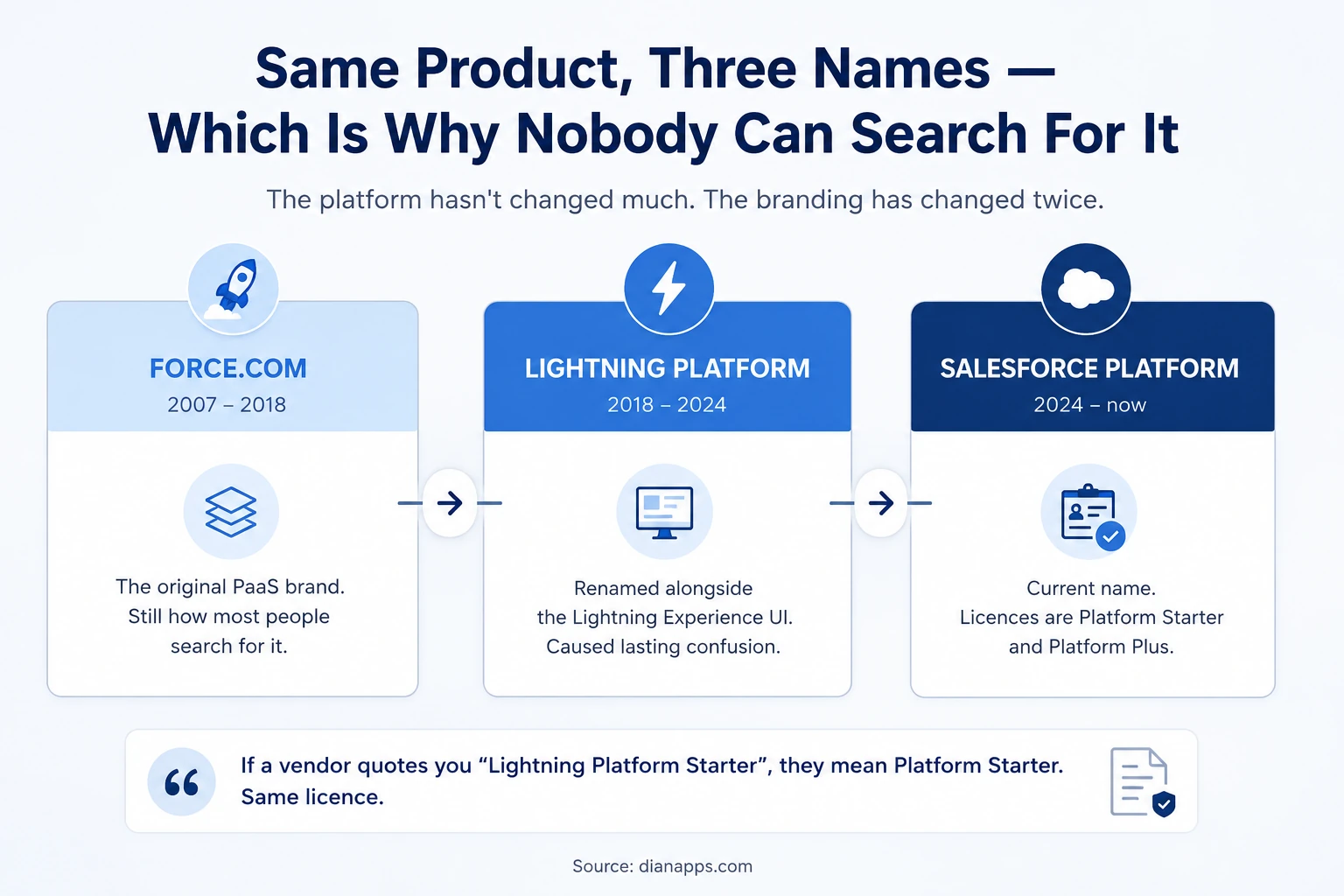
- Force.com: Was the original brand, and it’s still how most people search for it.
- Lightning Platform: Arrived alongside the Lightning Experience UI rebrand, which is where the confusion started, because it made a platform sound like an interface.
- Salesforce Platform: Is the current name. The licences are now Platform Starter (formerly Lightning Platform) and Platform Plus (formerly Lightning Platform Plus).
If a vendor quotes you “Lightning Platform Starter,” they mean Platform Starter. Same licence, older name. Plenty of documentation, blog posts, and even sales collateral still use the previous names.
Three Different “Lightning” Things
Worth separating before going further, because these get used interchangeably and they’re unrelated:
- Lightning Platform: The platform. Data model, security, APIs, automation. What this article is about.
- Lightning Experience: The user interface that replaced Salesforce Classic. See Lightning Experience vs Classic.
- Lightning Web Components: The framework developers use to build custom UI. See the LWC guide.
You can use the Platform without writing a single Lightning Web Component, and you can run Lightning Experience without caring about the platform beneath it.
Lightning Experience is the user interface that replaced Salesforce Classic. For a deeper comparison of the two interfaces, see Salesforce Lightning vs Classic.
What You Actually Get
The platform is what remains when you strip out Sales Cloud and Service Cloud’s specific objects and features:
- A Data Model: Custom objects, fields, relationships, record types, validation rules. See the Salesforce data model.
- A Security Model. Profiles, permission sets, sharing rules, field-level security, and record-level access – all of it enforced by the runtime rather than by your code.
- Automation: Flow, approval processes, and Apex when you need it. See Salesforce Flow and the Apex guide.
- APIs: REST, SOAP, Bulk, Streaming, Pub/Sub – the same ones the CRM apps use.
- A UI Framework: Lightning App Builder for declarative pages, Lightning Web Components for custom ones.
And the Parts Nobody Builds Themselves If They Can Help It: Authentication and SSO, audit trail, a mobile app, reporting and dashboards, a sandbox model, and a release process. Inheriting these is the actual argument for building on the platform.
The platform provides a structured Salesforce data model covering custom objects, fields, relationships, record types, and validation rules, giving custom applications the foundation they need without building a database layer from scratch.
Platform Licences and Real Cost
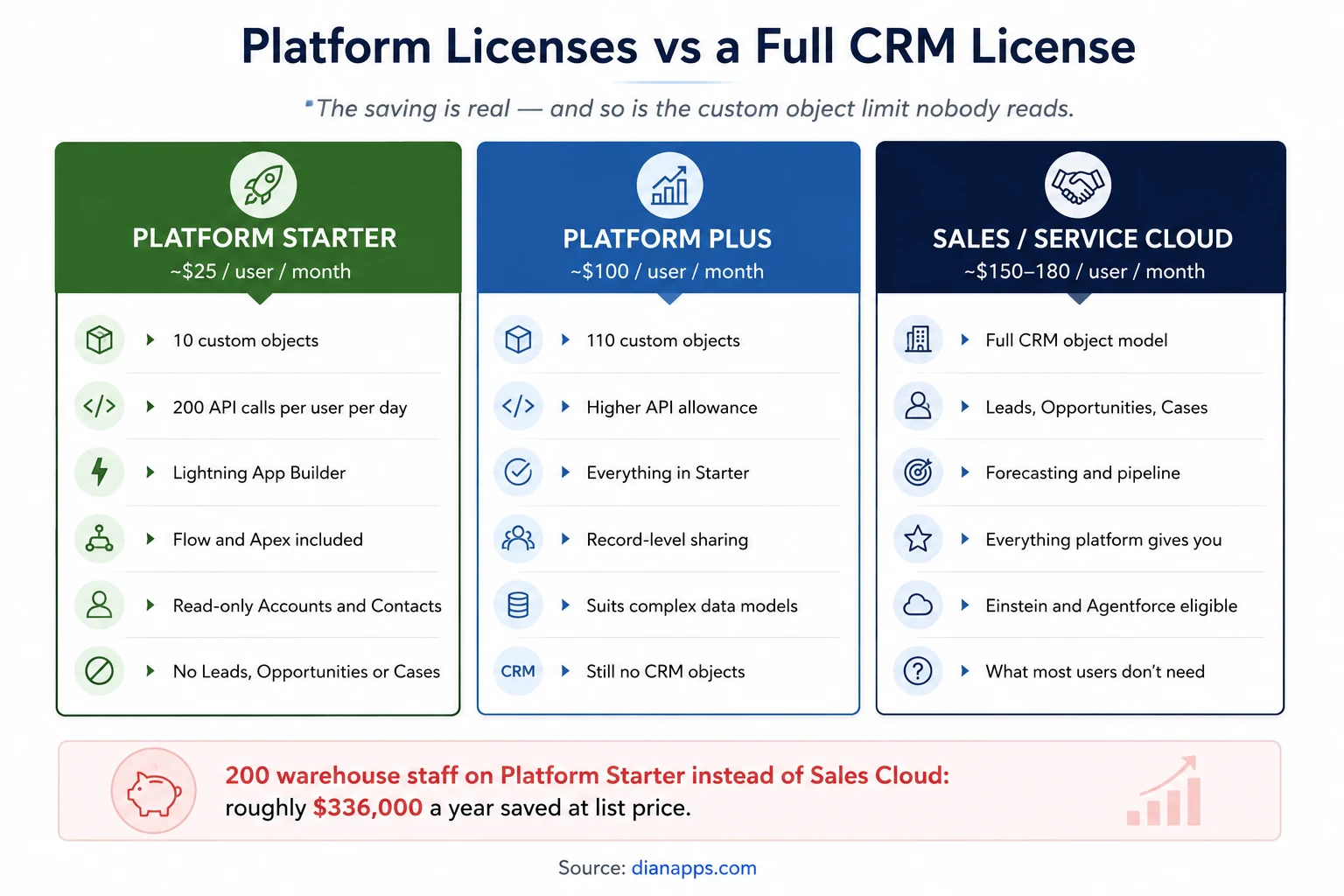
- Platform Starter: Gives access to 10 custom objects, 200 API calls per user per day, Lightning App Builder, AppExchange, Flow and Apex, plus read-only access to Accounts and Contacts. No Leads, Opportunities, Cases, or Campaigns.
- Platform Plus: Raises the custom object limit to 110 and adds record-level sharing – the right choice for genuinely complex data models.
- The Saving Is Substantial At Scale: Two hundred warehouse or operations staff on Platform Starter rather than Sales Cloud saves roughly $336,000 a year at list price. That’s the case people miss: they buy full CRM licences for users who will never open an Opportunity.
The custom object limit catches people out
It’s a Contractual Limit, Not a Technical One: Nothing in the software stops you from assigning a Platform Starter user access to more than 10 custom objects through permission sets. But doing so breaches your agreement, and Salesforce can charge for past usage upon discovering it.
This surfaces during licence audits, usually years after someone made a reasonable-looking configuration change. Track custom object assignment against licence type deliberately rather than discovering it retrospectively.
Related: how to reduce Salesforce licence costs
Build More With the Salesforce Platform
Get expert help assessing your platform requirements, designing custom applications and choosing the right Salesforce architecture for your team.
What People Build on It
Applications with no CRM component at all:
- Internal operations tools, asset tracking, facilities requests, equipment bookings
- Compliance and audit systems where the built-in audit trail and sharing model do the heavy lifting
- Field inspection apps that use the mobile app rather than requiring a custom build
- Grant and application management for public sector and nonprofit
- Employee-facing portals for HR requests, IT tickets, and onboarding can also benefit from custom interfaces when the standard components aren’t enough. Lightning Web Components provide the framework for those custom experiences, with the LWC guide covering the development approach in more detail.
- Vendor and supplier management where suppliers aren’t customers
These are the kinds of applications where Salesforce Development Services can help teams turn the platform’s built-in data, security, automation and mobile capabilities into purpose-built business applications.
The Pattern: Anything needing a data model, a security model, workflow, reporting, and mobile access – where building all of that from scratch would cost more than the licences.
Platform, Heroku or Somewhere Else?
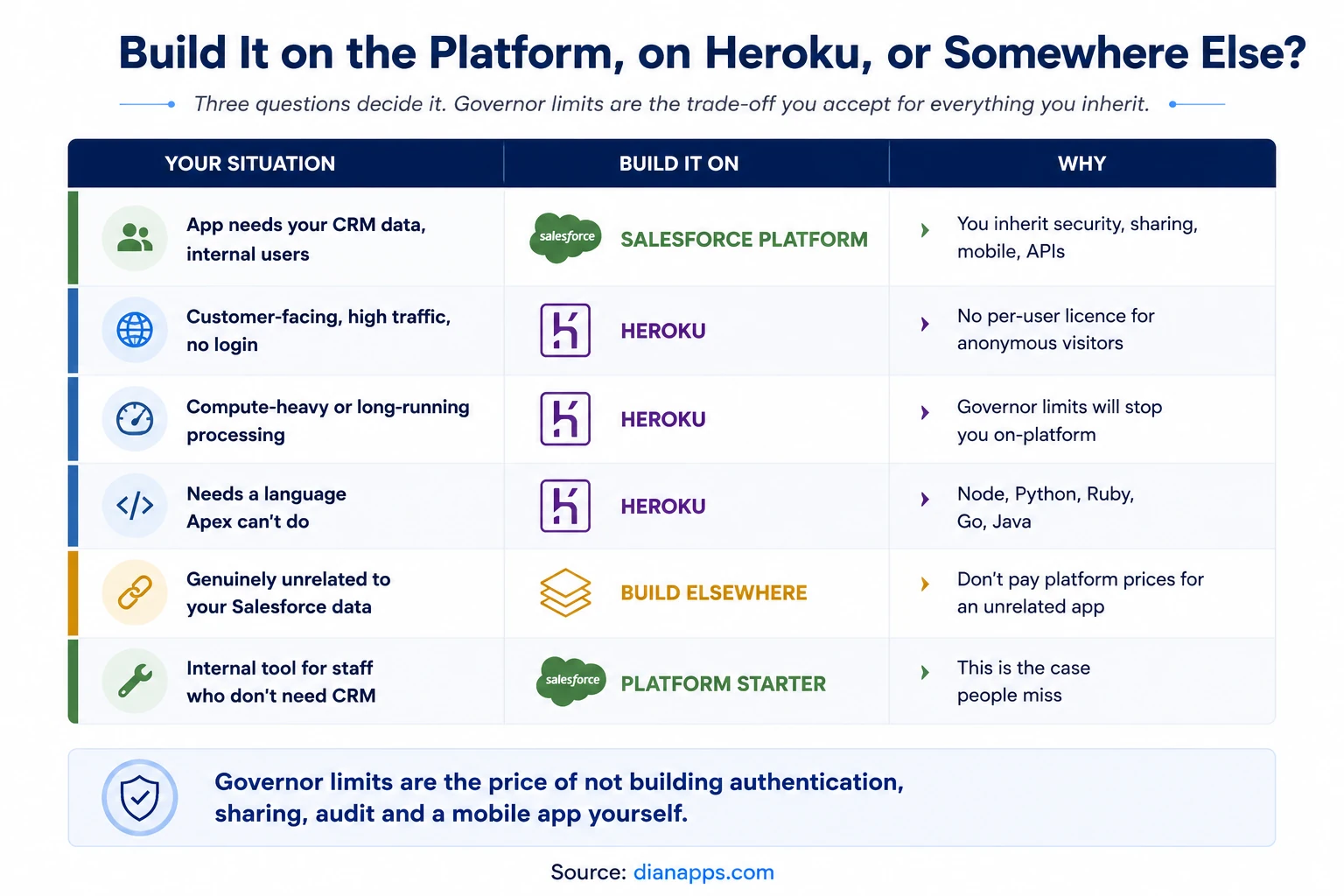
Governor limits are the trade-off. You accept per-transaction caps on queries, DML, CPU time, and heap in exchange for not building authentication, sharing, audit, and a mobile app yourself. For most internal business applications, that’s an obvious trade. For compute-heavy or high-traffic public-facing work, it isn’t.
Heroku is the Salesforce-owned escape hatch – a full PaaS with no governor limits, any language, and no per-user licence for anonymous visitors. It integrates back to Salesforce through Heroku Connect and AppLink. See Heroku for Salesforce.
And sometimes the answer is neither. If an application has genuinely nothing to do with your Salesforce data, paying platform licence prices for it is hard to justify.
Need Developers for Your Salesforce Platform?
Bring experienced Salesforce developers into your team to build custom applications, integrations, automation, and scalable platform solutions.
Related: governor limits · custom Salesforce development
Where to Go Next
For the interface that runs on top of it, see Lightning Experience vs Classic.
For building custom UI, Lightning Web Components and the Apex programming guide.
For the constraints you accept in exchange for the platform, see governor limits.
For the escape hatch, Heroku for Salesforce.
For licence cost more broadly, how to reduce Salesforce costs and Salesforce customization cost.
The complete Salesforce development guide is the hub.
Worth Checking Before Your Next Renewal
Most orgs we audit are paying full CRM licence prices for at least some users who never open a Lead, an Opportunity, or a Case.
That’s usually not carelessness – it’s that nobody has revisited licence allocation since the original implementation, and the Platform licence option isn’t obvious unless someone points at it.
We’re a certified Salesforce Consulting Partner, and licence right-sizing alongside a build assessment is routine work for our team. It frequently pays for the engagement.
Not Sure Which Salesforce Platform Option Fits?
Tell us about your users, applications, and licensing needs, and our Salesforce experts can help identify the right approach.
 0 comments










Leave a Comment
Your email address will not be published. Required fields are marked *