















 0 comments





Key Takeaways:
- Salesforce Pro Suite costs $100 per user per month and sits between Starter Suite and Enterprise.
- It adds custom objects, process automation, quoting, forecasting, omnichannel routing, and AppExchange access.
- Pro Suite fits growing teams that need more than a basic CRM but can operate without complex integrations.
- API requirements, record types, and advanced processes can quickly make Enterprise the more practical option.
- The right choice depends on your current requirements and whether your Salesforce roadmap is likely to outgrow Pro Suite.
Quick Answer: Salesforce Pro Suite costs $100 per user per month and sits between Starter Suite and Enterprise. It makes sense for growing teams that need custom objects, automation, quoting, and forecasting but can operate Salesforce without integrations. If integrations, record types, or more advanced requirements are on the roadmap, Enterprise may make more sense.
Pro Suite is Salesforce’s answer to a real problem, as Starter Suite is too limited for a growing business and Enterprise is a bigger commitment than a 20-person company wants to make. If you’re still getting familiar with the platform, our guide on what is Salesforce explains how Salesforce works and where its different editions fit.
At $100 per user per month, it adds custom objects, process automation, quoting, and forecasting to the Starter feature set. For a specific kind of organisation, it’s genuinely the right choice.
But that window is narrower than the marketing suggests, and one question decides it: does anything need to integrate with Salesforce? If yes, the arithmetic points at Enterprise almost immediately.
Where Pro Suite Sits
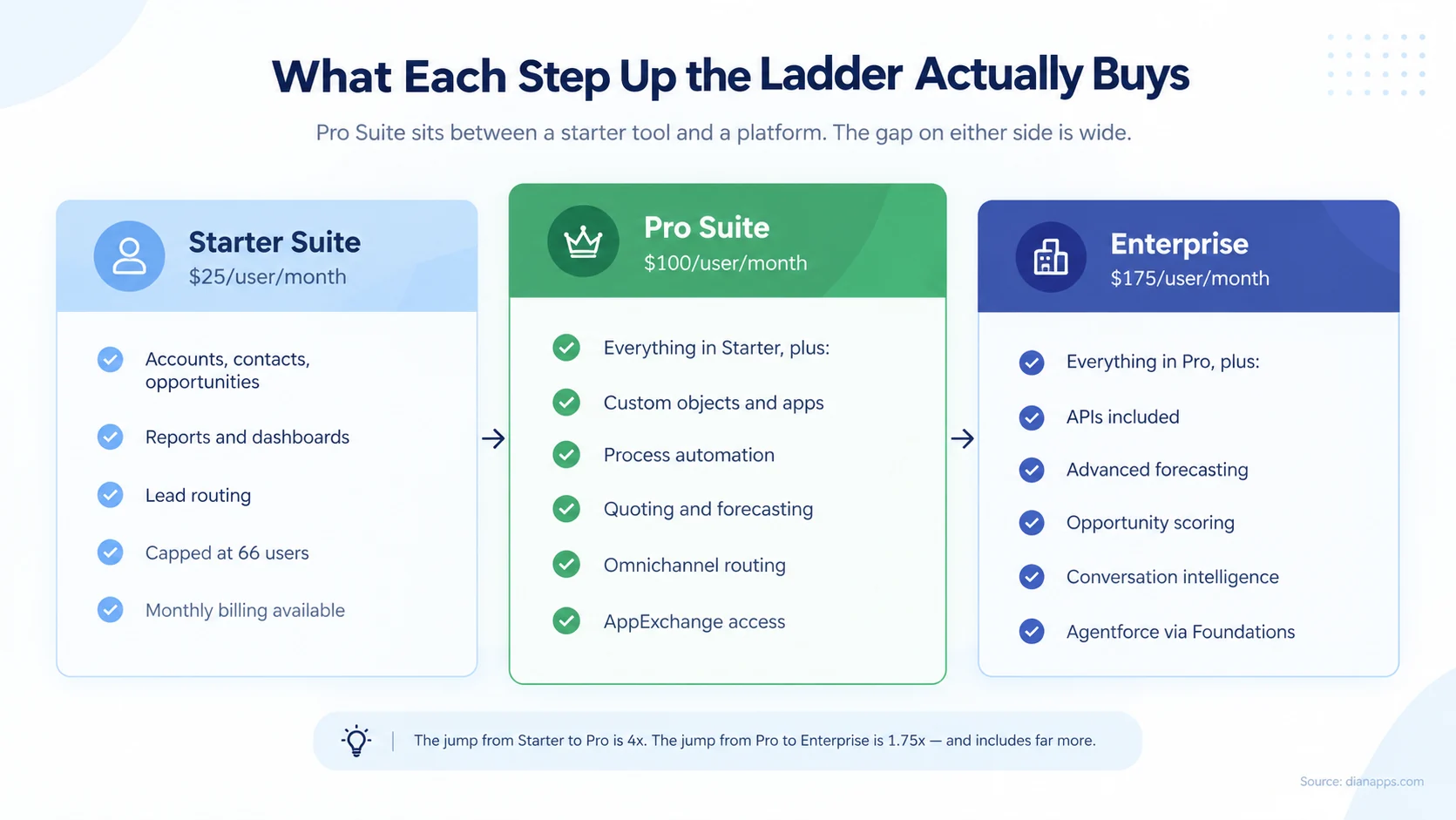
The Starter-to-Pro jump is 4×, which surprises people. It isn’t about seats; it’s about feature gates.
What Pro Suite unlocks over Starter:
- Custom Objects and Apps: Starter gives you Salesforce’s standard objects; Pro lets you model your own business. If you need an Invoice object, a Project object, or anything else specific to how you work, this tier makes it possible.
- Process Automation: Flow-based automation rather than basic rules.
- Quoting and Forecasting: Sales quotes and pipeline forecasting, which Starter lacks.
- Omnichannel Routing: Cases routed across channels rather than a simple queue.
- AppExchange Access: Third-party applications become available.
Worth Knowing About Starter’s Cap: It supports up to 66 users. That’s a specific and unusual number; it replaced a 325-user allowance, which itself replaced Essentials’ 10. If you’re near it, that’s a forcing function on its own.
Related: Salesforce editions compared
The Arithmetic That Decides It
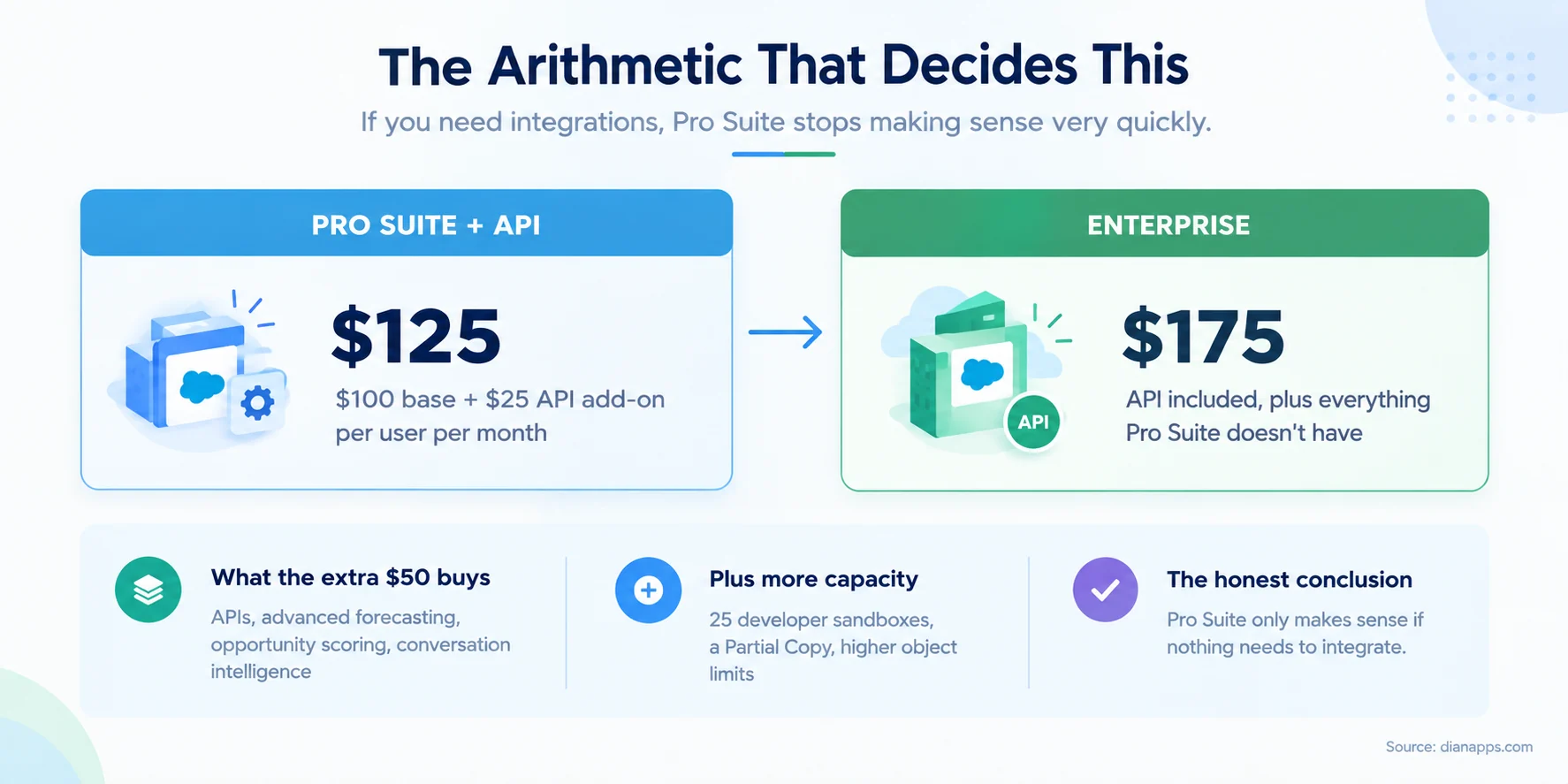
Salesforce lists APIs among the things Enterprise adds over Pro Suite. On Pro and below, API access is understood to be a paid add-on rather than included.
That changes the maths entirely. Pro Suite at $100 plus an API add-on lands around $125 per user per month. Enterprise is $175, and for the extra $50 you also get advanced pipeline management and forecasting, opportunity scoring, conversation intelligence, 25 developer sandboxes, a Partial Copy sandbox, record types, and Agentforce access through the free Salesforce Foundations add-on.
One caveat worth stating is that the sources disagree on whether Pro Suite includes API access. Salesforce’s own Sales pricing page lists APIs as an Enterprise addition, and its SOAP API documentation states the API requires Enterprise, Performance, Unlimited, or Developer Edition. At least one third-party review site claims Pro Suite includes REST and SOAP APIs.
Confirm your entitlement with Salesforce in writing before deciding. If Pro Suite does include API access for your contract, the calculation changes and Pro becomes considerably more attractive.
Is Pro Suite Really the Right Fit?
Compare your requirements, integrations, and roadmap before choosing an edition.
Related: Salesforce pricing 2026
Who Pro Suite Genuinely Fits
A growing team that has outgrown a basic CRM but runs Salesforce as a standalone system.
Concretely, that looks like:
- 10 to 50 users, past the point where a simple tool works
- A business process that needs custom objects, projects, assets, memberships, anything not covered by leads and opportunities
- Quoting and forecasting requirements that Starter can’t meet
- No integrations or none planned in the next eighteen months
- One sales process, not several requiring different page layouts and fields
- No dedicated admin; Pro Suite’s constraints are easier to manage than Enterprise’s flexibility, although Salesforce consulting services can help when the implementation or roadmap becomes more complex.
That last point is underrated; Enterprise gives you enough rope to build something nobody can maintain. For an organisation without an owner for the system, Pro Suite’s narrower scope is a feature rather than a limitation.
Six Signs You’ll Outgrow It
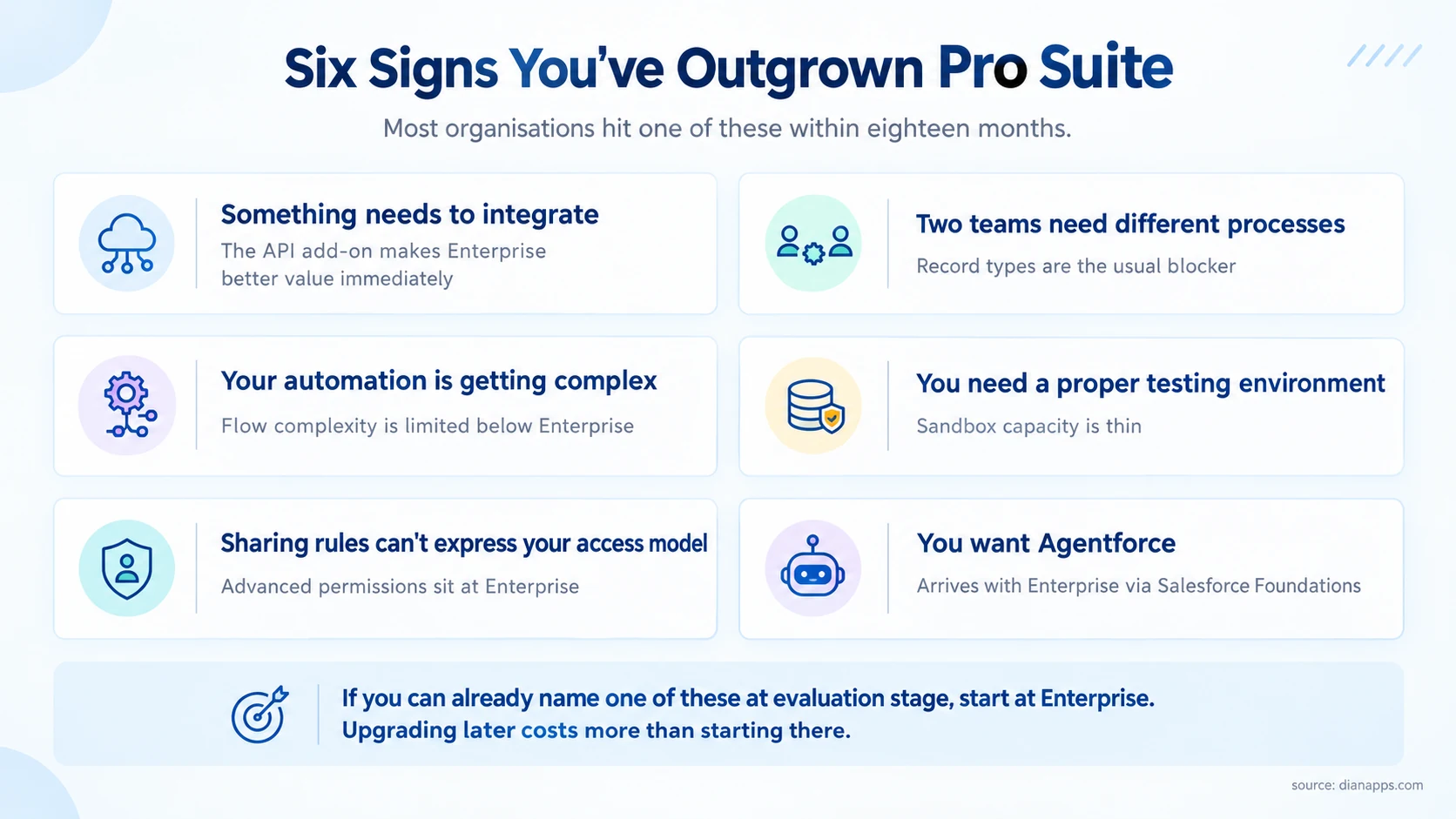
Most organisations hit one of these within eighteen months.
The integration one is decisive, and it arrives early. A marketing platform, an accounting system, a customer portal- any of these makes Enterprise better value immediately.
Record types are the second most common blocker. The moment two teams need different fields, page layouts, or sales processes on the same object, you need record types, and there’s no add-on route.
If you can already name one of these at the evaluation stage, start at Enterprise. Upgrading mid-contract is possible, but you’ll have paid for Pro Suite in the meantime, and you’ll negotiate the upgrade without renewal leverage.
Planning Beyond Pro Suite?
Build a Salesforce roadmap that accounts for your future requirements.
Related: Salesforce for startups and SMBs
Pro Suite vs the Alternatives
| Pro Suite | HubSpot Sales Pro | Zoho CRM Professional | |
|---|---|---|---|
| Price | ~$100/user/month | ~$100/user/month | ~$23/user/month |
| Custom objects | Yes | Limited | Yes |
| Ecosystem | AppExchange | Marketplace | Marketplace |
| Upgrade path | Into a full platform | Into HubSpot’s tiers | Into Zoho’s tiers |
| Best for | Growing into Salesforce | Marketing-led teams | Cost-sensitive teams |
The genuine argument for Pro Suite over cheaper alternatives isn’t features at this price point; it’s the upgrade path. You’re buying into a platform you can grow into rather than one you’ll migrate off.
The genuine argument against is that if you’re never going to need Enterprise, you’re paying a premium for optionality you won’t use. Zoho at a quarter of the price does most of what a 20-person team needs.
Related: Salesforce alternatives compared · Salesforce vs HubSpot
The Upgrade Path
Pro Suite to Enterprise is straightforward technically. Existing configuration continues working; new capabilities become available.
Commercially, timing matters:
- Upgrade At Renewal Rather Than Mid-Term: Mid-contract upgrades happen at whatever price you’re offered; renewal is where you have leverage.
- Negotiate The Upgrade Price When You First Sign: Ask what Enterprise would cost if you move up in year two and get it documented. Without that, you’re negotiating from zero later.
- Watch the Percentage Add-Ons: If you’re carrying anything priced as a percentage of licence spend, upgrading raises those bills automatically.
Need Help Choosing Your Salesforce Edition?
Get expert guidance on Pro Suite, Enterprise, integrations, and your upgrade path.
Related: how to reduce Salesforce licence costs
One Question Usually Settles It
Everything above reduces to this: is anything going to need to talk to Salesforce in the next two years?
If no, Pro Suite is a reasonable choice and you’ll save $900 per user per year against Enterprise.
If yes, or if you’re not sure, the gap closes to about $50 per user once you add API access, and Enterprise brings a great deal more with it.
 0 comments










Leave a Comment
Your email address will not be published. Required fields are marked *