















 0 comments





Key Takeaways:
- Use Flow for straightforward, admin-maintained automation, especially record updates, notifications, routing, and branching.
- Use Apex when Flow reaches its limits, particularly for complex collection processing, advanced callouts, transaction control, and high-volume workloads.
- Before-save Flow is the preferred choice for same-record updates, while complex, high-volume logic generally belongs in Apex.
- The best architecture often combines Flow and Apex, keeping complex, reusable logic in invocable Apex while allowing admins to manage the surrounding business process in Flow.
“Clicks not code” is good advice that gets applied badly.
Taken literally, it produces sprawling Flows doing work Apex should handle. Ignored entirely, it produces triggers doing work an admin could have built in an afternoon and maintained for years afterwards.
The useful version of this question isn’t “which is better”; rather, it’s who maintains this in two years and what Flow genuinely does not do.
This guide answers both and corrects something most comparisons get wrong about the order of execution.
Quick Answer: Use before-save Flow for same-record field updates, it’s roughly 10× faster than the alternative and costs no DML. Use Flow for related records notifications, routing and branching. Use Apex for complex collection processing, callouts with retry logic, transaction control and volumes above 50,000 records. Use both, invocable Apex called from a Flow, when logic is complex but an admin still needs to adjust the process around it.
Where Each Actually Sits in the Order of Execution
Most comparisons say “Flows run before Apex triggers.” That’s only true for before-save flows, and getting it wrong causes real bugs.
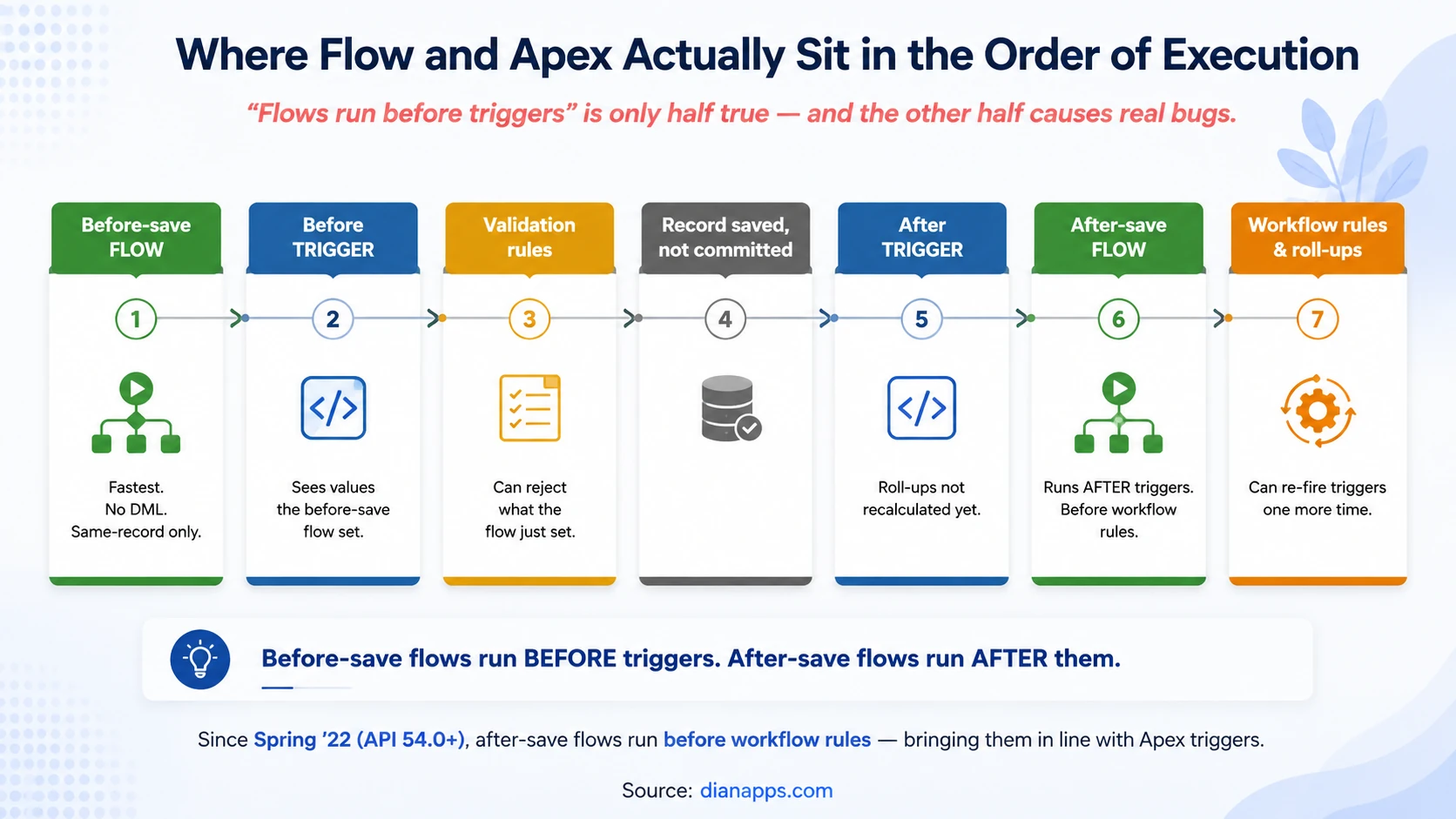
Three Consequences Worth Internalising:
A before-save Flow can set a value your before-trigger then reads; that’s a clean division of labour. Flow handles simple assignments, Apex handles complex logic, provided you document it. Undocumented, it’s the source of “where is this field being set?”
After-save Flows run after after-triggers, and since Spring ’22 (API 54.0 and later) they run before workflow rules. That change brought Flow into line with Apex triggers and stopped workflows from overwriting values Flows had just set.
Roll-up summaries recalculate after after-triggers fire. If your trigger reads a parent’s roll-up field, it sees the pre-update value. Defer the read to a Queueable or Platform Event if you need the recalculated number.
And you can now explicitly control Flow order, set trigger order values from 1 to 1,000, and set the sequence of flows sharing the same trigger and object. They always respect the overall order of execution – you can make one after-save flow run before another but never before a before-save flow or an Apex trigger.
Related: Salesforce Flow guide · Apex programming guide
What Flow Genuinely Cannot Do
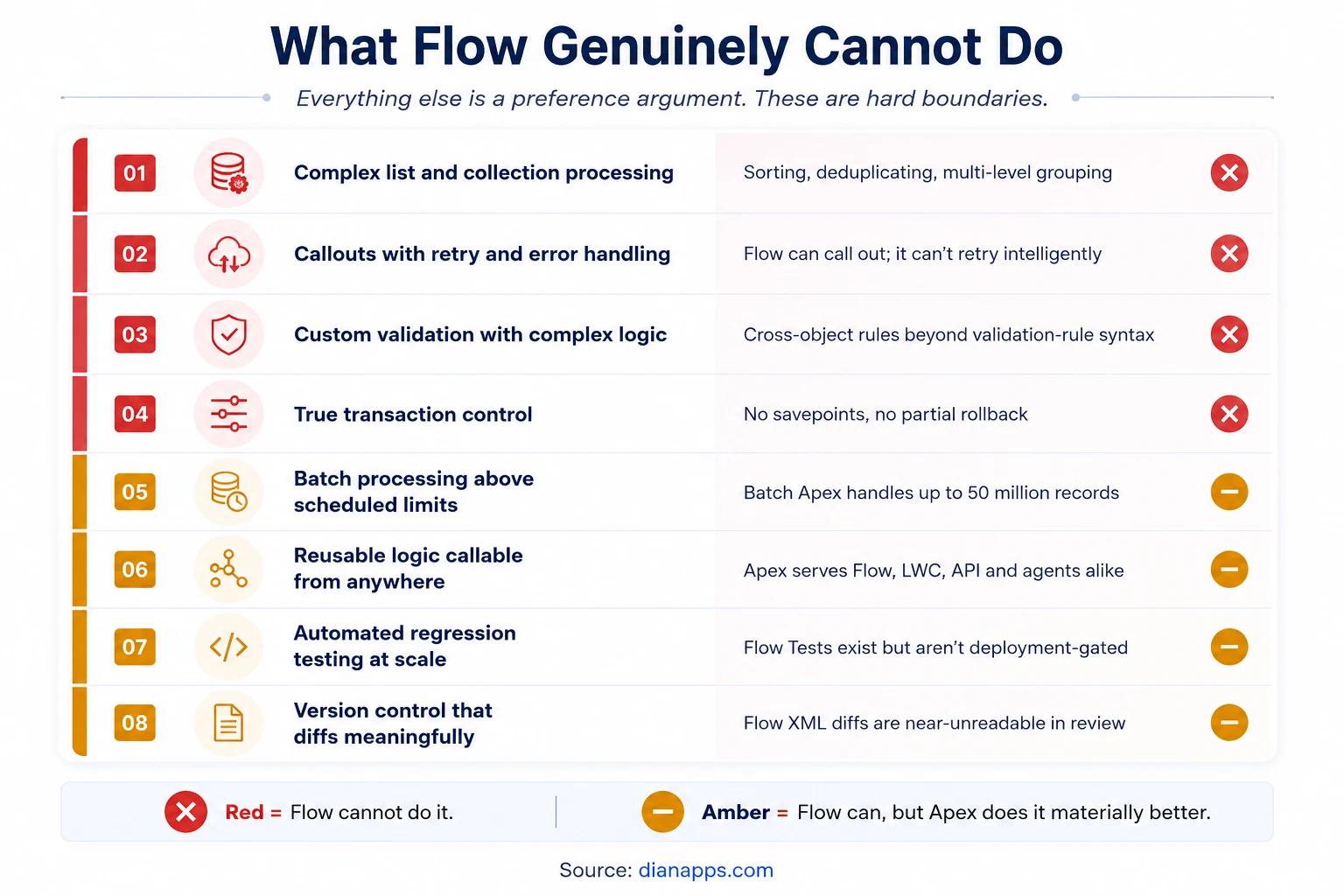
Everything outside this list is a preference argument. These are the hard boundaries.
- Complex Collection Processing: Sorting, deduplicating, multi-level grouping. Flow’s collection tools handle simple filtering well but run out of steam beyond that.
- Callouts With Real Error Handling: Flow can make a callout. It can’t implement exponential backoff, conditional retry, or partial-failure recovery.
- Transaction Control: No savepoints, no partial rollback, no Database.update(records, false) equivalent for allowing good records through while capturing failures.
- Volume Above The Scheduled Flow Ceiling: Batch Apex processes up to 50 million records with limits resetting per chunk. Nothing declarative reaches that.
- Reusable Logic Callable From Anywhere: An invocable Apex method serves Flow, LWC, the API, and Agentforce agent actions from one implementation. Flow logic is reusable only by other Flows.
- Meaningful Version Control: Flow metadata is XML that diffs almost unreadably. Reviewing a Flow change in a pull request means opening the Flow, not reading the diff. See Salesforce DevOps.
Performance: The Numbers That Matter
Before-save vs after-save is the biggest single performance lever in Flow – and it’s a Flow-vs-Flow decision, not Flow vs Apex. A before-save Flow updating fields on the triggering record writes them as part of the same save, consuming no additional DML. The after-save equivalent costs a full extra DML operation, which is why the before-save version is commonly cited as around 10× faster.
Against Apex, the picture is more nuanced than either camp claims:
- For simple field updates, before-save Flow and a before-trigger are close enough that the difference rarely matters.
- For complex logic at volume, Apex wins: no interpretation overhead and full control over how collections are handled.
- For anything with nested iteration, Apex wins clearly. Flow loops are expensive, and a Get Records inside a Flow loop causes the same governor limit failures as SOQL in an Apex loop.
The Trap Nobody Mentions: A Flow that performs well in isolation contributes to a shared transaction budget. Your Flow’s queries, your trigger’s queries, and every other automation on that object draw from the same 100 SOQL and 150 DML allowance. See Salesforce governor limits.
Bulk Behaviour
Record-triggered Flows are bulkified automatically for the records in the trigger batch, a genuine improvement over Process Builder.
But that doesn’t make them bulk-safe. The Get Records or Update Records element inside a Flow loop issues one query or DML per iteration, exactly like SOQL in an Apex loop. It’s the single most common cause of Flow limit failures, and Flow Builder won’t warn you.
The Flow Equivalent of Bulkification: Get all the records you need in one Get element outside the loop, use collection variables, and perform one Update after the loop.
Apex gives you more control here, not better defaults; a badly written trigger fails just as fast – the difference is that a code review can catch it, and static analysis tools like PMD will flag it automatically.
Testing and Governance
This is where the gap is widest, and it’s rarely discussed honestly.
| Flow | Apex | |
|---|---|---|
| Testing required to deploy | No | Yes - 75% coverage |
| Automated test tooling | Flow Tests | Apex test framework |
| Static analysis | Lightning Flow Scanner | PMD / Apex Code Analyzer |
| Code review | Open the Flow to review it | Readable diff in the PR |
| Can be built directly in production | Yes | No |
| Who typically owns it | Admin | Developer |
“You can build a Flow directly in production” is the governance problem in one line. Nothing prevents it, plenty of orgs do it, and it’s how automation appears that nobody reviewed, tested, or documented.
Flow Tests exist and let you save and re-run test configurations against record-triggered Flows. They’re genuinely useful, and almost nobody uses them, precisely because nothing forces the issue.
If You Take One Governance Action: Require Flows to move through source control and a sandbox like Apex does, and run Lightning Flow Scanner in your pipeline. It catches DML in loops, missing fault paths, hardcoded IDs, and unsafe run contexts.
The Hybrid: Invocable Apex
The best answer is often both.
|
1 2 3 4 5 6 7 8 |
public class DiscountCalculator { @InvocableMethod(label='Calculate Tiered Discount' description='Applies volume-based discount rules') public static List<Decimal> calculate(List<Id> opportunityIds) { // complex logic lives here, in code, tested return new List<Decimal>(); } } |
That method now appears as an action in Flow Builder. An admin builds and adjusts the process around it; a developer owns the complex calculation inside it.
- This is the pattern that resolves most Flow-vs.-Apex arguments: The logic that needs testing and precision lives in Apex. The process that changes as the business changes lives in Flow, where the person who understands the business can maintain it.
- It Also Future-Proofs the Logic: The same invocable method is callable from Agentforce agent actions and from Lightning Web Components without rewriting anything.
Bring Clarity to Your Salesforce Automation
Get expert help mapping complex Flows and Apex, consolidating overlapping automation, and designing a cleaner architecture that scales.
The Decision Matrix
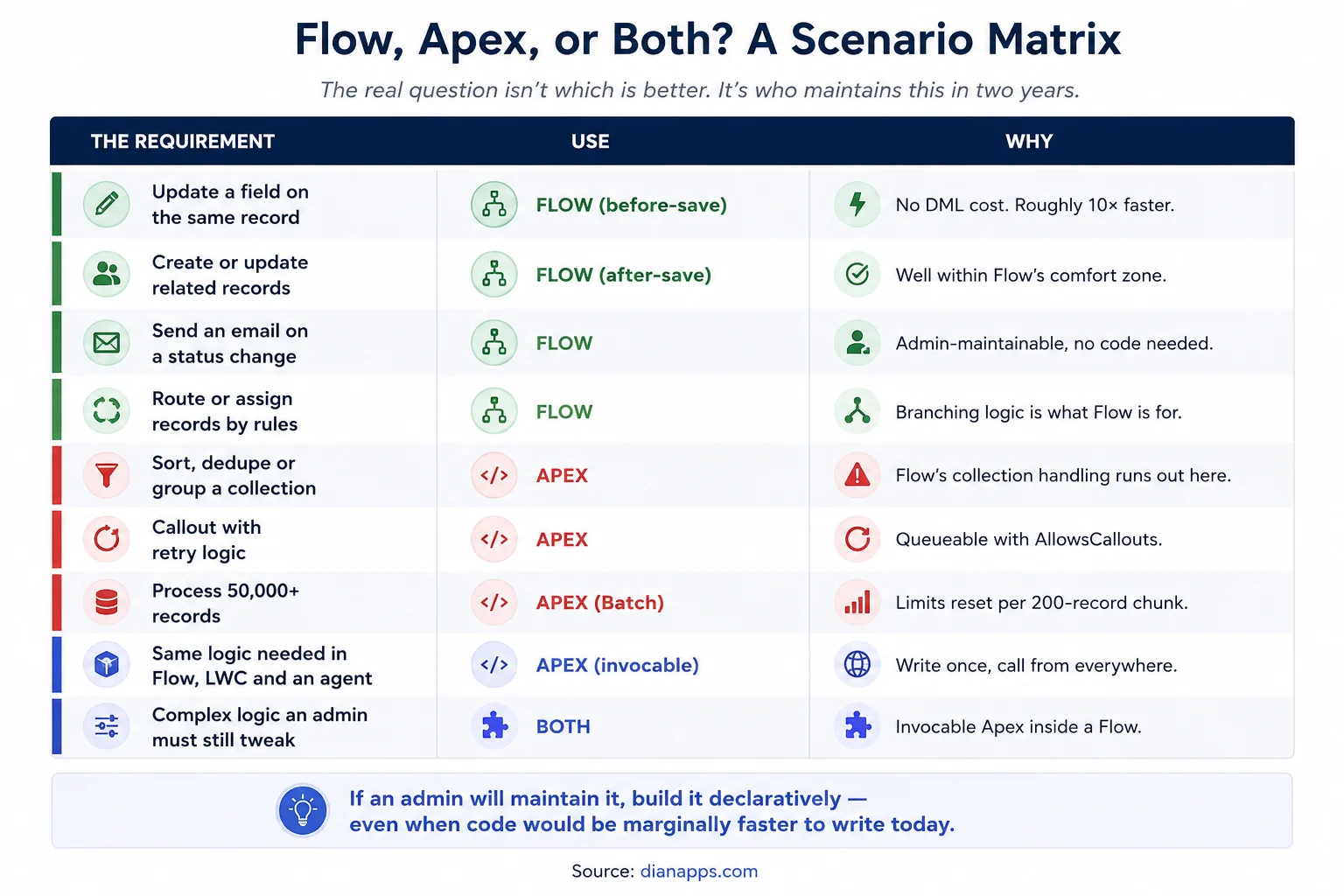
The question that settles most cases is: who maintains this in two years?
If the answer is an admin, build it declaratively, even when code would be marginally faster to write today. An admin who can adjust their own automation ships changes in hours. The same change routed through a developer backlog takes weeks.
If the answer is a developer or if nobody can articulate the answer, that’s a governance gap worth fixing before you write anything.
Total Cost of Ownership
Rate cards make Flow look obviously cheaper; the full picture is less clear-cut.
- Flow Costs Less To Build: Admin rates rather than developer rates and faster for straightforward automation.
- Flow Can Cost More To Maintain At Scale: Fifteen overlapping Flows on one object, none documented, none tested, several built directly in production, is a genuinely expensive situation to untangle, and it’s common.
- Apex Costs More To Build And Less To Review: Tests are mandatory, diffs are readable, static analysis is mature, and the next developer can understand it from the code.
- The Deciding Factor Is Usually Team Composition, Not The Technology: An org with three admins and no developer should push Flow as far as it goes. An org with a development team and mature DevOps gets more value from Apex for anything non-trivial.
Need Experienced Salesforce Developers?
Add skilled Salesforce developers to your team for Apex development, Flow optimization, automation cleanup, and ongoing platform improvements.
Related: Salesforce development cost · Admin vs developer vs architect
Where to Go Next
For building declaratively, see the Salesforce Flow guide and Flow Orchestration for multi-user processes.
For the code side, see the Apex programming guide and Governor limits.
For what can be built without code at all, Salesforce Low-Code Development and Configuration Vs Customization.
For governing either safely, Salesforce DevOps.
The Complete Salesforce Development Guide is the hub.
When the Answer Is “Both but Not Like That”
The orgs we’re called into rarely have a Flow-versus-Apex problem. They have fifteen automations on one object, built by four people over six years, where nobody can say what fires when and every change breaks something unrelated.
That’s not solved just by picking a side; it’s solved by mapping what runs, consolidating what overlaps, and drawing a clear line about what belongs in code and what belongs in Flow.
We’re a certified Salesforce Consulting Partner, and automation remediation is routine work for our team.
We’re a certified Salesforce Consulting Partner, and Salesforce Development Services are often part of this remediation work, from mapping automation dependencies and consolidating overlapping Flows to refactoring complex logic into maintainable Apex.
Not Sure Where Flow Should End, and Apex Should Begin?
Tell us about your automation challenges, and we’ll help you identify what belongs in Flow, what needs Apex, and where your architecture can improve.
 0 comments












Leave a Comment
Your email address will not be published. Required fields are marked *