















 0 comments





Quick Answer
Salesforce for small business is working well for teams that have a real sales process, manage ongoing client relationships, and need their tools connected under one roof. The Free Suite covers up to 2 users at zero cost, while the Starter Suite at $25/user/month is bringing sales, marketing, service, and commerce together. For businesses that need expert setup, working with a Salesforce consulting services partner like DianApps, a Salesforce development and consulting company, helps get the most ROI from day one.
Most small business owners hear “Salesforce” and immediately think enterprise. They are picturing large IT departments, six-figure budgets, and complex configurations that take months to deploy. That assumption is making less sense every year.
Salesforce has been deliberately building for smaller teams since 2023. In 2026, a two-person startup is getting started for free, a growing 10-person business is running a full CRM suite for $25/user/month, and a scaling company is expanding into AI-powered automation without ever switching platforms. Salesforce holds over 21.7% of the global CRM market share (IDC Worldwide Semiannual Software Tracker, 2025), and that dominance is now reaching small businesses too.
This guide is breaking down everything: features, pricing, pros, cons, implementation, CRM comparisons, and the honest reality of whether Salesforce for small business is making sense for your team right now.
TL;DR: Salesforce for small business is starting at $0 for 2 users (Free Suite) and $25/user/month for growing teams (Starter Suite). It is combining sales, marketing, service, and commerce in one platform. The ROI is showing up fast for teams with a structured sales process, but proper setup is essential. Implementation costs for small businesses typically range from $1,500 to $10,000 (Salesforce ecosystem reports, 2026).
What Does Salesforce for Small Business Actually Mean?
Salesforce CRM for small businesses refers to the suite of plans purpose-built for small to mid-sized teams. These are not stripped-down versions of the enterprise product. They are the same core platform, packaged in editions that are designed for smaller teams that need speed, simplicity, and scalability.
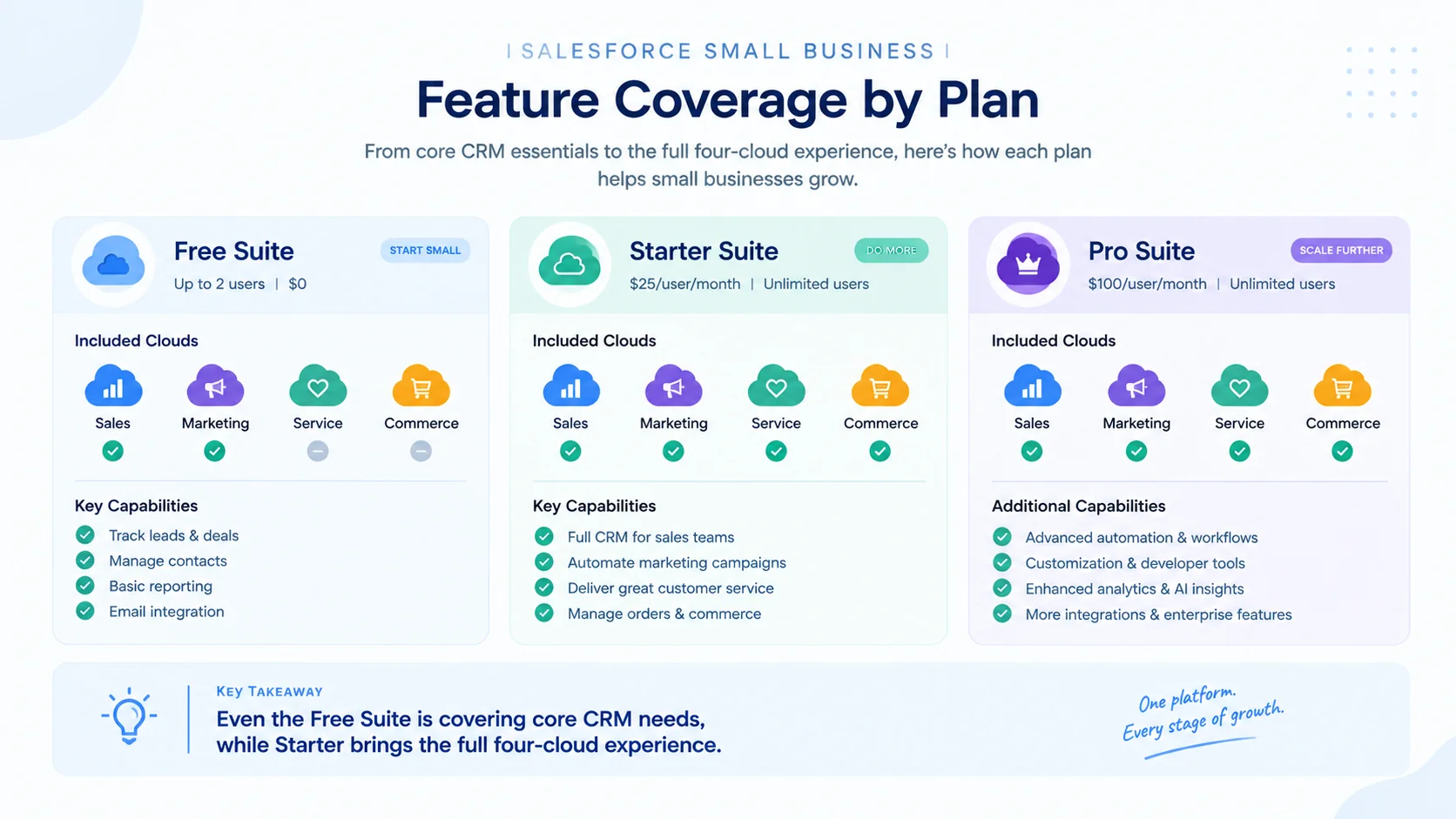
Salesforce is now offering three distinct plans for small businesses:
| Plan | Price | Users | Best For |
|---|---|---|---|
| Free Suite | $0 | Up to 2 | Solopreneurs, micro-teams testing CRM |
| Starter Suite | $25/user/month | Unlimited | Growing sales teams needing full CRM |
| Pro Suite | $100/user/month | Unlimited | Teams needing advanced automation and customization |
For small businesses specifically, Salesforce means one central place to track every lead, deal, and customer interaction, send and automate marketing emails, handle customer support tickets, run reports that show what is working, and connect with tools like Gmail, Outlook, Slack, and WhatsApp.
The important distinction is this: a small business using Salesforce today is not going to outgrow it at 50 or 500 employees. The platform is scaling with you, and that is one of the strongest arguments in its favor.
Recommended Read: Salesforce CRM Development: Key Features and Customizations for Your Business
What Features Does Salesforce Offer Small Businesses?
Salesforce’s feature set for small businesses varies significantly across the three plans. Here is a breakdown of what is actually included and where each feature is sitting.
Sales Cloud Features for Small Businesses
The sales features are the backbone of any Salesforce for small business deployment. Here is what each edition is offering:
| Feature | Free Suite | Starter Suite | Pro Suite |
|---|---|---|---|
| Account and contact management | ✅ | ✅ | ✅ |
| Opportunity management | ✅ | ✅ | ✅ |
| Lead management and scoring | ❌ | ✅ | ✅ |
| Web-to-lead capture | ❌ | ✅ | ✅ |
| Email templates and mass email | ❌ | ✅ | ✅ |
| Customizable sales process | ❌ | ✅ | ✅ |
| Mobile app | ❌ | ✅ | ✅ |
| Offline mobile functionality | ❌ | ❌ | ✅ |
| Customizable reports and dashboards | ✅ | ✅ | ✅ |
| Sales forecasting | ❌ | ✅ | ✅ |
| Quote creation and management | ❌ | ❌ | ✅ |
| Contract and order management | ❌ | ❌ | ✅ |
| Sandbox testing environment | ❌ | ❌ | ✅ |
The Free Suite is surprisingly capable for a zero-cost plan. It includes account management, opportunity tracking, customizable reports, and email integration with Gmail and Outlook. For a two-person team just getting started with CRM, that covers the essentials.
Marketing Cloud Features for Small Businesses
Marketing automation is bundled directly into Salesforce’s small business editions, meaning no separate email platform is required at the entry level.
| Feature | Free Suite | Starter Suite | Pro Suite |
|---|---|---|---|
| Marketing email sends | 100/month | 2,000/month | 2,000/month |
| Drag-and-drop email builder | ✅ | ✅ | ✅ |
| Einstein Send Time Optimization | ❌ | ✅ | ✅ |
| Campaign analytics | ❌ | ✅ | ✅ |
| Forms and landing pages | ❌ | ✅ | ✅ |
| Customer segmentation filters | ❌ | ✅ | ✅ |
Worth noting: 2,000 email sends per month is a real ceiling. A business with a subscriber list above 5,000 contacts is going to hit that limit fast and might need to upgrade or keep a separate email platform.
Recommended Read: LWC vs Aura vs Visualforce
Service Cloud Features for Small Businesses
Customer service capabilities are embedded across all three editions, though the scope is expanding with each tier.
| Feature | Free Suite | Starter Suite | Pro Suite |
|---|---|---|---|
| Case management | ✅ | ✅ | ✅ |
| Email support integration | ✅ | ✅ | ✅ |
| Knowledge base | ✅ | Read/Write | Read/Write |
| Case auto-assignment | ❌ | ✅ | ✅ |
| Case escalation rules | ❌ | ✅ | ✅ |
| Omni-channel routing | ❌ | ❌ | ✅ |
| Computer telephony integration | ❌ | ❌ | ✅ |
| Einstein Next Best Action | ❌ | 5K requests/user/month | 5K requests/user/month |
Commerce Cloud Features for Small Businesses
E-commerce functionality is available in Starter and Pro Suites, enabling small businesses to sell products directly through a Salesforce-powered storefront.
| Feature | Free Suite | Starter Suite | Pro Suite |
|---|---|---|---|
| Storefront website design | ❌ | ✅ | ✅ |
| Product and category management | ❌ | ✅ | ✅ |
| Promotions and buyer groups | ❌ | ✅ | ✅ |
| Managed checkout with payments | ❌ | ✅ | ✅ |
| Order summaries | ❌ | ✅ | ✅ |
| Insight dashboards | ❌ | ✅ | ✅ |
Is Salesforce Good for Small Businesses? Honest Pros and Cons
This is the question every small business owner is asking, and the honest answer is: it depends on what kind of small business you are. Let’s break down both sides.
Where Salesforce Is Genuinely Working Well
- Growth-oriented businesses: Salesforce is scaling from 2 users to 2,000 without requiring a platform migration. If growth is part of the plan, starting on Salesforce now is saving a painful switch later.
- Sales-driven teams: Even a 3-person sales team is benefiting enormously from shared pipeline visibility, automated follow-ups, and performance tracking. Salesforce’s 2026 State of Sales report surveyed 4,050 sales professionals and found that sellers are spending only 40% of their average week actually selling (Salesforce, 2026). Automation is directly addressing that gap.
- Client relationship businesses: Service businesses, agencies, consultants, and anyone whose revenue depends on managing client relationships well is finding Salesforce genuinely useful from day one.
- Multi-tool businesses: If you are tired of copy-pasting data between your CRM, email tool, and accounting software, Salesforce’s 7,000+ AppExchange integrations are offering a genuine consolidation advantage.
Where Small Businesses Should Think Twice
- Very early-stage solopreneurs: If you are pre-revenue or managing fewer than 50 contacts, a simpler tool like HubSpot’s free CRM might serve you better right now. Salesforce’s depth is feeling like overkill at the earliest stage.
- Extremely tight budgets: The Starter Suite at $25/user/month is reasonable, but implementation, customization, and add-ons are adding up. Going in without a budget for proper setup often leads to underutilization.
- Teams not ready for a learning curve: Salesforce is not difficult once you know it, but it is taking time to learn. Without proper onboarding or training, adoption is suffering, and the investment is not paying off.
- Simple contact management needs: A business that only needs a contact list and basic email tracking is paying for capability it will not use. Lighter CRMs are doing that job with less overhead.
The bottom line: Salesforce for small business is not a plug-and-play tool for everyone. But for businesses that are serious about growth, customer experience, and operational efficiency, it is one of the most powerful infrastructure investments available.
Recommended Read: Salesforce CRM Challenges
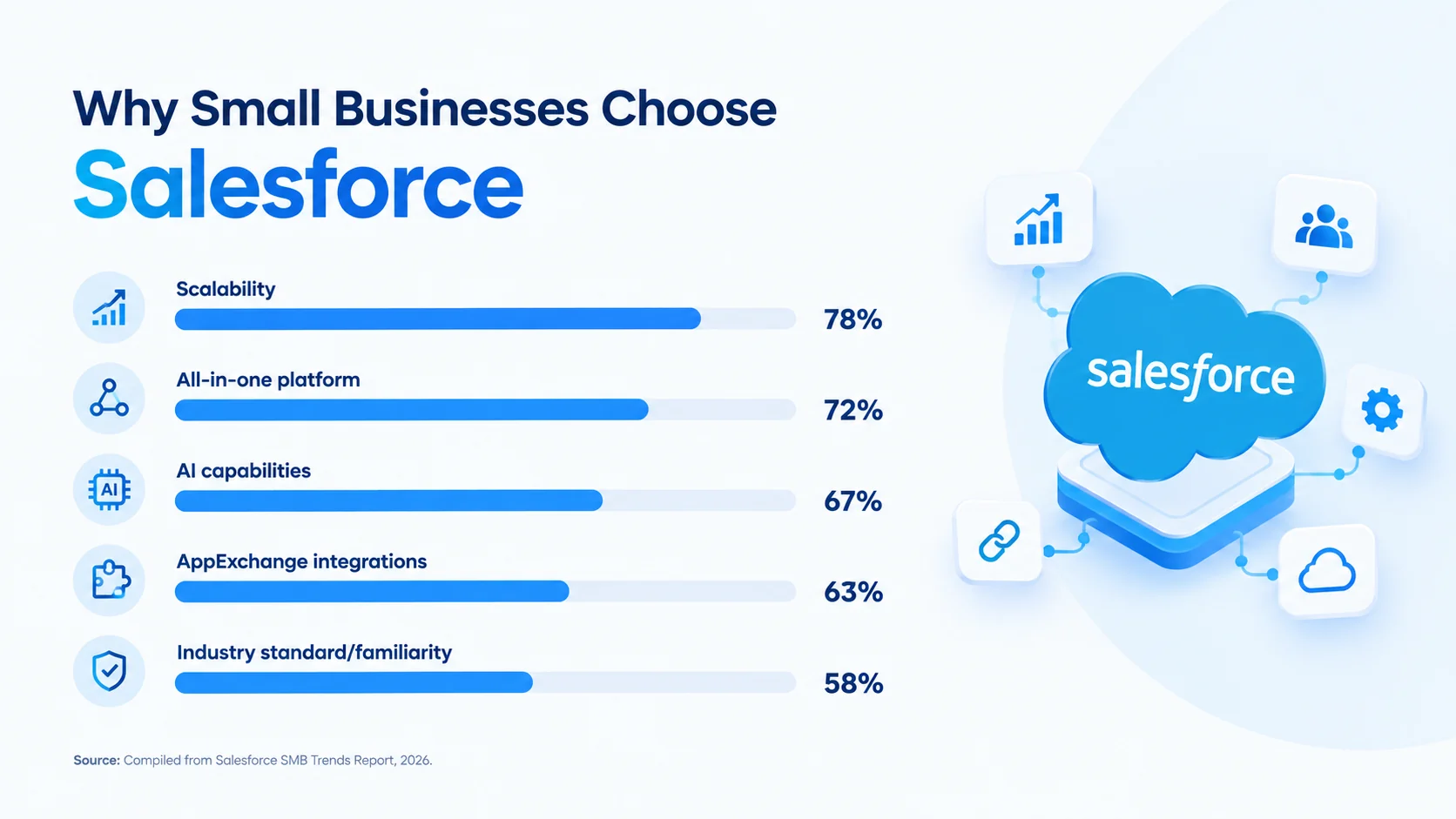
Why Are Small Businesses Choosing Salesforce Over Alternatives?
There are dozens of CRM tools available in 2026. Here is why Salesforce is continuing to win even against cheaper options.
It Is the Industry Standard
When your next sales hire has already used Salesforce at their previous company, onboarding takes days instead of weeks. When investors or enterprise clients are asking about your CRM setup, Salesforce is signaling operational maturity. That market familiarity alone has real business value.
One Platform Is Replacing Five Separate Tools
Most small businesses are running on a patchwork: one tool for email marketing, one for customer support, one for sales tracking, and one for analytics. Salesforce is bringing sales, marketing, service, and commerce under one roof. Less context-switching, fewer data inconsistencies, and a single source of truth for customer data.
It Is Growing With You
The Salesforce you are starting with at 5 employees is the same platform a 500-person company is running on. You are upgrading plans, adding clouds, and expanding capabilities without ever starting over. This is genuinely underrated as a benefit.
AI That Is Actually Working
Salesforce’s Agentforce AI is not a gimmick. It is handling first-line customer service queries, predicting which leads are most likely to close, and automating repetitive tasks. Salesforce’s latest SMB Trends research, covering more than 3,350 SMB leaders, found that approximately three in four small business leaders are already investing in AI (Salesforce, 2026). Being on a platform that has built AI natively is becoming a significant competitive advantage.
World-Class Learning and Community
Trailhead, Salesforce’s free learning platform, has millions of users and is covering everything from beginner CRM basics to advanced development. The community of certified partners, consultants, and developers is enormous, which means help is always available when you need it.
How Much Does Salesforce Cost for a Small Business?
Pricing is where most blogs either oversimplify or scare readers away. Here is the full picture, including costs that are often left out.
Salesforce Small Business Licensing Prices
| Plan | Monthly Cost Per User | Annual Cost Per User | Billing Options |
|---|---|---|---|
| Free Suite | $0 | $0 | N/A (free for up to 2 users) |
| Starter Suite | $25 | $300 | Monthly or annual |
| Pro Suite | $100 | $1,200 | Annual only |
What About the Costs Beyond Licensing?
The listed price per user is just the starting point. Here is what is affecting the actual total cost:
| Cost Component | Typical Range | Notes |
|---|---|---|
| Software licensing | $0 to $100/user/month | Depends on edition and user count |
| Implementation and setup | $1,500 to $20,000 | Includes data migration, workflow config and training |
| Customization | $2,000 to $15,000+ | Rises with business-specific process needs |
| Integrations | $500 to $5,000+ | Connectors, API mapping or custom development work |
| Ongoing admin/support | $500 to $2,000/month | Part-time admin or managed services |
| Add-ons | Varies | Advanced marketing, field service, AI features carry extra costs |
Real-World Cost Examples
| Business Size | Plan | Users | Annual License Cost | Est. Implementation | Total Year-1 Cost |
|---|---|---|---|---|---|
| Solo founder | Free Suite | 2 | $0 | $0 to $1,500 | $0 to $1,500 |
| Small sales team | Starter Suite | 5 | $1,500 | $3,000 to $8,000 | $4,500 to $9,500 |
| Growing business | Pro Suite | 10 | $12,000 | $8,000 to $20,000 | $20,000 to $32,000 |
A small business on Starter Suite with 5 users is looking at approximately $1,500/year in base licensing fees. That is roughly the cost of two months of a single software tool subscription at most competitors’ mid-tier pricing. The bigger cost variable is implementation quality.
Salesforce vs Other CRMs: How Does It Compare for Small Businesses?
Choosing a CRM is not just about features. It is about what fits your current stage, your sales process complexity, and where you are heading. Here is how Salesforce is stacking up against the main alternatives.
| CRM Platform | Starting Price | Best For | Limitations for Small Business |
|---|---|---|---|
| Salesforce Starter | $25/user/month | B2B teams with multi-stage deals, growing businesses | Setup complexity, learning curve |
| HubSpot CRM | Free (paid from $20/user/month) | Marketing-led startups, inbound-focused teams | Advanced customization is costing significantly more |
| Zoho CRM | $14/user/month | Budget-conscious teams wanting wide feature coverage | Ecosystem is not as deep, fewer enterprise integrations |
| Freshsales | $9/user/month | Very small teams wanting simplicity and AI basics | Limited scalability compared to Salesforce |
| Pipedrive | $14/user/month | Sales-only teams focused purely on pipeline management | No built-in marketing, service or commerce |
| Microsoft Dynamics 365 | $65/user/month | Teams already living in Microsoft 365 ecosystem | More complex setup than most small teams expect |
When Is Salesforce the Better Choice?
Salesforce is pulling ahead when the business needs multi-stage deal tracking, several team members touching the same account, integrations across finance and marketing tools, custom automation rules, or advanced reporting that has outgrown basic dashboards.
When Is a Simpler CRM the Better Choice?
HubSpot is often easier for a five-person marketing-led startup. Pipedrive is working well for pure sales teams that do not need marketing or service. Zoho is offering broader features at a lower price point if budget is the primary constraint.
The key question is not “which CRM has the most features” but “which CRM is matching where our business complexity is today and where it is heading in the next 18 months.”
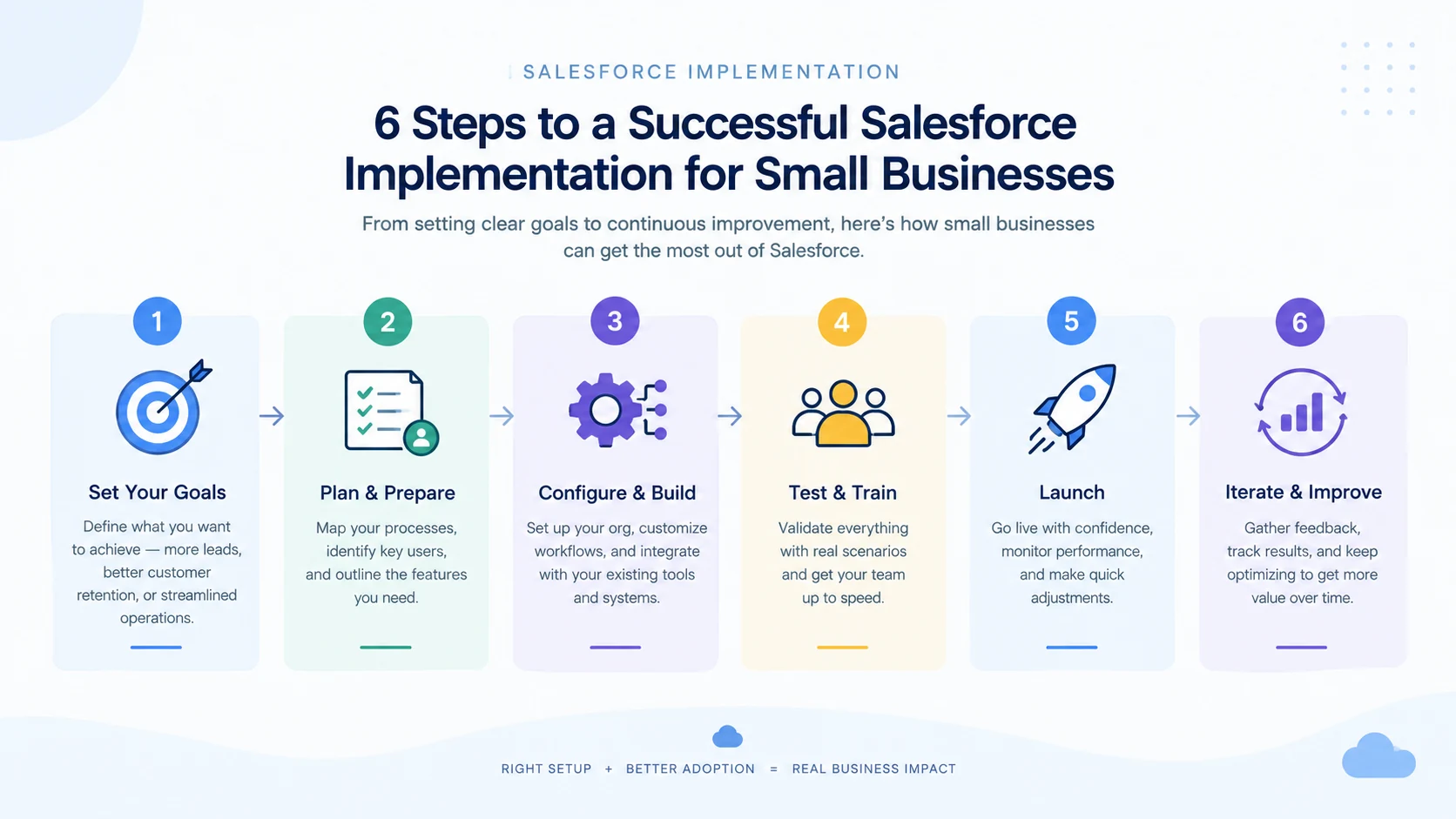
How to Implement Salesforce in a Small Business: Step-by-Step
A CRM is only as good as its implementation. Here are the steps that are separating successful Salesforce deployments from expensive failures.
Step 1: Define Business Goals First
Starting with a measurable problem. “Set up Salesforce” is not a goal. “Every inbound lead gets an owner within 10 minutes” is. “Sales can hand a closed deal to service without copy-pasting customer details” is another.
Write the sales process down before anyone starts creating fields or workflows. Salesforce should be following how the business needs to work, not the other way around.
Step 2: Choose the Right Edition
Match the edition to your current needs, not aspirational ones.
| If Your Team Needs... | Start With |
|---|---|
| Basic CRM for 1 to 2 people | Free Suite |
| Lead routing, email marketing, pipeline management | Starter Suite |
| Custom objects, quoting, forecasting, sandbox | Pro Suite |
Step 3: Clean Your Data Before Migration
Messy data is poisoning a CRM surprisingly fast. Before importing anything, you should be removing duplicates, standardizing company names, deciding who owns each record, and figuring out which old fields are still useful.
Testing a small batch before moving everything is critical. Finding a broken field mapping after 50 records is mildly annoying. Finding it after 50,000 is a different afternoon entirely.
Step 4: Configure Workflows and Automation
Starting with the repetitive tasks your team is currently doing manually. Lead assignment rules, follow-up reminders, deal-stage notifications, and post-sale handoff tasks are the first candidates for automation.
Keep it simple in the first version. Adding complex approval paths and multi-step flows can wait until the team has lived with the basics for a few weeks.
Step 5: Train Users Around Their Actual Jobs
Generic Salesforce training rarely sticks. A sales rep needs to know how to qualify a lead and move an opportunity. A manager needs to spot stalled pipeline. A service user needs customer history before picking up a case.
Training around real daily tasks is dramatically improving adoption rates.
Step 6: Iterate After 30 Days
Let the first setup survive a few real weeks. After 30 days, check which fields are staying blank, which reports nobody is opening, what work is still happening outside Salesforce, and which automations people are dodging. Fix one of those things next.
Real user friction makes a much better roadmap than the wish list everyone wrote before launch.
What Are the Common Challenges Small Businesses Face With Salesforce?
Most Salesforce headaches are starting before anyone clicks “Go Live.” Understanding these challenges upfront saves time, money, and frustration.
| Challenge | What Goes Wrong | How to Avoid It |
|---|---|---|
| Implementation complexity | Teams start configuring before agreeing on how sales actually works | Map the process, owners and handoffs first |
| Over-customization | Every exception becomes another field, flow or custom record | Keep the first version close to standard Salesforce |
| Poor user adoption | Reps keep notes in spreadsheets, so Salesforce never has the full picture | Remove pointless data entry, train on real workflows |
| Data quality issues | Duplicates, missing fields and inconsistent names wreck reports | Clean and test data before migration |
| Choosing the wrong edition | A team buys Starter, then discovers it needs custom objects | Check automation and customization requirements before signing |
| No clear CRM owner | Nobody manages permissions, reports or changes after launch | Assign one person clear responsibility |
| Budget surprises | Hidden costs from add-ons, integrations and training | Budget for total cost of ownership, not just licensing |
The single most common mistake is skipping proper implementation. A poorly configured Salesforce instance is worse than a well-used spreadsheet. This is exactly why the businesses that are getting the most value from the platform are working with experienced Salesforce development services partners who understand both the technology and the business goals behind it.
What Role Is Agentforce AI Playing for Small Businesses?
AI used to be enterprise-only territory. Not anymore. Salesforce’s Agentforce is bringing AI capabilities into every small business edition, and it is changing what a small team can realistically deliver.
What Is Agentforce Doing?
- Answering customer queries automatically: AI agents are handling first-line support, resolving common questions from knowledge base articles without human intervention.
- Surfacing next-best-action recommendations: Sales reps are receiving AI-powered suggestions about which leads to prioritize and what outreach to send next.
- Drafting emails and summaries: Free Suite includes AI-assisted content drafting, while Starter and Pro are adding broader Agentforce capabilities.
- Lead scoring with People Scoring: Summer 2026 brought People Scoring to Foundations, ranking leads and contacts using fit and engagement signals.
Why Does This Matter for Small Teams?
A 5-person sales team does not have the capacity to manually score every lead, research every prospect, and personalize every follow-up. Agentforce is effectively adding an extra team member that handles the repetitive analytical work. For small businesses with limited staff, this is extending what a small team can realistically deliver without hiring.
Recommended Read: A Complete Salesforce Development Guide
Are There Special Salesforce Plans or Discounts for Startups?
Yes. Salesforce is running a dedicated program called Salesforce for Startups (also referred to as Salesforce Launchpad) that is offering credits, discounted licensing, and mentorship resources specifically for early-stage companies. The program is typically provides up to 80% off Salesforce products for eligible startups.
Here is what the Salesforce for Startups program includes:
| Benefit | Details |
|---|---|
| Licensing credits | Up to 80% discount on select Salesforce products |
| Duration | Typically 1 year, renewable based on eligibility |
| Eligibility | Early-stage companies, often VC-backed or accelerator-affiliated |
| Products covered | Sales Cloud, Service Cloud, Platform licenses |
| Additional perks | Access to Trailhead learning, partner network, community events |
| Application | Through the Salesforce Startups website or partner referrals |
Beyond the startup program, the Free Suite itself is serving as an effective entry point. A two-person founding team is getting core CRM functionality at zero cost, and when the team is ready to scale, upgrading to Starter Suite at $25/user/month is a straightforward path.
Salesforce is also offering a 30-day free trial for Starter Suite and Pro Suite with no credit card required. This allows small businesses to test the full feature set before committing to an annual contract.
What Are the Most Popular Salesforce Apps for Small Businesses?
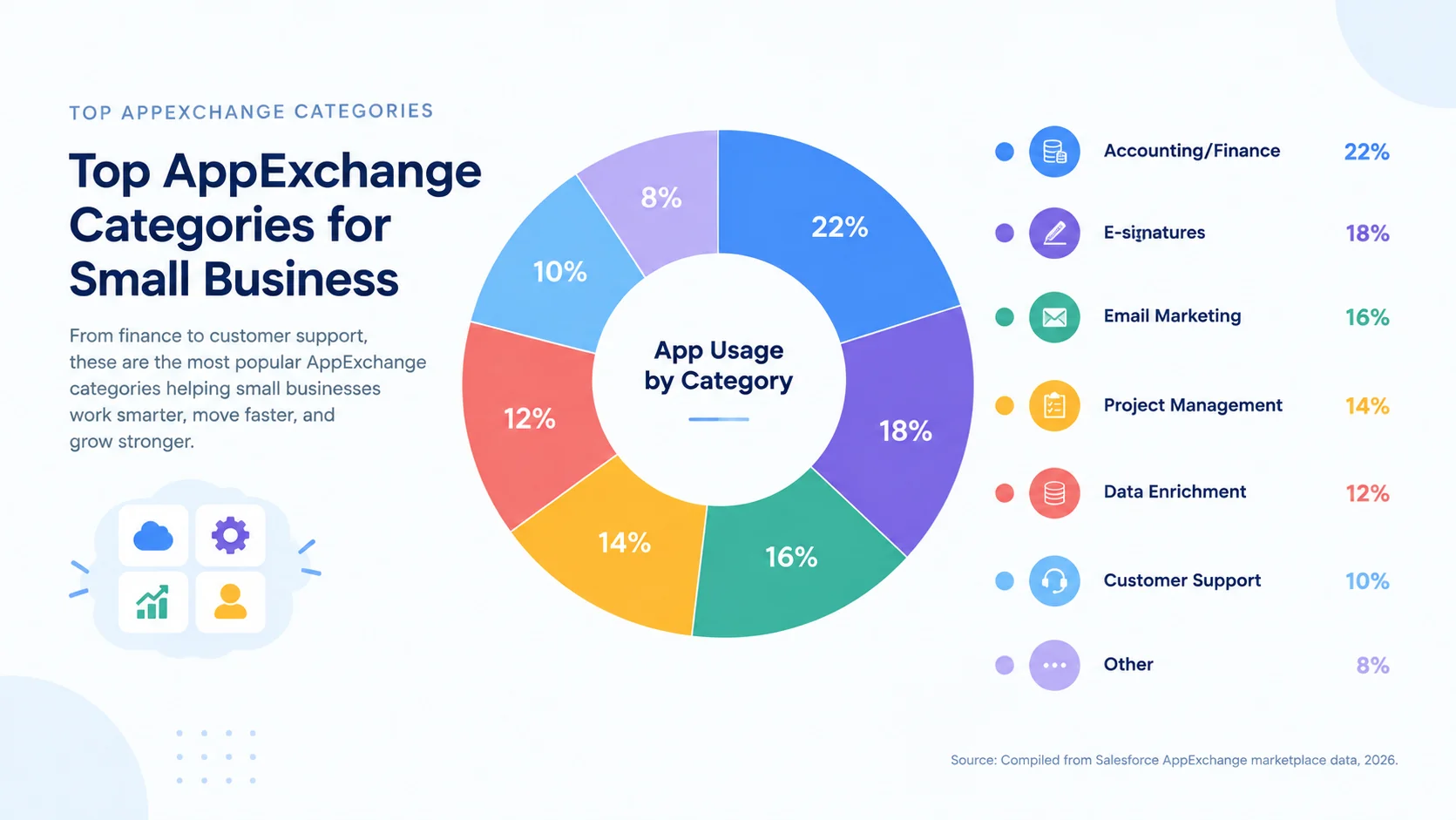
Salesforce AppExchange is hosting over 7,000 apps and integrations. For small businesses, the most impactful apps are falling into a few core categories. Here are the ones that small teams are using most frequently:
| App Category | Popular Apps | Accounting and finance |
|---|---|---|
| Accounting and finance | QuickBooks, Xero | Syncs invoices, payments and financial data with CRM |
| E-signatures | DocuSign, PandaDoc | Sends and tracks contracts directly from Salesforce |
| Email marketing | Mailchimp, ActiveCampaign | Extends email capabilities beyond the 2,000/month limit |
| Project management | Asana, Monday.com | Connects project workflows to deal stages |
| Data enrichment | ZoomInfo, Clearbit | Auto-fills lead and company data for faster prospecting |
| Customer support | Zendesk, Freshdesk | Enhances service capabilities beyond built-in case management |
| Document generation | Conga, Formstack | Creates proposals, quotes and contracts from CRM data |
| Communication | Slack, WhatsApp Business | Centralizes team and customer messaging inside Salesforce |
Most small businesses do not need custom-built integrations at the start. AppExchange is covering the most common needs out of the box. The key is starting with 2 to 3 essential integrations rather than connecting every tool at once, which adds unnecessary complexity during initial setup.
How Do I Get Started With Salesforce as a Small Business?
Getting started with Salesforce does not need to be overwhelming. Here is a quick-start checklist that maps the fastest path from sign-up to productive CRM usage:
| Step | Action | Timeline |
|---|---|---|
| 1 | Sign up for Free Suite or start a 30-day Starter trial | Day 1 |
| 2 | Import your existing contacts from spreadsheet or old CRM | Day 1 to 3 |
| 3 | Set up your sales pipeline stages to match your process | Day 2 to 5 |
| 4 | Connect email (Gmail or Outlook) integration | Day 3 to 5 |
| 5 | Create 3 to 5 essential reports (pipeline, lead source, activity) | Week 2 |
| 6 | Set up basic automation (lead assignment, follow-up tasks) | Week 2 to 3 |
| 7 | Train your team on daily workflows | Week 3 to 4 |
| 8 | Review adoption and refine after 30 days | Week 5 |
Onboarding to Salesforce typically takes between 2 and 8 weeks depending on complexity. A simple CRM setup with clean data can be ready in under 2 weeks. A more complex deployment with data migration, multiple integrations, and custom automation takes 4 to 8 weeks, especially when working with a Salesforce consulting partner.
The most common mistake during a quick start is scope creep. Trying to turn an accelerated deployment into a massive, customized enterprise build by adding extra features mid-project is the fastest way to derail the timeline. Start with the essentials and expand after the team has adopted the basics.
What Are Real Users Saying About Salesforce for Small Businesses?
Community forums and review sites are providing honest perspectives that marketing pages do not cover.
“Is Salesforce overkill for a team of 5?” A recurring thread on r/smallbusiness and r/salesforce is showing that teams with an actual multi-step sales process are getting value quickly, while teams that only need contact storage are feeling the platform is too much. The free tier announcement in late 2024 changed the conversation significantly, with many users expressing surprise that Salesforce is now accessible at zero cost.
“Setup took longer than expected.” This sentiment is appearing repeatedly across Capterra and G2 reviews. Capterra currently gives Salesforce Sales Cloud 4.4 out of 5 from over 18,000 reviews, with setup complexity and learning curve being the most common constructive criticisms. The CRM itself is not difficult, but configuring it properly for your process requires either dedicated time or partner support.
“Once it is set up right, nothing else compares.” Users who invested in proper implementation, whether through a partner or by dedicating internal time, are consistently reporting that Salesforce’s depth, automation, and reporting become irreplaceable within 6 months.
The pattern is clear: Salesforce for small business ROI is directly correlated with implementation quality. A quick-and-dirty setup produces quick-and-dirty results. A thoughtful setup produces a system nobody wants to leave.
How DianApps Is Helping Small Businesses With Salesforce
DianApps, a Salesforce development and consulting company, is working with startups, growing businesses, and enterprises to turn Salesforce into a scalable business platform rather than simply a CRM. With 450+ projects delivered across industries, DianApps is combining Salesforce expertise with modern software engineering, AI, and automation capabilities.
For small businesses specifically, DianApps is offering:
- Salesforce consulting and implementation: Understanding your business process before recommending a solution, ensuring the CRM matches how your team actually works.
- Custom Salesforce development: Building custom apps, workflows, and automation rules that fit your specific sales and service processes.
- CRM integration with existing tools: Connecting Salesforce with your accounting software, marketing platforms, e-commerce systems, and other business tools.
- Data migration and cleanup: Moving data from spreadsheets, legacy CRMs, or other systems with proper deduplication and validation.
- Ongoing support and optimization: Refining the system as your business is evolving, rather than locking you into a static configuration.
DianApps is not treating Salesforce as an isolated tool. Their product-first mindset is what sets them apart, especially for businesses that need their CRM to talk seamlessly with mobile apps, web platforms, and custom-built software.
Final Words
Salesforce for small business is not just a CRM decision. It is a decision about how seriously you want to take your customer relationships and your company’s growth infrastructure.
For businesses still figuring out the basics, simpler tools exist. But for businesses that are ready to build something that their team is not going to outgrow, that can automate repetitive work, and that gives everyone a single source of truth about every customer, Salesforce is hard to beat.
The caveat is real: Salesforce is only as good as how well it is set up and adopted. A poorly configured instance is worse than a well-used spreadsheet. That is why the businesses getting the most value from Salesforce are working with experienced partners who understand both the technology and the business goals behind it.
Whether you are starting from scratch, migrating from another CRM, or looking to extend what Salesforce already does with custom development and integrations, the right guidance is making the investment worth every penny.
Recommended Read: Salesforce CRM Trends in 2026
 0 comments










Your email address will not be published. Required fields are marked *