















 0 comments





Key Takeaways:
- Salesforce low-code tools can build complete applications, including automation, portals, dynamic pages, data models, and AI agents without writing Apex.
- Low-code has clear technical boundaries, including complex collection processing, advanced callout handling, transaction control, and very high-volume workloads.
- Low-code debt is usually a governance problem, driven by undocumented Flows, limited testing, unreadable metadata diffs, and unclear ownership.
- The best Salesforce architecture often combines low-code and pro-code, with admins owning declarative processes and developers handling Apex, LWC, integrations and complex logic.
Most low-code articles are sales pitches for low-code; this one covers what you can build and then spends equal time on what you can’t because the second half is where projects go wrong.
Salesforce’s declarative tools have got genuinely good; an admin can now build things that needed a developer five years ago. The risk isn’t that low-code can’t do enough; it’s that it can do just enough to let you build something nobody can safely change.
Quick Answer: Nine declarative tools cover page layouts, automation, portals, data models and now AI agents. Dynamic Forms is the most underused. You’ve hit the ceiling when you need collection sorting, callouts with retry, partial-success handling or volumes above 50,000 records. The real cost of low-code isn’t building it, but it’s the fifteenth undocumented Flow nobody dares touch.
What Is Low-Code Development in Salesforce?
Low-code means building functionality through visual tools and configuration rather than writing Apex or JavaScript. In Salesforce, this isn’t a bolt-on product – it’s how the platform was designed, with everything stored as metadata rather than compiled code.
Low-code and no-code aren’t quite the same thing, though the distinction is often overstated:
| No-code | Low-code | Pro-code | |
|---|---|---|---|
| Who builds | Business users, admins | Admins, technical admins | Developers |
| Tools | Page layouts, reports, validation rules | Flow, App Builder, Dynamic Forms | Apex, LWC, integrations |
| Ceiling | Standard functionality only | Complex logic, hits limits at scale | None, within governor limits |
| Testing | Manual | Flow Tests, optional | Mandatory, 75% coverage |
One Clarification Worth Making: Lightning Web Components, the Salesforce CLI, and Code Builder are sometimes listed as “low-code tools.” They aren’t. They’re pro-code tools that happen to sit on the same platform. Muddling them makes the low-code ceiling harder to see, which is exactly the problem this article is about.
The Low-Code Toolkit
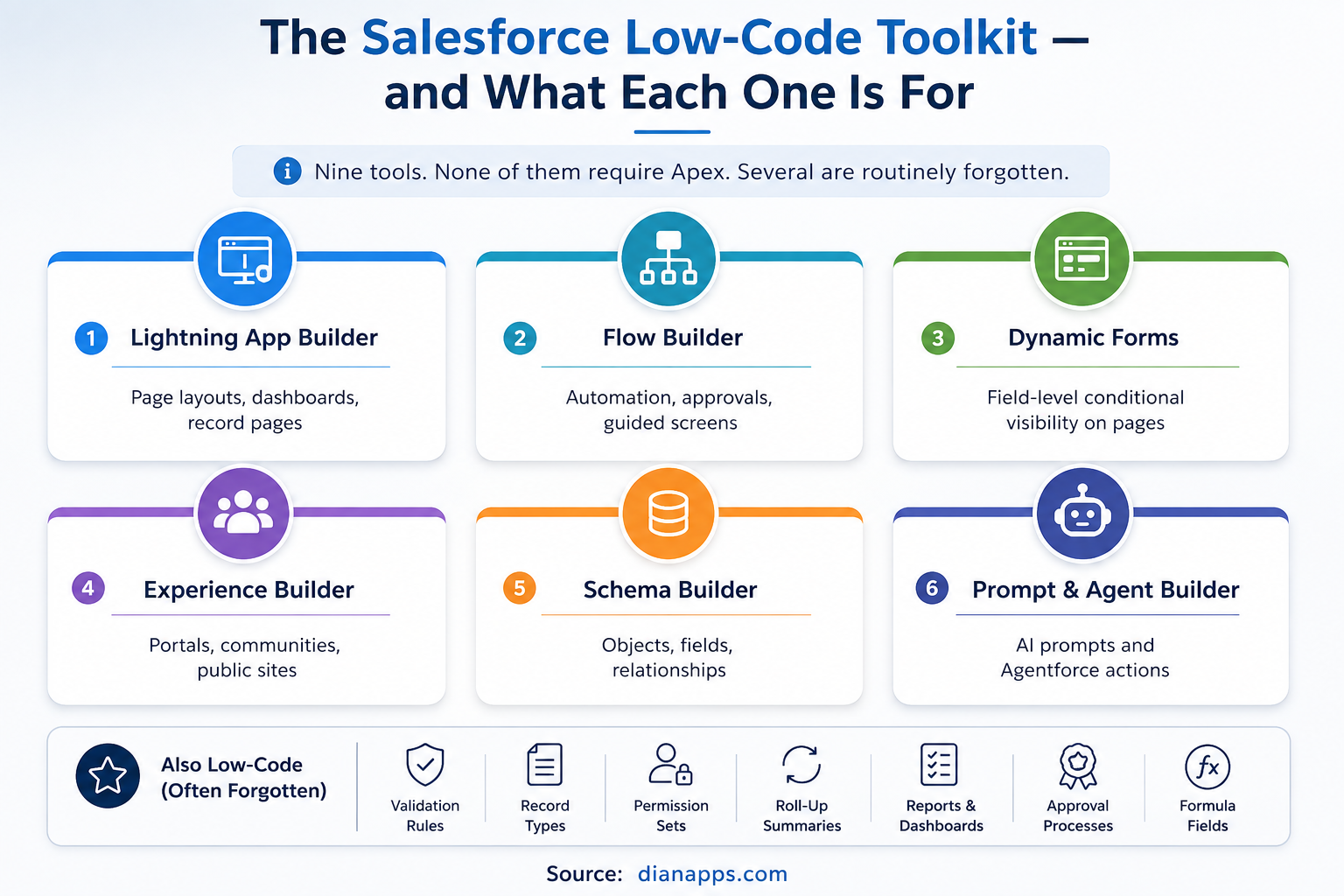
Six main Salesforce low-code tools: Lightning App Builder, Flow Builder, Dynamic Forms, Experience Builder, Schema Builder, and Prompt and Agent Builder
- Lightning App Builder: Record pages, app pages, home pages. Drag components, set visibility rules, done.
- Flow Builder: The automation engine. Record-triggered, screen, scheduled, and autolaunched flows cover the large majority of business process automation. See the Salesforce Flow guide.
- Dynamic Forms: The most underused tool on this list. It lets you place individual fields on a Lightning page and control their visibility with conditional rules, rather than managing page layouts and record types. If you’re still creating a new record type purely to show or hide fields, Dynamic Forms replaces that entirely.
- Experience Builder: Customer portals, partner communities and public sites without writing front-end code.
- Schema Builder: Visual data modelling. Objects, fields and relationships, drawn rather than clicked through Setup. See the Salesforce data model.
- Prompt Builder and Agent Builder: The newest additions. Prompt Builder creates reusable AI prompt templates grounded in your data; Agent Builder configures Agentforce agents with topics, actions and instructions. Both are genuinely declarative. See what Agentforce is.
- And the ones people forget to count: Validation rules, record types, permission sets, roll-up summary fields, formula fields, approval processes, reports and dashboards. Most of an org’s functionality is built with these, and none of it involves code.
What You Can Genuinely Build Without Code
Not theoretical – these are complete solutions delivered declaratively every day:
- A Full Custom App: Objects, relationships, page layouts, navigation, permissions
- Multi-Step Approval Processes: With conditional routing and escalation
- A Customer Self-Service Portal: With case submission, knowledge articles, and status tracking
- Guided Sales Processes: Screen flows that walk reps through qualification
- Automated Onboarding: Task creation notifications, document requests, scheduled follow-ups
- Dynamic Record Pages: That show different fields to different roles via Dynamic Forms
- Scheduled Data Hygiene: Nightly cleanup, renewal reminders, stale record flagging
- An AI Agent: Handling tier-one enquiries, built in Agent Builder
- Integrations Via Native Connectors: Outlook, Gmail, Slack and anything with an AppExchange connector
That list would have needed a developer in 2018; most of it doesn’t now.
Where the Ceiling Is
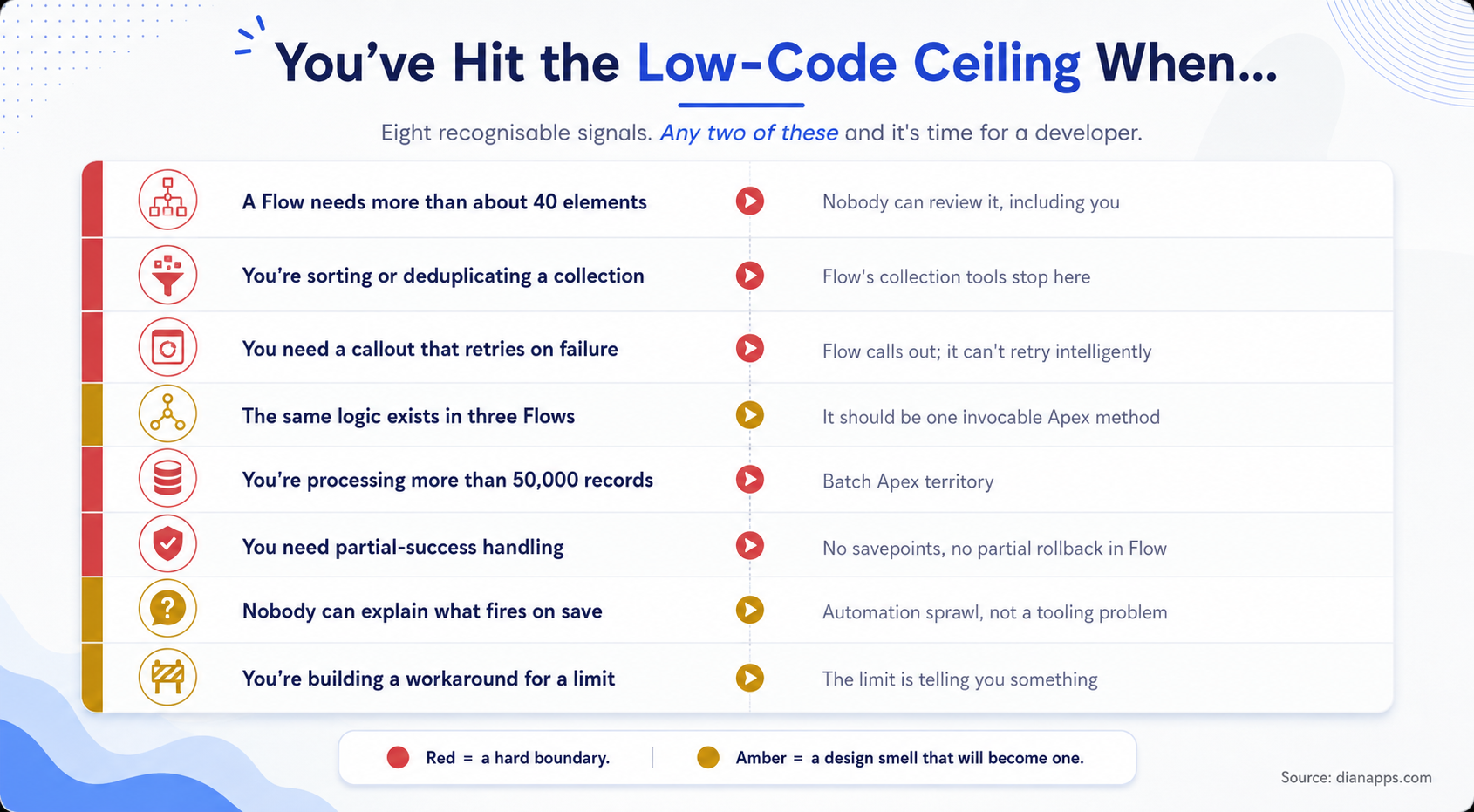
Eight signals you have hit the low-code ceiling, split into hard boundaries and design smells
The Hard Boundaries:
-
- Collection processing: Sorting, deduplicating, multi-level grouping. Flow handles simple filtering; it runs out fast beyond that.
- Callouts With Real Error Handling: Flow can call an external service. It can’t implement retry with backoff or recover from partial failure.
- Transaction Control: No savepoints, no partial rollback, no equivalent of Database.update(records, false) to let good records through while capturing the failures.
- Volume: Scheduled Flows have a ceiling. Batch Apex processes up to 50 million records with governor limits resetting per chunk.
- And The Design Smells That Become Boundaries.
- A Flow Past Roughly 40 Elements: Can’t be reviewed by anyone, including the person who built it. Break it into subflows or move the logic to Apex.
- The Same Logic In Three Flows: Should be one invocable Apex method called from all three.
- Building A Workaround For A Platform Limit: Usually means the limit is telling you something about the design.
Full Comparison: Flow vs Apex · governor limits
The Real Cost: Low-Code Debt
Here’s the part the low-code marketing skips.
Building is cheap, but maintenance is not; the characteristic failure isn’t a low-code project that fails – it’s a low-code estate that succeeds fifteen times and becomes unmaintainable.
The Pattern Is Consistent: Several admins over several years, each solving a real problem, each building a Flow, none documented, none tested, and several built directly in production. Two years later, nobody can say what fires when a record saves, and every change breaks something unrelated.
Why this happens more with low-code than with Apex:
- Nothing Forces Testing: Apex can’t deploy below 75% coverage. A Flow can be activated in production with no tests at all.
- Diffs Are Unreadable: Flow metadata is XML that can’t meaningfully be reviewed in a pull request.
- The Barrier To Building Is Low: Which is the point and also why volume accumulates.
- Ownership Is Diffuse: Code has an author in Git. A Flow often has nobody.
This isn’t an argument against low-code; it’s an argument for governing it the way you’d govern code.
Governance That Actually Works
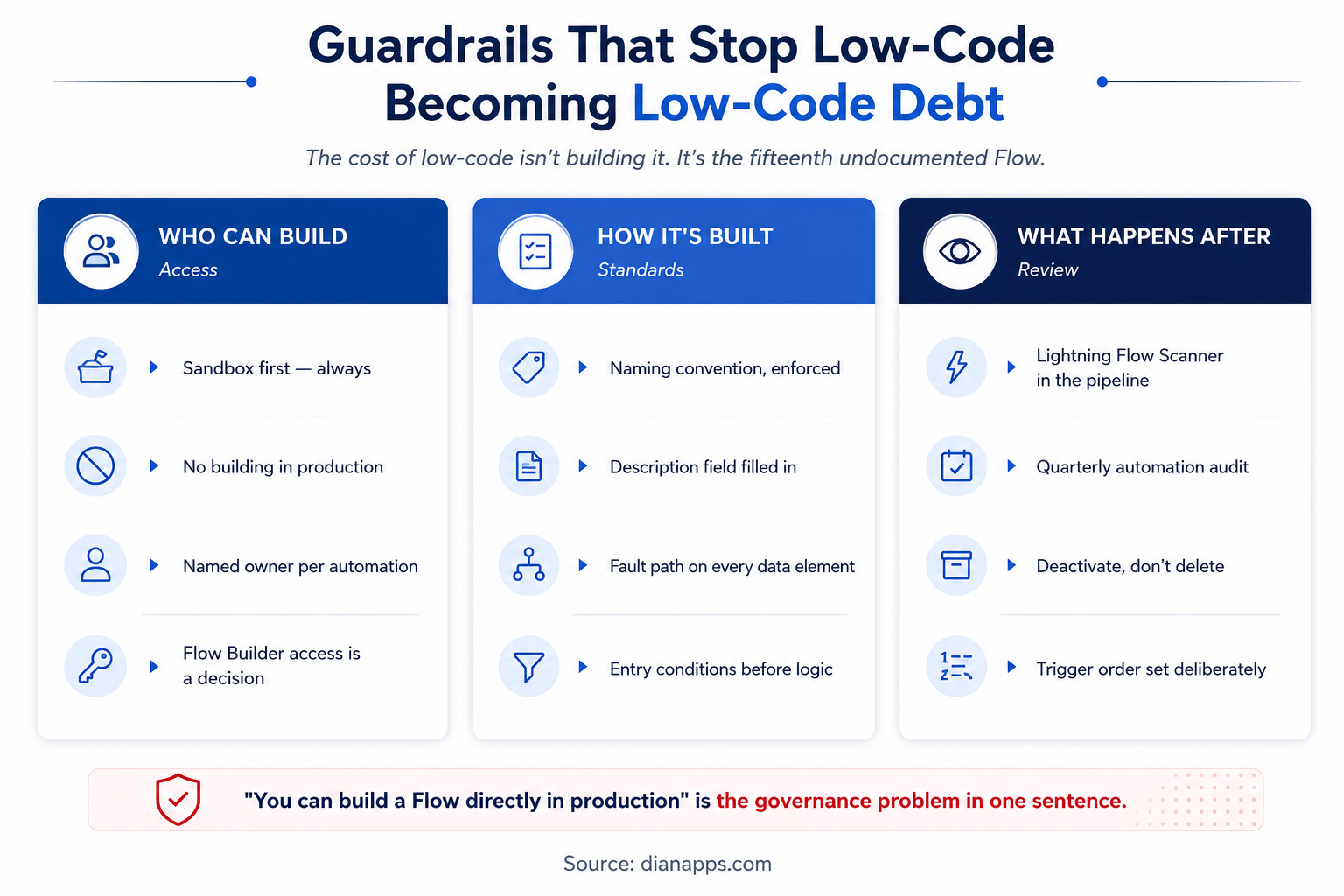
Three governance layers: who can build, how it’s built, and what happens after
- Who Can Build: Flow Builder access is a decision, not a default. Grant it deliberately, require sandbox-first development, and give every automation a named owner.
- How It’s Built: A naming convention that’s enforced. The description field filled in – on the Flow and on individual elements. A fault path on every element that touches data. Entry conditions before logic, so a Flow doesn’t run and then decide it shouldn’t have.
- What Happens After: Run Lightning Flow Scanner in your pipeline – it’s free, and it catches DML in loops, missing fault paths, hardcoded IDs, and unsafe run contexts. Audit automation quarterly. Deactivate rather than delete, because deleted Flows cannot be recovered. And set trigger order values deliberately so execution sequence is a decision rather than an accident.
Related: Salesforce DevOps · Salesforce Flow
Bring Order to Your Salesforce Automation
Get expert help consolidating complex Flows, documenting automation and deciding what should stay declarative and what needs custom development.
Citizen Developers: Enablement and Guardrails
“Citizen developer” describes a business user building their own solutions. It works, with structure.
What makes it work:
- A sandbox they can’t break and a rule that nothing is built in production
- A short standards document – naming, descriptions, fault paths. One page, not a manual.
- A review step before activation, doesn’t need to be heavy; one person confirming someone tested it.
- A clear escalation path – what to hand to an admin and what to hand to a developer
- Trailhead as the baseline, then supervised builds
What Makes It Fail: Granting Flow Builder access broadly with no standards, no review, and no owner. That’s not enablement; it’s deferred remediation cost.
The Handover Points
The most useful thing to define in advance is when work moves between people.
| Stage | Who owns it | Hand over when |
|---|---|---|
| Reports, list views, simple fields | Business user | Never - this is theirs |
| Page layouts, validation rules, permission sets | Admin | It needs Apex or an integration |
| Flows, Dynamic Forms, approval processes | Admin | The Flow exceeds ~40 elements or needs collection logic |
| Invocable Apex, LWC, integrations | Developer | - |
| Data model and automation architecture | Architect | - |
Defining This In Advance Prevents The Two Expensive Failure Modes: An admin spending three weeks building a workaround a developer would have coded in two days, and a developer writing Apex for something a Flow handles in an hour.
When those handover points are clear, Salesforce Development Services can provide the technical support needed for Apex, LWC, integrations, and automation architecture without taking routine declarative work away from admins.
Related: Admin vs developer vs architect · Configuration vs customization
Low-Code vs Pro-Code: The Honest Cost Picture
- Low-Code Costs Less To Build: Admin rates rather than developer rates and faster for straightforward automation. That gap is real, and it’s why low-code exists.
- Pro-Code Costs Less To Review, Test And Hand Over: Tests are mandatory, diffs are readable, static analysis is mature, and the next developer can understand it from the code.
- The Deciding Factor Is Usually Team Composition Rather Than The Technology: An org with three admins and no developer should push declarative tools as far as they go. An org with a development team and a working pipeline gets more value from Apex for anything non-trivial.
- And the Hybrid Resolves Most Cases: Invocable Apex called from a Flow. The complex logic sits in tested code; the process sits in Flow, where the person who understands the business can change it without a developer.
Ready to Extend Beyond Low-Code?
Add experienced Salesforce developers when your automation needs Apex, integrations, advanced logic or a more scalable technical foundation.
Related: Salesforce development cost
Where to Go Next
For the main low-code tool in depth, see the Salesforce Flow guide and Flow vs Apex for where the line sits.
For what needs code, Custom Salesforce development and the Apex programming guide.
For governing either safely, Salesforce DevOps and Governor limits.
For who should own what, Admin vs Developer vs Architect.
The Complete Salesforce Development Guide is the hub.
When Low-Code Needs a Second Pair of Hands
Most orgs we’re called into don’t need less low-code; they need the fifteen Flows consolidated into five, the undocumented ones documented, and a line drawn about what belongs in Apex.
That’s usually a few weeks of work, not a rebuild – and it leaves your admins able to keep building safely rather than being told to stop.
We’re a certified Salesforce Consulting Partner, and automation remediation is routine work for our team.
Not Sure Where Your Low-Code Setup Needs Help?
Tell us about your Salesforce automation, and we’ll help identify what to simplify, what to improve, and where custom development makes sense.
 0 comments










Leave a Comment
Your email address will not be published. Required fields are marked *