















 0 comments





Most articles like this end with the same answer: you need a development partner, and conveniently, here’s one.
Three of the eight signs below don’t need a developer at all; an admin fixes them faster and cheaper. Two are business risks rather than technical problems, and there’s a section on when you don’t need outside help, because sometimes you don’t.
Work through the eight, count how many apply, and the score at the end tells you what to do about it.
Quick Answer: Count your signs; 1-2 is normal operating friction, 3-5 means a capacity problem, usually more admin time or a developer. 6+ means a structural problem, where hiring one person won’t fix it because the issue is process, documentation and ownership rather than throughput.
The Salesforce Health & Resource Matrix
| Symptom (What Your Team Experiences) | Root Technical Cause | Who Fixes It? |
|---|---|---|
| Admin Backlog Never Shrinks: Simple updates or layout adjustments take weeks. | Capacity constraint; the backlog consists of declarative config (Flows, Page Layouts, Permissions). | Salesforce Admin |
| “Salesforce Can’t Do That”: Custom business logic or complex conditional automation is blocked. | Capability gap; the architecture has outgrown native declarative tools and requires programmatic code. | Salesforce Developer |
| System Breaks During Releases: Seasonal Salesforce updates trigger silent automation failures. | Tech Debt; lack of automated Apex regression test suites and deprecated API versions in active components. | DevOps / Developer |
| Manual Syncing & CSV Exports: Staff manually re-keys data between Salesforce and ERP/Accounting tools. | Siloed data architecture; broken or unbuilt REST/SOAP API end-points. | Integration Specialist |
The Eight Signs and Who Fixes Each One
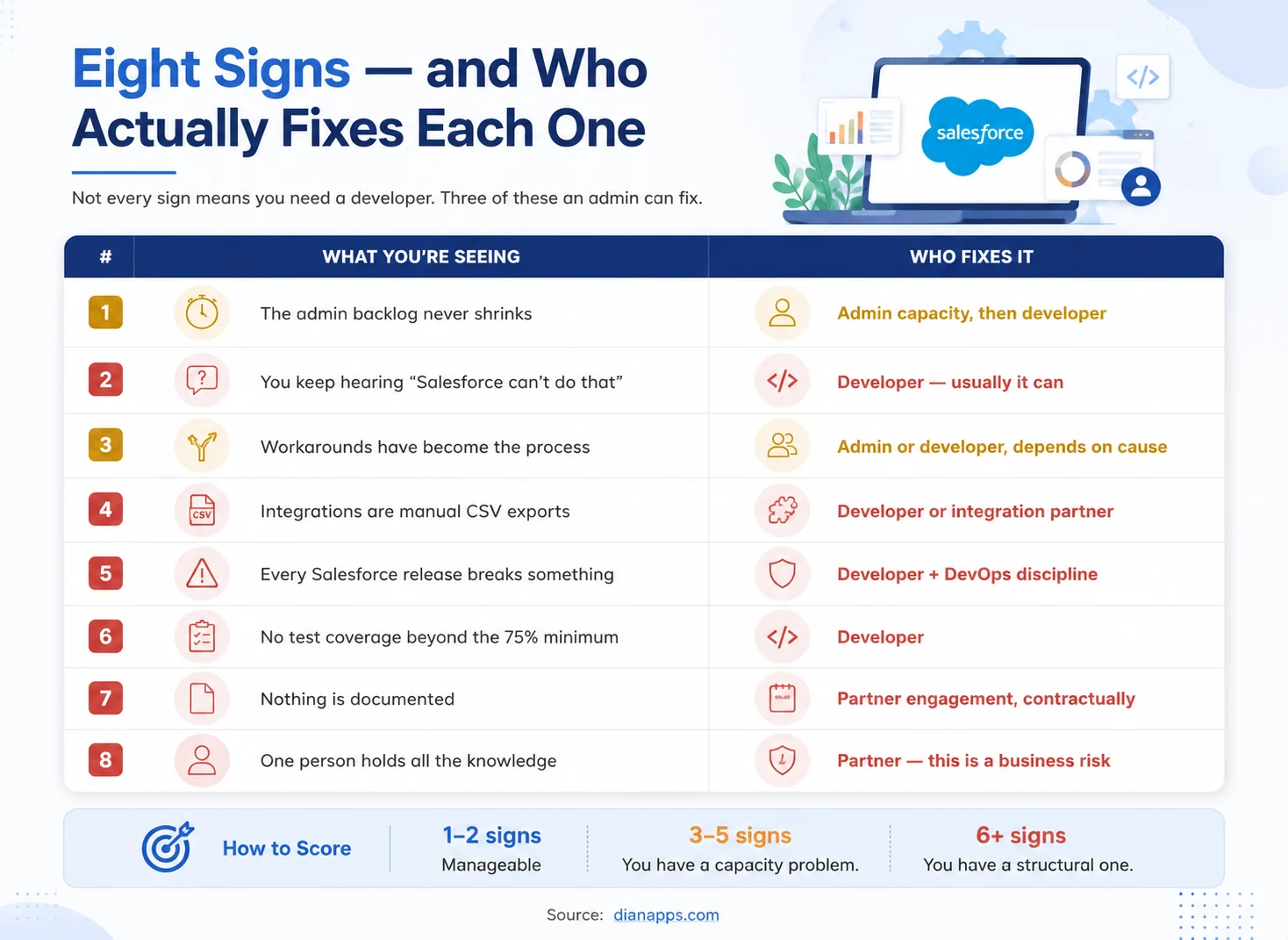
Table of eight signs your business needs Salesforce development help, each mapped to whether an admin, developer, or partner is the right fix.
Sign 1: The admin backlog never shrinks
- What You’re Seeing: Requests go in, some come out, and the total keeps climbing. Your admin is busy, but the queue is longer every month.
- What It Actually Means: Usually capacity, not capability, so before assuming you need a developer, sort the last twenty tickets. In the backlogs we review at DianApps, a substantial share of items labelled “development” turn out to be configuration, fields, Flows, permission sets, report types.
- Who Fixes It: More admin capacity first, a developer only if genuinely more than a third of the backlog needs code.
Sign 2: You keep hearing “Salesforce can’t do that”
- What You’re Seeing: Requests get declined on the basis that the platform doesn’t support them.
- What It Actually Means: It almost always can; the honest translation is “we can’t do that with the tools we’re using,” which is a capability gap, not a platform limit. Real platform limits exist (governor limits, edition restrictions, some Metadata API constraints), but they’re rarer than the phrase suggests.
- Who Fixes It: A developer or a second opinion before you accept the answer. If you’re on Professional Edition, check your edition first; some restrictions are real and licence-based.
Sign 3: Workarounds have become the process
- What You’re Seeing: A shared spreadsheet nobody will give up, a field used for something other than its name. A step where someone re-keys data between screens.
- What It Actually Means: The system stopped matching the process at some point, and people routed around it rather than reporting it. Workarounds are a leading indicator – they appear well before anyone raises a ticket.
- Who Fixes It: Depends on cause. If the process changed and configuration didn’t follow, an admin. If it needs logic, the declarative tools can’t express a developer.
See Configuration vs customization.
Sign 4: Your integrations are manual CSV exports
- What You’re Seeing: Someone exports from Salesforce weekly and uploads it somewhere else. Or the reverse.
- What It Actually Means: A real integration was scoped once, priced and deferred. Meanwhile, the manual process is costing hours a week and introducing errors nobody is measuring.
- Who Fixes It: A developer or integration specialist; check first whether a native connector or an AppExchange app covers it – that’s often cheaper than building.
See Salesforce API integration.
Sign 5: Every Salesforce release breaks something
- What You’re Seeing: Spring, Summer or Winter arrives, and something stops working. Nobody knew until a user reported it.
- What It Actually Means: You have no regression testing and no release process. Salesforce ships three releases a year on their schedule, and each includes API version changes that can break custom components.
- Who Fixes It: A developer plus DevOps discipline – a regression test pack and preview sandbox testing.
See managing Salesforce releases and Salesforce DevOps.
Sign 6: You have no test coverage beyond the 75% minimum
- What You’re Seeing: Deployments pass because coverage clears the gate, then production breaks anyway.
- What It Actually Means: Your tests execute code without asserting anything meaningful. Coverage measures which lines ran, not whether the behaviour is correct. It’s a deployment gate, not a quality measure.
- Who Fixes It: A developer, as remediation work; it’s unglamorous, and it prevents the most expensive class of incident.
See the Apex guide.
Sign 7: Nothing is documented
- What You’re Seeing: No record of why a Flow exists, what an integration does, or which automation sets a particular field.
- What It Actually Means: Every change becomes archaeology first; the new developers take three to six months to be productive largely because of this, and the cost increases with every person who joins or leaves.
- Who Fixes It: A partner engagement with documentation as a contractual deliverable. Not an aspiration – a line item with acceptance criteria. It’s the first thing cut when projects run late.
Sign 8: One person holds all the knowledge
- What You’re Seeing: There’s someone whose holiday makes people nervous.
- What It Actually Means: This is a business continuity risk with a technical cause; it’s the sign most likely to be tolerated for years and most likely to cause a genuine crisis, because it resolves suddenly on the day they resign.
- Who Fixes It: A partner, deliberately, not to replace that person but to document what they know and spread it across more than one head.
Other 2 Critical Signs
You are Experiencing “Trigger Sprawl” and Flow Chaos
What You’re Seeing: Updating a single customer record causes performance lags, or worse, conflicting automations overwrite each other’s data.
What It Actually Means: Multiple Apex Triggers and conflicting Record-Triggered Flows are running simultaneously on the same object without a unified architecture framework. The system doesn’t know what order to process the data in.
Who Fixes It: A Salesforce Developer or Architect to refactor your codebase into a single-trigger framework.
Sandboxes Break Regularly Due to Hardcoded IDs
What You’re Seeing: Features work perfectly in your Sandbox environment but immediately throw errors or point to the wrong data when deployed to Production.
What It Actually Means: Your previous developers hardcoded specific record IDs, URLs, or credentials directly into Apex code, Validation Rules, or Flows instead of using Custom Metadata Types or Environment Variables.
Who Fixes It: A Salesforce Developer to clean out hardcoded liabilities and secure your deployment pipeline.
Admin vs. Developer vs. Architect: Defining the Boundaries
To fix these signs efficiently, you must match the problem to the exact technical role:
- Salesforce Admin (Declarative Framework): Uses out-of-the-box configuration. They manage user permissions, build standard Record-Triggered Flows, adjust page layouts, and generate operational reports.
- Salesforce Developer (Programmatic Customization): Writes custom code. They engineer Apex Classes, construct scalable Lightning Web Components (LWCs), map custom REST/SOAP APIs, and write test classes.
- Salesforce Technical Architect (Infrastructure Design): Designs the enterprise ecosystem. They handle Large Data Volume (LDV) strategies, multi-org security governance, and end-to-end platform integrations.
Which One Do You Actually Need?
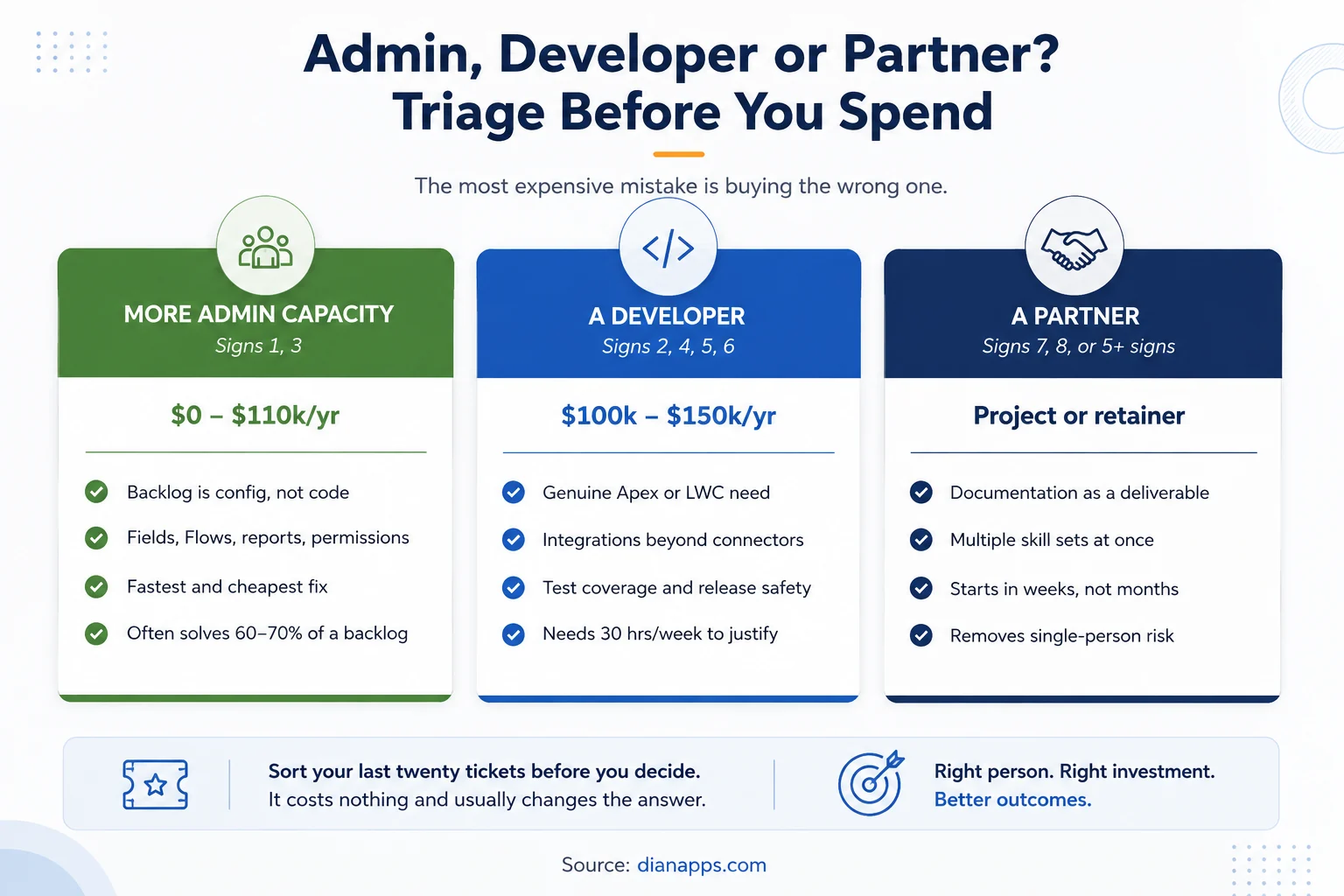
Triage comparison showing when to add admin capacity, when to hire a developer, and when to engage a partner, with cost ranges for each.
The Most Expensive Mistake Is Getting the Wrong One: Hiring a developer to clear an admin backlog gets you a well-paid person doing configuration. Hiring an admin when the problem is undocumented technical debt gets you someone who can’t safely change anything. When the problem genuinely requires development, Salesforce Development Services can provide the technical capacity, specialist skills, and architecture support that an overloaded admin team may not have.
Related: Admin vs developer vs architect · How to hire a Salesforce developer · In-house vs outsourced
Not sure which of the three you need?
Send us your last twenty tickets; we’ll sort them into configuration, development, and things that shouldn’t be built at all, and tell you honestly whether you need a hire, a partner, or neither.
Get a free backlog review from our Salesforce development team →
The Self-Check
Score one point per sign that applies today.
| Score | What it means | What to do |
|---|---|---|
| 0-2 | Normal operating friction | Nothing. Every org has some of this. |
| 3-5 | A capacity problem | Add admin time or a developer. Sort the backlog first. |
| 6-8 | A structural problem | Hiring one person won’t fix it. You need process, documentation, and ownership - usually a partner engagement. |
- One Weighting Worth Knowing: Signs 7 and 8 count double in practice; an org with only those two has a bigger problem than an org with five of the others because throughput problems are visible and knowledge problems aren’t until they detonate.
When You Don’t Need Outside Help
The honest counterweight, because most articles skip it:
- Your Backlog Is Mostly Configuration, And Your Admin Has Capacity: Adding a developer adds cost, not throughput.
- The Requests Come From One Stakeholder And Haven’t Been Validated With Users: Fix the requirements process first.
- You’re Customising To Preserve A Process That Should Be Redesigned: Development makes a bad process faster and harder to change.
- A Standard Feature Or AppExchange App Already Covers It: Check properly before building. See custom Salesforce development.
- The Work Is Genuinely One-Off And Small. A short contract beats a permanent commitment.
What a Partner Engagement Actually Looks Like
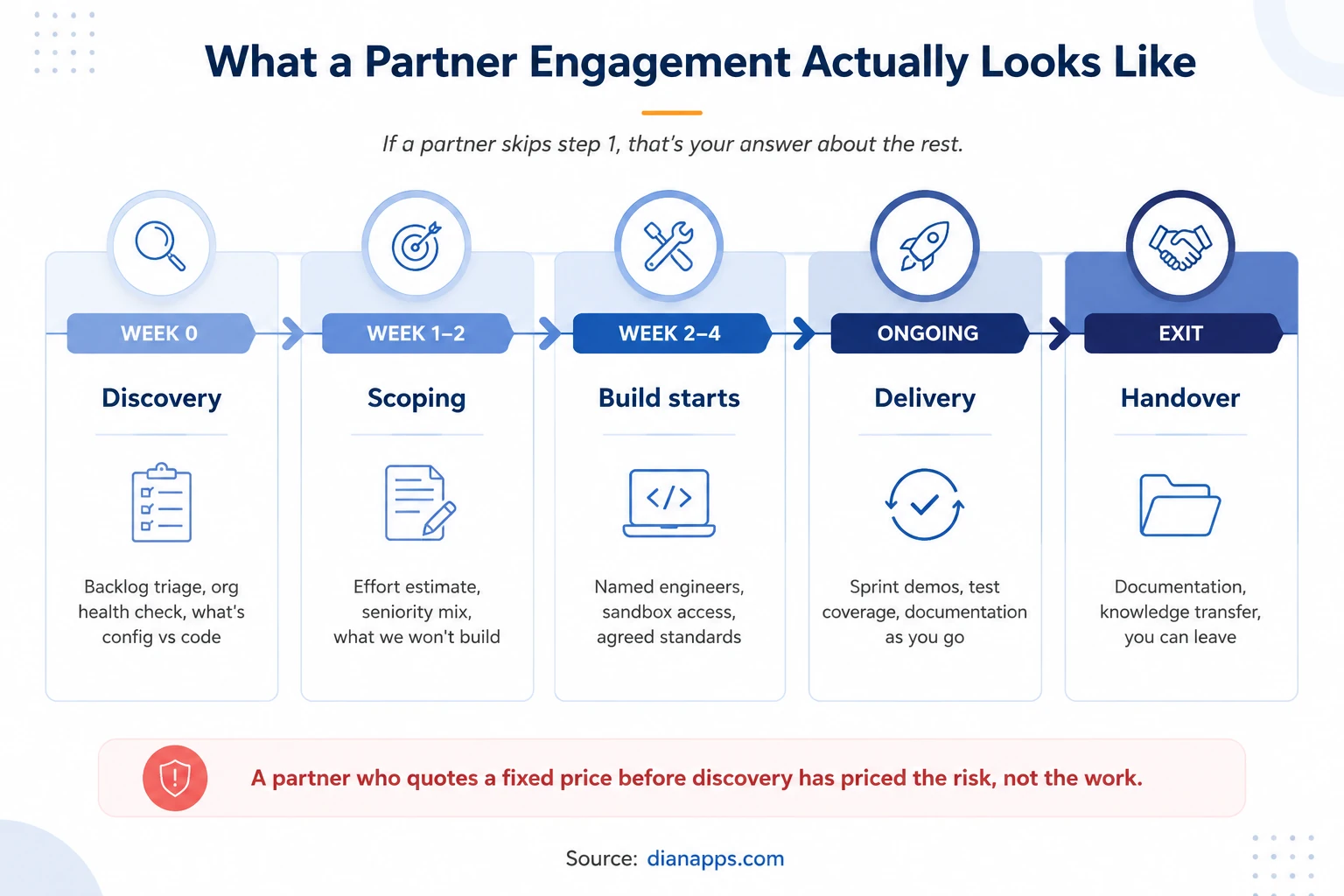
Five-stage partner engagement timeline from discovery through scoping, build start, delivery, and handover
- Discovery Comes First, Always: A partner who quotes a fixed price before looking at your org has priced the risk, not the work, and you’re paying for their uncertainty either way.
- What To Insist On In The SOW: Named engineers with certifications, documentation as a deliverable with acceptance criteria, a defined handover, and clarity on who regression-tests against Salesforce releases.
Deeper: how to choose a Salesforce development company · Salesforce development cost
Where to Go Next
If you’ve decided you need help, how to choose a Salesforce development company covers partner tiers, certifications and red flags, and the top Salesforce development companies has a shortlist.
If you’re weighing hiring against partnering, see in-house vs outsourced Salesforce development and how to hire a Salesforce developer.
If you’re not sure the work needs code, start with configuration vs customization and custom Salesforce development.
The complete Salesforce development guide is the hub for everything technical above.
Start With the Backlog, Not the Hire
Every organisation that contacts us about Salesforce development has a list. Very few have sorted it.
That’s the first thing we do, and it’s free. We’ll take your last twenty tickets and split them into configuration your admin can clear, development that genuinely needs code, and items that shouldn’t be built at all. Then we’ll tell you which of the three – admin, developer, partner – actually solves your situation.
Sometimes the answer is none of them, and we’ll say so.
We’re a certified Salesforce Consulting Partner with teams across the US, UK, Australia, Canada, UAE and India.
Need Help With Your Salesforce Org?
Have a Salesforce project in mind? Let’s discuss your requirements and find the right way forward.
 0 comments










Your email address will not be published. Required fields are marked *