















 0 comments





Key Takeaways:
- Pipedrive suits small teams with simple sales pipelines and minimal admin needs.
- Monday CRM works well for teams already using Monday for project management.
- Salesforce offers advanced customisation, industry clouds, and complex workflow support.
- Hidden costs, seat minimums, and add-ons can increase advertised CRM pricing.
- Migration costs and process complexity matter more than licence prices alone.
Quick Answer: Pipedrive is generally the best fit for teams under 20 users with straightforward sales processes, while Monday CRM suits businesses already using Monday for project management. Salesforce becomes more valuable when teams need complex workflows, advanced customisation, or industry-specific capabilities. Before deciding, compare realistic subscription costs, setup requirements, administrative effort, and potential migration expenses.
We implement Salesforce, and for most teams under 50, it isn’t the right answer.
That’s worth saying up front, because the two highest-ranking pages for this comparison are written by Pipedrive and Monday, each explaining why it beats Salesforce, and a partner’s page arguing the opposite would be equally predictable.
The genuinely useful information here isn’t which platform is best. It’s what each actually costs once you use it properly, how long each takes to run, and the two specific situations where a small team should still choose Salesforce, especially when you understand what Salesforce is designed to do and which capabilities a smaller business might actually need.
Advertised Price vs What You’ll Actually Pay
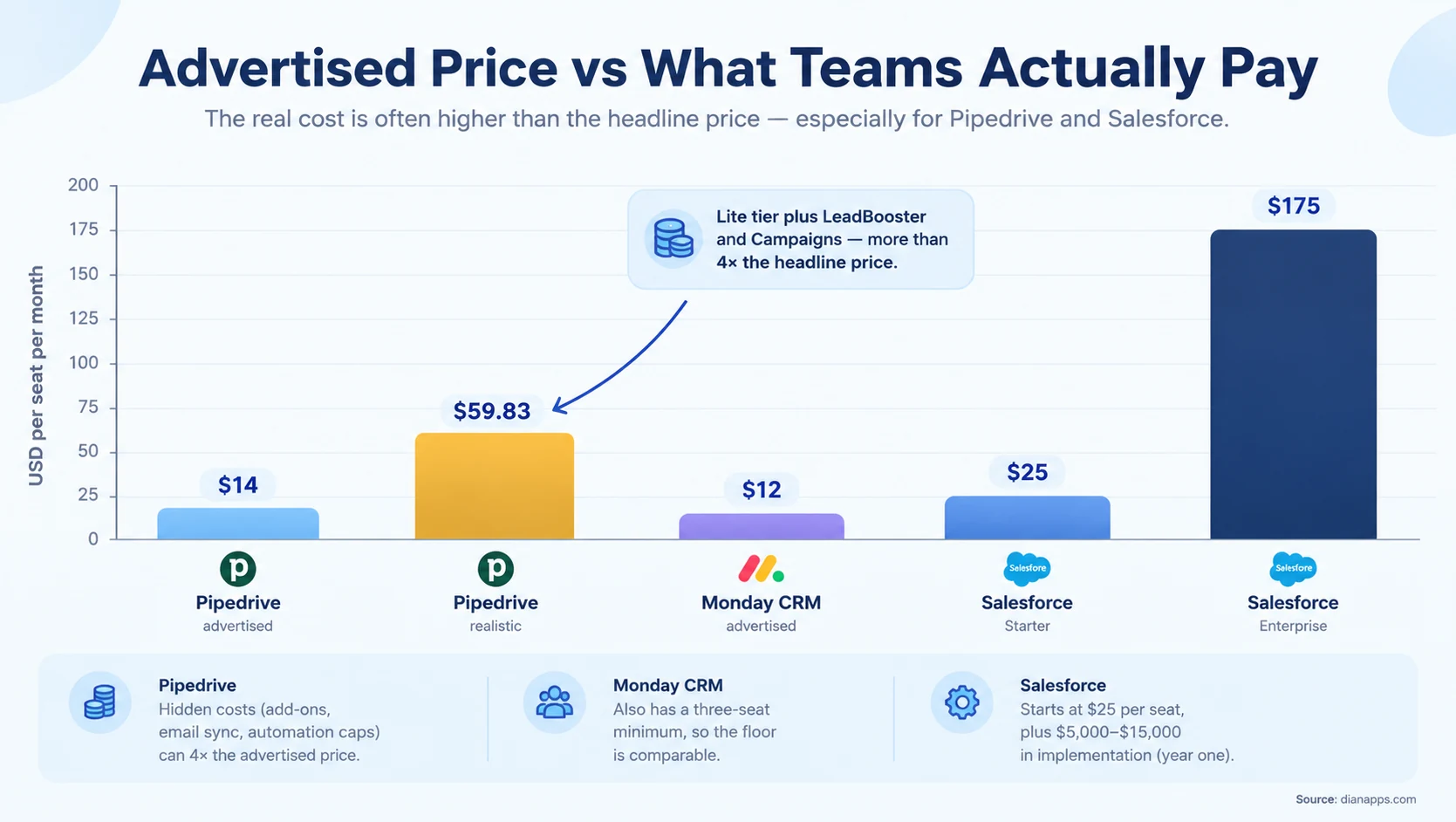
Pipedrive’s headline price is the least reliable number in this comparison. A typical small business on the Lite tier plus LeadBooster and Campaigns pays around $59.83 per seat per month, more than four times the advertised $14.
Four Pipedrive constraints worth knowing before you commit:
- Three-Seat Minimum: Even a solo user pays for three, so the real floor is about $36 per month rather than $14.
- No Email Sync On The Entry Tier: Email integration requires Standard at $17 per seat, and email sync is not an optional extra for a sales team.
- Automation Caps: Standard limits you to 250 automations per month, which an active team reaches faster than expected.
- Storage Limits: On lower tiers, pushing you up as you accumulate attachments.
Monday CRM also has a three-seat minimum at $12 per seat, so its floor is comparable.
And Salesforce’s honest number is $25 for Starter Suite or $175 for Enterprise, plus implementation of roughly $5,000–$15,000 in year one for a small team. There’s no hiding that; it’s the highest cost of the three by a wide margin.
Related: Salesforce pricing 2026
A Five-Person Team, Costed Properly
| Annual licences | First-year implementation | Year one total | |
|---|---|---|---|
| Pipedrive Professional | ~$2,940 | Minimal | ~$3,000 |
| Monday CRM Pro | ~$1,800 | Minimal, some config | ~$2,000 |
| Salesforce Starter Suite | ~$1,500 | Low | ~$2,500 |
| Salesforce Enterprise | ~$10,500 | $5,000–$15,000 | ~$16,000–$26,000 |
Salesforce Starter Suite is competitive at this size, and it’s the row most comparisons omit entirely. At $25 per seat, it undercuts Pipedrive Professional, and it’s the honest answer for a small team that wants to be on Salesforce.
What Starter doesn’t give you is custom objects, meaningful automation, or record types. If you need those, you’re at Pro Suite ($100) or Enterprise ($175), and the comparison changes completely.
Related: Salesforce editions compared · Pro Suite explained
Setup Time and Who Runs It
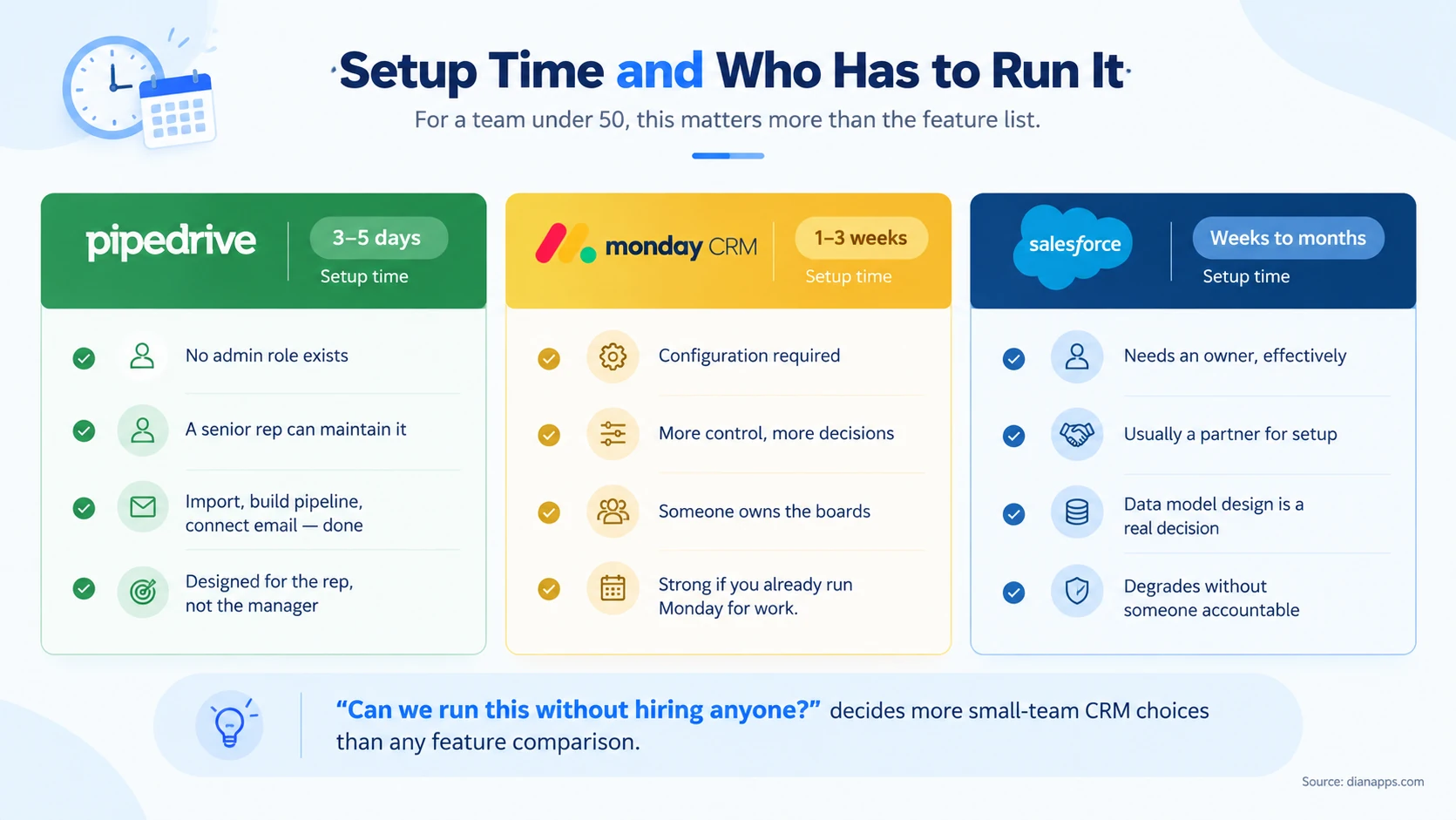
For a team under 50, this decides more than the feature list does.
Pipedrive has no admin role, and that’s deliberate. A five-person team can be fully configured in three to five business days: import contacts, build a pipeline, connect email. A senior rep can maintain it without training or certification.
Monday CRM sits in between. It requires configuration and someone to own the boards, but that person doesn’t need specialist skills. The trade is more control for more decisions.
Salesforce needs an owner. Not a nice-to-have; without someone accountable, data quality drops, automation breaks silently, and reports lose credibility within a couple of years. For a 20-person company, that’s usually a partial role rather than a hire, but it has to be somebody.
The question that decides it: Can you run this without hiring anyone? If the honest answer is no and you can’t spare someone, that points away from Salesforce regardless of anything else.
Not Sure Which CRM Fits Your Team?
Tell us about your team size, sales process, and workflow requirements. We’ll help you understand which CRM fits your needs without paying for features you won’t use.
Where Each One’s Ceiling Is
| Pipedrive | Monday CRM | Salesforce | |
|---|---|---|---|
| Custom objects | Limited | Board-based, flexible | Yes, from Pro Suite |
| Structured CRM relationships | Yes | Weak | Yes |
| Multi-stage approvals | No | Basic automations | Yes |
| Record types/process variation | No | Via separate boards | Yes, from Enterprise |
| Industry data models | No | No | Health, FSC, Manufacturing and others |
| Build custom applications | No | Limited | Yes, it’s a platform |
Monday’s weakness is worth being specific about. It was built as a work management platform with CRM views layered on, and it lacks the structured relationships between contacts, deals, and activities that a purpose-built CRM has. For simple pipelines, that’s fine. For anything where the relationships between records carry business logic, it shows.
Pipedrive’s ceiling is deliberate. It’s a sales pipeline tool, and it’s excellent at that. It isn’t trying to be a platform, and evaluating it as one misses the point.
Salesforce’s ceiling is far higher and mostly irrelevant to a team of 30. The question isn’t which can do more; it’s whether you’ll ever need what the extra buys, including the wider range of Salesforce products available for sales, service, marketing, commerce, and other business needs.
Related: Salesforce clouds compared
When a Small Team Should Still Choose Salesforce
Two situations, and they’re specific.
- Your sales process is genuinely complex: Multiple product lines with different processes, multi-stage approvals, territory rules, or a data model that isn’t leads-and-deals. Record types and custom objects exist for exactly this, and neither Pipedrive nor Monday has an equivalent.
- You’re in a regulated industry: Health Cloud, Financial Services Cloud, and the other industry clouds ship data models that would otherwise be a six-figure build. A 30-person financial advice firm may genuinely be better on Salesforce than on a cheaper generalist CRM. Comparing Salesforce clouds and their capabilities can help determine whether an industry-specific solution justifies the additional investment.
- A third, weaker case: you’re growing fast and know you’ll be past 100 people within two years. Migration costs money and disruption, and starting where you’ll end up has real value, but only if the growth is genuinely predictable.
- What isn’t a good reason: “Salesforce is the market leader.” At 20 people, that’s optionality you’re paying for and won’t use.
In these cases, Salesforce consulting services can help smaller businesses evaluate their industry-specific requirements, configure the right capabilities, and avoid investing in features they may not need.
Related: Salesforce for startups and SMBs
Weighing a simple CRM against Salesforce for a small team?
We’ll tell you honestly which fits, including when the answer is Pipedrive, and we’re not the right partner for you.
The Verdict
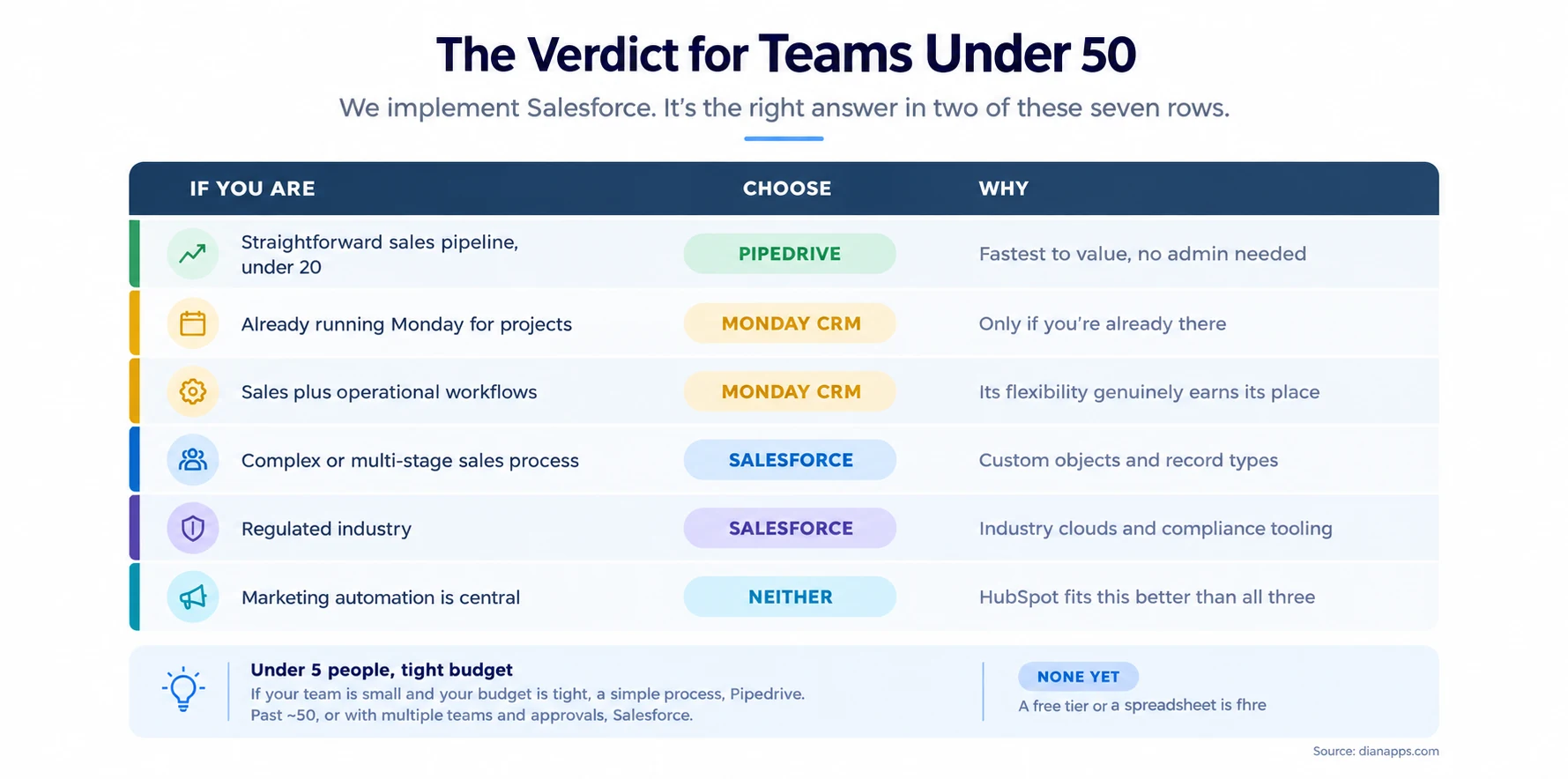
Salesforce is the right answer in two of seven rows, which is the honest distribution for this size of team.
The threshold most sources converge on: under roughly 20 seats with a straightforward process, Pipedrive wins on cost and speed. Past 50 seats, or when you need multiple teams, territories, and approval workflows, Salesforce’s depth starts justifying its price.
Between 20 and 50 is genuinely a judgement call, and it turns on process complexity rather than headcount.
Growth Path and Migration Cost
All three have an upgrade path within themselves, and the honest question is what happens when you outgrow the platform entirely.
Pipedrive to Salesforce is the most common migration in this group. It’s a real project; your pipeline data maps reasonably, but automation, integrations, and reporting all get rebuilt.
Monday to anything is harder than it looks, because Monday’s board structure doesn’t map cleanly onto a relational CRM model. Exporting boards isn’t the same as migrating a data model.
Salesforce Starter to Enterprise is the easiest path here: same platform, no migration, just an edition change and configuration work.
The arithmetic worth doing: if you’ll migrate within two years, the migration cost frequently exceeds the licence saving. If you won’t, take the cheaper tool now.
Related: Salesforce alternatives and switching cost
Where to Go Next
For other head-to-heads, Salesforce vs HubSpot · Salesforce vs Zoho · Salesforce vs Dynamics 365 · Salesforce vs custom CRM
For the Salesforce entry tiers specifically, Pro Suite explained, Salesforce editions compared, and Salesforce for startups and SMBs.
For full cost detail, Salesforce pricing 2026 and Salesforce ROI.
For whether you’ve outgrown what you have, 10 signs you’ve outgrown your CRM.
We’ll Tell You When It’s Pipedrive
There’s no version of this comparison where a 12-person team with a straightforward pipeline should be paying $175 a seat and hiring an administrator.
We say so because a Salesforce implementation that shouldn’t have happened fails, and a failed project costs us more than the revenue was worth.
We’re genuinely useful in the middle ground: teams between 20 and 50 where the answer depends on how complex the process really is, and that’s a conversation, not a comparison table.
Tell us how your sales process actually works
We’ll tell you whether it needs a platform or a pipeline tool, and if it’s the latter, which one.
 0 comments













Leave a Comment
Your email address will not be published. Required fields are marked *