















 0 comments





Key Takeaways :
- Agile works well for Salesforce, but teams must adapt sprint planning to mixed admin-and-developer teams, sandbox constraints, and three annual platform releases.
- A Salesforce story is not done when it works in a sandbox. It needs to be tested, documented, reviewed, and deployment-ready under a clear Definition of Done.
- Environment strategy and release planning belong inside the sprint model, which makes understanding Salesforce sandboxes and release management essential to predictable delivery.
- One shared backlog works better than separate admin and developer queues, particularly when teams need to decide whether work belongs in Flow, Apex, configuration, or custom development.
Quick Answer: Agile fits Salesforce well, but four things need adapting: mixed admin-and-developer teams estimating very different work, declarative work that looks finished before it’s deployable, three annual platform releases you don’t control, and sandbox refresh cycles that constrain sprint cadence. Get the Definition of Done right before sprint one and most of the rest follows. Teams planning this way should also understand the wider Salesforce development lifecycle, including how work moves from discovery and design through development, testing, deployment and maintenance.
Almost every article on this topic explains what Scrum is, then asserts that Salesforce suits it. Both parts are true, and neither is useful if you’re actually running a Salesforce project.
The interesting question is what’s different. Generic Scrum assumes a team of developers working on one codebase with environments they control. Salesforce breaks all three assumptions, and the teams that struggle are usually the ones running textbook Scrum without adapting it.
Why Salesforce Suits Agile
Worth stating briefly, because it’s genuine.
- Salesforce Runs Agile Itself: The company moved from waterfall to agile in 2006, across a product organisation delivering three major releases a year. That’s not marketing – it’s a large-scale case study in exactly this context.
- The Platform Shortens The Build-Feedback Loop: A working prototype can exist in a sandbox in hours rather than weeks, which is the loop agile depends on.
- Requirements Genuinely Do Change: CRM sits on top of business processes and business process changes. Locking scope twelve months ahead assumes a stability most organisations don’t have.
And the platform itself changes three times a year, whether your project plan accounts for it or not.
What’s Actually Different About Agile on Salesforce
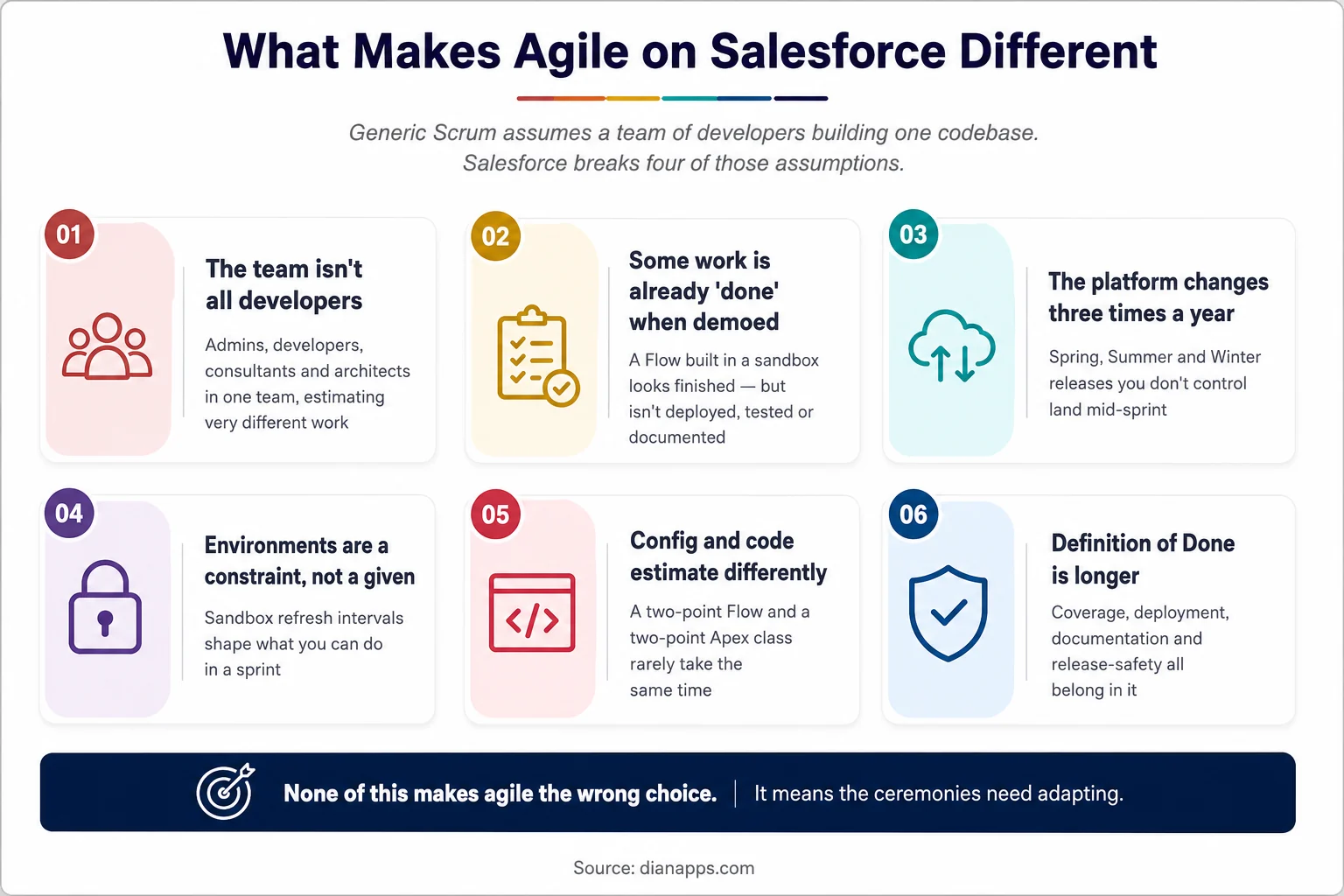
Six differences between generic Scrum and agile on Salesforce, covering team composition, demo-ready work, platform releases, environments, estimation and Definition of Done
The team isn’t all developers
A Salesforce squad typically holds an admin, a developer, a consultant or BA, and part of an architect. They estimate very differently, and a story that’s trivial for one is unfamiliar to another.
What Works: Estimate as a team, out loud, with the person who’ll do the work explaining why. The conversation matters more than the number.
Some work looks “done” before it is
This is the Salesforce-specific trap: an admin builds a Flow in a sandbox, demos it in the sprint review and everyone agrees it’s finished. It isn’t deployed, isn’t tested, isn’t documented, and hasn’t been checked against the next platform release.
Generic Scrum doesn’t warn you about this because in most software the demo is running code from the branch. On Salesforce, declarative work is demoable long before it’s shippable, which is exactly why the Definition of Done matters more here than elsewhere.
The platform changes three times a year
Spring, Summer, and Winter releases land on Salesforce’s schedule. Plan a sprint across a release window without accounting for it, and you’ll spend the sprint firefighting.
- What works: treat each release as a known event in your roadmap. Reserve capacity for regression testing in the sprint that spans it and use preview sandboxes to test early. See managing Salesforce releases.
Environments constrain your cadence
Full sandboxes refresh every 29 days. Partial copies every five. If your sprint cadence assumes a fresh environment every fortnight, the maths doesn’t work.
- What works: design the environment strategy alongside the sprint cadence, not after it. See Salesforce sandboxes explained.
Config and code don’t estimate the same way
A two-point Flow and a two-point Apex class rarely take the same effort, because the Apex needs tests, review, and deployment discipline the Flow doesn’t automatically get.
- What works: either separate the tracks with their own velocities or – better – apply the same Definition of Done to both so the points mean the same thing.
Writing Salesforce User Stories
Poorly defined requirements are a leading contributor to project failure – industry analysis puts the figure near 35%. On Salesforce, where declarative and custom work intersect with integrations, vague stories are expensive.
The Standard Format Still Applies: As a [role], I want [capability], so that [outcome].
What makes a Salesforce story good:
- Name The Actual Role: “As a user” tells you nothing. “As an inside sales rep working a renewal list” tells you which page layout, which permission set, and which profile.
- State The Outcome, not The Implementation: “As a sales manager, I want to see at-risk renewals so that I can intervene early” leaves room for a report, a dashboard component, or a Flow-driven alert. “I want a custom object with a Lightning component” has already made the design decision – usually wrongly.
- Write Testable Acceptance Criteria: “Works correctly” isn’t. “Renewals within 30 days with no activity in 14 days appear in the list, sorted by value descending” is.
- Split By User Value not By Technical Layer: “Build the object” then “build the automation” then “build the page” delivers nothing until all three are done. Slice thinly enough that each story delivers something demonstrable.
- Note the Non-Functional Requirements: Data volume, permissions, mobile, and which profiles need access. These are where Salesforce stories quietly expand mid-sprint.
- On Prioritisation: MoSCoW is easy for stakeholders to engage with; WSJF is better where you need to defend sequencing on economics. Either beats a backlog ordered by who asked loudest.
Sprint Design for Salesforce Teams
Two Weeks Is The Working Default: One week rarely leaves room for testing and deployment on config-heavy work; four weeks loses the feedback loop that justifies agile.
Ceremonies, adapted:
- Backlog refinement matters more than in generic Scrum, because “can this be done declaratively?” is a design conversation that has to happen before estimation. Answer it in refinement, or you’ll answer it mid-sprint.
- Sprint planning should explicitly ask what needs a sandbox refresh, what depends on a platform release, and what needs an architect’s input before work starts.
- Daily standup works unchanged.
- Sprint review is where the “looks done” trap lives. Demo from the environment closest to production, not from the builder’s own sandbox.
- Retrospective works unchanged and is where the Definition of Done gets tightened over time.
- Reserve capacity every sprint for production support, release regression, and technical debt. A team planning at 100% capacity is planning to miss.
Related: Salesforce DevOps and CI/CD
A Salesforce Definition of Done
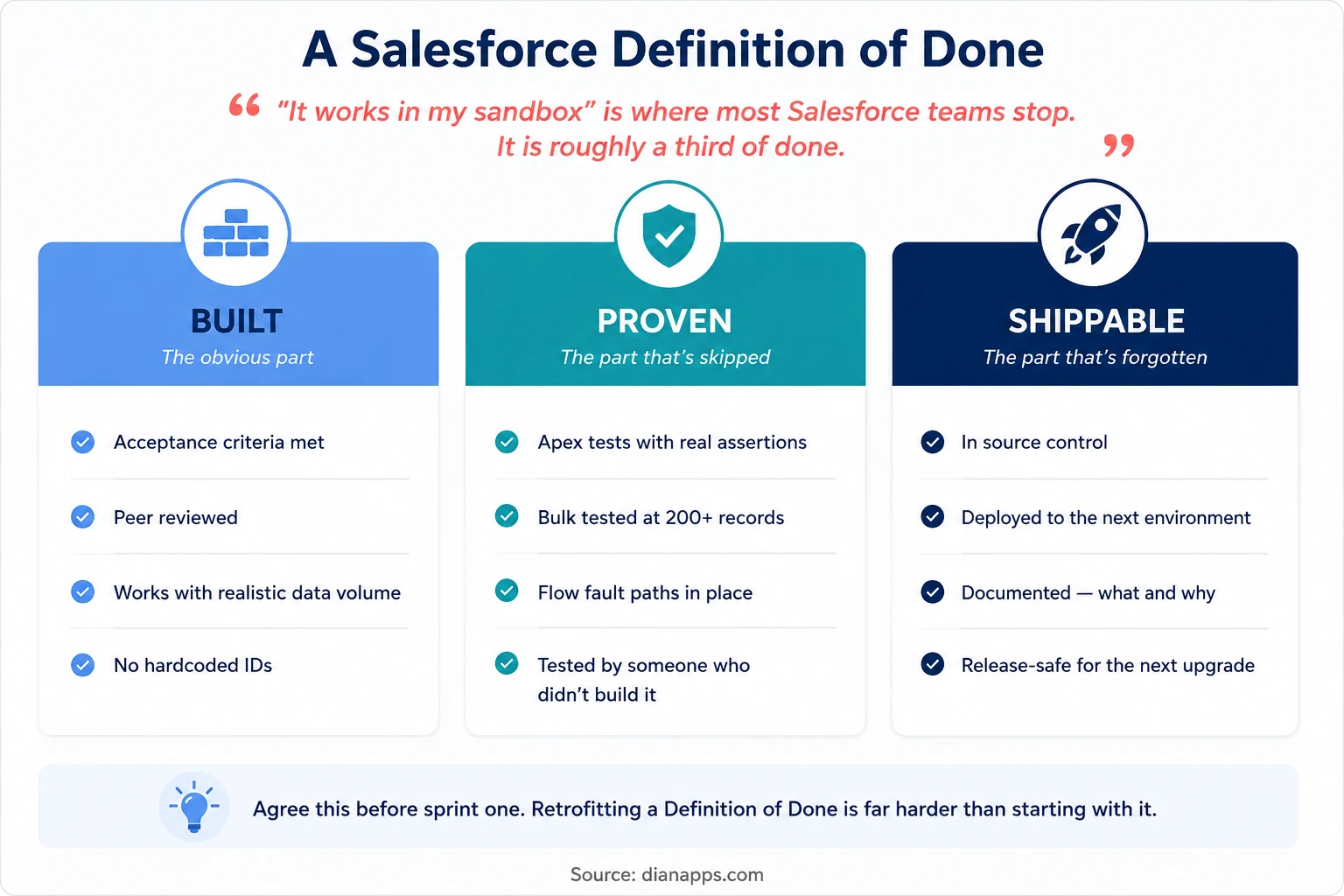
Three-Stage Definition of Done for Salesforce: Built, proven, and shippable, with specific criteria under each
This is the single highest-leverage thing to get right and the most commonly skipped.
“It works in my sandbox” is roughly a third of done: A story is finished when it’s built, proven, and shippable, and the second two are where Salesforce teams consistently lose time later.
- Agree This Before Sprint One: Retrofitting a Definition of Done onto a team that’s been shipping for six months means either a large remediation backlog or quietly deciding the old work doesn’t count. Neither is comfortable.
Related: Apex testing · Salesforce Flow
Managing a Mixed Config and Code Backlog
One backlog, not two: splitting into an “admin backlog” and a “developer backlog” is how you end up with two teams who don’t talk. When that backlog starts exceeding the capacity or expertise of the internal team, Salesforce Development Services can provide the additional engineering and architecture support needed to keep complex work moving without separating admins and developers into disconnected delivery tracks.
What to do instead:
- Tag Stories By Type: Configuration, development, integration, data, for reporting, while keeping one prioritised list.
Let the “Can This Be Declarative?” Questions happen in refinement, with both admin and developer present. This is where the most money is saved and lost. See Flow vs Apex.
- Track Dependencies Explicitly: Salesforce work has more of them than typical software – a field has to exist before the Flow, the Flow before the LWC, the permission set before anyone can test it.
- Keep Technical Debt Visible In The Same Backlog: Debt that lives in a separate document never gets prioritised.
Make Salesforce Delivery More Predictable
Get experienced Salesforce developers, architects and delivery support to bring structure to your backlog, sprints, environments and releases.
Release Trains vs Continuous Deployment
- Release Trains: Fixed dates, whatever’s ready ships, suit organisations with change advisory boards, training requirements or regulated environments. Predictable and slower.
- Continuous Deployment: Ship when done, requires a mature pipeline with automated testing, and it’s the faster model when you have one.
- Most Mid-Market Salesforce Teams Land In Between: Deploy to production every sprint on a fixed day, with a hotfix path outside that cadence.
- The Prerequisite For Either Is A Working Pipeline: A team deploying with change sets can’t do continuous anything, regardless of methodology. See Salesforce DevOps.
When Waterfall Genuinely Fits
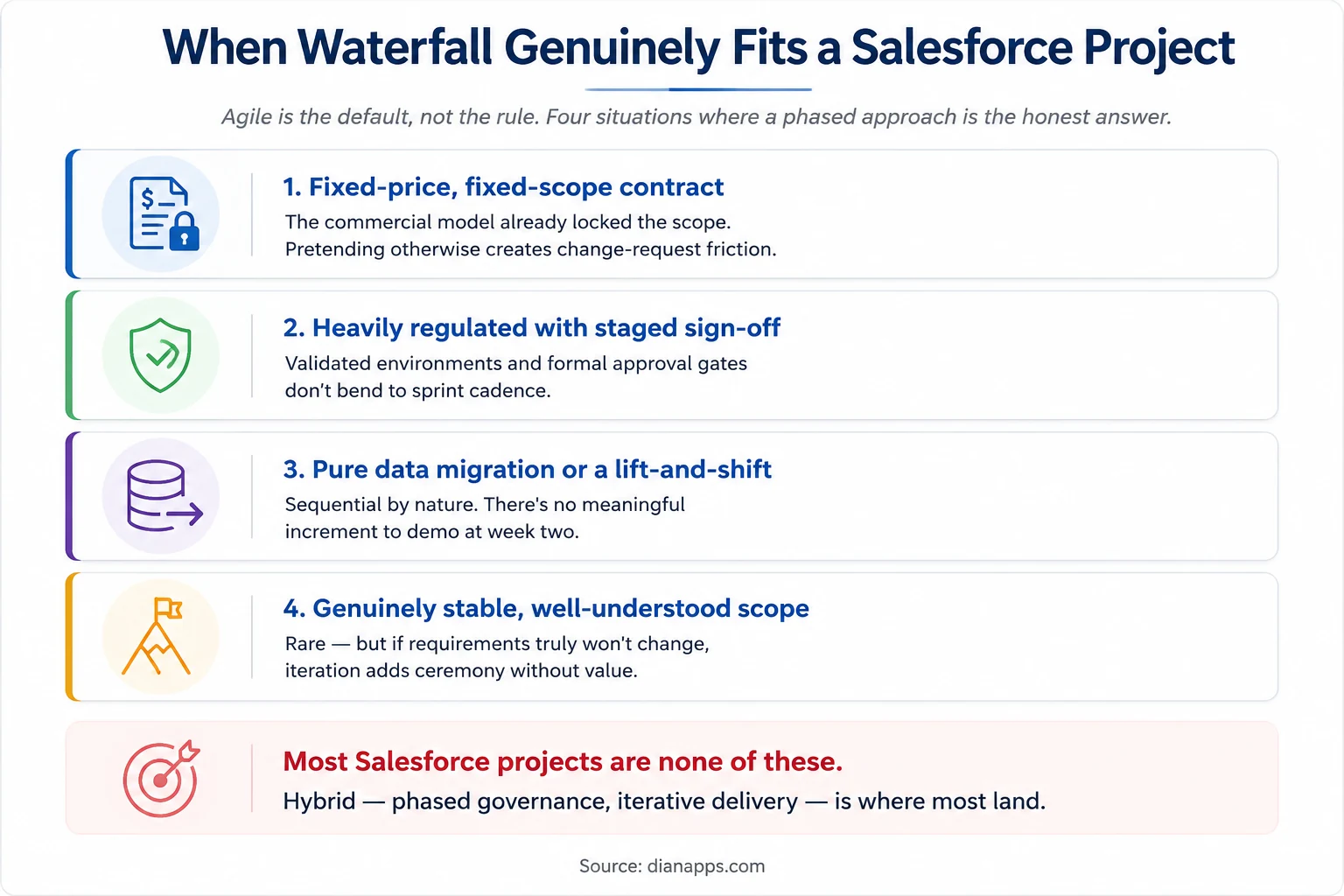
Four situations where a waterfall or phased approach fits a Salesforce project better than agile
Agile is the default, not the rule. Four situations where a phased approach is the honest answer and pretending otherwise creates friction rather than removing it.
The Realistic Middle Ground Is Hybrid: Phased governance and funding, with iterative delivery inside each phase. Discovery and design happen up front, build and test happen in sprints, and the steering committee gets the milestone structure it needs.
Most Salesforce programmes land here rather than at either extreme.
Related: the Salesforce implementation process
Where to Go Next
For the environments your sprints depend on, see Salesforce Sandboxes Explained.
For the pipeline that makes sprint-end deployment possible, Salesforce DevOps and CI/CD.
For the platform releases that interrupt your cadence, see Managing Salesforce Releases.
For the refinement question that saves the most money, Flow vs Apex and Configuration vs Customization.
For the wider delivery picture, The Salesforce Implementation Process.
The Complete Salesforce Development Guide is the hub.
When the Process Is the Problem
Teams rarely fail because they picked the wrong methodology. They fail because the Definition of Done was never agreed, the environment strategy was designed after the sprint cadence, and the backlog had dependencies nobody mapped.
Those are all fixable in a few weeks, and they’re usually cheaper to fix than the delays they cause.
We’re a certified Salesforce Consulting Partner, and setting up delivery for mixed admin and developer teams is routine work for us.
Is Your Salesforce Delivery Falling Behind?
Tell us where your sprints, backlog, environments, or releases are getting stuck, and our Salesforce experts can help identify the right fix.
 0 comments










Leave a Comment
Your email address will not be published. Required fields are marked *