















 0 comments





Key Takeaways:
- Salesforce costs scale with user count, while custom CRM costs are driven more by the initial build, maintenance, hosting and engineering requirements.
- Published Salesforce vs custom CRM break-even points vary widely because companies use different assumptions about build cost, users, maintenance and functionality.
- A fair comparison should consider total cost of ownership, not Salesforce subscription fees versus a one-time custom development quote.
- Salesforce provides an established data model, security and compliance infrastructure, ecosystem, AI capabilities and regular platform releases.
- Custom CRM offers exact workflow fit, data sovereignty, source-code ownership and costs that do not directly scale with headcount.
- Don’t treat custom development as a one-time expense. Ongoing maintenance and engineering capability need to be budgeted from the beginning.
- For many organizations, the strongest option is hybrid: Salesforce for core CRM and custom applications for differentiated processes.
- Salesforce may become harder to justify when licensing, customization, and administration costs keep rising while every new requirement requires custom development.
- Building a custom CRM can be a poor choice when processes are still changing, the team is small, or the organization lacks engineering capability.
Quick Answer: Salesforce vs custom CRM does not have one universal break-even point. Salesforce becomes more expensive as user count grows because licensing is seat-based, while a custom CRM requires a larger upfront investment but does not scale directly with headcount. The better choice depends on five-year total cost, workflow complexity, growth rate, maintenance requirements, and whether your CRM process is a competitive advantage. For many businesses, a hybrid approach using Salesforce for CRM and custom software for specialized workflows offers the best balance of cost and flexibility.
Search this question, and you’ll find confident break-even figures ranging from 30 users to 300 users.
That’s not a rounding difference. It’s a ten-fold spread on the single most important number in the decision, and once you notice who published each figure, the pattern becomes obvious.
We build both. We do both Salesforce work and custom application development, so we have no structural reason to prefer one answer. So here’s the version that starts by explaining why everyone else’s numbers disagree.
Why Every Published Break-Even Disagrees
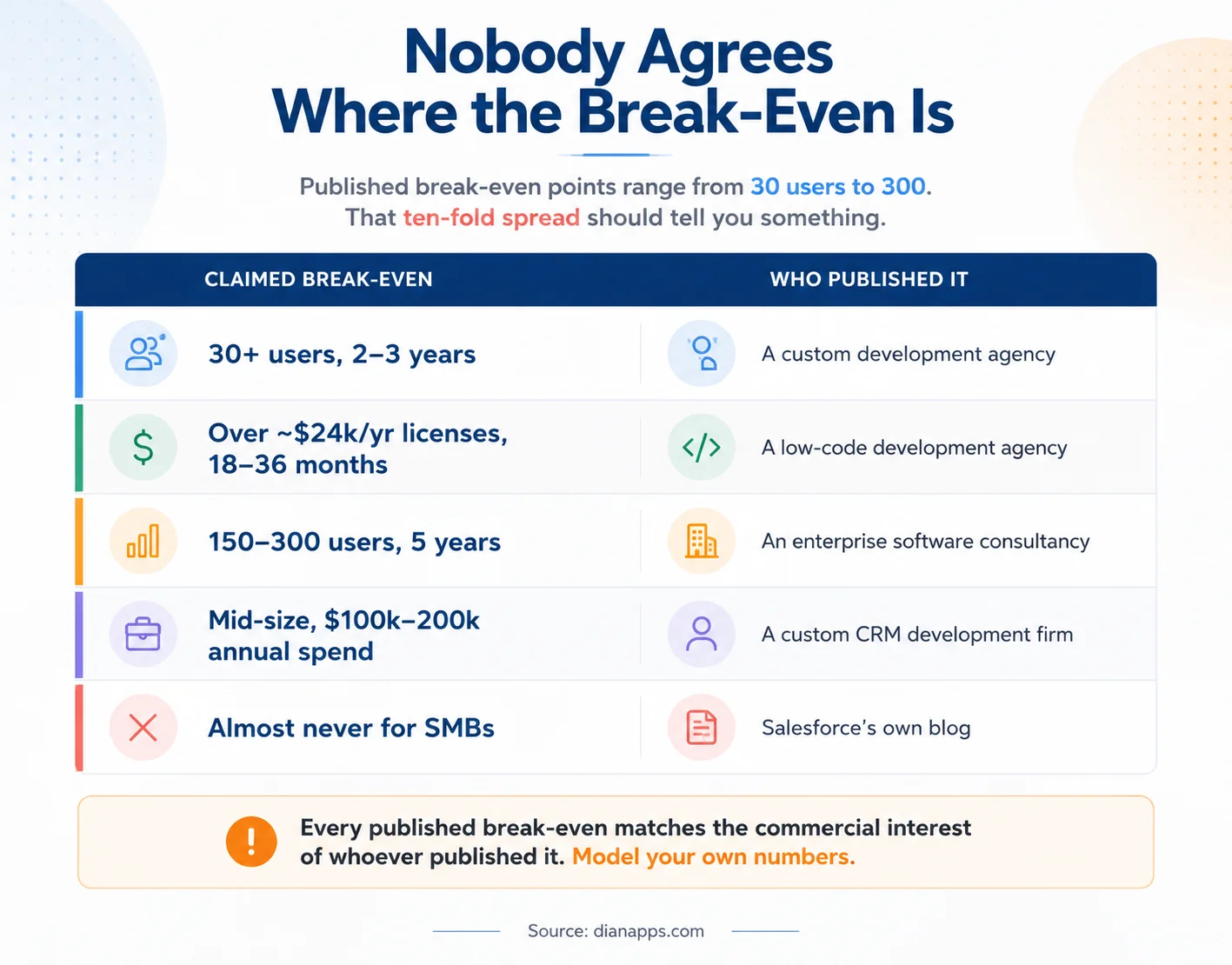
Table showing published break-even points ranging from 30 users to 300 users, with the type of company that published each
Look at the right-hand column: custom development agencies publish low break-even points. Enterprise consultancies publish higher ones. Salesforce publishes “rarely.”
None of them are lying; they’re just modelling different scenarios with different assumptions about build cost, maintenance, growth rate, and what counts as comparable functionality. But the assumptions aren’t disclosed, and the conclusions happen to align with what each firm sells.
What To Do With That: Treat every published break-even as a starting hypothesis, not an answer. The inputs that actually determine yours are:
- Current user count and realistic growth rate; this dominates everything else
- Salesforce edition and add-ons you’d genuinely need
- Implementation and ongoing customisation spend, not just licences
- Build cost amortised over the system’s useful life, not treated as one-off
- Maintenance, hosting and the cost of keeping engineering capability
The Economics, Honestly
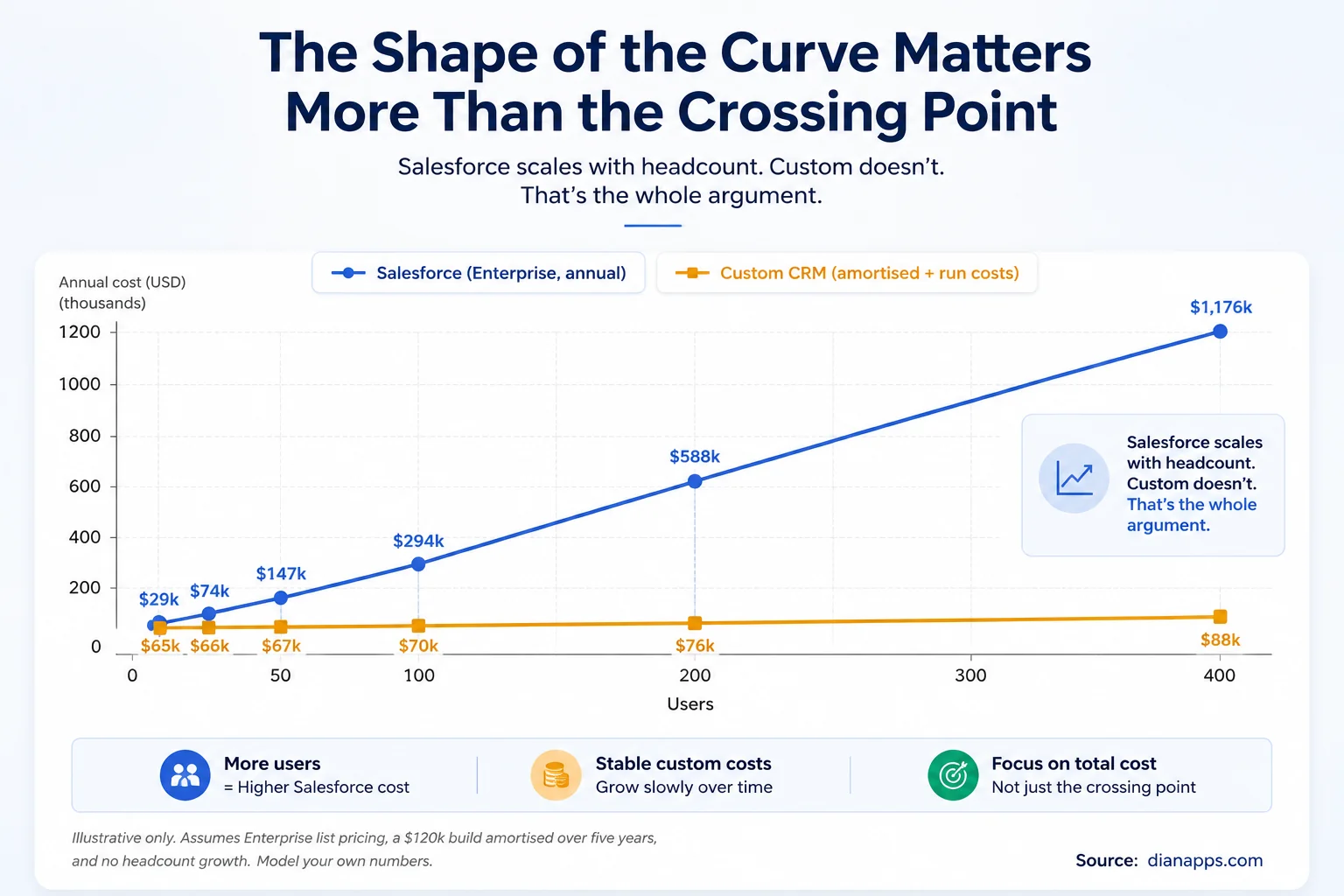
The Shape Of The Curve Matters More Than The Crossing Point.
Salesforce is per-seat; every hire adds to the annual bill, permanently. At Enterprise list pricing, 100 users is a materially different number from 25, and headcount growth compounds it.
A custom build is largely a one-time cost, amortised, plus hosting and maintenance that grow far more slowly. That’s why the lines eventually cross.
- Current Salesforce List Pricing For Context: Starter Suite around $25 per user per month, Pro Suite $100, Enterprise $175, Unlimited $350, and the Agentforce tiers at $550. Most organisations doing serious CRM work are at Enterprise or above.
Custom Build Costs vary enormously by scope, roughly $25,000 – $70,000 for a focused operational system, $50,000 – $150,000 for a mid-market CRM, and 12 – 24 months for genuine enterprise scope.
Three Things This Comparison Usually Gets Wrong:
- Comparing Subscription to Build Cost: The honest comparison is the total annual cost of a customised Salesforce instance against the amortised build plus run cost of the alternative. Licences alone understate Salesforce; ignoring maintenance understates custom.
- Ignoring The Customisation Trap: If every new requirement in Salesforce already means custom development, you’re paying platform fees and development costs. That’s the scenario where the economics genuinely shift.
- Treating A Custom Build As Finished: It never is. Budget continuing engineering the way you’d budget licences.
Related: Salesforce customization cost · Salesforce Lightning Platform licences
What Salesforce Genuinely Gives You
Worth stating plainly, because custom-development content tends to skip it.
- A Data Model You Don’t Maintain: Especially in regulated industries, Health Cloud is FHIR-aligned, Financial Services Cloud has the household model, and Order Management has a complete order lifecycle. Rebuilding those is expensive and rarely wise. See custom Salesforce development.
- Security and Compliance Posture You Inherit: SOC 1/2, ISO 27001, GDPR, and in some contexts FedRAMP. On a custom build, that’s yours to establish and evidence, which in regulated sectors is a substantial ongoing cost people forget to model.
- An Ecosystem: AppExchange, a large partner network and a hiring pool that already knows the platform. That hiring ecosystem also means organisations can build different levels of Salesforce capability internally. Understanding the difference between a Salesforce admin, developer and architect helps clarify what expertise is actually required as customisation increases.
- AI Without Building It: Agentforce and Einstein work on your data because the data governance is already there. This is Salesforce’s strongest current argument, and it’s a fair one; AI output quality depends on data quality, and homegrown systems typically lack the governance infrastructure to keep records clean and connected.
Three Releases A Year You Didn’t Pay For: New capability arrives whether or not you have engineers.
What a Custom Build Genuinely Gives You
Equally worth stating plainly.
- Cost That Doesn’t Scale With Headcount: The core argument and a real one at scale.
- Exact Process Fit: No workarounds, no “we do it this way because the platform does.”
- Data Sovereignty: Your infrastructure, your jurisdiction. In some regulated contexts, that’s a legal requirement rather than a preference.
- No Renewal Negotiation: No annual conversation about seat counts and edition upgrades.
- Source Code Ownership: Any requirement can be built, including ones that would need extreme customisation on a platform. On the Salesforce side, Salesforce Development Services can provide the engineering capacity needed to extend the platform without moving the entire CRM to a custom stack.
One Honest Counterweight: Developer dependency is the underappreciated risk on both sides. A heavily customised Salesforce org is understood by whoever built it; so is a custom CRM. When that person leaves, the knowledge leaves with them. Documentation isn’t optional in either scenario. That dependency exists regardless of whether the work is handled internally or by a partner, which makes the in-house vs outsourced Salesforce development decision part of the long-term cost calculation.
Which Way Should You Actually Go?
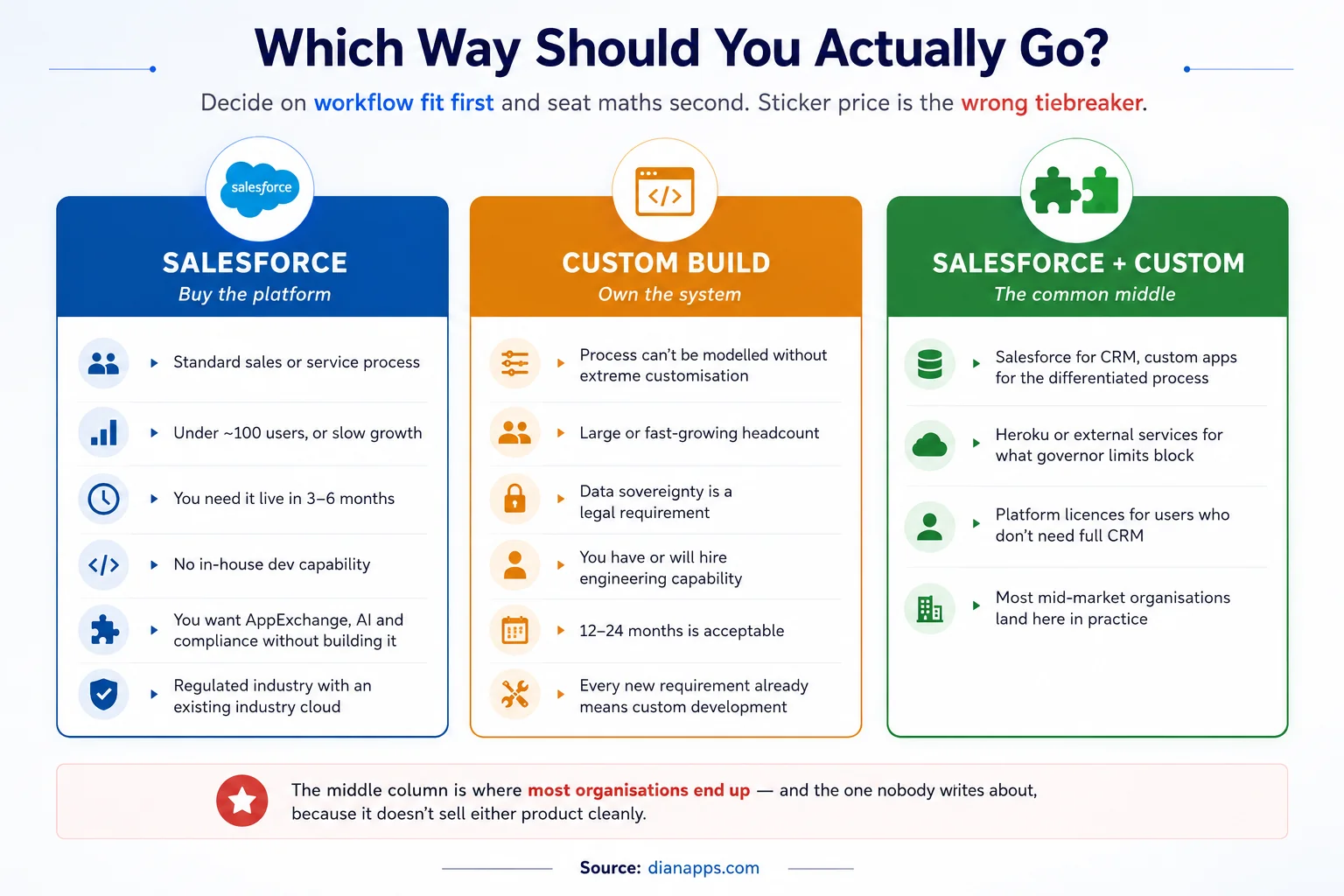
The middle column is where most organisations end up, and it’s the one nobody writes about because it doesn’t sell either product cleanly.
Salesforce for CRM, because the data model, compliance posture, and ecosystem are genuinely hard to replicate. Custom applications for the differentiated processes that don’t fit. Salesforce low-code development can also handle standard workflows without adding custom engineering costs unnecessarily.
The question that cuts through it: is your CRM process your competitive advantage, or is it the thing that lets your competitive advantage happen?
If it’s the first, custom deserves serious consideration. If it’s the second, and for most organisations it is, buy the platform and spend your engineering budget on whatever actually differentiates you.
Not Sure Whether Salesforce or Custom Fits?
Compare your five-year costs, user growth, workflow requirements, and development needs before committing to Salesforce or a custom CRM.
Related: configuration vs customization · Flow vs Apex
The Warning Signs on Each Side
Signs Salesforce may no longer be the right fit:
If the Salesforce-side warning signs are starting to look familiar, these signs your business needs Salesforce development help can help determine whether the problem is configuration, customisation, or a deeper platform-fit issue.
- Every new requirement already needs custom development
- Annual licence plus customisation plus admin spend exceeds six figures and is trending up
- You maintain workarounds because the platform can’t model your process
- Headcount is growing fast, and per-seat cost is growing with it
- You’re paying full CRM licences for users who never open an Opportunity, though that one has a cheaper fix
Signs a custom build would be a mistake:
- Your processes are still changing rapidly and aren’t yet stable
- Under roughly 20 users, where per-seat cost is manageable
- You need something live in three to six months
- You have no engineering capability and no plan to acquire it
- You’d be rebuilding an industry data model Salesforce already ships
- Compliance certification would be yours to establish from scratch
Want to Know Where Your Numbers Cross?
Share your user count, growth rate, Salesforce spend, and workflow requirements, and we’ll model the five-year economics for your organisation.
If You Build: What to Get Right
Don’t underestimate the non-CRM parts. Authentication, audit trail, mobile access, reporting, permissions, backup. Salesforce gives you all of it. On a custom build, each is a project.
Budget maintenance from day one. A CRM is never finished. Fifteen to twenty-five percent of build cost annually is a reasonable planning assumption.
Document as a deliverable, not an aspiration. This is the mitigation for developer dependency, and it’s the first thing cut when projects run late.
Plan the migration properly. Moving off Salesforce means data, integrations, reports, and retraining. It’s a project in its own right.
Be honest about AI. If AI-assisted workflows matter to you, the data governance underneath them has to exist. That’s substantial work on a custom system.
Need Salesforce Expertise for Your Customised Org?
Bring in Salesforce developers who can handle custom workflows, integrations, automation, maintenance, and the platform work your CRM requires as it grows.
We Build Both, Which Is Why We’ll Give You a Straight Answer
Most articles on this question are written by firms that only do one of these things. The conclusion is decided before the analysis starts.
We do Salesforce development, and we do custom application development. That means when we say “your process genuinely doesn’t fit the platform” or “you should stay on Salesforce and right-size your licences,” there’s no commercial thumb on the scale.
On a scoping call, we’ll model your actual five-year numbers, licences, implementation, customisation, maintenance, growth, and tell you where the lines cross for your organisation rather than for a case study.
We’re a certified Salesforce Consulting Partner with developers, architects and consultants across the US, UK, Australia, Canada, UAE and India.
Where to Go Next
If you’re staying on Salesforce, Salesforce customization cost and custom Salesforce development cover what building on the platform actually involves.
If cost is the concern, the Lightning Platform licence is usually the first place to look.
If you’re deciding what needs code at all, configuration vs customization and Flow vs Apex.
For workloads the platform can’t handle, Heroku for Salesforce and governor limits.
For build capacity either way, in-house vs outsourced development.
The complete Salesforce development guide is the hub.
 0 comments










Leave a Comment
Your email address will not be published. Required fields are marked *