















 0 comments





Key Takeaways :
- Agentforce Vibes IDE is the new name for Salesforce Code Builder, while the underlying browser-based VS Code environment and Salesforce tooling remain familiar.
- The View All Data requirement is the biggest security consideration, especially when giving external contractors access to the environment.
- The browser IDE is strongest for onboarding, contractors, restricted machines, and quick fixes, while local VS Code remains better for daily development.
- A new IDE won’t solve broken deployment or environment processes, so teams should fix the underlying delivery pipeline when that is the real bottleneck.
Quick Answer: Code Builder is now Agentforce Vibes IDE: Browser-based VS Code with the Salesforce Extension Pack, CLI, Node, npm, and Git preloaded. Licence count depends on your edition; it works with Identity or Free Limited Access licences, each environment gets roughly 10GB, and users need View All Data. It’s excellent for contractors, locked-down laptops and quick fixes. It doesn’t replace local VS Code for daily development.
If you’re searching for Code Builder, the first thing worth knowing is that it has a new name.
Salesforce now calls it Agentforce Vibes IDE and describes the change as more than branding – a shift from a foundational code editor to an AI-first development system. Every third-party guide currently ranking for “Code Builder” predates that.
The second thing worth knowing is a licensing detail almost nobody mentions: Users need the View All Data permission. That’s a security decision, not an administrative one, and it should be part of the evaluation.
The Rename and What Actually Changed
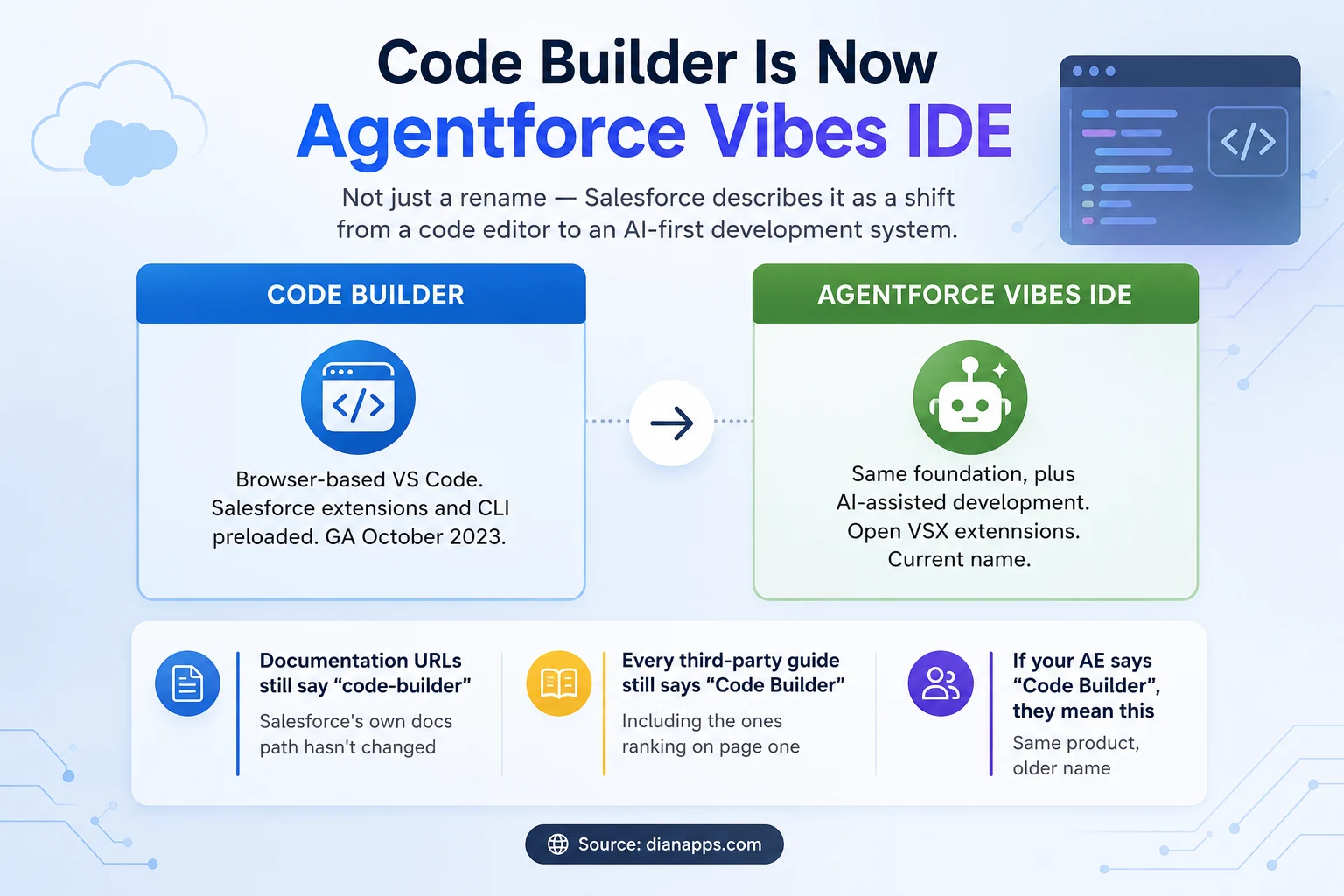
Diagram showing Code Builder renamed to Agentforce Vibes IDE, with notes that documentation URLs and third-party guides still use the old name
- Salesforce’s Own Framing: The next generation of their cloud-based IDE is now called Agentforce Vibes IDE, reflecting a shift from a code editor to an AI-first development system.
- What That Means Practically: The foundation is unchanged – it’s still browser-based VS Code with Salesforce tooling preloaded. What’s been added is AI-assisted development sitting on top of it.
Things that make this confusing right now:
- Salesforce’s own documentation URLs still contain code-builder. Every ranking third-party guide still says Code Builder. And if your AE mentions Code Builder, they mean this product.
- If you’ve read something describing Code Builder, it’s probably still accurate about the fundamentals and out of date on the name and the AI capability.
What You Actually Get
It’s VS Code in a browser tab, with the environment already set up:
- Salesforce Extension Pack, preloaded and kept up to date by Salesforce
- Salesforce CLI, same
- Node.js, npm and Git, pre-installed – no local setup
- SOQL Builder, a point-and-click query builder that’s genuinely useful
- GitHub integration built in, so it fits an existing DevOps workflow
- Open VSX extensions – a large catalogue, though not the full VS Code marketplace
- Standard IDE capability: code completion, refactoring, search, debugging
The setup story is the selling point: a new developer or contractor goes from nothing to a working Salesforce environment in minutes rather than spending a morning installing tooling – and without needing local admin rights on their machine.
Related: Salesforce DevOps and CI/CD
Licensing and the Permission Nobody Mentions
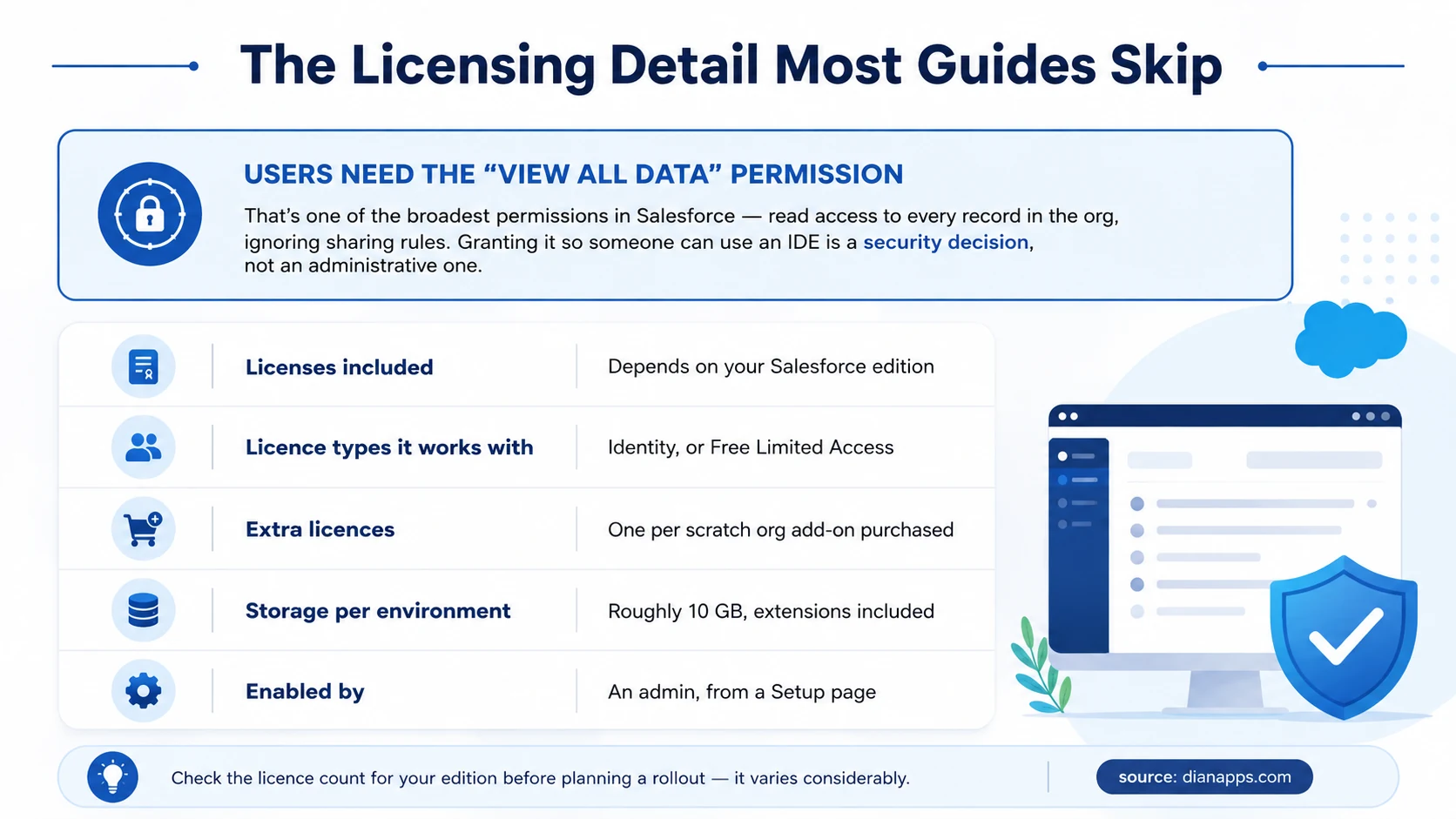
Licensing summary highlighting that users need the View All Data permission, plus edition-dependent licence counts, storage limits and how to enable it
The View All Data requirement deserves a moment; it grants read access to every record in the org, ignoring the sharing model entirely. Granting it so a contractor can use an IDE is a materially different decision from granting them a developer licence.
Practical implications:
- For internal developers who already have broad access, this changes little.
- For external contractors, it’s worth thinking about carefully – and it’s an argument for them working in a sandbox with masked data rather than anywhere near production. See Salesforce sandboxes.
- For regulated orgs, it may simply rule the tool out for some users.
On Licence Counts: They vary by Salesforce edition, and additional licences come bundled with scratch org add-on purchases – one per add-on. Check your specific edition’s allocation before planning a rollout, because it’s easy to assume you have more than you do.
Related: Salesforce licence costs
Browser IDE or Local VS Code?
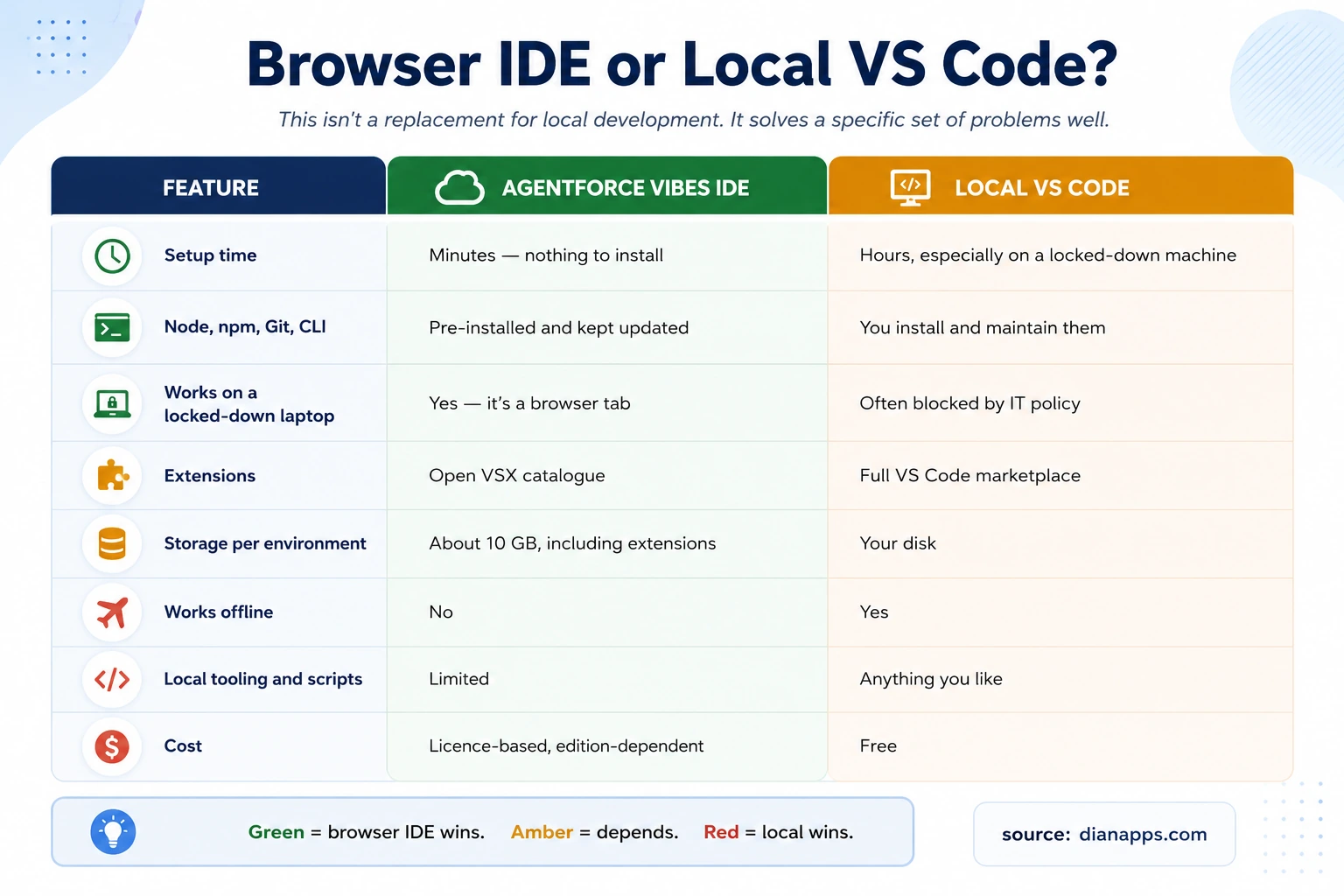
Comparison table of Agentforce Vibes IDE versus local VS Code across setup time, tooling, extensions, storage, offline use, local tooling and cost
Where the browser IDE genuinely wins:
- Onboarding Speed: A contractor starting Monday can be productive Monday, not Wednesday.
- Locked-down Machines: If IT policy blocks installing Node, npm and the Salesforce CLI – common in financial services, healthcare and public sector – this sidesteps the problem entirely.
- Consistency: Everyone gets the same environment with the same extension versions. “Works on my machine” stops being a category of bug.
Where Local VS Code Still Wins:
- Daily Development: Full marketplace access, local scripts, your own tooling and no dependency on connectivity.
- Offline Work: A browser IDE needs a connection. That’s obvious, and it still catches people out on flights and trains.
- Cost: Local VS Code is free; this is licensed.
- The Honest Positioning: This is a very good answer to specific problems – onboarding, contractors, restricted machines, quick fixes from an unfamiliar computer. It isn’t a replacement for a developer’s daily environment, and Salesforce doesn’t really position it as one.
Where It Fits Best
| Situation | Why it works |
|---|---|
| Onboarding a new developer | Productive on day one rather than day three |
| External contractors | No setup on their machine and access is revocable centrally |
| Locked-down corporate laptops | Nothing to install, so nothing for IT to approve |
| A quick fix from an unfamiliar machine | Open a browser, make the change, deploy |
| Training and enablement | Every trainee has an identical environment |
| Admins learning to code | Removes the setup barrier that stops people starting |
| Demos and workshops | No “install this first” preamble |
The most common reason an admin never learns Apex isn’t difficulty; it’s that installing a toolchain feels like a project and removing that step changes who’s willing to try.
Related: Admin vs developer vs architect
Need More Than the Right Development Environment?
Get expert Salesforce development support for implementation, integrations, custom Apex, LWC, DevOps, and production delivery.
Getting Started
- Check your edition’s licence allocation in Salesforce documentation before anything else.
- Enable it in Setup – there’s a dedicated page, and admins control the rollout.
- Assign licences to specific users via profile or permission set.
- Grant View All Data and decide deliberately whether that’s appropriate for each user.
- Connect to an org, ideally a sandbox rather than production.
- Add extensions from Open VSX if you need anything beyond the preloaded set, remembering the ~10GB environment limit.
One Practical Note: Environments have a lifecycle. Check current behaviour on inactivity timeouts and environment persistence before relying on long-running local state, since this has changed across releases.
Where to Go Next
For the pipeline this fits into, see Salesforce Devops And Ci/Cd.
For the environments you’ll connect it to, Salesforce Sandboxes Explained.
For what you’ll actually write in it: Apex, SOQL and Lightning Web Components.
For the AI capability the rename points at, What Is Agentforce.
For licence costs across the platform, How To Reduce Salesforce Costs.
The Complete Salesforce Development Guide is the hub.
When Tooling Isn’t the Bottleneck
Teams occasionally reach for a new IDE hoping it will fix something the IDE was never causing.
If deployments are slow, releases break things, or nobody’s sure what’s in production, that’s a pipeline and environment problem – and a different editor won’t touch it.
We’re a certified Salesforce Consulting Partner, and setting up source control, environments, and a working deployment pipeline is routine work for our team.
Is Your Real Problem Bigger Than the IDE?
Tell us where your Salesforce delivery is getting stuck, and we’ll help identify whether the issue is tooling, environments, DevOps, or development capacity.
 0 comments











Your email address will not be published. Required fields are marked *