















 0 comments





Key Takeaways:
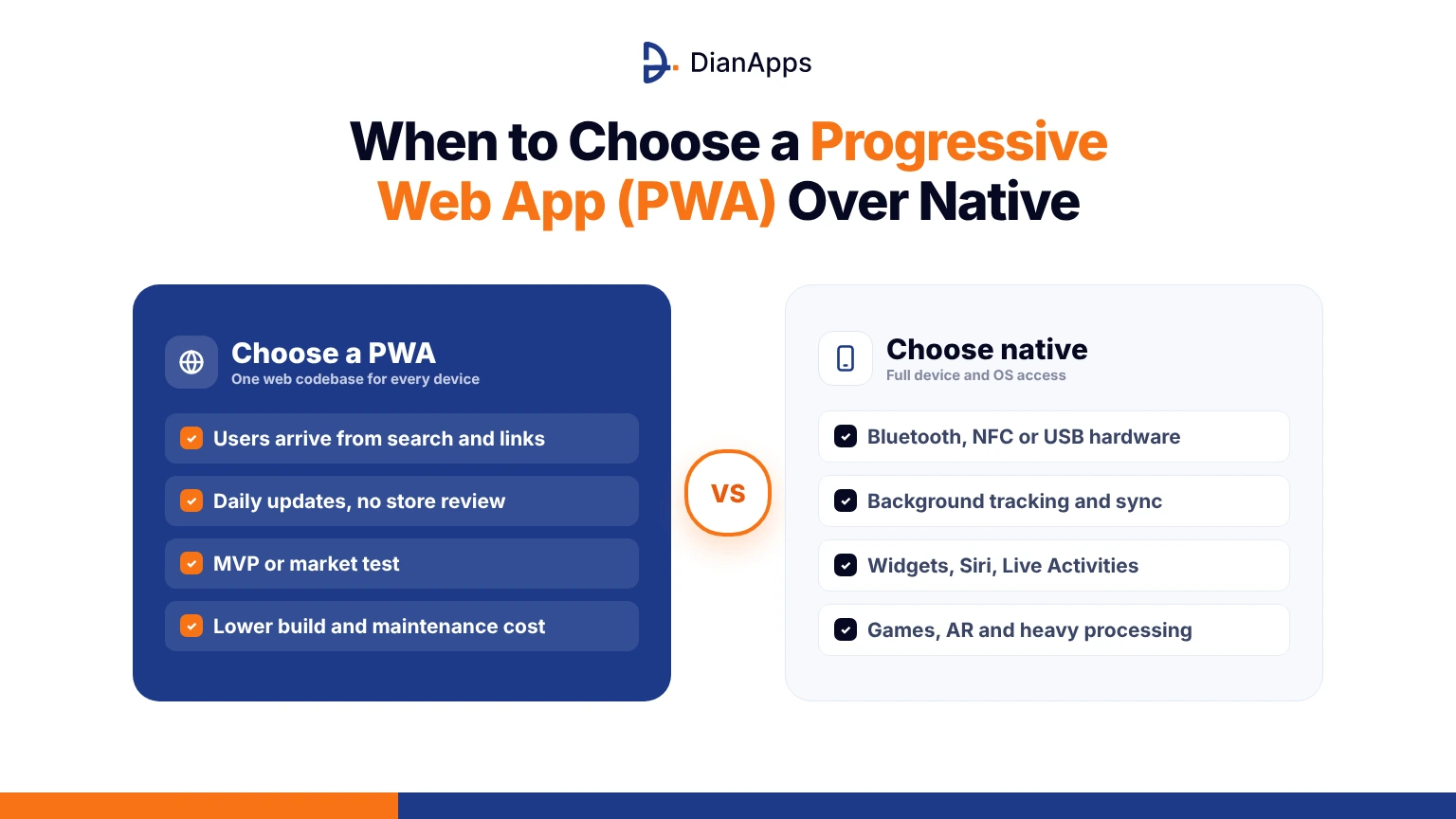
- PWAs suit products driven by web traffic, frequent updates, occasional usage and audiences that prefer instant access over app downloads.
- Native apps are better for Bluetooth, NFC, background processing, advanced hardware access and deep operating system integration.
- PWAs can reduce development and maintenance costs by using one codebase across desktop, Android and iOS.
- iOS 26 improves the installed PWA experience, but Safari still lacks key capabilities such as background sync, Bluetooth and NFC.
- Capacitor and Trusted Web Activities offer hybrid options for adding native features or Google Play distribution without rebuilding everything.
Quick Answer: Choose a progressive web app (PWA) over native when your product relies on browser-supported features, needs frequent updates, serves users through web traffic or requires a faster, more affordable launch. PWAs offer a shared codebase, instant access, offline support and push notifications without mandatory app store distribution. Choose native when your app depends on advanced hardware access, background processing, deep OS integration or high-performance computing. A hybrid approach using Capacitor or Trusted Web Activities can bridge the gap when you need capabilities from both.
A surprising number of apps sitting in the App Store today never needed to be there, and an equally surprising number of web apps are frustrating users who would have been better served by something native. Mobile App Development in 2026 is offering more routes to a phone screen than at any point in the last decade, and the progressive web app has quietly become one of the most capable of them, particularly since iOS 26 changed how installed sites behave.
If you’re at the stage of weighing every option, our guide on how to build a mobile app is laying out the full landscape first. This topic is narrower, because it is answering one question properly, which is when a PWA is the right call over native, so let’s break it down signal by signal.
What a Progressive Web App Actually Is in 2026
A PWA is your web application plus two small additions that are changing how a phone treats it, and understanding those two pieces is clearing up most of the confusion about what a PWA can and can’t do.
The first is a web app manifest, which is a JSON file declaring the name, icons, colours and display mode, and the second is a service worker, which is a script sitting between the app and the network to cache assets, serve content offline and receive push messages. Together they’re giving a web app the following properties:
- Installability, meaning a home screen icon and a full screen window without browser chrome, from Chrome’s install prompt on Android or Safari’s share menu on iPhone.
- Offline capability, with the service worker serving cached pages and queuing requests until the connection returns.
- Push notifications on both platforms, with iOS requiring the app to be added to the home screen first.
- Instant updates, because every visit is pulling the latest deployment with no store submission or user action.
The reasons are not hard to see once you’ve shipped one, so let’s look at exactly where the capability line sits on each platform this year.
PWA vs Native App: The 2026 Capability Table
The honest comparison is a feature table rather than a verdict, because the answer is depending entirely on which capabilities your product is needing. The iOS column has moved considerably, and the independent compatibility tracker at firt.dev is confirming that since iOS 26 every site added to the home screen is opening as a web app by default, alongside support for WebGPU and Digital Credentials, while Web Bluetooth, NFC and USB are still absent.
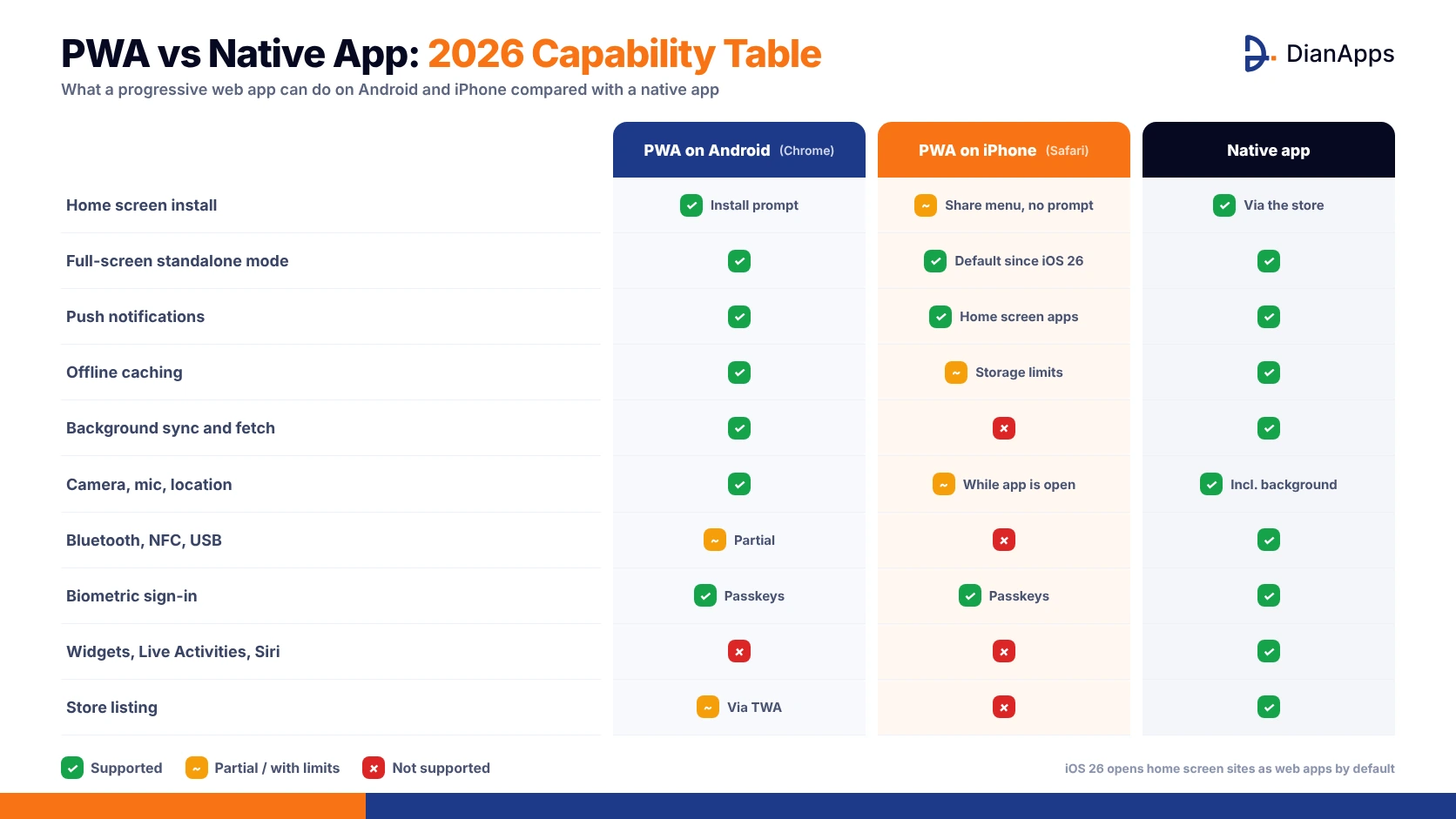
If every row your product needs is a yes in the PWA columns, the business case in the next section is usually deciding the matter.
The Business Case: Where a PWA Is Winning on Cost and Speed
The economic argument for a PWA is straightforward, because you’re building and maintaining one codebase that is serving desktop, Android and iPhone, with no platform specific teams and no duplicated QA. A product that would need a Swift team, a Kotlin team and a web team is instead needing one web team, which is typically cutting initial build cost by half or more against two native apps and is cutting ongoing maintenance even further, since every bug is being fixed once.
Time to market is compressing for the same reason, and the absence of store review is removing a week of uncertainty from every release cycle, which is mattering enormously for products that iterate daily. Acquisition is cheaper too, since a user is reaching the app through a link, a search result or a QR code and is using it within seconds, where a native app is asking for a store visit, a download and a permission screen before any value is delivered. None of this is making a PWA free, because offline design, performance budgets and platform quirks are real work, but the arithmetic is favouring the web for a large class of products.
Signal One: Your Users Are Arriving From the Web, Not the Store
The strongest signal that a PWA is the right choice is how your users are finding you, because the web’s distribution advantage is only worth something if your audience is actually on the web. When we’re assessing a product, the patterns that point toward a PWA are looking like this:
- Traffic is coming from search, email, social links or QR codes, so a tap is landing the user in the product with no store in between.
- Usage is occasional rather than daily, meaning users are visiting a few times a month and won’t bother installing anything.
- The product is serving a logged in audience who already have accounts, such as customers of a bank, utility, airline or school.
- Conversion is happening on the first visit, as it does for ecommerce, ticketing, bookings and events, where a download step is losing most of the funnel.
- The same experience is needed on desktop, so a web codebase is already required and the mobile layer is an extension of it.
A product with these traits is losing users at the store step, and a PWA is removing that step entirely, which is why retailers and publishers were the earliest and most successful adopters.
Signal Two: Your Feature List Lives Inside the Browser’s Reach
The second signal is a simple audit of what the product needs the phone to do, because the capability table above is drawing a clear line and most products are sitting comfortably on one side of it. If your feature list is content, forms, media, maps, payments, camera capture, location while in use, push notifications and offline reading, then everything you need is available to a PWA on both platforms, and building native is paying for capabilities you’ll never call.
The line is being crossed when the product needs Bluetooth or NFC hardware, background location for tracking, background processing for uploads or syncing while closed, deep integration with system features such as widgets or Siri, or the kind of sustained graphics performance that games and augmented reality demand. Many teams are discovering during this audit that a single feature on their wish list is forcing native, and the right response is often questioning whether that feature is essential for launch or whether it can arrive in a later native phase, which is a far cheaper conversation to have before the first line of code.
Signal Three: You Need to Ship Updates Daily Without Store Review
Release velocity is the third signal, and it is one that engineering leaders are feeling more sharply than product teams, because store review is a tax on every change. A PWA is deploying like a website, and the practical consequences are these:
- A bug fix is reaching every user on the next visit, with no submission, no review queue and no waiting for users to update.
- Experiments and feature flags are rolling out and back in minutes, which is making A/B testing and rapid iteration practical on mobile.
- Content and pricing changes are never blocked by a reviewer’s interpretation of store guidelines.
- Emergency changes during an incident are taking minutes rather than the day or more that an expedited review can require.
- Version fragmentation is disappearing, since every user is running the latest build rather than whichever version they last downloaded.
Native apps have narrowed this gap with over the air updates for some frameworks, but those updates are still bounded by store policy, and a team shipping several times a day is almost always happier on the web.
Not Sure Whether Your Feature List Fits a PWA?
Our mobile architects are auditing product requirements against current platform capabilities and giving you a clear answer.
Signal Four: The Product Is an MVP or a Market Test
The fourth signal is the stage of the product, because a PWA is the most forgiving way to find out whether anyone wants what you’re building. An early product is needing to reach users quickly, change constantly and avoid sinking capital into platform specific work that may be thrown away, and a PWA is satisfying all three, since a web team can ship in weeks, iterate daily and later wrap or rebuild natively once the product has earned it.
The risk the web is removing is particularly valuable for founders, who are often pressured to build native apps before they have evidence that mobile usage justifies the cost, and our guide to what an MVP is in app development is covering how to scope that first version tightly.
The usual objection is that investors and customers are expecting a store presence, and the honest answer is that on Android a Trusted Web Activity is putting the same PWA in Google Play with no extra code, while on iPhone a home screen install now looks and behaves like an app, which is enough for most market tests.
Signal Five: Your Audience Is Global, on Mid Range Devices or Low Data
The fifth signal is who your users are and what they’re holding, because a PWA’s lightness is a decisive advantage in markets that native apps are serving poorly. The conditions where this is deciding the choice are these:
- Users are on mid range or older Android devices with limited storage, where a fifty megabyte native install is competing with photos and messaging apps for space.
- Connectivity is intermittent or expensive, so a PWA’s small initial load and offline caching are reaching users a heavy download never will.
- The audience is spread across many countries, and the web is avoiding the per market store listing, localisation review and payment setup work.
- Device fragmentation is high, and a single responsive web codebase is adapting to screens that a native app would need to test individually.
- Users are reluctant to install apps from unfamiliar brands, which the web sidesteps by delivering value before asking for anything.
Companies serving emerging markets were among the first to prove this, and the pattern is holding wherever storage, data and trust are constrained.
When Native Still Wins: Hardware, Background Work and Deep OS Integration
Honesty about the limits is what makes a PWA recommendation credible, and there is a clear set of products where native is the only responsible choice. When we’re steering a client toward native, it is usually because of one of these:
- The product depends on Bluetooth, NFC or USB hardware, such as wearables, payment terminals, smart locks or medical devices, which Safari is not exposing to web apps.
- Background work is essential, including location tracking, uploads while the app is closed, or periodic syncing, which iOS is not permitting for web apps.
- The experience relies on system integration, such as widgets, Live Activities, Siri, CarPlay, HealthKit or the platform’s own intelligence features, like those in our guide to building AI features into iOS apps with Apple Intelligence.
- Performance demands are extreme, as in games, video editing, augmented reality or running compact models on the device, which we cover in deploying on device AI models in iOS apps.
- Monetisation depends on in app purchases, subscriptions through the store or store featuring as a discovery channel.
If two or more of these apply, the PWA conversation is over, and the only remaining question is whether a hybrid shell can share code with your web product.
The iOS Question: What Changed and What Still Hurts
The iPhone has always been the hard case for PWAs, and a fair assessment in 2026 is that Apple has removed the worst problems while leaving the structural ones in place. The biggest change is that iOS 26 is opening every home screen site as a standalone web app by default, which is ending the old confusion where an installed app would dump users back into a Safari tab, and push notifications, app badging and screen wake lock have all been available to home screen apps for a couple of releases now.
What still hurts is the install path, because Safari has no install prompt, so iPhone users must find the share menu and tap Add to Home Screen, and most of them don’t know the step exists without guidance from your interface. Background sync, background fetch, Bluetooth and NFC are still absent, storage for sites that haven’t been used recently can be cleared, and there is no App Store listing, so discovery is entirely on the web. Browsers other than Safari on iPhone are using Safari’s engine and are sharing its limits, so a PWA strategy on iOS is a Safari strategy whatever browser the user prefers.
The Middle Paths: Trusted Web Activities, Capacitor and Hybrid Shells
The choice isn’t binary, and three middle paths are letting teams keep a web codebase while reaching the store or the hardware a plain PWA can’t. On Android, a Trusted Web Activity is packaging your PWA for Google Play with a verified link between the site and the app, giving you a store listing and Play’s payment and distribution tools with the web app unchanged underneath. On both platforms, a shell such as Capacitor is wrapping the same web code in a native container and exposing plugins for Bluetooth, background tasks, biometrics, in app purchases and anything else the web lacks, which is producing an app that passes store review and reaches hardware while still being written once.
The cost is a second build pipeline, store accounts and the obligation to meet store guidelines, including Apple’s rule that wrapped sites must offer app like value rather than a repackaged website. The pattern we’re recommending most often is launching as a PWA, adding a Trusted Web Activity when Play presence matters, and reaching for a Capacitor shell only when a specific native capability is justifying it. (New sentence:) For a closer look at the tooling behind these options, see our roundup of the top AI and PWA development frameworks for web apps.
Performance, Offline and the Service Worker Strategy
A PWA is only competing with native if it is fast and reliable, and that is depending on engineering choices that many web teams have never had to make before. The service worker is the heart of it, and the decisions below are separating a PWA that feels native from one that feels like a slow website:
- Precache the application shell, meaning the HTML, CSS, JavaScript and icons needed to render the frame, so the app is opening instantly even offline.
- Choose a runtime caching strategy per resource type, such as network first for API data, cache first for images and stale while revalidate for content that can be slightly old.
- Queue writes locally with IndexedDB and replay them when connectivity returns, which is giving offline form submission even where background sync is unavailable.
- Keep the initial JavaScript payload small and code split by route, because the install moment is the first load and a slow one is costing the install.
- Measure Core Web Vitals on real mid range devices rather than on a developer’s laptop, since that is where the user experience is actually decided.
- Handle Safari’s storage eviction by syncing important data to the server rather than trusting the device to keep it.
Teams that are treating these as first class requirements are shipping PWAs that users don’t distinguish from native, and teams that are bolting a service worker onto an existing site are shipping disappointment.
Want a Prototype That Proves the PWA Path on iPhone?
We’re building installable PWA prototypes with push, offline and payments so you can test the real iOS experience in weeks.
Cost Comparison: PWA vs Native vs Hybrid
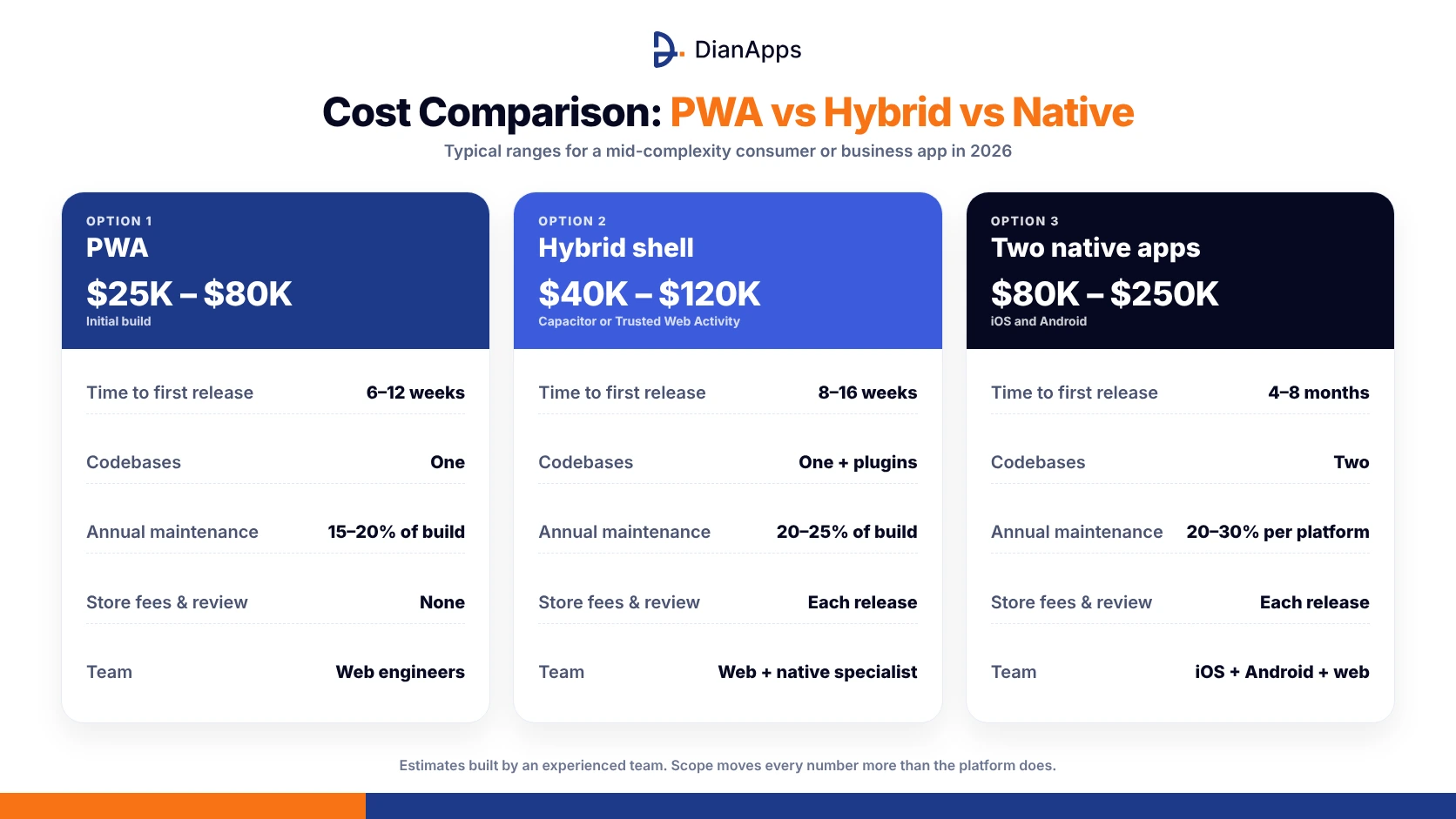
Cost is the question every stakeholder is asking, and the ranges below are reflecting what we’re seeing for a mid complexity consumer or business app in 2026, built by an experienced team, with the caveat that scope is moving every number more than the platform does.
| Cost Factor | PWA | Hybrid Shell (Capacitor, Trusted Web Activity) | Two Native Apps (iOS and Android) |
| Initial build | $25,000 to $80,000 | $40,000 to $120,000 | $80,000 to $250,000 |
| Codebases to maintain | One | One, plus native plugin layers | Two, plus any shared backend |
| Time to first release | 6 to 12 weeks | 8 to 16 weeks | 4 to 8 months |
| Annual maintenance | 15 to 20 percent of build | 20 to 25 percent of build | 20 to 30 percent of build, per platform |
| Store fees and review overhead | None | Store accounts and review on each release | Store accounts and review on each release |
| Team required | Web engineers | Web engineers plus occasional native specialist | iOS and Android engineers plus web for marketing site |
Regulated products are carrying additional cost regardless of platform, as our breakdown of telemedicine app development cost is showing, and a PWA is reducing but not removing that compliance work.
Discoverability, Monetisation and Store Policy
The web’s distribution freedom is coming with two trade offs that are worth facing directly, which are discovery and money. On discovery, a PWA is found through search, links and campaigns rather than through store browsing and featuring, which is an advantage for brands with existing web traffic and a disadvantage for products hoping the store will introduce them to strangers, though a Trusted Web Activity is restoring Play presence on Android at almost no cost.
On money, a PWA is taking payments through the web with cards, wallets and Apple Pay on the web, and it is keeping the full amount rather than paying store commission, which is a meaningful advantage for subscriptions and commerce, but it is forgoing the frictionless in app purchase flow and the store’s subscription management that some users expect. Store policy is cutting both ways too, since a PWA is never rejected and never subject to a reviewer’s reading of the guidelines, while a wrapped app is needing to satisfy them on every release. For most commerce and content products the web’s economics are winning, and for products whose business model is store native, the store is winning.
A Decision Checklist Before You Commit
Everything above is compressing into a short checklist, and teams that are answering it honestly are rarely regretting the outcome. Before choosing a PWA over native, confirm the following:
- Every must have feature is a yes in the PWA columns of the capability table for both platforms, or is deferred to a later phase.
- Users are reaching the product through the web, use it occasionally rather than constantly, or convert on first visit.
- The release cadence is frequent enough that store review would be a recurring cost rather than an occasional one.
- The product is early enough that learning fast matters more than squeezing the last percent of performance.
- The audience includes mid range devices, constrained data or markets where installs are a barrier.
- Discovery and monetisation are working through the web, or a Trusted Web Activity is covering the Android store need.
- The team is willing to invest in service worker design and real device performance testing rather than treating the PWA as a wrapper.
Five or more yes answers are pointing clearly at a PWA, and two or fewer are pointing at native, with the middle ground usually resolved by a hybrid shell.
Migrating From a PWA to Native Later Without Starting Over
The fear behind many native first decisions is that choosing a PWA is closing the door on native, and in practice the door stays open if the PWA is built with a little foresight. A well structured web app is keeping its business logic, API clients and state management in modules that are independent of the rendering layer, which is meaning a later native app or a hybrid shell can reuse the backend contracts, the authentication flow and often large pieces of the TypeScript logic without rewriting them.
Design systems built as tokens rather than as framework specific components are translating cleanly to native UI, and analytics, feature flags and experimentation are living on the server where every client can share them.
The migration itself is usually happening one feature at a time, with a Capacitor shell wrapping the existing app on day one and native screens replacing web screens only where the capability or performance gap is justifying it, which is the same incremental approach that makes conversational features easier to add later, as our comparison of a mobile AI agent vs an AI chatbot is illustrating. A PWA built this way is a foundation rather than a dead end.
Final Thoughts
Choosing a progressive web app over native in 2026 is coming down to five honest signals, which are where users are arriving from, whether the feature list fits inside the browser’s reach, how often you need to ship, how early the product is, and who the audience is and what they’re holding, weighed against the hardware, background and system integration needs that still belong to native.
The iPhone has become a far friendlier home for PWAs since iOS 26, the middle paths through Trusted Web Activities and hybrid shells are letting one codebase reach the stores and the hardware when needed, and a PWA built with proper service worker design and real device testing is standing comfortably beside native apps for a large share of products. If you’d rather have a progressive web app development company that has shipped all three kinds help you make the call and build the result, we’ve got you covered.
 0 comments










Your email address will not be published. Required fields are marked *