













 0 comments





Key Takeaways:
- Use Foundation Models to add on-device AI features with Swift.
- Connect AI-powered app actions to Siri using App Intents.
- Run custom models locally with Core AI or Core ML.
- Check device compatibility and provide fallbacks for unsupported iPhones.
- Test performance and output quality on real devices before launch.
Quick answer: To add AI features to an iOS app, call Apple’s on-device language model from Swift through the Foundation Models framework, then expose those features to Siri with App Intents. If you have your own models, you can run them with Core ML or the newer Core AI framework. On-device inference costs nothing, works offline and keeps user data on the phone. The catch is hardware, because Apple Intelligence starts at iPhone 15 Pro, so every feature you build needs a fallback for older phones.
AI features used to be a nice extra in iOS apps, but that has changed quickly. Apple says that in 2025 more than 40 of the top 100 apps by App Store billings had consumer-facing AI features, and those apps saw 4 times higher growth in billings (Apple Newsroom, June 2026). Apple has also turned its own models into developer tools, so you no longer need a large cloud budget or a machine learning team to ship something smart.
This guide walks through what Apple offers developers today, which framework fits which job, and how to build one feature step by step, including code, limits and costs.
What Is Apple Intelligence For Developers?
Apple Intelligence is Apple’s personal AI system across iPhone, iPad, Mac, Apple Watch and Vision Pro. For developers it is really a set of frameworks that give your app access to the same models behind Apple’s own features.
The centrepiece is the Foundation Models framework, which arrived with iOS 26 in September 2025. It gives apps direct access to Apple’s on-device large language model, which has roughly 3 billion parameters and which Apple describes as “device-scale” (WWDC25 session 286). Apple says developers can get started “with as few as three lines of code”, and that inference is free and works offline (Apple Newsroom, June 2025).
Can Developers Use Apple Intelligence In Their Own Apps?
Yes, any app can call Apple’s on-device model through the Foundation Models framework since iOS 26. iOS 27, which Apple announced at WWDC 2026, widened that access considerably (Apple Newsroom, June 2026).
What’s new for developers in iOS 27:
- The framework now offers one Swift API for several kinds of model, including stronger on-device models with image input, Apple’s server models on Private Cloud Compute, and third-party models such as Claude and Gemini through a new language model protocol.
- Apps in the App Store Small Business Program with fewer than 2 million first-time downloads can use Apple’s next-generation models on Private Cloud Compute with no cloud API cost.
- Dynamic Profiles let you swap models, tools and instructions on the fly while the app is running.
- A new Evaluations framework helps you check that AI features behave correctly in ways unit tests can’t catch.
- Core AI is a new framework for loading and running your own models fully on the device, with no server dependency and no token cost.
Which Apple AI Frameworks Should You Use For Which Feature?
Apple gives you several AI frameworks, and picking the right one early saves weeks of rework.
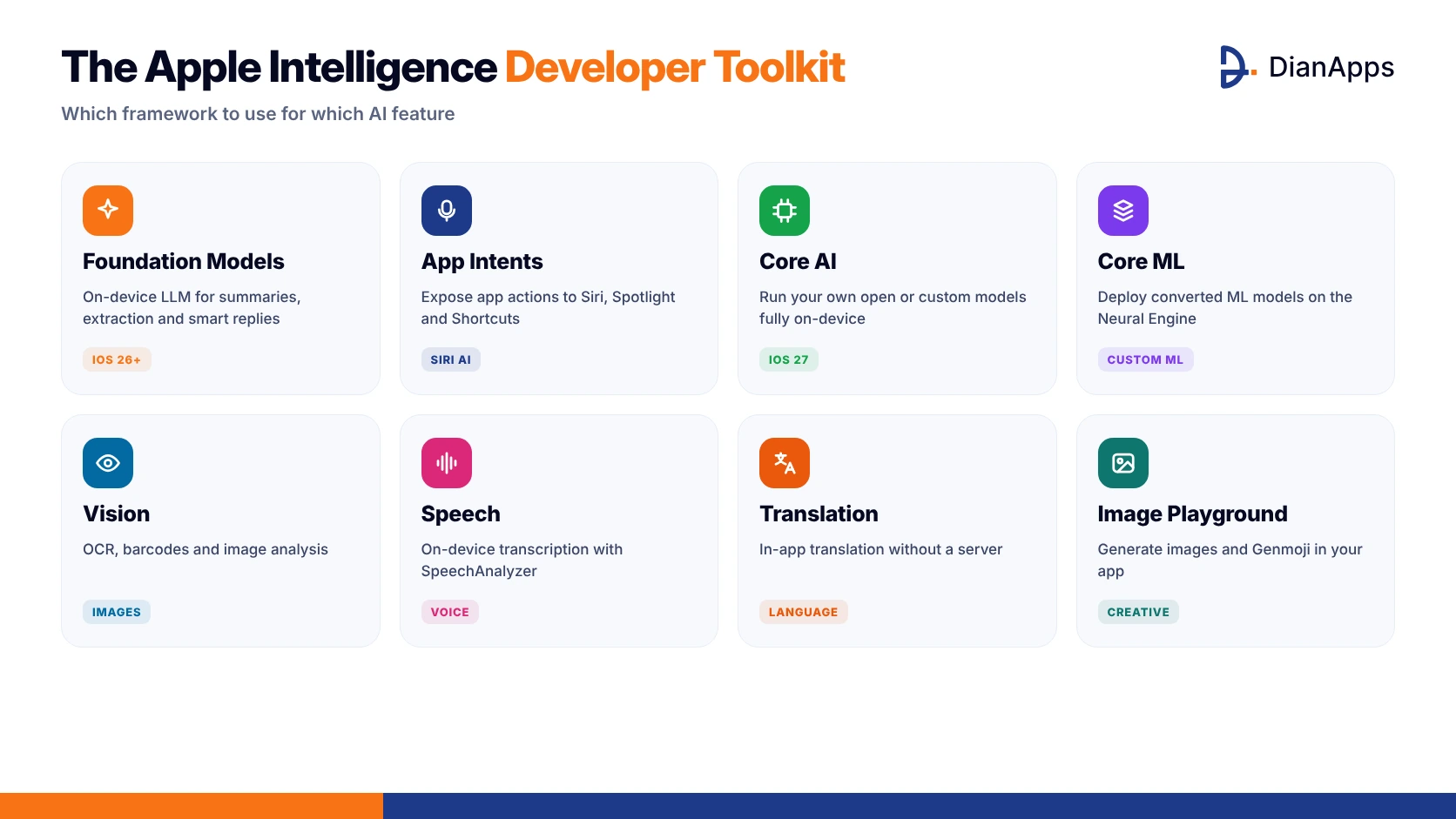
The Apple Intelligence developer toolkit
| Framework | Best for | Example feature |
| Foundation Models | Text generation, summaries, extraction, smart replies | Summarise a meeting note into action items |
| App Intents | Making app actions available to Siri, Spotlight and Shortcuts | “Log today’s workout” by voice |
| Core AI (iOS 27) | Running your own open or custom models on-device | A domain-specific model for medical terms |
| Core ML | Running converted machine learning models | Product image classification |
| Vision | OCR, barcodes, image analysis | Scan receipts or ID documents |
| Speech | On-device transcription | Voice notes turned into text |
| Translation | In-app translation | Translate customer messages |
| Image Playground | Image and Genmoji generation | Personalised stickers or avatars |
Core ML vs Foundation Models vs Core AI: what’s the difference?
Foundation Models gives you Apple’s ready-made language model through one Swift API, and in iOS 27 it can also route to other providers’ models. Core ML and Core AI, on the other hand, run models that you bring yourself. Apple now positions Core AI as the main way to run custom models on-device in iOS 27, while Core ML stays common for existing classic machine learning models. For a wider comparison, see our guide to the top frameworks for building AI-native mobile apps.
Which Iphones And iOS Versions Support Apple Intelligence?
This is the most important planning question, because iOS 27 runs on iPhone 11 and later, but Apple Intelligence runs on far fewer devices. According to Apple Support, Apple Intelligence in iOS 27 is available on these devices.
The supported iPhones are the iPhone 15 Pro and 15 Pro Max, plus every iPhone 16 model and later, including iPhone Air and iPhone Duo. On the iPad and Mac side, support covers the iPad mini with A17 Pro and any iPad or Mac with an M1 chip or later. Apple Vision Pro, Apple Watch Series 9 or later and Apple Watch Ultra 2 or later are supported as well.
The feature also has to be turned on, needs free storage of up to 8 GB on most eligible devices, and works in 16 languages including English, French, German, Spanish, Japanese, Korean and Chinese. To build with it you need Xcode 26 and the iOS 26 SDK at a minimum, and Xcode 27 for iOS 27 features such as image input and Core AI. For a broader look at what changed in the OS itself, read our post on iOS 26 features.
Ready to add Apple Intelligence to your iOS app?
Our iOS developers build on-device AI features with Foundation Models, App Intents and Core ML: private, fast and free to run.
How Do You Build An AI Feature With Apple Intelligence, Step By Step?
Here is the process we follow for AI-powered iOS app development, from first idea to a tested feature that Siri can use.
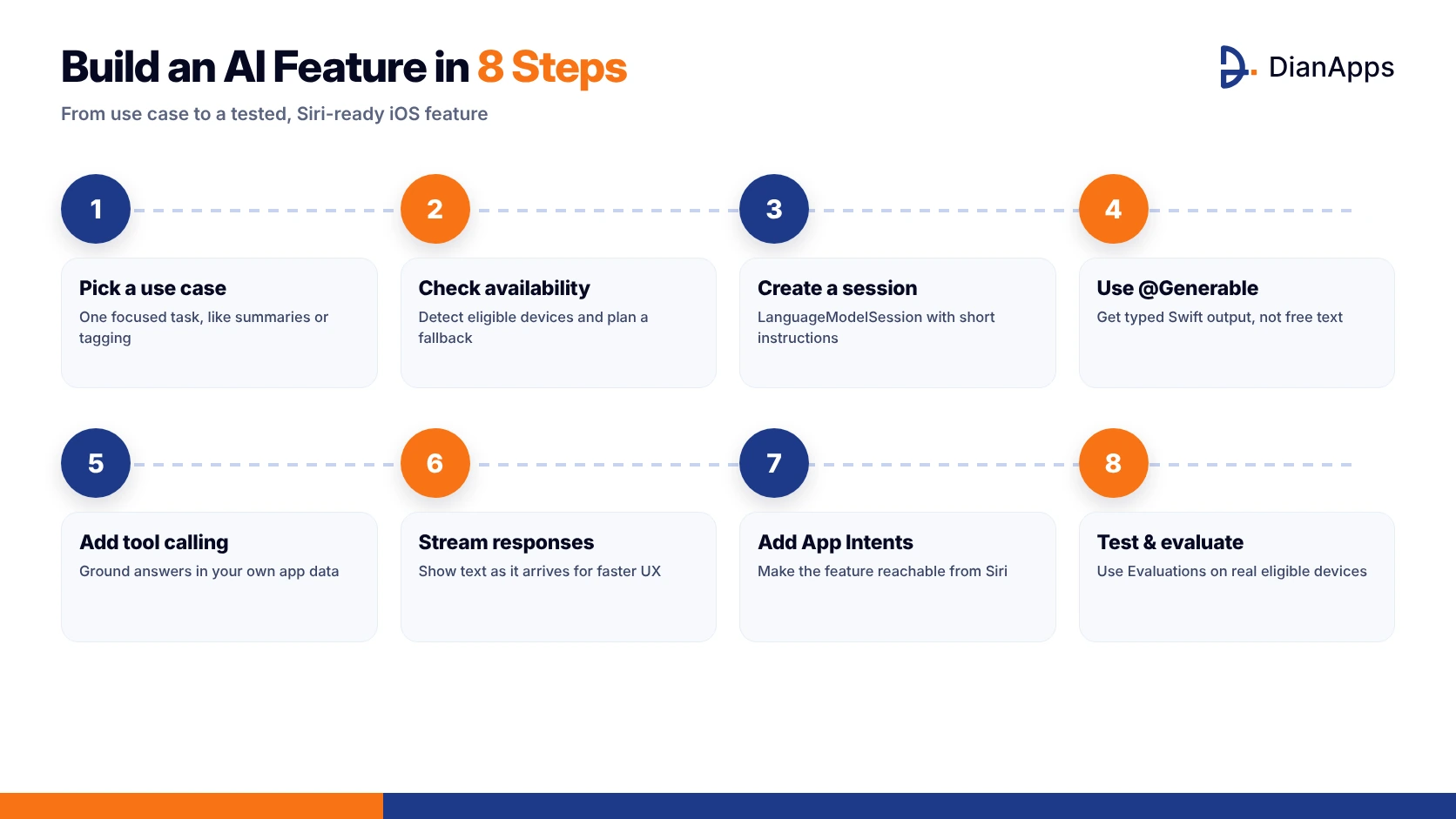
Build an AI feature in 8 steps
Step 1: Pick a focused use case
The on-device model is good at focused tasks and weaker at broad world knowledge. Good starting points include summaries, tagging, pulling fields out of text, rewriting and short personalised suggestions. Skip the ask-me-anything chatbot for your first project, because it is exactly where a small model struggles.
Step 2: Check model availability and plan a fallback
Always check availability before you create a session, because the model “can only run on Apple Intelligence-enabled devices in supported regions” (WWDC25 session 286).
|
1 2 3 4 5 6 7 8 9 10 11 12 |
import FoundationModels let model = SystemLanguageModel.default switch model.availability { case .available: // Show the AI feature break case .unavailable(let reason): // Hide the feature, use a simpler version, or route to a cloud model print("AI unavailable: \(reason)") } |
Step 3: Create a session with clear instructions
A LanguageModelSession holds one conversation with the model, so keep its instructions short and specific.
|
1 2 3 4 5 |
let session = LanguageModelSession( instructions: "Summarise workout notes in two friendly sentences." ) let response = try await session.respond(to: workoutNotes) summaryLabel.text = response.content |
Step 4: Get structured output with @Generable
Instead of parsing free text, ask the model for a Swift type, since guided generation makes results far more reliable.
|
1 2 3 4 5 6 7 8 9 10 11 12 |
@Generable struct TaskSuggestion { @Guide(description: "A short task title") var title: String @Guide(description: "Due date if one is mentioned") var dueDate: String? } let task = try await session.respond( to: "Call Sophia on Friday about the invoice", generating: TaskSuggestion.self ).content |
Step 5: Ground answers with tool calling
Tools let the model fetch real data from your app, such as a user’s orders or saved notes, instead of guessing. Apple’s featured app CellWalk uses tool calling to ground its responses in its scientific content (Apple Newsroom, September 2025).
Step 6: Stream responses for a faster feel
Use streamResponse(to:) to show text on screen while the model is still generating it. Requests to the on-device model run one after another on the Neural Engine, so streaming and clear loading states matter a lot.
Step 7: Expose the feature to Siri with App Intents
App Intents connects your app to Siri AI features such as personal context, app actions and on-screen awareness in iOS 27. This often brings the biggest discoverability win, and it doesn’t need any model code at all.
Step 8: Test with the Evaluations framework on real devices
AI output varies from run to run, so unit tests alone aren’t enough. Use Apple’s Evaluations framework and the App Intents Testing framework in iOS 27, and test on real eligible iPhones instead of relying only on the simulator.
Is The Foundation Models Framework Free?
Yes, on-device inference is free because it runs on the user’s own hardware. The table below compares the three model routes side by side so you can see the trade-offs.
| Route | Cost | Works offline | Context window | Best for |
| On-device Apple model | Free | Yes | 4,096 tokens in iOS 26; up to 8K on newer devices in iOS 27 | Fast, private, focused tasks |
| Apple model on Private Cloud Compute (iOS 27) | Free for Small Business Program apps under 2M first-time downloads | No | 32,000 tokens, with reasoning | Longer documents and harder tasks |
| Third-party models (Claude, Gemini, others) | Provider’s API pricing | No | Varies by provider | Frontier reasoning and broad knowledge |
The context figures come from Apple’s developer forums and WWDC26 sessions, so read contextSize at runtime instead of hard-coding a limit. If you’re weighing local against server AI more generally, our comparison of on-device AI vs cloud AI goes deeper.
Not sure which AI route fits your budget?
Talk to an AI-powered iOS app development team. We’ll recommend on-device, cloud or hybrid AI and give you a clear timeline and estimate.
What Are Real Examples Of Apps Using Apple Intelligence?
Apple has highlighted several apps that already ship Foundation Models features to real users (Apple Newsroom, September 2025).
- SmartGym writes workout summaries and gives trainer-style recommendations for reps and weights.
- Stoic offers personalised journaling prompts based on a person’s recent entries and mood.
- Stuff lets people add tasks in plain language, so typing “Call Sophia Friday” fills in the date and the list.
- Grammo is an AI grammar tutor that explains mistakes and writes new practice questions.
- VLLO combines Foundation Models with Vision to suggest music and stickers for each scene in a video.
The pattern is clear: the best AI features quietly save users a step inside an app they already use.
What Are The Limitations And Pitfalls?
- Device reach is the first problem, since many of your users may be on iPhones that can’t run Apple Intelligence, so plan a fallback for every feature.
- The context window is small, which means you should budget tokens carefully, summarise long histories and keep instructions short.
- The on-device model is not a replacement for a frontier cloud model when users ask open-ended questions.
- Check the 16 supported languages before you commit, and remember that Siri AI features are not available in China.
- Apple’s App Review Guideline 5.1.2(i) says you “must clearly disclose where personal data will be shared with third parties, including with third-party AI, and obtain explicit permission before doing so” (Apple Developer News, November 2025). This applies as soon as you send user data to Claude, Gemini or another provider.
- Build only on APIs that appear in Apple’s developer documentation, not on features that were merely shown in a keynote.
Why Does AI In iOSApps Matter For Your Business?
The numbers make a strong case for investing in AI-powered iOS app development.
- The App Store ecosystem facilitated over $1.4 trillion in developer billings and sales in 2025, according to an Apple-commissioned study (Apple Newsroom, June 2026).
- Apps with consumer-facing AI saw 4x more growth in billings, according to the same source.
- Generative AI app downloads doubled to 3.8 billion in 2025, and in-app purchase revenue nearly tripled to more than $5 billion (Sensor Tower, State of Mobile 2026).
Users are already paying for AI features, and Apple Intelligence lets you deliver them with lower running costs and stronger privacy than a cloud-only approach. For more on why local AI is gaining ground, read why on-device AI is the next big thing for iOS apps.
How Much Does It Cost To Add AI Features To An iOSApp?
Costs depend on the route you choose.
- Apple’s on-device model has no inference fees, so you only pay for design, development and testing.
- Private Cloud Compute is free for eligible small developers in iOS 27 and otherwise follows Apple’s terms.
- Third-party models bring ongoing per-request or per-token API costs that grow as usage grows.
- Custom models built with Core AI or Core ML add costs for data, training or conversion, and optimisation.
A focused feature built on the on-device model is usually the cheapest place to start. For a detailed breakdown, see how much AI development costs in 2026.
How Can DianApps Help You Build AI-Powered iOSApps?
DianApps is a mobile app development company founded in 2017, with more than 150 in-house specialists across India, Australia and the United States. Our iOS app development team builds Swift and SwiftUI apps, and our AI development services cover on-device AI, generative AI and LLM development.
As an OpenAI Select Partner and a Claude AI Partner, we can help you design hybrid setups that use Apple’s on-device model by default and a cloud model when a task needs more power. DianApps holds a 4.8/5 rating based on verified client reviews on Clutch. You can start with a focused AI pilot, or hire dedicated developers who stay with your product. If you’re building an in-house team instead, our guide on how to hire iOS app developers will help.
Conclusion
Apple Intelligence has turned AI from a cloud expense into a native iOS capability. With the Foundation Models framework, App Intents and Core AI, you can add private, fast and often free AI features using Swift APIs your team already understands. Start with one focused feature, check device availability, add a fallback and test on real devices. Then expand once you have seen how users actually respond to that first feature.
If you’re planning AI features for your iOS app, talk to the DianApps team about where Apple Intelligence fits your roadmap.
 0 comments








Your email address will not be published. Required fields are marked *