












 0 comments





Key Takeaways:
- Mobile-friendly CoreML models must balance memory usage, battery consumption and inference latency while supporting efficient Neural Engine execution.
- Lightweight architectures such as MobileNetV3, EfficientNet Lite and DistilBERT help reduce model size and improve on-device performance.
- Training at target input resolutions, using knowledge distillation and applying quantization-aware training prepare models for efficient CoreML conversion.
- Coremltools supports model conversion, while palettization, linear quantization and pruning help reduce model size and inference overhead.
- Real-device benchmarking, background model loading, versioned updates and accuracy validation are essential for reliable iOS deployment.
Quick Answer: Training and deploying custom CoreML models for iOS involves selecting a lightweight architecture, training with mobile constraints, converting the model using coremltools and applying compression techniques such as palettization or quantization. Benchmarking on real iPhones and integrating the model through Vision and MLModelConfiguration helps optimize inference speed, memory usage and battery consumption. Models can also be updated separately from app releases using downloadable, versioned assets.
Most iOS app development teams are starting their machine learning journey with cloud APIs, but rising costs and laggy screens often push them to explore better alternatives. Custom, mobile-friendly Core ML models solve this by enabling on-device AI inference directly within iOS apps, eliminating network delays and per-request costs while delivering faster, more efficient user experiences.
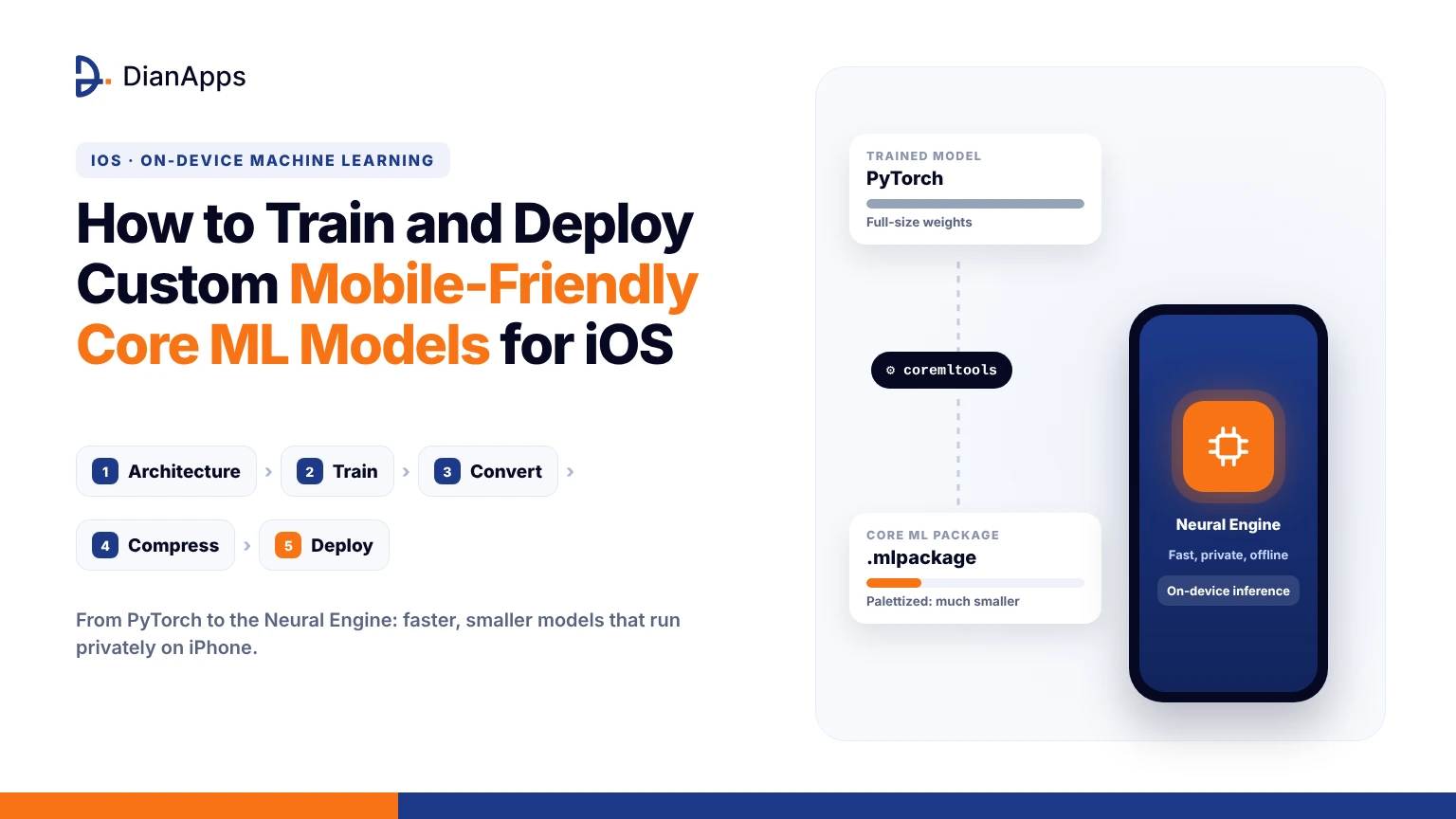
The path has five distinct stages, and skipping any one of them is where most projects are losing weeks in rework. In this guide, I’m walking you through architecture selection, training with mobile constraints, conversion with coremltools, compression, and deployment inside a real iOS app, so let’s break it down from beginning until completion.
What Makes CoreML Models Mobile Friendly in the First Place
A CoreML model is mobile friendly when it respects the three budgets every iPhone app is working within, which are memory, battery and latency. Apple’s runtime is scheduling work across the CPU, the GPU and the Neural Engine, and a model that maps cleanly onto the Neural Engine is running several times faster than the same model falling back to the CPU.
If you’re new to on device inference, our guide on how to deploy on device AI models in iOS apps covers the runtime basics, and the requirements that follow from it are these:
- Weights stored as float16 or smaller, since float32 is doubling memory for no accuracy gain on most tasks.
- Fixed or enumerated input shapes, because fully flexible shapes are forcing the runtime to skip Neural Engine compilation.
- Operators that coremltools and the Neural Engine support natively, rather than custom layers that need a slow CPU fallback.
- A total package size that your users’ patience and storage can tolerate on a first install.
Each of these constraints is shaping the training decisions that follow, and the reasons are not hard to see once you’ve profiled a model that ignores them, so let’s take a look at architecture first.
Choosing a Lightweight Architecture Before You Train CoreML Models for iOS
The biggest mobile performance win is happening before a single epoch runs, because architecture is deciding most of your final latency long before compression does. Families like MobileNetV3, EfficientNet Lite and the smaller ConvNeXt variants were designed around depthwise separable convolutions that the Neural Engine is executing extremely efficiently, while large transformer backbones are often spilling onto the GPU and draining battery.
For text and audio, distilled encoders such as DistilBERT or compact conformer models are giving you most of the accuracy at a fraction of the parameter count. A practical rule I’m using with clients is to cap vision models near ten million parameters and language models near a hundred million for anything that must run on devices older than the iPhone 15. If you’re still scoping the wider product, our walkthrough on how to build a mobile app is helping teams place the model inside a realistic roadmap, and once the backbone is chosen, the training loop needs a few mobile aware adjustments, so let’s take a look.
Training a Custom Model With Mobile Constraints in Mind
Training a custom mobile friendly CoreML model isn’t that different from any other supervised training run, but a few choices are making conversion and compression painless later. Start from pre trained ImageNet or similar weights whenever your dataset is small, since fine tuning is converging faster and generalising better than training from scratch, and keep the following habits throughout the run:
- Train at the exact input resolution you’ll ship, because resizing at inference time is adding latency and hurting accuracy.
- Use quantization aware training in the final epochs so the model is learning to tolerate int8 or 4 bit weights.
- Apply knowledge distillation from a larger teacher model, which is recovering accuracy that a small student would otherwise lose.
- Fold batch normalisation into convolutions and strip training only layers before export, since these are confusing the tracer.
- Bake the normalisation step into the model graph itself, so your iOS code isn’t doing manual preprocessing math on every frame.
And that is not all, you should also log validation accuracy at float16 precision during training, because that is the precision CoreML is defaulting to and surprises here are far cheaper to catch early. With a trained checkpoint ready, conversion is the next stage.
Not Sure Which Architecture Fits Your App?
Our iOS engineers are helping teams pick, train and ship CoreML models that run fast on real devices.
Converting Trained Models Into the CoreML Format With coremltools
Apple’s coremltools package is the official bridge between PyTorch or TensorFlow and the .mlpackage format that Xcode understands, and the conversion itself is only a few lines once the model is traced. The stable route is still torch.jit.trace, while the newer torch.export path is marked as beta in the official Core ML Tools PyTorch workflow guide, so I’m recommending tracing for any production build today. A typical conversion for an image classifier is looking like this:
python
|
1 2 3 4 5 6 7 8 9 10 11 12 13 14 15 |
import coremltools as ct import torch model.eval() example = torch.rand(1, 3, 224, 224) traced = torch.jit.trace(model, example) mlmodel = ct.convert( traced, inputs=[ct.ImageType(name="image", shape=example.shape, scale=1/255.0)], convert_to="mlprogram", minimum_deployment_target=ct.target.iOS17, compute_precision=ct.precision.FLOAT16, ) mlmodel.save("Classifier.mlpackage") |
Using ImageType instead of TensorType is letting Vision and CoreML hand you pixel buffers directly, which is removing an entire copy step on every frame, and setting the deployment target explicitly is unlocking newer compression operations that older targets simply can’t express. Conversion gives you a working model but rarely a small one, so compression is where the real mobile friendliness is coming from.
Compressing CoreML Models for Smaller Downloads and Faster On Device Inference
Compression is where custom mobile friendly CoreML models are separating from plain converted ones, and coremltools exposes three techniques through its ct.optimize.coreml module that you can stack together. Each method is trading a little accuracy for a lot of size, and the right mix depends on whether your bottleneck is download size, memory or latency:
- Palettization is clustering weights into a lookup table of 2, 4, 6 or 8 bits, cutting size sharply versus float16 with negligible accuracy loss on most vision tasks.
- Linear quantization is storing weights as int8, and on iOS 17 and later activations can be quantized too, which is unlocking faster integer paths on the Neural Engine.
- Pruning is zeroing out low magnitude weights so the sparse representation compresses well, and it pairs nicely with palettization when applied gradually during training.
Models that need to run continuously, such as the lightweight reasoning loops we compared in mobile AI agent vs AI chatbot, are depending on this step more than any other, because sustained inference is exactly where thermal throttling is starting to bite.
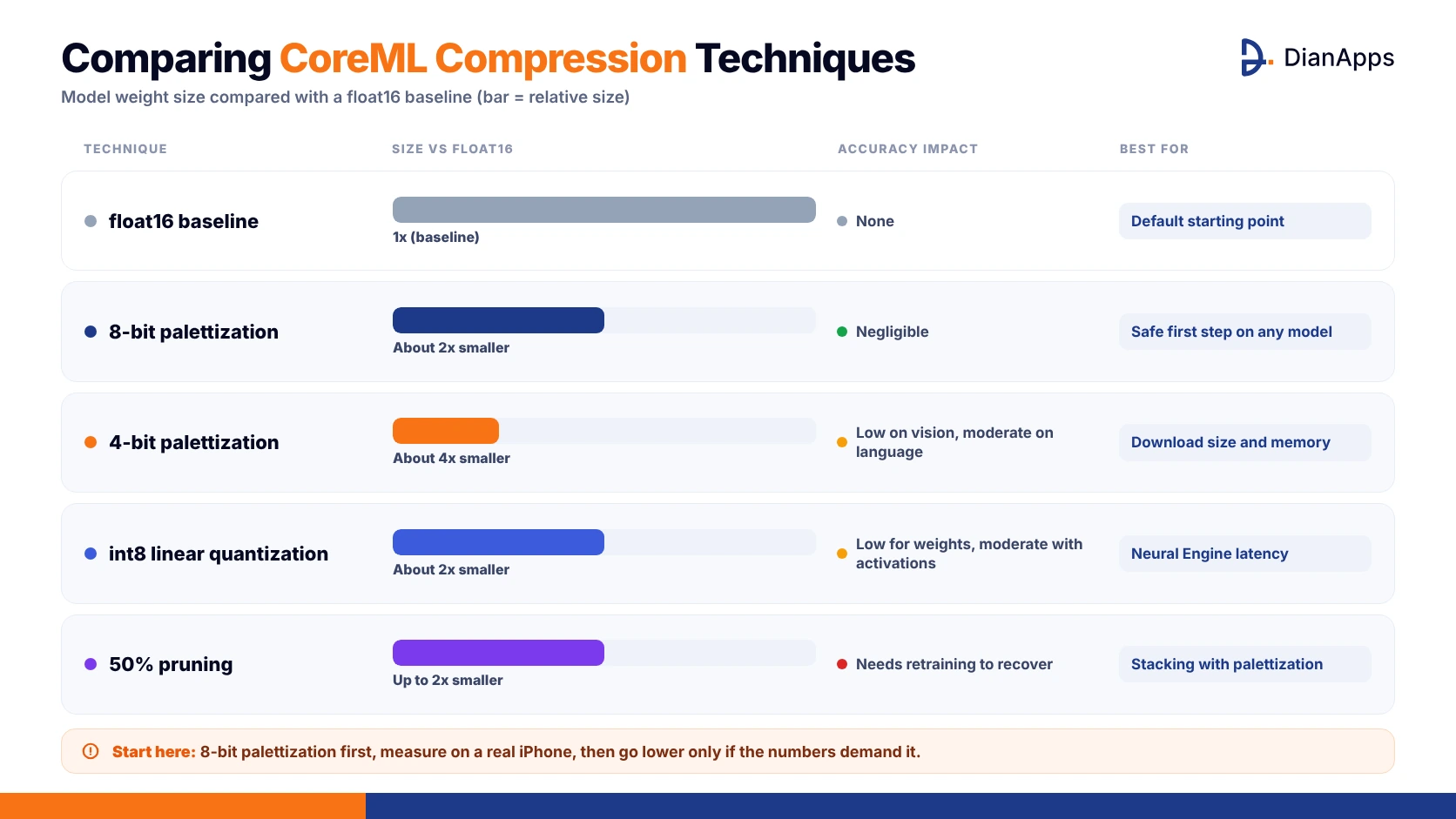
Comparing CoreML Compression Techniques
| Technique | Size Versus float16 | Accuracy Impact | Best For |
| float16 baseline | 1x | None | Default starting point |
| 8 bit palettization | About 2x smaller | Negligible | Safe first step on any model |
| 4 bit palettization | About 4x smaller | Low on vision, moderate on language | Download size and memory |
| int8 linear quantization | About 2x smaller | Low for weights, moderate with activations | Neural Engine latency |
| 50 percent pruning | Up to 2x smaller | Needs retraining to recover | Stacking with palettization |
I’m usually starting every project with 8 bit palettization, measuring on a real device, and only going lower when the numbers are demanding it.
Testing and Benchmarking CoreML Models on Real iOS Devices
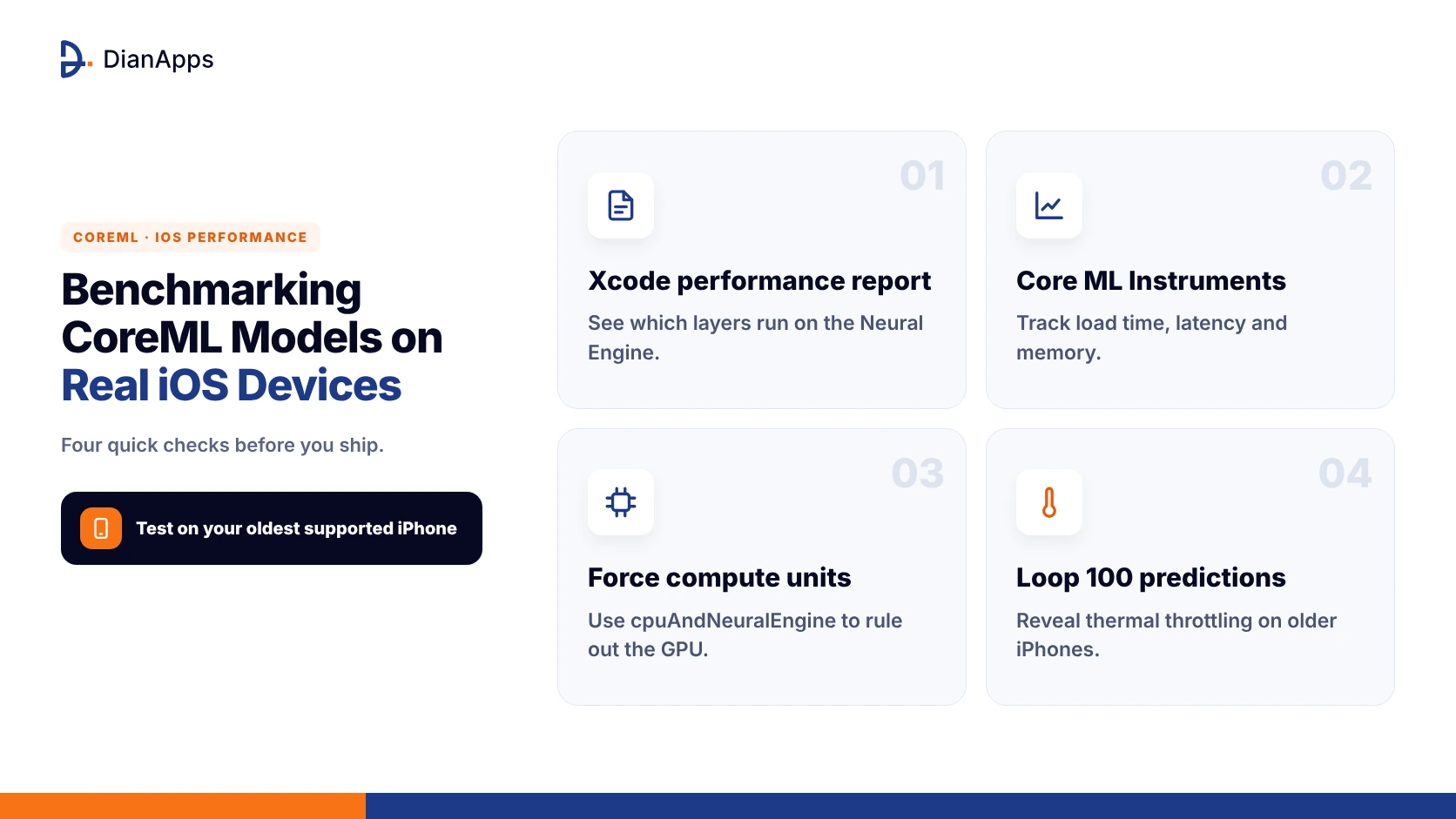
A model that benchmarks well on an M series Mac is telling you almost nothing about an iPhone 12 sitting in a warm pocket, so real device testing is something you simply can’t skip before shipping. Xcode is giving you two tools for this that most teams are ignoring, and together they’re answering nearly every performance question you’ll have:
- The Xcode performance report, opened by selecting the .mlpackage, is showing per layer compute unit assignment and flagging every operation that is falling off the Neural Engine.
- The Core ML Instruments template is recording load time, prediction latency and memory across a real session, which is exposing warmup spikes and leaks.
- The computeUnits property on MLModelConfiguration is letting you force cpuAndNeuralEngine to confirm the GPU isn’t silently absorbing the work.
- Looping a hundred predictions on your oldest supported device is revealing thermal throttling that single shot tests are never catching.
Treat the oldest device in your support matrix as the benchmark target, because that is the user who is leaving the one star review, and once the numbers hold there you’re ready to integrate.
Deploying Custom CoreML Models Inside an iOS App
Deployment is starting the moment you drag the .mlpackage into Xcode, which is compiling it into an .mlmodelc bundle and generating a Swift class with strongly typed inputs and outputs. Loading should happen once and off the main thread, since model initialisation on first launch can take hundreds of milliseconds on older hardware, and the setup is looking like this:
swift
|
1 2 3 4 5 6 7 8 9 |
let config = MLModelConfiguration() config.computeUnits = .cpuAndNeuralEngine Task.detached(priority: .userInitiated) { let classifier = try Classifier(configuration: config) let visionModel = try VNCoreMLModel(for: classifier.model) let request = VNCoreMLRequest(model: visionModel) request.imageCropAndScaleOption = .centerCrop } |
Wrapping the model in VNCoreMLRequest is handing image resizing, orientation and pixel format conversion to Vision, which is both faster and less error prone than manual CGImage math. If you’re also planning to blend your custom model with Apple’s own on device features, our guide on building AI features into iOS apps with Apple Intelligence is showing how the two are fitting together inside one product.
Updating CoreML Models Without Shipping a New App Build
Bundling the model inside the binary is fine for a first release, but retraining every month and waiting on App Review each time isn’t sustainable, and this is where downloadable models are stepping in. CoreML is letting you ship a model as a separate asset, fetch it over the network, and compile it on device with MLModel.compileModel(at:), after which you’re caching the compiled .mlmodelc in the application support directory and loading it exactly like a bundled one.
Apple’s Background Assets framework is handling the large download during installation or quietly in the background, so users aren’t staring at a progress bar on first launch. Version the model file alongside your API, keep the previous version on disk as a fallback if validation fails, and gate rollouts by percentage, which is the same disciplined approach we’re recommending in what is an MVP in app development for any feature touching real users. With updates sorted, let’s look at the mistakes that still trip up experienced teams.
Want a Performance Audit of Your Existing Model?
We’re benchmarking CoreML models across real devices and handing you a clear optimisation plan.
Common Mistakes When Deploying Custom CoreML Models on iOS
After shipping a fair number of these models, I’m seeing the same handful of problems appear in almost every code review, and all of them are avoidable with a little foresight. Watch for the following before your next release goes out:
- Loading the model on every prediction, which is reallocating memory each time and quietly destroying scroll performance.
- Leaving flexible input shapes enabled when the app only ever sends one resolution, pushing the whole graph onto the CPU.
- Forgetting that float16 is clipping values above 65504, which is silently breaking models with large intermediate activations.
- Skipping accuracy validation after compression, so a 4 bit model that looked fine on size is misclassifying edge cases.
- Treating medical or financial outputs as final answers without a human review path, a lesson that regulated products like those in our telemedicine app development cost breakdown are learning early.
None of these are hard to fix, but each of them is costing days when discovered in production rather than in a profiler, so build the checks into your pipeline now.
Final Thoughts
Building custom mobile friendly CoreML models is less about any single trick and more about carrying mobile constraints through every stage, from the architecture you pick to the way you load the model at runtime. Teams that are training at the right resolution, converting with explicit deployment targets, compressing with palettization, and benchmarking on their oldest supported iPhone are shipping models that feel instant, and users are rarely noticing the machine learning at all, which is exactly the goal.
The tooling from Apple has matured a great deal, and coremltools now covers nearly every path from PyTorch to the Neural Engine, so the remaining work is discipline rather than discovery. If you’re planning this for your own product and would rather skip the trial and error, we’ve got you covered.
 0 comments










Your email address will not be published. Required fields are marked *