















 0 comments





Key Takeaways:
- Most mobile apps take four to twelve months to develop, test and launch.
- A focused MVP can launch in six to ten weeks with a clearly defined scope.
- Backend development, third-party integrations, security and testing often take the most time.
- Healthcare, fintech and enterprise apps need longer timelines due to compliance and system complexity.
- Agile sprints, cross-platform frameworks and early testing can help reduce development delays.
Quick Answer: App development typically takes four to twelve months, while a focused MVP can launch in six to ten weeks. Complex enterprise platforms may take over a year, depending on features, integrations, security requirements, testing and approval processes.
Remember the excitement of having a brilliant app idea, scribbling the screens on the back of a notebook and imagining it sitting on the App Store by the end of the month? Well, most founders and business owners are having that exact same moment, and then reality is quietly stepping in, with designers asking about user flows, developers asking about the backend, the compliance team asking about data and suddenly that one month is turning into six.
So, how long does it take to build an app, really? Well, the honest answer is that most mobile apps are taking anywhere between 4 and 12 months from the first planning call until launch day, a focused MVP can be going live in as little as 6 to 10 weeks, and large enterprise platforms are often stretching beyond a year. The difference is not coming from how many screens your app has, it is coming from what is happening behind those screens, the backend, the integrations, the security work and the approvals that each and every serious product needs to go through.
In this guide, we at DianApps are walking you through the complete app development timeline phase by phase, what is speeding projects up, what is slowing them down and some real estimates you can actually plan around, so let’s take a look.
Wondering How Long Your App Will Really Take?
Every app idea is coming with its own set of features, integrations and approvals, and a generic estimate is rarely telling the full story. Share your idea with the DianApps team and get a realistic timeline built around your product.
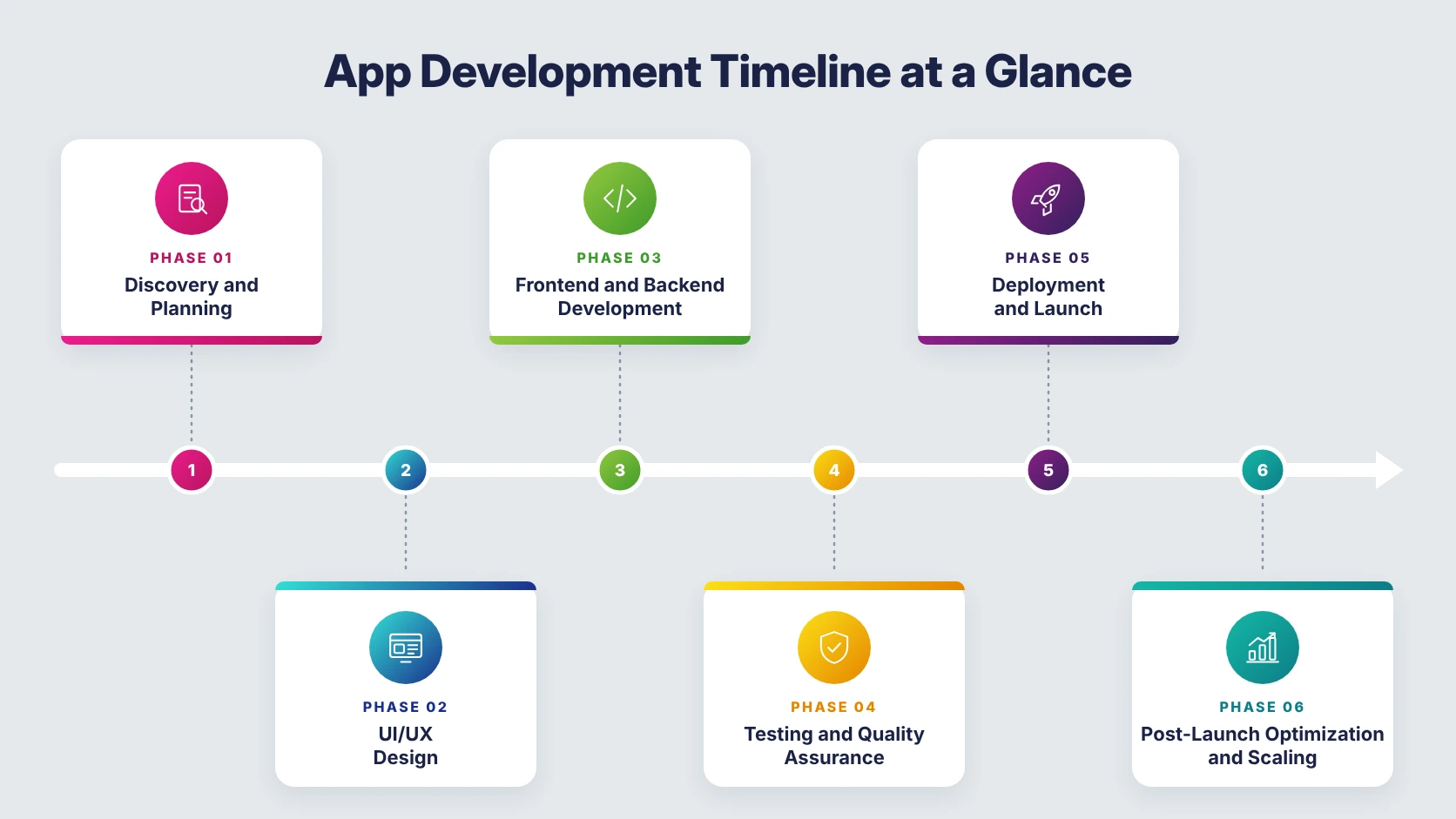
App Development Timeline at a Glance
Before we go into each phase, here is a quick overview of how a typical project is spreading its time across the full journey, from the very first workshop until the app is live and being improved.
| Phase | Typical Duration |
|---|---|
| Discovery and Planning | 2 to 4 Weeks |
| UI/UX Design | 3 to 6 Weeks |
| Frontend and Backend Development | 3 to 9+ Months |
| Testing and Quality Assurance | 3 to 6 Weeks |
| Deployment and Launch | 1 to 3 Weeks |
| Post-Launch Optimization | Ongoing |
As you can see, development is eating up the biggest chunk of the calendar, but the phases before and after it are deciding whether that development is going smoothly or getting stuck halfway, let’s break it down.
Phase 1: Discovery and Planning Phase (2 to 4 Weeks)
This is the phase where the idea is turning into a proper plan, and skipping it is one of the most common reasons why projects are running late later on. The team is sitting down with you to understand who the users are, what problem the app is solving, which features are must-haves for launch and which ones can wait for later updates, and the key activities here are usually including:
- Business goal and user research.
- Feature prioritisation and scope definition.
- Technical architecture planning.
- Integration and compliance mapping.
- Budget and timeline estimation.
By the end of this phase, everyone is on the same page about what is being built and why, and this is saving weeks of back-and-forth once the developers are already writing code. If you are starting from zero, our blog on the key stages of developing an app from scratch is explaining this phase in a lot more detail.
Phase 2: UI/UX Design Phase (3 to 6 Weeks)
Once the plan is ready, designers are bringing the app to life visually, mapping out how users are moving from one screen to another and how the app is looking and feeling on every device. This is a lot more than picking colours, the design team is working on things like:
- User flow and wireframe creation.
- Clickable prototype building.
- Design system creation.
- Accessibility validation.
- Responsive design testing.
Each of these is helping the development team later, because a clear design is meaning fewer guesses, fewer reworks and a much more hassle-free build.
Common Design Deliverables
| Deliverable | Why It Is Needed |
|---|---|
| Wireframes | Planning the layout structure |
| Clickable Prototypes | Testing workflows before coding |
| Design Systems | Keeping the UI consistent |
| Component Libraries | Speeding up frontend development |
Technical Considerations
Behind the visuals, there are a few technical details the designers are also keeping in mind, and these are:
- Responsive breakpoints for different screen sizes.
- Gesture interactions like swipes and long presses.
- Accessibility standards.
- How the UI is behaving across iOS and Android.
- Design token systems.
- Animation performance on lower-end devices.
For enterprise products, the designs are usually getting reviewed against employee workflows, customer journeys and internal process requirements before any development is starting, which is adding a little time here but saving a lot later. You can see how our UI/UX design team is approaching this for different industries.
Phase 3: Frontend and Backend Development Phase (3 to 9+ Months)
If you are asking how long does it take to build an app, this is the phase that is really holding the answer, because this is where the interface, backend services, APIs, databases, infrastructure and security systems are all being built together. Depending on how complex your product is, this phase alone can be running anywhere from three months to well over nine.
Frontend Development
The frontend is everything that users are seeing, tapping and scrolling through inside the app, and the experience of the developers on your team is directly affecting how quickly and cleanly this part is coming together. Some of the common frontend tasks are:
- Building the mobile UI.
- Managing app state.
- Connecting with APIs.
- Showing real-time data.
- Syncing data for offline use.
- Making screens responsive across devices.
Common Frontend Technologies
| Layer | Common Technologies | Estimated Timeline |
|---|---|---|
| iOS Development | Swift, SwiftUI | 4 to 10 Months |
| Android Development | Kotlin, Jetpack Compose | 4 to 10 Months |
| Cross-Platform | Flutter, React Native | 3 to 8 Months |
| Web Frontend | React, Angular, Vue | 2 to 6 Months |
Cross-platform frameworks are definitely helping shorten this phase, since one codebase is serving both iOS and Android.
Backend Architecture Development
The backend is the engine that is running quietly behind the app, handling the logic, processing data, sending notifications, managing logins and talking to other systems through APIs. Understanding backend development properly from the start is helping businesses scope this phase a lot more accurately, and the common backend tasks here are:
- Developing APIs.
- Designing the database.
- Processing queues and background jobs.
- Setting up file storage.
- Building notification services.
- Orchestrating workflows.
Common Backend Technologies
| Layer | Common Technologies |
|---|---|
| Backend Frameworks | Node.js, .NET, Django, Spring Boot |
| Databases | PostgreSQL, MongoDB, MySQL |
| Caching | Redis |
| Message Queues | Kafka, RabbitMQ |
API and Third-Party Integrations
Very few business apps are working on their own, most of them are connecting with outside systems such as:
- Payment gateways.
- ERP systems.
- CRM platforms.
- Identity and login providers.
- Analytics platforms.
- AI services.
- Maps and geolocation APIs.
Integration work is often the part that is quietly adding weeks to the timeline, mainly because of a few common issues, such as:
- APIs that are unstable or poorly documented.
- Rate limits on how often you can call them.
- Authentication conflicts between systems.
- Old legacy systems that were never designed to connect.
This is why it is extremely crucial to list every integration during planning, so there are no surprises halfway through development.
Cloud Infrastructure and DevOps Setup
Modern apps are needing automated deployment and proper infrastructure management right from day one, and businesses that are investing in cloud app development are usually seeing faster setups and much more stable production environments. The common DevOps tasks here are:
- Setting up CI/CD pipelines.
- Containerising the app.
- Orchestrating with Kubernetes.
- Managing infrastructure as code.
- Provisioning environments.
- Setting up monitoring.
Common Infrastructure Technologies
| Infrastructure Layer | Common Technologies |
|---|---|
| Cloud Platforms | AWS, Azure, Google Cloud |
| Containers | Docker |
| Orchestration | Kubernetes |
| CI/CD | GitHub Actions, Jenkins, GitLab CI |
Authentication and Security Implementation
Security is something that is being built into the app throughout development, rather than something that is added in the last week before launch. Some of the common security tasks are:
- OAuth 2.0 setup.
- JWT token management.
- Multi-factor authentication.
- Role-based access control.
- Data encryption.
- Secure API gateways.
Security Standards Often Required
| Industry | Common Standards |
|---|---|
| Healthcare | HIPAA |
| Payments | PCI DSS |
| Enterprise SaaS | SOC 2 |
| Global Applications | GDPR |
And that is not all, apps that are using AI are also needing a few extra layers of protection, such as:
- Filtering prompts.
- Testing for hallucinations.
- Controlling who can access the model.
- Protecting the vector database.
Each of these is adding a bit of time, but it is also making sure the app is safe and trustworthy once real users are coming in.
Phase 4: Testing and Quality Assurance Phase (3 to 6 Weeks)
How long testing is taking really depends on how complex the system is, but this is the phase where the team is checking stability, performance and release readiness, finding bugs, security gaps and infrastructure weak spots before your users are finding them. The key activities here are:
- Functional testing.
- Regression testing.
- Device compatibility testing.
- Performance testing.
- Penetration testing.
- User acceptance testing.
Common QA Types
| Testing Type | What It Is Checking |
|---|---|
| Functional Testing | Whether features are working as expected |
| Load Testing | How much traffic the app can handle |
| Penetration Testing | Security vulnerabilities |
| UAT | Whether business workflows are right |
Technical Considerations
While testing, the QA team is also keeping a close eye on a few technical areas, such as:
- API response times.
- Memory leaks.
- Handling many users at once.
- Crash analytics.
- Infrastructure failover.
- Database query speed.
For enterprise platforms, this phase is often going through several approval rounds before anything is moving into production, which is something every business should be planning time for.
Phase 5: Deployment and Launch Phase (1 to 3 Weeks)
So, how long does it take to launch an app once it is built and tested? Well, deployment is usually taking around 1 to 3 weeks, and this is where the app is moving onto live infrastructure, the release settings are getting finalised, the monitoring is switched on and a rollback plan is kept ready just in case. The key activities here are:
- Setting up the production environment.
- Submitting to the App Store and Google Play.
- Validating the release.
- Managing the rollout.
- Verifying backups.
- Preparing incident response.
Common Deployment Tasks
| Deployment Task | Why It Is Done |
|---|---|
| Production Build Creation | Packaging the final release |
| App Store Submission | Getting platform approval |
| Blue-Green Deployment | Rolling out more safely |
| Monitoring Activation | Seeing what is happening live |
Technical Considerations
There are also a few behind-the-scenes things that are needing attention during launch, and these are:
- CDN configuration.
- DNS propagation.
- Rollback planning.
- Autoscaling setup.
- Production logging.
One thing many businesses are not expecting is that the Apple App Store review alone can be holding up a launch by several days, so it is always a good idea to keep some buffer here.
Phase 6: Post-Launch Optimization and Scaling (Ongoing)
Launch day is feeling like the finish line, but it is really just the beginning, because once real users are coming in, the app is needing constant monitoring, tuning and updates to keep it running smoothly. The key activities after launch are:
- Scaling the infrastructure.
- Monitoring and analytics.
- Releasing new features.
- Fixing bugs.
- Tuning performance.
- Applying security patches.
Common Monitoring Areas
| Monitoring Area | What It Is Tracking |
|---|---|
| Crash Reporting | Runtime failures |
| APM Monitoring | Backend performance |
| User Analytics | Engagement and usage |
| Infrastructure Metrics | CPU, memory and scaling |
Technical Considerations
As the user base is growing, the technical team is also working on things like:
- Scaling the database.
- Caching strategies.
- Optimising APIs.
- Observability tools.
- Retraining AI models.
- Managing release versions.
Most product teams are relying on usage data and analytics to decide what is getting built next, which is making sure every update is actually improving the overall user experience.
Is Your App’s Backend Ready for What Is Coming?
Shaky integrations and infrastructure gaps are usually showing up late in the project, and by then they are slowing everything down. Let the DianApps engineers review your backend plan early and keep your launch on track.
App Development Timeline by App Type
Different types of apps are needing very different amounts of engineering work, for example, a fintech platform with fraud detection and PCI DSS compliance is going to take far longer than a simple shopping app with a standard checkout.
| App Type | Typical Timeline | Example Product |
|---|---|---|
| Fitness App | 8 to 12 Weeks | Workout and habit trackers |
| eCommerce App | 16 to 24 Weeks | Online jewellery or skincare stores |
| Social Media App | 20 to 30 Weeks | Video sharing and community apps |
| Food Delivery App | 16 to 22 Weeks | Restaurant ordering and delivery platforms |
| Healthcare App | 20 to 32 Weeks | Telemedicine and patient care apps |
| Enterprise SaaS Platform | 6 to 12 Months | Customer engagement software |
| AI-Driven Business App | 12 to 24 Weeks | AI hiring and workflow platforms |
| Logistics / Transit App | 4 to 8 Months | Fleet and shuttle tracking apps |
| Large Enterprise Platform | 8 to 14 Months | Multi-department operations systems |
| Unified Enterprise System | 6 to 12 Months | Connected ERP and CRM suites |
At DianApps, our teams have worked on products across many of these categories, from food delivery and eCommerce to fintech, enterprise SaaS and AI hiring platforms like Hirenetix AI, so we are seeing first-hand how much the app type is shaping the timeline.
So, how long does it take to make an app like a food delivery platform compared to a banking app or an AI assistant? Well, the workload is changing a lot once sensitive data and complex systems are entering the picture, and here is why:
- Healthcare apps are including patient records and compliance checks.
- Fintech apps are needing payment security and fraud monitoring.
- Social apps are managing feeds, uploads and notifications.
- Enterprise apps are connecting with CRMs, ERPs and internal tools.
- AI apps are requiring LLM integration and model testing.
The more complex the backend and integrations are, the longer the delivery is usually taking, and for Android-specific builds, our Android app development team is always factoring in payments, compliance and real-time data before giving an estimate.
Feature-Level Timeline Breakdown for Modern Mobile Apps
The best way to estimate your own timeline is by looking at it feature by feature, because a login screen is definitely not taking the same effort as a live chat system or an AI assistant. Some features are small frontend jobs, while others are needing backend services, database work, testing and infrastructure all at once.
| Feature/Component | Estimated Development Time |
|---|---|
| User Authentication and Login Systems | 1 to 2 Weeks |
| User Profiles and Account Management | 1 to 2 Weeks |
| Push Notifications | 3 to 5 Days |
| Search and Filtering Functionality | 1 to 2 Weeks |
| Payment Gateway Integration | 1 to 3 Weeks |
| Real-Time Messaging and Chat | 3 to 6 Weeks |
| Media Upload and Video Streaming | 2 to 5 Weeks |
| Social Sharing and Engagement Features | 1 to 3 Weeks |
| Geolocation and Live Tracking | 2 to 4 Weeks |
| AI Chatbots and Recommendation Engines | 4 to 10 Weeks |
| Multilingual Support | 1 to 2 Weeks |
| Analytics Dashboards and Reporting | 2 to 4 Weeks |
| Role-Based Access Control | 1 to 3 Weeks |
| Third-Party API Integrations | 1 to 4 Weeks |
| Admin Panel Development | 2 to 5 Weeks |
| Security and Compliance Features | 2 to 6 Weeks |
Real-time systems, AI features and large integrations are the ones that are usually pushing timelines higher, which is why it is really important to focus on stability and performance early in development rather than fixing it just before launch. If real-time chat is part of your plan, our guide on how to make a chatting app like WhatsApp is covering what goes into it.
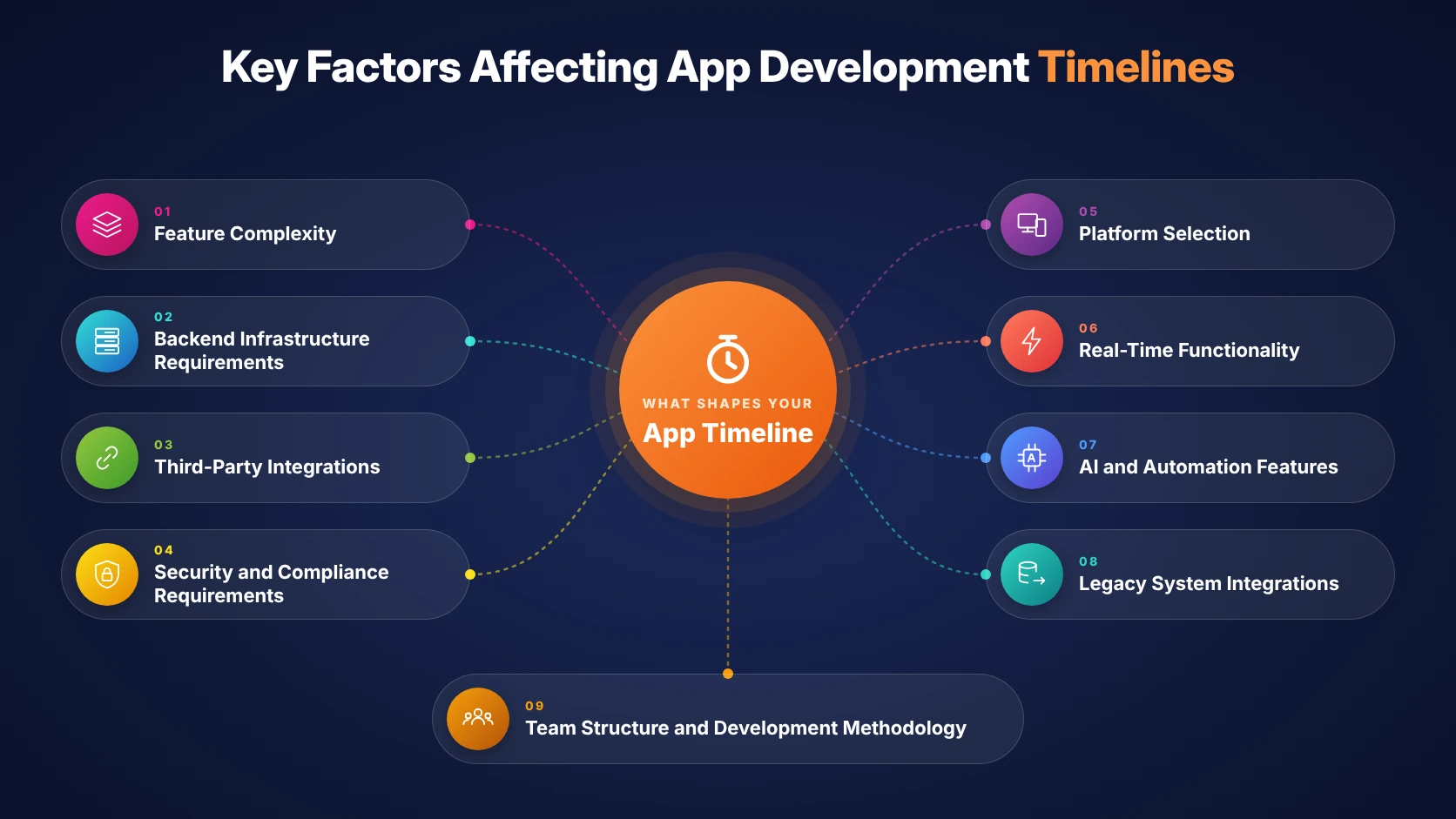
Key Factors Affecting App Development Timelines
The timeline of an app is changing with the amount of engineering work sitting behind it, a basic app with standard screens is moving a lot faster than a platform that is tied to internal systems, cloud infrastructure and large amounts of data. Here are the main factors that are deciding how long your project will take.
Feature Complexity
Simple features like login pages or profile screens are not taking much time, but things like real-time chat, video processing, recommendation systems and advanced dashboards are adding a lot more development work to each and every sprint.
Backend Infrastructure Requirements
Some apps are only needing a lightweight backend, while others are needing distributed databases, caching layers, queue systems and autoscaling infrastructure to handle heavy traffic, and the second kind is naturally taking much longer to build.
Third-Party Integrations
Many projects are connecting with payment gateways, ERP software, CRMs, analytics tools and other external APIs, and delays are often creeping in once the team is dealing with login conflicts or outdated systems on the other side.
Security and Compliance Requirements
Banking, healthcare and enterprise apps are usually going through extra security reviews, where teams are needing encryption, audit logging, access controls and penetration testing before the release is getting approved.
Platform Selection
Building separate native iOS and Android apps is often taking more time than a cross-platform build. If you are leaning towards native, our iOS app development team can help you understand the full scope of effort involved before you commit.
Real-Time Functionality
Live chat, location tracking and instant notifications are increasing the backend workload, since these systems are depending on stable, low-latency communication and continuous data syncing.
AI and Automation Features
AI features are adding another layer of complexity, and this workload is only growing as the latest AI development trends are pushing apps towards smarter automation and LLM-powered experiences.
Legacy System Integrations
Older enterprise systems are slowing projects down, especially when ERP connections are involved, because missing APIs, outdated documentation and custom workflows are creating extra engineering work that very few teams are budgeting for upfront. This is where experienced ERP software development support is really helping.
Team Structure and Development Methodology
Delivery speed is also depending on how the team is working together, which is why many businesses are choosing to outsource to partners who already have sprint planning and QA processes in place. Our blog on why DianApps is the right outsourcing partner is explaining how this is working in practice.
External Factors Affecting App Development Time
Here is something that surprises a lot of businesses, a project can lose weeks without a single line of code going wrong, because many delays are happening during approvals, coordination, purchasing or external reviews. Some of the most common ones are:
- Leadership taking time to approve budgets, changes or release plans.
- Legal and compliance reviews in healthcare, fintech and enterprise projects.
- Vendor onboarding delaying access to payment gateways, cloud systems or APIs.
- Procurement holding things up during contract and licence approvals.
- Different departments working on different schedules.
- Distributed teams across time zones slowing down feedback.
- Apple and Google rejecting builds over privacy or payment rules.
- External APIs changing mid-project and forcing rework.
- Scope debates and budget cuts pausing development.
- Internal security reviews delaying deployment after development is done.
This is why enterprise projects are usually slowing down because of coordination gaps rather than coding, and planning for these early is making a huge difference.
Examples of App Development Timelines
Two apps can be looking almost the same from the outside and still take completely different amounts of time to build, and the difference is usually coming from the backend, integrations, compliance work, infrastructure scale and release requirements. Let’s take a look at three real-world style examples.
Example 1: MVP Ecommerce App Timeline
Similar To: Shopify seller storefronts or early-stage marketplace modules
| Phase | Estimated Timeline |
|---|---|
| Discovery and Planning | 2 Weeks |
| UI/UX Design | 3 Weeks |
| Development | 10–12 Weeks |
| Testing and Deployment | 3 Weeks |
Total Timeline: 4 to 6 Months
An app like this is usually including features such as:
- Product catalogue.
- Payment gateway integration.
- Order management.
- Push notifications.
- Search and filtering.
- Admin dashboard.
Most of the development time here is going into payment workflows, inventory systems and API integrations.
Example 2: Enterprise Healthcare App Timeline
Similar To: Hospital patient portals or large healthcare management systems
| Phase | Estimated Timeline |
|---|---|
| Compliance Planning and Architecture | 4 Weeks |
| UI/UX Design | 5 Weeks |
| Backend and Integration Development | 5–7 Months |
| Security and Performance Testing | 6 Weeks |
| Deployment and Validation | 3 Weeks |
Total Timeline: 10 to 16 Months
Projects like this are often involving:
- EHR integrations.
- HIPAA compliance.
- Audit logging.
- Encrypted patient records.
- Appointment systems.
- Role-based access control.
Security reviews and healthcare integrations are usually the parts that are taking the most time here.
Example 3: AI-Powered Customer Support App Timeline
Similar To: AI copilots and smart helpdesk assistants
| Phase | Estimated Timeline |
|---|---|
| AI Strategy and Architecture Planning | 3 Weeks |
| Conversational UX Design | 3 Weeks |
| LLM Integration and Backend Development | 4–6 Months |
| AI Testing and Optimization | 4–6 Weeks |
| Deployment and Monitoring Setup | 2 Weeks |
Total Timeline: 8 to 14 Months
The engineering work here is commonly including:
- LLM integration.
- Vector database setup.
- Retrieval pipelines.
- Prompt testing.
- Conversation memory.
- AI response monitoring.
Testing AI accuracy and reducing hallucinations is often adding extra time, and you can read more about this in our blog on generative AI in enterprise app development.
How to Reduce App Development Time Without Compromising Quality
Knowing how long does it take to build an app is only half the story, because most apps are not falling behind because of coding alone. A delay is usually starting somewhere small, the QA team is getting the build too late, the product team is changing workflows in the middle of development or the security review is happening in the final week instead of earlier, and these small gaps are slowly piling up into weeks.
The good news is that there are some proven ways of speeding up delivery without adding any technical risk, and these are:
- Adopting Agile Development: Shorter sprints are helping teams review features early and catch issues before they spread across the whole product.
- Using Cross-Platform Frameworks: Choosing React Native or Flutter is cutting down repeated frontend work across iOS and Android.
- Leveraging DevOps and CI/CD Automation: Automated testing and deployment are reducing manual release work and making rollouts much faster.
- Prioritising MVP-First Development: Many businesses are launching the core workflow first with MVP development services, then growing the product based on real user feedback.
- Building with Reusable Components: Shared UI libraries, login modules and API templates are saving engineering hours on each and every project.
- Using AI-Assisted Development: Many teams are now using AI coding tools for debugging, unit testing and documentation.
- Leveraging Cloud-Native Infrastructure: Managed databases, Kubernetes services and autoscaling are reducing setup and deployment effort.
Put together, these practices are helping teams ship faster while still keeping the app stable, secure and ready to scale. If you are planning an MVP with AI features, our guide on AI-powered MVP development is a great place to start.
Why Enterprise App Development Projects Often Take Longer Than Expected
So, how long does app development take for enterprise projects? Well, usually longer than anyone is expecting at the start, because enterprise apps are coming with approval layers, legacy system dependencies and compliance requirements that no first roadmap is fully capturing. Here are the main reasons:
- Governance and Approval Layers: Large companies are rarely approving a release through one team, security, compliance, operations and leadership are often reviewing the same deployment one after another.
- Legacy System Modernisation: Older internal systems are creating problems quickly, with some still running on outdated databases or APIs that nobody has documented.
- Scalability and Performance Engineering: Real production traffic is changing everything, so teams are spending extra time testing load, failover, caching and database scaling.
- Security Hardening and Compliance: Healthcare and fintech apps are usually going through security audits, penetration testing and compliance checks before getting approved.
- Scope Growing During Development: A project is often starting with one feature list, and then new workflows and reports are appearing halfway through.
This is why choosing a partner who has already handled enterprise complexity is saving businesses a lot of time, and our blog on factors to select the right mobile app development company is helping you make that choice.
Don’t Let Scope Creep Push Your Launch Back by Months
Changing requirements, long review cycles and scaling surprises are pushing many apps far beyond their original timelines. Talk to DianApps and get a realistic, well-planned roadmap from beginning until completion.
How DianApps Helps Enterprises Accelerate App Development Timelines
Most enterprise projects are starting to slip long before launch day, a security review is taking longer than planned, an old ERP system is refusing to sync properly or the app is working perfectly in staging and then struggling the moment real traffic is hitting it. Almost every team is running into some version of these problems along the way, and this is exactly where DianApps is stepping in, and we’ve got you covered.
Our mobile app development services are built for businesses that are wanting faster delivery without piling up technical debt for later, and here is a quick look at who we are.
| Experience Snapshot | Numbers |
|---|---|
| Apps Delivered | 350+ |
| Engineers on the Team | 150+ |
| Building Digital Products Since | 2017 |
| Global Offices | USA, Australia, Canada, UAE, India |
| Clutch Rating | 4.8 (80+ Reviews) |
Businesses are usually bringing DianApps in for things like:
- Architecture planning.
- Cloud migration.
- AI integration.
- Flutter and React Native development.
- DevOps setup.
- ERP and CRM integrations.
- Modernising older enterprise systems.
A healthcare business might be needing HIPAA-ready infrastructure before release, a fintech platform might be needing stronger fraud controls and PCI DSS validation, and a retail app might be struggling to stay up during big sale days, and our teams have been solving these kinds of challenges for brands like Uber Eats, Freshworks, Khatabook and CaratLane across healthcare, fintech, logistics, retail and enterprise SaaS.
Many of our engagements are starting with a simple timeline discussion or an architecture review, and if you are still deciding how to approach your build, our blog on things to keep in mind before outsourcing a mobile app project is helping you set realistic goals before work begins. So, if you are ready to build an app with the right architecture decisions from day one, let’s connect and get started.
 0 comments










Leave a Comment
Your email address will not be published. Required fields are marked *