















 0 comments





Key Takeaways:
- Voice-first means the app is designed around speech as the main input, with the screen supporting the conversation instead of leading it.
- Every voice-first app is running the same pipeline of voice activity detection, speech recognition, language understanding, reasoning and text-to-speech.
- On-device options from Apple and Google are free per minute, cloud streaming APIs are priced between USD 0.0025 and USD 0.017 per audio minute (Fora Soft, 2026).
- A single voice feature on an existing app is taking 8 to 12 weeks, a full conversational agent is taking 14 to 18 weeks.
- Latency above two seconds and weak privacy consent are what is breaking most voice releases, not the AI model.
Quick Answer: Voice-first AI mobile app development is the practice of building an iOS or Android app where spoken conversation is the primary interface, backed by speech recognition, a language model and text-to-speech. The usual stack pairs on-device recognition with a cloud language model. DianApps, a mobile and AI app development company, is building these through its AI development services.
For most of the smartphone era, apps have been built around taps, swipes and forms, and voice has been a side feature hidden behind a small microphone icon. That is changing, and voice-first AI mobile app development is the reason.
Users are asking for apps that listen, understand context and act, while their hands are busy or their eyes are somewhere else. This guide covers how the technology works, which SDKs are worth testing, what it costs and how to start without rebuilding your whole product.
What Is Voice-First AI Mobile App Development?
Voice-first AI mobile app development means designing the product so that a user can finish the main job by talking, and the visual screen is there to confirm, show results or handle edge cases. The difference between voice-first and voice-enabled is where the design starts: a voice-first app begins with the spoken conversation and adds screens around it.
Voice-enabled mobile app development is the lighter version, where a dictation button or voice search is added to an existing interface. Both are valid, and the right one depends on the user problem you are solving.
Let’s compare the two interface models side by side.
| Factor | Graphical interface (GUI) | Voice user interface (VUI) |
| Primary input | Tap, swipe, type | Speech |
| Learning curve | Menus must be discovered | Users say what they want |
| Best context | Browsing, comparing, editing | Hands busy, eyes busy, quick tasks |
| Main risk | Too many steps | Misheard words and delay |
| Feedback | Visual | Audio plus visual confirmation |
Takeaway: The strongest products are mixing both, with voice for intent and the screen for proof.
Why Voice AI in Mobile Apps Is Growing So Fast
The numbers are showing a market that is moving from experiment to baseline. The voice assistant application market was valued at USD 11.92 billion in 2026, growing at a 33.6% compound annual growth rate toward USD 121.08 billion by 2034 (Fortune Business Insights, 2026).
On the user side, 27% of global online users are using voice search on mobile devices. On the business side, 84% of organizations are planning to raise voice technology budgets within 12 months.
AI spending is also reshaping the store, with non-game app revenue passing gaming revenue for the first time in 2025.
Ready to Bring Voice AI Into Your Mobile App?
Find the right speech recognition tools, AI models and integration strategy for your mobile application with our experts.
Benefits of Voice-First UX in Mobile Apps
The benefits of voice-first UX in mobile apps are showing up in task speed, reach and daily use. Voice removes steps, and every removed step is a user who does not abandon the task.
- Faster Task Completion: Saying “reorder my last coffee” is replacing four screens and a payment confirmation.
- Wider Accessibility: Users with limited vision, motor difficulty or low literacy are getting a full interface instead of a partial one.
- Hands-Free Context: Driving, cooking, workouts and field work are all moments where touch is not practical.
- Higher Engagement: Conversational products are creating more frequent, shorter sessions because starting one costs nothing.
How Voice AI Works Inside a Mobile App
Every voice-first AI mobile app development project is built on one pipeline, and understanding each stage is what lets a team find the delay when something feels slow.
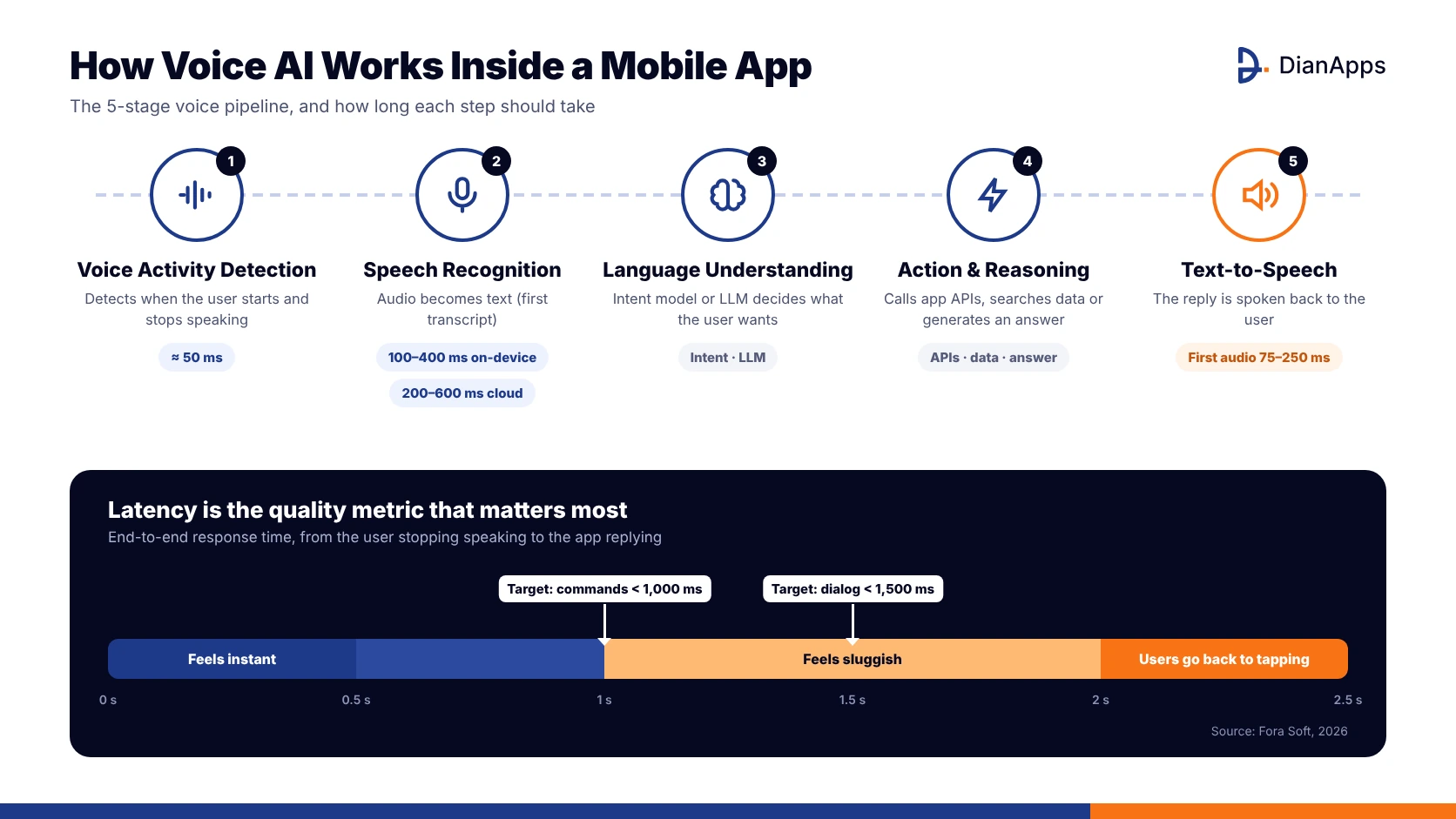
- Voice Activity Detection: The app is detecting when the user starts and stops speaking, usually in about 50 milliseconds.
- Speech Recognition (ASR): Audio is converted to text, with the first transcript arriving in 100 to 400 milliseconds on-device and 200 to 600 milliseconds in the cloud (Fora Soft, 2026).
- Language Understanding: An intent model or large language model (LLM) is deciding what the user wants.
- Action And Reasoning: The app is calling its own APIs, searching data or generating an answer.
- Text-To-Speech (TTS): The reply is spoken back, with first audio ideally arriving in 75 to 250 milliseconds.
Latency is the quality metric that matters most. Responses under 500 milliseconds feel instant, one to two seconds feels sluggish, and past two seconds most users go back to tapping (Fora Soft, 2026). The practical target is under 1,000 milliseconds end to end for commands and under 1,500 milliseconds for dialog.
How to Build a Voice-First AI Mobile App
The question most product teams are asking is how to build a voice-first AI mobile app without a year-long research phase. The path below is the one DianApps is following with clients.
Step 1: Pick one problem that voice makes dramatically easier
Start with the user problem, not the technology. Good first workflows are voice search, adding items to a list, logging a workout, checking an account balance or reading content aloud. If speaking is not clearly faster than tapping, the feature is not ready.
Step 2: Design the voice user interface (VUI)
Voice user interface (VUI) design is a different discipline from screen design. It covers conversation flow, error recovery, confirmations for risky actions and how the assistant sounds. Our guide to designing a voice user interface for your product is walking through the research, prototyping and testing steps in detail.
Step 3: Choose the architecture
Decide what runs on the device and what runs in the cloud. On-device recognition is private and has zero marginal cost, cloud models are more accurate on difficult audio and are required for large language model reasoning.
Step 4: Select SDKs and models
Match the SDK to the platform, budget and privacy needs. The comparison table in the next section is the starting shortlist.
Step 5: Build consent, privacy and fallbacks
Add a permission pre-screen before the system microphone prompt, since apps using pre-prompt screens are reporting 20 to 30% higher grant rates (Fora Soft, 2026). Always keep a visual fallback for noisy rooms and failed recognition.
Step 6: Test with real voices and measure
Test across accents, background noise and phone models. Track completion rate, repeat rate, latency at the 95th percentile and the share of sessions that fall back to touch.
How to Integrate Voice AI into an Existing Mobile App
Many teams already have a live product and are asking how to integrate voice AI into a mobile app without a rewrite. The lowest-risk route is adding one voice workflow to the current app, proving it works and then widening the scope.
- Reuse Existing APIs: The voice layer should call the same backend endpoints your screens are already using.
- Use A Managed AI Service: A hosted speech and language model removes the need to train and maintain models in-house.
- Add Confirmation Steps: Payments, deletions and messages should always be confirmed before they run.
- Measure Before Scaling: Review usage data for one release cycle before adding a second workflow.
This is also the natural entry point for in-app voice assistant development, where a small assistant grows from commands into a multi-turn conversation as the data justifies it.
Best Voice AI SDKs for iOS and Android
Choosing among the best voice AI SDKs for iOS and Android is mostly a trade between privacy, accuracy, price and platform reach. The table below is vendor-neutral and uses published list prices from November 2026, which are changing often, so confirm with each vendor before budgeting.
| SDK or API | Where it runs | Price per audio minute | Best for |
| Apple SpeechAnalyzer (iOS 26+) | On-device | Free | Private iOS dictation and commands |
| Android ML Kit GenAI Speech Recognition | On-device | Free | Android apps wanting zero APK weight (API still in alpha) |
| Picovoice | On-device | Free tier, commercial plans | Wake words and offline commands |
| AssemblyAI Universal-Streaming | Cloud | About USD 0.0025 | Low-cost live transcription |
| Deepgram Nova-3 | Cloud | USD 0.0077 list | Fast streaming for voice agents |
| Google Chirp 3 | Cloud | USD 0.016 (first 500k minutes) | Multilingual accuracy |
| OpenAI GPT-Live-Transcribe | Cloud | USD 0.017 | Teams already building on OpenAI |
For cross-platform builds, Flutter and React Native both have community wrappers for these services, although native modules are still giving the best latency. A hybrid setup, with on-device recognition for commands and cloud models for complex requests, is the pattern most production apps are settling on.
Cost to Develop a Voice AI Mobile App
The cost to develop a voice AI mobile app is depending on scope more than anything else, and published industry estimates are wide. Voice AI proofs of concept are typically quoted between USD 10,000 and USD 25,000 (Master of Code), adding an AI feature to an existing app is quoted at USD 20,000 to USD 60,000 (RiseUp Labs), and a full AI personal assistant app is commonly estimated between USD 40,000 and USD 120,000 (Creole Studios).
| Project tier | What is included | Typical timeline |
| Voice search or commands | One workflow, on-device or cloud ASR | 8 to 12 weeks |
| In-app voice assistant | Multi-turn dialog, several integrations | 12 to 16 weeks |
| Full conversational AI agent | LLM reasoning, tool use, compliance work | 14 to 18 weeks |
Running cost matters as much as build cost. A cloud voice stack is budgeting around USD 0.50 to USD 2 per voice-using monthly active user, and on-device recognition is adding no per-minute cost (Fora Soft, 2026). The main cost drivers are:
- Feature Complexity: Commands are cheap, open-ended assistants are not.
- Speech And AI Usage: Minutes of audio and LLM tokens grow with every active user.
- Integrations: Each connected system adds build and testing time.
- Security And Compliance: Consent flows, biometric rules and regional laws add effort early and save far more later.
Challenges Teams Hit with Voice AI
An AI voice agent mobile app fails in production for reasons that are rarely about the model. Most voice failures are pipeline failures: latency, noise, bad context handling and missing privacy design.
- Latency: Waiting for each stage to finish is adding seconds, streaming ASR, LLM and TTS together is the fix.
- Noise And Accents: Test on real devices in real rooms, not only in a quiet office.
- Hallucination: Ground answers in verified app data and keep actions behind controlled APIs.
- Privacy And Consent: Apple guideline 5.1.2(i), in force since November 2025, is requiring disclosure and explicit permission before voice data goes to a third-party AI service. The EU AI Act Article 50 has applied to AI voice agents serving EU users since 2 August 2026 (Fora Soft, 2026).
We have covered the ten most common failure points in our post on AI voice agent challenges, and it is worth reading before you finalize architecture.
Let’s Plan Your Voice AI App Development Budget
Get a development roadmap tailored to your features, technology stack, integrations and budget.
What Teams Are Actually Asking About Voice AI
Developer and product forums are asking the same handful of questions again and again. Here are two that keep appearing, answered plainly.
Is on-device speech recognition accurate enough to ship? For commands and short dictation, yes, on current flagship phones. For noisy audio or long free-form speech, cloud models still win, so most teams are using both.
Will users really talk to their apps in public? Not always, which is why a voice-first design still needs a quiet, visual path. Voice works best at home, in the car and in the field.
How DianApps Builds Voice-First AI Mobile Apps
DianApps, an AI-first product development company, is building mobile products with more than 150 engineers, working with 350+ clients across 25+ countries. The team holds a 4.8 out of 5 rating on Clutch across 81+ reviews and is a Premier Verified provider, with a U.S. presence supporting North American clients.
What is making DianApps a practical partner for voice work is full-cycle ownership. Mobile, web, backend, DevOps and AI under one team means the speech pipeline, the app and the data layer are designed together instead of being stitched together later. Our work covers LLM development, conversational AI, AI agents and natural language processing for both iOS and Android.
We are also honest about fit. If your use case is a single dictation field, a platform SDK is enough and custom AI would be a wasted budget. For a business-facing view of the same technology, see our guide to AI voice agents for business.
Future of Voice Interfaces in Mobile Development
The future of voice interfaces in mobile development is pointing in three directions. Voice is moving from commands to conversations, and from the cloud to the device.
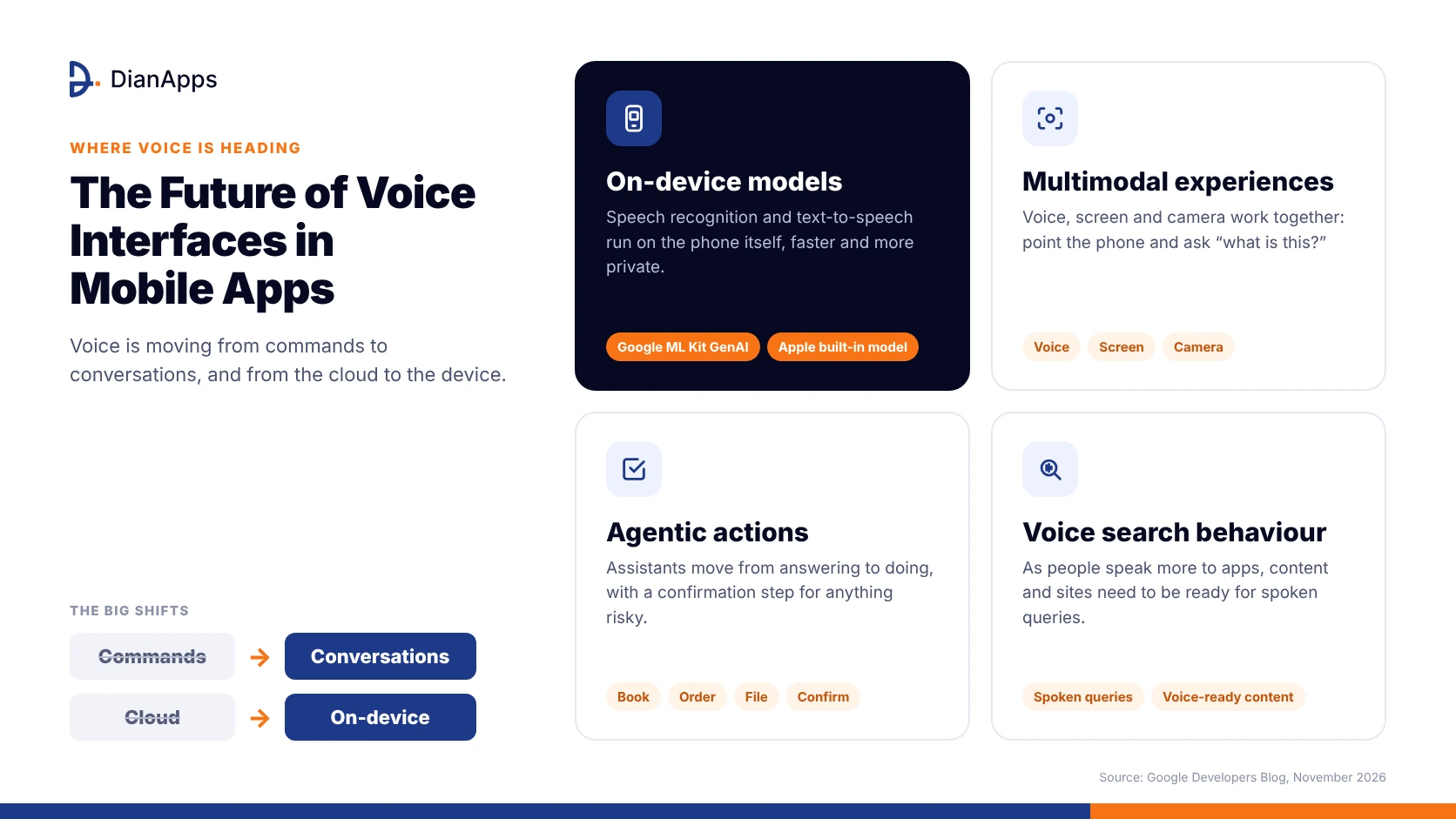
- On-Device Models: Google is adding on-device speech recognition and text-to-speech through ML Kit GenAI, and Apple ships its recognition model with the operating system (Google Developers Blog, November 2026).
- Multimodal Experiences: Voice, screen and camera are working together, so a user can say “what is this” while pointing the phone.
- Agentic Actions: Assistants are moving from answering to doing, booking, ordering and filing on the user’s behalf, with confirmation steps for anything risky.
- Search Behavior: As users speak more to apps, content and sites need to be ready for spoken queries, see our notes on designing websites for voice search readiness and how to optimize a website for voice search.
Conclusion
Voice-first AI mobile app development is moving from experiment to expectation, with market forecasts, user behavior and SDK maturity all pointing the same way. The winning approach is not a giant assistant, it is one well-chosen workflow, a fast pipeline and a privacy design that users can trust.
Start with a single use case, pick the right mix of on-device and cloud services, and measure before you expand. If you are planning a voice for a new or existing product, talk to the DianApps AI team and we will map the first release with you.
 0 comments









Your email address will not be published. Required fields are marked *