















 0 comments





Key Takeaways:
- Salesforce is a cloud-based CRM platform that manages customer data, sales, service, marketing, commerce, and business processes.
- The platform goes beyond CRM with four layers: AI agents, applications, platform capabilities, and a unified data layer.
- Salesforce has shifted its positioning toward an “Agentic CRM” with Agentforce playing a central role in its 2026 strategy.
- Core Salesforce concepts include Leads, Accounts, Contacts, Opportunities, and Cases.
- Salesforce offers products including Agentforce Sales, Service Cloud, Marketing Cloud, Commerce Cloud, Data 360, Tableau, Slack, MuleSoft, and Heroku.
- Pricing in the article ranges from about $25 to $550 per user per month, depending on the edition.
- Salesforce is strongest for businesses with complex processes, rapid growth, multiple customer-facing teams, or specialized industry requirements.
- The platform can be overkill for very small teams with simple sales pipelines.
- Major disadvantages include total cost, implementation complexity, ongoing administration, platform limits, and the need to manage frequent releases.
- Salesforce can be customized largely through point-and-click configuration, while developers are needed for more advanced requirements.
Quick Answer: Salesforce is a cloud-based CRM and business platform that helps companies manage customer relationships, sales, service, marketing, commerce, data, and increasingly AI-powered tasks. In 2026, Salesforce positions itself as an “Agentic CRM,” combining applications, a platform, unified data, and AI agents. It is particularly valuable for growing organizations with complex processes but can be unnecessary for small businesses with simple CRM needs
Salesforce is software that keeps track of your customers, who they are, what you’ve sold them, what they’ve asked for, and what should happen next.
That’s the honest one-sentence answer, and it’s most of what you need if you’re just trying to understand what the company does.
But the fuller answer changed in 2026, and most guides ranking for this question haven’t caught up. Salesforce no longer describes itself as a CRM or even as an AI CRM. It now calls itself the “#1 Agentic CRM”, software where AI agents do work rather than just suggesting it. Several products have been renamed around that shift.
This guide covers the plain-English version, why the platform dominates, what it genuinely doesn’t do well, and what’s actually current.
What Salesforce Is, in Plain Language
CRM stands for Customer Relationship Management. Every business has one, whether they call it that or not: a notebook, a spreadsheet, or software. It records who your customers are, what you’ve discussed, and what they’ve bought.
Salesforce is CRM software delivered over the internet. No servers in a cupboard, no installation. You log in through a browser, the way you would with Gmail.
That was genuinely radical in 1999; business software then meant buying servers, hiring engineers to install it, and only being able to use it from inside the office. Marc Benioff’s pitch was blunt enough to become a logo: the end of software.
It is not one product. It’s a large family of products sharing one platform and one customer record, which is the actual reason companies pick it over cheaper alternatives. Your marketing team, sales team, and support team all see the same customer.
SFDC, if you’ve seen the acronym, is just shorthand for Salesforce.com.
The Four Layers
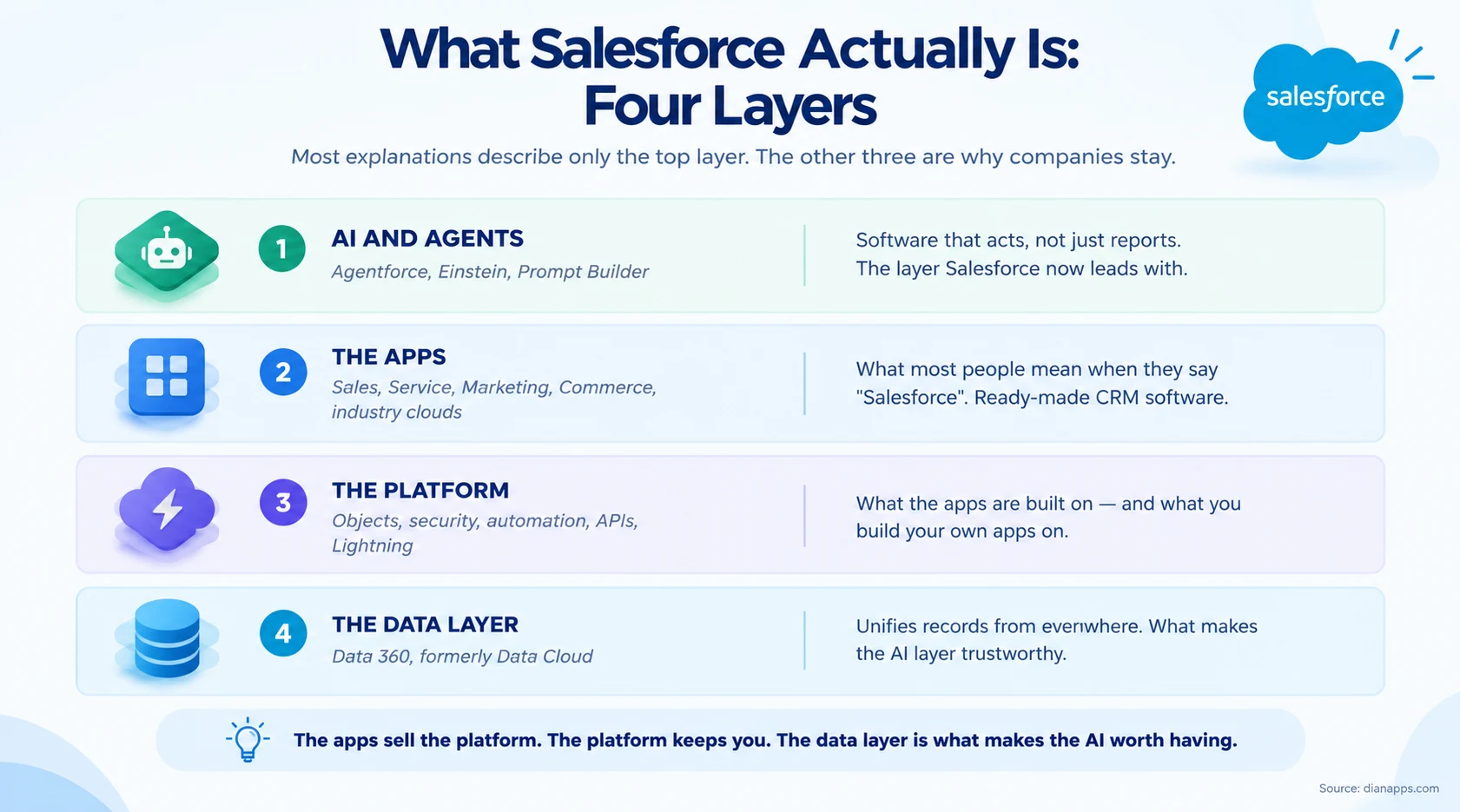
Most explanations stop at the apps; that’s the layer people see, and it’s what “Salesforce” means in everyday conversation.
The other three explain why companies stay for a decade. The platform means you can build your own applications rather than buying more software. The data layer unifies records from systems Salesforce doesn’t own. And the AI layer only works well because the other two exist – an agent is only as good as the data underneath it.
Why Is Salesforce So Popular?
A fair question, and the marketing answers (“innovation”, “trust”, “customer success”) don’t really explain a 25-year run at number one. Six structural reasons do.
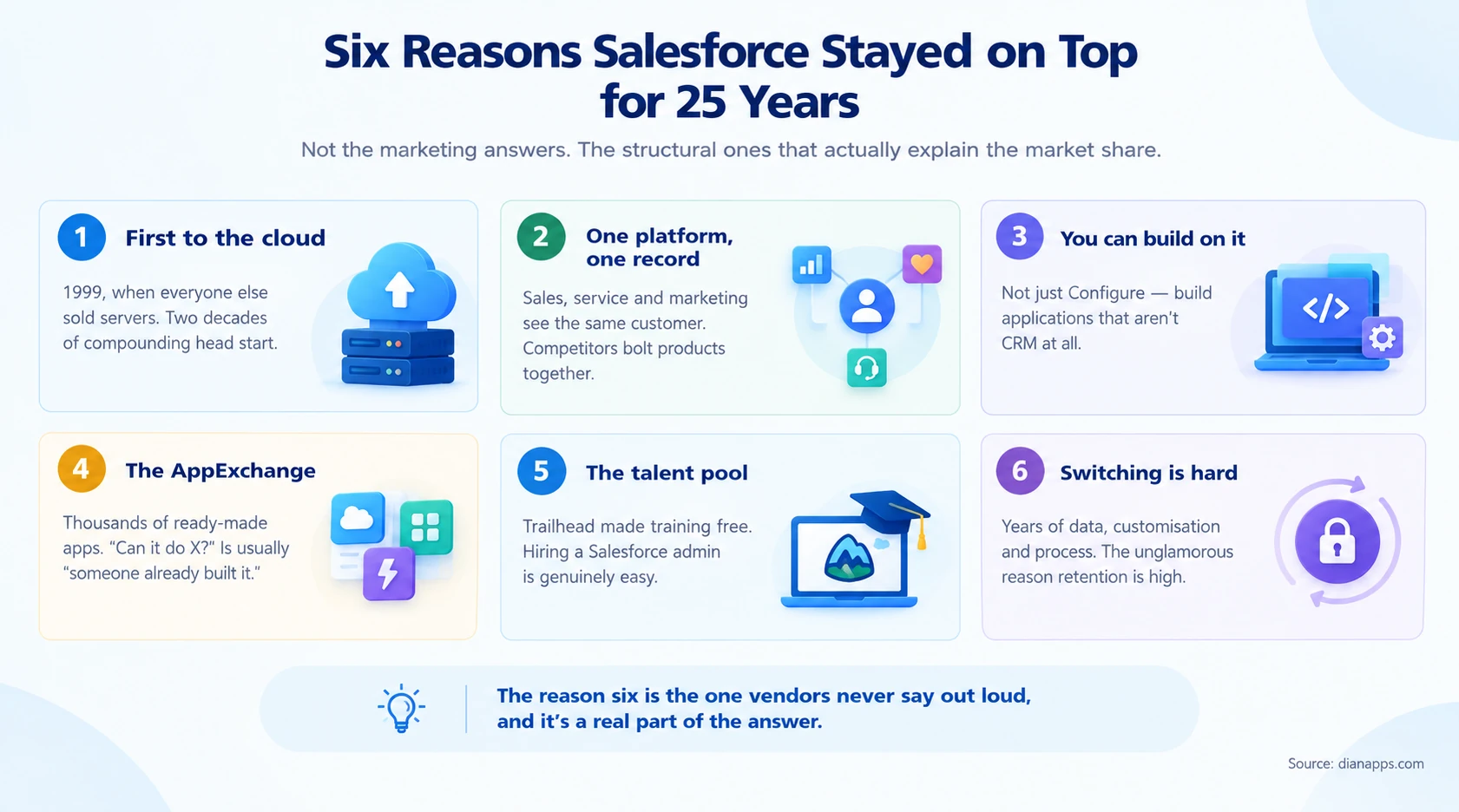
- It Was First To The Cloud, By Years: In 1999, competitors were selling servers and installation projects. Salesforce sold a login. That head start compounded – while rivals rebuilt their products for the web, Salesforce spent those years adding features.
- One Platform, One Customer Record: This is the reason enterprises pick it over cheaper point solutions. Sales, service, marketing, and commerce all read and write the same record. Competitors that grew by acquisition often have products that technically integrate but don’t genuinely share a data model.
- You Can Build On It, Not Just Configure It: Most CRMs let you add fields. Salesforce lets you build entire applications that have nothing to do with CRM – inspection systems, grant management, employee portals. That turns a CRM purchase into a platform decision, which is a much harder thing to reverse.
- The AppExchange: Thousands of ready-made applications for e-signature, accounting, project management, and industry-specific needs. The practical effect is that “can Salesforce do X?” is usually answered with “someone already built it” rather than “we’d have to develop that.”
- The Talent Pool, Built Deliberately: Trailhead made Salesforce training free, gamified, and open to anyone. That was a strategic decision, not a charitable one – it means hiring a Salesforce administrator is genuinely easy, which removes one of the biggest objections to adopting enterprise software.
- Switching Is Hard: The unglamorous reason vendors never say it out loud. After a few years, you have historical data, custom objects, integrations, trained staff, and processes shaped around the platform. Migrating isn’t a software swap; it’s a programme. High retention isn’t purely a satisfaction story.
The Honest Summary: Reasons one to five are genuine product strengths. Reason six is why the market share is stickier than the product advantage alone would justify. Both are true.
A Short History
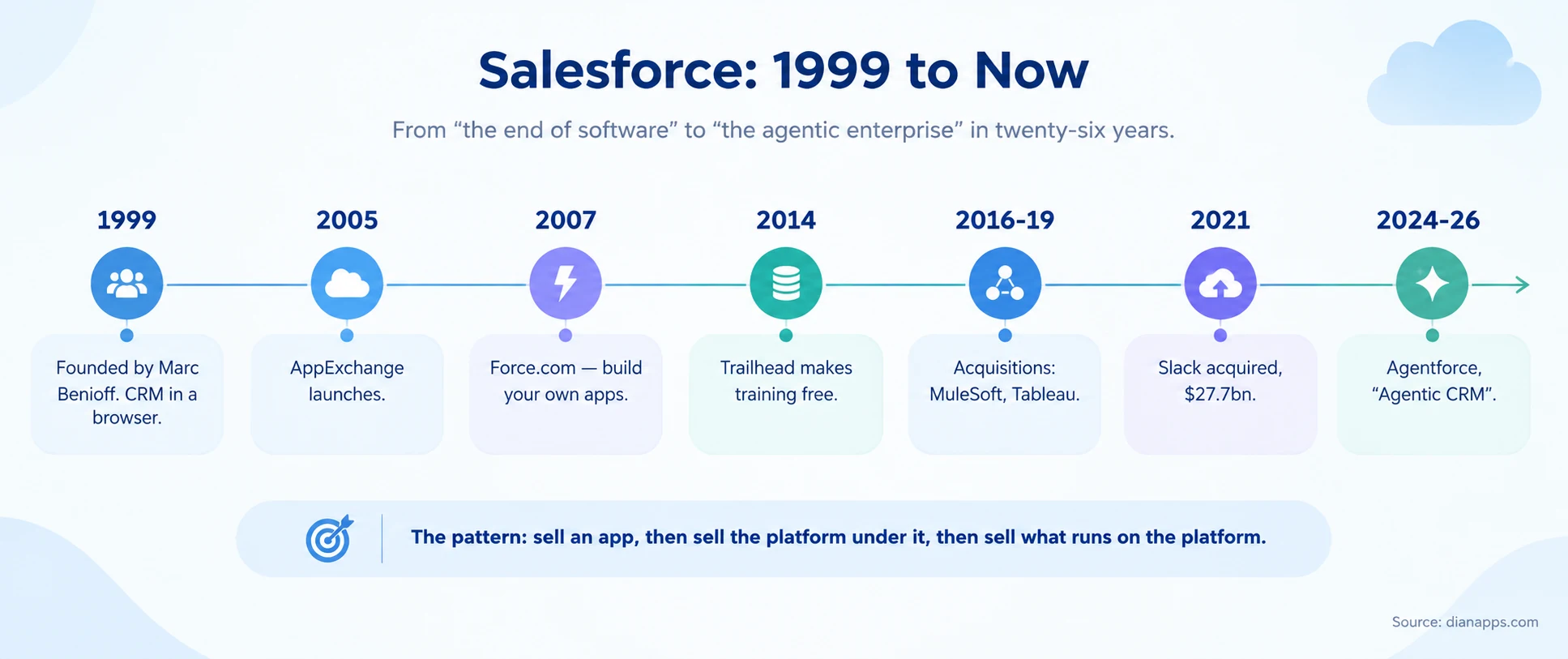
- The Pattern Worth Noticing: Salesforce sells an application, then sells the platform underneath it, then sells what runs on the platform. AppExchange in 2005 and Force.com in 2007 turned a CRM company into a platform company – which is why the portfolio now includes analytics, integration middleware, and a messaging app.
- The Acquisitions Matter More Than They Look: MuleSoft brought integration, Tableau brought analytics, Slack brought the collaboration layer. Each one closed a gap that would otherwise have sent customers to a competitor.
Deeper: Every Salesforce acquisition and what it means
What Changed in 2026
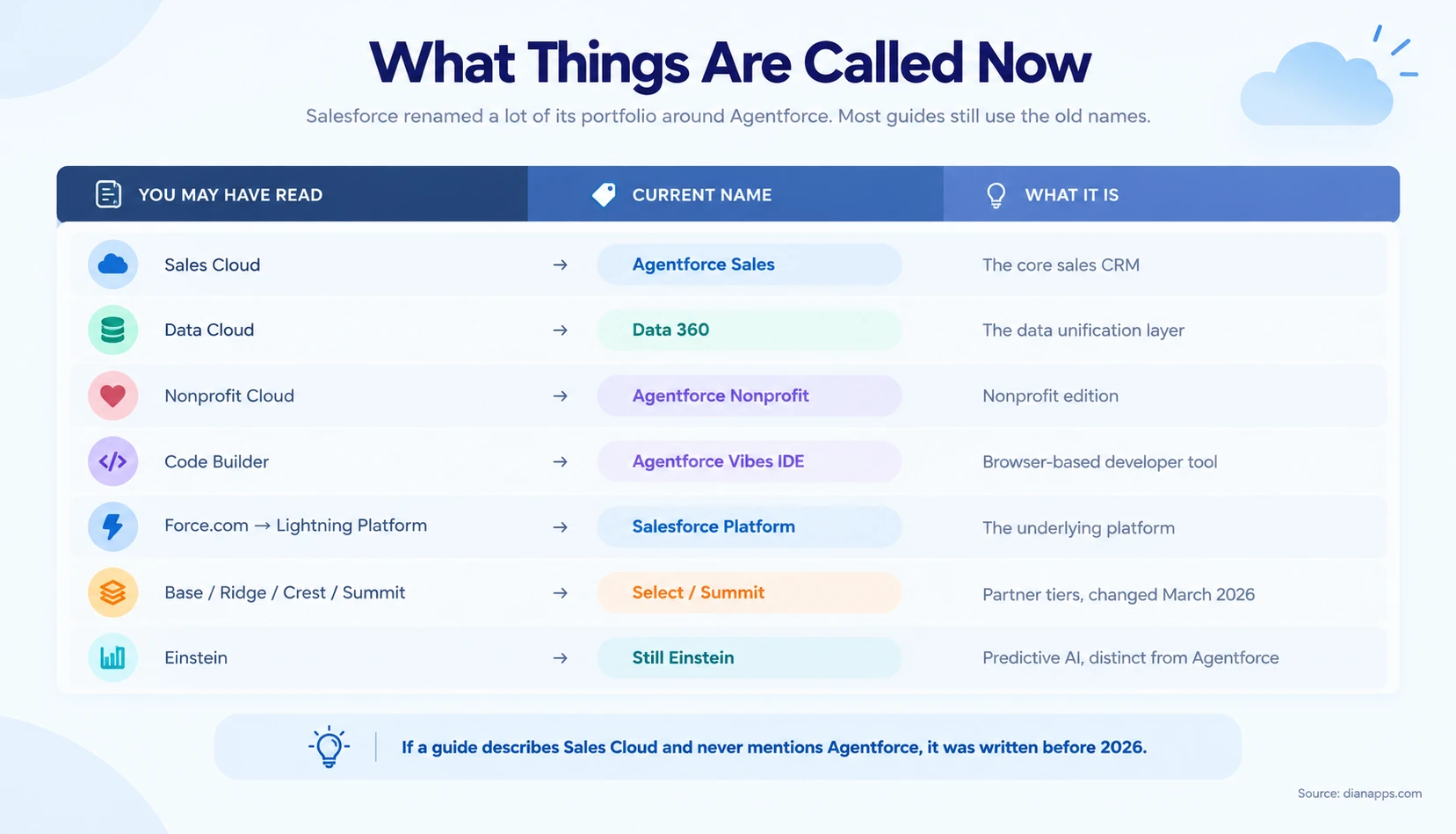
This trips people up more than anything else on this page. If you’re comparing guides and the names don’t match, this is why.
- The Bigger Shift Is Conceptual. For twenty years, Salesforce sold software that recorded things and suggested things. Agentforce is sold as software that does things – answering a customer email, qualifying a lead, processing a return without a person clicking approve each time.
Whether that lives up to the marketing depends almost entirely on data quality. An agent grounded in messy records gives confident wrong answers. That’s the honest caveat, and it’s why the data layer matters more than the AI layer.
Deeper: What is Agentforce · Data 360 explained
The Core Concepts
Five words do most of the work in Salesforce. Learn these and the rest follows.
| Term | What it means | Everyday equivalent |
|---|---|---|
| Lead | Someone who might buy, not yet qualified | A business card from a conference |
| Account | A company you do business with | The organisation |
| Contact | A person at that company | The individual you email |
| Opportunity | A potential deal with a value and a stage | A live sales conversation |
| Case | A customer problem or request needing resolution | A support ticket |
- The Flow, Simplified: A Lead comes in. If it’s real, it converts into an Account (the company), a Contact (the person), and an Opportunity (the deal). The Opportunity moves through stages until it’s won or lost. After the sale, problems become Cases.
Everything else- quotes, contracts, campaigns, orders – hangs off those five.
A Worked Example
Abstract definitions only go so far; here’s one customer moving through the system.
- Monday: Someone downloads a pricing guide from your website. Salesforce creates a Lead – name, company, email, and the fact they came from that page.
- Tuesday: An agent or a rule checks whether they fit your target profile. They do. The Lead is converted, creating three records: an Account (their company), a Contact (them), and an Opportunity worth an estimated £40,000 at the “Qualification” stage.
- Over Three Weeks: Calls, emails, and meetings are logged against the Contact automatically. The Opportunity moves through stages: Qualification, Proposal, Negotiation. Your forecast updates as it moves, because the forecast is just a roll-up of Opportunity stages and values.
- Week Four: They sign; the Opportunity is marked Closed Won. That triggers automation: a task for onboarding, a notification to finance, a welcome email sequence.
- Three Months Later: Something breaks. They email support, which creates a Case. The support agent opens it and sees the whole history – what was sold, by whom, at what price, and every conversation since.
- That Last Step Is The Entire Argument For CRM. The support agent didn’t have to ask what the customer bought. Everything else is detail.
The Product Portfolio
| Product | What it does | Who uses it |
|---|---|---|
| Agentforce Sales (Sales Cloud) | Pipeline, forecasting, quoting, deal management | Sales teams |
| Service Cloud | Cases, routing, knowledge base, live chat, phone | Support teams |
| Marketing Cloud | Email, journeys, SMS, advertising, personalisation | Marketing teams |
| Commerce Cloud | B2B, D2C and B2C storefronts | Ecommerce teams |
| Data 360 (Data Cloud) | Unifies customer data from every system | Data and IT |
| Agentforce | AI agents that take action across the above | Everyone |
| Tableau | Analytics and visualisation | Analysts, leadership |
| Slack | Where people and agents collaborate | Everyone |
| MuleSoft | Connecting Salesforce to other systems | IT and integration |
| Heroku | Custom applications outside platform limits | Developers |
And The Industry Versions: Health Cloud, Financial Services Cloud, Manufacturing Cloud, Agentforce Nonprofit, Education Cloud and others. These aren’t add-ons – they’re pre-built data models for regulated or specialised sectors, which is why they matter more than the marketing suggests. Building the equivalent from scratch costs six figures.
Deeper: Salesforce clouds compared · Every Salesforce product
How the Platform Works
Three architectural facts explain most of Salesforce’s behaviour, good and bad.
- It’s Multi-Tenant: Your org shares infrastructure with thousands of others. That’s why it’s affordable and why there are strict limits on how much processing any single customer can do at once. Those limits shape every technical decision made on the platform.
- It’s Metadata-Driven: Your customisations are configuration, not compiled code. That’s why an admin can add a field in thirty seconds without a developer and why upgrades don’t break things.
- It Upgrades Three Times A Year: Spring, Summer and Winter. You don’t choose when. New features arrive automatically; anything custom you’ve built needs to still work afterwards.
- What “Customising” Actually Means: most changes are point-and-click – fields, page layouts, automation, permissions. A trained administrator handles the large majority of requests without writing code. Developers get involved when the declarative tools genuinely run out.
Deeper: The Salesforce Platform explained · Configuration vs customization · Governor limits
What It Costs
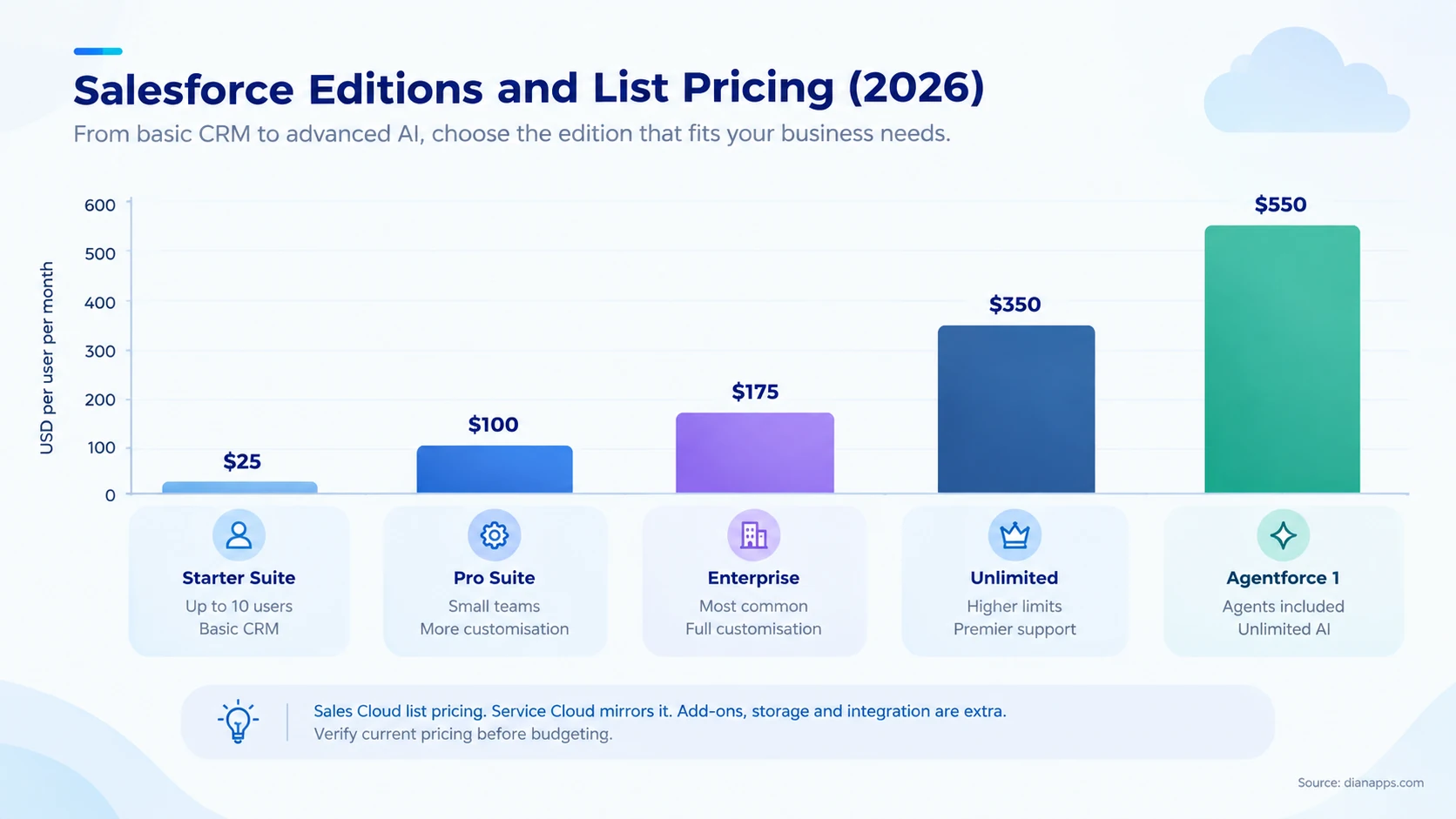
| Edition | List Price | Best For |
|---|---|---|
| Starter Suite | ~$25/User/Month | Up To 10 Users, Simple Needs |
| Pro Suite | ~$100/User/Month | Small Teams Wanting Customisation |
| Enterprise | ~$175/User/Month | The Most Common Choice - Full Customisation And Api Access |
| Unlimited | ~$350/User/Month | Higher Limits, Premier Support |
| Agentforce 1 | ~$550/User/Month | Agents and AI Included At Scale |
Three things the sticker price hides.
- Implementation is separate, and for a mid-market rollout it commonly costs more in year one than the licences do.
- Add-ons accumulate – extra storage, sandboxes, Shield encryption, integration tooling, premier support. The gap between list price and actual annual spend is usually significant.
- There’s a cheaper licence most buyers never hear about. A Platform licence costs around $25 per user per month for people who need custom apps but never touch Leads, Opportunities, or Cases – warehouse staff, field engineers, internal teams. For those users, it’s roughly a sixth of an Enterprise seat, and it’s the single most common way organisations overspend without knowing it.
Deeper: Salesforce pricing in full · Editions compared · How to reduce Salesforce costs
Need Help Planning Your Salesforce Investment?
Get expert guidance on Salesforce licensing, implementation, customization, and the right setup for your business.
Who Actually Uses It
Salesforce has over 150,000 customers and roughly a fifth of the global CRM market, the largest share of any single vendor. Customers range from two-person startups to Fortune 500 companies, including American Express, Sony, and Coca-Cola.
Where it genuinely shines:
- Complex sales processes, multiple stages, multiple people, long cycles
- Companies growing fast, where a spreadsheet has visibly stopped working
- Businesses needing one customer view across sales, service and marketing
- Regulated industries, where the industry clouds save enormous build effort
- Organisations with unusual processes that need building rather than buying
Where it’s honestly overkill:
- A five-person team with a simple pipeline as Pipedrive or HubSpot will be cheaper and faster to live.
- Businesses with no process to speak of. Salesforce enforces structure; if you don’t have any, it’ll feel like bureaucracy.
- Anyone without an owner for it, as Salesforce needs someone responsible for it or it degrades into a database nobody trusts.
That last point causes more failed implementations than any technical issue.
Deeper: Salesforce for startups and SMBs · Salesforce alternatives · Salesforce vs HubSpot
What Salesforce Doesn’t Do Well
Every guide lists benefits. Fewer list the trade-offs, and knowing them before you buy is worth more than another feature list.
- It’s Expensive, And The Price Is The Smaller Half: Licences are visible; implementation, admin time, integration, and add-ons are not. Organisations routinely spend two to three times the licence cost in year one.
- It Needs An Owner: Without an administrator who is genuinely accountable for it, data quality decays, automation breaks silently, and within two years nobody trusts the reports. This is the most common cause of failure, and it’s organisational, not technical.
- Complexity Accumulates Quietly: Every field, workflow, and automation someone adds stays forever unless removed. Ten-year-old orgs commonly have hundreds of unused fields and automations nobody dares delete.
- The Interface Is Dense: Salesforce optimises for capability over simplicity. Users coming from Pipedrive or a spreadsheet find it heavy, and adoption suffers if nobody manages the change.
- Governor Limits Are Real: Multi-tenancy means hard caps on processing. Developers arriving from other platforms consistently underestimate this, and it shapes what can be built.
- You Don’t Control Upgrades: Three releases a year, on Salesforce’s schedule. Mostly beneficial, occasionally disruptive, always requiring someone to check that nothing custom broke.
None of this makes it the wrong choice: It makes it a choice with real costs that should be planned for rather than discovered.
For businesses dealing with Salesforce complexity, Salesforce Consulting Services can help with implementation planning, customization, integrations, and ongoing platform management.
Common Misconceptions
“Salesforce is just for sales teams.” It started there. It’s now used for service, marketing, commerce, and a great deal of custom application work that isn’t CRM at all.
“It’s only for big companies.” Starter Suite exists for teams under ten people. The honest constraint isn’t company size; it’s whether you have process worth systematising.
“You need developers to use it.” No. A trained administrator handles most changes with point-and-click tools. Developers become necessary when declarative tools run out, which is later than most people assume.
“Salesforce and CRM are the same thing.” Salesforce is a CRM vendor, the largest one. CRM is the category. HubSpot, Zoho, Dynamics, and Pipedrive are also CRMs.
“Once you’re on it, you’re stuck.” Migrating is genuinely hard, but your data is yours and exportable. The lock-in is practical rather than contractual.
“AI will do the work for us now.” Agents work well on clean, well-structured data and badly on messy data. The AI doesn’t fix the data problem – it exposes it.
Need Developers to Customize Salesforce?
Build, customize, integrate, and maintain your Salesforce environment with experienced developers who understand the platform’s technical constraints.
The Ecosystem
Three things extend Salesforce well beyond the software, and they’re a genuine part of why it dominates.
AppExchange is an app store for Salesforce. Thousands of ready-made applications – e-signature, accounting, project management, industry tools. Often the answer to “can Salesforce do X” is “yes, someone already built it.”
Trailhead is free training, gamified, open to anyone. It’s the reason the talent pool is as large as it is and a realistic route into the ecosystem for career changers.
Partners implement and customise Salesforce. There are thousands globally, in two tiers as of March 2026: Select and Summit. The older Base, Ridge, Crest, Gold and Platinum labels have all been retired, so a partner still using them hasn’t updated their own materials.
Deeper: what is Trailhead · Salesforce certifications · choosing an implementation partner
Is It Hard to Learn?
| As A… | Difficulty | Realistic Timeline |
|---|---|---|
| User | Easy | Productive In A Day Or Two |
| Administrator | Moderate | A Few Months To Certification, No Prerequisites |
| Developer | Hard | Six Months To Competence, Longer To Fluency |
| Buyer | The Hard Part Isn’t Technical | Deciding What You Need Before Someone Sells You More |
As a user, no, if you can use Gmail, you can use Salesforce.
As an administrator, moderately. The Administrator certification has no prerequisites, and a determined person with Trailhead access can reach it in a few months. This is the most common entry point into the ecosystem.
As a developer, yes – but not for the reason people expect. The syntax is straightforward. What takes time is the constraints: governor limits, the sharing model, and the order in which things execute. Experienced developers from other platforms consistently underestimate this.
As a buyer, the hard part isn’t the software at all.
Getting Started
| If you’re… | Start here |
|---|---|
| Just curious | Trailhead, free, no commitment |
| Evaluating for a business | Pricing and editions, then a trial |
| Comparing against alternatives | Salesforce vs HubSpot and alternatives compared |
| Ready to implement | Choosing an implementation partner |
| Wondering if you’ve outgrown your CRM | 10 signs you’ve outgrown your CRM |
| Worried about cost | How to reduce Salesforce licence costs |
| Considering a career in it | Trailhead, then the Administrator certification |
One Piece Of Advice Worth More Than The Rest: Start smaller than you think you need. The most common implementation failure isn’t picking the wrong software – it’s buying more of it than the organisation was ready to use.
Where to Go Next
This is the hub for everything we publish on Salesforce. The guides below go deeper on each part.
Understanding the platform – Salesforce clouds compared · every Salesforce product · how Salesforce CRM works · the Salesforce Platform · every Salesforce acquisition
Cost and editions – Salesforce pricing · editions compared · Salesforce ROI · reducing licence costs · Pro Suite for SMBs
Comparing options – Salesforce alternatives · vs HubSpot · vs Zoho · vs Dynamics 365 · vs Pipedrive and Monday · vs custom CRM · signs you’ve outgrown your CRM
Buying and implementing – choosing an implementation partner · writing a Salesforce RFP · top consulting companies · Salesforce for startups and SMBs
Security and compliance – Salesforce compliance · Salesforce Shield
Market context – Salesforce statistics · CRM market share · Salesforce trends
Building on it – the complete Salesforce development guide · configuration vs customization · what is Agentforce · Data 360
Learning it – what is Trailhead · Salesforce certifications · admin vs developer vs architect
Still Not Sure Whether Salesforce Is Right for You?
Most articles answering “what is Salesforce” are written by people who want you to buy Salesforce. We implement it, so that includes us.
The honest position is that it’s excellent for some organisations and expensive overkill for others, and the difference usually comes down to whether you have enough process complexity to justify it – not company size.
Have Questions About Your Salesforce Setup?
Tell us what you’re trying to achieve, and our team can help you figure out the right Salesforce approach for your business.
 0 comments










Your email address will not be published. Required fields are marked *