















 0 comments





Key Takeaways:
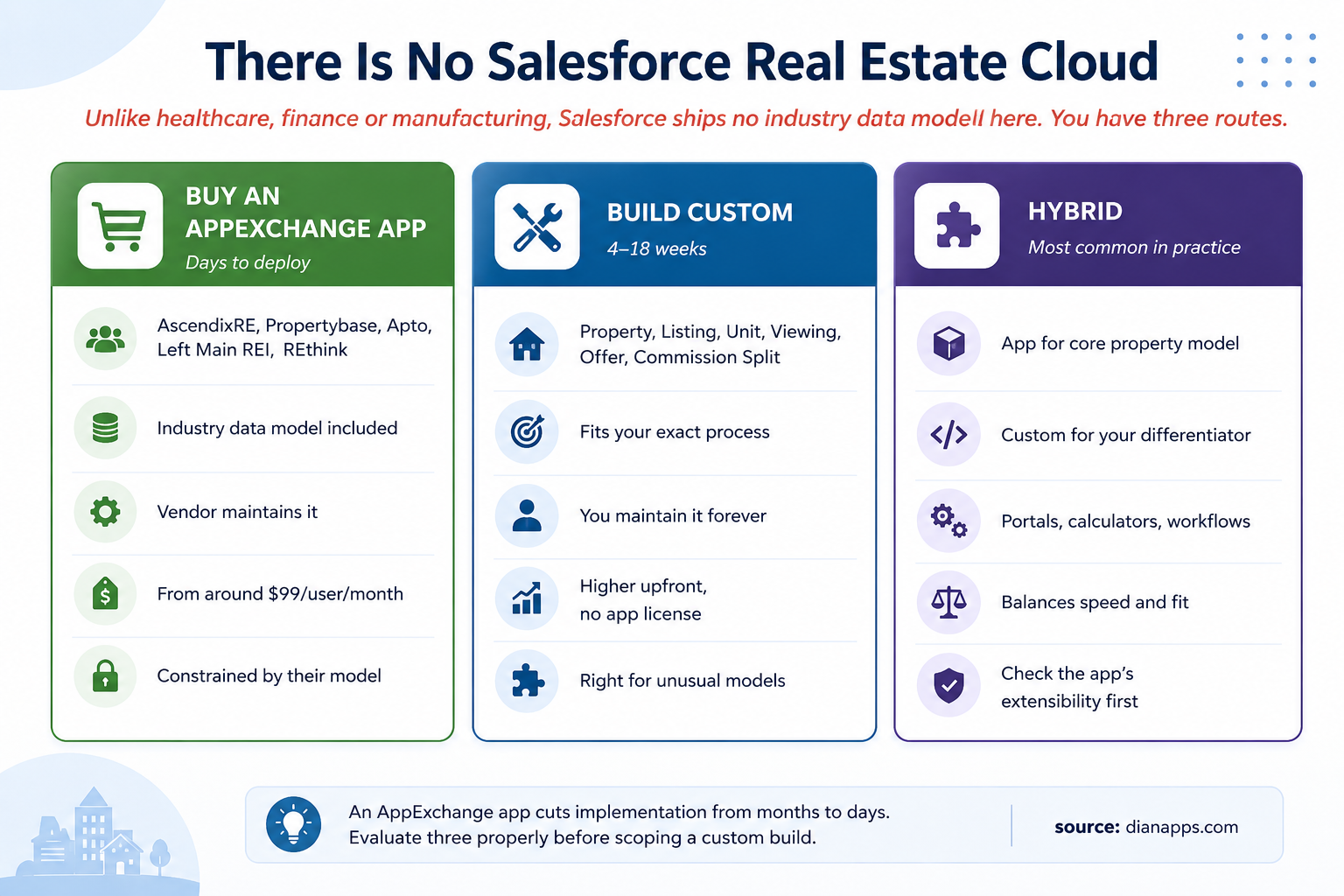
- Salesforce has no dedicated Real Estate Cloud, so firms typically choose between an AppExchange app, custom development, or a hybrid approach.
- AscendixRE, Propertybase, Apto, Left Main REI and REthink serve different real estate segments and workflows.
- Custom development makes more sense for unusual ownership structures, mixed portfolios, or processes that create a competitive advantage.
- The most important Salesforce real estate data-model decision is keeping Property and Listing as separate objects.
- MLS integrations, commission calculations, client portals, and valuation tools are common areas for custom development.
- Custom property data models can range from $25,000 to $70,000, while configuring an AppExchange solution is estimated at $8,000 to $25,000 in the article.
Quick Answer: Real estate companies using Salesforce have three practical options: buy an AppExchange application, build a custom Salesforce solution, or combine both. Established apps such as AscendixRE, Propertybase and Apto can deploy faster for standard workflows, while custom development is better when property models, commission structures, portals or transaction processes are highly specific. For many firms, a hybrid approach delivers the best balance of speed, cost and flexibility.
Real estate is the exception among Salesforce industries. Healthcare has a Health Cloud, financial services has FSC, manufacturing has Manufacturing Cloud. Each ships a data model, and the right advice is usually don’t rebuild what you already have.
There is no Salesforce Real Estate Cloud, no Property object, no Listing, no Viewing, no Commission Split. If you want them, someone builds them, either you or an AppExchange vendor who already has.
That makes this the one industry post where custom development might genuinely be the answer. It also makes the buy-versus-build decision the most consequential one you’ll make.
Where Standard Salesforce Stops for Real Estate
Sales Cloud gives you Account, Contact, Lead, and Opportunity. For a brokerage, that’s a reasonable start – buyers and sellers are contacts, deals are opportunities.
- What It Doesn’t Give You Is The Asset: A property exists independently of any transaction. It gets listed, delisted and relisted over years. It may contain units. It attracts viewings, offers and eventually a sale, and then the whole cycle repeats with a different agent.
- Nothing Standard Models That: Nor commission splits, nor tenancy, nor the relationship between a physical asset and the many listings attached to it over its life.
That’s the gap, and unlike other industries you have a real choice about how to fill it.
Three Routes, and How to Choose
Three routes for real estate on Salesforce: buy an AppExchange app, build custom, or hybrid
Start by evaluating apps properly, not a five-minute AppExchange search, but a genuine assessment of three options against your requirements. The established products cover residential, commercial, investment, and property management, and they reduce implementation from months to days.
| App | Best for | Notes |
|---|---|---|
| AscendixRE | Commercial real estate | Editions for brokerage, capital markets, land |
| Propertybase | Residential and commercial brokerages | Lone Wolf Technologies; lead generation built in |
| Apto | Commercial brokers | Buildout; broker-workflow focused |
| Left Main REI | Investors | Investment and acquisition workflows |
| REthink | General brokerage | Long-established |
- Build Custom When: Your model genuinely doesn’t fit – unusual ownership structures, mixed portfolios, development and construction pipelines, or a process that is your competitive advantage.
- Go Hybrid: Buy the core real estate application from AppExchange, then build the gaps. This is usually the sweet spot. Salesforce low-code development can handle standard workflows and configuration, while custom development can be reserved for the parts of the real estate process that genuinely need new logic.
One Caution Worth Stating: Much of the “Salesforce for real estate” content you’ll find is written by firms that also sell a real estate app on AppExchange. That doesn’t make it wrong, but it means the conclusion was decided before the analysis. Read accordingly, including this post, where our interest is in the development work.
Need to Build Salesforce for Real Estate?
Evaluate your real estate workflows, data model, integrations, and AppExchange options before deciding what to build, buy, or extend.
Related: custom Salesforce development · configuration vs customization
The Data Model You’d Actually Design
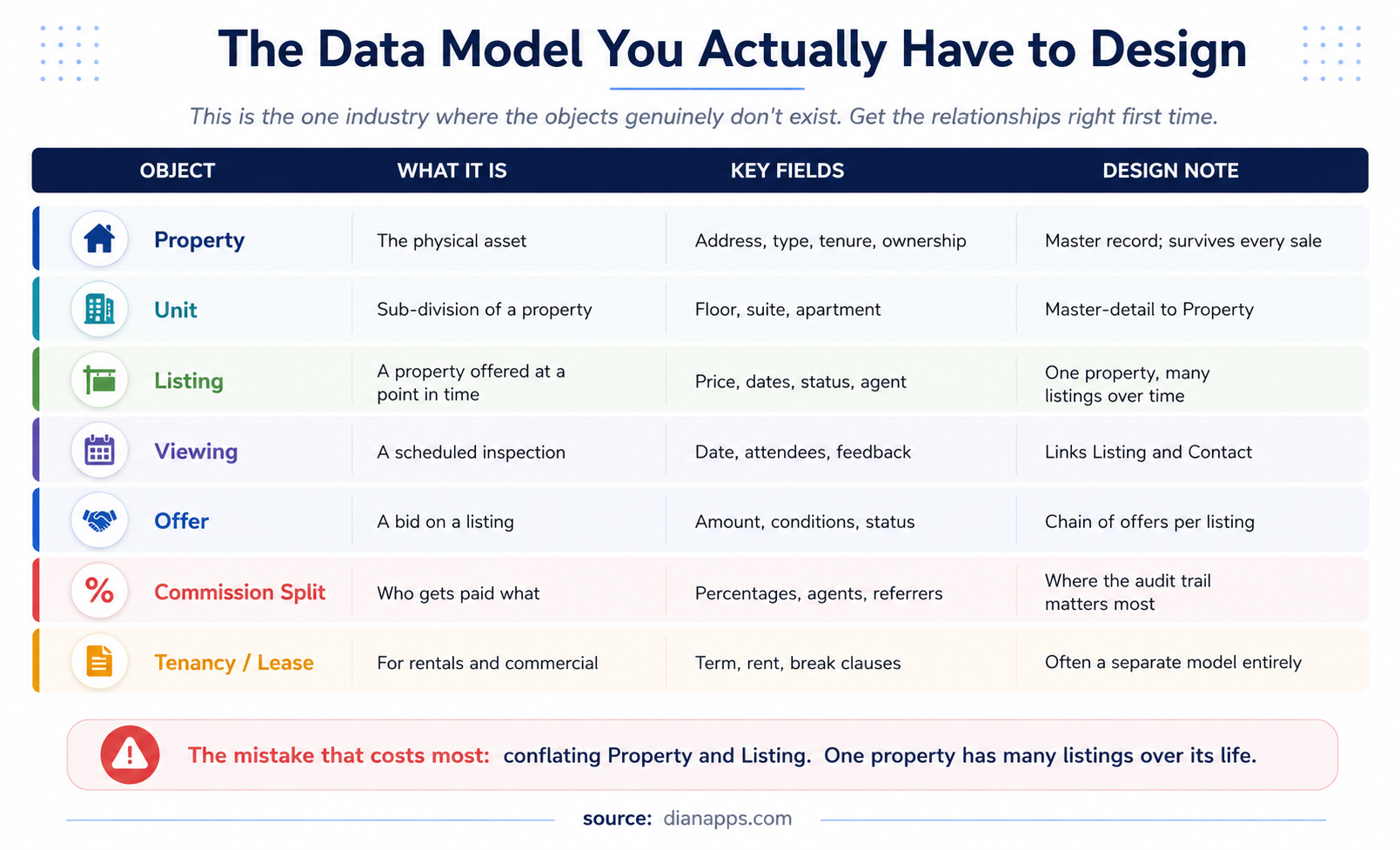
Table of the real estate data model objects including Property, Unit, Listing, Viewing, Offer, Commission Split, and Tenancy with key fields and design notes
The Error That Costs Most: Conflating Property with Listing.
A property is a physical asset that exists permanently. A listing is a time-bound offer to sell or let it. One property has many listings across its life – different agents, different prices, different years.
Teams that model these as one object discover the problem when someone asks for the price history of a property, or when the same house comes back to market with a different agent and the previous record has to be overwritten.
Two other design decisions that matter:
- Unit As Master-Detail To Property: For anything with sub-divisions – apartment blocks, office floors, retail units. Getting this wrong means restructuring live data later.
- Commission Split Is Where The Audit Trail Matters Most: Who was owed what, agreed when, paid when. It’s the object most likely to be examined in a dispute, and the one most often designed as an afterthought.
Related: The Salesforce data model explained
Buy vs Build: The Three-Year Cost
Bar chart comparing three-year costs of an AppExchange app versus a custom build for a 25-user brokerage
If custom development is the right route, the next decision is whether to build that capability internally or use a partner. The in-house vs outsourced Salesforce development decision depends on workload, specialist requirements, delivery speed, and long-term maintenance.
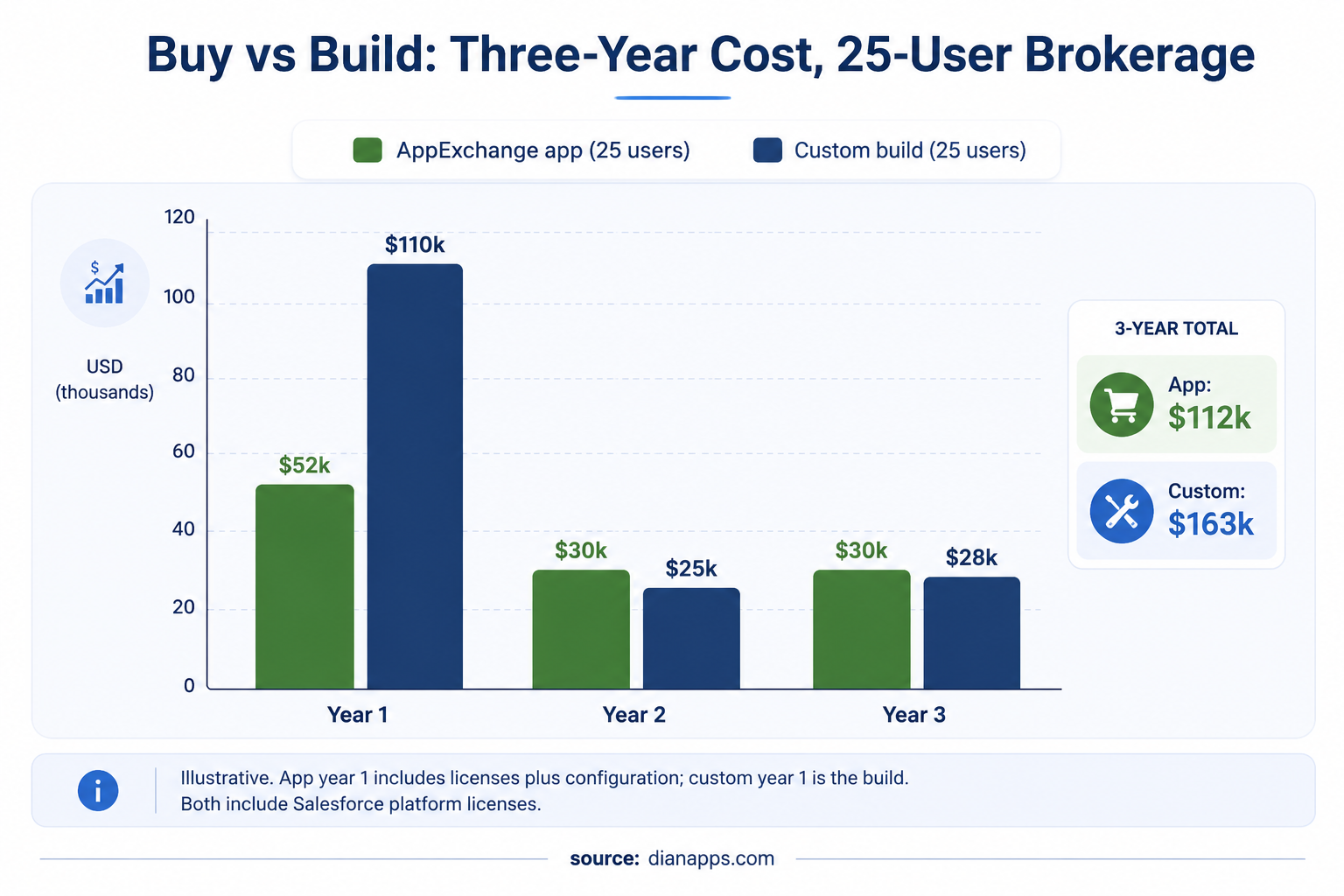
The Pattern: An app costs more in ongoing licences and less upfront. A custom build costs more upfront and carries maintenance instead of licence fees.
Where it tips toward custom:
- Higher User Counts: Per-user app licences scale linearly; a custom build doesn’t.
- Genuinely Unusual Models: The app would need heavy customisation to support anyway.
- You Already Have Salesforce Developers: And the maintenance is marginal.
Where it tips toward an app:
- Smaller Teams: Where per-user licensing stays modest.
- Standard Processes: The app already handles.
- No In-House Development Capability: Someone has to maintain a custom build for as long as you use it.
The Question That Settles It: Would you still choose to build this in three years, knowing you’ll have maintained it for all three? If the honest answer is no, buy the app.
If you’re still unsure whether those conditions justify custom work, these signs your business needs Salesforce development help can help you assess whether the problem actually requires development capacity.
Related: Salesforce customization cost
Weighing an AppExchange app against a custom build?
We’ll assess your requirements against what the established apps actually do – including telling you when buying is the better call.
What Real Estate Firms Actually Build
Even with an app in place, this is the custom work that recurs:
- Client and Investor Portals: Document exchange, transaction status, portfolio performance. Experience Cloud, almost always custom.
- Valuation and Yield Calculators: Comparable analysis, rental yield, ROI modelling, affordability. Business logic no standard object encodes.
- Commission Calculation Engines: Multi-party splits, tiered structures, referral fees, deductions. Complex, high-stakes, and firm-specific.
- Transaction Milestone Tracking: From offer accepted to completion – searches, surveys, mortgage, exchange. Increasingly a Flow Orchestration rather than a chain of separate flows, since it spans weeks and multiple parties.
- MLS and Portal Integration: Two-way sync with listing feeds. Consistently the hardest technical piece.
- Compliance and Audit Workflows: Agent licensing records, anti-money-laundering checks on buyers, fair housing evidence, and the audit trail behind all three.
This is where Salesforce Development Services become useful, extending the core real estate application with firm-specific workflows, customer experiences, calculations, and integrations without rebuilding the entire platform.
Need Salesforce Developers for Your Real Estate Build?
Add Salesforce development expertise for property data models, portals, commission logic, MLS integrations, workflows, and custom applications.
The Integration Surface
| System | What flows | Watch for |
|---|---|---|
| MLS / listing portals | Listings out, enquiries in | Feed formats vary by region; rate limits are common |
| Property management systems | Tenancy, maintenance, rent | Often legacy; batch rather than real-time |
| E-signature | Contracts, offers, disclosures | Evidence chain matters more than convenience |
| Mortgage and title providers | Application status, conditions | Rarely modern APIs |
| Valuation data | Comparables, indices | Licensing restricts what you may store |
| Marketing platforms | Enquiries, nurture, consent | Consent state must flow both ways |
MLS integration is the piece that consistently costs more than expected. Feed formats differ by region and provider, update frequencies vary, and rate limits shape your sync architecture. Scope it as a project, not a connector.
Valuation data licensing is the same trap as market data in financial services – what you may cache in Salesforce is a contractual question before it’s a technical one.
Related: Salesforce API integration · Salesforce integration guide
Compliance Constraints
- Fair Housing: In the US, how you segment, target, and communicate is regulated. Automation that filters or scores prospects needs review for discriminatory proxies – a genuine risk when lead scoring is involved, and increasingly relevant where AI is making the recommendation.
- Agent Licensing: Licence numbers, expiry dates, jurisdiction. Often needs to gate who can be assigned to what.
- Anti-Money-Laundering: Buyer identity verification and source-of-funds checks, increasingly required in property transactions across jurisdictions.
- Commission and Escrow Audit Trails: Immutable evidence of what was agreed and paid. Design it into the data model rather than reporting on it afterwards.
- Consumer Privacy: CCPA, GDPR and equivalents apply to prospect data, and property enquiries generate a lot of it.
Related: Salesforce compliance and data security
What It Costs
Indicative bands, excluding Salesforce platform and app licences:
| Build | Typical range |
|---|---|
| Custom property data model (Property, Unit, Listing, Viewing, Offer) | $25,000 - $70,000 |
| Commission calculation engine | $20,000 - $60,000 |
| Valuation or yield calculator | $10,000 - $30,000 |
| Client or investor portal | $35,000 - $100,000 |
| MLS / listing portal integration | $30,000 - $90,000 |
| Transaction milestone orchestration | $15,000 - $45,000 |
| AppExchange app configuration instead of the first row | $8,000 - $25,000 |
Configuring an established app to fit is frequently a third of the cost of building the equivalent, and it’s the line most development-agency content leaves out.
The Mistakes That Cost Most
- Conflating Property and Listing: The data model error that surfaces months later.
- Skipping The AppExchange Evaluation: Building what you could have bought.
- Designing Commission Splits As An Afterthought: It’s the object most likely to end up in a dispute.
- Treating MLS Integration As A Connector: It’s a project.
- Automating Lead Scoring Without A Fair Housing Review: A compliance exposure hiding inside a productivity feature.
- Buying An App Without Checking Its Extensibility: If you’ll need custom work on top – and you probably will – confirm the app’s data model can be extended before you commit.
Where to Go Next
For the build decision, custom Salesforce development and configuration vs customization.
For designing the model properly, the Salesforce data model explained.
For multi-week transaction processes, Flow Orchestration.
For integration, Salesforce integration and Salesforce API integration.
For budgeting, Salesforce customization cost.
The complete Salesforce development guide is the hub.
Before You Scope a Real Estate Build
We’re a development company, so the honest disclosure is that custom work suits us commercially.
It still isn’t always the right answer here. For a 15-agent residential brokerage running standard processes, an established AppExchange app configured properly will beat a custom build on cost, speed, and risk – and we’d tell you that.
Where custom genuinely wins is unusual portfolios, mixed-use models, and firms whose process is their advantage. That’s a real conversation, and it takes about an hour to have properly.
We’re a certified Salesforce Consulting Partner with developers, architects, and consultants across the US, UK, Australia, Canada, UAE, and India.
Not Sure Whether to Build or Buy?
Share your property model, workflows, AppExchange requirements, and integrations, and we’ll help you determine whether custom development actually makes sense.
 0 comments










Leave a Comment
Your email address will not be published. Required fields are marked *