















 0 comments






Search this question, and you’ll get $11.78, $30, $47, $62, $115, and $200, all presented as the answer.
They’re all correct; they’re measuring three different things, and nobody says so. That single confusion is why so many Salesforce budgets are wrong before anyone writes a line of code.
TL;DR – Salary sites report employee cost ($47-62/hr, derived from annual salary). Freelance marketplaces report contractor rates ($25-150/hr). Consultancies quote agency billing rates ($60-200/hr). These aren’t competing answers to one question; they’re answers to three. Compare like with like, and judge on cost per unit of delivered work rather than the headline number.
Why Every Source Gives You a Different Number
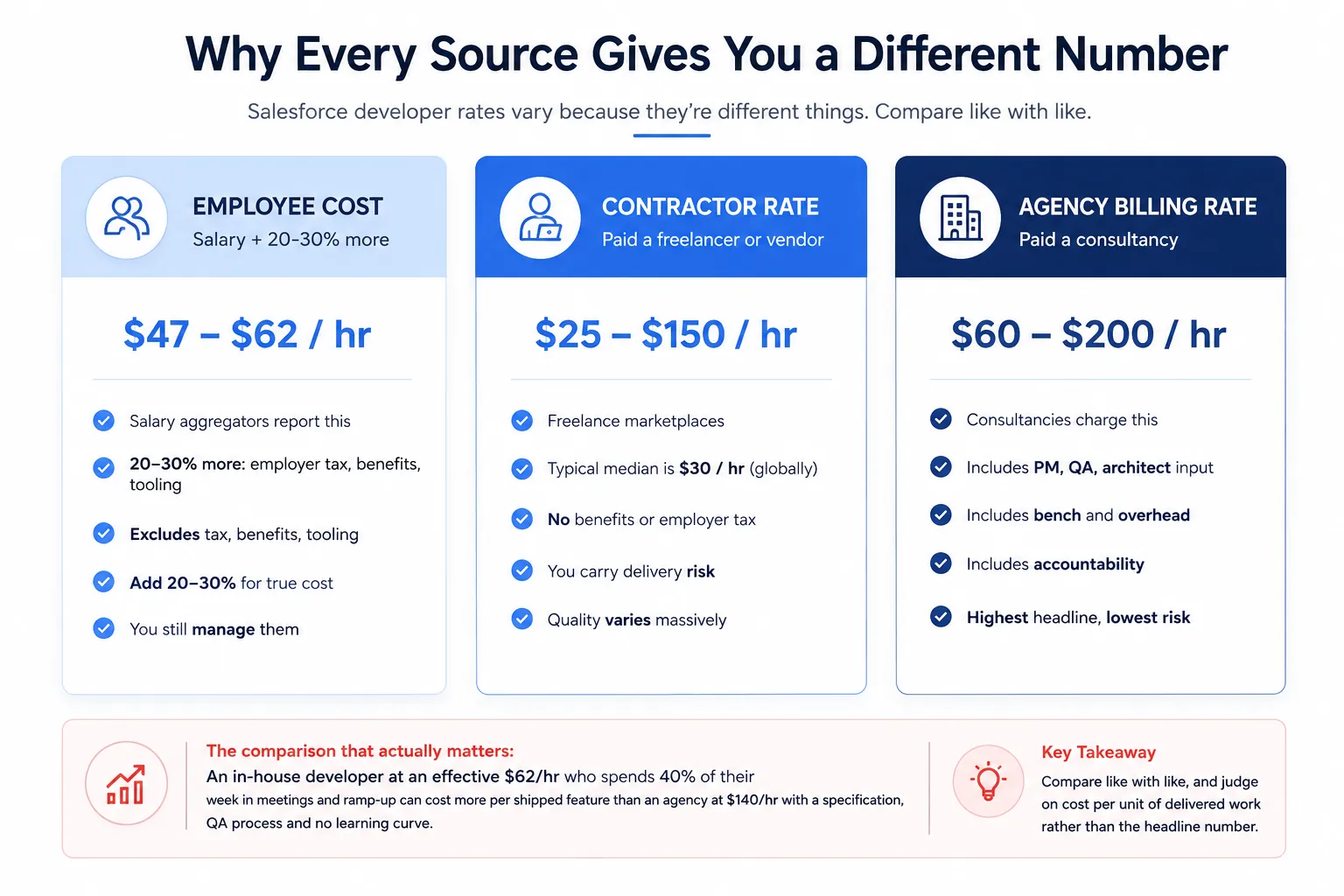
Employee cost is what salary aggregators publish; they take an average annual salary and divide it by 2,080 working hours. It’s a real number, but it excludes employer taxes, benefits, tooling, recruitment, and the fact that a developer isn’t billable every hour they’re employed. Add 20-30% for the true cost, and remember you still have to manage them.
Contractor rates are what freelancers invoice; the marketplace medians sit surprisingly low, around $30 an hour globally, because the pool spans every experience level and geography. No benefits, no employer tax, and you carry the delivery risk.
Agency billing rates are what a consultancy charges: the highest headline number and the one that confuses people most, because it isn’t one person’s time. It bundles project management, architect review, QA, tooling, bench time, and accountability.
The comparison that actually matters: An in-house developer at an effective $62 an hour who spends 40% of their week in meetings and ramp-up can cost more per shipped feature than an agency at $140 an hour with a specification, a QA process, and no learning curve.
Looking for professional Salesforce Development Services? At DianApps, we provide Salesforce development solutions with industry expertise.
Rates by Role
Rates track responsibility, not just years.
| Role | US / Canada | Western Europe | Eastern Europe / LatAm | India / SE Asia |
|---|---|---|---|---|
| Administrator | $45 - $90 | $45 - $80 | $25 - $45 | $18 - $35 |
| Developer (Junior) | $60 - $85 | $50 - $75 | $30 - $45 | $20 - $30 |
| Developer (Mid) | $85 - $120 | $70 - $100 | $40 - $60 | $28 - $40 |
| Developer (Senior) | $115 - $160 | $90 - $130 | $55 - $80 | $38 - $55 |
| Technical Architect | $150 - $220 | $120 - $180 | $75 - $110 | $50 - $75 |
| Functional Consultant | $100 - $175 | $85 - $140 | $50 - $80 | $35 - $55 |
| Specialist (CPQ, Marketing Cloud, Agentforce) | $130 - $200 | $110 - $160 | $65 - $95 | $45 - $70 |
Two things’ worth knowing: specialist skills carry a premium of roughly 20-35% over a generalist developer at the same seniority; CPQ, Marketing Cloud, and increasingly Agentforce are the current examples, and architect demand has outpaced supply sharply in the last year, which is why the top of that band keeps moving.
More on Which Role You Need: Admin vs developer vs architect vs consultant
Rates by Region
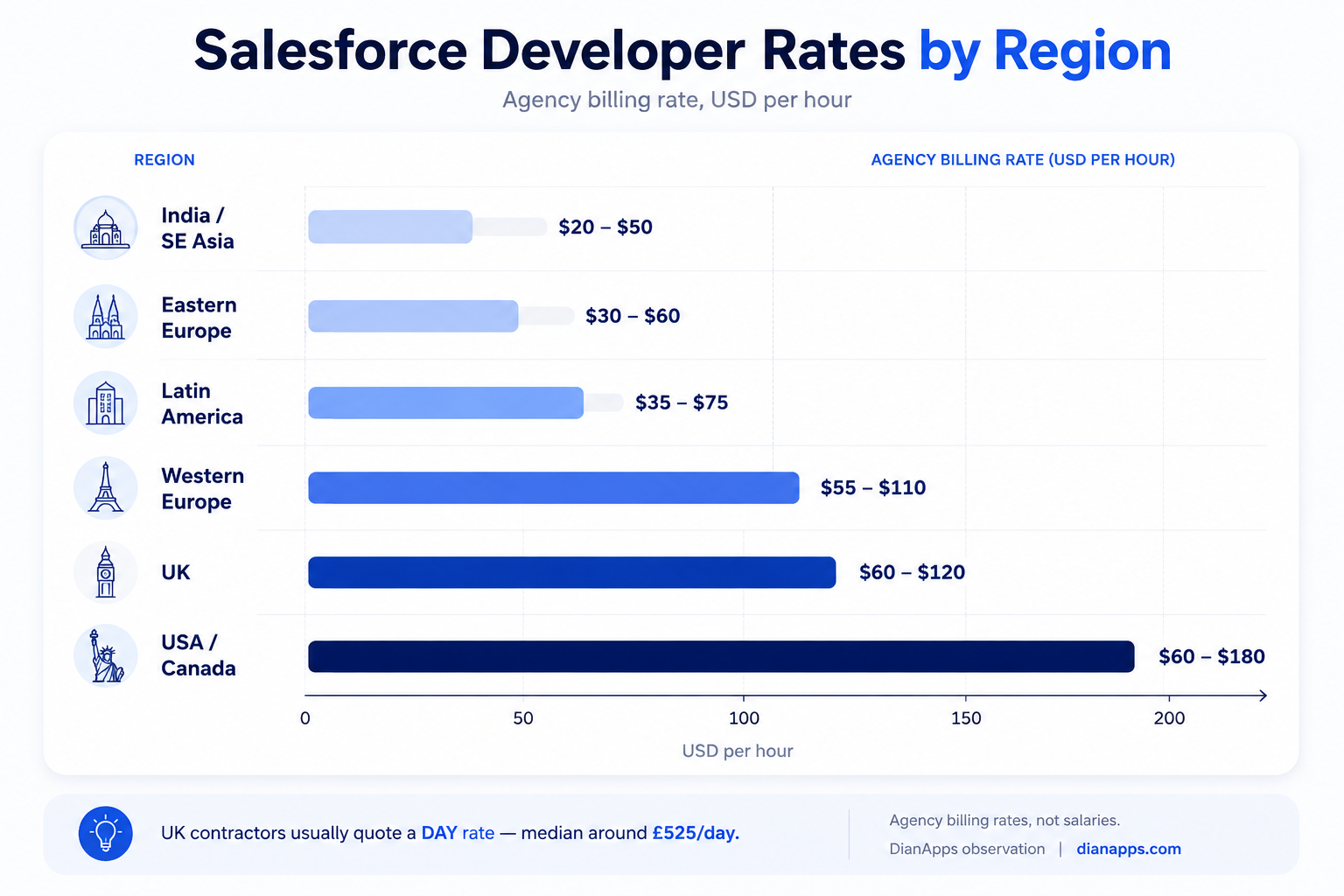
A Regional Quirk That Catches People Out: UK contractors usually quote a day rate, not an hourly one. Median contract day rates for Salesforce roles in the UK sit around £500-550, with London higher. If a UK supplier quotes you hourly, they’re either an agency or converting for your benefit- ask which.
Nearshore Is the Underrated Option: Latin America for US clients and Eastern Europe for European clients typically lands 40-55% below onshore rates while keeping four or more hours of working overlap. That overlap matters more than most cost comparisons acknowledge.
What’s Actually Inside an Agency Rate
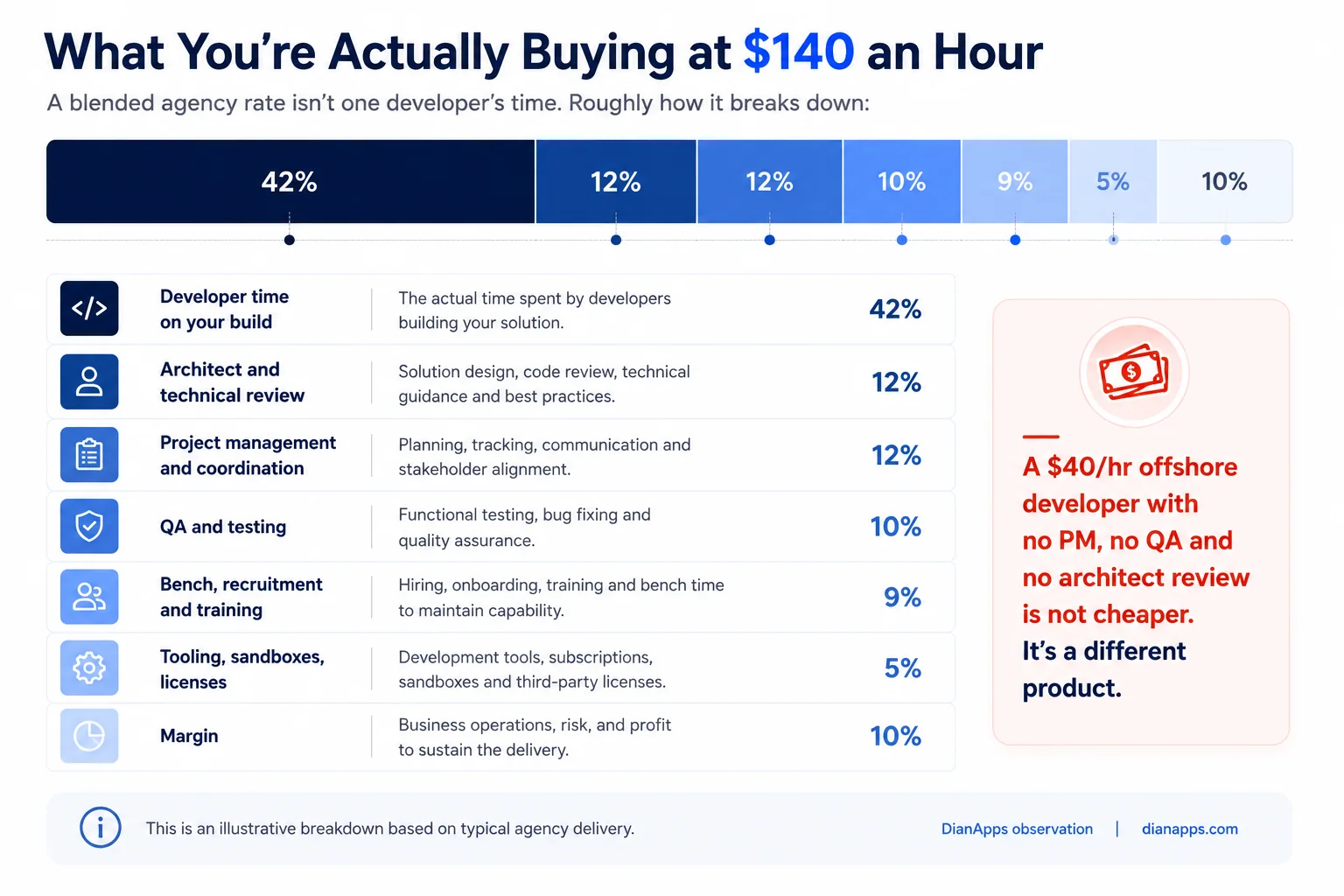
This is the part that makes agency pricing look expensive until you unpack it.
A $40/hour offshore developer with no PM, no QA, and no architect review isn’t a cheaper version of a $140/hour agency engagement. It’s a different product. Whether that’s the right product depends entirely on whether you already have the architect and the QA process in-house.
If you do, buying raw developer hours is efficient and you should. If you don’t, you’re buying the developer and then discovering you need the rest anyway, usually after the first release breaks something.
Engagement Models and How They Price
| Model | Typical pricing | Best for | Watch for |
|---|---|---|---|
| Hourly / time & materials | Rate × hours | Undefined or evolving scope | Costs run without a cap - agree one |
| Fixed price | Quoted per deliverable | Clear, stable requirements | Risk premium baked in; change requests |
| Monthly retainer | Block of hours | Steady ongoing work | Check unused hours roll over |
| Dedicated team | Monthly per person | Long programmes | Usually 10-20% below hourly equivalent |
| Staff augmentation | Monthly per person | Extending an existing team | You supply the management |
Dedicated and retainer models are cheaper per hour than ad-hoc time and materials – commonly 10- 20% less because the supplier can plan capacity. If your work is continuous, don’t buy it hourly.
Related: In-house vs outsourced development · How to hire a Salesforce developer
Want a rate benchmarked against your actual scope?
We will tell you what your requirement should cost and which parts don’t need a developer at all.
Red Flags in a Very Low Rate
A rate well below the regional band isn’t a bargain by default; usually one of these is true:
- It’s A Junior Priced As A Senior: Ask who specifically does the work and see their certifications.
- No QA Is Included: You’ll pay for the testing later, in production.
- No Architect Involvement: Fine for a small change, expensive on anything structural.
- It’s A Bait Rate: Low headline, then change requests for everything not explicitly listed.
- The Work Is Being Subcontracted: To someone you’ll never meet.
- No Documentation: The cheapest work to build and the most expensive to maintain.
One question exposes most of this: “What’s excluded from this rate?”
An honest supplier answers immediately.
How to Benchmark a Quote
- Establish Which Rate Type You’re Comparing: Employee, contractor or agency – never mix them in one spreadsheet.
- Normalise for Region: A $45 rate is high for India and low for the US.
- Ask What’s Included: PM, QA, architect review, documentation, warranty period.
- Convert To Cost Per Outcome: Two suppliers quoting 80 and 140 hours for the same build are not comparable on rate alone.
- Check Seniority Mix: A blended rate of $90 could be one senior or three juniors and a manager.
- Ask For The Year-Two Number: Maintenance is where you see the real cost.
Related: Salesforce customization cost · Choosing a development partner
Where to Go Next
If you’re deciding whether to hire or contract, see how to hire a Salesforce developer and in-house vs outsourced development.
If you’re budgeting a project rather than a person, Salesforce customization cost has per-build pricing.
If you’re shortlisting suppliers, how to choose a Salesforce development partner covers the vetting questions.
For what the work involves, the complete Salesforce development guide is the hub.
Get a Rate Benchmarked Against Real Scope
Rate cards are easy to publish and hard to use. What you actually need is a number for your requirement.
We’re a certified Salesforce Consulting Partner with teams across the US, UK, Australia, Canada, UAE, and India – which means we quote across most of the bands on this page and can tell you honestly where your work should sit.
On a scoping call, we’ll give you the effort estimate, the seniority mix it needs, and which items don’t need a developer at all.
Book a Salesforce development scoping call →
 0 comments











Leave a Comment
Your email address will not be published. Required fields are marked *