















 0 comments





Key Takeaways
- Mobile application development is the end-to-end work of planning, designing, building, testing and releasing software for smartphones and tablets, mainly on Android and iOS.
- Android holds 67.61% of worldwide mobile OS share and iOS holds 32.36% (StatCounter Global Stats, August 2026), so most products need a plan for both.
- Native, cross-platform, hybrid and progressive web apps trade speed, cost and device access against each other in different ways.
- Discovery, requirements, UX and UI design, architecture, development, testing, release and post-launch support make up a complete project.
- Kotlin, Swift, Flutter and React Native cover most front-end work, with a backend, cloud and DevOps layer behind every serious app.
- Most teams choose between in-house developers, an app development agency or a dedicated team, depending on scope clarity and runway.
Quick Answer
Mobile application development is the process of designing, building, testing and releasing software for smartphones and tablets, mostly on Android and iOS. It runs through eight stages, from discovery to post-launch support, and uses native, cross-platform, hybrid or progressive web approaches. A partner offering mobile app development services handles the full cycle, from strategy to store release.
Each business conversation is now concluding with the same question: shall we build an app? But before the answer can be given, the complexities of what building an app actually is need to be outlined; which is where most conversations get stuck in their jargon.
The process and terminology of app development made simple in this comprehensive step-by-step guide. What does app development mean? What are the common types of applications? What are the eight stages of app development, from idea to delivery and future proofing? What is the tech stack of a typical app build, and what costs and timelines does it affect?
What Is Mobile Application Development?
Mobile App Development can be defined as the act of programming software apps that can be executed on mobile devices like tablets, smartphones and wearables. This definition includes everything from coming up with an idea all the way to maintaining it through its lifecycle.
The primary distinction between web development and app development is where the app is deployed. A mobile app exists on the device, can access the camera, GPS, sensors, biometrics, push notifications, and must be compliant with each app store. A web page runs within a browser and has limited access to these functionalities.
Mobile apps are just one among many application development services that make up the overall application development process – including web applications, enterprise applications, cloud applications, and so on. All actual products typically span many of them – an app simply can’t exist without its backend, database, and an admin panel. This is why Mobile App Development Services often need to cover more than the app itself, including backend development, databases, APIs, and ongoing support.
Why Mobile Application Development Matters in 2026
The app economy is huge, although the scale is open for debate. Sensor Tower measured close to 150 billion downloads across iOS and Google Play combined in 2025. Appfigures measured 106.9 billion in that same year. The variations in total are due to differing ways of tracking apps, but both numbers are in the ballpark of hundreds of billions (Sensor Tower, 2025; Appfigures, 2025).
The split by platform is more important than the overall. Android accounts for 67.61% of worldwide mobile OS share, and iOS is 32.36% (Stat Counter Global Stats, August 2026). But those numbers are going to be very different for your country, so your launch plan should be based on where your users are, not worldwide.
For a business, an app gives direct access to customers, push notifications, offline use and deeper device features. For a startup, the app is often the product itself.
Types of Mobile Apps by Technology
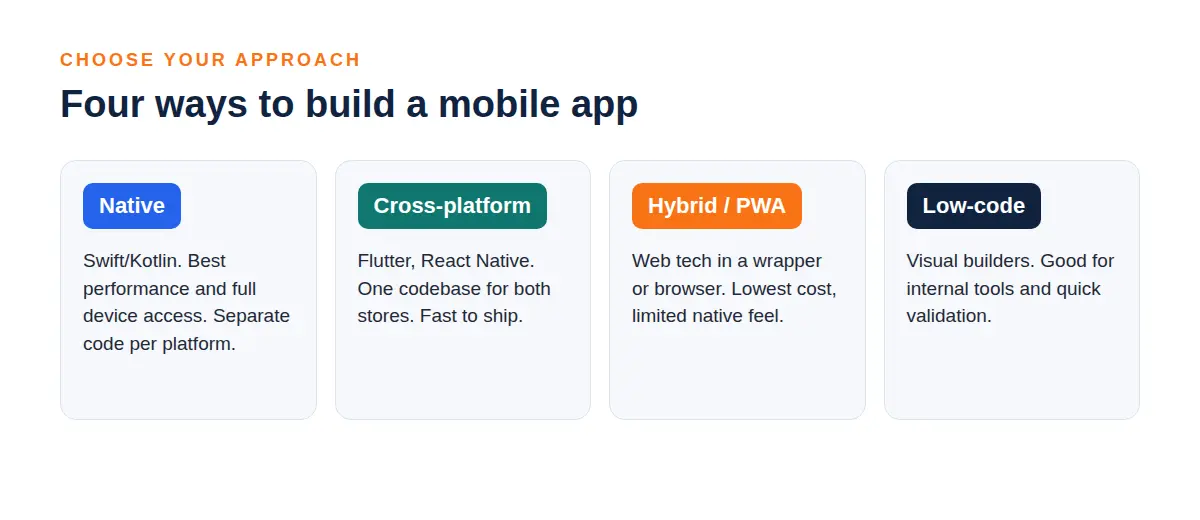
The first decision in any project is how the app will be built. There are four common approaches, and each one changes cost, speed and what the app can do on the device.
| Approach | How it works | Strengths | Trade-offs | Good fit |
|---|---|---|---|---|
| Native | Separate app per platform in Kotlin or Java for Android and Swift for iOS | Best performance, full device access, platform-native feel | Two codebases and a higher budget | Banking, AR, games, performance-heavy apps |
| Cross-platform | One codebase for both platforms using Flutter or React Native | Faster delivery, shared code, lower cost | Some native features need custom code | Most business and consumer apps, MVPs |
| Hybrid | Web code wrapped in a native shell, using tools like Ionic or Capacitor | Reuses web skills, quick to build | Slower for heavy interfaces | Content apps, internal tools |
| Progressive web app | A website that installs from the browser | No store needed, instant updates | Limited device access and uneven iOS support | Lightweight tools, early tests |
Source: DianApps analysis of common industry practice, 2026.
Native Android and iOS apps
Native apps are built for one platform using the platform’s own tools. This allows them to deliver the possible user experience and get access to new operating system features the fastest.. The trade-off is clear: two separate codebases, two development teams or one team that must master two different skill sets.
Our pages on Android app development and iOS app development cover each route in more detail.
Cross-platform apps
React Native changed that. With these tools a single team of developers can create apps for both iOS and Android using the codebase. For business applications cross-platform apps now perform so well that users can’t tell the difference from native apps. The only exceptions are apps that depend heavily on high-performance graphics, low-level hardware access or the latest platform features. Our comparison of Flutter vs React Native explains how to pick between them.
Hybrid and progressive web apps
Hybrid apps wrap a web app, inside a container. Progressive web apps don’t go through the app store—they run directly in the browser. Both options work well for products and early testing. If your app requires complex animations or deep device integration they aren’t the right choice.
Types of Mobile Apps by Purpose
Apps can be grouped based on technology and also based on what they do. The purpose decides what features they have, how secure they are and what connections they can make.
- Consumer apps: These are apps that people use every day like fitness apps, travel apps, food apps, education apps and entertainment apps.
- E-commerce and retail apps: These include things like product listings, shopping carts, checkouts, loyalty programs and tracking orders.
- On-demand and marketplace apps: These are apps that bring customers and service providers together. Examples include restaurant delivery, Uber or a handyman service.
- Fintech apps: These are apps related to money like wallets, loans, investments and banking. They need security and must follow strict rules.
- Health-related apps: These include things like doctor visits, patient records and health tracking. They often deal with information and must follow rules like HIPAA.
- Enterprise apps: These are apps used by teams working in the field handling logistics, human resources and other company operations.
- Social and community apps: These are apps for messaging, networking and sharing content. They need moderation to manage user interactions.
- Games and media apps: These are apps that require graphics. They usually focus on performance to deliver a better experience.
- Super Apps: These are apps that have many services in one place. You can shop, pay or book things all with one login.
Custom mobile app development is what happens when you build an app for your needs instead of using a standard template. It may cost more at the start. It gives you a lot more freedom when it comes to designing features, managing data and planning the future of your product.
Template or no-code tools work for a quick test, and an MVP development approach sits between the two.
Planning a Mobile App? Start With the Right Strategy
From defining your idea to choosing the right technology and development approach, our team can help you plan a mobile app that is built around your business goals.
The Mobile App Development Process: 8 Stages
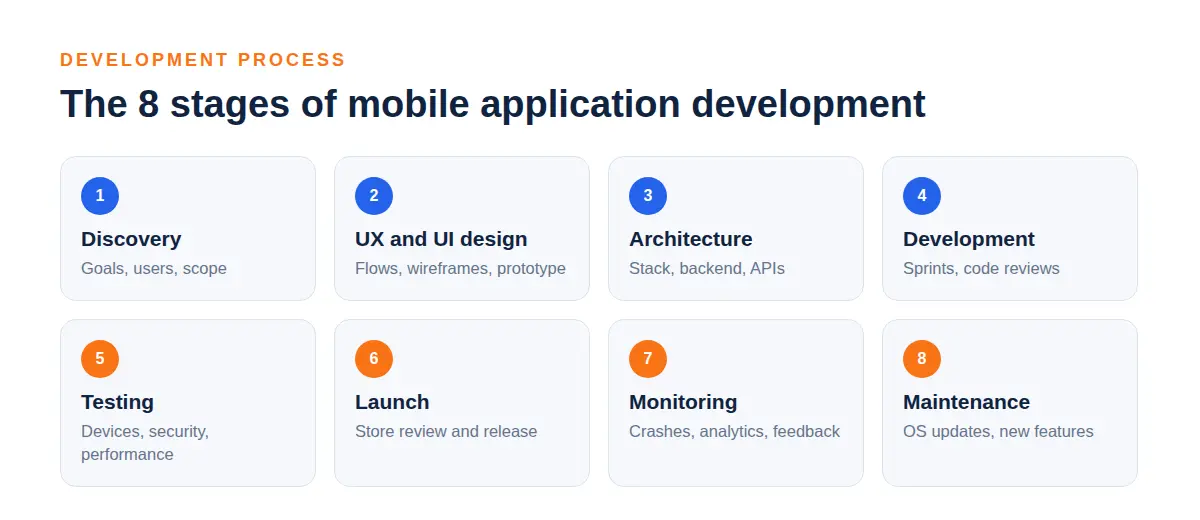
Every project follows roughly the same path, even when teams name the stages differently. Skipping one usually shows up later as rework.
| Stage | What happens | Output |
|---|---|---|
| 1. Discovery and strategy | Goals, users, market and competitors are studied | Product brief and success metrics |
| 2. Requirements and scope | Features are listed, ranked and cut down to a first release | Scope document and backlog |
| 3. UX and UI design | Flows, wireframes and visual design are built and tested | Clickable prototype and design system |
| 4. Architecture and tech selection | Stack, APIs, data model and security approach are chosen | Technical plan |
| 5. Development | Developers build in short sprints with code reviews | Working builds every sprint |
| 6. Testing and QA | Functional, device, performance and security checks run | Test reports and a closed bug list |
| 7. Release | Store listing is prepared, the app is submitted and rolled out in stages | Live app |
| 8. Post-launch support | Monitoring, fixes, OS updates and new features continue | Updates and reports |
-
Discovery and strategy
This phase answers the question of why the app should be built and who it’s for. The team researches the market, talks to prospective customers and sets the definition of success (e.g. Registrations, orders, persistence). Without discovery, a project will be building the wrong thing efficiently.
-
Requirements and scope
Ideas turn into a ranked list of features. The most valuable decision made here is determining what not to include in version one. A lean first version launches sooner and provides tangible feedback to inform everything that follows.
-
UX and UI design
Designers sketch out user flows, wireframe the screens and build a clickable prototype. By testing with a handful of real users in the early stages of wireframes, we identify confusing screens before any code is written, and the costliest stage.
-
Architecture and tech selection
Engineers determine the composition of the app, the back end, and the data. These are difficult decisions to change down the line – native vs. cross-platform, which database, which cloud provider and also where the security and scaling architecture begins.
-
Development
The work is completed in one-to-two week intervals called sprints, with each sprint culminating in a build that can be experienced by the client. Frontend and backend work are done simultaneously and linked via APIs. The team runs demos to stay brief.
-
Testing and QA
Testers ensure features function correctly, the app runs on hundreds of real devices and it remains responsive under load. Security testing screens for insecure storage, open APIs and unsafe permissions. Android has higher device coverage due to the diversity of mobile phones out there.
-
Release
The team drafts the store listing, takes screenshots, discloses the privacy information and builds, and submits to Apple and Google. A limited debut, starting with a small percentage of users, gives the team a chance to iron out issues before they reach the mass market.
-
Post-launch support
Launch is the beginning for your app’s life. Every year, a new OS version is released, people give feedback, and crash reporting tools show you where everything is breaking. Budget for maintenance immediately because an app that isn’t maintained will experience a gradual ‘drift’.
The Mobile App Tech Stack
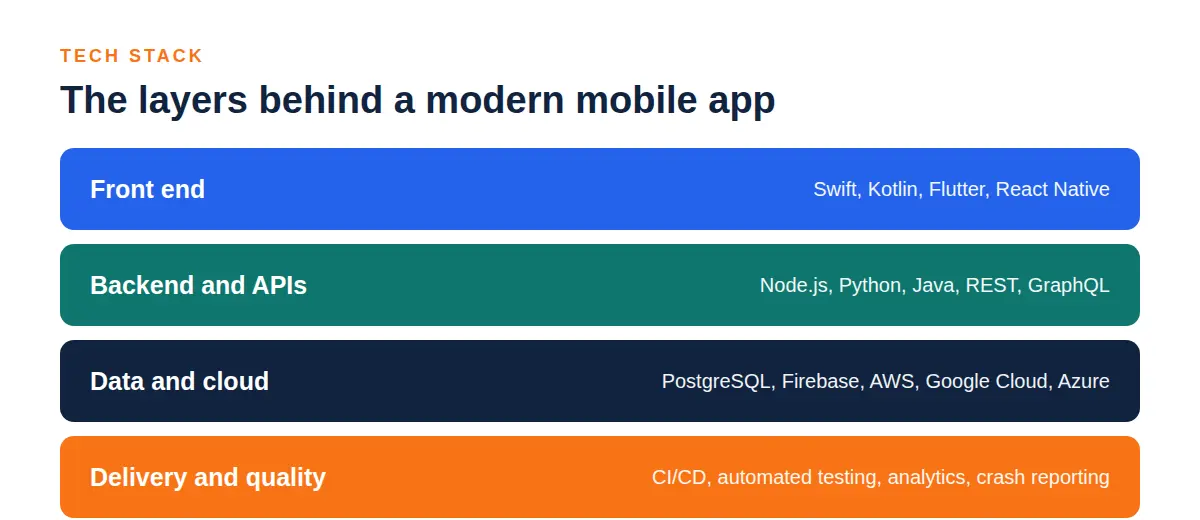
A tech stack is the set of coding languages, frameworks and services that form the building blocks of an app. Many apps include device-side front ends, a device-side backend with logic and data, along with the cloud and tooling that connect to each other.
| Layer | Common options | Role |
|---|---|---|
| Android native | Kotlin, Java, Jetpack Compose | Builds the Android app |
| iOS native | Swift, SwiftUI, Objective-C | Builds the iOS app |
| Cross-platform | Flutter (Dart), React Native (JavaScript or TypeScript), Kotlin Multiplatform | One codebase for several platforms |
| Backend | Node.js, Python with Django or FastAPI, Java with Spring Boot, .NET | Business logic and APIs |
| Databases | PostgreSQL, MySQL, MongoDB, Firebase Firestore, SQLite on device | Stores user and app data |
| Cloud | AWS, Google Cloud, Microsoft Azure | Hosting, storage and scaling |
| Notifications and auth | Firebase Cloud Messaging, Apple Push Notification service, OAuth 2.0 | Messaging and sign-in |
| Testing | Espresso, XCTest, Appium, Detox | Automated checks |
| Monitoring and analytics | Firebase Crashlytics, Sentry, Mixpanel | Crash reports and usage data |
| CI/CD | GitHub Actions, Bitrise, Fastlane | Builds and releases |
Front-end development
Native teams will code in Kotlin with Jetpack Compose for Android and Swift with SwiftUI for iOS. Cross-platform teams will choose between Flutter or React Native. The decision has more to do with your team’s resources and requirements than which one is better.
Our guide on what makes Flutter ideal for MVP development shows one case where it clearly wins.
Backend and databases
The backend runs accounts, payments, data, and business rules, offering APIs for the app to call. Depending on the teams’ skills and workload, they generally select their backend language and combine it with a relational or document database.
Cloud and DevOps
These days, files are stored on cloud services which also host the backend, with DevOps tooling used to build, test and release. A good pipeline is one where every change is automatically verified before deployment.
Testing and monitoring
Automated tests catch regressions, device labs provide actual hardware and crash reporting shows what’s breaking out in the wild. Tracking the application after it launches is just as critical as testing it before it does.
AI and machine learning
Additional applications offer suggestions, chatbots, image or voice capabilities. The former operates locally on the device – maintaining data security, and not requiring an internet connection – while the latter operates in the cloud, which supports larger models.
Our guide to choosing an AI mobile app development company lists the questions to ask, and our AI development services page covers the build side.
Android Application Development: What Is Different
Android development for android devices aims at the largest segment of the world’s population as well as the most diverse. Phones have various sizes, OEM software, hardware capabilities and OS versions.
Having that diversity means that testing on real devices is the key quality aspect of Android development. An app build that seems to run perfectly on one device can misbehave on another, so teams test on a range of brands, screen dimensions and Android OS versions.
Google also enforces publishing guidelines. Beginning August 31, 2026, new apps and app updates on Google Play will need to target Android 16 (API level 36) or higher, with lower requirements for Wear OS, Android Automotive OS, Android TV, and Android XR apps. Developers who need more time will be able to request an extension to November 1, 2026 (Android Developers, Google Play target API requirements, 2026).
Kotlin is Google’s preferred language, and Jetpack Compose is the modern toolkit for building interfaces. If you are starting out, our post on Android app development fundamentals is a useful companion.
iOS App Development: What Is Different
There are less device variations with iOS, making testing easier. However, Apple has a more rigorous App Review process and the review times are less predictable. Apps are written in Swift, SwiftUI, and Xcode, and beta testing is via Test Flight.
Budget for additional App Review time, particularly for apps involving payments, health or user content. Apple also needs builds that are built with the latest Xcode and SDK versions and the minimum needed for that year’s release. Be sure to check Apple’s newest requirement before each submission.
Our overview of iOS frameworks covers the tools worth knowing.
Security, Privacy and Compliance
Mobile apps hold personal data, so security is part of the design, not a final check. Four areas need attention in most projects.
- Data protection: Encrypt data in transit with TLS and at rest, and keep secrets in the platform Keychain or Keystore.
- Authentication: Use proven standards such as OAuth 2.0, biometrics and short-lived tokens instead of custom schemes.
- Security testing: The OWASP Mobile Application Security Verification Standard (MASVS) gives a practical checklist for testing.
- Privacy and regulation: GDPR in Europe, HIPAA for US health data, PCI DSS for card payments and India’s Digital Personal Data Protection Act, 2023 apply depending on where users live and what data you hold.
Both stores also require privacy disclosures, shown as Apple’s privacy labels and the Data safety section on Google Play. Wrong or missing disclosures are a common reason for rejection, so prepare them before submission.
Build a Secure, Scalable Mobile App
Need help turning your app idea into a production-ready product? Get expert support across development, integrations, security, testing, and deployment.
Who Builds the App: Roles, Teams and Partners
A full team normally comprises a product manager, a UX and UI designer, a mobile app developer for each platform, a backend developer, a QA engineer, a Dev Ops engineer, and a project manager. In smaller projects, some roles are merged, but they still need to be addressed.
You have four main routes to get that team.
| Route | Best for | Watch out for |
|---|---|---|
| In-house team | Funded products with proven demand | Slow hiring and high fixed cost |
| Freelancers | Small, well-defined tasks | One person as a single point of failure |
| App development agency | Clear scope and a launch date | Vetting quality and agreeing scope early |
| Dedicated team from a company | Long roadmaps and growing products | Needs a product owner on your side |
Many founders searching for a Mobile App Development Company are really choosing between these four routes.If you plan to hire mobile app developers directly, our guide on how to hire developers for a startup covers what to check. If you need extra capacity, IT staff augmentation explains how remote teams work in practice.
What Affects Cost and Timeline
No honest number applies to every app, because scope drives both. These factors move cost and timeline the most:
- Platforms: Building for Android and iOS together costs more than one platform, and the approach you pick changes by how much.
- Feature complexity: Payments, real-time chat, video or AI features add more work than basic screens.
- Design depth: Custom animation and detailed brand design take longer than standard components.
- Integrations: Each third-party system, such as a CRM, payment gateway or ERP, adds build and test time.
- Backend scope: Admin panels, analytics and scaling requirements often cost as much as the app itself.
- Compliance: Regulated sectors need extra security work and documentation.
- Maintenance: Updates, hosting and support continue after launch.
The timeline depends more on how clear the scope is than on how large the team is. Adding people to an unclear project rarely speeds it up. A reliable Mobile App Development firm should also explain how these factors affect the project’s overall budget and delivery timeline before development begins. Our guide on how much it costs to build an app goes deeper into the numbers.
Common Mistakes to Avoid
- Building everything at once: A bloated first release delays launch and hides what users actually want.
- Skipping user research: Teams that guess at needs often rebuild screens after launch.
- Ignoring Android device variety: Testing on two phones leaves bugs for users to find.
- Choosing a partner on price alone: A very low quote usually leaves out testing, design or backend work.
- Leaving ownership unclear: Code, designs and store accounts should belong to you, in writing.
- Forgetting maintenance: Operating system updates arrive every year and apps need to keep up.
Choosing a partner on price alone: A very low quote usually leaves out testing, design or backend work. A capable Mobile App Development firm should provide a clear breakdown of what’s included before you commit. If you are still deciding whether to build at all, our walkthrough on building your own app is a good place to start. For a view of where the field is heading, read our mobile app development trends.
Quick Reference Checklist
- Write a one-page brief covering users, platforms, integrations and budget.
- Decide which features stay out of version one.
- Choose native, cross-platform, hybrid or web based on real needs.
- Prototype and test the design before development starts.
- Agree the tech stack and the backend plan early.
- Plan device testing, especially for Android.
- Prepare store listings and privacy disclosures before submission.
- Confirm in writing who owns the code and store accounts.
- Set up crash monitoring and analytics before launch.
- Budget for maintenance and yearly operating system updates.
How DianApps Approaches Mobile Application Development
DianApps is a Mobile and AI App Development Company that builds Android, iOS, Flutter and React Native Apps for startups & enterprises. Strategy, Design, Development, QA, Dev Ops and Post Launch support all happen in one team. It helps reduce handovers and gives you full clarity on who owns what.
Products like Khatabook, CaratLane, with a 4.8 rating on Clutch Our designers create user flows, wireframes and visual mockups which represent the skeletal structure of an app so to speak. The team behind Khatabook also works on API, back-end and server-side development.
Not every idea requires a native app right away. We generally suggest a sharp MVP and then iterate, building out once you can see the behaviour of real users. If you’re considering solutions, forward your brief and we’ll tell you straight which way is best. These Mobile App Development Services cover the product lifecycle from strategy and design through development, QA, deployment, and post-launch support.
Final Note
Mobile App Development is a series of choices, not a build. Approach, scope of initial release, tech stack and maintenance planning are as critical as the code, perhaps more.
Begin with a defined brief, test early with real users and hold onto your code.Choosing the right Mobile App Development Company can also make a significant difference, particularly when the project involves complex integrations, security requirements, or long-term scaling.
If you would like a team to scope your idea, explore our mobile app development services or send us your brief for a free quote.
 0 comments










Leave a Comment
Your email address will not be published. Required fields are marked *