















 0 comments





Key Takeaways:
- Wearable apps need to be designed around quick interactions, small screens, limited battery, and contextual use, rather than treated as smaller mobile apps.
- Businesses can build wearable apps for fitness, healthcare, productivity, enterprise, travel, and companion experiences.
- Apple Watch and Wear OS require different development stacks, APIs, device considerations, and testing approaches.
- Health data, sensors, synchronization, connectivity, privacy, and battery performance are major technical considerations.
- Development cost depends on platforms, features, integrations, backend requirements, security, testing, and maintenance.
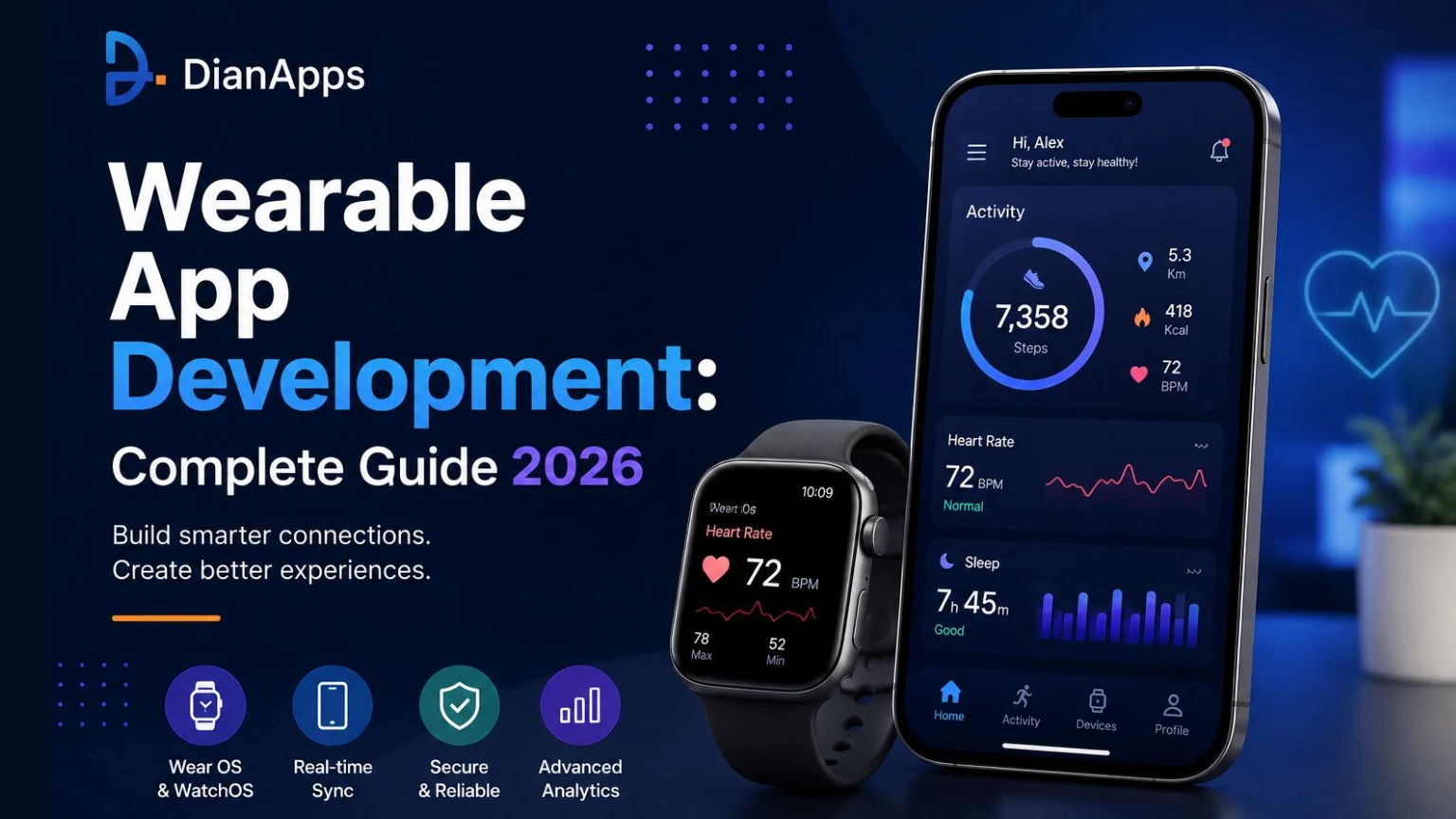
Quick Answer: Wearable app development involves building applications specifically for smartwatches and other wearable devices, with the experience designed around short interactions and limited device resources. The process typically includes choosing a platform such as Apple Watch or Wear OS, defining the MVP, designing wearable-specific UX, developing the app and backend, integrating sensors or health APIs, testing on physical devices, optimizing battery and performance, and maintaining the application after launch.
Smartwatches and wearable devices are becoming a major part of the way people interact with technology, from checking notifications and tracking fitness activities to monitoring health information, receiving reminders and staying connected without having to take out their smartphone every single time. This is making wearable app development an important opportunity for businesses that are looking to provide their users with a faster, more convenient and more connected digital experience.
But when it comes to building an application for a wearable device, things are not as simple as taking an existing mobile application and making it smaller. The screen is smaller, the battery is limited, the way users interact with the device is different and most importantly, users are not looking to spend several minutes browsing through an application on their wrist. They are looking for quick information, quick actions and an experience that works without creating needless hassle.
So, what exactly goes into wearable app development in 2026? How do businesses choose between Apple Watch and Wear OS, what are the wearable UX constraints that need to be considered, how does health data integration work and what does it actually take to build, test and launch a wearable application? Well, let’s take a look.
Why Wearable App Development Is Different From Mobile App Development
For years, mobile applications have been designed around a larger screen where users can read detailed information, move between different pages, fill out forms and complete multiple actions in one session. Wearable applications are working in a completely different environment. A person checking their smartwatch may only be looking at it for a few seconds while walking, exercising, working or doing something else, which means the application needs to deliver the right information at the right time without making the user go through unnecessary steps.
This is why wearable app development needs to be approached differently from conventional mobile development. The application needs to be focused, quick and easy to understand, while also making sure that the device is not being pushed unnecessarily. Battery usage, processing power, connectivity, sensors and screen size all become important considerations during development.
And that is not all, wearable devices also provide businesses with access to contextual information that can make applications much more useful. Activity, movement, location, heart rate and other supported information can be used to create experiences that respond to what the user is doing rather than simply displaying static information. This is one of the biggest reasons businesses are now exploring wearable applications across different industries.
What Types of Wearable Apps Can You Build?
Wearable applications are no longer limited to basic step counters or applications that simply mirror smartphone notifications. With the growth of smartwatches and other connected devices, businesses can now build wearable experiences for fitness, healthcare, productivity, enterprise operations, travel and several other use cases. Some of the most common examples include:
- Fitness and sports applications.
- Health and wellness applications.
- Productivity and utility applications.
- Enterprise and industrial applications.
- Travel and lifestyle applications.
- Companion applications connected with mobile platforms.
Fitness and Sports Apps
Fitness and sports applications are one of the most common use cases for wearable devices because users are already wearing the device while they are running, walking, cycling or working out. Instead of constantly checking a smartphone, users can see their activity, workout information, distance, heart rate and other supported metrics directly from the wearable. This makes the overall experience much more practical and also gives businesses an opportunity to create applications around real-time activity.
Health and Wellness Apps
Health and wellness is another major area where wearable applications are being used. Users can monitor selected health and activity information, receive reminders and keep track of their daily routines directly through a device they are already wearing. However, health applications also require additional care because the information being handled can be sensitive and the application needs to make sure users understand what information is being collected and why it is required.
Productivity and Utility Apps
Not every wearable application needs to be complicated. Sometimes the most useful application is one that allows the user to check a reminder, approve something, receive an alert, authenticate an action or see a quick status update without opening their phone. These smaller interactions are exactly where wearable devices can provide a lot of value.
Enterprise and Industrial Wearable Apps
Businesses can also build wearable applications for employees working in logistics, field services, manufacturing and other environments where having information available on the wrist can reduce the need to constantly handle a smartphone or another device. This can make workflows faster and also reduce unnecessary interruptions during work.
How to Choose the Right Wearable Platform
Before starting wearable app development, businesses need to decide which platform they actually want to build for. This is an important decision because the platform affects the development tools, programming language, available APIs, device capabilities, testing process and even the overall development cost.
The right platform should not simply be selected because it has a large market presence. Businesses need to look at where their target users are, what devices they already use and what the application needs to do. For some businesses, Apple Watch will be the obvious choice, while for others Wear OS development may be more suitable. Some applications may eventually need to support both.
So, which platform should you choose? Let’s break down the major options.
Apple Watch and watchOS
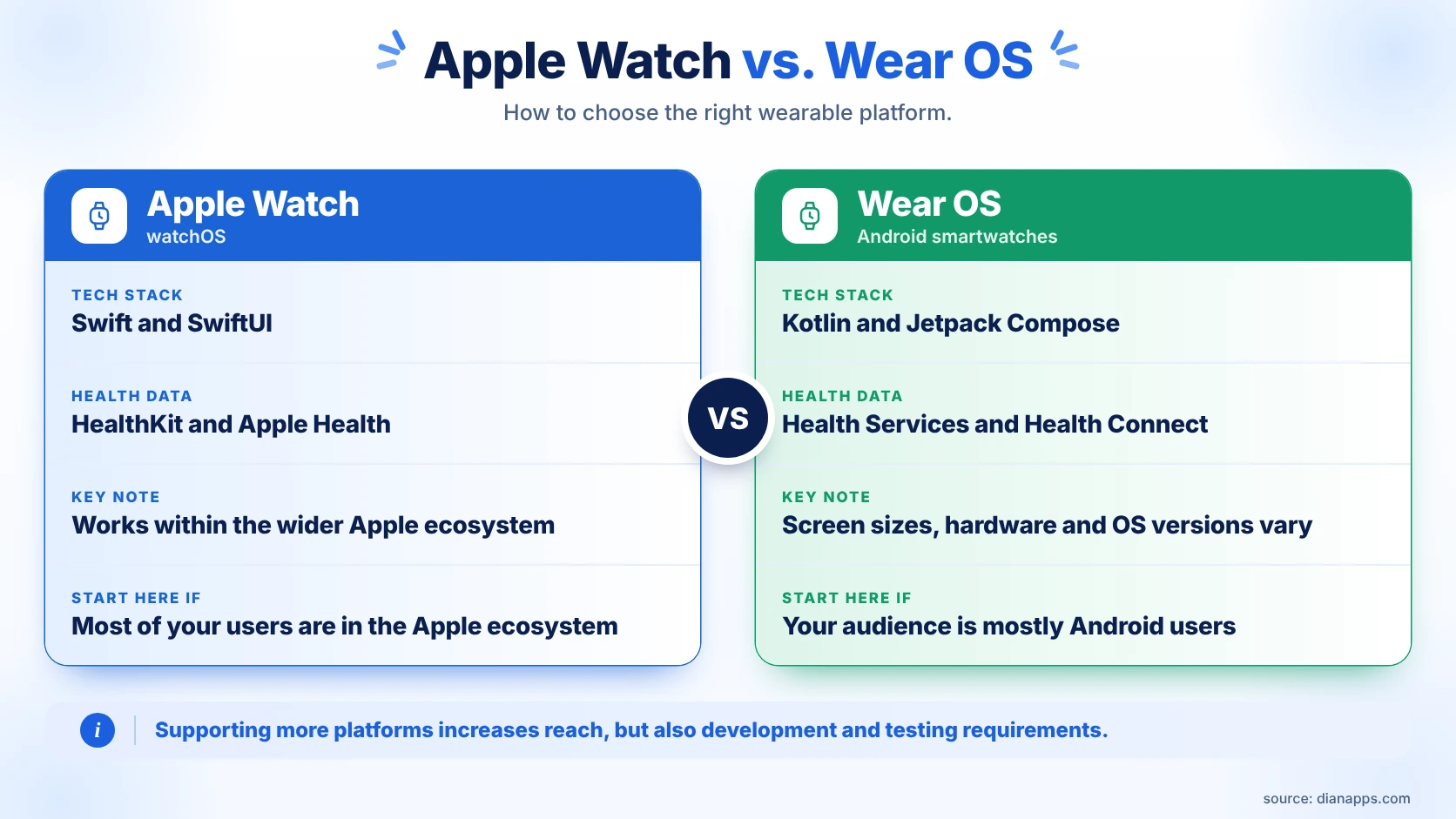
Apple Watch is an important option for businesses targeting users within the Apple ecosystem. Apple Watch app development generally uses Swift and SwiftUI along with Apple’s watchOS frameworks, allowing developers to create experiences around notifications, connectivity, health features and other supported device capabilities.
The biggest advantage here is the wider Apple ecosystem. A wearable application can be designed to work alongside the iPhone application and other Apple services, creating a connected experience instead of making the watch operate as an isolated product.
Wear OS for Android Smartwatches
For businesses targeting Android users, Wear OS is another major platform to consider. Wear OS development commonly uses Kotlin and modern Android development tools, while platform APIs can provide access to notifications, sensors, health-related features and other wearable capabilities.
The Android market also contains a wider range of devices, which means businesses need to think carefully about compatibility. Different devices can have different screen sizes, hardware capabilities and software versions, and this makes testing particularly important.
Samsung Galaxy Watch and Other Wearable Platforms
Depending on the target audience, businesses may also need to consider Samsung Galaxy Watch and other wearable ecosystems. Supporting additional devices can increase the potential reach of the application, but it can also increase development and testing requirements. This is why the platform decision needs to be made around the actual target audience instead of simply trying to support every device available.
Single-Platform vs. Multi-Platform Development
If most of your users are already concentrated around one ecosystem, starting with a single platform can make the initial development process easier to manage. It allows the team to focus on one set of device capabilities and one user experience before expanding.
However, if the target audience is divided between iOS and Android, supporting both platforms may eventually be necessary. The important thing is to decide this before development begins because building for multiple wearable ecosystems is not simply a matter of copying the same application from one platform to another.
Apple Watch App Development
Apple Watch app development needs to be planned around the way people actually use a smartwatch. The user is not sitting down with the watch and browsing it like a smartphone. They are checking something quickly, responding to an alert, tracking an activity or completing a small action.
This means the application needs to provide the right information without making the user go through a long process. At the same time, Apple provides different frameworks that allow businesses to build experiences connected with the iPhone, health data, notifications and other supported capabilities.
Apple Watch Development Stack
Swift and SwiftUI are commonly used for modern Apple Watch applications, while watchOS frameworks provide access to the capabilities required by the application. The exact stack depends on whether the application needs health features, connectivity, notifications, background tasks or other device functionality.
Apple Watch App Architecture
The architecture needs to clearly define what is happening on the watch, what is being handled by the companion iPhone application and what belongs to the backend. This becomes especially important when information needs to remain synchronized between devices.
If this separation is not planned properly, the application can end up doing too much on the wearable, resulting in unnecessary battery usage and a poor user experience. This is why architecture should be considered before development rather than after the application has already been built.
HealthKit and Apple Health Integration
Applications that require health information can use supported HealthKit and Apple Health capabilities when the user provides the required permissions. However, businesses should not request access to every available metric simply because the platform makes it possible. The information being collected needs to have a clear purpose and the user needs to understand what they are allowing the application to access.
Watch Connectivity and Notifications
A lot of Apple Watch applications need to communicate with a companion iPhone application. This can involve transferring information, keeping data synchronized and making sure important notifications reach the user at the right time.
Notifications especially need to be handled carefully. Sending too many alerts can quickly become frustrating, while sending too few can make the wearable experience feel unnecessary. The goal should always be useful information rather than simply more notifications.
Wear OS Development
Wear OS development also needs to be treated as wearable-specific development rather than simply taking an Android application and reducing the interface. The user experience is different, the available space is limited and battery consumption can become a problem if the application is constantly running unnecessary processes.
At the same time, the Android ecosystem provides developers with a strong foundation and different tools for building applications around wearable devices, sensors, notifications and health information.
Wear OS Technology Stack
Kotlin and modern Android development tools are commonly used for Wear OS development, while Jetpack Compose can be used to build modern wearable interfaces. Platform APIs can also be used to work with notifications, sensors, health capabilities and other device features depending on the requirements.
Health Services and Health Connect
Applications that need health and activity information can use supported Android health frameworks and data sources depending on the device and permissions provided by the user. This allows businesses to create experiences that use relevant information without requiring users to manually enter everything themselves.
Tiles, Complications and Quick Information
Users do not always need to open the complete application just to check one piece of information. Tiles, complications and similar quick-access experiences can make frequently required information available with fewer steps. For many wearable applications, this can actually be more useful than building a large number of application screens.
Sensors, GPS and Background Work
Wearable devices can use GPS and different sensors, but these features need to be handled carefully. Constantly accessing sensors, refreshing information or running background processes can consume the battery quickly. This is not suitable nor suggested for an application that users are expected to wear throughout the day, because battery performance can directly affect whether people continue using the application.
Designing for Wearable UX Constraints
One of the biggest mistakes businesses can make during wearable app development is treating the smartwatch like a smaller smartphone. The wearable UX constraints are completely different because the user may be walking, exercising, working or doing something else while interacting with the device.
This means the design needs to focus on quick understanding and quick actions. Users should not have to read large amounts of information, navigate through several unnecessary screens or complete complicated forms just to perform a basic task. The experience needs to be designed around the situation in which the wearable is actually being used.
Design for Glanceable Interactions
The most important information should be available quickly. If a user needs to open several screens before finding the information they were looking for, then the application is already creating needless hassle. Important information should be prioritized and secondary information can remain available deeper in the experience or on the companion application.
Small Screens and Limited Input
The small screen creates obvious limitations, but the solution is not simply reducing the font size. Text needs to remain readable, buttons need to be comfortable to tap and the interface should not become crowded. Every element needs to have a purpose because there is limited space available.
One-Handed and Quick Interactions
Many wearable interactions are happening with one hand and limited attention. This is why the main actions should be easy to find and complete. If a task requires too many taps or too much typing, users may simply move to their smartphone instead.
Touch, Voice, Haptics and Physical Controls
Depending on the device, users may interact through touch, voice, haptic feedback or physical controls. A good wearable application should use the interaction method that makes the most sense for the situation. For example, voice can be useful when typing is inconvenient, while haptic feedback can communicate a simple alert without requiring the user to constantly look at the screen.
Battery-Conscious UX Design
Battery life is one of the most important considerations when designing a wearable application. Heavy animations, constant sensor access, frequent network requests and unnecessary background processing can all reduce battery life. The application therefore needs to be designed in a way that provides the required functionality without continuously consuming resources in the background.
Build a Smarter Wearable Experience
Turn your wearable app idea into a scalable product with the right UX, technology stack, integrations, and development strategy.
Wearable App Architecture: How the Pieces Fit Together
A wearable application is usually made up of more than the application installed on the watch. Depending on the project, there can be a wearable application, companion mobile application, backend, APIs, database, authentication system and third-party integrations all working together.
The wearable should handle the things that make sense on the wearable, while the mobile application can handle longer workflows and the backend can manage persistent information, business logic and synchronization. With this approach, each part of the system has a clear responsibility instead of putting everything on one device.
Standalone vs. Companion Wearable Apps
Some applications can operate independently on a wearable while others depend on a smartphone for certain features. The right option depends on the product. If the application needs access to information that is already available on the watch, a standalone experience may make sense. If the user needs to complete a long workflow, the smartphone may be the better place for it.
APIs and Data Synchronization
Data synchronization is another important part of the architecture because the watch and smartphone may not always have a perfect connection. The system needs to know what happens when the connection is interrupted, when the user performs an action offline or when information is updated more than once.
Planning these situations from the beginning can prevent synchronization problems later and also makes the application more reliable in real-world use.
How to Build a Wearable App Step by Step
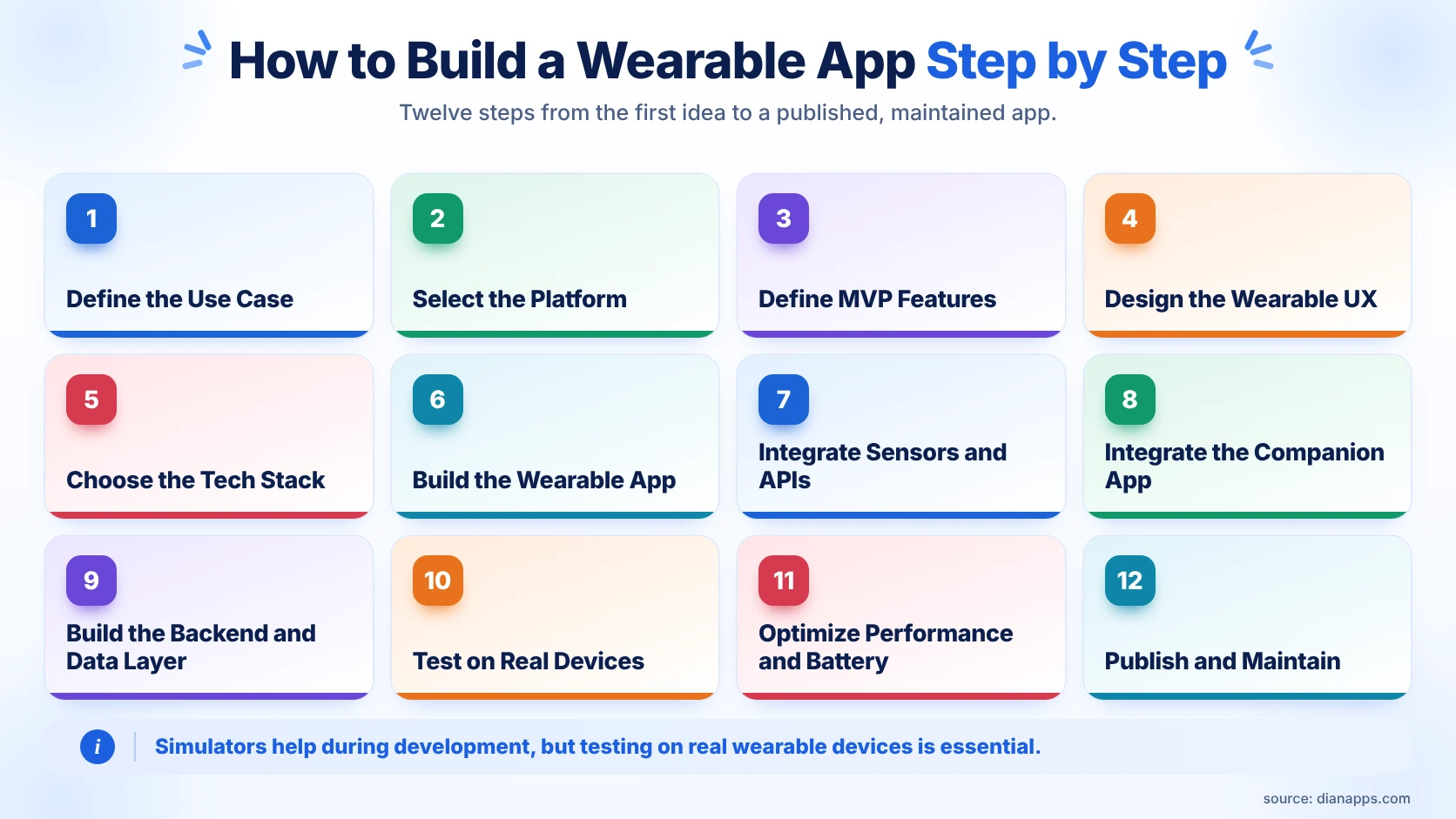
Building a wearable application properly starts well before the development stage. The business needs to understand the users, the use case, the platform and the features before the development team starts putting everything together. Let’s break down the complete process.
Step 1: Define the Use Case and Target Users
- First, understand what the application is solving and why that problem needs to be solved through a wearable. If the same experience is better suited to a smartphone, there should be a clear reason for bringing it to the wrist.
Step 2: Select the Wearable Platform
- Choose Apple Watch, Wear OS or another relevant platform based on the target audience, device capabilities and business requirements.
Step 3: Define the MVP Features
- Do not try to move the entire mobile application onto the watch. Identify the features that provide the most value during short interactions and build those first.
Step 4: Design the Wearable User Experience
- Create the user flow specifically for the wearable and remove unnecessary steps. The main actions should be quick and easy to complete.
Step 5: Choose the Technology Stack
- Select the programming language, framework, APIs, backend technologies and integrations based on the chosen platform and application requirements.
Step 6: Build the Wearable App
- Develop the interface, interactions, notifications and device-specific features while keeping battery consumption and performance in consideration.
Step 7: Integrate Sensors and APIs
- Connect the application with the health, activity, location or other APIs that are actually required.
Step 8: Integrate the Companion Mobile App
- If the application requires a companion mobile experience, establish reliable communication and synchronization between the devices.
Step 9: Build the Backend and Data Layer
- The backend can manage accounts, authentication, business logic, persistent data, synchronization, analytics and third-party integrations.
Step 10: Test on Real Wearable Devices
- Simulators can help during development, however, physical device testing is essential because real-world battery, connectivity and interaction behavior cannot always be reproduced accurately in a simulator.
Step 11: Optimize Performance and Battery Usage
- Review background tasks, network requests, sensor usage, animations and refresh intervals before launch.
Step 12: Publish and Maintain the App
- After launch, continue monitoring the application and updating it as wearable operating systems, APIs and devices change.
Health Data Integration in Wearable Apps
Health data integration is one of the biggest opportunities in wearable applications because these devices can collect information that can be useful for fitness app development, wellness and other experiences. At the same time, this is also one of the areas where businesses need to be particularly careful.
Health information can be sensitive, and users need to understand what they are sharing and why the application needs it. Depending on the platform and device, applications may work with activity, heart rate, sleep, movement, location and other supported information, but not every device provides the same data and the accuracy can also vary.
Apple Health and HealthKit
Apple applications can use supported HealthKit and Apple Health capabilities after users provide the required permissions. The application should only request information that is directly relevant to its functionality and should make the purpose of that information clear to the user.
Health Connect and Android Health Data
Android applications can use supported health frameworks and data sources where the device and permissions allow it. This can help applications bring relevant health and fitness information into the overall experience without requiring unnecessary manual entry.
Wearable Sensor Data Integration
Sensor information can be extremely useful, but it should not automatically be treated as perfectly accurate. Different devices can produce different readings, information can sometimes be missing and environmental or usage conditions can affect the result. This is why applications need to handle sensor data carefully instead of presenting every measurement as an absolute fact.
Privacy, Consent and Security
Health information needs to be protected from the moment it is collected until the point where it is stored, processed or displayed. Appropriate authentication, access controls, secure transmission and storage practices are important, while additional privacy or regulatory requirements may also apply depending on the application and market.
Essential Features of a Modern Wearable App
The features will always depend on the type of application being built, however, there are several capabilities that can make a wearable experience more useful, including:
- Real-time notifications and alerts.
- Health and activity tracking.
- GPS and location features.
- Voice and quick interaction controls.
- Offline functionality where required.
- Complications, tiles and other glanceable information.
- Cross-device synchronization.
- Personalized alerts and insights.
- Secure authentication and account access.
How to Test a Wearable App
Testing a wearable application is not only about checking whether every screen is opening correctly. The application is being used in real-world situations, which means testing needs to cover the things that can actually affect the user experience, including connectivity, battery, sensors, physical interaction and different devices.
Simulator vs. Real Device Testing
Simulators are useful during development and can help identify interface problems, but real devices are required to understand actual battery consumption, connectivity, sensor behavior and interaction. Testing on physical devices should therefore happen before the final release and not only after everything else is complete.
UI and Interaction Testing
Test readability, touch targets, navigation, haptic feedback, orientation and the speed of important actions across supported devices. Small issues that may not look serious during development can become frustrating when the application is being used repeatedly throughout the day.
Sensor and Health Data Testing
Test missing readings, delayed information, permission changes and unusual sensor conditions instead of testing only perfect data. This makes the application more reliable when it is being used by real users in different situations.
Connectivity and Sync Testing
Test what happens when the smartphone disconnects, Bluetooth becomes unavailable, the network becomes weak or the user performs an action while offline. The application should be able to recover and synchronize properly once the connection becomes available again.
Battery and Performance Testing
Monitor battery consumption, memory usage, background activity, startup time and application responsiveness. An application that is technically functional but constantly draining the wearable battery is not providing a good user experience.
Common Challenges in Wearable App Development
Wearable applications can look simple from the outside because users are interacting with a small screen, however, the development behind that experience can involve several different technical challenges. Some of the most common ones include:
- Limited battery capacity and processing resources.
- Small screens and restricted input methods.
- Different wearable devices and operating system versions.
- Sensor accuracy and inconsistent data.
- Connectivity interruptions.
- Background execution restrictions.
- Privacy and security requirements.
- Synchronization between multiple devices.
- Testing across different wearable models.
Wearable App Development Cost in 2026
The cost of wearable app development depends on what the application actually needs to do. A simple application that displays notifications or basic information is going to have a completely different development requirement compared to an application using multiple sensors, health data integration, a backend, real-time synchronization and a companion mobile application.
The number of platforms, features, integrations, backend requirements, security, testing and development team all influence the final cost. Businesses should also remember that the cost does not end at launch because wearable operating systems and devices continue to change, meaning applications need ongoing maintenance and updates.
What Affects the Development Cost?
Platform count, feature complexity, integrations, backend development, sensor usage, security requirements, testing scope and the experience of the development team are some of the biggest factors that can increase or reduce the overall development cost.
Apple Watch vs. Wear OS Development Costs
Apple Watch and Wear OS can have different development requirements depending on the application. Instead of comparing only the number of development hours, businesses should compare the complete scope required to deliver the intended experience on each platform, including design, integrations, testing and maintenance.
Wearable App Development Tech Stack in 2026
Programming Languages and Frameworks
Swift and SwiftUI are commonly used for Apple Watch applications, while Kotlin and modern Android development tools are widely used for Wear OS development. The exact technology stack should be selected around the platform and features rather than choosing technologies simply because they are currently popular.
APIs and Wearable SDKs
Platform-specific APIs and SDKs provide access to notifications, sensors, health information, connectivity and other wearable capabilities required by the application.
Backend Technologies
Depending on the application, the backend can include APIs, databases, authentication systems, cloud infrastructure, analytics and third-party services. The backend should support the wearable experience rather than making the wearable responsible for tasks it is not designed to handle.
Analytics and Monitoring
Analytics and monitoring help businesses understand how users are interacting with the application while also helping development teams identify crashes, performance problems and other issues after launch.
Best Practices for Successful Wearable App Development
Building a wearable application successfully is not only about selecting the right programming language or framework. The complete experience needs to be designed around the strengths and limitations of the wearable, and some of the wearable best practices that can make the biggest difference include:
- Build for the wrist, not a mini smartphone.
- Keep the most important information easy to see.
- Reduce unnecessary interactions.
- Protect battery life wherever possible.
- Keep synchronization reliable.
- Design around real-world usage conditions.
- Test physical devices early.
- Collect only the data that is genuinely required.
- Protect user information throughout the complete data flow.
Wearable App Development vs. Mobile App Development
Wearable and mobile applications can work together, but they should not be treated as exactly the same product. Mobile applications development have more screen space and are better suited for longer workflows, while wearable applications are designed around quick information, short actions and contextual use.
This is why businesses should give each device a clear role. The wearable can handle alerts, quick actions and information that needs to be available immediately, while the smartphone or web application can handle deeper workflows. With this approach, the overall experience becomes more useful instead of trying to make one device do everything.
Should You Build for Apple Watch, Wear OS, or Both?
There is no single answer that works for every business. If the majority of your users are already within the Apple ecosystem, starting with Apple Watch can make sense. If the target audience is primarily Android users, Wear OS may be the better starting point. If the business needs to reach both audiences, supporting both platforms may eventually be necessary.
However, the decision should not be based only on technology. User demographics, application requirements, market demand and long-term business goals all need to be considered before development starts.
Ready to Build Your Wearable App?
From Apple Watch and Wear OS development to health integrations, synchronization, testing, and launch, DianApps can help you build a reliable wearable application tailored to your business goals.
Conclusion
Wearable app development is no longer limited to basic smartwatch notifications or step counting. Businesses are now using wearable applications for fitness, healthcare, productivity, enterprise operations and several other use cases where quick information and contextual actions can make the overall digital experience much easier for users.
However, building a successful wearable application is not about taking an existing mobile application and making everything smaller. From selecting the right platform and understanding wearable UX constraints to handling health data integration, building reliable synchronization and testing the application on real devices, every part of the product needs to be considered around the wearable itself.
If you are planning to build a wearable application and are looking for a development partner that can help you turn the idea into a reliable and scalable product, DianApps can help you with strategy, UX design, development, integrations, testing and launch.
 0 comments










Leave a Comment
Your email address will not be published. Required fields are marked *