















 0 comments





Key Takeaways:
- Audit inactive users, unused licenses, and integration accounts.
- Move eligible users from full CRM to Platform licenses.
- Reduce seats before negotiating your renewal.
- Negotiate discounts, future seat pricing, and renewal uplift caps.
Quick Answer: Start your Salesforce license audit at least six months before renewal. Identify inactive users, over-licensed users, unused permission set licenses, and integration accounts, then reduce or downgrade what you do not need. After that, negotiate the renewal based on your actual requirements, including contract discounts and a cap on future price increases.
The organisations that get the best Salesforce renewals aren’t the ones with the best negotiators. They’re the ones who arrive with a spreadsheet showing exactly who logged in last month, which permission set licenses are assigned to people who never use them, and precisely how many seats could go without anyone noticing.
That’s the whole method. Industry estimates put shelfware, licenses bought and never used, at 20–30% of a typical Salesforce estate.
And there’s a structural fact that shapes everything: mid-term, you’re locked in. Salesforce won’t let you reduce seat counts between renewals. Renewal is the only moment you can materially change anything, which is why the work has to start six months before it.
Where the Waste Actually Hides
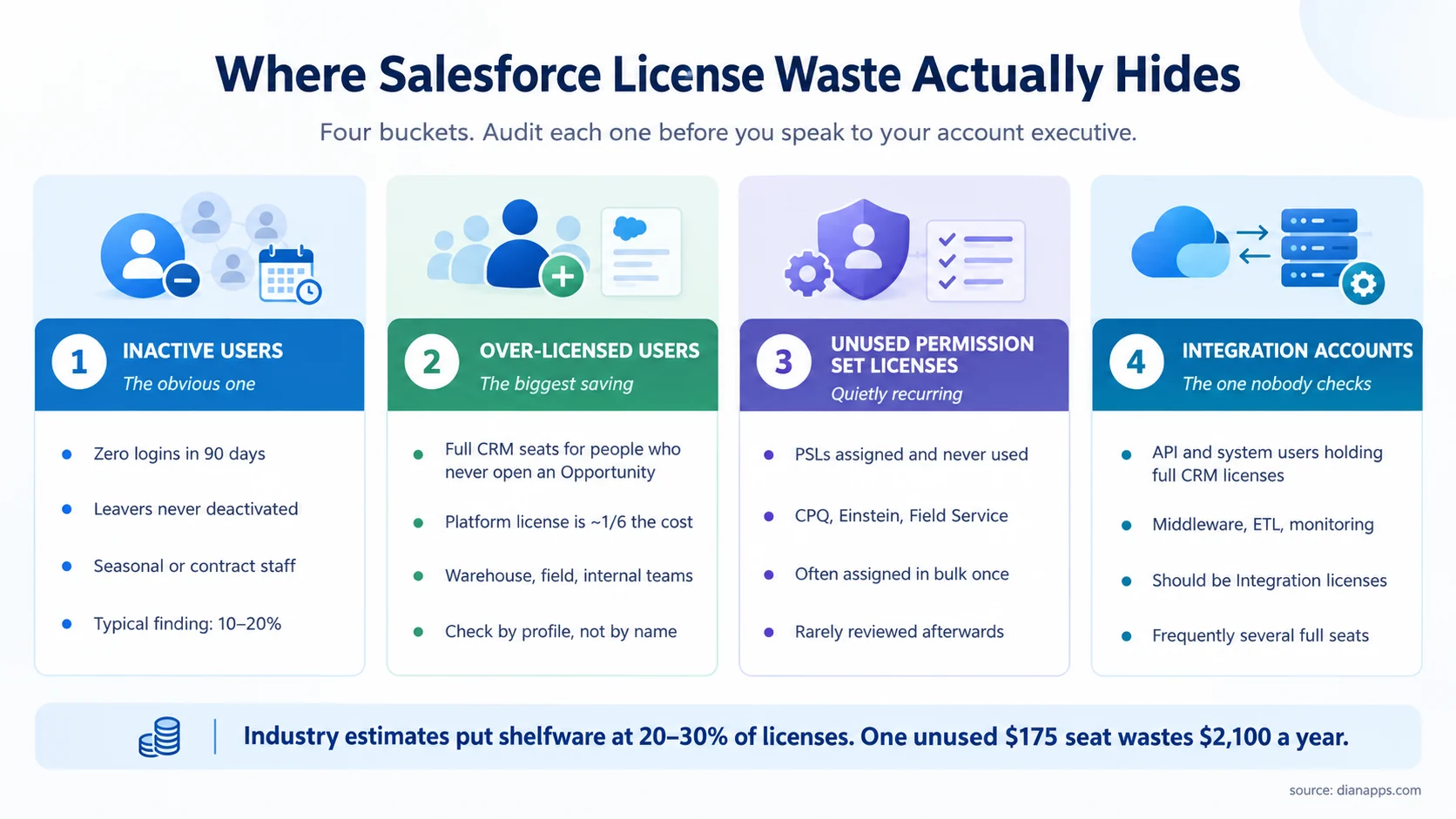
Bucket two is where the money is, and bucket four is the one nobody checks.
Inactive users
Pull login history for the last 90 days; you’re looking for zero-login accounts, leavers never deactivated, and seasonal staff still holding seats.
A typical finding is 10 – 20%. One global manufacturer found 15% of its licenses had no logins in a quarter.
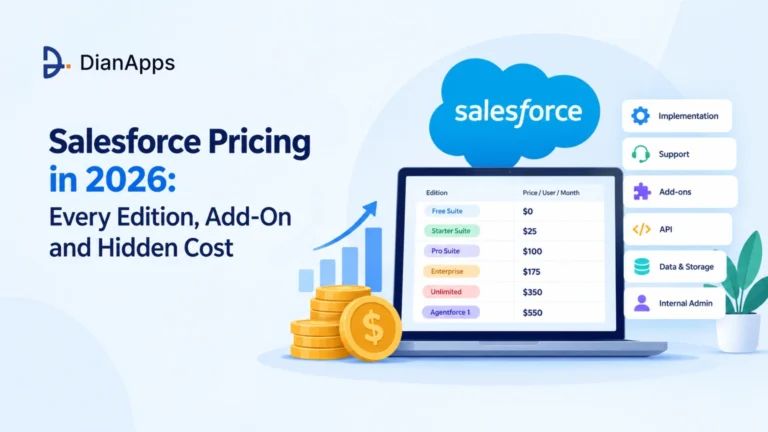
- The Arithmetic Is Stark: One unused Enterprise seat at $175 per month wastes $2,100 a year. Twenty of them is $42,000.
And it’s a security issue as well as a cost one. Dormant accounts with live credentials are a genuine exposure, which is a useful second argument when you need internal support for the cleanup.
Over-licensed users
This is the largest saving available to most organisations, and it’s structural rather than administrative.
Look for people holding full CRM licenses who never touch Leads, Opportunities, or Cases: warehouse staff, field engineers, internal service teams, anyone using a custom app rather than the CRM.
A Platform license costs roughly a sixth of a full CRM seat. Moving fifty such users from Enterprise to Platform saves around $90,000 a year.
Audit by profile, not by name: pull a list of profiles and what each one actually accesses, and the pattern will show up immediately.
See the Salesforce Platform explained for what Platform licenses cover.
Unused permission set licenses
PSLs are add-ons layered on top of a base license, CPQ, Einstein features, Field Service, and others. They’re frequently assigned in bulk during an implementation and never reviewed.
Check assignment against actual use. A PSL assigned to someone who has never opened the feature is pure waste, and it recurs annually.
Integration accounts
The bucket nobody checks. API users, middleware connections, ETL jobs, and monitoring tools frequently hold full CRM licenses because that’s what was easiest at setup.
Salesforce offers integration-specific licenses designed for exactly this. Check every account that isn’t a human, and expect to find several full seats.
The Renewal Timeline
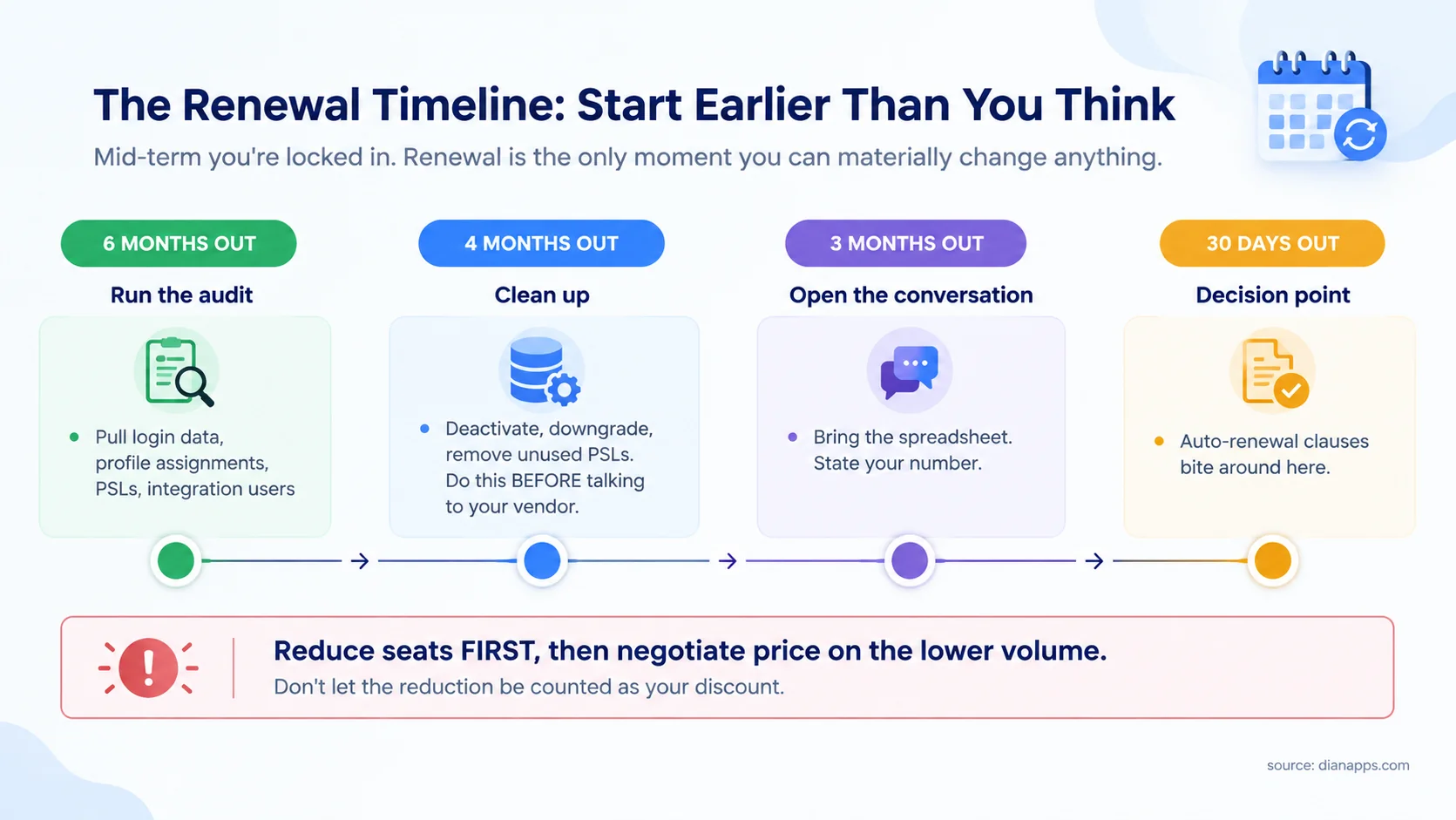
- Six Months Out: Run the audit, pull login data, profile assignments, PSL allocations, and integration accounts. This takes an admin a few days, and it’s the entire foundation.
- Four Months Out: Clean up, deactivate, downgrade, and remove unused PSLs before you speak to your account executive.
- Three Months Out: Open the conversation with the spreadsheet and a number you’ve already decided. If the renewal involves multiple products, complex licensing, or significant spend, Salesforce consulting services can help you validate the requirements before entering negotiations.
Thirty days out: The decision point. Check your contract for auto-renewal clauses, which frequently bite around here.
The tactic most buyers get wrong: if you’re paying for 50 seats and need 35, reduce to 35 first, then negotiate the price on 35. Do it the other way round, and Salesforce counts the reduction as your discount; you’ve handed over your leverage and received nothing for it.
What Salesforce Will and Won’t Move On
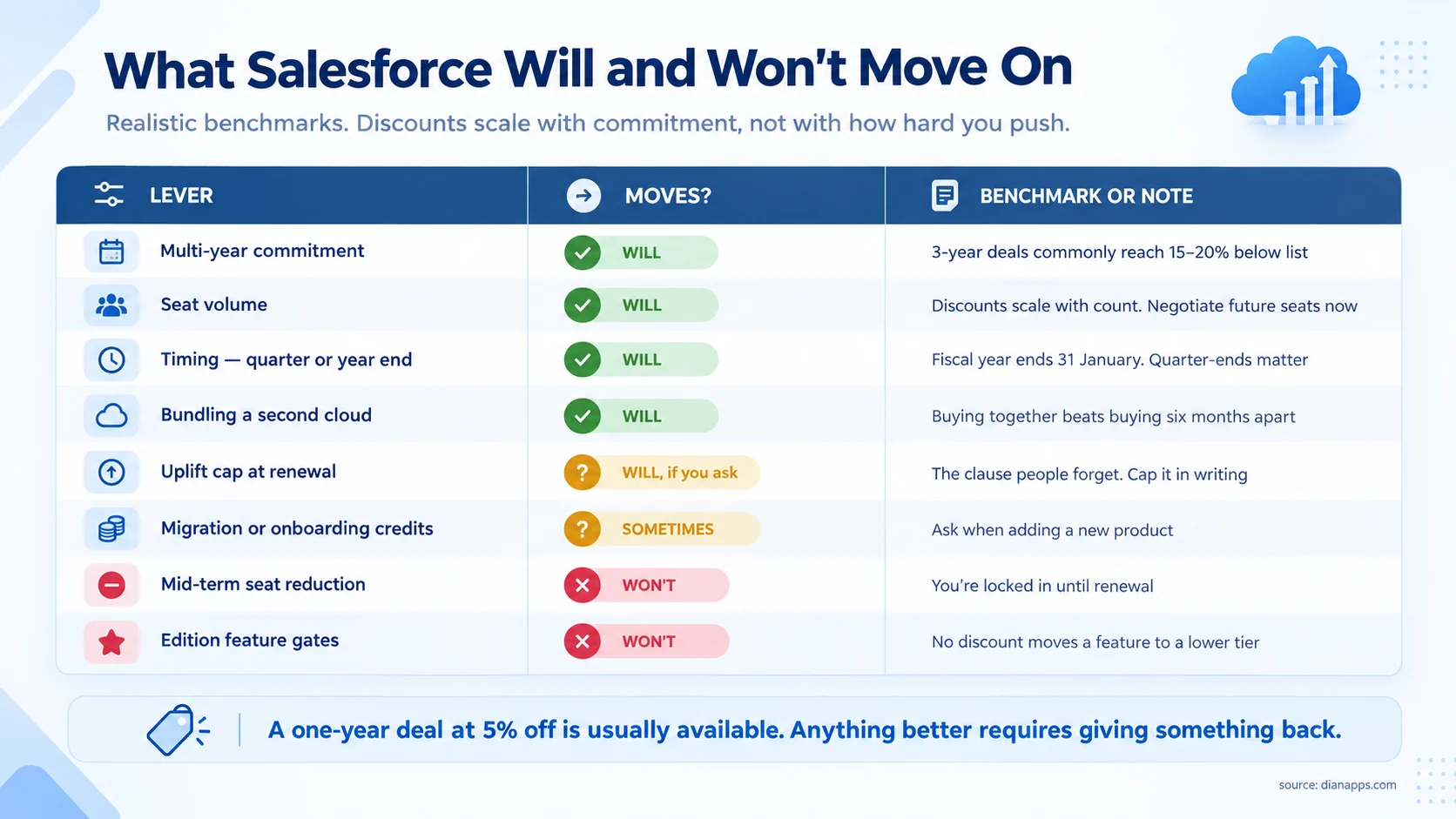
- Realistic Benchmarks: A one-year renewal at around 5% off list is generally available. Three-year commitments commonly reach 15–20% below list. Anything better than that usually requires giving something up for a longer term, more seats, or an additional product.
Four levers worth using deliberately:
- Timing: Salesforce’s fiscal year ends 31 January, and quarter-ends matter. Negotiating into a quarter close is a genuine advantage.
- Future Seat Pricing: Negotiate the rate for seats you’ll add mid-term, at the same discount, billed pro rata. Without it, growth gets expensive, and you have no leverage mid-contract.
- Uplift Caps: Without a contractual cap on annual increases, you’re exposed to whatever Salesforce decides, and it raised Enterprise and Unlimited pricing roughly 6% in late 2025.
- Migration Credits: If you’re adding a product, ask for implementation or onboarding credits rather than only a percentage discount.
- And Know The Limits: Salesforce won’t reduce seats mid-term, and no discount moves a feature from Enterprise into Pro. If you need something gated at a higher edition, the edition is the price.
Related: Salesforce pricing in full · editions compared
Renewal coming and no audit done yet?
We’ll run the license audit logins, profiles, permission sets, integration accounts, and hand you the spreadsheet to negotiate with. It typically pays for itself several times over.
Choosing the Right License Type
| License type | Rough cost | Who it’s for |
|---|---|---|
| Enterprise / Unlimited CRM | $175 / $350 per user/month | People who genuinely use Leads, Opportunities, Cases |
| Platform | ~$25 per user/month | Custom apps, no CRM objects |
| Integration | Varies | API and system accounts, not humans |
| Experience Cloud | Per login or per member | External customers and partners |
| Chatter Free | Free | Collaboration only, no CRM data |
The Platform swap is the single highest-value move in most organisations, and it’s frequently overlooked because nobody audits by profile. The reason this distinction matters is that Salesforce is not a single application with one license model. It is a broader platform made up of different applications, data, platform, and AI layers. Understanding what Salesforce is makes the licensing structure easier to evaluate.
One caution on restricted-use licenses. Salesforce sometimes offers licenses limited to partial functionality at a lower price. The catch is that Salesforce doesn’t technically disable the unused functionality, so if users exceed the agreed scope, you can face charges for the difference. If you go this route, monitor usage actively rather than assuming the limit enforces itself.
The Other Costs Worth Auditing
Licenses aren’t the only recurring line.
- Premier Success at 30% Of Net License Fees: Ask whether you’re using it. Many organisations pay for premium support and raise a handful of tickets a year.
- Sandboxes: Developer sandboxes are included; Full and Partial Copy sandboxes cost extra and frequently outlive the project that needed them.
- Data Storage: Overage charges accumulate quietly. Archiving or deleting genuinely dead data is a real saving and rarely done.
- Add-Ons Nobody Uses: Revenue Intelligence, Territory Management, Mobile App Plus, and other products can quietly add to your annual spend. Check assignment against use, the same as PSLs. Understanding the broader Salesforce product portfolio also makes it easier to identify products your organisation may be paying for without fully using.
Paying for Salesforce You Don’t Use?
Find unused licenses, add-ons, and storage that could be driving up your costs.
Related: Salesforce customization cost · every Salesforce product
Making It Stick
- A One-Off Audit Before Renewal Saves Money Once: The organisations that stay lean do three things continuously:
- Deactivate On The Day Someone Leaves: Tie it to your HR offboarding process rather than a periodic sweep.
- Review License Type At Every New Hire: Ask what the person will actually use before assigning a full CRM seat. The default is expensive.
- Run A Quarterly Login Report: Fifteen minutes, and it catches drift before it compounds into a renewal problem.
- And Keep The Evidence: The spreadsheet you build for one renewal is the starting point for the next. This becomes even more important when your organisation runs multiple Salesforce clouds, since different products can have different licensing and usage considerations. A Salesforce clouds comparison can help clarify what each cloud actually covers before you decide what to keep.
When to Bring in Help
Do it yourself if your estate is under about 100 users, you have an admin who can pull the reports, and your contract is straightforward.
Consider a licensing advisor or partner if:
- Your annual spend is in the six figures, where a few points of discount exceeds any fee
- You have multiple orgs, clouds, or contracts with different renewal dates
- You’ve been through a merger and inherited overlapping agreements
- Nobody internally has negotiated a large SaaS contract before
- Your renewal is under 60 days away, and no audit has been done
The honest note: for a straightforward 40-user renewal, the audit is a few days of admin work, and you don’t need anyone. The value of outside help scales with contract size and complexity, not with how much you dislike negotiating.
If you are evaluating an external partner, don’t judge expertise only by the company’s headline certification count. Check the credentials of the people who will actually work on your account. Our guide to Salesforce certifications explains what the current certification landscape looks like and what those credentials actually tell buyers.
The Spreadsheet Is the Whole Negotiation
Account executives arrive with usage data. If you don’t have your own, you’re negotiating on their numbers.
The audit isn’t complicated logins, profiles, permission sets, integration accounts. It’s a few days of admin work, and it’s the difference between accepting a renewal quote and setting one.
Want the audit done properly before your renewal?
We’ll pull the data, identify what can be cut or downgraded, and give you the evidence to negotiate with. Most audits find more than they cost.
 0 comments










Leave a Comment
Your email address will not be published. Required fields are marked *