















 0 comments





Most companies that commission custom Salesforce development don’t need as much of it as they buy.
That isn’t a criticism of the buyers – it’s a criticism of how the work gets scoped. A backlog arrives labelled “custom development,” nobody sorts it, and a fortnight of configuration gets quoted at developer rates alongside the genuinely complex work.
So this guide does the thing most vendor guides avoid: it starts with whether you should build at all, then covers what it costs when you should.
TL;DR: Custom Salesforce development means extending the platform with code – Apex, Lightning Web Components, integrations, custom data models, portals and Agentforce agents – where the declarative tools stop. Most projects run $15,000 to $80,000 and take 6 to 16 weeks. Before commissioning any of it, check whether configuration or an AppExchange app does the job, because that single decision saves more than any negotiation will.
What Is Custom Salesforce Development?
Custom Salesforce development is building functionality on the Salesforce platform using code rather than the point-and-click tools alone. It covers Apex for server-side logic, Lightning Web Components for interfaces, API integrations with external systems, custom data models, and increasingly the custom actions behind Agentforce agents.
For businesses with complex requirements, Salesforce development services can help design and build these solutions while connecting custom functionality with existing Salesforce workflows, data, integrations, and business processes.
The distinction that matters commercially is a three-way one, not a two-way one:
- Configuration: Changing what already exists. Fields, page layouts, validation rules, permission sets, reports. No code, no deployment risk, an admin does it in hours.
- Customization: Building new behaviour declaratively. Flows, custom objects, App Builder pages, dynamic forms. Still no code, but now you’re designing systems and can design them badly.
- Custom Development: Writing Apex, LWC, integrations or packaged apps. Full control, mandatory test coverage, and a permanent maintenance obligation.
Vendors tend to collapse the second and third together, which is how configuration work ends up on a developer’s rate card. We break the boundary down properly in configuration vs customization.
What Custom Salesforce Development Actually Builds
“Custom development” is a category, not a thing; six types of work sit inside it, and most projects involve one or two rather than all six.
Businesses often use Salesforce development services to build and integrate these capabilities when native Salesforce features, configuration, or AppExchange solutions cannot fully meet their requirements.
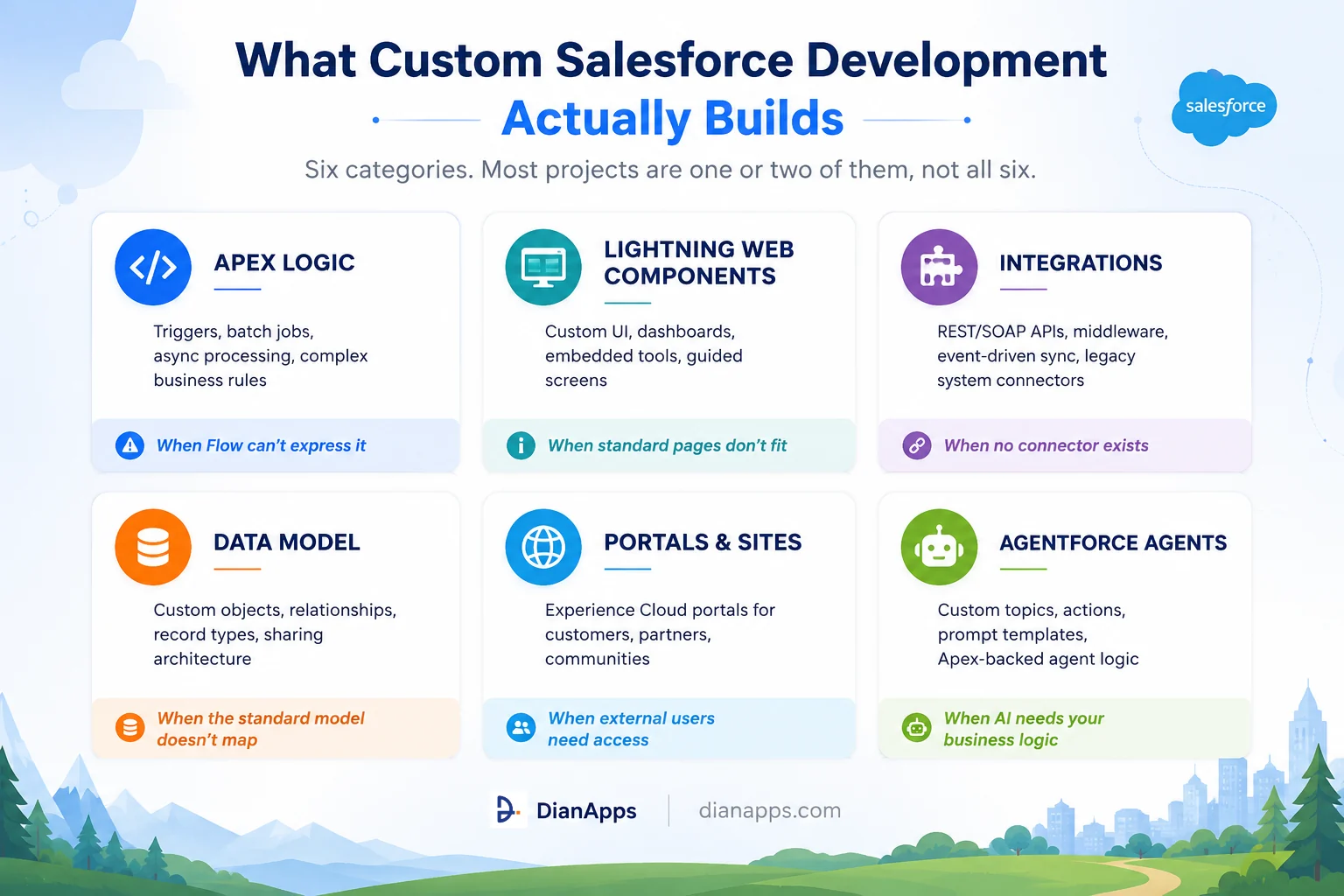
Six categories of custom Salesforce development: Apex logic, Lightning Web Components, integrations, data model, portals, and Agentforce agents, each with when to use it
- Apex Logic: Handles what Flow can’t express – batch processing at volume, callouts with retry logic, recursion control, transactional rollback, complex conditional branching. See the Apex programming guide.
- Lightning Web Components: Build interfaces standard pages can’t: guided screens, embedded tools, dashboards showing what your managers actually want rather than what Salesforce assumes. See the LWC guide.
- Integrations: Connect Salesforce to ERP, finance, support or proprietary systems where no off-the-shelf connector exists. Usually the largest and riskiest line item. See Salesforce API integration.
- Data model work: Custom objects, relationships, record types and sharing architecture. Cheap to build and expensive to get wrong, because fixing it later means migrating live data. See the Salesforce data model explained.
- Portals and sites: On Experience Cloud, where customers or partners need access without full Salesforce licences.
- Agentforce agents: Custom topics, actions and prompt templates, often backed by Apex. This category didn’t exist two years ago and is now among the fastest-growing. See what is Agentforce.
Should You Actually Build It?
Four questions, in order. Stop at the first one that gives you an exit.
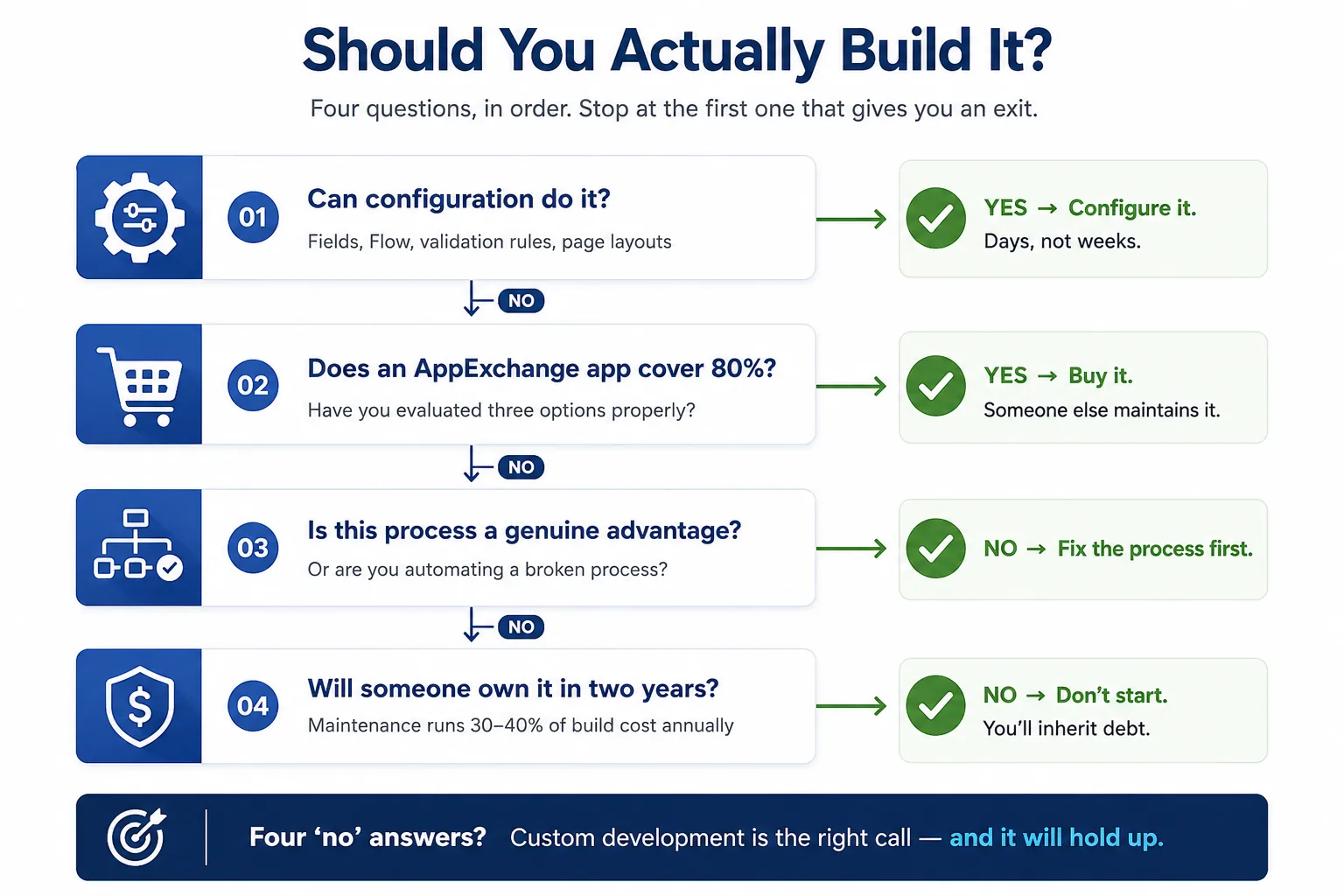
Decision flowchart with four questions: can configuration do it, does an AppExchange app cover eighty percent, is this process a genuine advantage, will someone own it in two years
Can configuration do it?
- Is the one that saves the most money and gets asked the least. Sort your last twenty backlog items before you scope anything – in the backlogs we review at DianApps, a substantial share of tickets labelled “development” turn out to be configuration.
Does an AppExchange app cover it?
- Needs an actual evaluation of three options, not a five-minute search. Buying means someone else absorbs the maintenance and the release regression, permanently.
Is this a genuine advantage?
- It is an uncomfortable one. Automating a broken process makes it faster and harder to change.
Will someone own it in two years?
- Is the question that separates code that ages well from code nobody dares touch. Custom work carries a maintenance obligation of roughly 30–40% of build cost every year – if nobody’s accountable for that, don’t start.
When building genuinely is right:
- The process is your actual competitive differentiator
- No AppExchange app covers it, and you’ve checked properly
- The integration is with something niche or proprietary
- Licence maths favours it – a per-user app across 500 users can cost more over three years than building once
- You can maintain it, or a partner can be contracted to
Not sure which side your backlog sits on?
Send us your last twenty tickets. We’ll tell you which genuinely need code, which are configuration, and which shouldn’t be built at all. Get a free backlog review from our Salesforce development team
What Custom Salesforce Development Costs
Individual builds range from a few hundred dollars for a validation rule to $200,000 for an AppExchange app through security review. Most mid-market projects land between $15,000 and $80,000.
Rough bands to calibrate against:
| Project type | Typical range |
|---|---|
| Single LWC or Apex trigger with tests | $3,000 – $12,000 |
| Custom object with automation | $8,000 – $25,000 |
| One system integration | $20,000 – $70,000 |
| Customer or partner portal | $30,000 – $90,000 |
| AppExchange app through security review | $60,000 – $200,000 |
Two things move these numbers more than anything else. Org health – the same feature costs meaningfully more in an org with fifteen years of undocumented automation, because the first third of the engagement is spent working out what will break and requirements clarity – vague scope gets priced with a risk premium by every partner, including honest ones.
What Quotes Routinely Omit: discovery, testing and UAT, data migration, training, regression testing against three annual Salesforce releases, and ongoing maintenance. Together, these often exceed the build itself over three years.
Full breakdown with per-artefact pricing: Salesforce customization cost · developer hourly rates by region
How Long Does It Take?
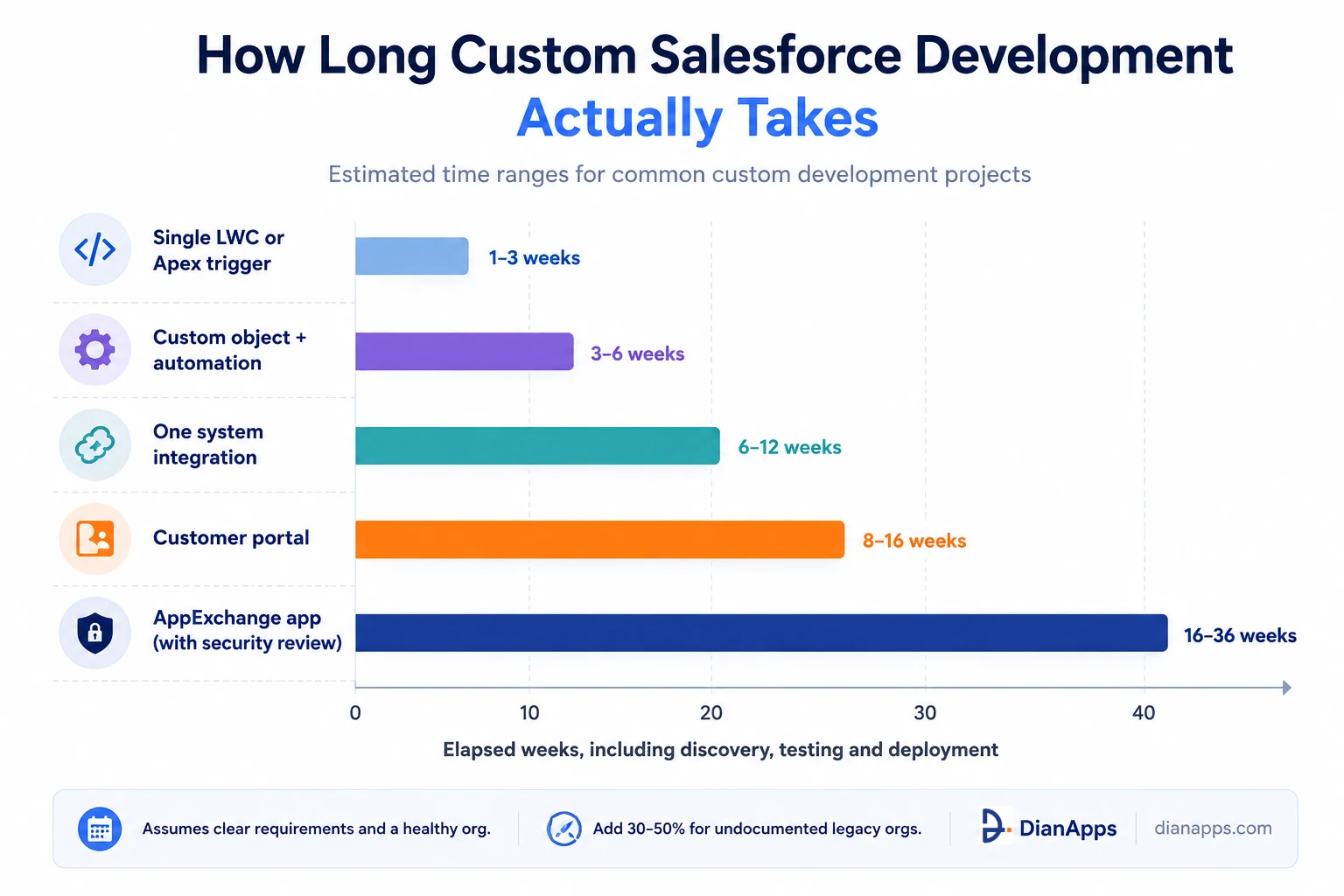
Timeline chart showing single components take one to three weeks, custom objects three to six weeks, integrations six to twelve weeks, portals eight to sixteen weeks, and AppExchange apps sixteen to thirty-six weeks
Those ranges assume clear requirements and a reasonably healthy org. Add 30–50% for an undocumented legacy org, and add substantially more if requirements are still being discovered mid-build.
The AppExchange range is wide because the security review is a workstream in its own right, and first-time submissions frequently come back with findings.
The Mistakes That Cost the Most
- Customizing Because It Feels More Complete: Custom code isn’t better than native tooling. Every custom component needs re-validating three times a year. If a Flow does it, use the Flow – see Flow vs Apex.
- Starting Without A Data Model: Object relationships are the hardest thing to change later. Getting them wrong compounds through every automation, report, and integration built afterwards.
- Building Away From The People Who’ll Use It: Development that doesn’t involve daily users tends to solve the wrong problem precisely.
- Ignoring Governor Limits At Design Time: Code that works on ten records and fails on fifty thousand is the single most common production failure on the platform. See governor limits.
- Treating Documentation As Optional: It’s the difference between an asset and a dependency. Put it in the SOW as a deliverable.
- Budgeting The Build And Nothing Else: Maintenance starts the day you go live and never stops.
- Checking The Edition Too Late: Professional Edition has real restrictions on Apex and advanced automation. Confirm your edition supports what’s being scoped before development starts, not after.
How to Choose a Custom Salesforce Development Partner
Certifications prove exposure. Delivery history proves capability. Ask for both, then ask these:
Which of these items don’t need custom development?
The answer tells you immediately whether you’re talking to a partner or a vendor. Anyone who says all of them hasn’t looked.
Who specifically will do the work?
Names and certifications, not “our team of certified experts.”
What’s your approach to testing beyond the 75% coverage requirement?
Coverage measures which lines ran, not whether the tests proved anything. A developer without a structured testing answer builds fragile things.
Walk me through an integration you built that went wrong.
Anyone with real delivery experience has one. The answer separates practitioners from salespeople.
What will maintenance cost in year two?
A partner who can’t answer hasn’t thought past go-live.
How will you document this so we can maintain it or move it?
Get it contracted. It’s the first thing cut when projects run over.
Deeper: how to choose a Salesforce development partner · how to hire a Salesforce developer · in-house vs outsourced · signs you need a development partner
Want a scope that tells you what not to build?
We’ll review your requirements and come back with an honest split: configuration, AppExchange, and the parts that genuinely need code – with a realistic estimate for each.
Where to Go Next
If you’re deciding what needs code, start with configuration vs customization.
If you’re budgeting, Salesforce customization cost has per-artefact pricing and the maintenance maths.
If you’re building a team or shortlisting partners, see hiring a Salesforce developer and choosing a development partner.
For the technical foundations of what’s being built, the complete Salesforce development guide is the hub.
Talk to a Team That Will Tell You Not to Build
We’re a certified Salesforce Consulting Partner with developers, architects, and consultants across our US, UK, Australia, Canada, UAE, and India teams.
The first thing we do on any custom development enquiry is work out how much of it isn’t custom development. It’s a strange way to open a sales conversation, and it’s the reason our clients tend to stay.
On a scoping call you’ll get:
- An honest split of your backlog into configuration, AppExchange, and genuine custom work
- Realistic effort and cost ranges for the parts that need building
- The maintenance figure for years two and three, before you commit
- Named engineers with certifications, not a generic team pitch.
 0 comments










Leave a Comment
Your email address will not be published. Required fields are marked *