















 0 comments





What Changed in 2026
The market landscape shifted meaningfully in the last twelve months. Here are the verified data points that shape the guidance below:
- Global mobile app market projected to hit $633.71 billion in 2026 (Statista App Market Forecast).
- MVP mobile app cost in 2026: $25,000-$50,000 over 6-10 weeks (DianApps client benchmark data).
- AI feature integration adds 15-25% to standard build costs (DianApps 2026 project benchmarks).
- Enterprise app builds average $150K-$500K over 6-12 months in 2026 (DianApps enterprise client data).
- Managed services averaging $5K-$25K per month for ongoing 2026 support (DianApps managed services benchmark).
Related Reading From Our 2026 Guides
For deeper context, see these companion guides:
- Mobile App Development Trends 2026
- How Much Does Mobile App Development Cost in 2026
- AI App Development Cost for US Businesses
There is a quiet decision sitting inside every mobile product roadmap right now, and most teams are making it without realizing the full weight of it.
When your app’s AI feature fires – the recommendation, the voice response, the image analysis, the predictive text where does that thinking actually happen? On the user’s phone? Or on a server somewhere that their phone just called?
That single architectural choice cascades into everything: your app’s response speed, your infrastructure bill, whether your app works in a tunnel, what happens to user data, and whether you can build the feature at all on a mid-range Android device.
The global AI in mobile market hit $14.19 billion in 2024 and is projected to reach $96.85 billion by 2030. Most of that growth is being driven not by one approach, but by the collision of two that are increasingly deployed together. Edge computing and on-device AI are reshaping how modern apps are built not as a replacement for cloud AI, but as its complement.
This guide gives you a clear map of both approaches what they actually do, where each one makes sense, and how the most capable mobile products in 2026 are combining them.
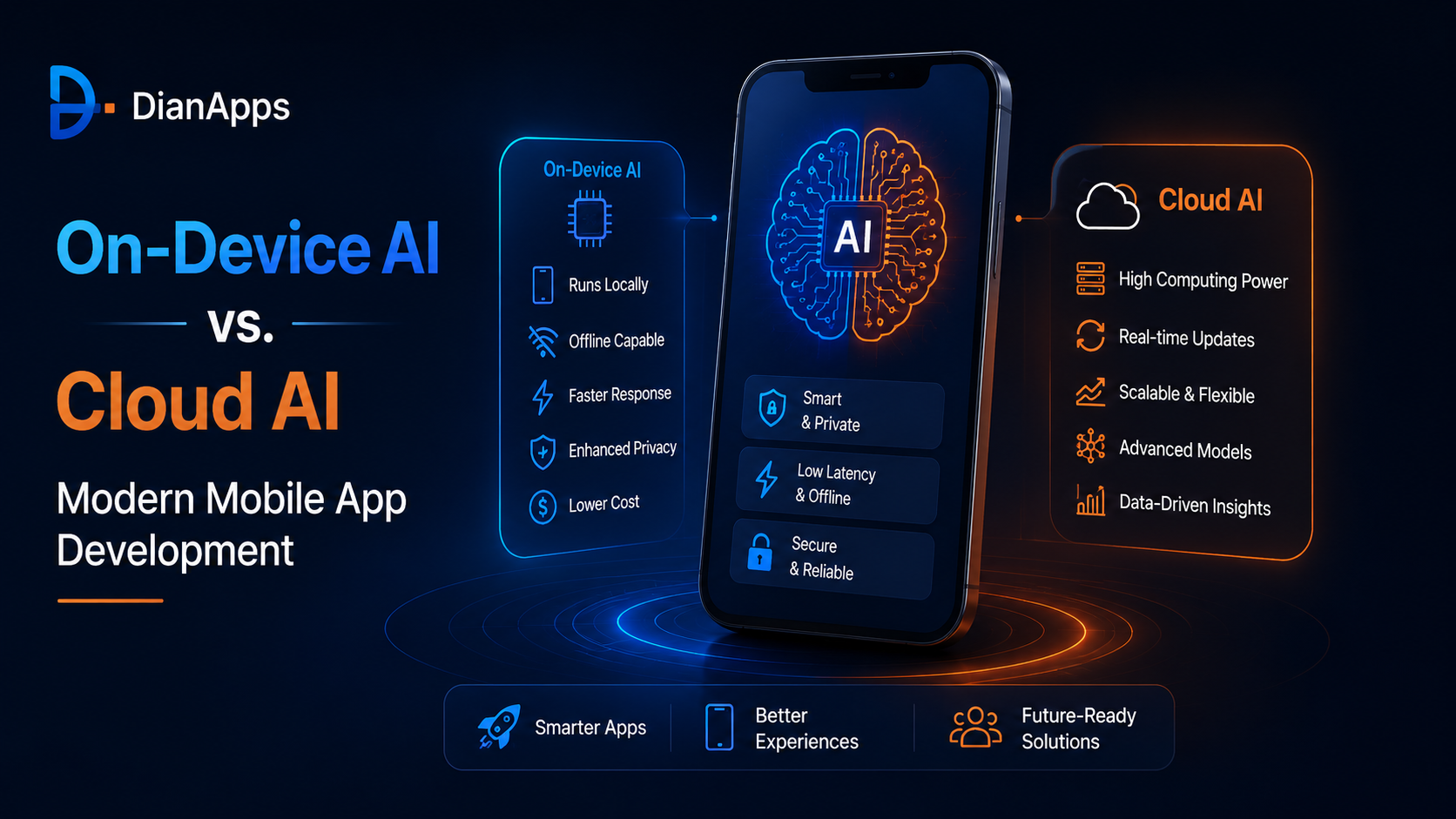
Quick Summary: On-device AI runs ML models directly on a phone’s processor – no internet required, no data sent to servers, instant response. Cloud AI calls remote models via API more powerful, constantly updated, but dependent on connectivity and introducing latency. Most modern mobile apps need both: on-device for speed, privacy, and offline capability; cloud for complex reasoning, large language models, and capabilities no phone chip can handle yet.
What On-Device AI Actually Means?
On-device AI is the execution of machine learning models entirely within the hardware of the user’s device, the phone’s CPU, GPU, or dedicated Neural Processing Unit (NPU). No data leaves the device. No API call is made. The model loads, runs, and returns a result inside the phone itself.
Apple’s Neural Engine (built into every A-series and M-series chip since 2017), Google’s Tensor chips in Pixel devices, and Qualcomm’s AI Engine in flagship Android hardware have all made genuinely capable on-device inference possible on consumer smartphones. Apple’s Neural Engine in the A18 Pro chip can run 35 trillion operations per second. That is not a research milestone, it’s shipping hardware that millions of people carry in their pockets.
The practical effect: tasks like image classification, face detection, natural language understanding, pose estimation, and speech recognition can now run in real time on a mid-range device without ever touching a remote server.
On-device AI is reshaping iOS app development in particular, Apple’s Private Cloud Compute architecture and the Neural Engine integration in CoreML have made on-device inference a default design consideration for any serious iOS product, not an edge case.
The Technical Stack Behind On-Device AI
| Layer | iOS | Android |
|---|---|---|
| ML Runtime | CoreML | TensorFlow Lite / LiteRT, ONNX Runtime |
| Hardware Accelerator | Apple Neural Engine (ANE) | Qualcomm Hexagon DSP, Google Tensor NPU, NNAPI |
| Vision / Camera AI | Vision framework, ML Kit | ML Kit, CameraX + TFLite |
| NLP / Language | NaturalLanguage framework, Apple Intelligence | Google Gemini Nano, ML Kit NLP |
| Cross-Platform Integration | Flutter (TFLite plugin, google_ml_kit) | Flutter (same), React Native (react-native-tensorflow-lite) |
What Cloud AI Actually Means?
Cloud AI sends the user’s input, text, audio, an image, sensor data to a remote server where a large model processes it and returns a result. The model never runs on the device. The device is just a client.
This is how ChatGPT works on your phone. It’s how Google Gemini responds. It’s how Midjourney generates an image from a text prompt. The intelligence isn’t in your phone, your phone is a well-designed window into intelligence that lives elsewhere.
Cloud AI’s defining advantage isn’t any single capability. It’s scale. A language model running in a cloud datacenter has hundreds of billions of parameters. The models that run comfortably on a phone have hundreds of millions at most. That difference isn’t a rounding error, it represents the full gap between a model that can follow a complex multi-step instruction and one that can handle a short request.
The leading cloud AI providers, OpenAI, Anthropic, Google, Cohere, Mistral, are all accessible via API. For mobile developers, this means the full capability of GPT-4o, Claude 3.5, or Gemini 1.5 Pro is one HTTP call away. That accessibility is why cloud-connected AI app ideas are accelerating so fast, the barrier to entry for powerful AI features dropped from “train a model” to “call an API.”
The Technical Stack Behind Cloud AI on Mobile
| Component | What It Does | Common Tools |
|---|---|---|
| LLM API | Language reasoning, generation, summarization | OpenAI, Anthropic, Gemini, Cohere |
| Backend AI Layer | RAG pipelines, agent orchestration, memory | LangChain, FastAPI, LlamaIndex |
| Model Hosting | Custom or fine-tuned model deployment | AWS SageMaker, Azure ML, Vertex AI |
| Mobile Client | Calls the API, handles streaming responses | Flutter (Dio/HTTP), React Native (openai npm, fetch) |
| Streaming | Sends tokens progressively to improve perceived speed | Server-Sent Events (SSE), WebSocket |
On-Device AI vs. Cloud AI: The Full Comparison
| Dimension | On-Device AI | Cloud AI |
|---|---|---|
| Response speed | Milliseconds, no network round-trip | 300ms to 3s depending on model size and network |
| Offline capability | Works with no connectivity | Requires internet access to function |
| Data privacy | Data never leaves the device | Data transmitted to external servers |
| Model capability ceiling | Limited by device memory and chip (typically 1–7B parameters) | Uncapped, access to 70B+ parameter models |
| Per-inference cost | Zero, runs on user’s own hardware | Token-based billing, scales with usage |
| Battery consumption | Higher on-device compute draw | Lower device compute, uses radio instead |
| Model updates | Requires app update or OTA model delivery | Update the API endpoint, no app store submission |
| Compliance (HIPAA etc.) | Strong, no external data transmission | Requires vendor BAA and careful data handling |
| Context window | Limited, small models have short context | Large, GPT-4o and Gemini support 128K+ tokens |
| Multimodal capability | Vision, audio, text, specialist models per task | Full multimodal in one API (text, image, audio, video) |
| Best for | Real-time sensing, privacy, offline, cost-sensitive scale | Complex reasoning, LLM chat, personalization, agents |
Where On-Device AI Wins Clearly?
There are scenarios where the on-device approach isn’t just preferable, it’s the only sensible architecture. Understanding these helps you make the decision quickly instead of debating it in sprint planning.
1. Real-Time Camera and Sensor Processing
Face unlock, AR overlays, pose estimation for a fitness app, live document scanning, defect detection in an industrial inspection tool, these all share the same constraint: the result must be available within a single frame (approximately 16ms for 60fps). A round trip to a cloud server takes 200ms minimum under ideal network conditions. Cloud AI physically cannot serve real-time camera-based features. This is solely on-device territory.
2. Privacy-Sensitive Health and Biometric Data
An app that analyzes heart rate variability, sleep patterns, menstrual cycle data, mental health indicators, or voice biomarkers is working with the most sensitive category of personal data that exists. The regulatory burden of sending that data to a third-party API server, HIPAA in the US, GDPR in the EU, PDPA in various Asian markets, is substantial. On-device processing removes the compliance surface area entirely. The data never leaves the device, so there’s nothing to regulate at the transmission layer.
This is why DianApps’ healthtech app development practice defaults to on-device AI for any feature touching patient biometrics, the architecture is both the privacy solution and the compliance solution simultaneously.
3. Offline-First Applications
Field workers in manufacturing or energy, logistics drivers in rural areas, healthcare workers in low-connectivity clinics, pilots, emergency responders, users whose value comes from situations where connectivity is unreliable. An app that degrades to “AI not available” when signal drops is not a serious tool for these users. On-device AI keeps working regardless of connectivity status.
4. High-Frequency, Low-Complexity Inference at Scale
If your app runs 50 AI inferences per user session, keyboard prediction, content filtering, spam detection, sentiment tagging, and you have 500,000 daily active users, that’s 25 million API calls per day. At fractions of a cent per call, that’s a real infrastructure number. On-device execution of the same tasks costs exactly zero in API fees. For features where the model can be small and the task is routine, on-device is the financially rational choice at scale.
Where Cloud AI Wins Clearly?
1. Complex Language Reasoning
A user asks your app to draft a legal summary of a 40-page document, explain the relationship between three data sets, or help them write a persuasive business case. That task requires a model with deep reasoning capability, broad world knowledge, and a long context window. No phone chip runs GPT-4o. No on-device model handles 128,000 tokens of context. This is structurally a cloud AI problem, and treating it any other way leads to a worse product.
2. Personalization That Learns Across the Entire User Base
A recommendation engine that gets smarter because it observes patterns across millions of users, what they click, what they skip, what converts, requires centralized data. On-device models learn from one user’s data on one device. Cloud systems learn from everyone simultaneously. For consumer apps where social signals and collective behavior drive recommendations, cloud AI is not just better, it’s the only architecture that enables the product at all.
3. Agent-Level Workflows
An AI agent that reads your emails, schedules your meetings, queries a CRM, drafts a response, and sends it, that multi-step orchestration requires a capable LLM making sequential decisions, calling external APIs, and managing state across a workflow. None of this is viable on a phone-resident model. The capabilities that are reshaping mobile development in 2026, agentic AI, autonomous workflows, real-time reasoning, are almost exclusively cloud-based capabilities accessed from mobile interfaces.
4. Multimodal Tasks Combining Multiple Data Types
Analyze a photo of a meal and explain its nutritional content. Transcribe a meeting recording and generate action items. Describe what’s happening in a short video. These tasks combine vision, audio, and language in ways that modern cloud models handle natively. Replicating this on-device requires separate models for each modality, complex orchestration, and hardware that most phones still can’t support for tasks of this complexity.
The Hybrid Architecture: What Production Apps Actually Do?
The framing of on-device AI “vs.” cloud AI is a false choice for most serious mobile products. What actually happens in well-architected apps is that on-device handles what it’s good at, cloud handles what it’s good at, and the routing logic between them is itself a design decision worth thinking carefully about.
Here’s a practical example from a healthcare mobile app:
| Feature | AI Layer | Why |
|---|---|---|
| Heart rate monitoring from camera | On-device | Real-time, biometric data, zero latency |
| Symptom classification (short text) | On-device | Privacy, offline availability, small model sufficient |
| Doctor consultation summarization | Cloud | Long context, reasoning depth required |
| Medication interaction checking | Cloud + on-device cache | Cloud for accuracy, on-device cache for common queries offline |
| Personalized health insights | Cloud | Population-level learning, complex multi-variable reasoning |
| Push notification personalization | On-device | No API cost, runs quietly in background |
The same logic applies to a fintech app, an e-commerce platform, a fitness tool, or an enterprise productivity suite. The decision for each feature is driven by four questions: Does it need to work offline? Does it need zero data transmission? Does it require real-time response? Can a small model handle the task? If yes to any, on-device. If no to all, cloud.
Framework Choices and Their Impact on Your AI Architecture
The framework your team chooses for the mobile client shapes, but doesn’t lock, how AI integrates. Both primary cross-platform frameworks handle the hybrid architecture, but with different strengths at each layer.
Flutter and On-Device AI
Flutter’s integration with TensorFlow Lite is production-mature. The tflite_flutter plugin and Google’s google_ml_kit package cover face detection, image labeling, text recognition, pose estimation, and object detection out of the box. For iOS, Flutter apps use CoreML models through platform channels. The Impeller rendering engine means AI-driven UI updates, overlays, real-time results, streaming responses, render at consistent 60–120fps regardless of device.
Our Flutter app development engagements include on-device ML integration as a standard capability, not a specialist add-on.
React Native and Cloud AI
React Native’s structural advantage for cloud AI is the JavaScript ecosystem. The OpenAI npm package, Anthropic’s SDK, and LangChain.js all run natively in React Native without wrappers. Streaming LLM responses, agent workflows, and complex API orchestration are faster to build in React Native than in any other mobile framework when the AI is cloud-side.
Our React Native app development services cover full LangChain integration and cloud LLM streaming as standard capabilities for AI-native product builds.
Native iOS and On-Device AI
Swift and CoreML give the deepest access to Apple’s Neural Engine. For apps where on-device AI performance is a core differentiator, real-time computer vision, Apple Intelligence features, on-device language understanding, native iOS development gives the most direct hardware access and the lowest inference latency. Our iOS app development practice handles CoreML model integration and Neural Engine optimization as first-class capabilities.
Regardless of framework, the AI/ML development services layer, model selection, on-device inference optimization, cloud API architecture, RAG pipelines, is where the intelligence is designed into the product from the first sprint.
Not Sure Which Architecture Fits Your Product?
On-Device or Cloud AI, We Help You Choose the Right One Before Sprint One
DianApps reviews your feature requirements, user base, compliance context, and infrastructure goals, and maps each AI feature to the right execution layer before any code is written.
★ Clutch #1 Premier Verified | 4.9/5 Rating | 200+ Engineers
Industry-by-Industry: How the Decision Actually Plays Out?
| Industry | On-Device AI Features | Cloud AI Features | Primary Driver |
|---|---|---|---|
| Healthcare | Biometric monitoring, symptom triage, vitals tracking | Clinical note summarization, drug interaction checking, population analytics | Privacy / HIPAA compliance |
| Fintech | Face/biometric auth, local anomaly flagging, offline balance | Fraud detection at scale, credit decisioning, investment reasoning | Security + model complexity |
| E-commerce | Visual product search (camera), AR try-on, barcode scanning | Recommendation engine, price prediction, LLM product assistant | User experience + personalization scale |
| Fitness / Wellness | Pose estimation, form correction, sleep tracking | AI coaching, nutrition analysis, long-term trend insights | Real-time performance + reasoning depth |
| Logistics / Field Service | Barcode/RFID processing, document OCR, damage detection | Route optimization, predictive maintenance, supply chain AI | Offline reliability |
| Enterprise SaaS | Local content filtering, offline form intelligence | Document summarization, workflow agents, CRM automation | Task complexity + agent capability |
The Privacy Shift: Why On-Device AI Is Gaining Ground Faster Than Expected?
Three years ago, on-device AI was a technical curiosity for power users. Today, it’s a product differentiator in competitive markets not because on-device models became dramatically smarter, but because user expectations around data privacy shifted faster than the industry anticipated.
Apple’s App Tracking Transparency framework reduced the opt-in rate for data tracking to under 25% in most markets. GDPR enforcement has produced fines exceeding €4 billion cumulatively. The state of AI regulation is moving rapidly, AI tools are evolving faster than the regulatory frameworks designed to govern them, and apps that handle user data conservatively are betting correctly on where the regulatory environment is heading.
For mobile product teams, this creates a real competitive angle: an AI feature that runs entirely on the user’s device, collects nothing, transmits nothing, and requires no privacy policy changes to deploy, is easier to ship, easier to explain to users, and lower-risk than its cloud-connected equivalent. The privacy story is now a product story, not just a compliance checkbox.
The top software development trends shaping 2026 consistently place privacy-by-design and edge computing together, not as separate considerations but as a single architectural philosophy.
A Decision Framework You Can Apply to Your Own Product
Run each AI feature in your product roadmap through this sequence:
| Question | If YES → | If NO → |
|---|---|---|
| Does it require a response in under 100ms? | On-device only | Continue to next question |
| Does it process biometric, health, or deeply personal data? | Strong preference: on-device | Continue to next question |
| Must it function in offline or low-connectivity scenarios? | On-device required | Continue to next question |
| Does it require complex multi-step reasoning or 10,000+ token context? | Cloud required | Continue to next question |
| Does personalization improve with data from other users at scale? | Cloud required | Continue to next question |
| Will this run 10+ times per session across a large user base? | On-device preferred (cost) | Either approach viable, decide on model quality |
Running a full AI product roadmap through this framework, feature by feature, reveals the right hybrid architecture. It is almost never 100% on-device or 100% cloud. The right answer always lives at some specific combination of the two, determined by the product’s actual constraints rather than a preference for one approach.
Understanding what different AI models do differently is also part of this decision, some cloud models are specialized for reasoning, others for multimodal tasks, others for cost-efficient high-frequency inference. The decision isn’t just on-device vs. cloud; it’s which cloud model for which task.
How DianApps Approaches This Decision?
At DianApps, the AI architecture decision, on-device, cloud, or hybrid, is made during the product discovery phase, not after the first sprint starts. The reason is straightforward: a feature that should have been on-device but is built cloud-first has to be rebuilt to achieve offline capability, reduce API costs at scale, or pass a compliance review. That rework is expensive. Getting the architecture right before code is written is always cheaper than fixing it after.
Our mobile app development process includes an AI architecture review as a standard discovery deliverable for any product with AI features. We map each feature to the right execution layer, on-device, cloud, or hybrid, based on latency requirements, data privacy classification, offline needs, model complexity, and infrastructure cost projections at your target user scale.
Whether the build is Flutter, React Native, native iOS, or a hybrid stack, the AI layer is designed to fit the framework, not constrain it. And our AI/ML development services cover the full pipeline: model selection, on-device inference optimization, cloud API backend architecture, and the monitoring infrastructure to know whether your AI is actually working as intended in production.
Related reading: For a comprehensive look at where mobile apps are headed this year, see our pillar guide on Mobile App Development Trends 2026, covering AI integration, framework choices, and USD cost benchmarks.
Frequently Asked Questions
What is the difference between on-device AI and cloud AI in mobile apps?
On-device AI runs ML models directly on the phone’s processor, no internet required, no data transmitted, instant response. Cloud AI sends data to a remote server where a larger model processes it and returns a result. On-device AI is better for real-time, privacy-sensitive, and offline use cases. Cloud AI is better for complex reasoning, large language models, and features that learn from population-wide data.
Can on-device AI match cloud AI quality in 2026?
For specific tasks, image classification, face detection, short-form NLP, pose estimation, on-device models are production-grade and approach or match cloud quality. For complex language reasoning, long-context understanding, and multi-step agent workflows, cloud models remain significantly more capable. The gap on language tasks is large; the gap on vision and sensing tasks is narrow. The right approach is matching the task to the appropriate execution layer rather than choosing one universally.
Does on-device AI work offline?
Yes, that is one of its defining advantages. Because the model runs entirely on the device, there is no dependency on network connectivity. This makes on-device AI the necessary architecture for apps used in field environments, transportation, healthcare settings with poor connectivity, or any context where offline functionality is a user requirement.
What are the privacy benefits of on-device AI?
When AI processing happens on-device, personal data, including health metrics, biometrics, location history, and behavioral data, never leaves the device. There is no data transmission to secure, no third-party server to trust, and no API vendor’s privacy policy to review. This eliminates a significant category of regulatory risk under GDPR, HIPAA, and BIPA, and creates genuine user-facing privacy assurance that cloud-connected AI features cannot offer.
How much does cloud AI cost for a mobile app at scale?
Cloud AI costs depend on the model and usage volume. GPT-4o is priced at roughly $2.50 per million input tokens and $10 per million output tokens. At 100,000 daily active users each making 10 moderate-length API calls, that’s a real monthly infrastructure figure, often $10,000–$50,000+ depending on average conversation length. On-device models eliminate this cost entirely for tasks they can handle. Hybrid architectures use cloud AI only for the features where model quality justifies the spend.
Which mobile frameworks support both on-device and cloud AI?
Flutter supports both well: TensorFlow Lite and ML Kit for on-device inference, and REST/Dio for cloud AI APIs. React Native supports cloud AI more natively through the JavaScript SDK ecosystem, with growing on-device capability through react-native-tensorflow-lite and ONNX Runtime. Native iOS (Swift + CoreML) gives the deepest on-device access via Apple’s Neural Engine. All frameworks can implement hybrid architectures, the choice of framework affects developer experience at each layer, not whether the architecture is achievable.
The Takeaway
On-device AI and cloud AI are not competing philosophies. They are complementary execution layers that modern mobile apps deploy in combination, each doing the work it’s genuinely suited for.
On-device handles the real-time, the private, the offline, and the high-frequency. Cloud handles the complex, the large-context, the agentic, and the population-scale personalization. The skill is deciding which features belong where, before the first line of code is written, not after the first user complaint about latency or the first compliance letter.
The mobile products winning in 2026 aren’t the ones that picked the better AI approach. They’re the ones that picked the right approach for each specific feature, designed the hybrid architecture thoughtfully, and built the infrastructure to monitor whether it’s actually working.
 0 comments











Leave a Comment
Your email address will not be published. Required fields are marked *