















 0 comments





Key Takeaways:
- AWS describes itself as offering over 200 fully featured services, but most businesses only need 8 to 15 of them to run a modern application.
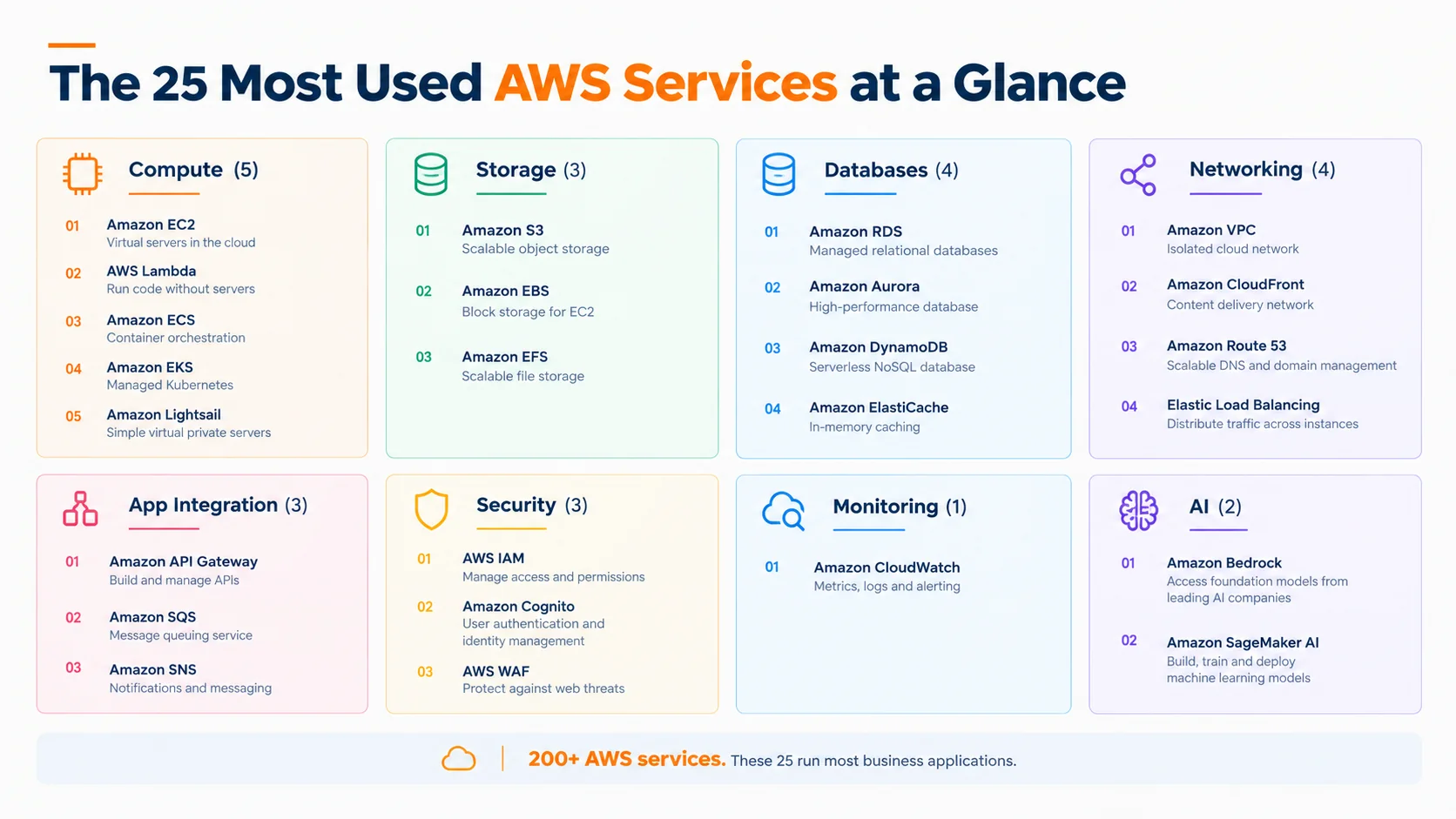
- The core AWS services fall into eight groups: compute, storage, databases, networking, application integration, security, monitoring, and AI.
- Amazon EC2, AWS Lambda, Amazon S3, Amazon RDS, Amazon DynamoDB, Amazon CloudFront, IAM, and Amazon CloudWatch are among the services nearly every AWS setup uses.
- Several services have always-free monthly allowances, such as 1 million Lambda requests and 25 GB of DynamoDB storage.
- The right AWS services list for your business depends on your workload, team skills, and budget, not on how popular a service is.
Quick Answer: AWS offers over 200 fully featured services, but most businesses use Amazon EC2 and AWS Lambda for compute, Amazon S3 for storage, Amazon RDS or DynamoDB for databases, Amazon CloudFront and Route 53 for delivery, IAM for security, and Amazon CloudWatch for monitoring. Most businesses start with 8 to 15 services and add more as they grow.
Anyone who has opened the AWS console for the first time knows the feeling of scrolling through a never-ending menu, with names like EC2, EKS, ECS, EBS, and EFS sitting right next to each other, and wondering which of these the business actually needs and which ones are just going to add to the bill. If you are still getting familiar with what AWS is, understanding how its services fit together is a good place to start. Developers recommend one setup, a blog post recommends another, and decision-makers are left trying to understand what they are even paying for.
So how many AWS services are there, and which ones really matter? Well, AWS is offering over 200 fully featured services, but the good news is that most businesses are running perfectly well on a small, carefully chosen set of them, so let’s break it down group by group.
How Many AWS Services Are There?
AWS describes its platform as offering over 200 fully featured services, covering compute, storage, databases, networking, analytics, machine learning and AI, IoT, security, media and application development. The full catalogue is listed on the official AWS products page, and it keeps changing as new services launch and older ones are renamed or retired.
But the number is not what is deciding your cloud success. Most of those 200+ services are built for very specific needs like satellite data, media streaming, or quantum computing, while a typical web or mobile application is running on a much shorter AWS services list. This is why understanding the core AWS services first is extremely crucial, and if you are still deciding whether AWS is the right platform at all, our AWS vs Azure vs Google Cloud decision guide compares all three in detail.
Compute Services: Where Your Application Runs
Compute is the engine of every AWS setup, as this is where your code is actually running, and AWS is giving you several ways to run it depending on how much control you want, so let’s take a look.
1. Amazon EC2
Amazon EC2 provides virtual servers in the cloud, giving you full control over the operating system, software, and configuration. Businesses are using it for web applications, backend systems, legacy software, and anything that needs a traditional server.
- Cost note: You pay for the time instances run, and Savings Plans, Reserved Instances, and Spot Instances can lower the cost of steady or interruptible workloads.
2. AWS Lambda
AWS Lambda runs your code only when something triggers it, like an API call, a file upload, or a scheduled job, without you managing any servers. It is ideal for APIs, automation, background tasks, and event-driven apps.
- Cost note: Lambda includes an always-free allowance of 1 million requests and 400,000 GB-seconds of compute each month, and beyond that you pay per request and per duration.
3. Amazon ECS
Amazon ECS runs containerised applications, and when paired with AWS Fargate, it removes the need to manage the underlying servers. It is a great fit for teams that are packaging their apps in Docker containers and want a simpler path than Kubernetes.
- Cost note: You are paying for the EC2 or Fargate resources your containers use.
4. Amazon EKS
Amazon EKS is AWS’s managed Kubernetes service, built for teams that are already using Kubernetes or running many microservices at scale.
- Cost note: EKS charges a fee per cluster on top of the compute your workloads use, so it usually makes sense only once you need Kubernetes.
5. Amazon Lightsail
Amazon Lightsail is the simplest way to get started on AWS, bundling a virtual server, storage, and networking into easy plans. It suits small business websites, WordPress blogs, and simple apps.
- Cost note: Lightsail uses predictable, bundled monthly pricing, which is helping small businesses avoid surprise bills.
This is why choosing the right compute service is affecting both your bill and how much your team is spending on server maintenance, and the reasons are not hard to see once you compare managing servers with paying only for what runs.
Storage Services: Where Your Data Lives
Every application is producing files, backups, images, and logs, and AWS is offering different storage services depending on how that data is being accessed.
6. Amazon S3
Amazon S3 is object storage for virtually anything, including images, videos, documents, backups, static websites, and data lakes, and it is one of the most used AWS services across every industry.
- Cost note: You pay for storage, requests, and data transferred out, and moving rarely used data to cheaper storage classes, like the Glacier archive classes, can lower costs significantly.
7. Amazon EBS
Amazon EBS provides block storage volumes attached to EC2 instances, working like the hard drive of your virtual server.
- Cost note: You pay for the storage you provision, even if you are not using all of it, so unattached volumes and old snapshots are a common source of waste.
8. Amazon EFS
Amazon EFS is a shared file system that many servers or containers can access at the same time, useful for content management systems and shared application files.
- Cost note: EFS charges for the storage you are actually using, but it usually costs more per GB than S3, so it is best kept for data that truly needs file-system access.
Database Services: Where Your Business Data Is Managed
Managing a database on your own is time-consuming, which is why AWS is offering managed databases that handle backups, patching, and scaling for you.
9. Amazon RDS
Amazon RDS runs managed relational databases, including MySQL, PostgreSQL, MariaDB, Oracle, and SQL Server, and it is the default choice for most business applications that need structured data.
- Cost note: You pay for instance hours and storage, and Multi-AZ deployments add a standby instance for high availability, which increases the cost.
10. Amazon Aurora
Amazon Aurora is AWS’s own relational database, compatible with MySQL and PostgreSQL, and it is built for higher performance and availability than standard RDS engines, with a serverless option that scales capacity up and down automatically.
- Cost note: Aurora usually costs more than standard RDS at small scale, but its serverless option can save money for unpredictable workloads.
11. Amazon DynamoDB
Amazon DynamoDB is a fully managed NoSQL database built for apps that need fast responses at any scale, like gaming, IoT, shopping carts, and user sessions.
- Cost note: DynamoDB offers on-demand and provisioned capacity modes, and 25 GB of storage is always free each month.
12. Amazon ElastiCache
Amazon ElastiCache is an in-memory cache that speeds up applications by storing frequently used data closer to your app, reducing the load on your main database.
- Cost note: You pay for cache nodes or serverless usage, but a well-placed cache can lower database costs, so the two are worth evaluating together.
Not Sure Which AWS Services Your App Needs?
Share your product idea or current setup, and our AWS-certified team will map out the right services for your workload and budget.
Networking and Content Delivery Services
Networking is deciding how your users are reaching your application and how secure and fast that connection is, and four services are doing most of the work here.
13. Amazon VPC
Amazon VPC creates your own private, isolated network inside AWS, where you control IP ranges, subnets, and traffic rules, and almost every serious AWS setup is starting with a properly designed VPC.
- Cost note: The VPC itself is free, but components like NAT Gateways are charged per hour and per GB processed, and public IPv4 addresses are charged hourly, which often surprises new teams.
14. Amazon CloudFront
Amazon CloudFront is a content delivery network (CDN) that delivers websites, images, videos, and APIs from locations close to your users, making apps load faster around the world.
- Cost note: CloudFront includes an always-free allowance of 1 TB of data transfer out and 10 million requests each month.
15. Amazon Route 53
Amazon Route 53 is AWS’s DNS service, connecting your domain name to your application and routing users to healthy resources.
- Cost note: You pay a small monthly fee per hosted zone plus per-query charges, with domain registration billed separately.
16. Elastic Load Balancing
Elastic Load Balancing spreads incoming traffic across multiple servers or containers, keeping your app available even when one of them fails.
- Cost note: Load balancers are charged per hour plus usage, so running one for a low-traffic test environment is often an unnecessary expense.
Application Integration Services
As applications are growing, different parts of the system need to talk to each other reliably, and these services are making that possible without building everything from scratch.
17. Amazon API Gateway
Amazon API Gateway creates, publishes, and secures APIs, and it is commonly paired with Lambda to build serverless backends for web and mobile apps.
- Cost note: API Gateway charges per API call and data transfer, and usage is covered by Free Tier credits for new accounts.
18. Amazon SQS
Amazon SQS is a message queue that lets different parts of your application pass tasks to each other, so a spike in orders or uploads does not crash the system.
- Cost note: SQS charges per request, with an always-free monthly allowance that covers many small workloads.
19. Amazon SNS
Amazon SNS sends notifications and messages, from push notifications and SMS to alerts between services.
- Cost note: SNS is billed per message and delivery type, and SMS messages are priced by destination country, so they can add up quickly.
Security and Identity Services
Security on AWS follows a shared responsibility model, where AWS protects the infrastructure, but your team is responsible for access, configuration, and data, and these three services are the foundation of that.
20. AWS IAM
AWS Identity and Access Management (IAM) controls who can access which AWS resources and what they can do, and setting it up correctly from day one is one of the most important security steps a business can take.
- Cost note: IAM is available at no additional charge.
21. Amazon Cognito
Amazon Cognito adds sign-up, sign-in, and user management to your web and mobile apps, including social logins and multi-factor authentication.
- Cost note: Cognito is priced by monthly active users, with a free allowance on its entry tier.
22. AWS WAF
AWS WAF is a web application firewall that protects your apps from common attacks like SQL injection, cross-site scripting, and bad bots.
- Cost note: WAF charges per web ACL, per rule, and per million requests inspected.
For businesses in regulated industries, getting these three right is not optional, and our cloud security services are helping teams build secure foundations from the start.
Monitoring and Management
23. Amazon CloudWatch
Amazon CloudWatch collects logs, metrics, and alarms from your AWS resources, helping your team spot problems before customers do and understand how the app is performing in real time.
- Cost note: Basic metrics are free, but log ingestion, storage, and custom metrics are charged, and verbose logging is a common hidden cost.
AI and Machine Learning Services
AI is now shaping a lot of cloud decisions, and AWS is offering two main services depending on whether you want to use existing models or build your own.
24. Amazon Bedrock
Amazon Bedrock gives you access to foundation models from companies like Anthropic, Meta, Mistral AI, OpenAI, and Amazon’s own Nova family through a single API, helping businesses add chatbots, AI agents, content generation, and document processing without managing AI infrastructure.
- Cost note: Bedrock is generally priced per token processed, and prices vary by model, so testing a few models on your real use case helps control costs. If you are building AI agents that connect to your business tools, our guide on Model Context Protocol (MCP) explains how that layer works.
25. Amazon SageMaker AI
Amazon SageMaker AI is for building, training, and deploying your own machine learning models, used by data science teams working on predictions, recommendations, and custom AI.
- Cost note: You pay for the instances used for training and hosting, and endpoints left running when idle keep billing, so shutting them down is extremely crucial.
And that is not all, as services like Amazon Athena and Amazon Redshift for analytics, AWS CloudTrail for audit logs, and AWS Amplify for frontend hosting are also worth knowing once your needs are growing. For deciding where your AI should actually run, our guide on on-device AI vs cloud AI explains the trade-offs.
AWS Services List by Category: Quick Summary
Here is the complete list of AWS services covered above in one place, along with their most common business use.
| # | AWS Service | Category | Best Business Use |
| 1 | Amazon EC2 | Compute | Full-control servers and legacy apps |
| 2 | AWS Lambda | Compute | APIs, automation, event-driven tasks |
| 3 | Amazon ECS | Compute | Containerised apps |
| 4 | Amazon EKS | Compute | Kubernetes at scale |
| 5 | Amazon Lightsail | Compute | Simple websites and small apps |
| 6 | Amazon S3 | Storage | Files, backups, static sites |
| 7 | Amazon EBS | Storage | Server disk storage |
| 8 | Amazon EFS | Storage | Shared file systems |
| 9 | Amazon RDS | Database | Relational business data |
| 10 | Amazon Aurora | Database | High-performance relational data |
| 11 | Amazon DynamoDB | Database | Fast NoSQL at any scale |
| 12 | Amazon ElastiCache | Database | Caching and speed |
| 13 | Amazon VPC | Networking | Private, secure network |
| 14 | Amazon CloudFront | Networking | Fast global content delivery |
| 15 | Amazon Route 53 | Networking | DNS and domain routing |
| 16 | Elastic Load Balancing | Networking | Traffic distribution |
| 17 | Amazon API Gateway | Integration | Building and securing APIs |
| 18 | Amazon SQS | Integration | Message queues |
| 19 | Amazon SNS | Integration | Notifications and alerts |
| 20 | AWS IAM | Security | Access control |
| 21 | Amazon Cognito | Security | User sign-up and login |
| 22 | AWS WAF | Security | Web attack protection |
| 23 | Amazon CloudWatch | Monitoring | Logs, metrics, and alarms |
| 24 | Amazon Bedrock | AI | Generative AI with ready models |
| 25 | Amazon SageMaker AI | AI | Custom machine learning |
Which AWS Services Does Your Business Actually Need?
This is the part most AWS services explained articles are skipping, but it is the most important one, because the right set of services depends on what you are building and at what stage, so let’s take a look at the most common scenarios.
- Small Business Website or Blog: Amazon Lightsail, or Amazon S3 with CloudFront for static sites, along with Route 53 for your domain. This keeps costs predictable and management simple.
- Startup MVP: AWS Lambda, API Gateway, DynamoDB, and Cognito for a serverless backend, or Amazon ECS with RDS if your team prefers containers, plus CloudWatch from day one. This lets you launch quickly and pay mostly for actual usage, which is why our MVP development services often start with a serverless setup.
- Growing SaaS or Mobile App: Amazon ECS or EKS, Aurora, ElastiCache, Elastic Load Balancing, CloudFront, SQS, and WAF, all inside a well-designed VPC. This supports more users without slowing down.
- AI-Powered Product: Amazon Bedrock for generative AI features, S3 for your data, Lambda for orchestration, and SageMaker AI only if you need custom models. Our generative AI development services are helping businesses pick the right path here.
- Business Moving From On-Premises: EC2, RDS, EBS, VPC, and IAM are usually the first services in a migration, before modernising to containers or serverless later, and our cloud migration services cover this journey end to end.
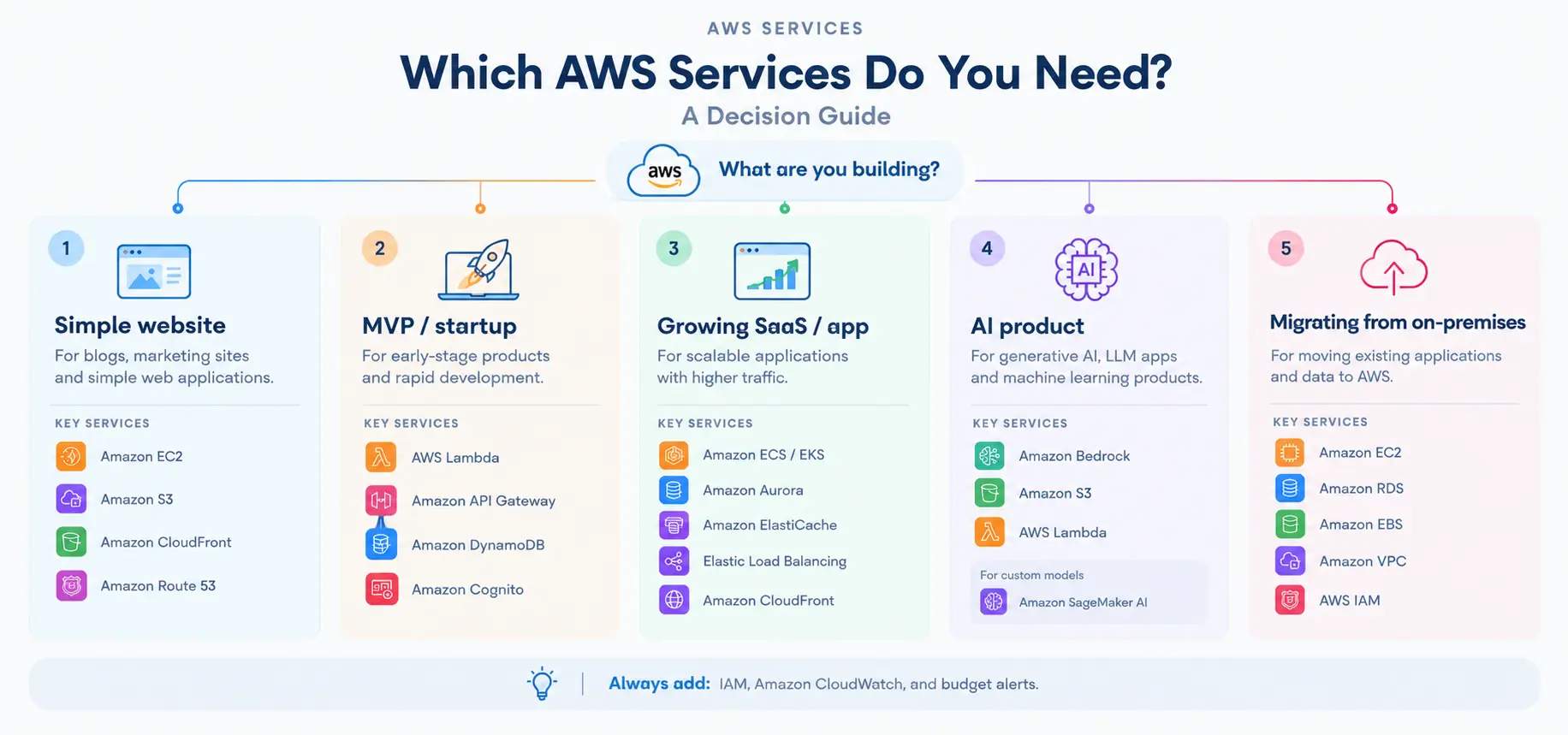
The common thread across each and every scenario is that IAM, CloudWatch, and cost monitoring are needed from the start, no matter how small the setup is.
AWS Cost Notes: What Is Really Driving Your Bill
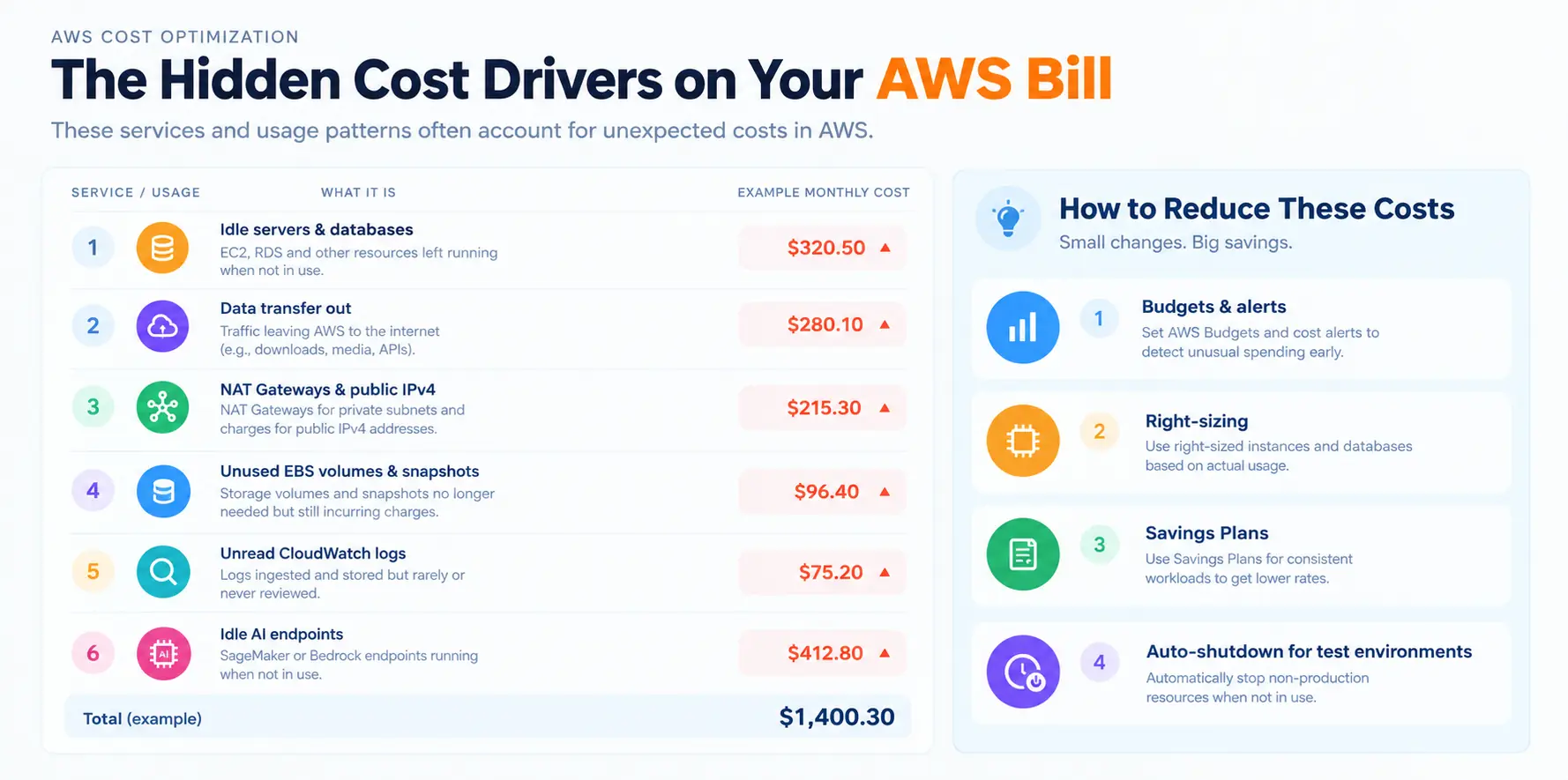
AWS follows a pay-as-you-go model, which means you are paying for what you use, but a lot of businesses are discovering that the bill is coming from places they did not expect, resulting in costs from:
- Servers and databases running 24/7 even when nobody is using them.
- Data transfer out to the internet and between regions.
- NAT Gateways, load balancers, and public IPv4 addresses in test environments.
- Unattached EBS volumes and old snapshots.
- CloudWatch logs that nobody is reading.
- Idle SageMaker endpoints and oversized instances.
This is why using AWS Budgets and Cost Explorer from day one, right-sizing resources, and committing to Savings Plans for steady workloads is making a real difference. New AWS customers are also getting up to $200 in Free Tier credits, while startups can apply for AWS Activate credits, and our guide on AWS Activate credits for startups explains how to get them.
Is Your AWS Bill Higher Than It Should Be?
Our AWS experts are reviewing your current setup and finding the services, sizes, and settings that are quietly increasing your costs.
How to Choose and Manage AWS Services the Right Way
Choosing services is only the first step, as how you set them up and run them is deciding your performance, security, and costs over time. A few habits are helping businesses get it right, resulting in:
- Starting with managed and serverless services wherever possible to reduce maintenance.
- Designing the VPC and IAM setup properly before launching anything.
- Automating deployments with infrastructure as code and CI/CD pipelines.
- Tagging every resource by project and environment to track costs.
- Reviewing architecture and costs every quarter as usage changes.
This is where having an experienced partner is saving a lot of time and money, especially for teams without in-house cloud experts. Our AWS consulting services and DevOps solutions are helping businesses plan, build, and run on AWS, and if you are comparing options, our guide on how to choose an AWS consulting partner covers what to look for.
Final Thoughts
AWS is offering over 200 services, but the businesses getting the most value out of it are not the ones using the most services; they are the ones using the right ones. For most companies, a well-chosen set of compute, storage, database, networking, security, and monitoring services covers everything needed to launch and scale, with AI services like Bedrock being added as the product grows.
The smartest approach is starting with your workload, your team’s skills, and your budget, picking the core AWS services that fit them, and then keeping a close eye on costs from beginning until completion. And if you need a helping hand along the way, our AWS team is always here to guide you.
Ready to Build or Scale on AWS?
From picking the right services to running them cost-effectively, our AWS-certified team is helping businesses build cloud setups that grow with them.
 0 comments










Your email address will not be published. Required fields are marked *