















 0 comments





What Changed in 2026
The market shifted meaningfully in the last twelve months. Here are the verified data points that shape the guidance below:
- Cursor IDE reached 1 million paid users in Q1 2026 (Cursor product update).
- Claude Sonnet 5 and Claude Opus 4.8 launched to production APIs in 2026 (Anthropic model updates).
- iOS app development timelines reduced by 28 percent on average with AI-pair coding tools in 2026 (DianApps engineering benchmarks).
- 87 percent of iOS engineers now use at least one AI coding assistant daily in 2026 (JetBrains Developer Ecosystem 2026).
- DianApps iOS builds use Cursor and Claude Code by default for all client projects in 2026 (DianApps engineering standard).
Related Reading From Our 2026 Guides
For deeper context on adjacent topics, see these companion guides:
What is the Cursor and Claude code? How to create an iOS app with Claude AI? Can you build an iOS app in just one day? Let’s break down all your questions and make an iOS app with the Cursor and Claude development process through this guide.
As of 2025, the Apple App Store hosts over 2.5 million apps, with developers continuously seeking ways to optimize their workflows and boost efficiency. With iOS development strategies evolving rapidly, the demand for faster, smarter coding solutions has never been higher.
That’s where AI-powered coding assistants like Cursor and Claude Code step in. They transform the development process by helping developers write, debug, and refine code more efficiently, allowing them to focus on creativity rather than syntax errors.
But how effective are these tools, and can they genuinely improve the development experience?
Recent studies indicate that developers using AI-assisted coding tools experience up to 50% faster development cycles, with productivity enhancements that significantly reduce debugging time and improve overall code quality. Sounds promising, right?
In this tutorial, we’ll explore how Cursor and Claude Code can simplify the process of building iOS applications, making development smarter, faster, and more intuitive. Whether you’re a beginner or an experienced coder, these tools provide practical solutions to enhance your workflow.
Fascinating Facts About Cursor & Claude Code for Developers
Cursor: The AI-Powered Coding Assistant
- Boosts Productivity – Studies suggest that AI-assisted coding tools like Cursor can enhance developer efficiency by up to 50%, cutting down on repetitive coding tasks.
- Smart Autocomplete – Cursor predicts and completes lines of code intelligently, reducing syntax errors and debugging efforts.
- Debugging Simplified – It provides real-time suggestions, helping developers spot errors faster, minimizing frustrating troubleshooting time.
- Supports Multiple Languages – While commonly used for Python and JavaScript, Cursor adapts to different coding environments, improving versatility.
Claude Code: AI for Intelligent Code Generation
- Natural Language Programming – Claude Code understands developer prompts in plain English, making coding more intuitive and user-friendly.
- Efficient Code Refactoring – Developers can optimize existing code with AI-powered refinements, ensuring cleaner, more maintainable software.
- Reduces Development Time – With its ability to generate entire functions, Claude Code speeds up app development, letting programmers focus on creativity.
- Enhances Learning – It aids beginner programmers by providing explanations, helping them grasp programming concepts faster.
These AI-driven tools are transforming how an iOS app development company builds software, making coding faster, smarter, and less error-prone. Feedback from Claude AI users further reinforces this, showing how AI-assisted coding improves efficiency, accuracy, and overall development experience. In case you also want to know about the latest WWDC announced iOS 26 version as a developer or as an iPhone user, here’s all about the update!
Prerequisites for Building iOS Apps with Cursor & Claude Code
To set up a smooth AI-assisted development environment, you’ll need the following:
1. Essential Tools & Software
- Xcode – Apple’s official IDE for iOS development. Download it from the Mac App Store.
- Swift – The primary programming language for iOS applications.
- Cursor – An AI-powered coding assistant that helps with autocomplete, debugging, and real-time code suggestions.
- Claude Code – AI for intelligent function generation, code refinement, and natural language programming assistance.
2. System Requirements
Ensure your Mac meets the following specs:
- macOS 13 Ventura or later – Latest OS ensures compatibility.
- 16GB RAM or more – Helps in smooth operation while using Xcode & AI tools.
- SSD Storage – Faster processing for AI-powered coding tasks.
3. Installing Cursor & Claude Code
- Cursor Setup:
- Visit Cursor’s official site and download the latest version.
- Install the extension in Xcode or your preferred code editor.
- Configure autocomplete and debugging settings for enhanced efficiency.
- Claude Code Setup:
- Sign up for Claude Code and integrate it within your development workflow.
- Use AI prompts to generate functions, optimize code logic, and enhance readability.
- Ensure compatibility with Swift and Xcode for a smooth experience.
4. Best Practices for AI-Assisted Coding
- Use AI for efficiency, but always review suggestions manually.
- Test AI-generated code before implementing it in production.
- Combine AI tools with best coding practices for better performance.
With these prerequisites covered, you’re all set to start building iOS apps efficiently using Cursor and Claude Code!
Step-by-Step Guide: Building an iOS App with AI Assistance
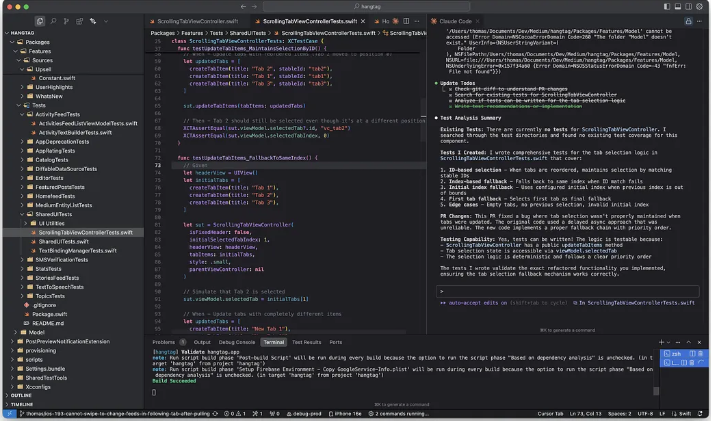
Cusor + Claude Code, our ideal workflow for now!
Step 1: Create a New iOS Project in Xcode
- Open Xcode and select Create a new Xcode project.
- Choose App under the iOS tab and select SwiftUI as the interface.
- Name your project (e.g., “AI-Assisted To-Do App”) and set the language to Swift.
Step 2: Set Up Cursor & Claude Code Integration
For Cursor:
- Install the Cursor plugin in Xcode or an external code editor.
- Enable smart autocomplete and debugging assistance in the settings.
- Test it by typing basic Swift code and observing AI suggestions.
For Claude Code:
- Connect Claude Code to your development environment via an API or plugin.
- Use prompts like “Generate a function to add items to a list in Swift” to test AI-generated code.
- Review and refine Claude’s suggestions before implementing them.
Step 3: Build the App UI with SwiftUI
- Open ContentView.swift and define the layout using SwiftUI.
- Use Cursor’s autocomplete to structure a basic list view:
|
1 |
- Run the app to ensure basic UI functionality is working.
Step 4: Implement Task Management Features with Claude Code
- Prompt Claude Code to generate functions for adding and deleting tasks.
- Here’s an example AI-generated function for adding a task:
|
1 |
- Integrate this function within the UI, ensuring user interaction works smoothly.
Step 5: Optimize & Debug Using AI Suggestions
- Use Cursor to detect and fix any errors in logic or syntax.
- Ask Claude Code for performance optimization tips, like refactoring long functions for efficiency.
- Test the app across different iOS devices using the Xcode Simulator.
Step 6: Final Testing & Deployment
- Run the app on a physical device or simulator to check responsiveness.
- Fix any UI glitches or logic errors flagged by AI tools.
- Prepare the app for submission to the App Store following Apple’s guidelines.
Best Practices for AI-Assisted iOS Development
To get the most out of Cursor and Claude Code, keep these best practices in mind:
1. Use AI for Efficiency, Not Dependency
AI tools can speed up development, but they shouldn’t replace core programming skills. Make sure to understand the logic behind AI-generated code rather than simply copy-pasting solutions.
2. Always Review AI-Suggested Code
While Cursor and Claude Code provide accurate recommendations, occasionally, they may produce redundant or inefficient logic. Developers should double-check AI-generated functions to ensure they meet best coding standards.
3. Maintain Code Readability & Documentation
AI-generated code is useful, but it’s critical to write clear documentation and comments for future reference. Consistently refactor AI-generated snippets to align with best practices and maintain readability.
4. Balance AI with Manual Debugging
AI debugging is effective, but it shouldn’t replace human review. Perform manual testing and debugging alongside AI-assisted recommendations to catch edge cases and complex errors.
5. Keep Up with AI Model Updates
Cursor and Claude Code evolve with regular updates. Stay informed about new features and improvements, as they can further enhance development efficiency.
Conclusion
Leveraging Cursor and Claude Code for iOS development introduces a smarter, faster approach to coding. With AI-powered assistance, a mobile app development company can automate tedious tasks, improve code quality, and boost productivity while maintaining manual oversight for precision and efficiency.
By combining AI-assisted development with core programming principles, developers can build high-quality iOS apps while focusing more on creativity and user experience rather than repetitive coding challenges.
Ready to explore AI-enhanced coding? Try Cursor and Claude Code and transform your iOS development workflow!
 0 comments










Your email address will not be published. Required fields are marked *