












 0 comments





Key Takeaways:
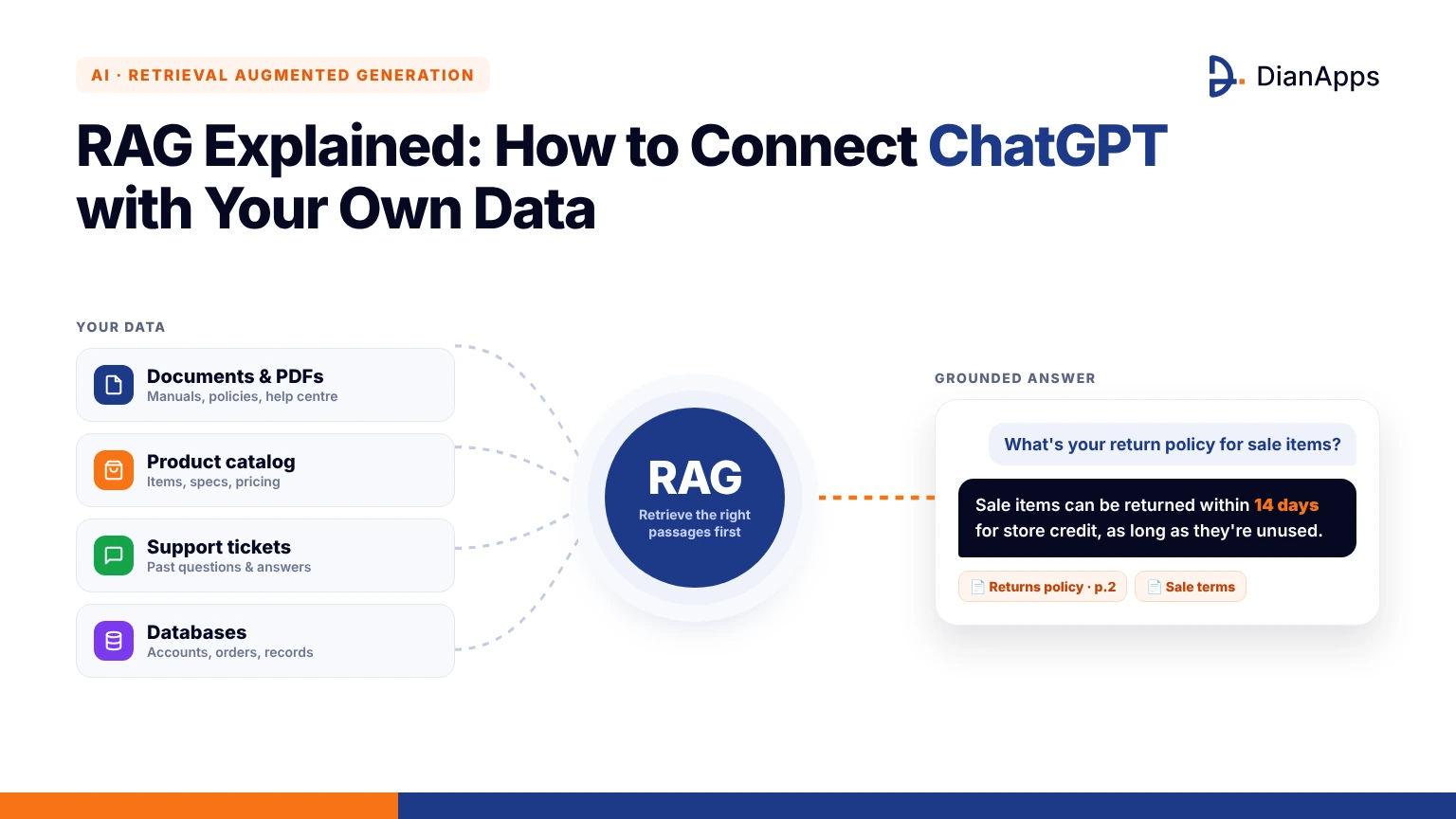
- RAG connects ChatGPT to your own documents and databases by retrieving relevant information before generating an answer.
- A RAG pipeline involves data ingestion, chunking, embeddings, vector storage, retrieval, reranking and response generation.
- Cloud retrieval suits shared and frequently updated data, while on-device retrieval supports smaller datasets and offline access.
- Metadata filters, user permissions and source citations help protect private data and improve answer reliability.
- Start with one data source, a hosted vector store, streaming responses and user feedback before scaling the RAG system.
Quick Answer: Retrieval Augmented Generation (RAG) connects ChatGPT to your own data by searching relevant documents or database records and providing that information to the model before it generates a response. To implement it in a mobile app, prepare and chunk your data, convert it into embeddings, store those vectors in a vector database, and retrieve relevant passages whenever a user asks a question. The backend then sends the retrieved context to ChatGPT and streams the grounded answer back to the app, with permissions and source citations handled along the way.
About half the briefs that reach our mobile app development services team now contain some version of “we want ChatGPT inside the app, but it should know our stuff.” What they’re describing is RAG (Retrieval Augmented Generation), and the question underneath it, what is RAG in AI and why does every app suddenly want it, deserves a longer answer than most explainers bother with. RAG is the technique that lets a language model answer from your documents, your catalog or your support history rather than from whatever it absorbed during training. This guide is written from a mobile builder’s seat, because using ChatGPT with your own data inside an iOS or Android app raises problems a web demo never meets, like battery, latency and what happens on a train with no signal. You’ll get the theory, the pipeline, the code, the tools, the mistakes and the parts nobody tells you until you’ve shipped one.
The Problem RAG Exists to Solve
Understanding why a model fails to know your internal data is essential before selecting a retrieval mechanism. Below are the key core challenges faced when using LLMs directly with private or dynamic content.
Why ChatGPT Doesn’t Know Your Data
A language model is a compressed snapshot of public text up to a cutoff date, and your internal knowledge base was never in that snapshot. Ask it about your return policy and it produces something plausible and probably wrong, which is worse than a blank screen because users believe it. That gap is what ChatGPT private data integration closes, and it’s the reason an AI chatbot with custom data behaves so differently from the generic assistant people have poked at on their phones. The model isn’t learning your data, it’s being shown the right page at the right moment, every single time it answers. For mobile products this matters twice over, since users expect an in app assistant to know the app, the account and the order currently on screen, not the general internet. Whether that assistant should answer questions or take actions is a separate call, and mobile AI agent vs AI chatbot is where we draw that line.
Where This Bites Mobile Apps Specifically
The problem shows up differently in an app than in a browser tab, and the scenarios below are ones we’ve been handed as briefs rather than hypotheticals. Each one looks like a chatbot request and is actually a retrieval request.
- Banking and fintech apps: Users ask about their own transactions, fees and limits, and a generic model knows none of it.
- Field service apps: Technicians need the manual for the exact unit in front of them, often with no connectivity in a basement.
- Retail and marketplace apps: Shoppers ask whether a product fits their situation, which depends on your catalog data and policies.
- Health and wellness apps: Members ask about their plan, their history and what’s covered, all of it private and regulated.
- Internal employee apps: Staff ask about policies, procedures and who to call, scattered across wikis and PDFs nobody has indexed.
In every case the model is fine and the data access is the missing piece, which is the whole point of what is RAG in AI as a question.
Why Fine Tuning Isn’t the Fix
The first idea most teams have is to fine tune the model on their documents, and it’s a reasonable instinct that almost always turns out wrong. Fine tuning changes how a model writes and reasons, not what facts it reliably knows.
- Facts don’t stick: Models fine tuned on documents still hallucinate specifics, because training adjusts style far more than it stores retrievable facts.
- Data goes stale: Every policy change means another training run, and your app ships updates faster than that cycle allows.
- Cost and expertise: Preparing datasets, running jobs and evaluating results needs machine learning skills most app teams don’t carry.
- No access control: A fine tuned model can’t forget what it learned for one user when a different user asks.
- No citations: You can’t show a source for an answer that came from weights rather than a document.
Retrieval Augmented Generation sidesteps all of this by leaving the model alone and fixing the data access instead, which is cheaper and, in our experience, far easier to debug.
What Is RAG in AI?
Before diving into technical steps, it helps to establish a clear foundation of what RAG actually means in architectural terms. The breakdown below details the fundamental concepts and working parts.
The Definition and the Two Halves
Retrieval Augmented Generation is a pattern rather than a product, and keeping that straight clears up most confusion. When someone asks what is RAG in AI, the one breath answer is that you fetch relevant pieces of your own data first and then let the model write using those pieces. The first half is the retriever, which searches an index of your content and returns the handful of passages most relevant to the question, using meaning rather than exact keywords. The second half is the generator, which is the language model, given the question plus those passages and told to answer from them. Neither half is novel on its own, since search engines have done retrieval for decades and models have done generation for years. The useful part is wiring them together so the model never answers from memory when your data has the answer, and that wiring is what the rest of this guide is about.
A Plain Analogy That Holds Up
If you’ve ever handed a colleague a document and asked them to answer from it rather than from memory, you already understand how does RAG work at the human level. Without the document, your colleague answers from what they remember, which was accurate when they learned it and may be wrong now. With the document, they read the relevant page first, then answer, and they can point at the paragraph they used. RAG is that second behavior, automated, for every question, with the “reading the relevant page” step done by vector search over your content. The analogy also explains the common failures, since a colleague handed the wrong page gives a confident wrong answer, and a colleague handed twenty pages skims and misses the detail. Most of RAG development is making sure the right page gets handed over.
How Does RAG Work, Step by Step
The end-to-end execution of a RAG pipeline relies on sequential data processing and runtime retrieval steps. The sections below outline each phase from raw document ingestion through final answer delivery.
Steps One and Two: Prepare and Chunk the Data
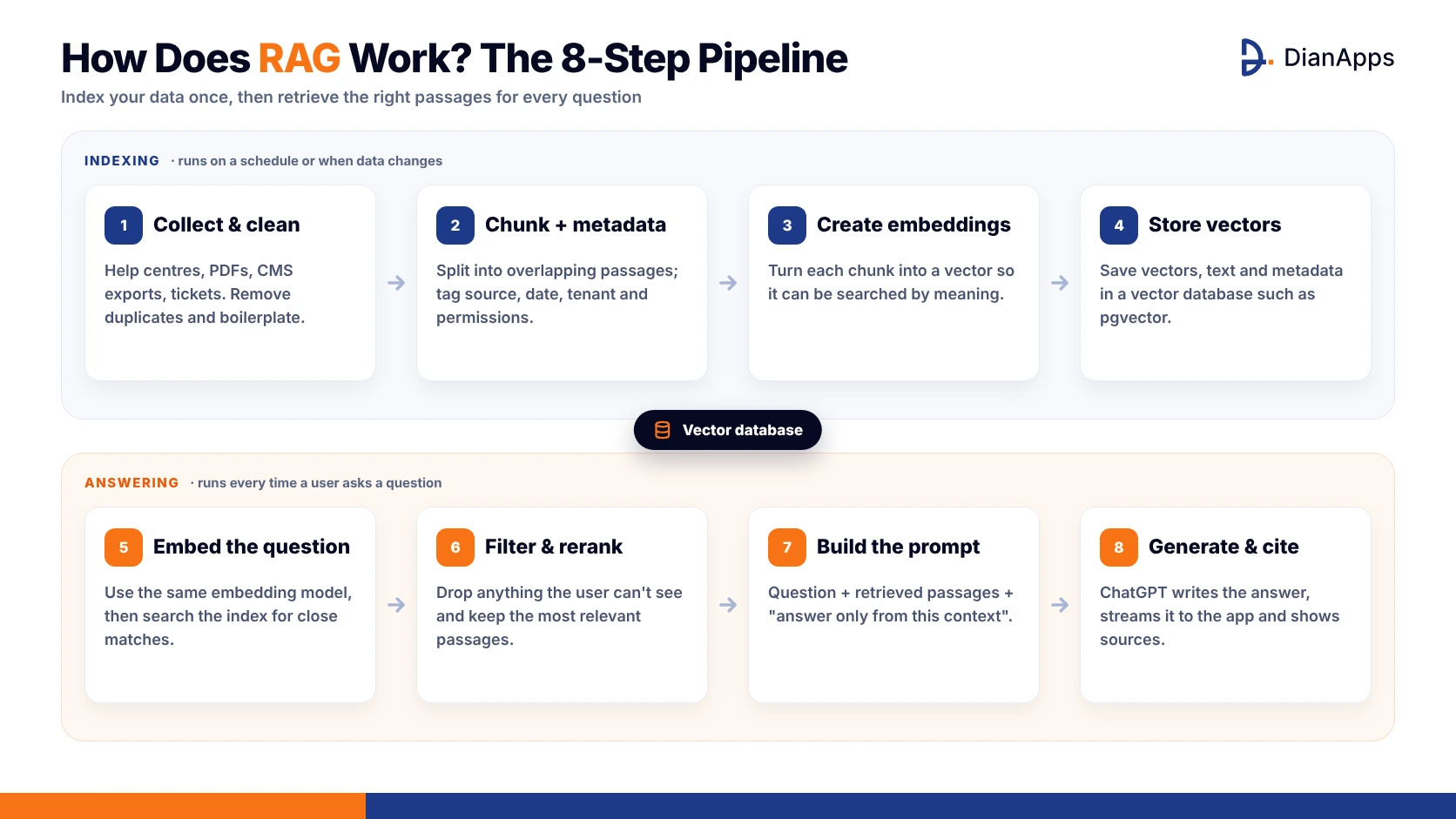
How does RAG work in practice is best answered by following data from your source system to the user’s screen, and the RAG pipeline starts with ingestion. Gather the documents, tickets, product records or app content that should be answerable, clean them, and split them into chunks.
- Collect from source systems: Help centers, CMS exports, PDFs, database tables and ticket histories, pulled on a schedule or via webhooks.
- Clean before chunking: Deduplicate, fix OCR errors in scanned PDFs, strip navigation boilerplate and normalize headings.
- Chunk with overlap: Passages of a few hundred tokens with a little overlap, so a fact split across a boundary survives.
- Attach metadata: Source, section heading, date, tenant or region, and permissions, carried with every chunk from this point onward.
The chunking step is where most retrieval quality is won or lost, and the code below is the shape we start from before tuning on real content.
python
|
1 2 3 4 5 6 7 8 9 10 11 12 13 14 15 16 17 18 19 20 21 |
from langchain_text_splitters import RecursiveCharacterTextSplitter splitter = RecursiveCharacterTextSplitter( chunk_size=400, chunk_overlap=60, separators=["\n\n", "\n", ". ", " "] ) chunks = [] for doc in documents: for i, text in enumerate(splitter.split_text(doc["text"])): chunks.append({ "id": f"{doc['id']}_{i}", "text": text, "metadata": { "source": doc["source"], "section": doc["section"], "tenant": doc["tenant"], "updated": doc["updated"] } }) |
Steps Three and Four: Embed and Store
Embeddings are the step that turns text into something searchable by meaning, and they’re less mysterious than they sound. An embedding model reads a chunk and outputs a list of numbers, typically a thousand or more, positioned so that chunks about similar things end up numerically close together. You run every chunk through the same model once, store the resulting vectors next to the original text and metadata in a vector database, and that database becomes your index. The choice of database matters less early than people assume, since pgvector inside the Postgres you already run is enough for most apps until the index reaches millions of chunks. What matters more is using exactly the same embedding model for queries later, because vectors from two different models aren’t comparable and the symptom is retrieval that looks random.
python
|
1 2 3 4 5 6 7 8 9 10 11 12 13 14 15 16 |
from openai import OpenAI client = OpenAI() EMBED_MODEL = "text-embedding-3-small" def embed(texts): resp = client.embeddings.create(model=EMBED_MODEL, input=texts) return [d.embedding for d in resp.data] vectors = embed([c["text"] for c in chunks]) for chunk, vec in zip(chunks, vectors): db.execute( "INSERT INTO chunks (id, text, metadata, embedding) VALUES (%s, %s, %s, %s)", (chunk["id"], chunk["text"], chunk["metadata"], vec) ) |
Steps Five to Eight: Retrieve, Augment, Generate, Deliver
The query side runs every time a user asks something, and it needs to be fast, filtered and honest about what it found. These four steps are the live half of the RAG pipeline.
- Embed the question: Same model as the chunks, then search the index for the closest vectors, usually five to ten.
- Filter and rerank: Drop anything the user can’t see, reorder by relevance with a reranker, and trim to what fits the prompt.
- Build the prompt: Question plus retrieved passages plus instructions to answer only from them and to say so when they don’t help.
- Generate and cite: Call the model, stream the answer to the app and return which chunks were used so the UI can show sources.
The prompt wording in the last step is doing more work than it looks, and “if the answer isn’t in the context, say you don’t know” is the single most valuable line in the system.
python
|
1 2 3 4 5 6 7 8 9 10 11 12 13 14 15 16 17 18 19 20 21 22 23 24 25 26 27 28 29 30 31 32 33 34 35 36 37 38 39 40 41 42 43 |
def answer(question, user): qvec = embed([question])[0] rows = db.execute(""" SELECT text, metadata FROM chunks WHERE metadata->>'tenant' = %s ORDER BY embedding <=> %s LIMIT 8 """, (user.tenant, qvec)).fetchall() context = "\n\n".join(f"[{i}] {r.text}" for i, r in enumerate(rows)) system = ("Answer using only the numbered context. Cite passages as [n]. " "If the context does not contain the answer, say you do not know.") stream = client.responses.create( model="gpt-4.1", instructions=system, input=f"Context:\n{context}\n\nQuestion: {question}", stream=True ) for event in stream: if event.type == "response.output_text.delta": yield event.delta |
RAG Architecture for a Mobile App
Designing a RAG architecture requires balancing component placement across server infrastructure and mobile client platforms. The following sections outline optimal layout choices, on-device comparisons, and available tooling.
Where Each Piece Should Live
A mobile product diverges from a web dashboard here, and anyone still wondering what is RAG in AI from a practical angle should read this part slowly. A sensible RAG architecture for an app keeps the heavy pieces, meaning the vector store, the embedding service and the model calls, on a backend you control, and keeps the app thin. The phone sends a question and a little context about where the user is in the app, the backend retrieves and generates, and the app streams the answer back token by token so it feels alive rather than stuck.
LLM data integration happens server side because that’s where your data already sits and where access control can actually be enforced per user. We’ve watched teams embed documents on the device to skip a round trip, and it works for small personal datasets and then quietly collapses for anything shared or frequently updated. If you’re earlier than that and still deciding how the app itself gets built, how to build a mobile app covers the foundation this sits on.
On Device Retrieval vs Cloud Retrieval
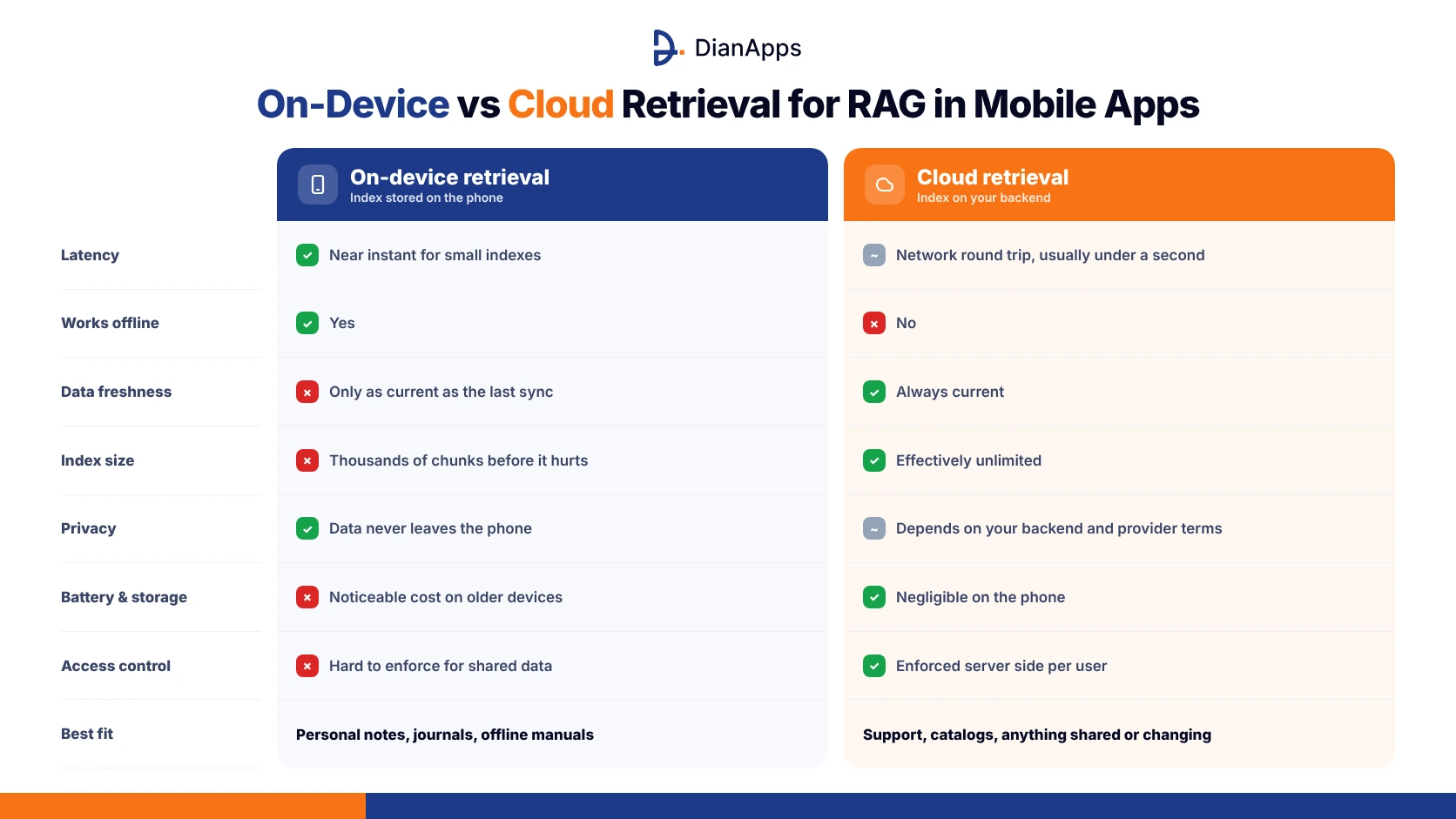
The one decision that’s genuinely mobile only is where retrieval runs, and this table is the comparison we walk clients through before they commit. Neither column wins outright, and plenty of apps use both for different kinds of data.
| Factor | On device retrieval | Cloud retrieval |
| Latency | Near instant for small indexes | Network round trip, typically under a second |
| Works offline | Yes | No |
| Data freshness | Only as current as the last sync | Always current |
| Index size | Thousands of chunks before it hurts | Effectively unlimited |
| Privacy | Data never leaves the phone | Depends on your backend and provider terms |
| Battery and storage | Noticeable cost on older devices | Negligible on the phone |
| Access control | Hard to enforce for shared data | Enforced server side per user |
| Best fit | Personal notes, journals, offline manuals | Support, catalogs, anything shared or changing |
For the generation step, running a model locally is its own project, and how to deploy on device AI models in iOS apps explains what’s realistic on current hardware before you promise it to anyone.
Tools and Frameworks Worth Knowing
The tooling has settled enough that a short table is more useful than a long tour, and the opinions in the right column are ours from using each in production. Treat them as starting points rather than verdicts.
| Tool | What it is | Where it fits | Our take |
| OpenAI file search | Hosted vector store inside the Responses API | Fastest prototype, small to mid indexes | Ship with it, outgrow it when you need filters |
| pgvector | Vector extension for Postgres | Anything already on Postgres | Default for most apps, boring in the best way |
| Pinecone | Managed vector database | Large indexes, no ops team | Easy and reliable, watch the bill at scale |
| Chroma | Lightweight local vector store | Learning and local prototypes | Great first week, not a production home |
| Weaviate | Open source vector plus hybrid search | Hybrid keyword and semantic needs | Powerful, more to operate |
| Milvus | Open source, distributed | Tens of millions of vectors | Serious scale, serious setup |
| LangChain | Orchestration framework | Rapid assembly, many integrations | Useful early, thin it out as you harden |
| LlamaIndex | Indexing focused framework | Document heavy ingestion | Cleaner for ingestion than LangChain |
| Cohere Rerank | Hosted reranking model | Improving the top results | Cheap quality boost, add it second |
A Short Tool Selection Guide
Picking tools is easier when you decide by stage rather than by feature list, and the stages below are how we scope RAG application development with clients. Moving between stages is normal and expected.
- Prototype week: OpenAI file search or Chroma, a single data source, a notebook, and no infrastructure at all.
- First real users: pgvector in your existing database, a reranker, metadata filters and streaming to the app.
- Scaling up: Pinecone or Milvus when the index outgrows Postgres, with a gateway so the model is swappable.
- Regulated data: Self hosted vector store, embeddings you control, and a provider contract your legal team has read.
Most apps never need the third stage, and knowing that early stops a lot of premature infrastructure.
Want your app to answer from your own data?
We’ll design the retrieval layer around your product and users.
Build a RAG Chatbot, Hands On
Building a practical prototype helps clarify how components interact in a live application environment. The step-by-step guidance below covers implementation across the backend service and the client application.
The Backend in Under Sixty Lines
To build a RAG chatbot you can actually run, the backend below ingests a folder of markdown help articles, indexes them in pgvector and exposes one streaming endpoint. It’s deliberately plain so the moving parts are visible.
python
|
1 2 3 4 5 6 7 8 9 10 11 12 13 14 15 16 17 18 19 20 21 22 23 24 25 26 27 28 29 30 31 32 33 34 35 36 37 38 39 40 41 42 43 44 45 46 |
import glob, os from fastapi import FastAPI from fastapi.responses import StreamingResponse from openai import OpenAI from langchain_text_splitters import RecursiveCharacterTextSplitter import psycopg client = OpenAI() db = psycopg.connect(os.environ["DATABASE_URL"]) app = FastAPI() splitter = RecursiveCharacterTextSplitter(chunk_size=400, chunk_overlap=60) def embed(texts): r = client.embeddings.create(model="text-embedding-3-small", input=texts) return [d.embedding for d in r.data] def ingest(folder): for path in glob.glob(f"{folder}/*.md"): text = open(path).read() pieces = splitter.split_text(text) vecs = embed(pieces) for i, (p, v) in enumerate(zip(pieces, vecs)): db.execute( "INSERT INTO chunks (id, text, source, embedding) VALUES (%s,%s,%s,%s) " "ON CONFLICT (id) DO UPDATE SET text=EXCLUDED.text, embedding=EXCLUDED.embedding", (f"{path}_{i}", p, os.path.basename(path), v)) db.commit() @app.get("/ask") def ask(q: str): qv = embed([q])[0] rows = db.execute( "SELECT text, source FROM chunks ORDER BY embedding <=> %s::vector LIMIT 6", (qv,)).fetchall() ctx = "\n\n".join(f"[{i}] ({r[1]}) {r[0]}" for i, r in enumerate(rows)) def gen(): s = client.responses.create( model="gpt-4.1-mini", instructions="Answer only from the context. Cite [n]. Say 'I don't know' if unsure.", input=f"Context:\n{ctx}\n\nQuestion: {q}", stream=True) for e in s: if e.type == "response.output_text.delta": yield e.delta return StreamingResponse(gen(), media_type="text/plain") |
The Mobile Client Side
On the phone the job is to send the question, show tokens as they arrive and render sources, and the Swift sketch below does the first two with a plain streaming request. Android with Kotlin and OkHttp looks nearly identical.
swift
|
1 2 3 4 5 6 7 8 9 10 11 12 13 14 15 |
func ask(_ question: String, onToken: @escaping (String) -> Void) async throws { var comps = URLComponents(string: "https://api.yourapp.com/ask")! comps.queryItems = [URLQueryItem(name: "q", value: question)] let (bytes, _) = try await URLSession.shared.bytes(from: comps.url!) for try await line in bytes.lines { onToken(line) } } |
Two details matter more than the code suggests. Send a little app context with the question, like the screen name and the order or account in view, because “why was I charged this?” is unanswerable without knowing which charge. And never show an empty bubble for more than a moment, since users read a blank as broken even when the backend is working fine. Those two habits do more for perceived quality than any amount of prompt tuning.
How to Connect ChatGPT to Your Data: The Three Routes
People ask how to connect ChatGPT to your data as if there’s a single switch, and there are really three routes with different costs attached. Picking the wrong one is the early mistake we correct most often.
- OpenAI file search: Upload documents to OpenAI’s hosted vector store and let the Responses API retrieve them, quickest to ship and least configurable.
- Your own vector database: Run pgvector, Pinecone, Weaviate or similar, embed with any model and call ChatGPT only for generation, more work and much more control.
- Hybrid with a gateway: Keep retrieval in house and route generation through a gateway that can swap models later, which is our default for anything customer facing.
- Data boundaries: Whichever route you pick, confirm what the provider keeps, for how long and whether it trains on it.
Using ChatGPT with your own data mostly comes down to where the data sits during retrieval, and for regulated industries that answer is usually “with you.”
Scoping the MVP Version
The first version should be deliberately small, since the hardest problems only appear once real users ask real questions. Anyone asking what is RAG in AI with a launch date attached should start here rather than with the full platform.
- One data source: Your help center or your product FAQ, nothing else, until retrieval quality on that is proven.
- Hosted vector store: OpenAI file search or pgvector, so you aren’t running new infrastructure for a prototype.
- Streaming answers: Token by token display in the app, because a three second blank screen reads as broken.
- Visible sources: Show which document the answer came from, which builds trust and makes bad retrievals obvious fast.
- Feedback buttons: Thumbs up and down per answer, logged with the retrieved chunks, becomes your first eval dataset.
That’s the shape that survives contact with users, and it maps closely to what an MVP in app development originally meant rather than what the term has drifted into.
Where RAG Pays Off Inside Apps
The use cases that justify the work tend to sit on repetitive, knowledge heavy questions with clear source material, and the list below is drawn from what we’ve actually shipped or scoped. The common thread is that the answer already exists somewhere and users can’t find it.
- In app support: Answering “how do I” and “why did” questions from help content and the user’s own account data, deflecting tickets.
- Field and service apps: Manuals, parts lists and procedures for the equipment in front of the technician, with offline fallback.
- Commerce assistants: Product questions answered from catalog data, policies and reviews, with the exact item linked.
- Employee apps: HR policies, IT procedures and who to contact, pulled from wikis nobody reads voluntarily.
- Health and benefits apps: Plan details and coverage questions answered from the member’s own documents, with strict permissions.
- Learning apps: Explanations grounded in the course material rather than the open internet, with sources shown.
What these share is that the model’s job is reading comprehension over your content, which is the task RAG system development is good at and the task pure chat is bad at.
Need a RAG chatbot in your app this quarter?
We’ll ship the MVP version and iterate on real questions.
Best Practices That Actually Move Quality
Optimizing RAG requires focus across multiple operational dimensions, from index setup to network performance and metadata security. The guidelines below focus on targeted improvements for production systems.
Embeddings and Chunking
Two choices made in the first week shape retrieval quality for the life of the system, and both are cheap to get right and expensive to change later. Experiment on your real content rather than trusting defaults.
- Pick one embedding model and stick to it: Switching later means re embedding everything, so choose for your languages and domain upfront.
- Chunk by structure, then by size: Split on headings and paragraphs first, then enforce a token ceiling, so chunks stay coherent.
- A few hundred tokens with overlap: Whole pages dilute relevance and single sentences lose context, so we usually land around four hundred with sixty of overlap.
- Prepend context to chunks: Adding the document title and section heading to each chunk’s text noticeably improves retrieval on long documents.
- Keep the original text: Store the readable chunk beside the vector, since you’ll need it for the prompt and for showing sources.
Run a dozen real questions against three chunk sizes before you index everything, because it’s an afternoon of work that saves weeks.
Latency, Cost and Reranking
Mobile users notice every hundred milliseconds, and RAG adds an embedding call, a search and a model call to each question, so the budget is tight. The levers below are the ones with the best return in our RAG implementation work.
- Retrieve more, send less: Pull ten to twenty candidates, rerank, and send the model only the top three to five.
- Filter before searching: Metadata filters on tenant, language or product line shrink the search space and improve relevance at once.
- Cache embeddings for common questions: Identical or near identical queries shouldn’t pay for a new embedding call.
- Use a smaller model for generation: Grounded answers don’t need the largest model, and the cheaper one is faster on a phone screen.
- Stream everything: Time to first token is what users feel, and streaming hides most of the total latency.
Reranking in particular is the cheapest quality upgrade available, and adding it is usually the second thing we do after the prototype works.
Metadata, Permissions and Sources
Metadata is the part of custom RAG solutions that looks like bookkeeping and turns out to be the whole product once more than one user is involved. Every chunk should know where it came from, when, which section it belongs to and who is allowed to see it, and the retrieval query should filter on those fields before similarity ever runs.
That ordering is what lets a banking app answer about one customer’s transactions without any chance of surfacing another’s. Sources then become almost free, because the chunk already carries its origin and you simply return it with the answer. Showing those sources in the app does three jobs at once: it reassures the user, it exposes bad retrievals the moment they happen, and it gives your team a direct line from a wrong answer back to the document that caused it.
python
|
1 2 3 4 5 6 7 8 9 10 11 12 13 14 15 |
db.execute(""" SELECT text, metadata FROM chunks WHERE metadata->>'tenant' = %s AND metadata->>'region' = ANY(%s) AND (metadata->>'updated')::date > %s ORDER BY embedding <=> %s::vector LIMIT 12 """, (user.tenant, user.regions, cutoff, qvec)) |
RAG Implementation Mistakes That Cost the Most
Most failures aren’t model failures, they’re retrieval failures the model then papers over with confident prose. We’ve made several of these ourselves, which is why the list is specific rather than generic.
- Chunks too big or too small: The symptom is vague answers or missing details, and the fix is testing sizes on your content.
- No metadata filtering: Retrieving across every customer’s data because nobody added a tenant filter is a breach waiting for a date.
- Stale index: Documents updated in the CMS but never re embedded, so the chatbot cheerfully quotes last year’s pricing.
- Ignoring “I don’t know”: Prompts that never let the model decline produce fabrications the moment retrieval comes back empty.
- Mismatched embedding models: Indexing with one model and querying with another, which makes retrieval look random and is maddening to diagnose.
- Skipping evals: With no set of known questions and expected answers, every prompt tweak is a guess dressed as a fix.
- Prompt stuffing: Cramming twenty chunks into context because more felt safer, when it mostly adds noise and cost.
- Raw user queries: Typos, abbreviations and vague phrasing go straight to embedding, when a light rewrite step would fix most of them.
RAG development shares a property with every other kind of software, which is that the demo is easy and how hard it is to make an app that people rely on is the question that actually matters.
Enterprise RAG Solutions and Private Data
Once an app serves a company rather than a consumer, the retrieval layer inherits every permission rule the company already has, and that’s where enterprise RAG solutions earn what they cost. A field engineer should see the manuals for their region, a manager should see their own team’s reports, and the chatbot has to respect those boundaries at retrieval time rather than after generation.
In practice the vector store carries access metadata, the query carries the user’s identity, and the filter runs before any chunk reaches the model, exactly as in the snippet above. ChatGPT private data integration at this level also means audit logs, retention policies and, usually, a long conversation about which provider’s data terms your legal team will sign. Custom RAG solutions for enterprises end up spending more effort on ingestion and permissions than on the model, and stakeholders who expected the AI part to be the hard part are often a bit deflated by that. If you’re evaluating what is RAG in AI at company scale, budget for plumbing first and the model second.
RAG on iOS with Apple Intelligence in the Mix
iOS adds a wrinkle web teams never deal with, because Apple now ships on device models and system features that overlap with parts of a RAG setup. Writing Tools, summarization and the Foundation Models framework can handle some generation locally, which is appealing for privacy and for anything that has to work in airplane mode. What they can’t do is search your company’s knowledge base, so the realistic pattern is retrieval from your backend paired with generation either on device or in the cloud, chosen per feature based on how sensitive the data is and how good the answer needs to be.
Short factual answers over retrieved passages are well within reach of the on device model, while long synthesized responses still want the cloud. How to build AI features into iOS apps with Apple Intelligence goes through the platform pieces properly, and it’s worth a read before assuming everything has to route through ChatGPT.
Ready to connect your app to your data?
Tell us what your users need answered and we’ll plan the build.
Where RAG Is Heading
Anyone asking what is RAG in AI today is asking about a moving target, and the directions below are the ones we’re already seeing in client work rather than conference slides. None of them replace the basics above.
- Hybrid retrieval as default: Combining keyword and vector search, since each catches what the other misses, especially on product codes and names.
- Conversation memory: Retrieval that accounts for the previous turns, so “how much does it cost” knows what “it” refers to.
- Multimodal indexes: Screenshots, product photos and diagrams embedded alongside text, so a user can ask about what they’re looking at.
- Graph aware retrieval: Following relationships between entities rather than only similarity, useful for anything with structure like parts and policies.
- Live data in the loop: Tool calls fetching the current balance or stock level at answer time, blended with retrieved documents.
- More on device: Smaller embedding and generation models making private, offline retrieval realistic for a growing share of app data.
The pattern underneath stays the same, which is reassuring, since retrieve first and generate second doesn’t stop being right as the pieces improve.
Choosing a Team for RAG System Development
RAG looks approachable because the tutorials are short, and a capable mobile team can have a prototype working in a week using the code in this guide. The parts that take experience are chunking strategy, permission aware retrieval, evaluation and the mobile specific business of streaming, caching and offline behavior, and a first project underestimates all four more often than not.
If your team has shipped LLM application development before, this guide plus a decent eval set should carry you. If it hasn’t, and the chatbot touches customers or confidential data, a partner who’s already broken a few retrieval layers will get you there faster and with fewer awkward incident reports. Either way, ask whoever builds it to explain what is RAG in AI in their own words before you sign, since a team that can’t explain it simply will struggle to debug it at 2am.
Final Thoughts
Set the acronym aside and what is RAG in AI comes down to one discipline: find the right facts first, then let the model write. For mobile apps the extra decisions are where retrieval runs, how the answer streams back and what happens offline, and those are app engineering questions as much as AI ones. Start with one data source and a hosted store, show sources, log feedback and grow the index as users show you where they need help.
Keep permissions at the retrieval layer, keep the model swappable and keep an eval set from the first week, even if it’s only thirty questions. The code in this guide is enough to get a working version in front of a product manager by Friday, and the rest of it is what turns that into something users rely on. DianApps, a mobile and AI app development company, has built RAG into consumer and enterprise apps this year, and the ones users trust are the ones that know when to say they don’t know.
 0 comments









Your email address will not be published. Required fields are marked *