












 0 comments





Key Takeaways:
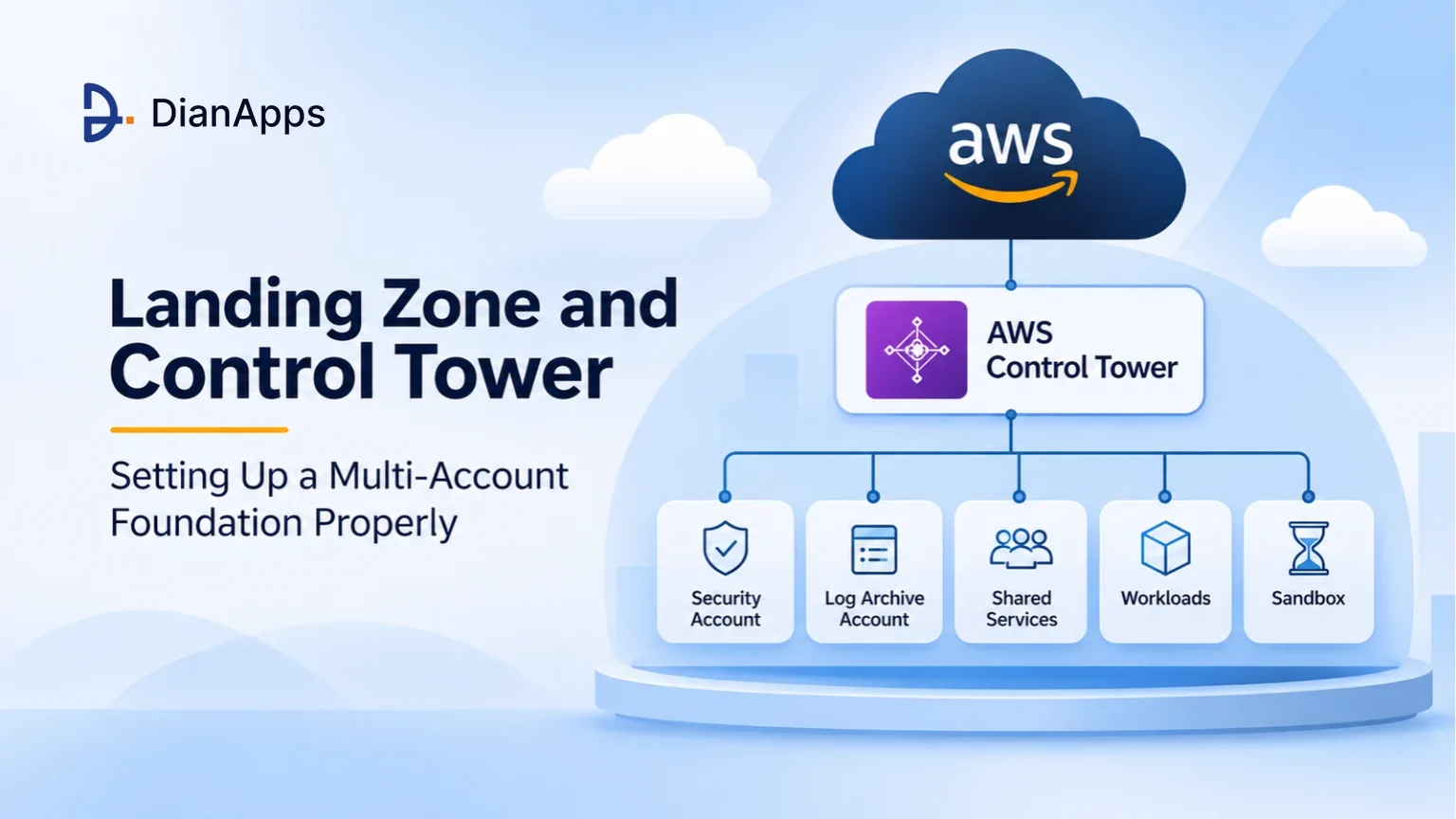
- An AWS landing zone is the pre-configured, multi-account foundation where security, identity, networking, logging, and billing rules are set before any workload goes live.
- AWS Control Tower automates the setup and ongoing governance of a landing zone using AWS Organizations, IAM Identity Center, preventive controls, and detective controls.
- A clear AWS multi-account strategy separates security, logging, shared services, workloads, and sandboxes into their own organizational units, limiting the blast radius of any mistake.
- Following AWS Organizations best practices means using SCPs as guardrails, centralising logs in a Log Archive account and keeping the management account free from workloads.
- A cloud consulting company can help through advisory, delivery, or managed engagements, and the right choice depends on in-house skills, timelines, and long-term operating capacity.
Quick Answer: Setting up an AWS landing zone properly means building a multi-account environment where accounts are grouped into organizational units, guardrails are applied through service control policies, access is managed centrally through IAM Identity Center, and logs from every account are flowing into a dedicated Log Archive account. AWS Control Tower is automating most of this setup, while networking, cost governance, and custom controls still need careful planning based on the business’s own security, compliance, and growth requirements.
For most businesses, the AWS journey is starting with a single account, where developers are launching servers, testing new features, and storing customer data side by side, and for the first few months everything is working well enough. If you are still getting familiar with the platform itself, our guide on what AWS is and how it works covers the basics, but once the team is growing, new products are launching, and auditors are asking questions, that single account is quickly turning into a tangled setup where nobody is fully sure who has access to what.
Inefficiencies like these don’t just slow down the engineering team; they also create real security and compliance risks, as a single misconfigured permission is able to expose production data and a single forgotten test environment is able to inflate the bill for the entire business. This is why organisations are now moving towards an AWS landing zone, a properly structured multi-account foundation that is giving every team its own space while keeping security, identity, logging and billing under central control.
But what does an AWS landing zone actually include, and how is AWS Control Tower helping businesses build one without months of manual configuration work? Let’s break it down step by step, from the basic definition to the account structure, guardrails, and the role a cloud consulting company is playing in getting it right.
What Is an AWS Landing Zone?
An AWS landing zone is a pre-configured, secure, and scalable multi-account AWS environment, giving businesses a ready foundation where new workloads can be deployed without rethinking identity, networking, logging, and governance each and every time. AWS itself is describing a landing zone as a well-architected, multi-account environment built around security and compliance best practices, with AWS Control Tower automating its setup through integrations for identity, federated access, and account structure.
The easiest way to understand it is to think about an airport, where planes are not landing anywhere they like, as runways, control towers, security checks, and terminals are all set up first, so that every flight is arriving safely and following the same rules. In the same way, an AWS landing zone is preparing the runways for your cloud, and it typically includes the following core building blocks:
- Account Structure: Separate AWS accounts for security, logging, shared services, production, development, and sandbox work, grouped into organizational units.
- Guardrails: Preventive and detective controls that stop risky actions and flag non-compliant resources across every account in the organization.
- Identity and Access: Centralised sign-in through IAM Identity Center, with permission sets that give each user only the access their role actually needs.
- Networking: A planned IP address scheme, shared connectivity, and controlled internet access that connects workloads without exposing them unnecessarily to outside threats.
- Logging and Monitoring: Organization-wide CloudTrail and AWS Config data flowing into a dedicated, tamper-resistant Log Archive account for audits and investigations.
- Cost Governance: Consolidated billing, tagging rules, budgets, and alerts that are showing exactly which team, product, or environment is driving the cloud spend.
Once these building blocks are in place, every new account is created with the same baseline, which is saving time for engineering teams and giving security teams the confidence that nothing is being launched outside the agreed rules.
It is also worth noting that the older AWS Landing Zone solution, which was a deployable reference implementation, is no longer the recommended path for new setups, as AWS has stopped its active development and is advising customers to transition to AWS Control Tower.
The Challenges of Running Everything in a Single AWS Account
Before looking at how a multi-account foundation works, it is important to understand why the single-account approach is failing so many growing businesses, and the reasons are not hard to see once the workloads start piling up.
Running production, testing, and experiments inside one AWS account usually creates a long list of operational problems, resulting in:
- Shared Blast Radius: A single compromised credential or faulty script is able to affect production, staging, and development resources all at once.
- Permission Sprawl: IAM policies are becoming so complex over time that nobody is confidently able to say who can access sensitive data.
- Unclear Cost Ownership: Bills are arriving as one large number, making it difficult to see which product, client, or team is responsible for spending.
- Compliance Gaps: Auditors are struggling to verify controls when regulated workloads are sitting next to experimental projects inside the same account boundary.
- Service Quota Limits: Teams are competing for the same per-account service limits, which is slowing down deployments during busy release cycles.
Problems like these don’t just frustrate the cloud team; they also affect brand perception, as a single data exposure or prolonged outage gives customers a poor impression that can take years to repair. This is why modern businesses are treating account separation as a real security boundary, and this is exactly where AWS Control Tower is stepping in.
How AWS Control Tower Builds and Governs Your AWS Landing Zone
AWS Control Tower is the managed service that is automating the creation of an AWS landing zone, sitting on top of AWS Organizations and bringing account provisioning, guardrails, and compliance visibility into a single dashboard that both cloud and security teams are able to use.
When the landing zone is first set up, AWS Control Tower typically creates a Security organizational unit with two shared accounts, a Log Archive account for centralised logs and an Audit account for security tooling, while the management account stays at the top of the organization. Here is what AWS Control Tower is bringing to the table for businesses building their first multi-account environment, including:
- Account Factory: A standardised way to create new AWS accounts that are automatically enrolled with the right baseline, network settings, and access.
- Controls Library: Hundreds of managed preventive, detective, and proactive controls that are mapped to common security and compliance frameworks out of the box.
- Compliance Dashboard: A central view showing which accounts and organizational units are drifting from the agreed controls, so issues are fixed quickly.
- Drift Detection: Alerts whenever someone is changing the landing zone configuration manually, helping teams keep the baseline consistent across every enrolled account.
- Account Factory for Terraform: A GitOps-friendly option for teams that prefer to provision and customise accounts using Terraform pipelines instead of the console.
And that is not all, as landing zone version 4.0, released on November 17, 2025, is making service integrations optional and introducing a controls-only experience, which means businesses with an existing AWS Organizations setup are now able to adopt AWS Control Tower governance without accepting every default that older versions were enforcing. The same release window also saw AWS Control Tower adding support for seven new compliance frameworks along with 279 additional AWS Config rules, giving regulated businesses far more coverage without writing custom rules themselves.
From a cost point of view, AWS Control Tower itself is not carrying any additional charge, but businesses are paying for the underlying services it is enabling, such as AWS Config, CloudTrail, Amazon S3 storage, KMS keys, and any VPC components created through Account Factory.
AWS Control Tower vs Custom Landing Zone vs Landing Zone Accelerator
Not every business is building its AWS landing zone in the same way, as some are relying fully on AWS Control Tower, some are building custom foundations with Terraform, and highly regulated organisations are often using the Landing Zone Accelerator on AWS alongside AWS Control Tower.
Here is a quick comparison of the three approaches to help you decide which one fits your current stage of cloud maturity:
| Feature | AWS Control Tower | Custom (Terraform/CDK) | Landing Zone Accelerator |
| Setup Time | Hours to Days | Weeks to Months | Days to Weeks |
| Governance | Managed Controls and Dashboard | Fully Self-Built | Control Tower Plus Extended Configs |
| Flexibility | Moderate, Improved in v4.0 | Very High | High Through Config Files |
| Maintenance | Largely Handled by AWS | Your Own Team | Shared, Config-Driven |
| Compliance Focus | General Best Practices | Depends on Build | Healthcare, Finance, Public Sector |
| Best Fit | Most Businesses | Unique, Complex Needs | Regulated Industries |
For most growing businesses, AWS Control Tower is definitely the right starting point, as it provides a well-governed foundation quickly, while the custom route only makes sense when the business has strong in-house platform engineering skills and requirements that the managed service is simply not covering.
Not Sure Which Landing Zone Approach Fits Your Business?
Our AWS experts are assessing your current accounts, compliance needs, and growth plans to recommend the right AWS landing zone setup from day one.
Designing an AWS Multi-Account Strategy That Scales
A good AWS multi-account strategy is not about creating as many accounts as possible; it is about grouping workloads by security needs and ownership, so that policies are applied once at the organizational unit level and inherited automatically by every account underneath.
The structure that AWS recommends, and that most mature organisations are following, is usually looking like this:
| Organizational Unit | Purpose | Example Accounts |
| Security | Central Security Tooling and Log Storage | Log Archive, Audit |
| Infrastructure | Shared Networking and Platform Services | Network Hub, Shared Services |
| Workloads | Business Applications Split by Environment | Prod, Staging, Dev per Product |
| Sandbox | Free Experimentation With Strict Spend Limits | Developer Sandboxes |
| Policy Staging | Testing SCPs Before Production Rollout | Policy Test Accounts |
| Suspended | Holding Closed or Quarantined Accounts | Decommissioned Accounts |
A few principles are keeping this AWS multi-account strategy clean and manageable as the business keeps growing, such as:
- One Workload Per Account: Giving each application environment its own account is keeping the blast radius small and making cost ownership very clear.
- Shallow OU Hierarchy: Keeping organizational units only two or three levels deep is making policy inheritance easier to understand, troubleshoot, and audit.
- Separate Production and Non-Production: Placing production accounts under their own OU is allowing stricter guardrails without slowing down developers in lower environments.
- Consistent Naming and Tagging: Following one naming convention for accounts, emails, and tags is helping finance, security, and operations teams speak the same language.
This is why the account structure is extremely crucial to decide early, as moving workloads between accounts later is costly, disruptive, and often requires changes inside the applications themselves.
AWS Organizations Best Practices for a Secure Foundation
AWS Organizations is the service sitting underneath every AWS landing zone, and following AWS Organizations best practices is what separates a foundation that is truly secure from one that only looks organised on paper, so let’s take a look at the areas that matter the most.
Service Control Policies and Guardrails
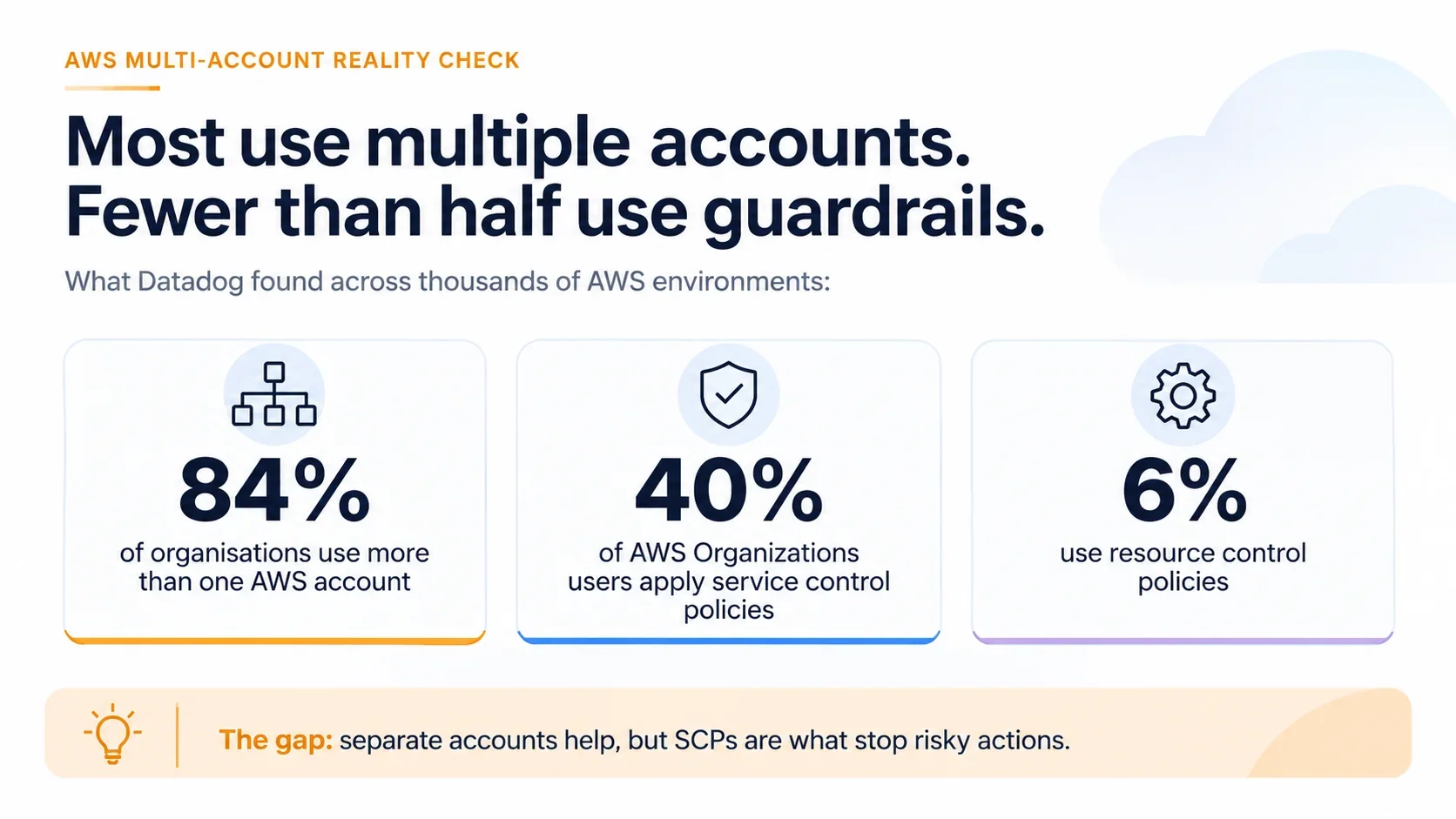
Service control policies, or SCPs, set the maximum permissions available in an account, which means even an administrator inside a member account is not able to perform an action that an SCP is denying, making them the strongest preventive guardrail available. The most commonly used SCPs in a well-designed AWS landing zone include the following guardrails:
- Region Restriction: Denying the use of AWS Regions where the business is not operating, which supports data residency and reduces the attack surface.
- Root User Lockdown: Blocking root user actions in member accounts, so that nobody is using the most powerful credentials for daily work.
- Security Service Protection: Preventing anyone from disabling CloudTrail, AWS Config, GuardDuty, or Security Hub inside workload and sandbox accounts.
- Organization Exit Prevention: Stopping accounts from leaving AWS Organizations, which keeps every account under central governance and consolidated billing at all times.
Resource control policies also complement SCPs by setting maximum permissions on resources such as S3 buckets and KMS keys, which helps block access from identities that sit outside your organization. It is always better to test new SCPs in a Policy Staging OU first, as a single badly written deny statement is able to break production deployments across dozens of accounts within minutes.
Centralised Identity With IAM Identity Center
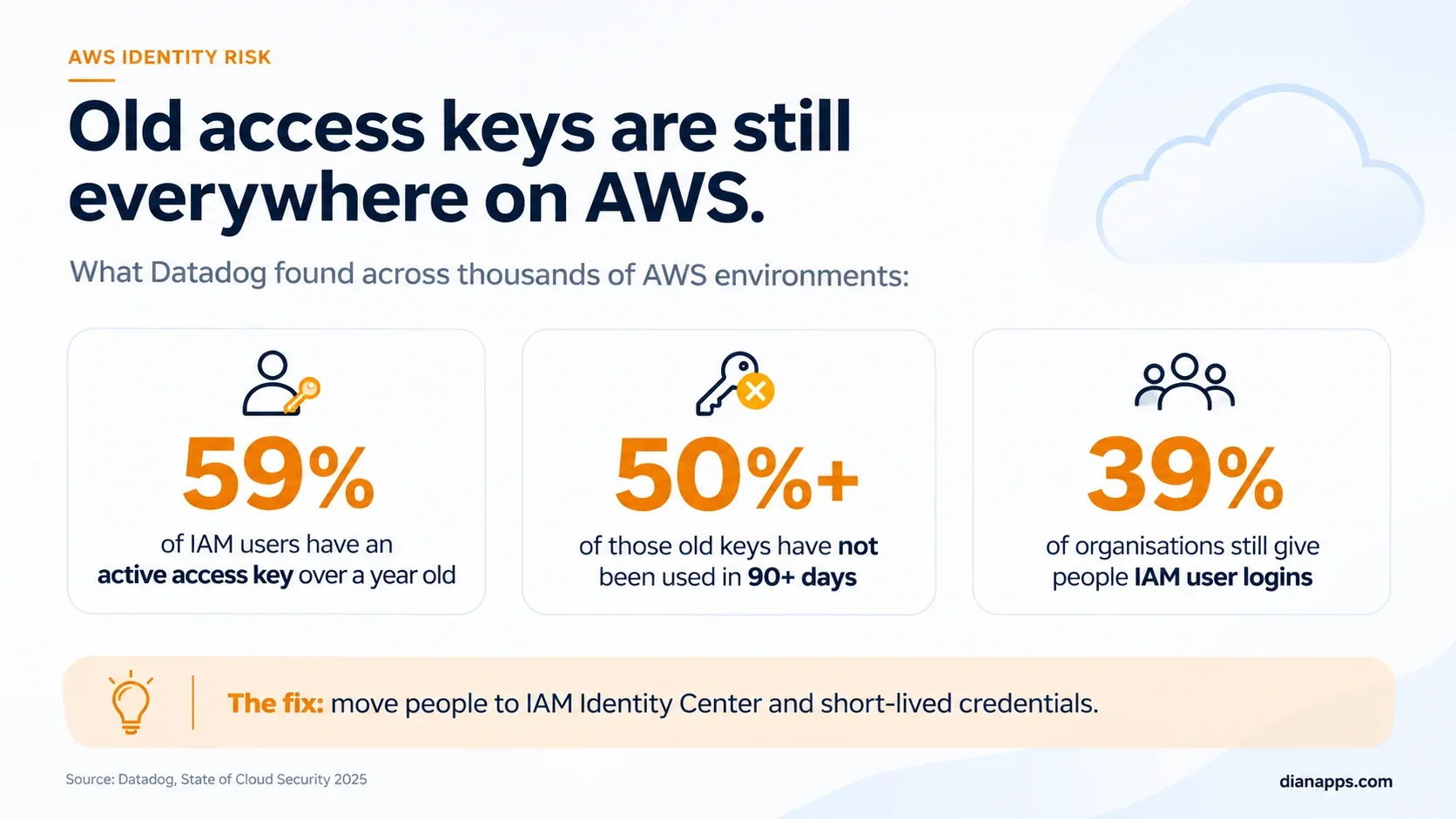
Long-lived IAM users with access keys are one of the most common causes of cloud breaches, which is why AWS Organizations best practices are recommending IAM Identity Center as the single place where people are signing in to every account. IAM Identity Center connects with existing identity providers like Microsoft Entra ID, Okta, or Google Workspace, and permission sets such as ReadOnly, Developer, or SecurityAuditor are being assigned to groups, so access follows each employee’s role automatically.
When someone is joining or leaving the business, access is being granted or removed in one place, which is saving hours for the IT team and closing the gap that orphaned credentials are usually creating.
Network Architecture Across Accounts
Networking is often the part of an AWS landing zone that is planned too late, resulting in overlapping IP ranges, duplicated NAT gateways, and complicated peering connections that are difficult to untangle later. A well-planned network foundation that supports growth without constant redesign usually includes the following components:
- IP Address Planning: Using Amazon VPC IP Address Manager to allocate non-overlapping CIDR ranges across every account, region, and on-premises network.
- Hub-and-Spoke Connectivity: Connecting workload VPCs through AWS Transit Gateway in a dedicated network account instead of building dozens of peering links.
- Centralised Egress and Inspection: Routing internet-bound traffic through shared NAT gateways and AWS Network Firewall, which is reducing cost and improving visibility.
- Hybrid Connectivity: Terminating Site-to-Site VPN or AWS Direct Connect links in the network account, so on-premises access is managed in one place.
Planning the network this way not only reduces data transfer and NAT costs, but also gives security teams a single point where traffic is being inspected and logged.
Centralised Logging and Security Monitoring
Logs are only useful when they are complete, protected, and easy to search, which is why every AWS landing zone should be sending organization-wide CloudTrail logs and AWS Config data to the Log Archive account, where S3 Object Lock and restricted access are protecting them from tampering.
On the monitoring side, services like Amazon GuardDuty, AWS Security Hub, IAM Access Analyzer, and Amazon Inspector are being enabled across all accounts through delegated administration in the Audit account, so the security team is seeing findings from the entire organization in one dashboard. This setup is also making audits much easier, as evidence for frameworks like ISO 27001, SOC 2, and PCI DSS is already sitting in one place, and our cloud security services team is helping businesses configure this monitoring layer correctly.
Cost Visibility and Governance
A multi-account structure is naturally improving cost visibility, as AWS Organizations is consolidating billing across every account while still showing exactly how much each account, and therefore each team or product, is spending. To keep cloud spend predictable as the number of accounts is growing, the landing zone should also include:
- Tag Policies: Enforcing mandatory tags like cost center, owner, and environment, so every resource is traceable to a team and budget.
- AWS Budgets and Alerts: Setting per-account and per-OU budgets that notify owners before spending crosses agreed limits, not after the invoice arrives.
- Cost Categories and Reports: Grouping accounts into business units and sending Cost and Usage Reports to a central account for finance analysis.
- Sandbox Spend Controls: Applying strict budgets and automated clean-up to sandbox accounts, where forgotten experiments are usually generating the most waste.
Savings Plans and Reserved Instances are also being shared across the organization by default, which means discounts purchased centrally are benefiting every eligible account without any extra effort from individual teams.
Step-by-Step Process for Setting Up an AWS Landing Zone
Setting up an AWS landing zone does not have to be overwhelming, as long as the business is following a clear sequence instead of creating accounts first and thinking about governance later, and the process usually looks like this:
- Assess Requirements: Documenting compliance frameworks, data residency needs, existing accounts, identity providers, and expected workloads before any configuration begins.
- Design the Account Structure: Defining organizational units, account naming, email aliases, and ownership based on the AWS multi-account strategy agreed with stakeholders.
- Prepare the Management Account: Securing the root user with MFA, setting billing alerts, and keeping the account strictly free from application workloads.
- Deploy AWS Control Tower: Launching the landing zone in the home Region, selecting governed regions, and configuring the Log Archive and Audit accounts.
- Configure Identity: Connecting IAM Identity Center to the corporate identity provider and creating permission sets mapped to job roles and groups.
- Apply Controls and SCPs: Enabling recommended controls, adding custom SCPs for Region and root restrictions, and testing them in a staging OU first.
- Build the Network Foundation: Deploying the network account, Transit Gateway, IPAM pools, and centralised egress before the first workload account is created.
- Automate Account Vending: Using Account Factory or Account Factory for Terraform, so every new account arrives with the same secure baseline.
- Enrol Existing Accounts: Moving existing accounts into the right OUs gradually, fixing drift and non-compliant resources carefully along the way.
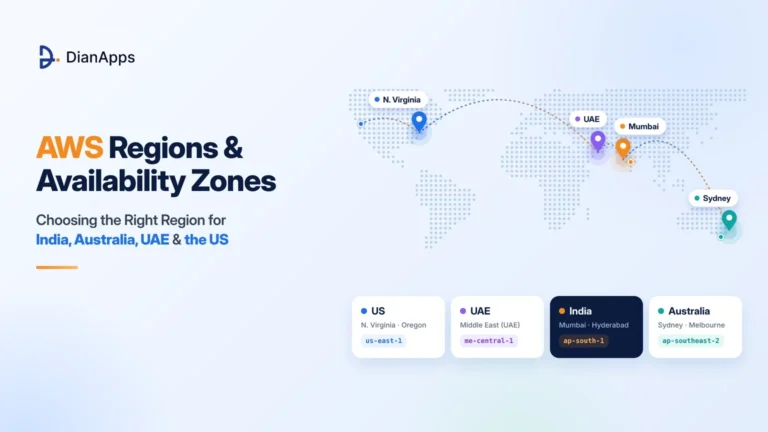
If you are still deciding on the home Region, our guide on AWS Regions and Availability Zones compares the best options for India, Australia, the UAE, and the US. For businesses that already have workloads running, the enrollment step is usually the most sensitive one, and our cloud migration services are helping teams move existing accounts and applications into the new structure without unplanned downtime.
Common Mistakes That Weaken an AWS Landing Zone
Even with AWS Control Tower doing most of the heavy lifting, many businesses are still making a few avoidable mistakes that are quietly weakening their AWS landing zone over time, such as:
- Running workloads in the management account, which is placing the most privileged account directly in the path of everyday deployment risk.
- Creating IAM users with long-term access keys instead of using IAM Identity Center and temporary credentials for every person.
- Applying SCPs directly to production without testing, which is breaking pipelines and forcing emergency rollbacks across multiple accounts at once.
- Making manual changes to Control Tower resources, which is causing drift and blocking future landing zone updates until it is repaired.
- Ignoring IP address planning until later, which is resulting in overlapping CIDR ranges that are making connectivity extremely difficult to fix.
- Skipping tagging rules at the start, which is leaving finance teams unable to allocate cloud costs to the right products or clients.
Each of these mistakes is easy to prevent with the right plan, and avoiding them early is saving a lot of rework, audit stress, and unexpected spending later on.
Build Your AWS Landing Zone the Right Way From Day One
From account structure and SCPs to Identity Center, networking and centralised logging, our certified team is designing and deploying multi-account foundations that are secure, compliant and ready to scale.
What Do Cloud Consultants Do in a Landing Zone Project?
A lot of business leaders are asking what cloud consultants do once the decision to build a landing zone has been made, and the answer is that their role goes far beyond clicking through the AWS Control Tower setup wizard. A capable cloud consulting company is usually translating business, security, and compliance requirements into an account design, writing infrastructure as code, configuring guardrails, training internal teams, and documenting every decision, so the foundation stays maintainable long after the project is closed.
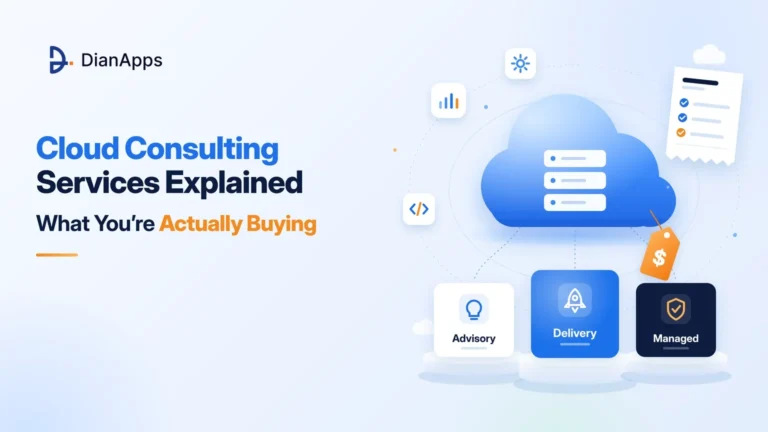
If you want a broader view of how these engagements work in general, our guide on cloud consulting services explains what you are actually buying in much more detail.
Advisory vs Delivery vs Managed Engagements
Cloud advisory services, hands-on delivery, and ongoing managed services are three very different engagement models, and knowing the difference helps businesses pay only for what they actually need.
| Aspect | Advisory | Delivery | Managed |
| Primary Goal | Strategy and Design | Build and Deploy | Operate and Improve |
| Typical Output | Architecture and Roadmap | Working Landing Zone in Code | Ongoing Monitoring and Updates |
| Duration | Short, Fixed Scope | Project-Based | Ongoing, Monthly |
| Who Executes | Your Internal Team | Consultant’s Engineers | Provider’s Operations Team |
| Pricing Model | Fixed Fee or Daily Rate | Fixed Fee or Milestones | Monthly Retainer |
| Best For | Teams With Strong In-House Skills | Teams Needing Speed and Expertise | Teams Without Cloud Ops Staff |
In practice, many businesses are starting with cloud advisory services to validate the design, moving into delivery for the actual build, and then deciding whether to run the environment themselves or hand it over to cloud managed services for day-to-day operations.
Deliverables You Should Expect From a Cloud Consulting Company
Whichever model is chosen, a professional cloud consulting company should be handing over clear, tangible deliverables rather than just a working console, including:
- Architecture Document: A written design covering OU structure, account list, network layout, identity model, and the reasoning behind each decision.
- Infrastructure as Code: Terraform, CloudFormation, or CDK repositories that recreate the entire landing zone, stored in your own version control.
- Guardrail Catalogue: A list of every enabled control and SCP, mapped to the compliance requirement or business risk it is addressing.
- Runbooks: Step-by-step operating procedures for account vending, access requests, incident response, and landing zone version upgrades.
- Knowledge Transfer: Hands-on sessions that are preparing your internal team to operate, extend, and troubleshoot the foundation confidently.
If any of these deliverables are missing from a proposal, it is definitely worth asking why, as a landing zone without code and documentation is becoming a black box the moment the consultants leave.
Pricing Models for Cloud Advisory Services
Pricing for cloud advisory services and landing zone delivery varies widely, as the final cost depends on the number of accounts, compliance frameworks, network complexity, existing workloads to migrate, and the level of automation expected. Most providers are pricing landing zone and advisory engagements through one of the following commercial models:
- Fixed-Fee Packages: A set price for a clearly defined scope, which provides predictability but requires very precise requirements upfront.
- Time and Materials: Billing by hours or days spent, which offers flexibility for evolving requirements but needs closer budget tracking.
- Milestone-Based Pricing: Payments tied to completed phases like design, deployment, and handover, which balances risk between both parties.
- Monthly Retainers: A recurring fee for managed operations, covering monitoring, updates, account vending, and compliance reporting every single month.
For reference, one AWS Marketplace listing for an AI-ready Control Tower landing zone is openly publishing package tiers at $75K, $125K and $175K, although simpler foundations for smaller businesses can cost considerably less depending on scope. Startups should also go through our guide on AWS Activate credits, as credits sometimes cover part of the underlying infrastructure costs during the early stages.
How to Choose the Right Cloud Consulting Company for Your AWS Landing Zone
Choosing a partner for something as foundational as an AWS landing zone is really important, as the decisions made in the first few weeks are shaping security, cost, and agility for years. Once you are clear on what cloud consultants do in such projects, the key things to look for before signing a contract are:
- Proven experience applying AWS Organizations best practices and AWS Control Tower for businesses of a similar size, industry, and compliance level.
- Infrastructure as code delivery by default, with all repositories and documentation owned by your business rather than the provider.
- Clear separation between advisory, delivery and managed scopes, so you are not paying for ongoing services you never needed.
- Certified AWS architects and security specialists working on the project, rather than generalist engineers learning the platform on your budget.
- Transparent pricing with defined deliverables, change-request rules, and a handover plan agreed before the project begins.
At DianApps, our AWS cloud services teams are covering the complete journey, from landing zone design to delivery, migration, and long-term management, so businesses are getting one accountable partner instead of juggling several vendors.
Final Thoughts
An AWS landing zone is no longer something only large enterprises are building, as every business that is expecting to grow on AWS is benefiting from separating workloads into accounts, applying guardrails centrally, managing identity in one place, and keeping logs safe from the very first day. AWS Control Tower is making this foundation much easier to set up and govern, especially with landing zone 4.0 giving more flexibility, but the real value is still coming from the design decisions around account structure, SCPs, networking, logging, and cost governance.
The businesses that are taking time to plan their AWS multi-account strategy properly are the ones scaling confidently without surprise bills, audit panic, or messy migrations later, and whether your team is building in-house or working with a cloud consulting company, getting these basics right is definitely going to pay off for years. And if you need a helping hand along the way, our team is always here to guide you from beginning until completion.
Ready to Set Up a Secure Multi-Account Foundation on AWS?
Our AWS experts are helping businesses build landing zones that are secure, compliant, and cost-efficient.
 0 comments










Your email address will not be published. Required fields are marked *