















 0 comments





Key Takeaways:
- Knowing how to build a mobile app is starting with the problem your users/customers are facing, and not with the code.
- Most businesses are now choosing cross-platform frameworks like Flutter and React Native, as one codebase is covering both iOS and Android.
- The backend is handling logins, data, payments and notifications, so planning it early is saving a lot of rework later on.
- A simple app is usually costing $20,000 to $60,000, while complex or regulated apps are easily going above $150,000.
- Most apps are taking three to nine months from idea until launch, and starting with an MVP is definitely making this faster.
Quick Answer: How to build a mobile app is really coming down to a few clear steps, validating the idea, deciding the MVP features, choosing between native and cross-platform, designing the UI/UX, building the frontend and backend, testing on different devices and then publishing it on the App Store and Google Play. A simple app is usually taking three to four months and costing somewhere between $20,000 and $60,000, while apps with custom backends, integrations or compliance needs are taking longer and costing a lot more. And the work is not stopping at launch either, as updates, bug fixes and user feedback are keeping the app improving long after it is live.
Booking a cab, ordering dinner, paying the electricity bill, all of it is now happening in a few taps on the phone, and most of us are not even remembering the last time we did these things any other way. This is exactly why app ideas are popping up everywhere, but figuring out where to start, who to hire and how much it is going to cost is not making it easy for anyone, and the first thing most founders/business owners are wondering is how hard is it to make an app and how to build a mobile app the right way.
And the numbers are really backing this up, as Sensor Tower’s State of Mobile 2026 report is showing that global app downloads reached nearly 150 billion in 2025, while in-app purchase revenue went up to $167 billion. This not only shows how much time people are spending inside apps, this also shows how much they are willing to spend there, which is why so many businesses are now investing in apps of their own.
But how does building an app actually work, and what is happening from the first idea until the app is live on the store? Well, let’s break it down, and in this guide we are covering each and every stage, from the backend to how much does it cost to build a mobile app and how long does it take to build a mobile app, in simple and easy terms.
Choosing the Right Type of Mobile App: Native, Cross-Platform or PWA
The type of app you are choosing is one of the first and most important decisions, but with native, cross-platform and PWA options all claiming to be the best, picking one is not always that simple for founders/business owners. Each option is coming with its own cost, speed and performance, and the table below is putting them side by side, so it is easier to see which one is suiting your app.
| Factor | Native Apps | Cross-Platform Apps | Progressive Web Apps (PWA) |
|---|---|---|---|
| Tech Stack | Swift/SwiftUI (iOS), Kotlin (Android) | Flutter, React Native | HTML, CSS, JavaScript |
| Codebase | Separate for each platform | One shared codebase | One web codebase |
| Performance | Highest | Near-native for most apps | Depends on the browser |
| Device Features | Full access | Most features via plugins | Limited access |
| Cost | Highest | Moderate | Lowest |
| Best For | Gaming, AR, heavy hardware use | Most business and consumer apps | Content and simple tools |
For most startups and businesses, cross-platform development is turning out to be the most practical choice, as one codebase is running on both iOS and Android, saving time and cost without really affecting the user experience. PWAs, on the other hand, are working well for simple content apps, but this is not suitable nor suggested for apps that are needing features like Bluetooth, AR or advanced camera controls.
And if most of your users are working on laptops and office systems instead of phones, it is worth reading about desktop app development before deciding, as a mobile app is not always the right fit for each and every business, and once this is clear, the actual building process can begin, so let’s take a look.
Have an App Idea You Are Ready to Build?
Take your app from a simple idea to a fully launched product on iOS and Android, with design, backend and testing all handled by one team, from beginning until completion.
How to Build a Mobile App: A Step-by-Step Process
Building an app is not happening in one go, it is happening in stages, and skipping or rushing any one of them is usually showing up later as bugs, delays or extra costs. Understanding how to build a mobile app is really about following these stages in the right order, so let’s break it down one step at a time.
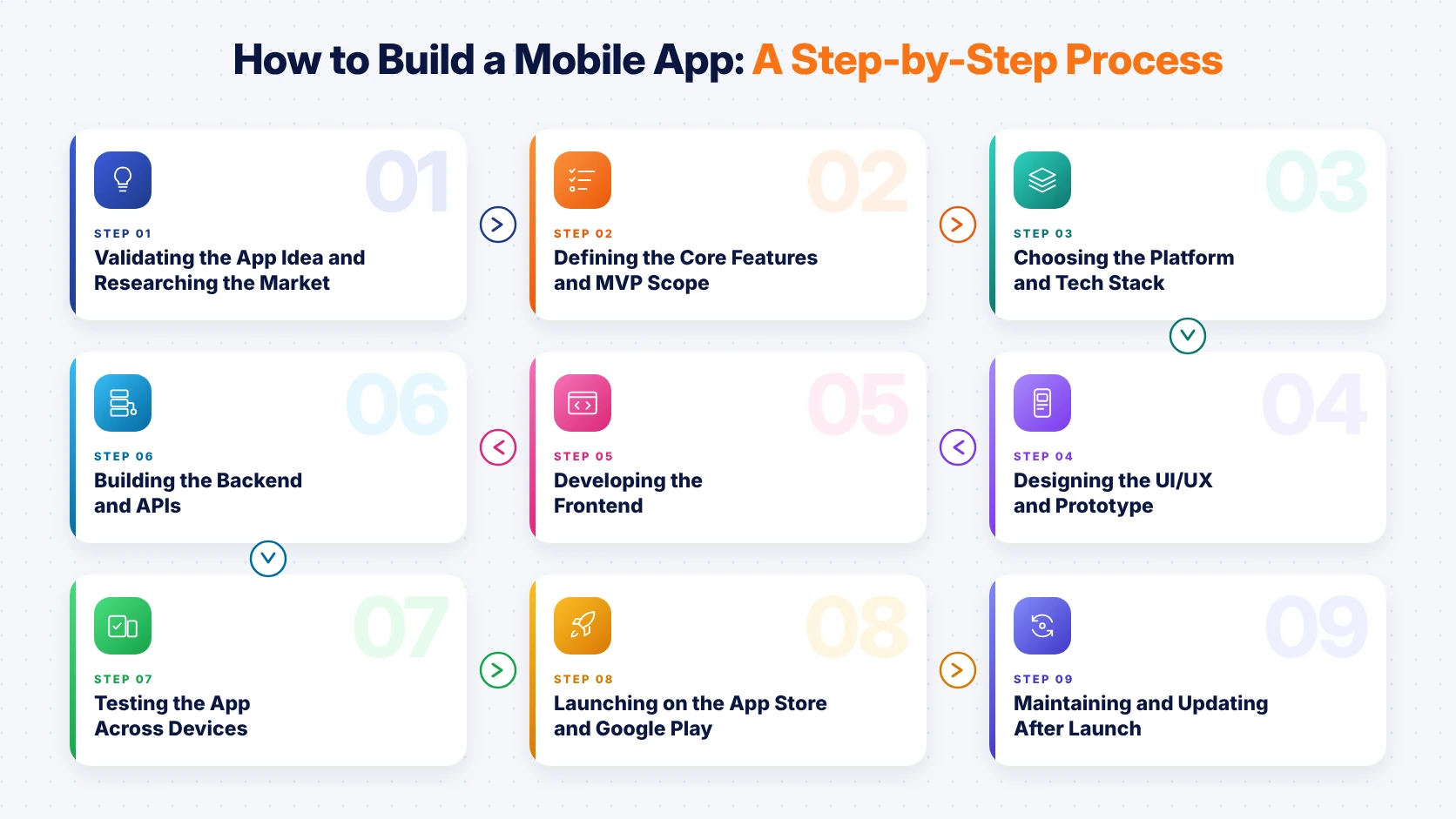
1. Validating the App Idea and Researching the Market
A lot of founders are jumping straight into design and development because the idea is feeling exciting, but this is also the reason why so many apps are launching and then struggling to find users. This is where proper research is stepping in, helping you understand whether people are really facing the problem your app is solving, and whether they are willing to download/pay for it.
Talking to potential users, going through competitor apps and reading their App Store and Google Play reviews is a really good starting point, because what users are complaining about in those reviews is very often your biggest opportunity.
2. Defining the Core Features and MVP Scope
Every founder is wanting each and every feature in the first version, but adding everything at once is increasing the cost, delaying the launch and making the app harder to use. This is why most teams are starting with an MVP (Minimum Viable Product), which is covering only the features users really cannot do without, and the easiest way to decide this is by dividing the features into three groups, resulting in:
- Must-have features like sign-up, the main user flow and basic settings.
- Nice-to-have features that can easily wait until the second release.
- Future features like AI recommendations or advanced analytics for later stages.
This not only keeps the first version simple and affordable, this also gets the app in front of real users much faster than a full-featured build.
3. Choosing the Platform and Tech Stack
Once the features are final, the next decision is whether the app is launching on iOS, Android or both, and which technologies the developers are using for the frontend and backend. If your audience is mostly in the US, iOS is usually getting the priority as iPhone users are spending more on apps, while Android is leading in markets like India and Southeast Asia, and this is where Flutter or React Native are helping, by covering both platforms together.
4. Designing the UI/UX and Prototype
Users are deciding within the first few seconds whether they are going to keep an app or delete it, and confusing screens, too many taps and cluttered layouts are giving a poor impression before the app has even had a chance. This is why designers are starting with wireframes, then moving to detailed mockups in tools like Figma and finally creating a clickable prototype that real users can test before development is even starting.
This is also saving a lot of money, because changing a screen in Figma is taking a few hours, whereas changing it after it is developed is taking days.
5. Developing the Frontend
This is the stage where the designs are finally turning into a working app, with developers building the screens, navigation, animations and everything else users are going to see and touch. Most teams are working in two-week sprints and sharing a testable version at the end of each one, so you are seeing the progress regularly and giving feedback before small issues are turning into bigger ones.
6. Building the Backend and APIs
While the frontend is handling what users are seeing, the backend is working quietly behind it, storing data, managing logins, processing payments and sending notifications, and since it is such an important part of the app, we are covering how to build a backend for a mobile app separately in the next section.
7. Testing the App Across Devices
Bugs and crashes don’t just frustrate the users, they also affect the brand perception and the app’s ratings on the store, and this is why testing is extremely crucial before any launch. A proper QA (Quality Assurance) process is checking the app from different angles, such as:
- Functional testing to make sure each and every feature and button is working.
- Device testing on different screen sizes, OS versions and older phones.
- Performance testing for load time, battery usage and slow networks.
- Security testing to keep user data, logins and payments fully protected.
This is why testing on real devices is really important, as what is working perfectly on a developer’s phone is not always working the same on your users’ phones.
8. Launching on the App Store and Google Play
To publish the app, you are needing a developer account on both stores, with Apple charging $99 per year for its Developer Program and Google Play charging a one-time $25 registration fee. Apple’s review process is usually stricter than Google’s, so preparing the screenshots, app description, privacy policy and keywords properly is helping the app get approved faster and making it easier for users to find it.
9. Maintaining and Updating After Launch
Launching the app is not the end of the journey, it is actually just the beginning, as user feedback, OS updates from Apple and Google and new feature requests are going to keep coming in. A common rule of thumb is keeping aside around 15% to 20% of the original development cost every year for maintenance, covering bug fixes, updates, server costs and small improvements that are keeping users coming back, and now the backend is needing a closer look.
How to Build a Backend for a Mobile App
Most users are never thinking about what is happening behind the screen when they are logging in, placing an order or receiving a notification, but each and every one of these actions is depending on the backend. So, what exactly is a backend, and how to build a backend for a mobile app without making it complicated? Well, the backend is the server-side part of the app, and it is usually made up of a few main components, resulting in:
- A server and business logic that is processing requests and applying your rules.
- A database like PostgreSQL, MySQL or MongoDB for storing user and app data.
- APIs, usually REST or GraphQL, that are letting the app and server talk.
- Authentication through email, phone OTP or Google/Apple sign-in.
- Cloud hosting on AWS, Google Cloud or Azure for running and scaling the app.
- Third-party services like Stripe for payments and Firebase for push notifications.
This is why the backend is needing as much planning as the app itself, because a weak backend is slowing down the app the moment more users are joining in.
Now, building all of this from scratch is not always needed, as Backend-as-a-Service (BaaS) platforms are offering a lot of ready-made features, and choosing between BaaS and a custom backend is depending on your app, so let’s take a look.
| Factor | BaaS (Firebase, Supabase, AWS Amplify) | Custom Backend (Node.js, Python, Java) |
|---|---|---|
| Setup Speed | Very fast, ready-made services | Slower, built from scratch |
| Upfront Cost | Low | Higher |
| Flexibility | Limited to platform features | Full control over logic and data |
| Scalability | Good, but costs rise with usage | Planned around your growth |
| Vendor Lock-In | Higher | Minimal |
| Best For | MVPs, prototypes and simple apps | Complex, regulated or high-scale apps |
Many teams are starting with a BaaS platform for the MVP and then moving to a custom backend once the app is growing, which is a really practical way of keeping the early cost low without getting stuck with one platform later.
How Much Does It Cost to Build a Mobile App?
Budget is one of the main reasons why so many app ideas are staying on paper, because quotes are ranging from a few thousand dollars to a few hundred thousand, and nobody is really explaining why. So, how much does it cost to build a mobile app in 2026? Well, it is depending on how complex the app is, which platforms you are targeting and where the development team is based, and the table below is giving a clearer picture based on common industry estimates.
| App Complexity | Examples | Typical Features | Estimated Cost |
|---|---|---|---|
| Simple App | To-do list, calculator, basic info app | Few screens, little or no backend | $20,000 - $60,000 |
| Medium App | Booking, e-commerce, fitness tracking | User accounts, payments, APIs, push notifications | $60,000 - $150,000 |
| Complex App | Marketplace, fintech, telemedicine, social | Real-time features, AI, custom backend, compliance | $150,000 - $300,000+ |
Note: These are estimated ranges, and hourly rates are changing a lot from region to region, with North American teams usually charging more than teams in Eastern Europe or India.
And that is not all, apart from the features, there are a few other factors that are also pushing the cost up or down, such as:
- Choosing separate native apps for iOS and Android instead of one cross-platform app.
- Custom animations, illustrations and detailed design interactions.
- Backend features like real-time chat, video, AI or heavy data processing.
- Third-party integrations like payment gateways, maps, CRMs and analytics tools.
- The team model and location, whether freelancers, in-house or an agency.
This is why, whenever someone is asking how much does a mobile app cost to build, the most accurate answer is only coming after the features are properly planned, and a discovery phase is really worth doing before any quote is final.
How Much Does a Mobile App Cost to Build in Regulated Industries?
Apps in healthcare, fintech and insurance are needing extra security, encryption, audit logs and compliance checks, and this is pushing both the cost and the timeline higher than a regular consumer app. For example, a healthcare app handling patient data in the US is needing to follow HIPAA (Health Insurance Portability and Accountability Act) rules, and this healthcare app development cost and HIPAA compliance guide is explaining how these requirements are affecting the budget, and next comes the timeline, so let’s take a look.
How Long Does It Take to Build a Mobile App?
Along with the budget, time is another big concern, as most founders are wanting to launch before a competitor does or before the market moves on. So, how long does it take to build a mobile app? Well, most apps are taking somewhere between three and nine months from idea until launch, while complex apps can even go beyond a year, and the table below is showing how this time is usually getting divided.
| Phase | Simple App | Medium App | Complex App |
|---|---|---|---|
| Discovery and Planning | 1 - 2 weeks | 2 - 4 weeks | 4 - 6 weeks |
| UI/UX Design | 2 - 3 weeks | 3 - 6 weeks | 6 - 10 weeks |
| Development (Frontend and Backend) | 6 - 10 weeks | 3 - 5 months | 5 - 9 months |
| Testing and QA | 1 - 2 weeks | 3 - 4 weeks | 4 - 8 weeks |
| Launch and Store Approval | 1 week | 1 - 2 weeks | 2 weeks |
| Total Estimate | 3 - 4 months | 5 - 8 months | 9 - 14 months |
Phases like design and backend development are often running side by side, so a well-organised team is usually saving a few weeks here, and this detailed guide on how long it takes to develop an app is explaining what is speeding up or slowing down each stage.
The biggest delays are not really coming from the coding itself, they are coming from requirements changing midway, slow feedback and approvals and new features getting added after development has already started.
Common Mistakes to Avoid When Building a Mobile App
Most apps are not failing because of bad code, they are failing because of decisions that were made much earlier, and these mistakes are coming up again and again, such as:
- Skipping validation and building something users are not really needing.
- Adding too many features to the MVP and delaying the launch.
- Treating the backend as an afterthought and paying for rebuilds later.
- Rushing the testing to meet a deadline and launching with bugs.
- Not keeping any budget for maintenance, hosting and updates after launch.
Mistakes like these don’t just delay the launch, they also affect the trust users are placing in the app, and knowing how to build a mobile app is really as much about avoiding these as it is about following the right steps.
Get a Clear Estimate Before You Build
Share your app idea and must-have features with our team, and we will be giving you a realistic cost and timeline breakdown.
In-House Team, Freelancers or App Development Agency: Which One Is Right?
Once the plan is ready, the next big question is who is actually going to build the app, and with in-house teams, freelancers and agencies all having their own pros and cons, the comparison below is making the choice a lot easier.
| Factor | In-House Team | Freelancers | App Development Agency |
|---|---|---|---|
| Upfront Cost | Highest (salaries, benefits, tools) | Lowest | Moderate |
| Speed to Start | Slow, hiring takes months | Fast | Fast |
| Skill Coverage | Limited to who you hire | Usually one specialty | Design, frontend, backend and QA together |
| Project Management | Your responsibility | Your responsibility | Handled by the agency |
| Long-Term Support | Strong | Uncertain | Available through support plans |
| Best For | Large companies with ongoing roadmaps | Small tasks and quick fixes | Startups and businesses building full products |
For most startups and growing businesses, working with an agency is the most practical way of figuring out how to build a mobile app without the stress, as you are getting a complete team from day one without spending months hiring each role yourself.
Final Thoughts
Mobile app development can seem like a lot at first, but once it is broken down into clear steps, from validating the idea and planning the MVP to designing, building the backend, testing and launching, the whole process is becoming much easier to manage. The apps that are really succeeding are not always the ones with the most features, they are the ones solving one problem well, launching early and improving regularly based on what users are actually saying.
So whether you are still figuring out how to build a mobile app or already have the feature list ready, proper planning around the cost, timeline and backend is making a huge difference, and if you are looking for a team that is taking care of everything from beginning until completion, we’ve got you covered.
 0 comments










Your email address will not be published. Required fields are marked *