















 0 comments





Key Takeaways:
- AI agents for customer service are going beyond simple chatbots, as they are understanding the customer, finding the right answer and actually taking actions like refunds, bookings and order updates.
- An AI customer service agent is connecting with your helpdesk, CRM, order system and knowledge base, so that it is resolving issues end-to-end instead of just replying with links.
- Most platforms are charging per resolution or per action, with Fin at around $0.99 per resolution, Zendesk at $1.50 to $2 and Salesforce Agentforce at $2 per resolution or $0.10 per action.
- AI agents for customer support are handling the repetitive, high-volume queries, while human agents are focusing on complex, emotional and high-value conversations.
- Scaling across contact centers is needing a strong knowledge base, clear handover rules, proper testing and real-time monitoring, so start with a few use cases and grow step by step.
Quick Answer: AI agents for customer service are AI systems that are understanding customer questions, finding answers from your knowledge base and taking actions in your business systems, like tracking orders, processing refunds or updating bookings, while handing complex cases over to human agents. They are working across chat, email and voice, connecting with tools like Zendesk and Salesforce, and are usually costing around $0.99 to $2 per resolved conversation on popular platforms, or more for custom-built agents. A team offering AI Agent development services can help you decide whether a ready-made platform or a custom agent is the right fit for your business.
Just a few years back, calling customer care meant pressing 1 for English, 2 for billing, 3 for something that was never matching your problem, and then listening to the same hold music for twenty minutes, only to be told that your call is being transferred to another department? A lot of customers are still going through this even today, and on the other side, support teams are drowning in the same “Where is my order?”, “How do I reset my password?” and “Can I get a refund?” questions each and every day, while the complex and important cases are waiting in the queue.
This is where AI agents for customer service are stepping in, helping businesses / organisations answer customers instantly at any hour, resolve common issues end-to-end and free up human agents for the conversations that are really needing a human touch. But what is an AI customer service agent exactly, how is it different from the old chatbots, and what is it actually costing? Let’s break it down, from how these agents are working and what they are handling to the best tools, pricing, integrations and how to scale them across contact centers.
What Are AI Agents for Customer Service?
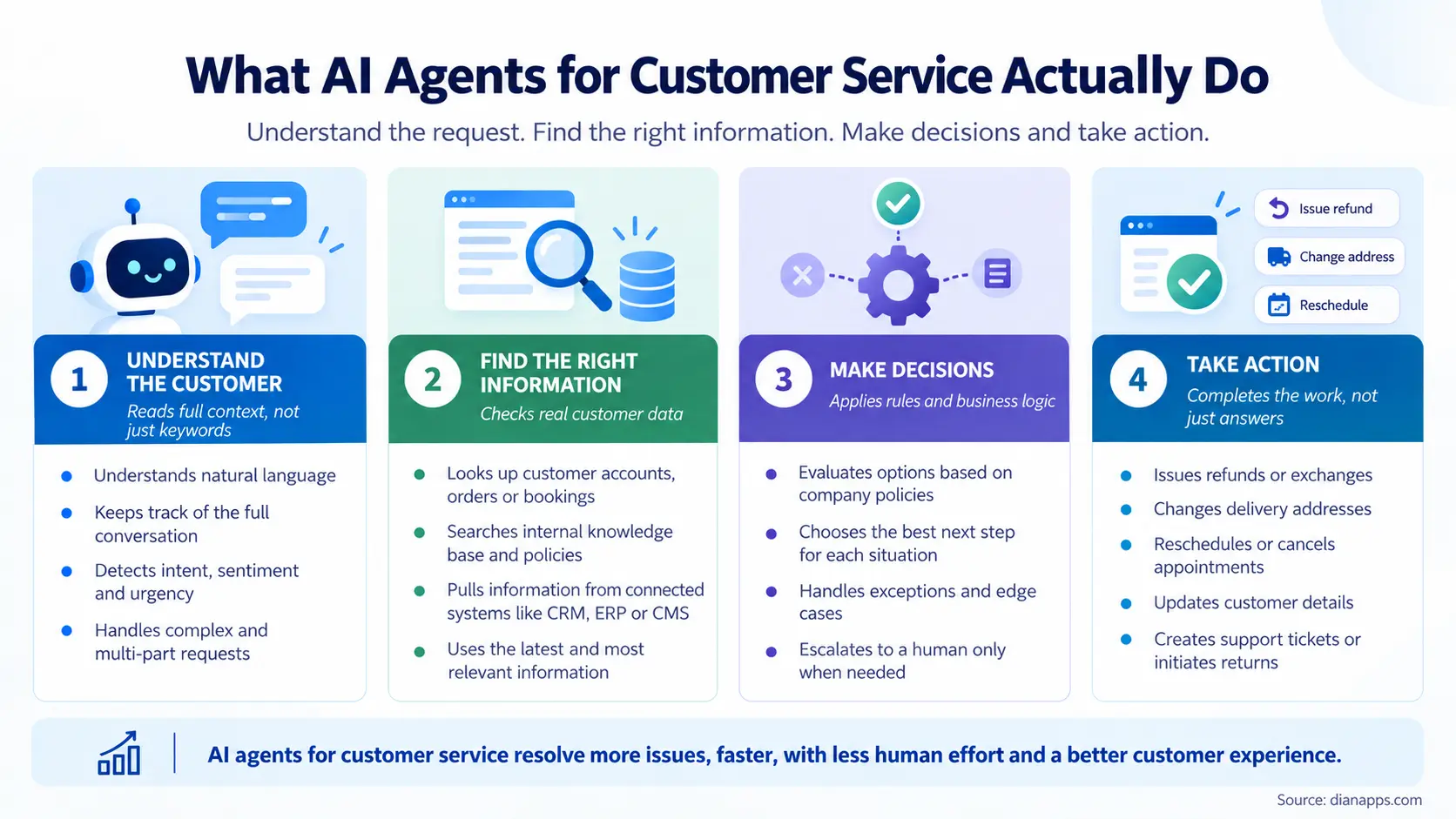
AI agents for customer service are AI systems that are able to understand what a customer is asking, find the right information, make decisions and take actions to resolve the issue, all without a human needing to step in for every single conversation. Unlike the old rule-based chatbots that were only following a fixed script and sending customers to an FAQ page, an AI agent for customer service is reading the full context, checking the customer’s account, order or booking and then actually doing the work, like issuing a refund, changing a delivery address or rescheduling an appointment.
The easiest way to understand it is to think about the difference between a help desk notice board and a trained front desk executive, as the notice board is only giving information and leaving the customer to figure out the rest, while the front desk executive is listening, checking the system and solving the problem right there. AI agents for customer support are working like that trained executive, only they are available 24/7, are handling thousands of conversations at the same time and are never getting tired of answering the same question again and again.
This is also why agentic AI for customer service is becoming such a big topic for businesses, as it is not just answering questions anymore, it is completing entire support journeys from beginning until completion.
The Challenges of Traditional Customer Support
Before understanding why AI agents for customer service are becoming so popular, it is important to look at the problems that support teams and customers are facing with the traditional way of handling support.
Running customer support only with human agents and basic chatbots is usually coming with a long list of problems, resulting in:
- Long wait times during busy hours.
- Repetitive questions filling up the queue.
- Limited support at night and on weekends.
- High cost for each and every ticket.
- Agent burnout and high staff turnover.
- Inconsistent answers from different agents.
- Chatbots that are not solving anything.
Inefficiencies like these don’t just frustrate the customers, they also affect the brand perception, as a customer who is waiting hours for a simple refund update is getting a poor impression before they have even decided whether to shop with you again. This is why modern businesses need smarter support infrastructure, and this is exactly where the AI customer service agent is stepping in.
AI Agents vs Chatbots: What Is the Difference?
A lot of businesses are still assuming that AI agents and chatbots are the same thing with a new name, but the reality is quite different, so it is really helpful to compare both side by side.
| Feature | Traditional Chatbot | AI Agent |
| How It Works | Fixed rules and scripts | Understands and reasons |
| Understanding | Keywords only | Full context and intent |
| Actions | Shares links and FAQs | Refunds, bookings, updates |
| System Access | Very limited | Helpdesk, CRM, ERP, orders |
| Handling New Questions | Fails or loops | Adapts and finds answers |
| Handover to Humans | Basic | Smart, with full context |
| Resolution Rate | Low | Much higher |
The table makes it clear that chatbots are mostly deflecting questions, while an AI agent for customer support is actually resolving them, and this is the biggest reason why businesses are now upgrading from chatbots to agents.
How an AI Customer Service Agent Works?
An AI customer service agent can look quite magical from the outside, but most of them are running on the same basic building blocks, and once these are clear, the picture is becoming much simpler, so let’s break it down.
Understanding the Customer
The agent is first reading the customer’s message, whether it is coming through chat, email, WhatsApp or voice, and understanding the intent, the urgency and even the tone, so that an angry customer asking about a missing delivery is being treated very differently from a curious customer asking about product features.
Finding the Right Answer
Next, the agent is searching your help center, product documents, policies and past tickets to find the right answer, and the quality of this step is really depending on how well the agent is trained on your business data, whether through RAG, fine-tuning or prompt engineering. This is why a clean and updated knowledge base is extremely crucial, as an agent is only as good as the information it is able to find.
Taking Action in Your Systems
This is where AI agents for customer service are really standing apart, as they are connecting with your helpdesk, CRM, order management, billing and even ERP systems to take real actions, like checking an order status, processing a refund, updating an address or booking a callback, instead of just telling the customer to contact someone else.
Handing Over to Humans
When a case is too complex, too sensitive or simply needing a human decision, the agent is handing it over to a human agent along with the full conversation, customer details and what has already been tried, so that the customer is not repeating their story all over again, which is improving the overall customer experience.
Learning and Improving
And that is not all, every conversation is giving the team useful data about what customers are asking, where the agent is struggling and which answers are needing updates, and this is helping the agent get better each and every week.
AI Agent for Customer Support in Action: A Simple Example
To make it easier to understand, let’s walk through how an AI agent for customer support is handling one single request from beginning until completion, where a customer is messaging, “My order hasn’t arrived and it was supposed to come yesterday.
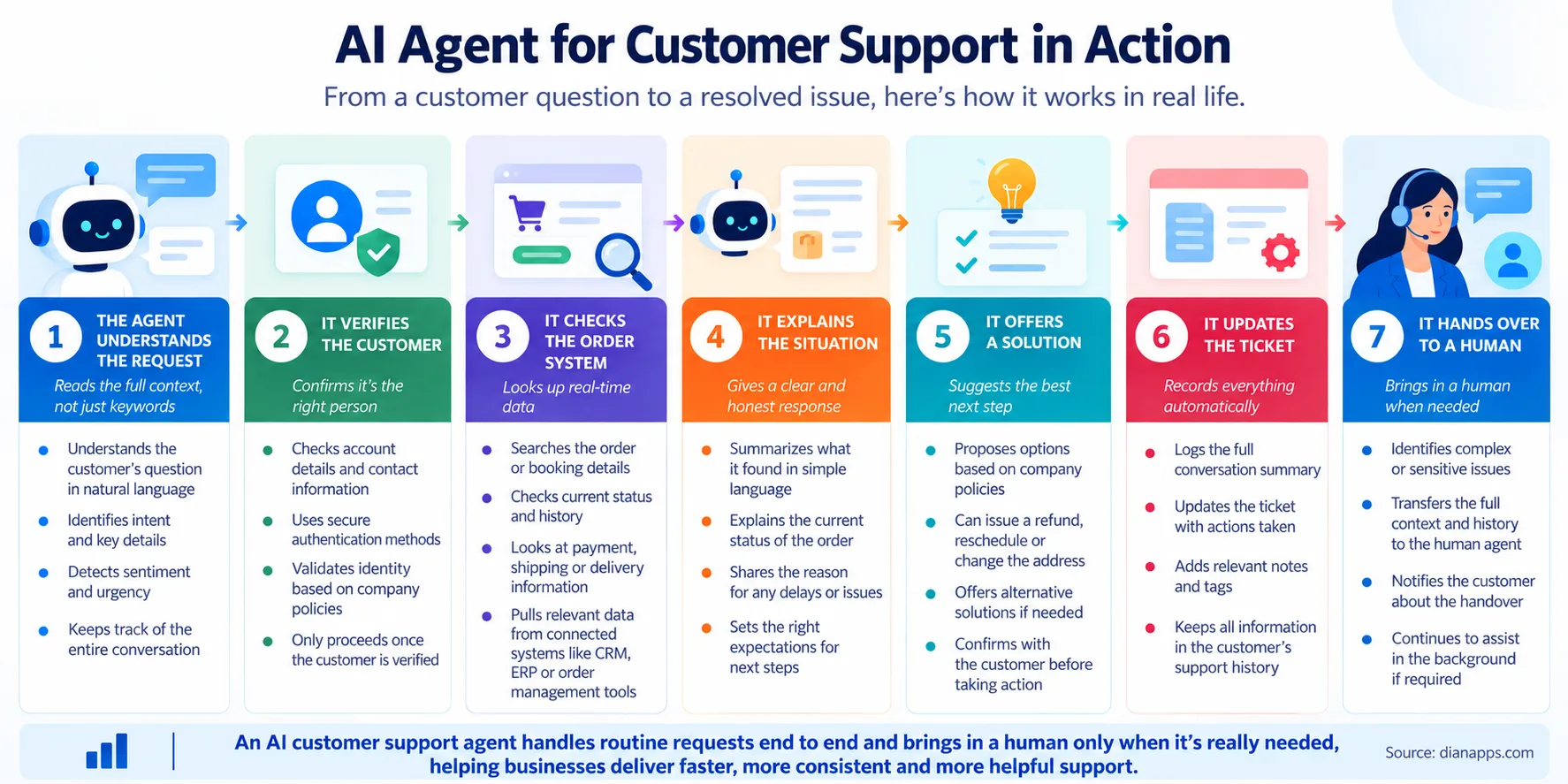
- The agent understands the request and recognises it as a delayed delivery issue with some frustration in the tone.
- It verifies the customer using their email or order number in a secure way.
- It checks the order system and the courier tracking to find the latest delivery status.
- It explains the situation clearly, sharing the new expected delivery date.
- It offers a solution, like a delivery fee refund or a discount code, based on your policy.
- It updates the ticket in your helpdesk with all the details and actions taken.
- It hands over to a human only if the customer is still unhappy or the case is outside the policy.
A human agent would usually be needing several minutes to switch between screens and do all of this, while the AI agent is doing it within seconds, any time of the day, and this is how businesses are reducing wait times while also keeping customers happy.
What Can AI Agents for Customer Support Handle?
AI agents for customer support are being used across almost every industry today, and depending on the business, they are usually handling a mix of these tasks, let’s take a look.
- Order and Delivery Tracking: Checking order status, delays and delivery updates.
- Refunds and Returns: Processing returns and refunds based on your policy.
- Account and Password Help: Resetting passwords and updating account details.
- Billing and Payments: Explaining invoices, failed payments and plan changes.
- Bookings and Appointments: Scheduling, rescheduling and cancelling bookings.
- Product Questions: Answering questions about features, sizes and availability.
- Technical Troubleshooting: Guiding customers step by step through common issues.
- ERP-Linked Queries: Checking stock, invoices and shipments for B2B customers.
What is common across all of these is that the questions are repetitive, high-volume and connected to your business systems, which is exactly where agentic AI for customer service is making the biggest difference.
Benefits of Agentic AI for Customer Service
When the use case is right, switching to agentic AI for customer service is bringing a number of real advantages for businesses, resulting in:
- Instant replies at any hour.
- Lower cost for each resolved ticket.
- Shorter queues and wait times.
- Consistent answers across channels.
- Support in multiple languages.
- Human agents focusing on complex cases.
- Real-time insights into customer issues.
Gartner has also predicted that by 2029, agentic AI will autonomously resolve 80% of common customer service issues without human intervention, leading to a 30% reduction in operational costs (Gartner, 2025), and this is why more and more businesses are now treating AI agents as a core part of their support strategy rather than a side experiment.
Planning to Build an AI Agent System?
Get expert guidance on choosing the right agents, orchestration pattern and tools for your business.
Best AI Agents for Customer Support in 2026
There are now many platforms offering AI agents for customer service, and the best AI agents for customer support are really depending on the helpdesk you are already using, your ticket volume and how much customisation you are needing, so here is a simple summary of the popular options for quick reference.
| Platform | Best For | Pricing Model |
| Fin (formerly Intercom) | Chat-first support teams | Per resolution |
| Zendesk AI Agents | Teams already on Zendesk | Seats plus per resolution |
| Salesforce Agentforce | Businesses on Salesforce Service Cloud | Per action, resolution or user |
| Freshdesk Freddy AI | Small and mid-sized support teams | Add-on to plans |
| Custom-Built AI Agent | Unique workflows and deep integrations | Build cost plus usage |
It is also worth knowing that the market is moving quite fast, as Salesforce agreed in June 2026 to acquire Fin, formerly Intercom, for around $3.6 billion and fold it into Agentforce, so it is a good idea to keep an eye on the roadmap and pricing changes before signing a long contract.
Ready-made platforms are great when your support processes are standard and your data is already living inside one helpdesk, but they are not suitable nor suggested for businesses with unique workflows, multiple internal systems or strict data rules, and choosing between a custom AI agent or an off-the-shelf tool is really one of the most important decisions in the whole journey.
How Much Does an AI Customer Service Agent Cost?
The cost of an AI customer service agent is one of the most confusing topics for business leaders, mainly because each platform is charging in a different way, but once the basic pricing models are clear, the picture is becoming much simpler.
| Platform or Option | Typical Pricing |
| Fin AI Agent | Around $0.99 per resolution, plus seats |
| Zendesk AI Agents | Around $1.50 to $2 per automated resolution |
| Salesforce Agentforce | $2 per resolution or around $0.10 per action |
| Custom-Built AI Agent | Build cost plus model and hosting usage |
On Zendesk, the Advanced AI add-on is running at around $50 per agent, with automated resolutions charged at roughly $1.50 on committed usage or $2 pay-as-you-go, while Agentforce is costing 10 cents per action on Flex Credits or $2 per resolved Help Agent conversation, along with per-user licenses from $5 to $550 a month.
For comparison, many teams are paying around $5 to $15 per ticket for human-handled support, which is why per-resolution AI pricing is looking attractive, but this also is making the bill grow with your volume and your resolution rate, so it is extremely crucial to model your real ticket numbers before committing. Custom-built agents are usually coming with a one-time development cost along with ongoing model, hosting and maintenance costs, but they are giving businesses full control over the workflows, data and integrations.
How AI Agents Integrate With Zendesk or Salesforce?
Most businesses are not replacing their helpdesk when they are adding AI agents, they are connecting the agent with the tools they are already using, and Zendesk and Salesforce are two of the most common ones.
With Zendesk, the AI agent is connecting through APIs and apps to read and create tickets, pull customer history, use your help center articles as its knowledge source and update ticket fields and tags after each conversation, while also handing over to human agents inside the same Zendesk workspace. Third-party agents are also working on top of an existing Zendesk setup, and Fin, for example, can be deployed on top of Zendesk or Salesforce as a standalone AI agent.
With Salesforce, Agentforce is working natively inside Service Cloud, using your CRM data, cases, knowledge articles and Flows to take actions, while custom agents are connecting through Salesforce APIs to read and update cases, contacts and orders. In both cases, the key is giving the agent access to only the data and actions it is needing, setting clear permissions and making sure each and every action is being logged for full visibility.
Planning to Build an AI Agent System?
Get expert guidance on choosing the right agents, orchestration pattern and tools for your business.
How to Scale AI Agents Across Contact Centers?
Launching an AI agent for one channel or one use case is quite simple, but knowing how to scale AI agents across contact centers is where most businesses are needing a proper plan, and the process usually looks like this:
- Start With High-Volume Use Cases: Pick the top five to ten repetitive questions first.
- Clean Up the Knowledge Base: Update help articles, policies and macros before training.
- Connect the Core Systems: Integrate the helpdesk, CRM, order and billing tools.
- Set Clear Handover Rules: Decide exactly when the agent passes cases to humans.
- Expand Channel by Channel: Move from chat to email, WhatsApp and then voice.
- Add Languages and Regions: Roll out to new markets once the base is stable.
- Train Human Agents: Help your team work alongside AI and review its work.
- Monitor in Real-Time: Track resolution rate, CSAT, cost per ticket and escalations.
This is why scaling is always working better step by step, as each new channel, region and use case is building on a system that is already proven, instead of switching everything on at once and hoping for the best.
Challenges of AI Agents in Customer Service
AI agents for customer service are powerful, but they are not completely free of risk, and knowing these challenges early is helping businesses plan better instead of reacting in panic later, such as:
- Wrong or Made-Up Answers: Agents are guessing when the knowledge base is weak.
- Poor Handover: Customers are getting stuck in loops without reaching a human.
- Data Privacy: Agents are handling personal and payment information.
- Unpredictable Costs: Per-resolution bills are growing with ticket volume.
- Integration Gaps: Agents are failing when systems are not connected properly.
- Customer Trust: Some customers are still preferring to speak with a human.
This is why guardrails, clear escalation paths and regular reviews are not optional extras, they are an essential part of each and every AI support setup that is facing real customers.
Best Practices for AI Agents in Customer Support
Teams that are getting the most out of AI agents for customer support are usually following a few common practices, and these are the ones that are making the most difference on the ground, let’s take a look.
- Keep your knowledge base updated, as outdated articles are leading to wrong answers.
- Always offer a human option, so that customers are never feeling trapped.
- Limit actions with clear rules, like refund limits and approval steps.
- Test and evaluate your AI agents, using real tickets and tricky edge cases before going live.
- Track resolution quality, not just the number of tickets closed.
- Be open with customers that they are chatting with an AI agent.
- Review conversations weekly, and keep improving answers and workflows.
Following these right from the beginning is helping businesses avoid the most common failures, while also keeping their AI customer service agent reliable as the volume is growing.
Ready to Put AI Agents to Work?
Discuss your workflow with our team and find out which AI agent setup fits your business best.
How DianApps Builds AI Agents for Customer Service?
DianApps, one of the best AI Agent Development Companies in USA, is helping startups and enterprises design and build AI agents for customer service that are actually resolving customer issues and not just sending them around in circles, and each and every project is starting with understanding your support workflows, ticket data and systems, so that we are able to tell you honestly whether a ready-made platform or a custom AI agent is the better choice.
From connecting the agent with Zendesk, Salesforce, ERP and order systems to setting up guardrails, human handovers and real-time monitoring, our team is handling the complete process under one roof, so that your AI agents are delivering hassle-free support from the very first day and are continuing to improve long after the launch.
Conclusion
AI agents for customer service are turning support from a long queue of waiting customers into instant, round-the-clock help that is actually solving problems, from tracking orders and processing refunds to troubleshooting issues and updating bookings, and this is definitely changing the way businesses are looking at their contact centers. At the same time, getting the real value out of an AI customer service agent is depending on a strong knowledge base, the right integrations, clear handovers to humans and careful cost planning, which is why the smartest approach is starting with a few high-volume use cases and scaling up step by step.
So if you are planning to bring agentic AI for customer service into your business, our AI development services team is always here to help you plan, build and scale it the right way from beginning until completion, we’ve got you covered.
 0 comments










Your email address will not be published. Required fields are marked *