















 0 comments





Key Takeaways:
- AWS is Amazon’s cloud computing platform, providing on-demand servers, storage, databases, networking, security, and AI services.
- Businesses use AWS to host websites and apps, store data, run analytics, build AI solutions, and improve disaster recovery.
- Core services include Amazon EC2, Amazon S3, Amazon RDS, AWS IAM, Amazon Bedrock, and Amazon CloudWatch.
- Pay-as-you-go pricing reduces upfront hardware costs, but budgets, billing alerts, and resource optimization are essential to control spending.
- AWS follows a shared responsibility model, making businesses responsible for configuring access, permissions, and data protection correctly.
- Start with a clear business goal, secure the account, select the right Region, and test a small workload before scaling.
Quick Answer: Amazon Web Services (AWS) is Amazon’s cloud computing platform that lets businesses access computing power, storage, databases, networking, and AI tools over the internet without maintaining their own physical servers. Companies use AWS to host applications, manage data, scale operations, and support innovation while paying for the resources they use.
For many years, businesses have been relying on their own servers to run everything, from the company website and emails to customer records and billing software, and for a long time this was working well enough. But anyone who has been through a website crash in the middle of a big sale, a server room overheating on a summer afternoon, or an IT team spending the entire weekend restoring lost files knows how stressful this setup can get, and how quickly a small technical issue is turning into lost sales, unhappy customers, and a poor impression before the customer has even reached the checkout page.
This is the reason why businesses/organisations are now moving away from owning hardware and are shifting their systems to the cloud, and the platform leading this shift is Amazon Web Services, better known as AWS. But what is AWS exactly, and why are so many business leaders trusting it with their most important systems? Well, let’s break it down.
What Is AWS?
AWS is Amazon’s cloud computing platform, which gives businesses on-demand access to servers, storage, databases, networking, security tools, and AI services over the internet, so that they don’t have to buy, set up, and maintain their own hardware. Instead of investing in a server room, hiring people to look after it, and paying for machines that sit idle half the time, businesses are simply logging into AWS, choosing the services they need, and paying only for what they actually use.
The easiest way to understand it is to think about the electricity in your office, as nobody is building their own power plant just to switch on the lights and run the computers; they connect to the grid and pay for the units they use. AWS is working in the same way for computing, where Amazon is running huge data centres across the world, and businesses are plugging into them through the internet, using as much or as little as they need, whenever they need it.
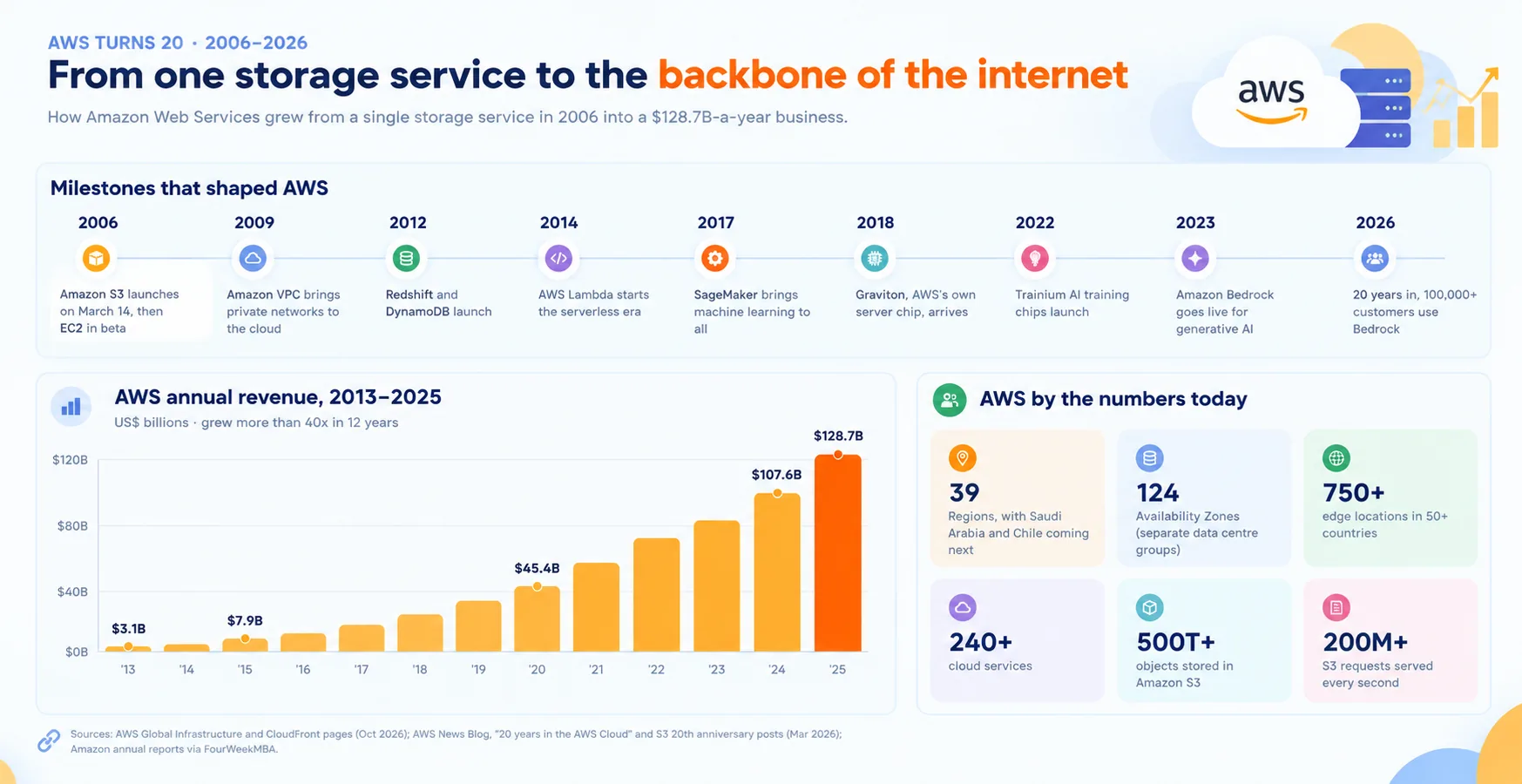
AWS is also not a small side project for Amazon, as it has grown into one of the most important parts of the company. In Q2 2026, AWS sales grew 37% year-over-year to $42.2 billion, with operating income rising to $16.6 billion from $10.2 billion a year earlier, and Amazon is now putting its annualised revenue run rate at $169 billion. It is also leading the global cloud market, with Synergy Research Group placing Amazon, Microsoft and Google at 28%, 20% and 15% of worldwide cloud infrastructure spending in Q2 2026.
This is why AWS is no longer seen as an experimental or risky choice for businesses, as it is the largest and most established cloud platform in the world, quietly running a large share of the apps, websites, and online stores we are using each and every day.
The Challenges of Traditional IT Infrastructure
Before understanding why AWS is becoming so popular, it is important to look at the problems businesses have been facing with the traditional way of running IT, where everything is sitting on servers that the company is buying and managing on its own.
Running your own servers usually comes with a long list of headaches, resulting in:
- Heavy upfront spending on hardware.
- Weeks of waiting for new servers to arrive.
- Paying for capacity that is mostly unused.
- Websites slowing down or crashing during traffic spikes.
- IT staff busy with maintenance instead of new projects.
- Risk of data loss from hardware failure or local disasters.
- Costly upgrades every few years.
Inefficiencies like these don’t just frustrate the IT team; they also slow down the entire business, as new products are taking longer to launch, customers are facing slow apps, and leaders are spending money on infrastructure that is not really helping the business grow. This is why modern businesses need smarter, more flexible infrastructure, and this is exactly where AWS is stepping in.
How Does AWS Work?
AWS runs its data centres across many countries and groups them into Regions, which are geographic locations like Mumbai, Sydney, the UAE, or Northern Virginia, and each Region is made up of multiple Availability Zones, which are separate data centres placed far enough apart so that if one is facing a problem, the others keep running. This is helping businesses keep their apps closer to their customers for faster loading, and also keep a backup copy of their systems ready in another zone, so that one failure is not bringing everything down.
For businesses serving customers in India, the Middle East, Australia and the US, AWS is offering local Regions that are making a real difference in speed and compliance. In India, AWS opened its Mumbai Region in 2016 and its Hyderabad Region in November 2022, and it is now putting an additional $13 billion into expanding data centre capacity in both locations. In the Middle East, AWS is running two Regions, one in Bahrain and one in the UAE, while in Australia it is running Regions in Sydney and Melbourne, and in the US it has several Regions, including its busiest one in Northern Virginia.
The way a business is actually using AWS day to day is quite simple, as the team is logging into the AWS Management Console, which is a web dashboard, choosing the services they want, setting them up within minutes, and then tracking performance and costs from the same place. Developers are also able to do all of this through code, which is helping them automate repetitive tasks and launch new environments in seconds.
And the best part is the pay-as-you-go model, where AWS is charging only for what is being used, whether that is by the second, by the hour, by the gigabyte stored, or by the number of requests. This not only removes the need for big upfront investments, but it also allows businesses to start small, test an idea with real customers, and then grow their usage step by step as the business is growing.
Core AWS Services Explained
AWS is offering a very long list of services, and new customers are able to explore more than 200 of them through the AWS Free Tier, which can feel overwhelming when you open the console for the first time. The good news is that most businesses need only a handful of core services to get started, and these fall into a few simple groups, so let’s take a look.
- Compute is the processing power that is running your apps and websites. Amazon EC2 gives you virtual servers to rent, where you choose the size, memory, and operating system and change them whenever needed, while AWS Lambda runs small pieces of code automatically whenever something happens, like a customer placing an order, without you having to manage any server at all.
- Storage is where your files and data are kept safely. Amazon S3 stores everything from product images and videos to invoices, backups, and log files, and it grows with your needs, so you are never running out of space, while Amazon S3 Glacier offers low-cost storage for old records that need to be kept for years but are rarely opened.
- Databases are holding the information your business is running on, like customer details, orders, inventory, and payments. Amazon RDS and Amazon Aurora are managing traditional databases like MySQL and PostgreSQL, taking care of updates and backups automatically, while Amazon DynamoDB is a fast database that is handling high-traffic apps like shopping carts, gaming leaderboards, and user sessions really well.
- Networking is deciding how your apps are connecting to the internet and to each other. Amazon VPC lets you build a private network inside AWS, Amazon CloudFront delivers your website content from locations closer to your users so that pages load faster, and Amazon Route 53 manages your domain names and directs traffic to the right place.
- Security is protecting your systems and data. AWS IAM is controlling who can access what inside your account, Amazon GuardDuty is watching for suspicious activity, AWS WAF and AWS Shield are protecting your apps from attacks, and AWS Key Management Service is handling the encryption of your data.
- AI and Machine Learning is the fastest-growing area right now. Amazon Bedrock is giving businesses access to generative AI models from Anthropic, Meta, Mistral, Cohere, DeepSeek, Stability, and Amazon’s own Nova family through one contract, which is making it much easier to build chatbots, AI assistants, and smart search, while Amazon SageMaker AI is helping data teams build and train their own models for things like demand forecasting and fraud detection.
- Analytics and Monitoring is helping businesses understand what is happening across their systems and their data. Amazon Redshift is analysing large amounts of business data, Amazon QuickSight is turning it into easy dashboards, and Amazon CloudWatch is tracking the health of your apps and sending alerts the moment something is slowing down.
Still wondering which AWS service would best suit you?
Connect with our team of AWS experts; we will analyze and assist you in the best possible way.
Here is a simple summary of these services for quick reference.
| AWS Service | What It Does | Business Example |
| Amazon EC2 | Virtual servers for rent | Running your website or app |
| AWS Lambda | Runs code without servers | Sending order confirmations |
| Amazon S3 | File and data storage | Storing product images and backups |
| Amazon RDS / Aurora | Managed databases | Keeping customer and order records |
| Amazon DynamoDB | Fast NoSQL database | Handling busy shopping carts |
| Amazon CloudFront | Content delivery | Faster website loading worldwide |
| AWS IAM | Access control | Deciding who can change what |
| Amazon Bedrock | Generative AI models | Building a support chatbot |
| Amazon SageMaker AI | Machine learning | Predicting demand or churn |
| Amazon CloudWatch | Monitoring and alerts | Getting notified of slowdowns |
And that is not all; AWS is also offering services for IoT, media streaming, gaming, contact centres, and much more, but these core services cover most of what a typical business needs in the early stages of its cloud journey.
What Is AWS Used For?
AWS is being used for almost every kind of digital work a business is doing today, from running a simple company website to powering complex AI platforms, and the reasons are not hard to see once you look at how businesses are actually using it.
The most common starting point is website and app hosting, where businesses are moving their websites, web apps, and mobile app backends to AWS so that they can handle sudden traffic during sales, launches, or marketing campaigns without crashing, and then scale back down when things are quieter. For eCommerce brands, this is really important, as a slow or broken checkout page during a festive sale is not just a technical issue; it is directly costing revenue and affecting how customers see the brand.
Data storage and backup is another big use case, where businesses are keeping their files, documents, and media on AWS, often with copies in more than one location, which protects them from hardware failure, accidental deletion, and local disasters. Many businesses are also using AWS for disaster recovery, keeping a ready-to-run copy of their critical systems in the cloud instead of maintaining an expensive second data centre that sits unused most of the year.
AWS is also helping businesses make better decisions through data analytics, as companies are bringing data from their apps, CRM, sales and marketing tools into one place and turning it into dashboards that leaders/managers are checking every day. On top of this, AI and machine learning are now becoming a major use case, with businesses building chatbots, recommendation engines, document processing tools, and fraud detection systems on AWS, without having to buy expensive hardware of their own.
Other popular uses include:
- Streaming videos and audio to users worldwide.
- Running multiplayer games with low latency.
- Creating test environments for software development.
- Running internal business tools and ERP systems.
- Connecting and managing IoT devices.
This is why AWS is no longer a tool used only by the IT department; it has become the foundation on which marketing, sales, operations, and customer experience are all running together.
Who Is Using AWS?
A lot of business owners are still assuming that AWS is only meant for big tech companies with huge budgets, but the reality is quite different, as AWS is being used by startups, small businesses, large enterprises, and even government organisations, each in its own way.
Startups are using AWS because it allows them to launch their product without spending heavily on infrastructure, test their idea with real users, and grow their setup only when customers are actually coming in. Small and mid-sized businesses are moving their websites, accounting systems, file storage, and customer apps to AWS to get rid of ageing office servers, reduce maintenance work, and get enterprise-level security and reliability without building it themselves.
Large enterprises are running their most critical systems on AWS too, and one of the best-known examples is Netflix, which is using AWS to stream billions of hours of content every month and to run the analytics platform behind its global service. Netflix has also moved terabytes of mission-critical data across more than 100 database clusters to Amazon Aurora with almost no downtime, which is showing how much trust large businesses are placing in the platform.
Banks, insurance companies, healthcare providers, and government departments are also using AWS, often with additional controls and dedicated environments like AWS GovCloud (US), which is built for sensitive government workloads in the United States. AWS is also investing in local talent, especially in markets like India, where it has trained more than seven million people in cloud skills, and this is making it easier for businesses to find people who already know how to work with the platform.
The interesting thing here is that the same infrastructure that is supporting a global streaming giant is also available to a small startup launching its first app, with each one paying only for what it is using, and this is one of the biggest reasons behind the popularity of AWS across industries.
The Benefits of AWS for Businesses
Switching to AWS brings a number of real advantages for businesses, and these go far beyond just saving money on hardware, resulting in:
- Lower upfront investment.
- Scaling up or down within minutes.
- Paying only for what is used.
- Faster launch of new products and features.
- High availability across multiple data centres.
- Built-in security and compliance tools.
- Ready access to AI and analytics services.
- Global reach through Regions in many countries.
- Less time spent on hardware maintenance.
This is helping businesses move faster and experiment more freely, as the IT team is no longer spending its days fixing servers and is instead focusing on projects that are actually growing the business. This is also helping customers, as apps are loading faster, staying available during busy periods, and getting new features more often, which is improving the overall customer experience and brand perception.
AWS vs Traditional Servers
To really understand the value AWS is bringing, it is helpful to compare it side by side with the traditional setup where a business is owning and managing its own servers.
| Feature | Traditional Servers | AWS |
| Upfront Cost | High | Low |
| Setup Time | Weeks to months | Minutes |
| Scaling | Buy more hardware | Few clicks |
| Maintenance | Your own team | Handled by AWS |
| Disaster Recovery | Needs a second site | Multiple zones and Regions |
| AI Tools | Costly to set up | Ready to use |
| Global Reach | Limited | Worldwide |
| Cost Control | Fixed, even when unused | Flexible, needs monitoring |
The table makes it clear that AWS is giving businesses much more speed and flexibility, but the last row is also a reminder that cloud costs are not fixed anymore, and they need regular attention to stay under control.
How AWS Is Powering AI for Businesses
AI has become one of the biggest reasons why businesses are looking at AWS in 2026, and Amazon is putting a lot of focus on it. The annual revenue run rate of the AWS AI business has crossed $25 billion, growing at triple-digit percentages year over year, and the wider market is moving in the same direction, with Synergy reporting that GenAI-specific cloud services are growing at 165% year over year.
AWS is also building close partnerships with leading AI companies, as Amazon is an investor in Anthropic, and its Q2 2026 results included $53.4 billion of non-operating pre-tax income, mainly from those investments. On top of this, AWS has signed a new partnership with OpenAI that includes a revenue share, which is showing that AWS is positioning itself as a place where businesses can use many different AI models instead of being tied to just one.
For business leaders, this means that AI features like smart search, chatbots, document summarisation and personalised recommendations are becoming much more practical to build, as the models, computing power and security controls are all sitting inside the same platform where the business data already is. If you are also deciding whether the AI in your app should run on the device or in the cloud, our guide on on-device AI vs cloud AI explains both options in detail.
Understanding AWS Pricing
AWS pricing is one of the most confusing topics for business leaders, mainly because there is no single price list and each service is charged in its own way, but once the basic models are clear, the picture becomes much simpler.
AWS is offering a few different ways to pay, depending on how predictable your usage is, including:
- On-Demand pricing with no commitment.
- Savings Plans for consistent usage over one or three years.
- Reserved Instances for steady, long-running servers.
- Spot Instances for low-cost, interruptible tasks.
On-Demand is the most flexible option and is perfect for testing and unpredictable workloads, while Savings Plans and Reserved Instances suit businesses that know they will be running certain systems for a long time, and Spot Instances are really useful for tasks like batch processing that can handle interruptions.
For businesses that are just exploring, AWS is also offering a Free Tier, where new customers get $100 in credits at sign-up and can earn up to $100 more by trying services such as Amazon EC2 and Amazon Bedrock. The free account plan is ending after 6 months or when the credits run out, whichever happens first, and more than 30 services are always free within monthly limits. This is great for learning and testing ideas, but it is not suitable or recommended for running a full production business on it.
Your monthly bill usually depends on the size and number of servers, how long they are running, how much data you are storing, how much data is going out to the internet, the database size, the Region you are using, and any paid support plan. The biggest surprises, however, are rarely coming from the main servers; they are coming from data transfer charges, forgotten test environments, idle resources, old storage snapshots piling up, and servers that are much bigger than they need to be. These small leaks don’t just add up quietly every month; they also make it difficult for leaders to understand where the money is actually going.
This is where AWS’s own cost tools are really helping, as AWS Budgets lets you set spending limits and alerts, AWS Cost Explorer is showing where the money is going, and AWS Compute Optimizer is pointing out servers that can be downsized. Setting these up from the very first day is definitely a must, because cloud bills are growing with business growth, but they are also growing quietly with poor planning.
Security and Compliance on AWS
Security is often the first worry business leaders raise when they think about moving to the cloud, and it is a fair worry, as putting customer data, payment details and business records outside your own office can feel uncomfortable at first.
AWS is following what is called a shared responsibility model, where AWS is securing the physical data centres, hardware and core infrastructure, while your business is responsible for user access, passwords, permissions, configurations and data protection. This means AWS is giving you a very secure foundation, but how safe your setup really is will depend on how well your team is configuring it, and most cloud security incidents are actually happening because of mistakes on the customer side, like weak passwords, missing multi-factor authentication, or storage left open to the public.
On the compliance side, AWS is holding major global certifications like ISO 27001, SOC 1 and SOC 2, and PCI DSS for payment data, along with HIPAA-eligible services for healthcare and dedicated environments like AWS GovCloud (US) for government workloads. For businesses in India, the UAE, and Australia, having local Regions is also making it easier to keep data within the country and meet local data protection rules, such as India’s DPDP framework.
The Risks of Using AWS
AWS is a powerful and reliable platform, but no cloud is completely free of risk, and knowing these risks early helps businesses plan better instead of reacting in panic later.
The first risk is outages, as even the biggest cloud providers face downtime from time to time. On October 20, 2025, a DNS issue inside DynamoDB in AWS’s busiest Region, us-east-1, set off a chain reaction that took down streaming apps, online games, and smart devices like Alexa speakers and Ring doorbells, and it took around 15 hours to fully resolve. This was a reminder that even businesses running in other AWS Regions can still depend on us-east-1 for certain background operations, and the lesson here is not to avoid AWS, but to spread your most critical systems across multiple Availability Zones or Regions, so that one failure is not stopping your entire business.
The second risk is security misconfiguration, where a wrong setting on your side is exposing sensitive data, and this is one of the most common problems for businesses that are moving to the cloud without proper guidance. The third risk is rising costs, as the same flexibility that is making AWS so easy to use is also making it easy to overspend when teams are launching resources quickly and forgetting to switch them off.
The fourth risk is complexity, as AWS has hundreds of services and many ways of doing the same thing, which can confuse teams that are new to the cloud and lead to the wrong choices early on. And the fifth risk is vendor lock-in, where the more a business is building on AWS-specific services, the harder and costlier it is becoming to move to another provider later.
| Risk | What It Means | How to Reduce It |
| Outages | Services going down in a Region | Use multiple zones or Regions |
| Misconfigurations | Data exposed by wrong settings | Security reviews and MFA |
| Rising Costs | Bills higher than expected | Budgets, alerts, and right-sizing |
| Complexity | Wrong services chosen | Expert guidance from the start |
| Vendor Lock-In | Difficult to move later | Plan portability early |
The good news is that each and every one of these risks is manageable when it is considered right at the start, and this is why planning is really the most important part of any AWS journey.
How to Get Started With AWS
Getting started with AWS does not have to be complicated or stressful, as long as the business is following a clear plan instead of jumping straight into building, and the process usually looks like this:
- Defining what you want to move or build first.
- Creating an AWS account and choosing a plan.
- Securing the account with multi-factor authentication.
- Setting up budgets and billing alerts.
- Choosing a Region close to your customers.
- Starting with one small pilot workload.
- Planning the migration approach for existing systems.
- Following the AWS Well-Architected Framework.
- Scaling up once the pilot is running smoothly.
The first step is really about being clear on your goal, whether that is moving an existing website, launching a new app, setting up backups, or building an AI feature, because this goal determines which services you need and how your setup should look. Once the account is created, securing it should come before anything else, which means turning on multi-factor authentication, creating separate users for each team member with only the access they need, and keeping the main root account away from daily work.
Choosing the right Region is also making a big difference; for example, picking Mumbai or Hyderabad for customers in India or the UAE Region for businesses that need their data to stay in the UAE. And instead of moving everything at once, it is always better to start with one small and less critical system, learn from it, fix any gaps, and then move bigger systems with more confidence.
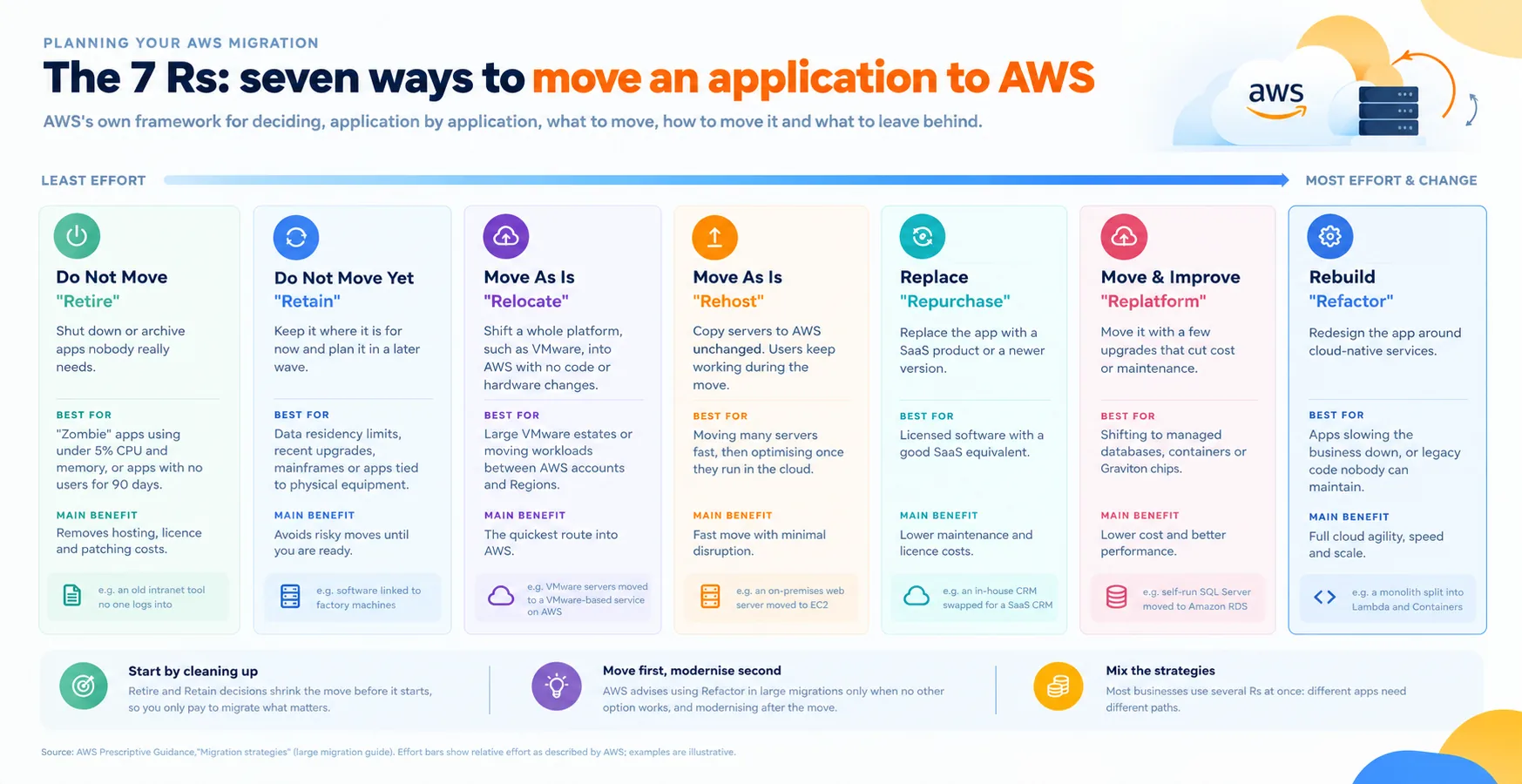
For businesses moving existing systems, AWS follows a set of migration strategies known as the 7Rs, which include moving an app as it is, making small improvements while moving it, or rebuilding it fully for the cloud, and the right option depends on the age, importance, and complexity of each system. Along with this, the AWS Well-Architected Framework offers best practices built around operational excellence, security, reliability, performance efficiency, cost optimisation, and sustainability, which helps businesses build setups that are secure, efficient, and ready to grow.
Not every business has an in-house cloud team, and that is completely fine, as working with experts offering AWS Consulting services makes the entire journey much smoother, from planning the architecture and handling the migration to managing costs, security, and performance on an ongoing basis. Experienced partners are also able to help businesses explore programs like the AWS Migration Acceleration Program (MAP), which can help reduce part of the migration cost. And if you are still figuring out what to look for in such a partner, our guide on hiring a cloud-managed service provider covers it in detail.
Common Mistakes Businesses Make on AWS
Even with the best intentions, many businesses are making a few avoidable mistakes in the early days of their AWS journey, such as:
- Using the root account for everyday work.
- Skipping multi-factor authentication.
- Not setting budgets or billing alerts.
- Choosing servers far bigger than needed.
- Leaving test environments running.
- Keeping everything in a single Availability Zone.
- Moving all systems at once without a pilot.
- Having no backup and recovery plan.
Each of these mistakes is easy to prevent with a little planning, and avoiding them early is saving a lot of money, stress, and rework later on, which is why getting the basics right from day one just cannot be ignored.
Is AWS the Right Choice for Your Business?
AWS is a strong choice for businesses that want the widest range of services, a proven and mature platform, a large talent pool, and data centres across the world, and it suits startups, growing businesses, and large enterprises alike. However, it is not automatically the perfect fit for everyone, as businesses that are heavily invested in Microsoft products are sometimes finding Azure more cost-effective because of licensing benefits, while data- and AI-first businesses are often looking at Google Cloud as well.
The right decision really depends on your existing systems, your budget, your team’s skills, the markets you are serving, and your plans for AI and data. If you are comparing your options before making the final call, our guide on the top cloud service providers in 2026 is giving you a wider view of the market.
Final Thoughts
AWS has grown from a simple idea of renting out computing power into the platform that is quietly running a huge part of the apps, websites, online stores, and AI tools we are all using every day, and for business leaders, understanding it is no longer something to leave only to the IT team. It is giving businesses of every size access to the same infrastructure that global brands are relying on, with the freedom to start small, test new ideas and grow at their own pace, while also opening the door to AI, analytics and global reach that were once possible only for the biggest companies.
At the same time, getting the real value out of AWS depends on careful planning around costs, security, and reliability from the very first day, and the businesses that are taking the time to plan properly are the ones enjoying the benefits without surprise bills or sleepless nights. So whether you are moving an old system to the cloud, launching a new app, or starting your first AI project, understanding AWS is definitely going to help you make smarter and more confident decisions, and if you need a helping hand along the way, our team is always here to guide you from beginning until completion.
Ready to Move Your Business to AWS?
From choosing the right services and setting up security to planning a smooth migration and keeping your cloud costs under control, our AWS experts are helping businesses get started the right way.
 0 comments










Your email address will not be published. Required fields are marked *