















 0 comments





Key Takeaways:
- A simple app takes about 2 to 4 months, a mid-complexity app takes 4 to 8 months and a complex app takes 8 to 12 months or even more to be developed.
- Scope clarity is changing the timeline more than the team size, a fixed and ranked feature list is beating a bigger team every time.
- A utility app and a fintech platform can differ by 6 months or more, because of the integrations, security and compliance work involved.
- Design and development are taking most of the time, but discovery, testing and store release are adding 4 to 8 weeks that many plans are forgetting.
- One cross-platform codebase is usually saving 20 to 30% of build time compared with two separate native apps, though the saving is varying from project to project.
Quick Answer: Most apps are taking 2 to 12 months from the first brief to the store release. A simple app or MVP is taking 2 to 4 months, a medium app with accounts, payments and an admin panel is taking 4 to 8 months and a complex app such as fintech, healthcare or a marketplace is taking 8 to 12 months or more. A team offering mobile app development services can give you a firmer estimate once the scope is written down.
Every founder/business owner is asking the same first question and every agency is giving the same unhelpful reply, “It depends.” Well, that reply is accurate, but it is not helping you plan a budget, launch a campaign or prepare for a funding round, which is extremely crucial when you are planning a product launch.
So, how long does it take to build a mobile app, with real numbers and the reasons behind the time it is consuming? In this blog, we are covering the timeline by app type and by stage, the factors that are stretching a schedule, how the Android and iOS release timing differs and the genuine ways to reduce the mobile app development timeline, let’s take a look.
How Long Does It Take to Build a Mobile App?
A normal mobile app is taking between 2 and 12 months to be developed, depending on the scope and complexity. The ranges you see below are assuming a pre-defined brief, a team that is working full time on the project and a first release that is tested and live in the stores.
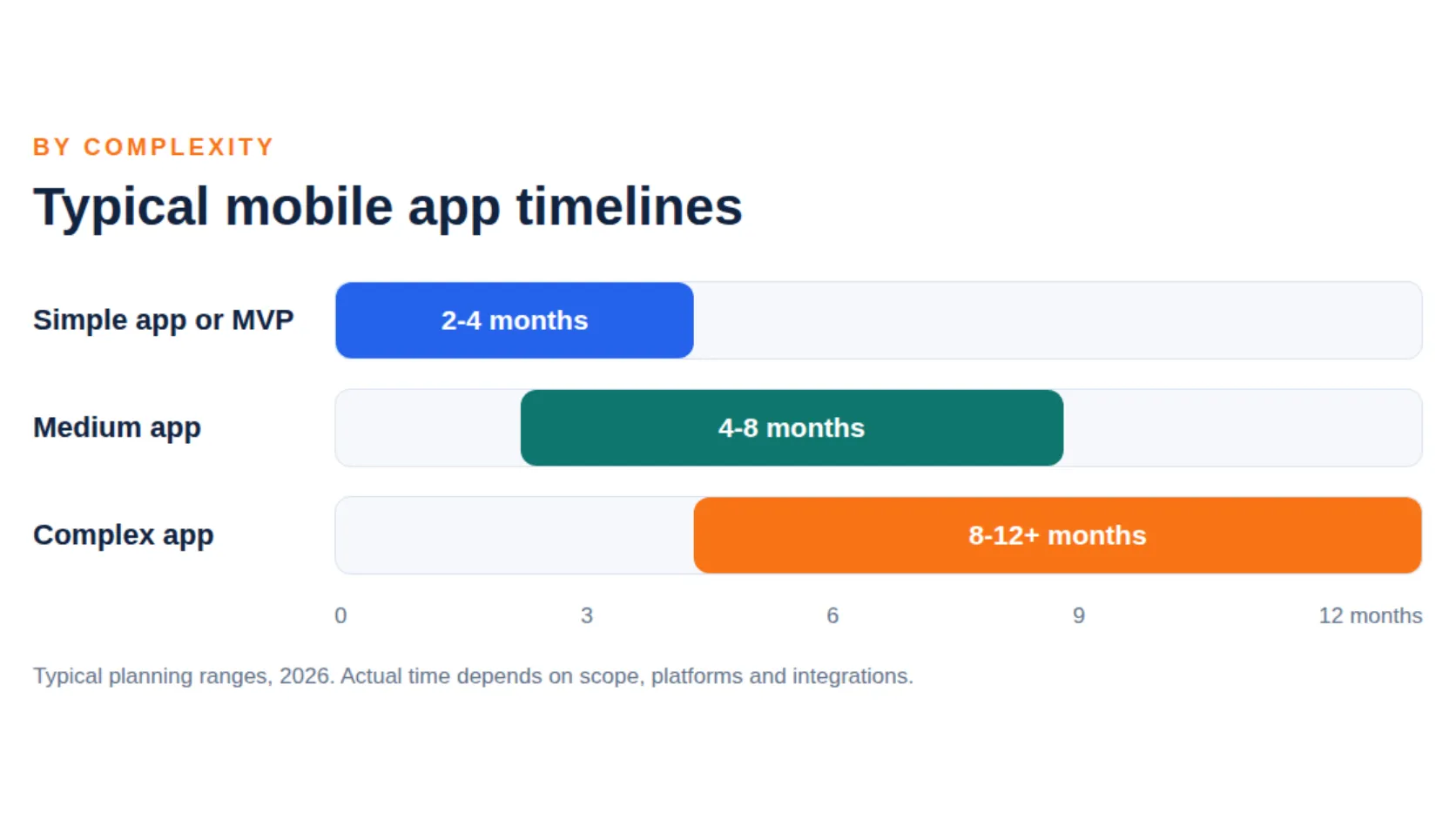
The timeline is depending primarily on three things, how many features you are building, how many platforms you are targeting and how many other systems the app must connect to. Everything else, from design improvements to team location, is moving the schedule by weeks and not months.
These are planning ranges and not a fixed global timeline, as a tightly scoped complex app can be developed sooner and a simple app, on the other hand, can drag on for twice as long.
| Complexity | Typical timeline | What it usually includes |
|---|---|---|
| Simple app or MVP | 2 to 4 months | Core user flow, basic accounts, a few screens, one platform or one cross-platform codebase |
| Medium app | 4 to 8 months | Accounts, payments, notifications, an admin panel, several integrations, both platforms |
| Complex app | 8 to 12+ months | Real-time features, multiple user roles, regulated data, heavy integrations, custom backend |
Mobile App Development Timeline by App Type
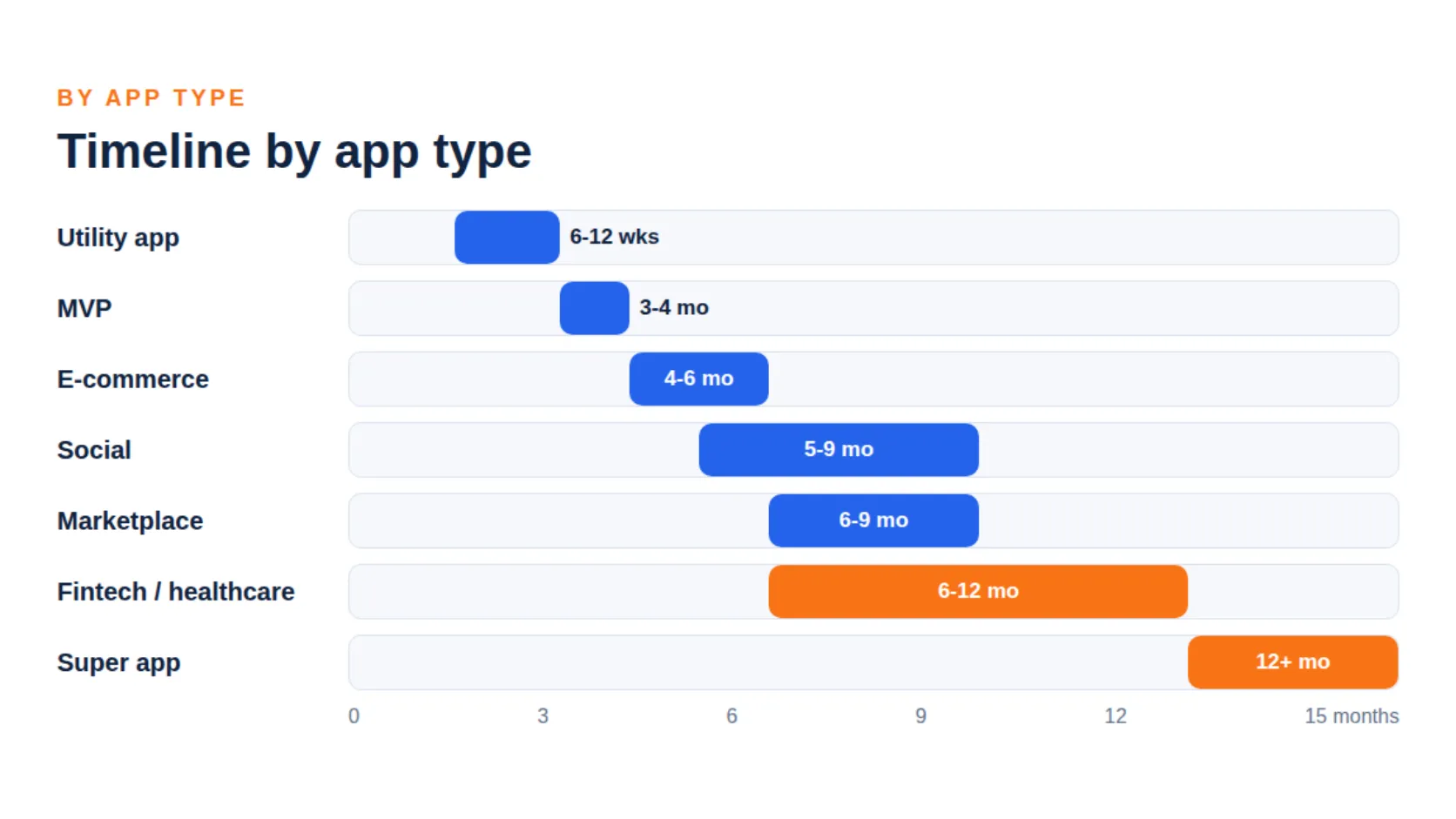
The type of app is the fastest way to narrow down your estimate, because it is telling you which integrations, security work and extra apps are coming with the project.
Simple and MVP apps
A simple app is great at doing a single job well, you can think of a calculator, a tracker or a simple booking form, while an MVP is adding just enough to test the business idea with real users. Our guide to MVP development is explaining how to choose the features that are earning a place in version one.
E-commerce and on-demand apps
These are looking simple on the surface but are much more complicated behind the scenes, imagine a food delivery or ride platform, it is needing three products at once, the customer app, the provider app and the admin dashboard. This is why a marketplace is taking noticeably longer than a shopping app with a similar number of screens.
Fintech and healthcare apps
Regulated apps are spending more time on security, documentation and review than on the screens themselves. You should be planning for compliance checks such as PCI DSS for card payments, HIPAA for US health data or GDPR for European users, and since these reviews are sitting on the critical path, they cannot be rushed.
AI-powered apps
An AI feature can be quick to prototype but slow to make reliable. The build itself may be taking a few weeks, while testing for wrong answers, bias and edge cases is taking much longer. Our AI development services page is covering how teams are approaching that work.
| App type | Typical timeline | Why it takes this long |
|---|---|---|
| Utility or single-purpose app | 6 to 12 weeks | Few screens and little backend work |
| MVP for a startup | 3 to 4 months | Only the core flow is built but design and testing still apply |
| E-commerce or retail app | 4 to 6 months | Catalogue, cart, payments, order tracking and an admin panel |
| Social or community app | 5 to 9 months | Profiles, feeds, messaging, moderation and notifications |
| On-demand or marketplace app | 6 to 9 months | Usually a customer app, a provider app and an admin panel |
| Fintech app | 6 to 12 months | KYC, secure payments, fraud checks and compliance reviews |
| Healthcare app | 6 to 12 months | Privacy rules, secure data handling and audit requirements |
| Enterprise app | 4 to 9 months | Single sign-on, legacy system integration and security review |
| AI-powered app | 3 to 8 months | Model selection, data pipelines, testing for accuracy and safety |
| Mobile game | 6 to 18 months | Art, game design, physics, balancing and live operations |
| Super app | 12 months or more | Many services under one login, built and released in phases |
Timeline by Development Stage
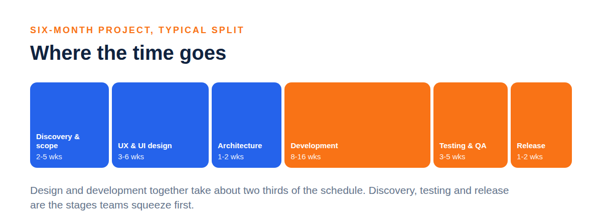
Mobile application development is moving through eight stages and each one is having its own realistic duration. The table below is showing a typical split for a medium app of about six months.
| Stage | Typical duration | What happens |
|---|---|---|
| 1. Discovery and strategy | 1 to 3 weeks | Goals, users, competitors and success metrics |
| 2. Requirements and scope | 1 to 2 weeks | Feature list, priorities and a first-release cut |
| 3. UX and UI design | 3 to 6 weeks | Wireframes, visual design and a clickable prototype |
| 4. Architecture and setup | 1 to 2 weeks | Tech stack, data model, APIs and environments |
| 5. Development | 8 to 16 weeks | Sprints for the app and the backend, built in parallel |
| 6. Testing and QA | 3 to 5 weeks | Functional, device, performance and security checks |
| 7. Release | 1 to 2 weeks | Store listing, submission, review and staged rollout |
| 8. Post-launch support | Ongoing | Monitoring, fixes, updates and new features |
Source: typical planning ranges used across the industry, 2026.
Design and development together are taking about two thirds of the schedule. Discovery, testing and release are the stages that are getting squeezed first, and squeezing them is exactly what is producing rework after the launch.
Discovery and requirements: 2 to 5 weeks
This is the cheapest time in the entire project, as decisions made here are costing only a conversation to change. The same decision, if discovered during development, is costing weeks of rework.
Design: 3 to 6 weeks
Designers are mapping the user flows, building wireframes and producing a prototype that real users can tap through. Testing this prototype before the coding starts is one of the most reliable ways to save time later.
Development: 8 to 16 weeks
Most of the calendar time is sitting here, with the work moving in sprints of one to two weeks and the frontend and backend running in parallel. Adding developers is helping only until the work cannot be split any further, after that, each new person is just adding coordination cost.
Testing: 3 to 5 weeks
Testing is covering features, real devices, speed and security, and it should be running alongside development with a final round before the release. Android is needing extra time here because of the number of device and OS combinations.
Release: 1 to 2 weeks
Preparing store listings, screenshots, privacy disclosures and builds is taking longer than most people are expecting. After that, the app is waiting for the store review, which we are covering below.
What Makes a Mobile App Take Longer
There are eight factors that are causing most of the schedule slips, and checking them against your plan is the quickest way to find out whether your estimate is honest or not, let’s take a look.
- Number of features: Each feature is adding design, build and test time, and the work is compounding because features are interacting with each other.
- Platforms: Two native apps are needing two builds, whereas a cross-platform framework such as Flutter or React Native is sharing most of the code.
- Integrations: Each and every third-party system, such as a payment gateway, CRM or ERP, is adding work and depending on someone else’s documentation and uptime.
- Backend scope: Admin panels, analytics, user roles and scaling are often taking as long as the app itself.
- Design depth: Custom animations and detailed brand work are taking longer than standard components.
- Compliance: Regulated sectors are adding security work, documentation and external reviews.
- Changing scope: Adding features mid-project is the most common cause of delay, as each change is touching design, code and tests.
- Slow feedback: Sprints are stalling when stakeholders are taking a week to approve a screen, and fast decisions are saving more time than extra developers.
Late changes are costing far more time than early ones. A feature moved at the design stage is costing hours, but the same feature moved during testing can cost weeks.
Android vs iOS: Does the Platform Change the Timeline?
Building for one platform is faster than building for two, but the difference between Android and iOS themselves is smaller than most people are thinking. The real time difference is coming from the approach that you are choosing.
Native development means two codebases, Android application development is using Kotlin and Jetpack Compose, while iOS is using Swift and SwiftUI. Teams are building each app separately, so the build effort is rising, even though the design work is shared. Cross-platform development with Flutter or React Native, on the other hand, is serving both stores from one codebase and usually trimming a meaningful share of the build time.
Testing and release are where the two platforms are differing. Android app development is needing wider device testing because of the range of phones and OS versions in use, whereas iOS has fewer devices to cover but Apple’s review process is needing planning time. You can read more on each route on our Android app development and iOS app development pages.
Need a Timeline for Your Mobile App?
Get a realistic development estimate based on your app’s features, platforms and scope, without any guesswork.
App store review times
Apple states that App Review typically reviews at least 50% of submissions in less than 24 hours and 90% in less than 48 hours (Apple Developer, App Review, 2026). However, rejections are adding days, so first-time submissions are definitely deserving a buffer.
Google is handling new developer accounts differently. A new personal Google Play developer account must run a closed test with at least 12 testers opted in for at least 14 days before it can apply for production access, and Google says that the review usually takes seven days or less (Google Play Console Help, 2026). Organization accounts are not subject to this rule, but if you are a founder publishing under a personal account, you should add at least three weeks to your launch plan.
And that is not all, Google is also moving its publishing rules each year. From August 31, 2026, new apps and updates on Google Play must target Android 16 (API level 36) or higher, with an extension available until November 1, 2026 (Android Developers, Google Play target API requirements, 2026). This is why it is extremely crucial to check the current requirement before you set your release date.
How Team Setup Changes the Schedule
Who is building the app is changing how quickly the work starts, as much as how quickly it finishes.
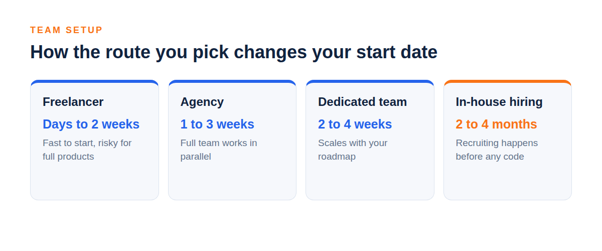
Hiring is the hidden delay here. If you are planning to hire mobile app developers directly, you should count the recruitment time before the project clock even starts. Our guide on how to hire developers for a startup is explaining what to expect, and IT staff augmentation is a quicker way to add capacity. If you are choosing between routes, our guide to choosing an AI mobile app development company is listing the questions that matter when you are comparing partners.
An app development agency is usually starting the fastest because the designers, developers and testers are already in place, while a dedicated team is giving a similar speed with more day-to-day control.
| Route | Time to start | Speed once started | Watch out for |
|---|---|---|---|
| Mobile app development company or agency | 1 to 3 weeks | Fast, a full team works in parallel | Agreeing scope before the contract |
| Dedicated team | 2 to 4 weeks | Fast, scales up as the roadmap grows | Needs a product owner on your side |
| Freelancers | Days to 2 weeks | Fast for small tasks, slow for full products | One person is a single point of failure |
| In-house hiring | 2 to 4 months | Slow at first, steady later | Recruiting delay before any code is written |
How to Build a Mobile App Faster
Speed is coming from removing the waiting and rework, not from asking people to type faster. These changes are shortening the schedule without lowering the quality, resulting in a faster and smoother launch:
- Write A One-Page Brief: Cover users, platforms, integrations, budget and launch date, this alone is removing weeks of back and forth.
- Cut Version One Hard. Launch with the features that are proving the idea, everything else is going into release two.
- Choose Cross-Platform When It Fits: One codebase for both stores is often saving a meaningful share of build time.
- Prototype Before You Code: Test a clickable prototype with five real users and fix the confusing screens first.
- Decide Fast: Name one person who can approve the designs within a day.
- Use Proven Components: Authentication, payments and notifications are having reliable ready-made services, and custom builds of these are rarely paying off.
- Test As You Go: Running QA in each sprint is preventing a long bug-fixing stretch at the end.
- Release In Stages: A small rollout is finding problems early without delaying the main launch.
A focused MVP is the single most reliable way to shorten the time to launch. It is getting the product in front of users in 2 to 4 months and letting their feedback decide what gets built next. Our post on what makes Flutter ideal for MVP development is showing how one framework choice is speeding up that route.
Why Cutting Corners Backfires
Teams under pressure are usually cutting testing, discovery or design, and the calendar is looking better for a few weeks. Then the bugs are showing up in production, the first reviews are poor and the team is spending all the saved time on emergency fixes, which is also affecting the brand perception.
Custom mobile app development is rewarding patience at the start. Skipping discovery is tending to produce a product that is built well but aimed at the wrong problem, and skipping QA is tending to produce one-star reviews that are hard to recover from. So, if a vendor is promising an unusually short timeline, ask them which stage they have removed.
If cost is your main concern as well as time, our guide on how much it costs to build an app is showing how time and budget are moving together.
Common Timeline Mistakes
- Estimating only development time: Design, testing and release can add 8 to 12 weeks that are never appearing in a quick quote.
- Forgetting store review: Plan for the review time and a possible rejection before you fix your launch date.
- Ignoring account setup: Developer accounts, certificates and privacy disclosures are taking time and cannot be started at the last minute.
- Adding scope mid-sprint: Every new feature is pushing the date back and the effect is larger than it looks.
- Assuming a bigger team is faster: Past a certain size, more people are meaning more coordination and more delay.
- Leaving maintenance out of the plan: An app is needing ongoing updates, so budget time for them right from the launch day.
If you are still deciding whether to build at all, our walkthrough of building your own app is a good place to start, and for a wider view of the field, you can see our guide to what mobile application development involves.
Quick Reference Checklist
-
- Write a one-page brief with users, platforms, integrations, budget and launch date.
- Pick your app type and compare it with the timeline table above.
- Rank the features and move everything non-essential to release two.
- Decide between native and cross-platform before the design starts.
- Prototype and test with real users before the development begins.
- Add 8 to 12 weeks to any developer estimate for design, testing and release.
- Set up developer accounts, certificates and privacy disclosures early.
- Plan for store review time and for the Google Play closed-test period on personal accounts.
- Name one decision-maker who is answering within a day.
- Plan monitoring and updates for the months after the launch.
Ready to Build Your Mobile App?
Discuss your app idea with our team and plan your next steps with confidence.
How DianApps Plans Mobile App Timelines
DianApps, a mobile and AI app development company, is building Android, iOS, Flutter and React Native apps for startups and established businesses alike. Each and every project is starting with a discovery phase that is turning your idea into a scoped and ranked feature list, and that scope is what is making the timeline reliable.
Design, development, QA and DevOps are sitting with one team, so there are fewer handovers and fewer places for a schedule to slip. The same team is also delivering wider application development services, including backends and AI features, so the app and the systems behind it are moving at the same pace.
If you want an estimate for your own idea, send us your brief, and we will give you a range, explain what is driving it and tell you plainly whether a smaller first release would get you to the market sooner.
Final Note
Asking how long it takes to build a mobile app is really asking how clear your plan is, as the calendar is following the scope and not the other way round.
So, write the brief, cut version one to the core, protect the time for design and testing and plan for the store review. If you would like a team to put a timeline on your idea, explore our mobile app development services or send us your brief for a free quote, we’ve got you covered.
 0 comments










Leave a Comment
Your email address will not be published. Required fields are marked *