















 0 comments





Figma’s stock dropped 12% in two days. That’s what happened when Google unveiled the latest version of Stitch AI on March 18, 2026 (CNBC, 2026). A free AI tool that turns plain English into polished UI designs, and now it listens to your voice, too.
Google originally acquired Galileo AI in mid-2025 and relaunched it as Stitch under Google Labs. The initial version debuted at Google I/O 2025. But the March 2026 update? That’s the one that got everyone’s attention. Voice Canvas, Vibe Design, an AI design agent, and exportable HTML/CSS code, all at zero cost.
The AI-powered design tools market hit $6.1 billion in 2025 and is growing at 17.3% CAGR (The Business Research Company, 2026). Stitch isn’t just another player in that market. It might be the one that redefines who gets to call themselves a designer.
Whether you’re running a UI UX design services team or you’re a solo founder sketching app ideas on napkins, this tool deserves your attention. Here’s the full breakdown.
TL;DR: Google Stitch AI is a free, browser-based design tool that converts text, images, sketches, and voice into high-fidelity UI with exportable HTML/CSS. Powered by Gemini 3, it offers 350 free generations per month. Figma stock dropped 12% after the March 2026 update added Voice Canvas, Vibe Design, and an AI design agent (CNBC, 2026).
A close-up of a computer screen displaying colorful code and web design elements
What Is Google Stitch AI and How Does It Work?
Google Stitch is an AI-native UI design platform that lives entirely in your browser at stitch.withgoogle.com. You describe what you want, in text, by uploading a sketch, or by speaking out loud, and Stitch generates complete, editable user interfaces in seconds. The UI/UX market is projected to grow from $1.98 billion in 2025 to $11.66 billion by 2031 at 32% CAGR (Mordor Intelligence, 2025). Stitch is riding that wave hard.
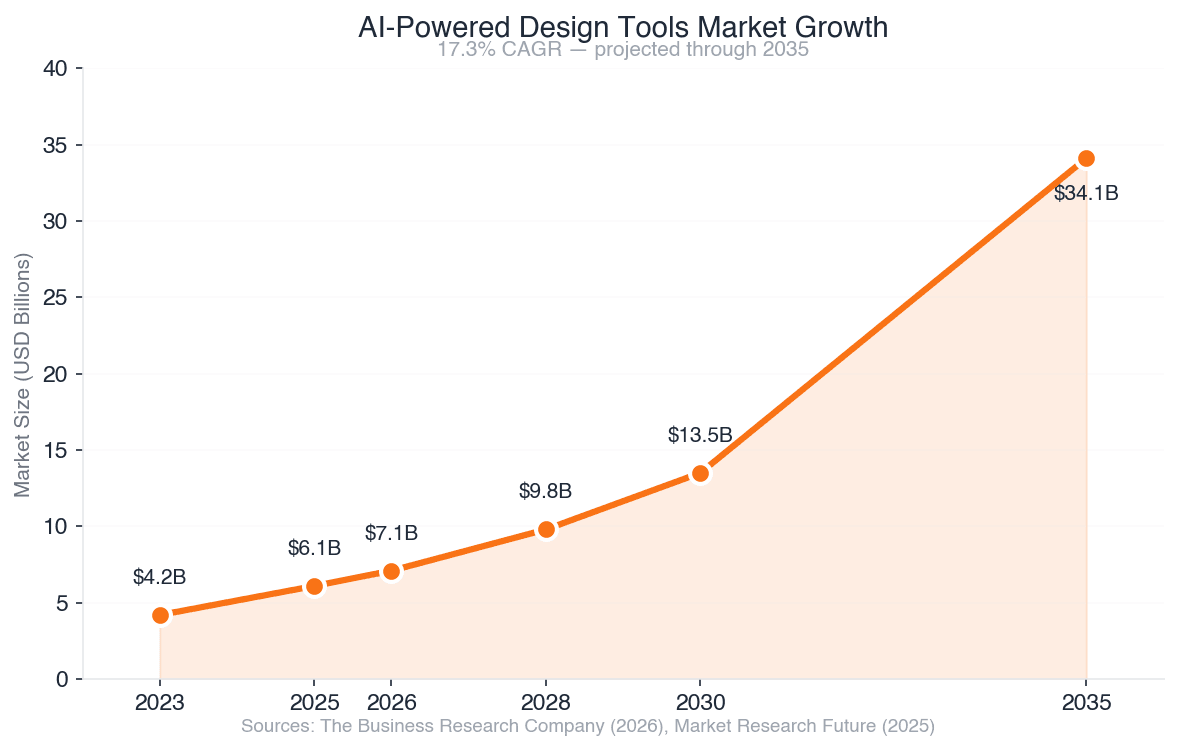
AI-Powered Design Tools Market Growth (2023–2035)
Here’s how each input method works:
- Text-to-UI, Type something like “a fitness tracking dashboard with weekly progress charts and a dark theme.” Stitch generates a complete layout with proper spacing, typography, and color schemes.
- Image-to-UI, Upload a napkin sketch, a wireframe, or even a screenshot of a competitor’s app. Stitch converts it into a clean digital interface. This runs in Experimental Mode using Gemini 2.5 Pro.
- Voice Canvas (new in March 2026), Talk directly to your canvas. Say “make the header bigger” or “add a sidebar with navigation links” and the AI agent updates the design in real time. It doesn’t just follow instructions, it also critiques and suggests improvements.
The tool runs on Google’s Gemini models. Standard Mode uses Gemini 2.5 Flash for speed. Experimental Mode uses Gemini 2.5 Pro for maximum fidelity. And since December 2025, Gemini 3 powers the primary design engine.
You can edit everything manually after generation, swap images, tweak text, adjust spacing. And when you’re done, export clean HTML/CSS, push to Figma with Auto Layout, or send directly to Google AI Studio.
Worth noting: We’ve tested a lot of AI design tools with clients over the past year. What makes Stitch different isn’t just the output quality, it’s that you can go from a vague idea to a clickable prototype without ever touching a traditional design tool. That’s genuinely new.
A smartphone screen showing a clean user interface with application icons
What Features Make Stitch Stand Out From Other AI Design Tools?
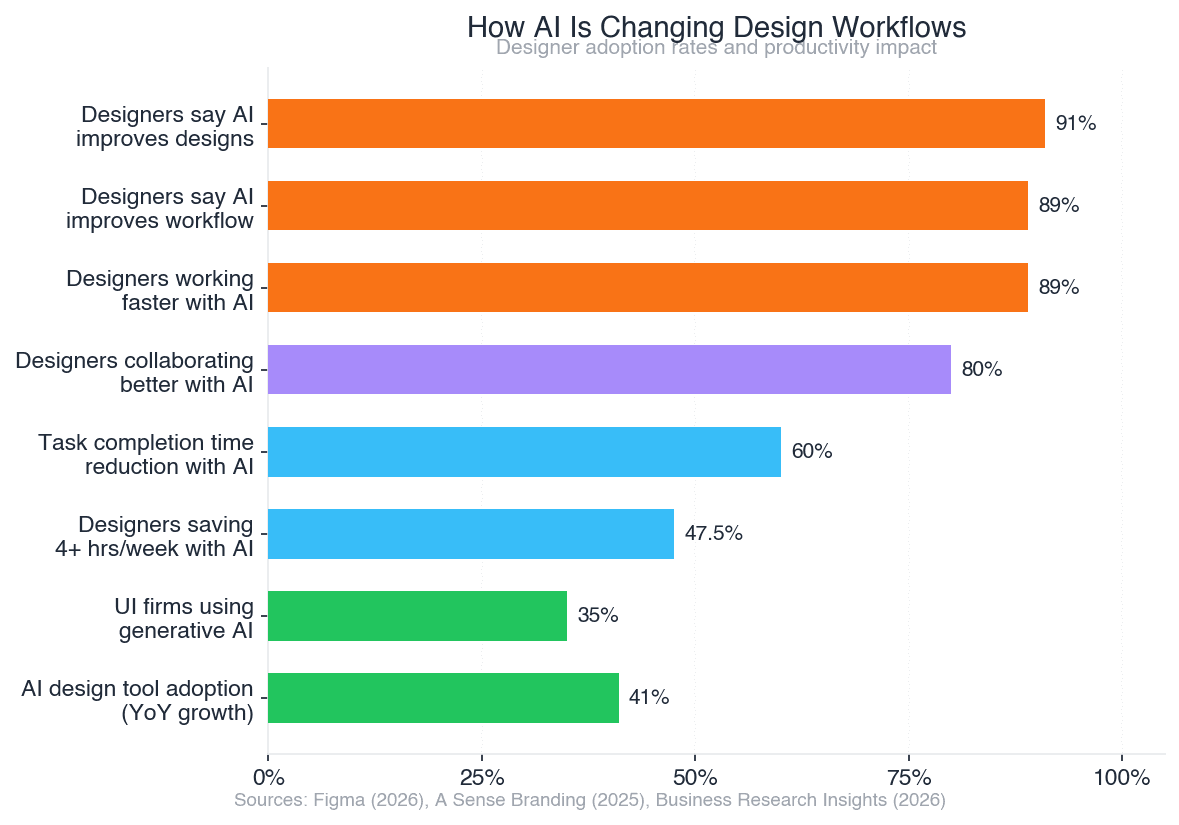
91% of designers say AI tools improve their designs (Figma, 2026). But most AI design tools do one thing well and leave the rest to you. Stitch tries to cover the full spectrum, from first idea to developer handoff. Here’s what’s in the box as of March 2026:
Vibe Design
This is the headline feature. Instead of describing a specific layout, you describe a feeling, a business goal, or an audience. Tell Stitch “professional and calm, for a meditation app targeting busy executives” and it generates multiple design directions that match that vibe. It’s less about pixel-perfect specs and more about creative exploration.
AI Design Agent
The agent doesn’t just respond to prompts. It reasons across your entire project history, previous screens, design decisions, color choices, and suggests what to do next. It creates variants, flags inconsistencies, and works on multiple ideas in parallel through the Agent Manager dashboard.
Need Custom AI Agent Development?
Work With our Autonomous Agents Engineering Team Build, assess, and implement autonomous agent workflows that are ready for production.
Schedule Your Technical DiscoveryInfinite Canvas
Think of it as an AI-native whiteboard. You start with a rough idea in one corner, generate UI variants in another, and connect them into interactive prototypes. The canvas grows with your thinking. There’s no rigid artboard structure forcing you into a specific workflow.
Instant Prototyping
Connect generated screens into clickable flows with transitions. No separate prototyping tool needed. Test user flows directly in the browser, share links with stakeholders, and iterate based on feedback, all inside Stitch.
DESIGN.md
This one’s for the technically minded. Stitch exports your design system as a markdown file that AI agents in other tools can read and understand. Working with Jules (Google’s coding agent) or another AI dev tool? Feed it your DESIGN.md and it understands your typography, color palette, spacing, and component structure without manual documentation.
Developer Export
Clean HTML/CSS code export. Figma export with Auto Layout support (Standard Mode only). Direct integration with Google AI Studio. For teams using UI UX design services alongside development, this closes the gap between “what the designer made” and “what the developer builds.
How Does Google Stitch Compare to Figma and Other Tools?
When Google dropped the March 2026 Stitch update, Figma’s stock fell 8% the same day and another 4% the next, now down roughly 85% from its all-time peak (CNBC, 2026). That tells you the market’s taking this seriously. But does the product actually compete?
Here’s an honest comparison:
| Feature | Google Stitch | Figma AI | Canva Magic Studio | Adobe Firefly | Framer AI | Uizard |
| Text-to-UI | Yes | Limited | Yes | No | Yes | Yes |
| Image/Sketch-to-UI | Yes | No | No | No | No | Yes |
| Voice Control | Yes | No | No | No | No | No |
| Code Export (HTML/CSS) | Yes | No | No | No | Yes | Limited |
| Free Tier | Full access | Limited | Limited | Limited | Limited | Limited |
| Collaboration | No | Yes | Yes | Yes | Limited | Limited |
| Design System Mgmt | DESIGN.md | Yes | Brand Kit | Style Kits | No | No |
| Interactive Prototyping | Yes | Yes | No | No | Yes | Limited |
Where Stitch Wins?
Free and fully featured. Voice-driven design. Image-to-UI conversion. Code export that developers can actually use. The combination of these features in a single free tool is unmatched right now.
Where Figma Still Wins?
Real-time multi-user collaboration. Stitch doesn’t have that yet, and for professional design teams working together on complex products, that’s a dealbreaker. Figma also has a massive plugin ecosystem, deeper design system management, and years of enterprise trust.
The Honest Take
Stitch isn’t replacing Figma for production design teams tomorrow. But it’s eating into two specific use cases fast: rapid prototyping and non-designer creation. A product manager who wants to mock up an idea before involving the design team? Stitch. A startup founder who can’t afford a designer yet? Stitch. A developer who needs a quick UI to test a feature? Stitch.
Adoption of AI design tools grew 41% year-over-year (Business Research Insights, 2026). Stitch is going to accelerate that number.
An AI interface displayed on a dark screen showing futuristic design elements
How Much Does Google Stitch Cost?
Nothing. That’s the part that spooked the market.
Google Stitch is completely free through Google Labs. You just need a Google account. Here’s what you get:
| Plan | Generations/Month | AI Model | Features |
| Standard Mode | 350 | Gemini 2.5 Flash | Text-to-UI, direct edits, Figma export, code export, prototyping |
| Experimental Mode | 50-200 | Gemini 2.5 Pro | Everything in Standard + image/sketch-to-UI, higher fidelity output |
350 free generations per month is a lot. For context, that’s roughly 12 high-fidelity screens per day, every day. Most individual designers won’t hit that ceiling.
The catch? It’s a Google Labs experiment. Google hasn’t committed to keeping it free forever or even keeping it at all. Labs experiments can be modified, paused, or shut down. But right now, the value proposition is absurd, you’re getting a Gemini 3-powered design tool for the price of a Gmail account.
For companies offering UI UX design services, this changes the math. Your designers can use Stitch for rapid concept exploration, generate multiple directions in minutes, and reserve expensive tool licenses for production work. That’s not a small savings.
What Impact Will Google Stitch Have on UI/UX Design Services?
89% of designers say AI has improved their workflow, and 47.5% save four or more hours every week by using AI tools (A Sense Branding, 2025). Stitch takes those numbers and pushes them further. But the impact goes beyond time savings.
How AI Is Changing Design Workflows, Designer Adoption & Impact
For Design Agencies and Freelancers
Client presentations get faster. Instead of spending two days on initial concepts, designers can generate ten directions in an hour with Vibe Design. The work shifts from pixel pushing to creative direction, choosing, refining, and combining AI-generated options rather than building everything from scratch. That’s not a threat to designers. It’s a promotion.
For Startups and Product Teams
The MVP timeline just got shorter. A founder with a clear product vision can go from idea to clickable prototype in a single afternoon. That prototype won’t be production-ready, but it’ll be good enough to test with users, pitch to investors, or brief a development team. No Figma license. No design hire. No waiting.
For Development Companies
If you’re a team offering mobile app development or web development services, Stitch changes client conversations. Clients can show up with Stitch prototypes instead of vague descriptions. That means fewer revision rounds, clearer requirements, and faster project kickoffs. This is where AI development solutions become critical, helping teams convert these prototypes into scalable, production-ready applications with the right architecture, integrations, and performance optimization.
AI reduces task completion time by over 60% across common design activities, from wireframing to content creation (A Sense Branding, 2025). The question isn’t whether AI tools will change design workflows. It’s whether you’ll adapt now or scramble later.
A design workspace with a notebook and iPhone on a table
How to Get Started With Google Stitch AI?
Getting started takes about 30 seconds. Seriously.
Google Gemini Monthly Active Users vs Competitors
- Go to [stitch.withgoogle.com](https://stitch.withgoogle.com) and sign in with your Google account
- Type a prompt, start simple. Try “a clean login page for a fitness app with email and social sign-in options”
- Review the output, Stitch generates a full UI. Click on any element to edit text, swap images, or adjust spacing
- Iterate with voice, Click the Voice Canvas button and speak changes. “Make the background darker. Add a forgot password link below the sign-in button.”
- Export, Download as HTML/CSS for developers, export to Figma, or create a shareable prototype link
Tips From Our First Month Using It
- Be specific with prompts. “A dashboard” gives generic results. “A SaaS analytics dashboard showing MRR, churn rate, and user growth with a dark sidebar navigation” gives you something useful.
- Use image references. Upload a screenshot of a design you like. Stitch picks up on layout patterns, color palettes, and component styles from the reference.
- Combine modes. Start with text-to-UI for the overall layout, then switch to voice for refinements. That two-step workflow is faster than either mode alone.
- Export DESIGN.md early. If you’re handing off to developers, the markdown design system file saves hours of documentation work.
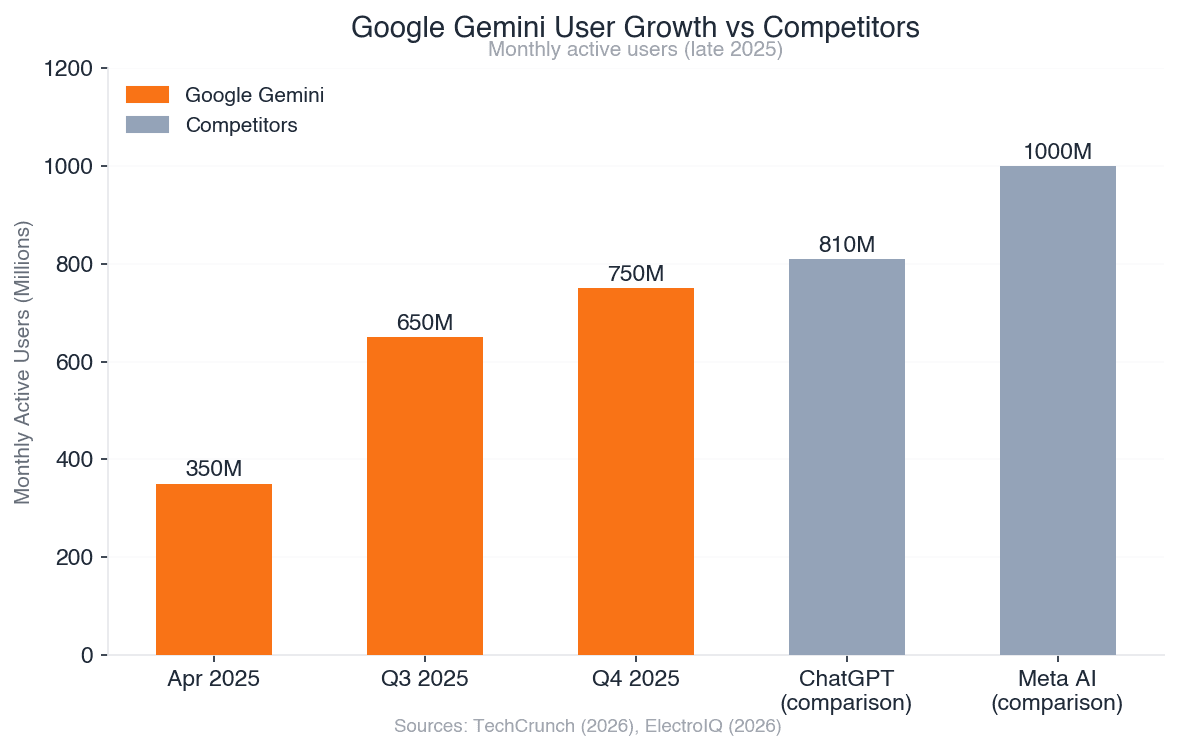
Google Gemini has surpassed 750 million monthly active users (TechCrunch, 2026). Stitch sits on top of that infrastructure. The AI behind it isn’t experimental, it’s the same engine powering products used by three-quarters of a billion people.
Is Google Stitch AI really free?
Yes, completely free as of March 2026. It’s a Google Labs experiment requiring only a Google account. You get 350 generations per month in Standard Mode (Gemini 2.5 Flash) and 50-200 in Experimental Mode (Gemini 2.5 Pro). There’s no paid tier yet. But since it’s a Labs product, Google could change pricing or availability in the future.
Can Google Stitch replace Figma?
Not for professional production teams, at least not yet. Stitch doesn’t support real-time multi-user collaboration, has no plugin ecosystem, and lacks the deep design system management that Figma offers. But for rapid prototyping, concept exploration, and non-designer UI creation, it’s already a strong alternative. Figma’s stock is down 85% from its peak, partly due to Stitch’s competitive pressure (CNBC, 2026).
What AI model does Google Stitch use?
Stitch uses multiple Gemini models. Standard Mode runs on Gemini 2.5 Flash for speed. Experimental Mode uses Gemini 2.5 Pro for higher fidelity. Since December 2025, Gemini 3 powers the primary design engine. The model choice affects both quality and how many generations you get per month.
Does Google Stitch export code?
Yes. Stitch exports clean HTML/CSS that developers can work with directly. It also supports Figma export with Auto Layout (Standard Mode only), integration with Google AI Studio, and DESIGN.md export for AI-readable design system documentation. The code isn’t production-grade React or Vue, it’s semantic HTML and CSS, which works as a solid starting point.
How does Voice Canvas work in Google Stitch?
Voice Canvas lets you speak commands directly to your design canvas. It’s not just speech-to-text, the AI agent listens, interprets your intent, makes changes, and sometimes pushes back with suggestions. Say “add a contact form with three fields” and it generates one. Say “this feels too busy” and it simplifies the layout. It was introduced in the March 2026 update.
Check out our guides on UI UX design services and mobile app development if you’re planning to take your Stitch prototypes into production.
Conclusion
Google Stitch AI just raised the floor for what anyone can create without professional design training. It’s free, it’s fast, and it’s powered by the same Gemini models that serve 750 million users. The March 2026 update, Voice Canvas, Vibe Design, the AI design agent, turned it from “interesting experiment” to “genuine industry disruptor.”
Here’s what matters:
- It’s free with 350 generations/month, no catch, no hidden tiers
- Voice Canvas is a real workflow shift, talk to your designs instead of clicking through menus
- Code export bridges design and development, HTML/CSS and Figma export in one tool
- Figma stock dropped 12%, the market sees this as a serious threat
- AI design tool adoption grew 41% YoY, and Stitch will push that higher
For businesses offering UI UX design services, Stitch isn’t a threat, it’s a tool that makes your team faster. For startups, it’s a way to prototype before you can afford a designer. For developers, it’s a bridge between what the client imagines and what you build.
The design industry changed this week. The teams that experiment with Stitch now will be the ones setting the pace six months from now. We’ve worked with dozens of teams on turning design concepts into production apps. If you’ve got a Stitch prototype that’s ready for development, we’d like to hear about it.
 0 comments










Your email address will not be published. Required fields are marked *