















 0 comments





Key Takeaways:
- Desktop app development is the process of building software that is installed and running directly on Windows, macOS or Linux computers, rather than inside a browser.
- Desktop applications are still the first choice for heavy workloads like design, accounting, engineering, point-of-sale and data processing, where speed and offline access really matter.
- Frameworks like Electron, Flutter, .NET, Qt and SwiftUI are helping a desktop app developer build faster, with many of them supporting multiple operating systems from one codebase.
Quick Answer: Desktop app development is the process of designing, building, testing and maintaining software that is installed and running directly on a computer’s operating system, such as Windows, macOS or Linux, instead of inside a web browser. Desktop applications are able to work offline, use the full power of the computer’s hardware, and connect with local files, printers and devices, which is making them ideal for design tools, accounting software, point-of-sale systems, engineering tools and internal business applications. Businesses are building them using native technologies like .NET and Swift, or cross-platform frameworks like Electron, Flutter and Qt.
For many years, businesses have been moving almost everything to the browser and the phone, from billing and inventory to design work and customer support, and for most everyday tasks this has been working well enough. But anyone who has watched a heavy web tool freeze in the middle of a large file upload, or a team losing a full afternoon of work because the internet went down, knows how quickly this setup is turning into lost hours and frustrated employees.
This is the reason why businesses/organisations are now turning back to custom software development for the desktop, building applications that are running directly on the computers their teams are using every day, and the process behind this is called desktop app development. But what is desktop app development exactly, and how is it different from building a website or a mobile app? Well, let’s break it down, starting with the basics that every business owner should understand.
What Is Desktop Software Development?
Desktop software development is the process of planning, designing, building, testing and maintaining applications that are installed on a computer and running directly on its operating system, which gives users full access to the computer’s processing power, memory, storage and connected devices. Instead of opening a browser tab and depending on an internet connection, users are simply clicking an icon on their desktop or taskbar and getting straight to work, whether they are online or not.
The easiest way to understand it is to think about the difference between watching a movie on a streaming website and watching one that is downloaded to your laptop, as the streamed version is stopping the moment the Wi-Fi drops, while the downloaded one is playing smoothly wherever you are. Desktop applications are working in the same way, where the core of the software is living on the computer itself, so it is faster, more reliable and not depending on the browser or the network for every single click.
So, what is desktop software development really offering that the web and mobile cannot? The answer is control, as businesses are getting software that is using the full strength of the machine, working offline, connecting with local hardware like printers, scanners and card readers, and handling large files without slowing down. This is why desktop software development is no longer seen as an old-fashioned choice, as some of the most popular tools in the world, like Microsoft Excel, Adobe Photoshop, Slack, Zoom and Visual Studio Code, are still being used as desktop applications by millions of people each and every day.
What Is a Desktop Application?
A lot of business owners are still asking what is desktop application software in simple terms, and the answer is quite straightforward, as a desktop application is any program that is downloaded, installed and launched on a personal computer or laptop, rather than being accessed through a website. It is usually distributed through an installer file, a company’s internal software portal, or app stores like the Microsoft Store and the Mac App Store, and it is getting updates either automatically or through a new version download.
Desktop applications are generally falling into three groups, as some are built only for one operating system, like Windows or macOS, some are built to run on all major operating systems from a single codebase, and some are hybrid apps that are combining a desktop shell with web technologies inside. Each group is coming with its own strengths, and choosing the right one is really depending on who your users are, what devices they are using, and how much performance the application is actually needing.
The Challenges of Relying Only on Web and Mobile Apps
Before understanding why desktop app development is becoming so valuable again, it is important to look at the problems businesses are facing when they are trying to run every workflow only through web and mobile apps.
Relying only on browser-based and mobile tools is usually coming with a long list of headaches, resulting in:
- Work completely stopping whenever the internet connection is slow, unstable or simply not available on site.
- Heavy files like videos, CAD drawings and large spreadsheets loading slowly and crashing the browser tab halfway through.
- Limited access to local hardware like barcode scanners, receipt printers, card readers and specialised machines.
- Browser memory limits slowing down complex tasks like data processing, image editing and financial modelling.
- Sensitive data travelling over the internet even when it only needs to stay on one secure office computer.
Inefficiencies like these don’t just frustrate employees; they also slow down the entire business, as customers are waiting longer at billing counters, designers are losing their work, and teams are spending more time fighting the software than actually using it. This is why many modern businesses need smarter, more reliable software on their computers, and this is exactly where desktop app development is stepping in.
Still Wondering Which Type of Desktop App Fits Your Business?
Connect with our app development experts, and we will analyse your users, workflows and devices to recommend the desktop approach that is creating the most value for you.
How Does Desktop App Development Work?
Desktop app development is starting with understanding who is going to use the application, which operating systems they are using, and which tasks the software must handle, because these answers are deciding whether the app should be native, cross-platform or hybrid. Once this is clear, the desktop application developer is designing the interface, choosing the right framework, building the core features, and connecting the app with local hardware, databases and any online services it needs, like payment gateways or cloud sync.
The finished application is then packaged into an installer for each operating system, signed with a security certificate so that Windows and macOS are trusting it, and distributed to users through an app store, a website download or an internal company portal. And the best part is that modern desktop apps are able to update themselves automatically in the background, which is removing the old headache of manually installing new versions on each and every computer in the office.
This is also why understanding what is desktop software development in practical terms is so helpful for business leaders, as the work is not ending at launch, and planning updates, security patches and support for new operating system versions is just as important as building the first release.
Types of Desktop Applications Explained
Desktop applications are coming in many shapes and sizes, but most of them are falling into a few clear categories, depending on how they are built and which operating systems they are supporting, so let’s take a look.
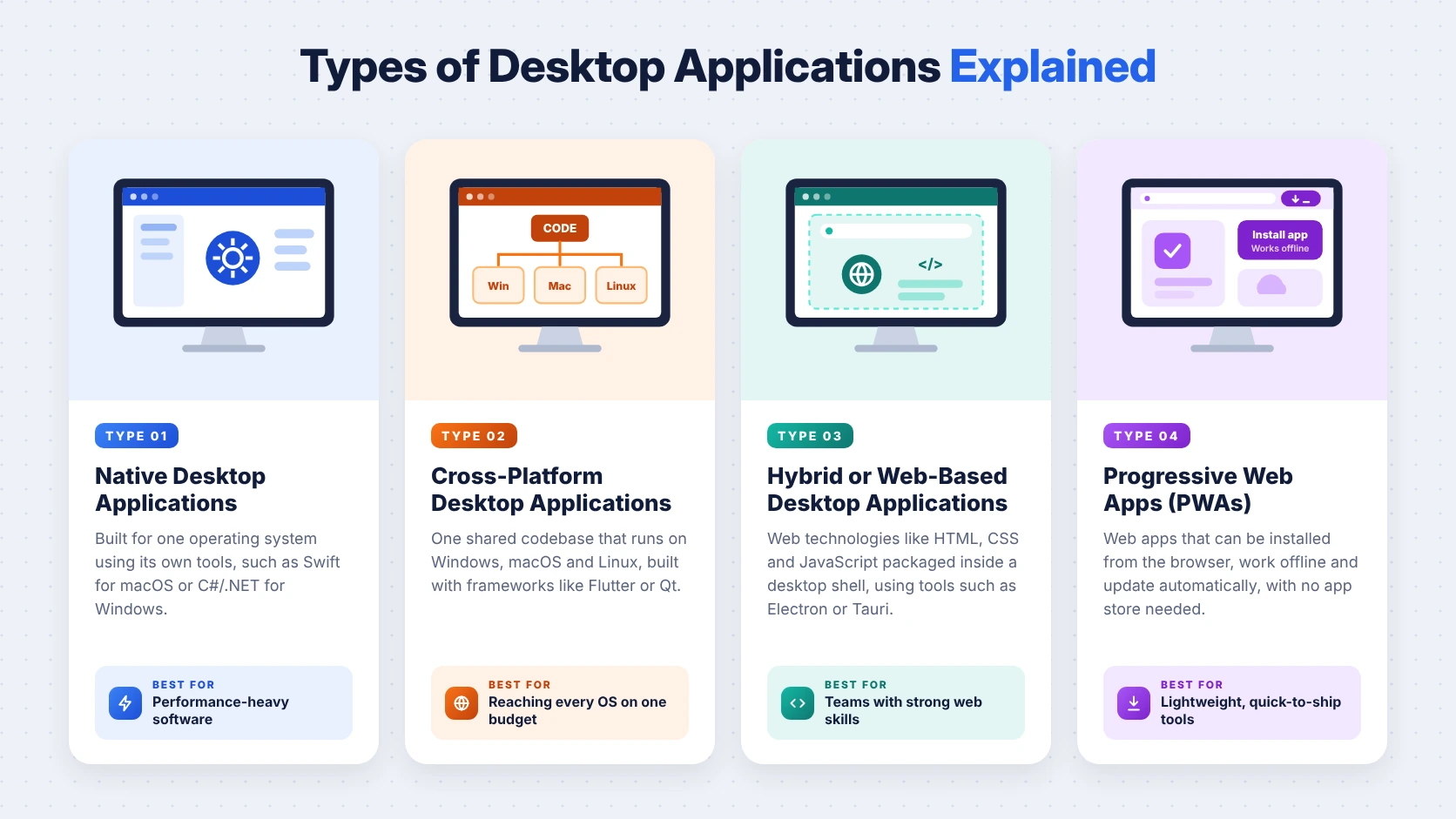
- Native Desktop Applications are built for one specific operating system using its own tools, like C# and .NET for Windows or Swift and SwiftUI for macOS, which is giving the best performance and the most natural look and feel on that platform.
- Cross-Platform Desktop Applications are built once and run on Windows, macOS and Linux, using frameworks like Flutter, Qt or .NET MAUI, which is saving time and cost when your users are spread across different computers.
- Hybrid or Web-Based Desktop Applications are using web technologies like HTML, CSS and JavaScript inside a desktop shell through tools like Electron or Tauri, which is helping businesses reuse their existing web code and skills.
- Progressive Web Apps (PWAs) are web apps that can be installed on a desktop and work partly offline, and our PWA development services are a good fit when a lightweight installable experience is enough.
Here is a simple summary of these types for quick reference.
| Type | How It Is Built | Best For |
|---|---|---|
| Native | Platform-specific tools | Maximum speed on one OS |
| Cross-Platform | One codebase for all OS | Mixed Windows and Mac users |
| Hybrid (Electron/Tauri) | Web tech in a desktop shell | Reusing existing web apps |
| PWA | Installable web app | Light tools with basic offline use |
And that is not all; desktop applications are also being grouped by purpose, such as productivity tools, accounting and ERP software, point-of-sale systems, design and media editors, engineering tools, healthcare imaging software and internal business dashboards.
Desktop Apps vs Web Apps vs Mobile Apps
To really understand the value desktop app development is bringing, it is helpful to compare it side by side with web and mobile apps, as each one is solving a different kind of problem.
| Feature | Desktop App | Web App | Mobile App |
|---|---|---|---|
| Installation | Installed on computer | Opens in browser | Installed from app store |
| Offline Use | Full | Limited | Partial |
| Performance | Highest | Depends on browser | High on device |
| Hardware Access | Full access | Very limited | Camera, GPS, sensors |
| Updates | Auto-update or download | Instant for all users | Through app stores |
| Best For | Heavy, focused work | Quick access anywhere | Work on the move |
The table makes it clear that desktop apps are winning when performance, offline access and hardware connections matter most, but the updates row is also a reminder that web apps are much easier to roll out instantly. This is why many businesses are combining all three, using a desktop app for heavy office work, web app development for quick access from anywhere, and mobile app development for teams that are always on the move.
The Benefits of Custom Desktop Software Development
Switching to custom desktop software development is bringing a number of real advantages for businesses, and these are going far beyond simply having an icon on the desktop, resulting in:
- Faster performance, as the app is using the computer’s full processing power instead of sharing it with a browser.
- Uninterrupted work offline, with data syncing automatically once the internet connection is available again.
- Direct connections with printers, scanners, card readers, medical devices and other specialised office hardware.
- Stronger data control, as sensitive information can stay on secure local machines or private company servers.
- Software built around your exact workflows, instead of teams adjusting their work to fit generic off-the-shelf tools.
- Lower long-term licence costs, as one custom app is often replacing several separate subscriptions that overlap.
This is helping businesses move faster and work more reliably, as employees are no longer waiting for pages to load or losing work to dropped connections, and customers are getting quicker service at billing counters, clinics and front desks.
Popular Frameworks and Technologies for Desktop App Development
There is no single best technology for desktop app development, as the right choice is depending on your target operating systems, performance needs and your team’s existing skills, but most modern projects are using one of the frameworks below.
| Framework | Language | Platforms | Best For |
|---|---|---|---|
| Electron | JavaScript, HTML, CSS | Windows, macOS, Linux | Reusing web apps |
| Tauri | Rust, JavaScript | Windows, macOS, Linux | Lighter hybrid apps |
| Flutter | Dart | Windows, macOS, Linux | Shared mobile and desktop UI |
| .NET (WPF, WinUI) | C# | Windows | Enterprise Windows apps |
| .NET MAUI | C# | Windows, macOS | Cross-platform .NET apps |
| Qt | C++, Python | Windows, macOS, Linux | High-performance and industrial apps |
| SwiftUI and AppKit | Swift | macOS | Native Mac apps |
Electron is powering well-known apps like Slack and Visual Studio Code, which is showing how far web-based desktop apps have come, while Flutter is offering native-compiled desktop performance and full access to Win32, Cocoa and UNIX platform APIs. This is really useful for businesses that already have a mobile app, as our Flutter app development team is able to extend the same codebase to the desktop instead of starting from scratch.
How to Make a Desktop App: Step-by-Step Process
A very common question from business owners is how to make a desktop app without wasting time and money, and the good news is that it does not have to be complicated or stressful, as long as the business is following a clear plan, which usually looks like this:
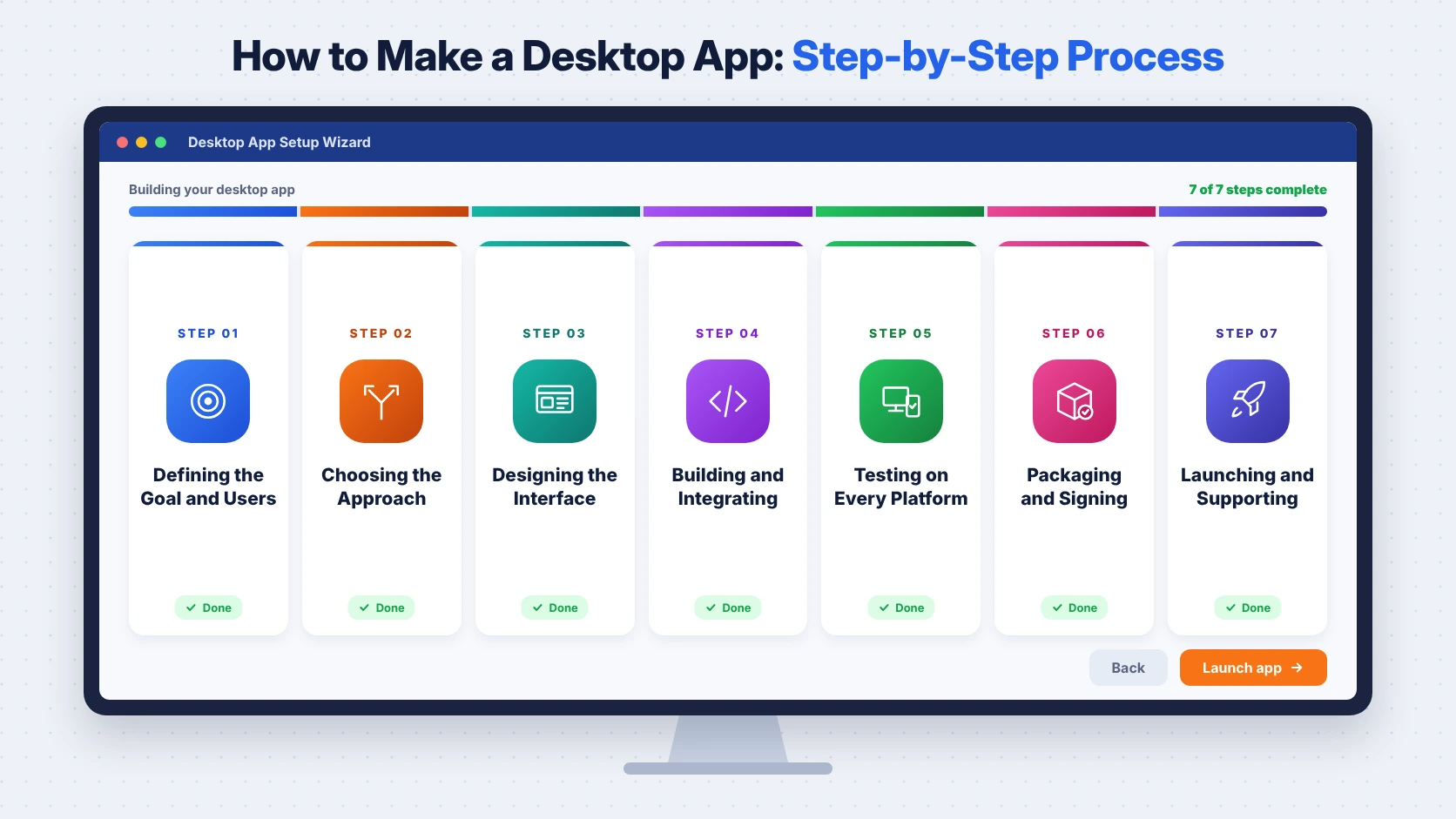
- Defining the Goal and Users is about deciding what problem the app is solving, who is using it, and which operating systems and devices they are working on.
- Choosing the Approach is about selecting native, cross-platform or hybrid development, based on performance needs, budget and whether you already have web or mobile code.
- Designing the Interface is about creating screens that feel natural on each operating system, and our UI/UX design team is focusing on keyboard shortcuts, menus and window layouts that desktop users expect.
- Building and Integrating is about developing the features in short sprints and connecting the app with local hardware, databases and online services like payments or cloud sync.
- Testing on Every Platform is about checking performance, security, installation and updates on each operating system version your users are running.
- Packaging and Signing is about creating installers and signing them with code-signing certificates, so that Windows and macOS are not blocking the app with security warnings.
- Launching and Supporting is about distributing the app, setting up automatic updates and planning regular fixes for new operating system releases.
Knowing how to make a desktop app is only half of the job, as the long-term support plan is what is keeping the app secure and useful for years, and starting with a focused first version through our MVP development services is always a smarter way to test the idea with real users.
Understanding Desktop App Development Cost
Desktop app development cost is one of the most confusing topics for business leaders, mainly because the price is depending on features, platforms, integrations and the team’s location, but once the main factors are clear, the picture becomes much simpler.
The table below is showing indicative cost ranges based on typical market pricing, and actual quotes will definitely vary with the complexity and scope of each project.
| Project Type | Typical Timeline | Indicative Cost (USD) |
|---|---|---|
| Simple Utility or Internal Tool | 2 to 4 months | $20,000 to $50,000 |
| Mid-Complexity Business App | 4 to 8 months | $50,000 to $150,000 |
| Complex Cross-Platform Software | 8 to 14+ months | $150,000 to $400,000+ |
| Ongoing Maintenance and Updates | Yearly | 15% to 20% of build cost |
The biggest cost differences are usually coming from the number of operating systems being supported, hardware integrations, offline sync, security requirements and the experience of the desktop software developer, so comparing quotes only on the final number is rarely giving the full picture.
The Risks of Desktop App Development
Desktop app development is a powerful choice, but no software project is completely free of risk, and knowing these risks early is helping businesses plan better instead of reacting in panic later.
| Risk | What It Means | How to Reduce It |
|---|---|---|
| Platform Differences | App behaves differently on each OS | Test on every target platform |
| Update Problems | Users stuck on old versions | Build in automatic updates |
| Security Warnings | OS blocking unsigned apps | Use code-signing certificates |
| Large App Size | Slow downloads and heavy memory use | Choose the right framework |
| OS Changes | New OS versions breaking features | Plan regular maintenance |
The good news is that each and every one of these risks is manageable when it is considered right at the start, which is why choosing an experienced desktop app developer is just as important as choosing the right framework.
What Does a Desktop Software Developer Do?
A desktop software developer is responsible for turning your business requirements into a working application that is installing smoothly, running fast and staying secure on each and every computer it reaches. Their work is covering planning the architecture, writing the code, connecting the app with databases and hardware, handling offline data and sync, packaging installers, and fixing issues whenever a new operating system update is changing how things work.
A good desktop application developer is also thinking beyond the code, as they are designing the app around how your team is actually working, suggesting where automation can save time, and making sure the app is easy to update and support for years. This is why the best desktop software developer is usually someone with experience across multiple frameworks, so that they are recommending the right technology for your needs instead of the only one they know.
How to Hire the Right Desktop Application Developer
Choosing the right desktop application developer is extremely crucial, as the decisions made in the first few weeks are shaping the app’s performance, cost and future flexibility, and the process usually looks like this:
- Checking their portfolio for desktop apps similar to yours in size, industry, platforms and hardware integrations.
- Asking which frameworks they are recommending for your project and why, instead of accepting a one-size-fits-all answer.
- Confirming their testing process across Windows, macOS and Linux, along with how they are handling code signing.
- Making sure your business is owning the source code, design files and documentation once the project is complete.
- Understanding their support plan after launch, including update schedules, response times and maintenance costs.
Not every business has an in-house desktop app developer, and that is completely fine, as you can hire dedicated developers or hire Flutter developers who are already experienced in building cross-platform desktop and mobile apps.
Common Mistakes Businesses Make in Desktop App Development
Even with the best intentions, many businesses are making a few avoidable mistakes in desktop app development, and these mistakes are often costing far more than the project itself, such as:
- Choosing a framework only because it is popular, without checking whether it is fitting the app’s performance needs.
- Building for only one operating system and later realising that a large part of the team is using another one.
- Skipping automatic updates, which is leaving users stuck on old versions with bugs and security gaps.
- Ignoring code signing, which is causing scary security warnings that stop employees and customers from installing the app.
- Not planning offline sync properly, which is leading to lost or duplicated data when connections come back.
Each of these mistakes is easy to prevent with a little planning, and avoiding them early is saving a lot of money, stress and rework later on, which is why getting the basics right from day one just cannot be ignored.
Planning to Build a Desktop App for Your Business?
From choosing the right framework and designing the interface to building, testing and launching on every platform, our team is helping businesses build desktop apps the right way.
Is Desktop App Development the Right Choice for Your Business?
Desktop app development is a strong choice for businesses that need high performance, offline access, deep hardware connections or strict control over sensitive data, and it is especially suiting industries like retail, healthcare, manufacturing, finance, media and engineering. However, it is not automatically the perfect fit for everyone, as businesses that only need quick access from anywhere are often better served by a web app, while teams that are always on the move are getting more value from iOS app development or Android app development.
The right decision is really depending on your users, your devices, your budget and how your team is working every day, and in many cases a combination of desktop, web and mobile is giving the best results, with frameworks like Flutter and React Native helping businesses share code across all of them.
Final Thoughts
Desktop app development has grown from the traditional software we used to install from CDs into a modern, cross-platform discipline that is powering some of the most widely used tools in the world, and for business leaders, understanding what is desktop software development is no longer something to leave only to the IT team. It is giving businesses software that is faster, works offline, connects with their hardware and is built around the way their people actually work, which is something browser tabs alone are not always able to deliver.
At the same time, getting the real value out of custom desktop software development is depending on careful planning around frameworks, platforms, updates and security from the very first day, and the businesses that are taking the time to plan properly are the ones enjoying the benefits without surprise costs or frustrated users. So whether you are replacing an old Windows tool, extending your mobile app to the desktop, or building something completely new, understanding desktop app development is definitely going to help you make smarter and more confident decisions, and if you need a helping hand along the way, our team is always here to guide you from beginning until completion.
 0 comments













Your email address will not be published. Required fields are marked *