















 0 comments





Key Takeaways:
- Enterprise application development is the process of building large-scale software that is supporting the core operations, workflows and data of an entire organisation.
- Common enterprise applications are including ERP, CRM, supply chain, HRMS, business intelligence, employee portals and AI-powered workflow automation tools.
- Building enterprise applications is different from consumer apps, as security, integrations, scalability, role-based access and compliance are all taking priority from day one.
- Costs are usually ranging from around $30,000 for focused internal tools to well over $500,000 for ERP-scale platforms, depending on scope and integrations.
- The right enterprise applications development company is the one that is understanding your business processes first and writing code second, with clear documentation and long-term support.
Quick Answer: Enterprise application development is the process of designing, building, integrating and maintaining large-scale software that is supporting an organisation’s core operations, such as ERP, CRM, supply chain management, HR and business intelligence systems. Unlike consumer apps, enterprise applications are built for many users, departments and locations at once, so they need strong security, role-based access, integrations with existing systems, high scalability and compliance with industry regulations. Businesses are investing in it to replace disconnected tools, automate workflows, get real-time data across teams and support growth without their software becoming the bottleneck.
For many years, enterprises have been running their operations on a mix of spreadsheets, email threads, legacy systems and off-the-shelf tools that were never really designed to talk to each other, and for a while this was working well enough. But anyone who has watched a sales team re-enter the same order in three systems, or a finance team waiting days for one report, knows how quickly this setup is turning into lost time and lost revenue.
This is the reason why businesses/organisations are now investing in custom software development built around how they actually work, and the discipline behind this shift is called enterprise application development. But what is enterprise application development exactly, how is it different from building a regular app, and what does it really cost? Well, let’s break it down, starting with the basics that every business leader should understand.
What Is Enterprise Application Development?
Enterprise application development is the process of designing, building, integrating and maintaining software that is supporting the core operations of an organisation, from managing finances, inventory and customers to running HR, procurement and reporting across multiple departments and locations. Instead of solving one small problem for one user, enterprise applications are connecting people, processes and data across the entire business, so that everyone is working from the same information.
The easiest way to understand it is to think about the nervous system of a body, as nobody is noticing it when it is working well, but each and every movement depends on signals travelling quickly and accurately between different parts. Enterprise applications are working in the same way for a business, where sales, finance, operations and leadership are all receiving the right information at the right time, without anyone chasing updates over email or phone calls.
Enterprise software development is also not a small or slowing market, as Gartner’s July 2026 forecast is expecting worldwide IT spending to reach $6.37 trillion in 2026, up 14.2% from 2025, with the fastest growth in AI-related infrastructure, cloud services and software. This is why enterprise app development is no longer seen as a project only for Fortune 500 companies, as mid-sized businesses and fast-growing startups are also building their own enterprise-grade systems to stay competitive.
The Challenges of Running an Enterprise on Disconnected Tools
Before understanding why enterprise application development is becoming so important, it is helpful to look at the problems businesses are facing when their operations are spread across disconnected tools and outdated systems.
Running a growing business on disconnected software is usually coming with a long list of headaches, resulting in:
- Teams entering the same data again and again in different systems, which is wasting hours and creating costly errors.
- Leaders making decisions on outdated reports, because data is sitting in separate tools that are not syncing in real time.
- Off-the-shelf software forcing teams to change their workflows, instead of the software adapting to how the business really works.
- Legacy systems that are slow, expensive to maintain and impossible to connect with modern cloud, mobile and AI tools.
- Security and compliance gaps, as sensitive data is being shared through spreadsheets, personal emails and unmanaged files.
Inefficiencies like these don’t just frustrate employees; they also slow down the entire business, as customers are waiting longer, mistakes are reaching invoices and orders, and leaders are spending more on software licences that are not really helping the business grow. This is exactly where enterprise application development is stepping in.
How Does Enterprise Application Development Work?
Enterprise application development is working very differently from building a simple app, as the team is first studying how the business operates, which departments are involved, which systems already exist and where the biggest delays and errors are happening. Only once these workflows are clearly mapped is the team designing the architecture, choosing the technology stack and deciding how the new application is going to connect with existing tools like accounting software, CRMs, payment gateways and data warehouses.
Most modern enterprise applications are being built on the cloud, using platforms like AWS, Azure or Google Cloud, which is helping businesses scale up during busy periods, keep backups across locations and roll out updates without long downtime.
The development itself is usually happening in phases, where a core module is launched first, tested with real users and then expanded with more features and departments, which is reducing risk and helping the business see value much earlier. This phased approach is really the biggest difference between successful projects and failed ones, as trying to build everything at once is often leading to delays, budget overruns and software that nobody wants to use.
Still wondering which enterprise application your business needs?
Connect with our team of enterprise solution experts; we will analyse your workflows and systems and recommend the application that is creating the most value for your business.
Types of Enterprise Applications Explained
Enterprise applications are coming in many shapes and sizes, but most of them are falling into a few clear categories that cover the core operations of almost every business, so let’s take a look.
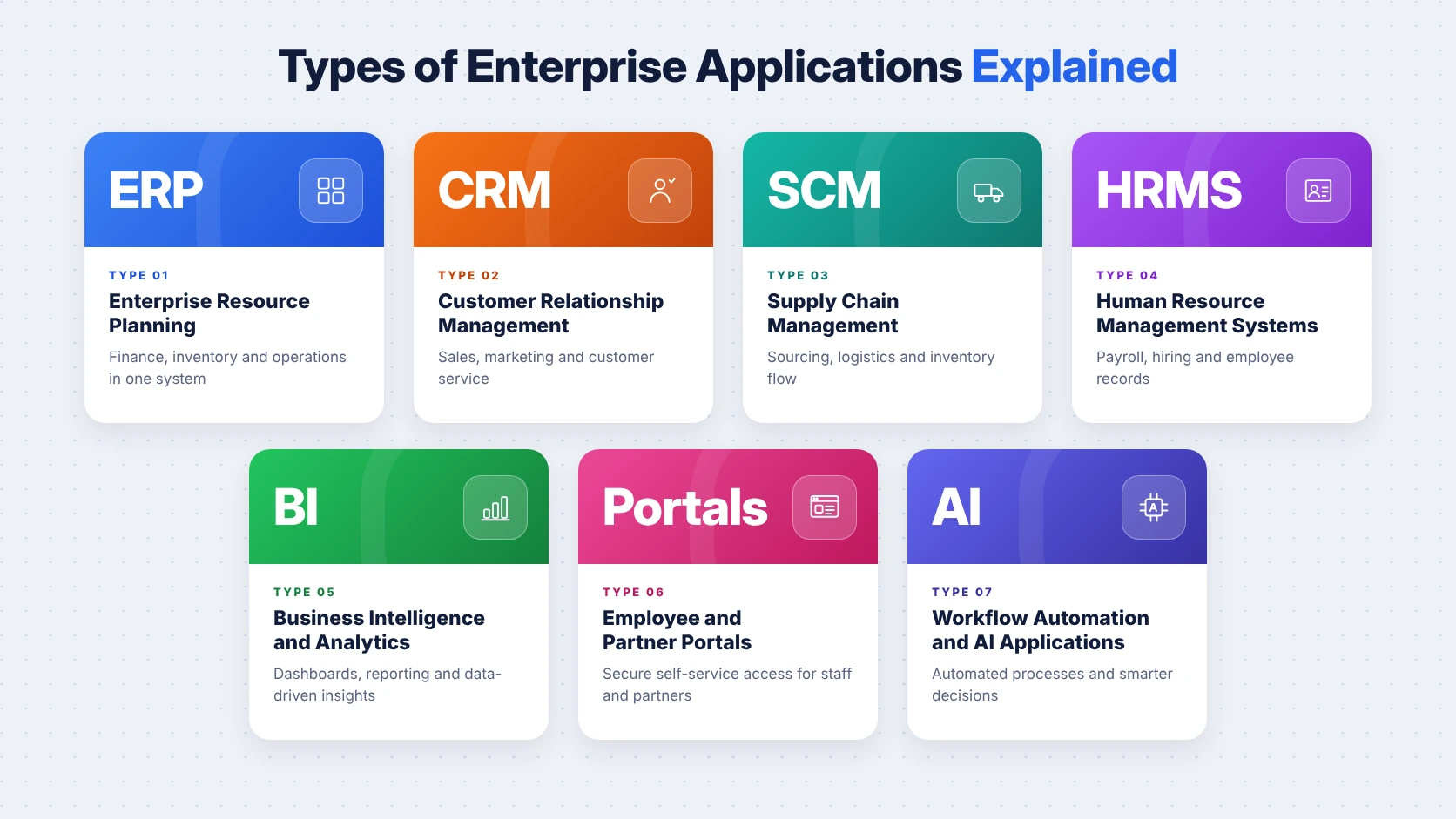
- Enterprise Resource Planning (ERP) is bringing finance, inventory, procurement, manufacturing and operations into one system, so that every department is working from the same real-time data, and our ERP software development team is building these around each client’s own processes.
- Customer Relationship Management (CRM) is managing leads, customers, sales pipelines and support tickets, helping sales and service teams see each and every interaction with a customer in one place, whether through platforms like Salesforce or fully custom builds.
- Supply Chain Management (SCM) is tracking suppliers, shipments, warehouses and deliveries, which is helping logistics, retail and manufacturing businesses reduce delays and avoid running out of stock at the wrong time.
- Human Resource Management Systems (HRMS) are handling hiring, onboarding, payroll, attendance, performance reviews and employee records, which is saving HR teams from piles of spreadsheets and manual approvals.
- Business Intelligence (BI) and Analytics are collecting data from across the business and turning it into dashboards and reports that leaders/managers are checking every day to make faster and better-informed decisions.
- Employee and Partner Portals are giving staff, vendors and partners secure, role-based access to documents, orders, approvals and internal tools, all through one login and one familiar interface.
- Workflow Automation and AI Applications are automating approvals, document processing, customer queries and forecasting, and our AI development services are helping enterprises add these capabilities to their existing systems.
Here is a simple summary of these applications for quick reference.
| Enterprise Application | What It Does | Business Example |
|---|---|---|
| ERP | Unifies finance and operations | Real-time inventory and accounting |
| CRM | Manages customers and sales | Tracking leads to closed deals |
| SCM | Tracks supply and logistics | Monitoring shipments and suppliers |
| HRMS | Manages employees and payroll | Automating leave and payroll |
| BI and Analytics | Turns data into insights | Daily sales and margin dashboards |
| Portals | Gives secure role-based access | Vendor order and invoice portal |
| AI Workflow Tools | Automates repetitive tasks | Processing invoices automatically |
And that is not all; many enterprises are also building custom applications for field service, asset tracking, compliance management and customer self-service, depending on their industry and the problems they are trying to solve.
Enterprise App Development vs Consumer App Development
To really understand what makes enterprise app development different, it is helpful to compare it side by side with building a regular consumer app, like a food delivery or fitness app.
| Feature | Consumer App | Enterprise App |
|---|---|---|
| Users | General public | Employees, partners, customers |
| Main Goal | Engagement and downloads | Efficiency and productivity |
| Access Control | Simple login | Role-based permissions |
| Integrations | Few third-party APIs | ERP, CRM, legacy, data systems |
| Security | Standard | Enterprise-grade, audited |
| Compliance | Basic privacy rules | Industry regulations |
| Scalability | Spikes in traffic | Large data and many departments |
| Lifespan | Frequent redesigns | Long-term, often 7 to 10 years |
The table makes it clear that building enterprise applications is less about flashy design and more about reliability, security and deep integrations, which is why the planning and architecture stages are taking much more time than they do for consumer apps.
Enterprise Web Application Development vs Enterprise Mobile Apps
Most enterprise applications are starting as web applications, as enterprise web application development is allowing employees to access the system from any browser, on any device, without installing anything, which is making rollouts across large teams and multiple offices much simpler. Web apps are also easier to update, as every user is getting the latest version the moment it is deployed, and our web app development services are focused on building these scalable, secure platforms.
Mobile apps, on the other hand, are really useful for teams that are working on the move, such as field sales, delivery staff, technicians and warehouse workers, who need offline access, camera scanning, GPS tracking and push notifications. This is why most enterprises are choosing a combination, where enterprise web application development is powering the core system and mobile app development is extending it to the people who are not sitting at a desk.
Key Features of Modern Enterprise Applications
Modern enterprise applications are expected to do much more than store data, and there are a few features that each and every enterprise system should be including from the very start, such as:
- Role-Based Access Control is making sure every user is seeing only the data and actions their role is allowed, which is protecting sensitive information across departments.
- Integrations and APIs are connecting the application with existing tools like accounting software, CRMs, payment gateways and data warehouses, so data is flowing without manual entry.
- Scalability is allowing the system to handle more users, more data and more locations as the business grows, without slowing down or needing a complete rebuild.
- Security and Compliance are covering encryption, audit logs, multi-factor authentication and support for regulations like GDPR, HIPAA, SOC 2 and India’s DPDP framework.
- Real-Time Reporting is giving leaders live dashboards instead of weekly spreadsheets, which is helping them spot problems and opportunities much earlier.
- AI and Automation are handling repetitive tasks like approvals, document processing and forecasting, which is freeing teams to focus on higher-value work.
These features don’t just make the application more powerful; they also make it trustworthy, which is extremely crucial when an entire organisation is depending on it every single day.
The Benefits of Enterprise Software Development for Businesses
Investing in enterprise software development is bringing a number of real advantages for businesses, and these are going far beyond simply replacing old tools, resulting in:
- Fewer manual tasks and data entry errors, as information is entered once and shared automatically across every connected department.
- Faster decision-making, because leaders are getting real-time data instead of waiting days for reports to be compiled manually.
- Software that is matching your exact workflows, instead of teams changing the way they work to fit generic tools.
- Lower long-term licence costs, as one custom system is often replacing several separate subscriptions that overlap with each other.
- Stronger security and compliance, with centralised access control, audit trails and data protection built into the system itself.
- A scalable foundation that is supporting new locations, products and AI features without the software becoming a bottleneck.
This is helping businesses move faster and operate more efficiently, as employees are spending less time chasing information and more time serving customers, which is improving both productivity and the overall customer experience.
The Enterprise Application Development Process
Building enterprise applications is not something that is happening overnight, and the most successful projects are following a clear, structured process from beginning until completion, which usually looks like this:
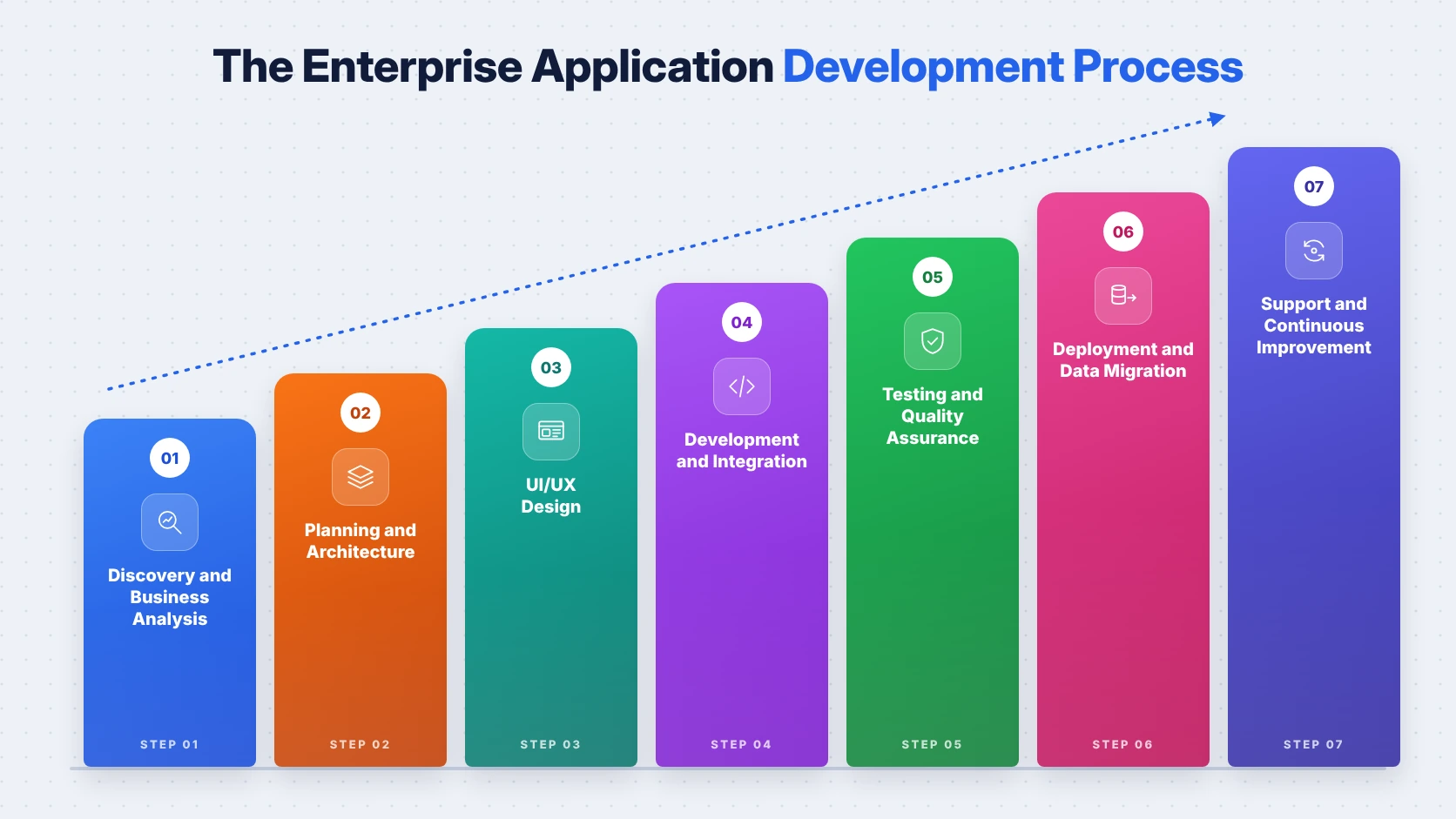
- Discovery and Business Analysis is mapping current workflows, pain points, users and existing systems, so that the team is solving the right problems from the very first day.
- Planning and Architecture is defining the modules, data model, integrations, security approach and cloud infrastructure that the application is going to be built on.
- UI/UX Design is creating simple, role-based interfaces that employees are actually enjoying using, and our UI/UX design team is focusing on reducing clicks and training time.
- Development and Integration is building the application in short sprints, connecting it with existing tools and sharing working versions regularly for feedback.
- Testing and Quality Assurance is covering functionality, performance, security and integrations, so that the system is reliable before it reaches real users.
- Deployment and Data Migration is moving data from old systems carefully, launching module by module, and training teams so that adoption is smooth.
- Support and Continuous Improvement is monitoring performance, fixing issues and adding new features, as enterprise applications are evolving with the business over many years.
Following this process with strong DevOps practices is making releases faster and safer, and it is also making sure the business is seeing value early instead of waiting a year for one big launch.
Technology Stack for Building Enterprise Applications
There is no single best technology stack for building enterprise applications, as the right choice is depending on your existing systems, your team’s skills and how much the application is expected to scale, but most modern projects are using a combination like the one below.
| Layer | Popular Technologies |
|---|---|
| Frontend | React, Angular, Vue.js |
| Backend | Java (Spring Boot), .NET, Node.js, Python |
| Mobile | Flutter, React Native, Swift, Kotlin |
| Database | PostgreSQL, SQL Server, Oracle, MongoDB |
| Cloud | AWS, Microsoft Azure, Google Cloud |
| Integration | REST and GraphQL APIs, message queues |
| DevOps | Docker, Kubernetes, CI/CD pipelines |
| AI | Amazon Bedrock, Azure OpenAI, custom ML models |
Java and .NET are still very popular for large enterprises because of their stability and long-term support, while Node.js and Python are being chosen for faster development and AI-heavy features, and the cloud choice is often depending on which ecosystem the business is already using. If you are still deciding between cloud platforms, our AWS vs Azure vs Google Cloud guide is comparing all three in detail.
Understanding Enterprise Application Development Cost
Enterprise application development cost is one of the most common questions business leaders are asking, and while there is no fixed price list, the total is mainly depending on the number of modules, users, integrations, compliance requirements and the location of the development team.
The table below is showing indicative cost ranges based on typical market pricing, and actual quotes will definitely vary with the complexity and scope of each project.
| Project Type | Typical Timeline | Indicative Cost (USD) |
|---|---|---|
| Focused Internal Tool or MVP | 3 to 5 months | $30,000 to $80,000 |
| Mid-Sized Portal, CRM or Workflow App | 5 to 9 months | $80,000 to $250,000 |
| Large ERP-Scale Platform | 9 to 18+ months | $250,000 to $1,000,000+ |
| Ongoing Support and Enhancements | Monthly | 15% to 20% of build cost per year |
The good news is that most businesses are not paying for everything at once, as starting with an MVP or a single core module is helping them validate the idea with real users before investing in the full platform, and our MVP development services are designed exactly for this stage.
Planning to build an enterprise application for your business?
From discovery and architecture to development, integration and long-term support, our enterprise experts are helping businesses build secure and scalable applications the right way.
The Risks of Building Enterprise Applications
Enterprise application development is extremely valuable, but it is not free of risk, and knowing these risks early is helping businesses plan better instead of reacting in panic later.
| Risk | What It Means | How to Reduce It |
|---|---|---|
| Scope Creep | Features keep growing mid-project | Clear scope and phased releases |
| Poor User Adoption | Employees avoid the new system | Involve users early, train well |
| Integration Failures | Systems not syncing correctly | Map integrations during discovery |
| Data Migration Errors | Old data lost or corrupted | Clean, test and migrate in stages |
| Security Gaps | Sensitive data exposed | Security reviews and access control |
| Vendor Lock-In | Hard to switch developers later | Own the code and documentation |
The good news is that each and every one of these risks is manageable when it is considered right at the start, which is why the discovery and planning stages are really the most important part of any enterprise project.
Common Mistakes Businesses Make in Enterprise Applications Development
Even with the best intentions, many businesses are making a few avoidable mistakes during enterprise applications development, and these mistakes are often costing far more than the project itself, such as:
- Skipping the discovery phase and jumping straight into development without fully understanding the existing workflows and pain points.
- Trying to build every feature for every department at once, instead of launching one core module and expanding step by step.
- Ignoring the end users during design, which is leading to complicated screens that employees are avoiding after launch.
- Underestimating integrations and data migration, which are often taking more time than building the new features themselves.
- Choosing a development partner only on price, without checking enterprise experience, security practices and support commitments.
Each of these mistakes is easy to prevent with a little planning, and avoiding them early is saving a lot of money, stress and rework later on, which is why getting the basics right from day one just cannot be ignored.
How to Choose the Right Enterprise Applications Development Company
Choosing the right enterprise applications development company is extremely crucial, as you are not just hiring developers; you are trusting a partner with the systems your entire business is going to run on for years, and the process usually looks like this:
- Checking their experience with enterprise projects in your industry, including case studies with similar scale, users and integrations.
- Understanding how they are running discovery, because a good partner is always asking about your processes before talking about technology.
- Confirming their security and compliance practices, including code reviews, access control, testing and support for regulations you must follow.
- Making sure your business owns the source code, documentation and cloud accounts once the project is delivered and handed over.
- Clarifying their support model after launch, including response times, maintenance costs and how new features are being planned and priced.
The best partners are answering these questions clearly and in writing, and they are also comfortable starting small with a pilot module, which is giving you a low-risk way to test the working relationship before committing to the full project.
Final Thoughts
Enterprise application development has grown from a luxury for large corporations into a practical necessity for any business that is serious about growth, as disconnected tools and outdated systems are quietly costing time, money and opportunities each and every day. Building enterprise applications that match your exact workflows is giving businesses the freedom to automate repetitive work, get real-time visibility across departments, and add AI and cloud capabilities without the software becoming the bottleneck.
At the same time, getting the real value out of enterprise software development is depending on careful planning around scope, integrations, security and user adoption from the very first day, and the businesses that are taking the time to plan properly are the ones enjoying the benefits without surprise costs or failed rollouts. So whether you are replacing a legacy system, connecting disconnected tools, or building a brand-new platform for your teams, understanding enterprise application development is definitely going to help you make smarter and more confident decisions, and if you need a helping hand along the way, our team is always here to guide you from beginning until completion.
 0 comments











Your email address will not be published. Required fields are marked *