















 0 comments





Key Takeaways:
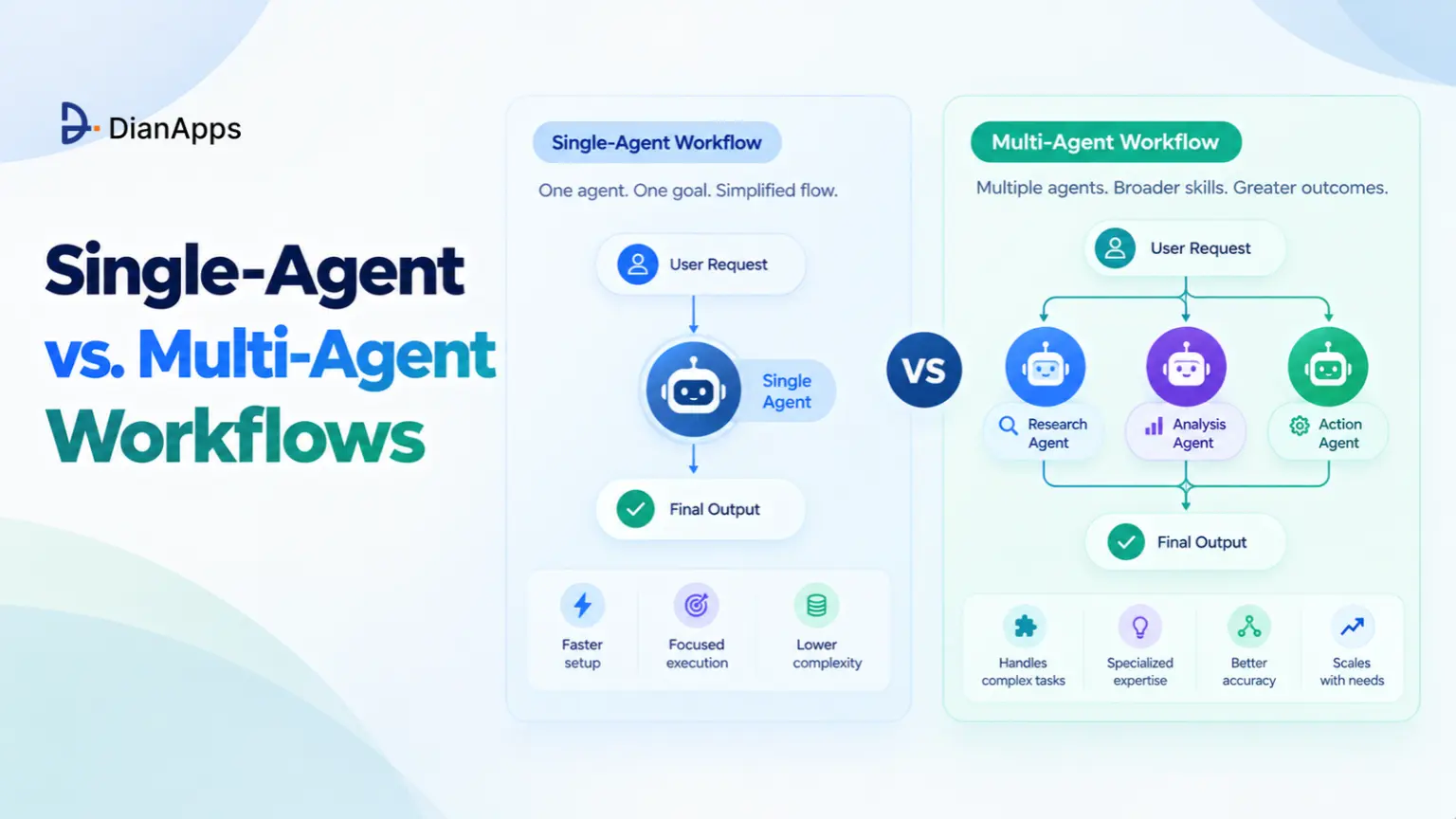
- Single-agent workflows suit simple tasks, while multi-agent systems handle complex, multi-step processes.
- Specialised agents improve task separation, validation and workflow control.
- Structured handoffs using JSON, context and error logs help agents collaborate reliably.
- Human review is essential before high-risk or irreversible actions.
- LangGraph, CrewAI and Microsoft Agent Framework support different multi-agent workflow needs.
Quick Answer: Single-agent workflows use one AI agent to complete a task, while multi-agent workflows divide complex tasks among specialised agents. Single agents are cheaper and easier to manage, whereas multi-agent systems suit workflows requiring research, validation and multiple handoffs. The right choice depends on task complexity, cost, reliability and the need for human oversight.
Ever visited a small restaurant where one person was taking the orders, cooking every dish, serving the tables and handling the bill all by themselves? It works fine on a quiet afternoon, but the moment a full dinner rush is walking in, orders are getting mixed up, dishes are coming out cold and the customers/guests are leaving unhappy. Many businesses are using AI in exactly the same way right now, asking one AI agent with one giant prompt to research, write, check and publish everything on its own, and then wondering why the output is not reliable enough to trust.
This is why more and more teams are turning to AI agent development that splits the work between specialised agents instead of piling it onto one. But how do these multi-agent workflows actually work, and when are they really worth it? Well, the answer is the same one the restaurant is using during the rush: give each job to a specialist, and let the work move from one station to the next like an assembly line.
In this guide we are comparing single-agent and multi-agent workflows, explaining why specialisation is working better for complex tasks, how agents are handing work to each other, where humans should stay in the loop and which frameworks are helping teams build these AI assembly lines today, so let’s break it down.
What Is a Single-Agent Workflow?
A single-agent workflow is where one AI agent, usually one large language model with access to a few tools, is handling a task from beginning until completion. You give it one detailed prompt, it reasons through the steps, calls whatever tools it needs and returns the final result. This setup is fast to build, cheaper to run and really easy to debug, which is why most AI chatbot development projects are still starting with a single agent for tasks like answering support questions, summarising documents or drafting short replies.
The problem starts when the task is getting bigger, because a single agent is holding everything in one context window, switching between very different jobs and checking its own work. The reasons it struggles are not hard to see once you compare it with the alternative, so let’s take a look.
What Is a Multi-Agent Workflow?
A multi-agent workflow is splitting one complex task between several specialised agents. Each agent has its own role, instructions, tools and context, and each one passes its output to the next agent in the chain, much like the stations on a factory assembly line. Some setups are running the agents one after another in a fixed order, while others are using a lead agent, or orchestrator, that plans the work and delegates it to the specialists. Anthropic, for example, is describing its own Research feature as an orchestrator-worker system, where a lead agent is coordinating the process and delegating to specialised subagents working in parallel.
Read More: AI agent architecture
When you put the two approaches side by side, the differences are coming down to a few clear points, resulting in:
- Single agents are suiting simple, well-defined tasks.
- Multi-agent workflows are suiting complex, multi-step tasks.
- Single agents are sharing one context window for everything.
- Multi-agent workflows are giving each agent its own focused context.
- Single agents are cheaper and easier to debug.
- Multi-agent workflows are using more tokens and need proper tracing.
This is why neither approach is winning in every situation. The right choice is depending on how complex the task is and how costly a mistake would be, and building either one well is starting with the right LLM development foundation underneath. This is also exactly where the shift to specialisation is coming in.
The Shift to Specialisation: Why One “God-Mode” Prompt Fails?
A “god-mode” prompt is that one massive instruction asking a single agent to research a topic, write the content, edit it, format it and publish it all in one go. On paper it looks efficient, but in practice it is creating a number of problems, resulting in:
- Instructions competing with each other inside one prompt.
- The context window filling up before the real work even starts.
- The agent grading its own work and missing its own mistakes.
- One small early error spoiling everything that comes after it.
- No clear point where you can see what actually went wrong.
Problems like these don’t just reduce the quality of the output, they also make the whole system really hard to trust, which is why teams are moving towards specialised agents. Take a content workflow as an example, where four agents are working as an assembly line, Researcher → Writer → Editor → Publisher. The Researcher is only gathering and verifying sources, the Writer is only drafting from those sources, the Editor is only checking accuracy, tone and structure against a checklist, and the Publisher is only formatting and pushing the approved piece to your CMS. This is giving each agent a smaller and clearer job, a focused prompt and only the tools it needs. It is also making every step easier to test and improve on its own, which is exactly how modern content marketing teams are starting to scale their output without losing quality.
The same pattern is working just as well for engineering tasks, where a Planner → Coder → Tester → Reviewer chain is replacing one agent that is trying to design, write, test and approve its own code inside your custom software development pipeline.
And that is not all, because there is real evidence behind this shift. Anthropic reported that its multi-agent system, with Claude Opus 4 as the lead agent and Claude Sonnet 4 as subagents, outperformed a single-agent Claude Opus 4 by 90.2% on its internal research evaluation. It also shared the trade-off openly: these systems were using about 15 times more tokens than standard chat interactions. Anthropic also noted that tasks needing all agents to share the same context, or involving many dependencies between agents, are not a good fit for multi-agent systems today. So specialisation is definitely powerful, but it is extremely crucial to use it where the task really needs it, which brings us to how these agents are actually talking to each other.
Agent-to-Agent (A2A) Protocols: How Agents Hand Off Work?
An assembly line is only working if each station is receiving exactly what it needs from the one before it, and multi-agent workflows are no different. Every handoff between agents should be passing three things, resulting in:
- The context, meaning the goal, the constraints and what has already been done.
- The structured output, in a predictable format like JSON.
- The error log, showing what failed, why it failed and what was already tried.
Structured outputs are especially important here. When the Researcher is returning its findings as a JSON object with fixed fields like sources, key facts and confidence notes, the Writer is not having to guess what the Researcher meant. This also is helping you validate every handoff automatically, so an output that is missing a required field gets sent back before the next agent even starts working on it. This is the same discipline good data engineering teams are already following when they build reliable pipelines.
For agents built on different frameworks or by different vendors, there is now an open standard for these handoffs. The Agent2Agent (A2A) protocol was started by Google and donated to the Linux Foundation, and it is letting agents built on frameworks like LangGraph, CrewAI and Google ADK discover what other agents can do and collaborate on tasks securely, without exposing their internal workings. A2A is built around a few core objects: an Agent Card for discovery, a Task as the unit of work with its own state, and Messages, Parts and Artifacts for passing information and outputs. Each agent is publishing its Agent Card at a standard location, so other agents know what it does, where to reach it and how to authenticate.
See the Comparative Analysis: AI agents vs agentic AI vs generative AI
A2A is also working alongside the Model Context Protocol (MCP) rather than replacing it. MCP is connecting an agent to its tools and data, while A2A is connecting one agent to another, and both usually sit on top of a solid backend development layer that is handling authentication, queues and logging. Supporting the protocol is not guaranteeing that two agents will understand each other or finish a task reliably, though, so testing, validation and clear task definitions are still your responsibility. Once the handoffs are working, the next question is where a human should be stepping in, so let’s take a look.
Planning Your First Multi-Agent Workflow?
Our AI engineers can help you map your process, decide where multi-agent workflows really add value and design the handoffs and safeguards before you write a single line of code.
The Human-in-the-Loop Safeguard: Where Humans Belong in the Chain?
Automation does not mean that nobody is watching. The most reliable AI assembly lines are placing human review at the exact points where a mistake would be expensive, irreversible or public. The simplest rule to follow is adding a human checkpoint before any action that cannot be easily undone, resulting in review gates at points like:
- Approving AI-generated code before production deployment.
- Approving content before it is published publicly.
- Confirming payments, refunds or financial changes.
- Approving emails or messages going to customers.
- Reviewing changes to databases, user accounts or permissions.
In a coding workflow, for example, the Planner, Coder and Tester agents can be running fully on their own, but the Reviewer’s output should be landing in front of a human engineer who approves the merge before your DevOps pipeline deploys anything to production. In a content workflow, the Editor’s approved draft is going to a human for a final check before the Publisher agent pushes it live. The same thinking is applying to robotic process automation and any other workflow that is touching real customers or real money. This is keeping the speed of automation while making sure accountability is always staying with a person.
Modern frameworks are making this much easier to build. In LangGraph, for example, an interrupt can pause the workflow at a specific step, save the full state using a checkpointer and wait for a human response before continuing. With the safeguards in place, the next decision is which framework you should be building on, so let’s break it down.
Tooling Breakdown: LangGraph, AutoGen and CrewAI
There are several popular orchestration frameworks for building multi-agent workflows, and each one is taking a slightly different approach. Most of them are Python-first, so having experienced Python developers on the team is really helpful when you move from a prototype to production.
LangGraph is modelling workflows as graphs, where each agent or step is a node and the connections between them decide what happens next. It is giving teams fine control over state, branching and retries, along with built-in human-in-the-loop support through interrupts and checkpointing. This makes it a strong choice for complex workflows that need precise control at every step.
AutoGen is the open-source multi-agent framework from Microsoft Research, known for conversation-based collaboration between agents. However, Microsoft moved AutoGen into maintenance mode in October 2025 and is now pointing new users to Microsoft Agent Framework. That framework reached version 1.0 in April 2026 and brings AutoGen and Semantic Kernel together into one SDK for Python and .NET. If you are starting a new project in the Microsoft ecosystem today, Microsoft Agent Framework is the path Microsoft itself is recommending, while AutoGen is mainly suiting teams that are maintaining existing projects.
Suggested Read- what is an AI agent
CrewAI is built around the idea of a “crew” of role-playing agents, each with its own goal and tools, working together on tasks. It also offers Flows, which act as the backbone of the application, with Crews acting as the teams of agents doing the specialised work inside them. This role-based design is making it really intuitive for workflows like Researcher → Writer → Editor → Publisher.
There is no single “best” framework here, because the right choice is depending on your team’s language, your existing stack, where you plan to host it, whether on AWS or another cloud, and how much control your workflow really needs. Once you have picked one, it is time to start building.
How to Build Your First AI Assembly Line?
Getting started with multi-agent workflows is much easier when you build step by step instead of automating everything at once, resulting in a process like this:
- Pick one repetitive, multi-step process that is costing your team real time.
- Break it into clear stages with one owner per stage.
- Turn each stage into an agent with a focused prompt and limited tools.
- Define a structured JSON format for every handoff.
- Add validation and error logging between agents.
- Place human review before every irreversible action.
- Test with real examples, measure the results and then scale.
Treating your first workflow like an MVP is helping you prove the value quickly and understand your token costs before you expand, and if a single agent is already doing the job well, it is definitely worth keeping it simple.
How DianApps Builds Multi-Agent AI Workflows?
At DianApps, we are helping startups, scale-ups and enterprises design and build AI systems that go well beyond a single chatbot, through our AI development services and generative AI solutions that connect with your existing products and tools. Our team is mapping your workflow first, deciding honestly whether a single agent or a multi-agent setup is the right fit, and then building the handoffs, validation, human review points and monitoring needed to run it reliably in production.
With 150+ skilled professionals, 450+ projects delivered and clients across 25+ countries, we are bringing AI, cloud, mobile and backend engineering together under one team. You can even hire AI developers to work directly with your in-house team. So whether you are automating a content pipeline, a code review process or a customer operations workflow, we’ve got you covered.
Turn Your Manual Process Into an AI Assembly Line
Share your workflow with our AI engineers and we will show you where specialised agents, structured handoffs and human checkpoints can save your team real time.
Final Thoughts
Single-agent workflows are still doing a great job for simple and focused tasks, but as soon as the work is getting bigger, a single “god-mode” prompt is starting to struggle, and this is where specialised agents are really proving their value. Breaking the work into stations like Researcher → Writer → Editor → Publisher, passing clean JSON handoffs with context and error logs between them, and placing human review exactly where mistakes would hurt the most is turning AI from an unpredictable helper into a dependable assembly line.
With frameworks like LangGraph, CrewAI and Microsoft Agent Framework maturing, and open standards like A2A connecting agents across systems, the tools are already here for businesses ready to use them. And if you would like help building your first AI assembly line the right way, our team at DianApps would definitely love to hear about your workflow and help you get it running from beginning until completion.
Ready to Build Smarter AI Workflows?
Tell us about your process and our team will get back to you within 24 hours with a clear plan for automating it with the right mix of AI agents and human oversight.
 0 comments










Your email address will not be published. Required fields are marked *