















 0 comments





TL;DR
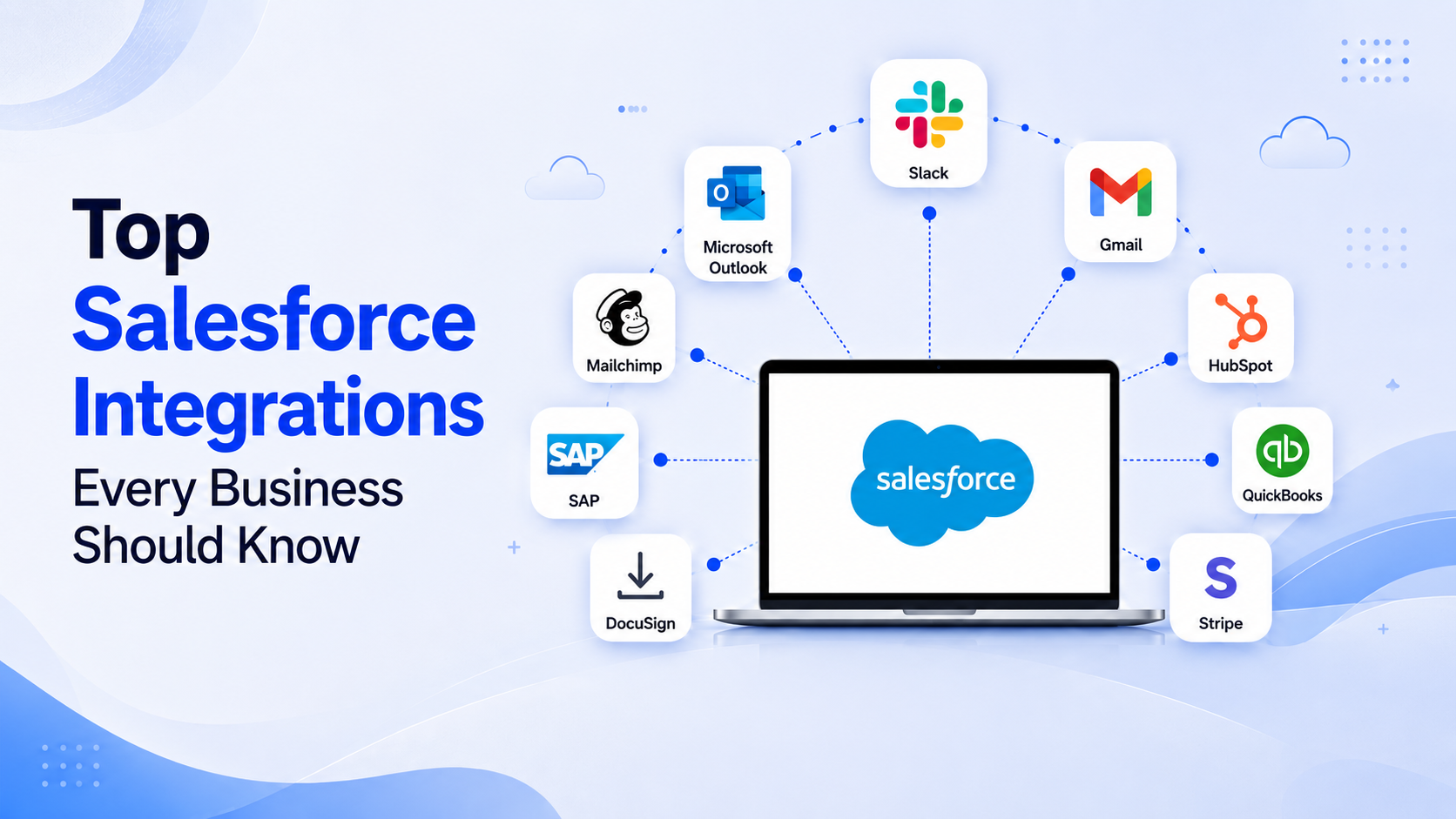
Salesforce is most valuable when it works alongside the rest of your business applications. Integrating Salesforce with communication, marketing, finance, customer support, and analytics platforms eliminates manual work, improves data accuracy, and helps teams make faster decisions. Some of the most impactful integrations include Slack, Microsoft Outlook, Gmail, HubSpot, Mailchimp, QuickBooks, Stripe, DocuSign, SAP, and Tableau. Businesses that invest in a well-planned integration strategy gain better visibility across departments while creating a smoother customer experience.
Businesses don’t need more software. They need software that works together.
Most organizations today use dozens of business applications. Sales teams work in Salesforce. Finance relies on accounting software. Marketing manages campaigns through automation platforms. Customer support uses ticketing systems, while executives depend on dashboards to monitor performance.
The challenge isn’t having the right tools. It’s ensuring those tools communicate with each other.
Without integrations, employees spend hours copying information between systems, updating customer records manually, and searching across multiple platforms for the same data. These repetitive tasks slow operations, increase the likelihood of errors, and make it difficult to maintain a complete view of every customer.
That is where Salesforce integration services become essential.
At DianApps, we’ve seen businesses unlock significantly more value from Salesforce by connecting it with the platforms they already use every day. A thoughtful integration strategy improves operational efficiency, enables faster decision-making, and creates a consistent customer experience across every touchpoint.
In this guide, we’ll explore the Salesforce integration patterns every business should know in 2026, why they matter, and how they can transform everyday business operations.
Why Salesforce Integrations Matter More Than Ever
Salesforce has evolved from being a customer relationship management platform into the operational backbone for many organizations. Sales, service, marketing, commerce, and AI capabilities now exist within a single ecosystem. However, no business operates entirely within Salesforce.
Modern organizations typically rely on numerous SaaS applications to manage different business functions. Integrating these systems allows information to move automatically instead of relying on manual updates.
The benefits include:
- A single source of truth for customer information
- Reduced manual data entry
- Faster response times
- Better collaboration across departments
- More accurate forecasting
- Improved customer experiences
- Stronger reporting and analytics
The need for integration continues to grow as businesses adopt more cloud applications.
According to Salesforce’s State of IT report, the average enterprise now uses over 1,000 applications, yet only a fraction of them are fully connected, creating significant operational inefficiencies.
Similarly, MuleSoft’s Connectivity Benchmark Report found that organizations continue to face major integration challenges as application ecosystems expand, making API-led connectivity a strategic priority.
These findings highlight why integration has shifted from being an IT project to a business strategy.
Top Salesforce Integrations Every Business Should Know
1. Slack
Slack has become one of the most valuable Salesforce integrations for modern organizations.
Rather than switching between applications, employees can receive Salesforce notifications directly inside Slack channels. Sales representatives receive updates when opportunities move stages, support teams get notified about critical cases, and managers can approve requests without opening multiple systems.
Some practical use cases include:
- Opportunity notifications
- Lead assignment alerts
- Service case escalations
- AI-generated customer summaries
- Cross-functional collaboration
Salesforce’s continued investment in Slack has also expanded AI-powered workflows, making it easier to automate approvals and surface customer insights directly within conversations.
Best for:
- Sales teams
- Customer support
- Enterprise collaboration
- Remote organizations
2. Microsoft Outlook
Email remains one of the most important communication channels in business.
Without integration, employees manually copy emails into Salesforce or update customer records after conversations.
The Outlook integration removes these repetitive tasks by allowing users to:
- Log emails automatically
- Sync calendars
- View customer records from Outlook
- Create Salesforce contacts directly from emails
- Schedule meetings with CRM context
This integration helps sales teams spend less time on administrative work while ensuring customer interactions remain accurately documented.
Best for:
- B2B sales teams
- Account managers
- Enterprise organizations
3. Gmail and Google Workspace
Organizations using Google Workspace can also connect Gmail with Salesforce development services.
The integration enables employees to access CRM information without leaving their inboxes. Users can view customer history, create leads, schedule meetings, and save conversations directly into Salesforce.
Additional integrations with Google Calendar and Google Drive simplify document management and scheduling.
Benefits include:
- Centralized customer communication
- Automatic activity logging
- Improved collaboration
- Reduced duplicate data
This is particularly useful for organizations that rely heavily on Google’s productivity ecosystem.
4. HubSpot
Many growing businesses use HubSpot for marketing while relying on Salesforce to manage sales pipelines.
Connecting the two platforms helps both teams stay aligned.
Marketing-qualified leads can flow directly into Salesforce, while sales updates automatically sync back into HubSpot for campaign optimization.
Common synchronization includes:
- Leads
- Contacts
- Companies
- Deal stages
- Campaign attribution
The result is better lead management, improved reporting, and stronger collaboration between marketing and sales.
Businesses that struggle with disconnected marketing and CRM data often see this integration as one of the highest-impact improvements they can make.
5. Mailchimp
Email marketing continues to deliver one of the highest returns among digital marketing channels.
Mailchimp’s Salesforce integration connects customer relationship data with email campaigns.
Marketing teams can:
- Build segmented audiences
- Personalize campaigns
- Track engagement
- Measure conversions
- Sync subscriber activity
Instead of exporting spreadsheets every week, customer information stays synchronized automatically.
This creates more accurate targeting while reducing manual marketing operations.
6. QuickBooks
Finance and sales often work with different systems.
QuickBooks integration bridges that gap.
Sales representatives can view invoices, payment history, and billing information directly inside Salesforce without requesting updates from finance.
Finance teams also gain visibility into customer lifecycle information that lives inside Salesforce.
Key capabilities include:
- Invoice synchronization
- Payment tracking
- Customer account updates
- Financial reporting
- Billing visibility
This integration reduces duplicate records while improving collaboration between finance and sales.
7. Stripe
For businesses processing online payments, Stripe integration simplifies payment tracking throughout the customer journey.
Instead of switching between payment dashboards and CRM records, teams can access transaction details directly within Salesforce.
Common use cases include:
- Payment status updates
- Subscription management
- Revenue tracking
- Refund visibility
- Customer payment history
Sales teams can also identify payment delays earlier, helping improve customer communication and revenue forecasting.
Also read: Top 5 tips to optimize Salesforce CRM
Salesforce Integrations Deliver Measurable Business Value
The impact of Salesforce integrations extends beyond convenience.
Organizations that connect their CRM with business-critical applications often experience:
- Faster sales cycles
- Higher data accuracy
- Better customer experiences
- Improved employee productivity
- Stronger cross-functional collaboration
- More reliable reporting
According to Salesforce’s Trends in Data and Analytics research, organizations increasingly view connected, trusted data as the foundation for AI, automation, and faster business decisions.
As AI adoption continues to accelerate across CRM platforms, businesses with integrated systems are significantly better positioned to automate workflows and deliver personalized customer experiences.
8. DocuSign
Closing deals often involves multiple rounds of document sharing, approvals, and signatures. Without an integration, sales representatives frequently download contracts, email them to customers, track responses manually, and then update Salesforce once everything is complete.
The DocuSign integration simplifies this process by bringing document workflows directly into Salesforce.
With the integration, businesses can:
- Generate contracts using Salesforce data
- Send agreements for electronic signatures
- Track document status in real time
- Store signed documents automatically
- Reduce manual follow-ups
The result is a faster sales cycle and greater visibility into every agreement.
Best for:
- Sales teams
- Legal departments
- Real estate businesses
- Financial services organizations
9. SAP
For large enterprises, Salesforce rarely operates in isolation. Critical operational data often resides in enterprise resource planning (ERP) platforms such as SAP.
Quick read on ERP vs CRM to understand the key differences.
Integrating Salesforce with SAP creates a unified view of both customer relationships and business operations.
Teams can access:
- Product availability
- Inventory levels
- Order status
- Customer credit information
- Invoice history
- Procurement data
Instead of asking multiple departments for updates, sales representatives can access the information they need directly within Salesforce.
This integration also improves forecasting because sales and operational data remain synchronized.
Best for:
- Manufacturing
- Retail
- Healthcare
- Supply chain organizations
- Enterprise businesses
10. Tableau
Data becomes valuable only when teams can understand and act on it.
Since Tableau is part of the Salesforce ecosystem, integrating the two platforms enables businesses to transform CRM data into interactive dashboards and visual reports.
Executives can monitor:
- Sales performance
- Pipeline health
- Customer acquisition
- Revenue trends
- Customer retention
- Regional performance
Instead of relying on static spreadsheets, leadership teams gain access to real-time insights that support faster decision-making.
Organizations that prioritize data-driven growth often consider Tableau one of the most impactful Salesforce integrations.
11. Microsoft Teams
Many organizations rely on Microsoft Teams for day-to-day collaboration.
Connecting Teams with Salesforce allows employees to access CRM information without leaving their collaboration workspace.
Teams can:
- Share Salesforce records during conversations
- Receive CRM notifications
- Collaborate on opportunities
- Discuss customer cases
- Launch meetings with customer context
This reduces unnecessary context switching and keeps discussions focused on current customer information.
12. ERP Systems
Beyond SAP, many businesses use ERP platforms such as Oracle NetSuite, Microsoft Dynamics 365 Business Central, or other industry-specific systems.
Integrating ERP software development services with Salesforce helps create a complete view of business operations.
Typical synchronization includes:
- Customer accounts
- Product catalogs
- Pricing information
- Inventory
- Purchase orders
- Shipping status
- Financial records
Instead of maintaining separate customer records across departments, businesses can establish a single source of truth that improves operational efficiency.
How to Choose the Right Salesforce Integrations
Not every business needs every integration.
The right combination depends on your existing technology stack, operational priorities, and long-term growth plans.
At DianApps, we generally recommend evaluating integrations based on four key factors.
Quick read on the top 10 Salesforce consulting companies to find the right choice.
1. Business Objectives
Start by identifying the processes you want to improve.
For example:
- Reduce manual data entry
- Improve lead management
- Accelerate sales cycles
- Enhance customer support
- Increase reporting accuracy
Technology should support business goals rather than adding unnecessary complexity.
2. Data Quality
Integrations are only as effective as the data they exchange.
Before connecting systems, review:
- Duplicate records
- Missing customer information
- Field consistency
- Data ownership
- Validation rules
Clean data leads to better automation and more reliable reporting.
3. Scalability
An integration that works for a small business may not support enterprise-level operations.
Look for solutions that can scale as your organization grows, especially if you plan to adopt AI, advanced analytics, or additional Salesforce products in the future.
4. Security and Compliance
Customer data moves across multiple systems during integration.
Ensure every integration aligns with your organization’s security policies and compliance requirements, including role-based access controls, encryption, and audit logging where applicable.
Common Salesforce Integration Mistakes to Avoid
Even with the right tools, implementation mistakes can reduce the value of Salesforce integrations.
Some of the most common issues include:
Integrating Too Many Applications at Once
Attempting to connect every business application simultaneously often creates unnecessary complexity.
A phased rollout delivers better results and allows teams to adapt gradually.
Ignoring User Adoption
Successful integrations depend on people as much as technology.
Provide training, gather feedback, and ensure employees understand how integrated workflows improve their daily work.
Poor Data Governance
Disconnected data standards often lead to duplicate records and inaccurate reporting.
Establish clear ownership, validation rules, and ongoing data quality processes before launching integrations.
Choosing Short-Term Fixes
Point-to-point integrations may solve immediate problems but often become difficult to maintain as businesses grow.
Modern API-based integration strategies offer greater flexibility and scalability.
How We Help Businesses Build Connected Salesforce Ecosystems
At DianApps, we believe Salesforce should serve as the central hub of your digital ecosystem rather than another standalone application.
Our team helps businesses design, implement, and optimize Salesforce integrations that improve operational efficiency while supporting long-term growth.
Our Salesforce capabilities include:
- Salesforce consulting and implementation
- Custom Salesforce development
- CRM modernization
- Third-party API integrations
- ERP and finance integrations
- AI-powered workflow automation
- Salesforce maintenance and support
Rather than applying the same approach to every project, we evaluate each organization’s processes, existing systems, and business objectives before recommending an integration strategy.
Whether you’re connecting marketing platforms, accounting software, collaboration tools, or enterprise systems, our focus remains the same: creating reliable, scalable integrations that simplify operations and improve customer experiences.
Final Thoughts
Salesforce delivers the greatest value when it becomes the central source of customer information across your organization.
By integrating Salesforce with communication platforms, finance software, marketing tools, analytics solutions, and enterprise applications, businesses can eliminate manual work, improve data accuracy, and give every department access to the information they need.
As organizations continue adopting AI, automation, and cloud-based technologies, connected systems will become even more important. Businesses with well-planned Salesforce integrations will be better positioned to improve operational efficiency, deliver consistent customer experiences, and make faster, data-driven decisions.
If you’re planning to expand your Salesforce ecosystem, choosing the right integrations today can create a stronger foundation for tomorrow’s growth.
 0 comments











Leave a Comment
Your email address will not be published. Required fields are marked *