















 0 comments





Your company just went live on Salesforce. Sales is happy. Leadership is happy. And then someone in the Monday standup asks: “How do we connect this with the ERP?”
The room gets quiet.
That moment is where Salesforce integration either becomes your competitive advantage or your biggest headache. And the difference usually comes down to one thing: which pattern you choose before you start building.
This isn’t a beginner’s intro to what Salesforce is. If you’re here, you probably already know. What you want to know is how to connect it to everything else without creating a mess you’ll spend two years cleaning up.
So let’s get into it.
TL;DR: Five integration patterns cover most Salesforce use cases: real-time API, batch/bulk, event-driven, ETL-based migration, and API-led connectivity. Picking the wrong one wastes months. According to MuleSoft’s 2024 Connectivity Benchmark Report, teams using structured integration patterns finish projects up to 30% faster than those building point-to-point connections without a plan.
What does “Salesforce integration” actually mean?
At its simplest, Salesforce integration means making Salesforce talk to other software automatically. Not export-CSV-import-manually. Not copy-paste between screens. Actually automated, bidirectional, reliable data flow.
When a deal closes in Salesforce, integration can create the invoice in your billing tool. When a support ticket opens in Zendesk, it can create a case record in Salesforce. When inventory drops below the threshold in your ERP, it can update the product availability visible to your sales team.
Without this, people fill the gaps manually. That costs hours, creates errors, and means leadership is always looking at stale data when they make decisions.
The tricky part is that there’s no single way to do it. The right approach depends on how often data needs to move, how much of it there is, how many systems are involved, and what happens if something breaks. Each of the five patterns below solves a different version of that problem.
The 5 patterns at a glance
Before going deep, here’s an honest side-by-side comparison.
Pattern | Best for | Data volume | Complexity | Popular tools |
| Real-time API | Live sync between two systems | Low to medium | Medium | REST API, MuleSoft, Boomi |
| Batch/Bulk | Large scheduled data loads | High | Low to medium | Bulk API, Talend, Informatica |
| Event-driven | Multiple systems reacting to one trigger | Medium | Medium to high | Platform Events, Kafka, EventBridge |
| ETL migration | Data warehouse sync, legacy migration | Very high | Medium | Informatica, Talend, Fivetran |
| API-led connectivity | An enterprise with many systems | High | High | MuleSoft Anypoint, Boomi |
Pattern 1: Real-time API integration
Real-time Salesforce API integration is what most people picture when they hear “integration.” Something changes in Salesforce, and within seconds the other system knows about it.
Close a deal. Project gets created in Asana. Customer gets an onboarding email. Finance team gets notified. All automatic, all immediate.
How it actually works
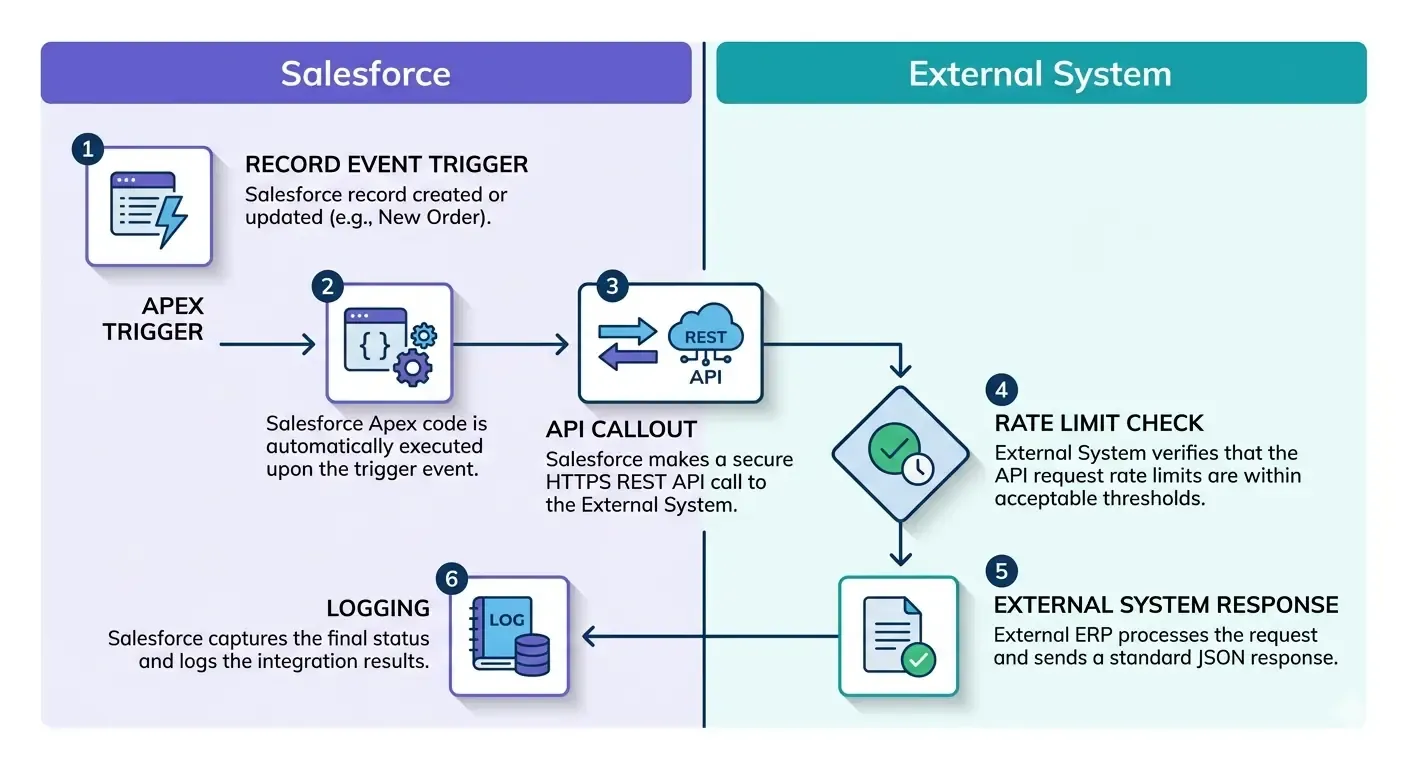
Salesforce exposes a REST API and SOAP API. When a record changes, something (an Apex trigger, a Flow, or middleware) fires a callout to the external system’s API endpoint. The external system responds. Done.
The flow looks like this:
- Record created or updated in Salesforce
- Apex trigger or Flow detects the change
- API callout goes out to the external system
- External system confirms receipt or sends data back
Simple on paper. The complications come in production.
When it’s the right choice
Real-time integration works when data latency genuinely matters. Customer portals, financial systems, anything where a rep or a customer is waiting on current information. It also works best when transaction volumes are manageable. Hundreds of calls per hour, not hundreds of thousands.
What breaks it
API rate limits catch people off guard. The limits depend on your Salesforce edition. Developer and Professional editions cap at 15,000 API calls per 24 hours. Enterprise gets significantly more. If you hit the ceiling during a busy period, syncs fail unless you’ve built retry logic, and most early-stage integrations haven’t.
Also, Salesforce updates its API three times a year. If the external system’s connector still talks to a deprecated endpoint, things break on release day and it’s usually not obvious why.
One thing the architecture diagrams never show: what happens when the external system goes down? If Salesforce fires a callout and the other system doesn’t respond, you need dead-letter queuing and alerting. “Works in testing” and “works when everything is healthy” are very different things from “works reliably in production.”
Also read: Salesforce vs microsoft dynamics crm comparison
Pattern 2: Batch and bulk data integration
Here’s the honest version of when to use batch integration: when your data doesn’t need to be current to the minute, and there’s a lot of it.
Batch integration moves data on a schedule. Instead of firing an API call for every single change, it collects a period’s worth of changes and processes them together. Nightly. Hourly. Weekly. Whatever the business needs.
This sounds less exciting than real-time. It’s also often more reliable, cheaper to run, and easier to troubleshoot.
How it works
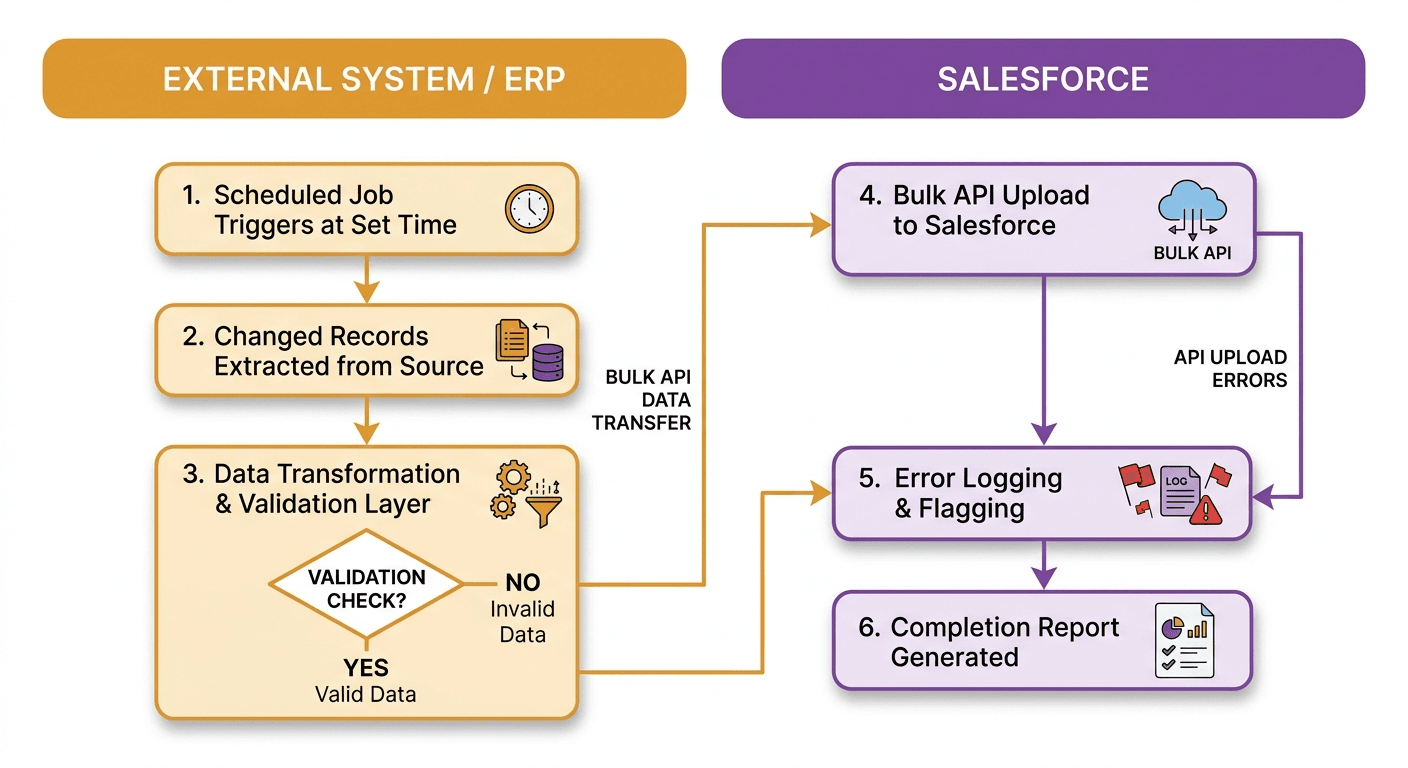
Salesforce’s Bulk API handles this well. It’s built for high-volume async jobs and can process up to 100 million records per 24-hour period. The job gets queued, Salesforce processes it in the background, and you get a completion report when it’s done.
A typical batch job:
- Scheduled job runs at a set time
- Changed records are pulled from the source system
- Batch job uploads data to Salesforce via Bulk API
- Errors get logged and flagged
If a sales rep can see yesterday’s inventory levels and still do their job, batch is fine. If overnight reconciliation between your ERP and Salesforce is the main goal, batch is probably better than real-time. For high-volume data loads, tens of thousands of records, batch is almost always the more sensible option.
Two things cause most batch failures: schema drift and deduplication.
Schema drift is when the source system changes a field name, adds a required field, or changes a data type and nobody updates the batch job to match. It usually surfaces at 2am when the nightly run fails and you get a support ticket before your first coffee.
Deduplication is the other one. Loading 50,000 records without a solid external ID strategy creates duplicates that take weeks to clean up. Salesforce duplicate rules help, but they won’t catch everything if your IDs aren’t consistent across systems.
In our experience working on batch integrations for e-commerce and manufacturing clients, the transformation layer breaks things more often than the batch tooling itself. Mismatched field types between source systems and Salesforce cause roughly 40% of first-month failures. Build validation before loading, not after.
Pattern 3: Event-driven integration
Event-driven integration is built around the idea that things happen in a business, and multiple systems need to react to those things.
It’s different from real-time API integration in an important way. With real-time API, System A calls System B directly. With event-driven, System A publishes an event, and any system that cares about that event reacts on its own. System A doesn’t need to know anything about System B.
That loose coupling is the whole point.
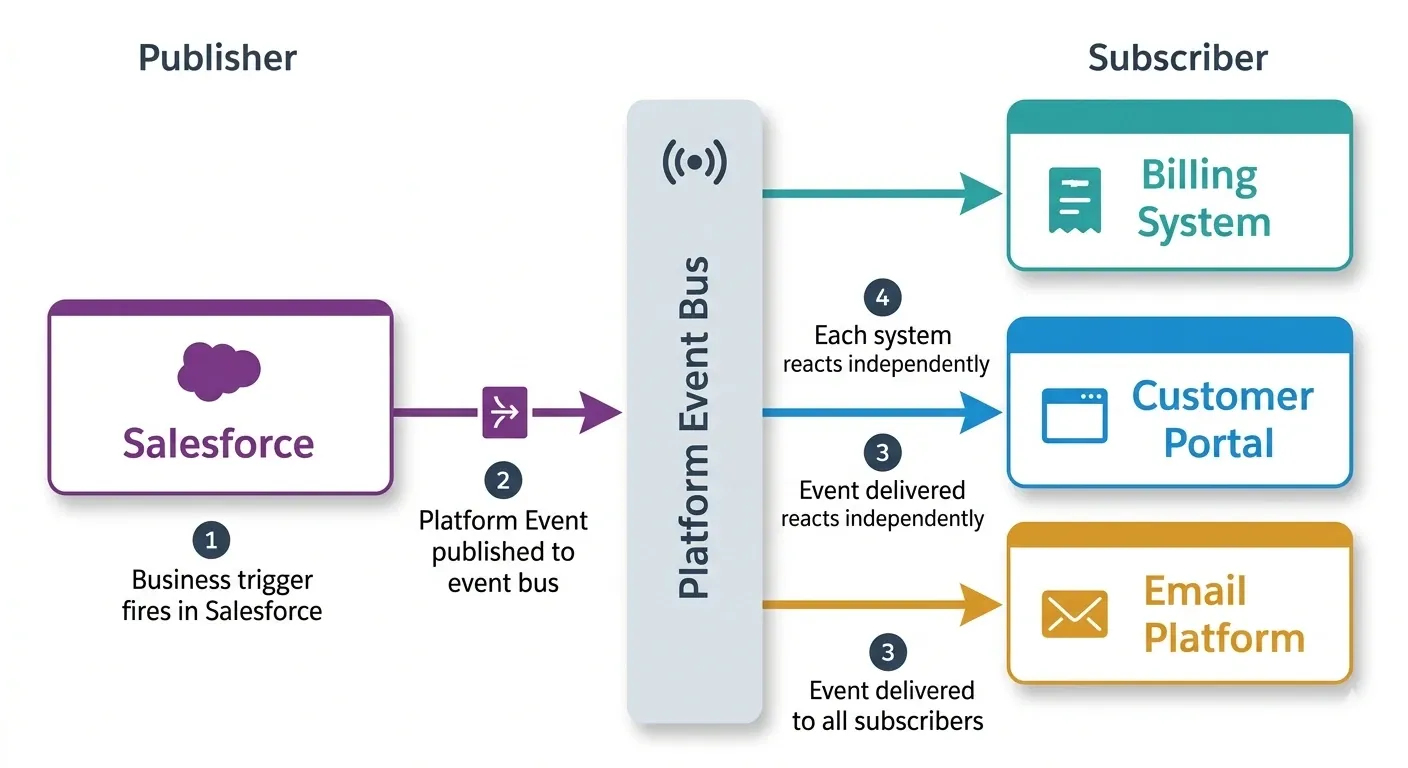
Salesforce Platform Events are the native mechanism here. Think of them as a pub-sub system built into Salesforce. Something happens, an event gets published, and any subscriber reacts.
A field service example: technician marks a job “Complete” in Salesforce. That single action publishes one Platform Event. The billing system picks it up and creates an invoice. The customer portal picks it up and updates the job status. The email platform picks it up and sends a satisfaction survey. The warehouse picks it up and triggers a parts restock.
One event. Four systems react. None of them are directly connected to each other.
Event-driven fits when multiple systems need to react to the same business trigger, when you want systems to be loosely coupled so one can change without breaking the others, and when you need to support workflows where the downstream steps aren’t always predictable in advance.
Event ordering is genuinely tricky. Two events fire close together, arrive out of sequence, and you end up with corrupted data. An “Account Updated” event arrives before the “Account Created” event that triggered it. Use Platform Event replay IDs to handle ordering and redelivery. Most integrations skip this until they hit the problem in production.
Monitoring is also harder. A REST API call gives you an immediate response. An event is fire-and-forget. If the consumer fails silently, nothing alerts you unless you’ve explicitly built that in. Budget for consumer-side error handling before assuming event-driven architecture is simpler than alternatives. It simplifies the triggering side and adds complexity to the consuming side. Teams that skip that second half usually regret it.
Pattern 4: ETL-based data migration and sync
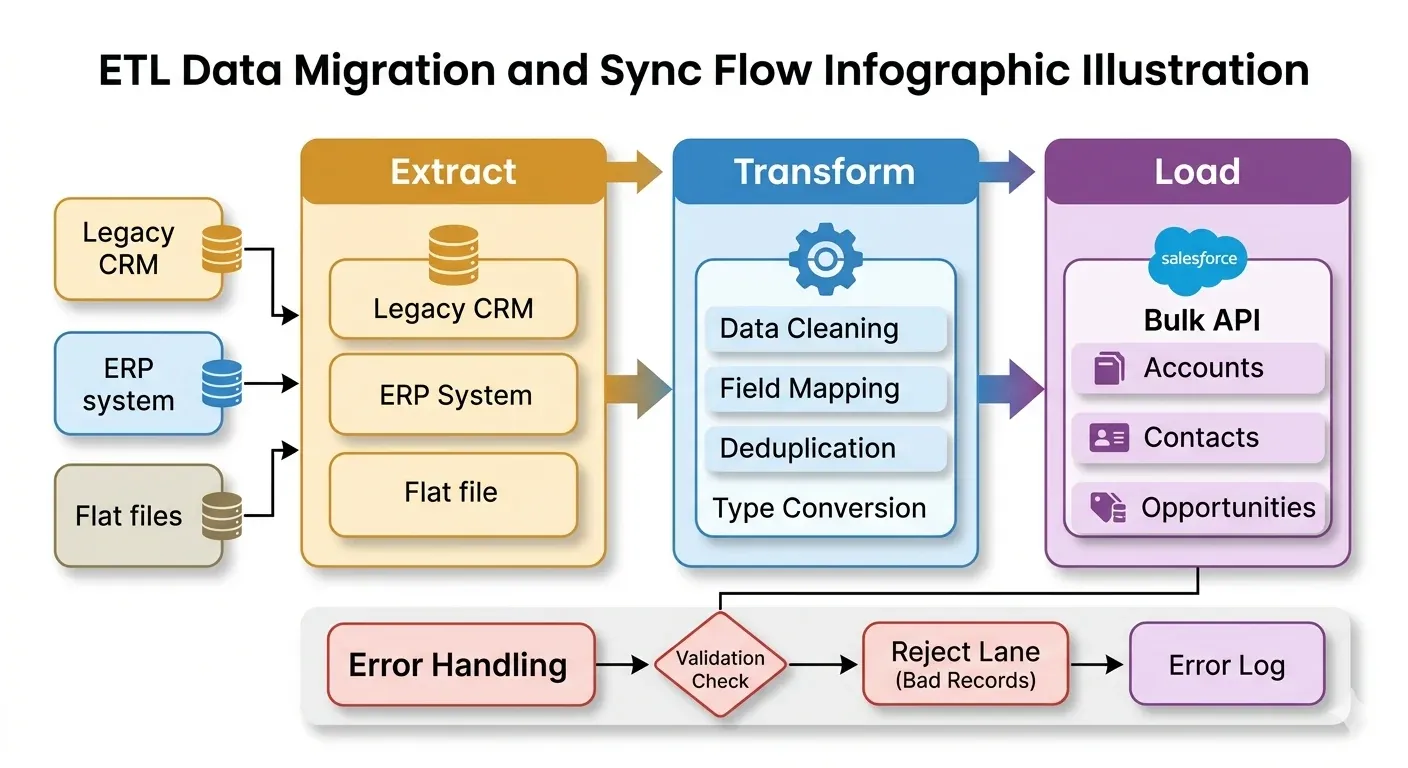
ETL stands for Extract, Transform, Load. It’s been around longer than Salesforce, and there’s a reason it’s still a standard pattern: it works well for moving large amounts of complex data, especially when that data needs significant reshaping before it lands anywhere.
For Salesforce, ETL shows up in two main scenarios. The first is migrating historical data from a legacy system. The second is keeping Salesforce data in sync with a data warehouse for analytics.
Three stages, and each one matters more than people expect.
Extract pulls data from the source. Legacy CRM, ERP, flat file, database. Whatever it is.
Transform is where most of the actual work happens. Cleaning data. Renaming fields. Converting types. Deduplicating. Mapping to Salesforce’s schema. This step consistently takes longer than scoped.
Load pushes the transformed data into Salesforce using the Bulk API or a native connector.
Moving from Siebel, HubSpot, or MS Dynamics to Salesforce. Syncing Salesforce opportunity data into Snowflake or BigQuery for BI reporting. Consolidating data from multiple source systems before it enters Salesforce. These are ETL scenarios.
Data quality in legacy systems is almost always worse than anyone admits going in. In most migration projects, 20 to 30 percent of records have some kind of issue, missing required fields, invalid values, inconsistent formatting across years of manual entry.
Build a data profiling step before transformation, not after. You’ll find out how bad the data actually is, and more importantly, you’ll find out before you’re halfway through the project.
Also plan for incremental loads. A full ETL run on a large dataset can take hours. Once the initial migration is done, switch to delta loads that only process records changed since the last run.
One thing that regularly surprises teams: the transformation phase takes two to three times longer than scoped, almost every time. The technical tooling is rarely the bottleneck. The bottleneck is decisions. “What counts as an active account?” “Do we migrate closed opportunities from 2018?” Those answers require stakeholder time, not just developer time, and they don’t come quickly.
Pattern 5: API-led connectivity
API-led connectivity is an architecture approach, not a single integration method. It’s what you reach for when you have enough integrations that managing them as individual point-to-point connections becomes a full-time problem.
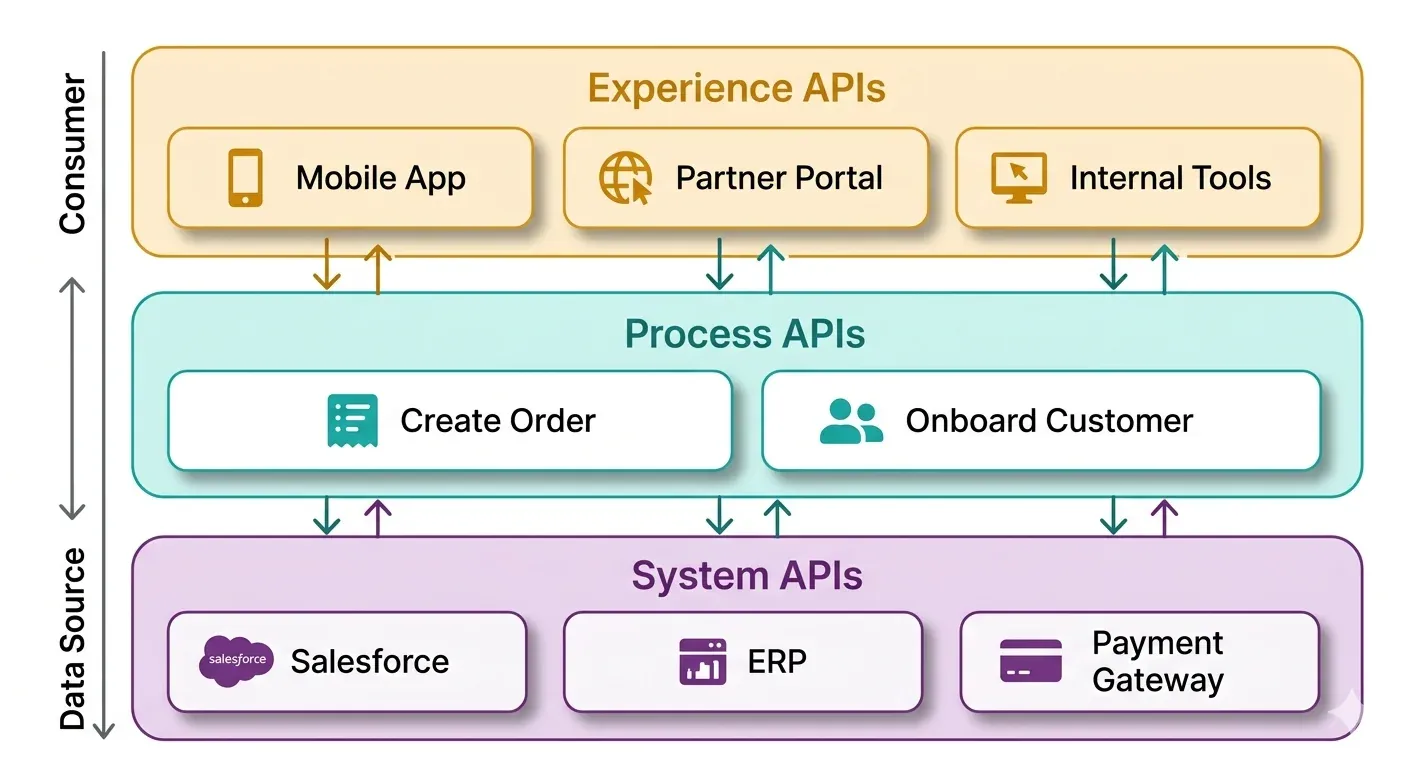
The core idea is straightforward: instead of building direct connections between systems, you build reusable API layers. Systems talk to layers. Layers talk to each other. When something changes, you update one layer instead of every connection that touches it.
MuleSoft designed this pattern, and it’s baked into Anypoint Platform.
Three tiers:
System APIs sit closest to the source systems. A Salesforce System API exposes Accounts and Contacts. An ERP System API exposes orders and inventory. These APIs don’t know or care what’s consuming them.
Process APIs handle business logic. They call multiple System APIs and orchestrate the result. A “Create Customer” process might simultaneously call the Salesforce System API and the billing System API. The logic lives here, not in either system.
Experience APIs are consumer-specific. The mobile app gets a lightweight experience built for its needs. The partner portal gets a different one. Both use the same Process APIs underneath. When the mobile app’s needs change, you update its Experience API without touching anything else.
If you have five or more systems that all need to share data with Salesforce, and multiple teams building integrations independently, point-to-point quickly becomes unmaintainable. API-led connectivity gives you governance, reusability, and a way to scale without creating integration spaghetti.
This pattern costs more upfront. You’re building three layers instead of one, which takes more time and more expertise. For a small business with two integrations, it’s genuinely overkill. Don’t let a vendor talk you into it before you actually need it.
But here’s the ROI argument that often gets missed: when Salesforce releases a breaking API change (at least once a year), you only need to update the System API layer. Without this pattern, you’d update every single integration that talks to Salesforce directly. That’s the real business case, and it’s more convincing than any benchmark report.
How to pick the right pattern
There’s no universal answer. But there’s a practical decision tree that works most of the time.
Start with volume and latency. If data needs to be current in seconds and volume is manageable, real-time API. If timing is flexible and volume is high, batch. If multiple systems need to react to the same thing, event-driven. If you’re moving historical data or feeding a data warehouse, ETL. If you have many systems and need governance, API-led.
Most Salesforce environments that have been running for more than two years use a mix. Real-time for customer-facing data. Batch for reporting. Event-driven for cross-system workflows. ETL for the data warehouse. These patterns aren’t competing with each other. They coexist.
The mistake isn’t picking the wrong pattern. The mistake is picking a pattern before you understand your actual requirements, data volume, acceptable latency, number of systems, team capacity to maintain it.
Also read: The complete 7 phase salesforce development lifecycle
Choosing middleware for Salesforce integration
Whatever pattern you use, middleware reduces the amount of custom code you write and maintain. Here’s how the main options compare.
Tool | Best for | Salesforce connector | Pricing |
| MuleSoft Anypoint | Enterprise, API-led | Deep native | Per vCore/month |
| Dell Boomi | Mid-market, fast setup | Good library | Per connection |
| Workato | Business-user automation | Native recipes | Per recipe |
| Informatica IICS | ETL and data quality | Strong native | Per compute unit |
| Zapier | Simple, low-volume | Native app | Per task |
| Azure Logic Apps | Microsoft-heavy orgs | Available connector | Per action |
Middleware is not mandatory. Some integrations are cleaner with custom Apex and native Salesforce Flows, especially when the data model is simple and the team has Salesforce development experience. The middleware decision is a cost-versus-maintenance tradeoff, not a technical requirement.
Common Salesforce integration mistakes (and how to skip them)
These aren’t edge cases. They come up on almost every project.
Governor limits ignored during design. Salesforce enforces execution limits on API calls, Apex code, and batch jobs. If your design doesn’t account for these from the start, you’ll hit walls in production at the worst possible time. Check the limits for your edition before architecture decisions get finalized.
No monitoring, just error logging. Error logging tells you what broke. Monitoring tells you when something is about to break, or when a sync stopped running silently. These are different things. Build alerting from the start.
Integration users with admin profiles. It’s common to see integration service accounts with Salesforce admin access because it was easier to set up. That’s a security risk and an audit finding. Integration users should have exactly the permissions needed, nothing more.
Zero documentation. Six months after go-live, the person who built the integration has moved to another team. If there’s no documentation of field mappings, error handling, dependencies, and architecture decisions, the next person starts from scratch. Document while it’s fresh, not when there’s a problem.
Also Read: The Salesforce Developer’s Guide to the Spring ’26 Release
Real-world examples
These patterns make more sense when you see them applied.
E-commerce retailer: Shopify orders sync to Salesforce via real-time API integration. When an order ships, a Platform Event updates the customer record in Salesforce and triggers a tracking email. Two patterns running together, each doing what it’s best at.
Mid-size manufacturer: Nightly batch jobs sync inventory levels from their ERP into Salesforce. Monthly, an ETL pipeline sends Salesforce opportunity data into Snowflake for supply chain analytics. No middleware. Custom Apex and a Talend job handle the whole thing.
Financial services firm: A bank with Salesforce, a loan origination system, a KYC tool, and a core banking platform builds API-led connectivity on MuleSoft. Each team owns a System API layer. New experience APIs take weeks to ship because the underlying layers already exist and are reusable.
None of these are unusual. They’re the situations most businesses end up in when Salesforce becomes genuinely central to operations.
What to do before you start building
The architecture conversation is more valuable than the build conversation, and most teams skip it.
Before picking a pattern or a tool, answer these questions:
- How often does this data actually need to move?
- What’s the maximum volume per sync cycle?
- What happens if the integration fails for an hour? A day?
- How many systems need to share this data?
- Who owns this integration when the builder is gone?
The answers determine your pattern. The pattern determines your tool. The tool determines your build approach. Get the first step right and the rest follows naturally.
At DianApps, we’ve built Salesforce integrations for clients in healthcare, fintech, e-commerce, and manufacturing. The most expensive mistakes we’ve seen aren’t technical. They’re architectural decisions made before the requirements were actually understood. If you’re at that stage now and want a second set of eyes on your plan before you start, we’re happy to take a look.
Wrapping up
Salesforce integration isn’t one decision. It’s a series of them, starting with which pattern fits your situation and ending with how you monitor and maintain what you’ve built.
The five patterns here cover most of what businesses actually need:
- Real-time API when data needs to be current, and volume is manageable
- Batch/bulk when volume is high, and timing is flexible
- Event-driven when multiple systems react to the same trigger
- ETL for migrations and data warehouse sync
- API-led for enterprise environments with many systems and many teams
Pick the simplest pattern that meets your requirements. Add complexity only when simpler options fail. Document everything from day one. And don’t deploy without error handling and alerting in place.
If you want to avoid the common mistakes and get the architecture right before a single line of code is written, Salesforce integration services, that’s exactly what we help with.
Frequently Asked Questions
 0 comments










Leave a Comment
Your email address will not be published. Required fields are marked *