















 0 comments





Quick Answer
Pick Salesforce if CRM is the center of your revenue operation, your sales process is complex, and AI agents are on your roadmap. Pick Microsoft Dynamics 365 if your reps live in Outlook and Teams, you want CRM and ERP on one data platform, or you need lower per-seat costs at enterprise tiers. Still undecided? Our Salesforce implementation team is starting every project with exactly this fit check.
Salesforce vs Microsoft Dynamics CRM
Salesforce is earning more than four times the CRM revenue of its nearest rival, according to IDC’s 2025 data. In the Salesforce vs Microsoft Dynamics race, though, market share is not the same as fit. The table below is lining up the facts that actually change a buying decision.
| Factor | Salesforce | Microsoft Dynamics 365 |
|---|---|---|
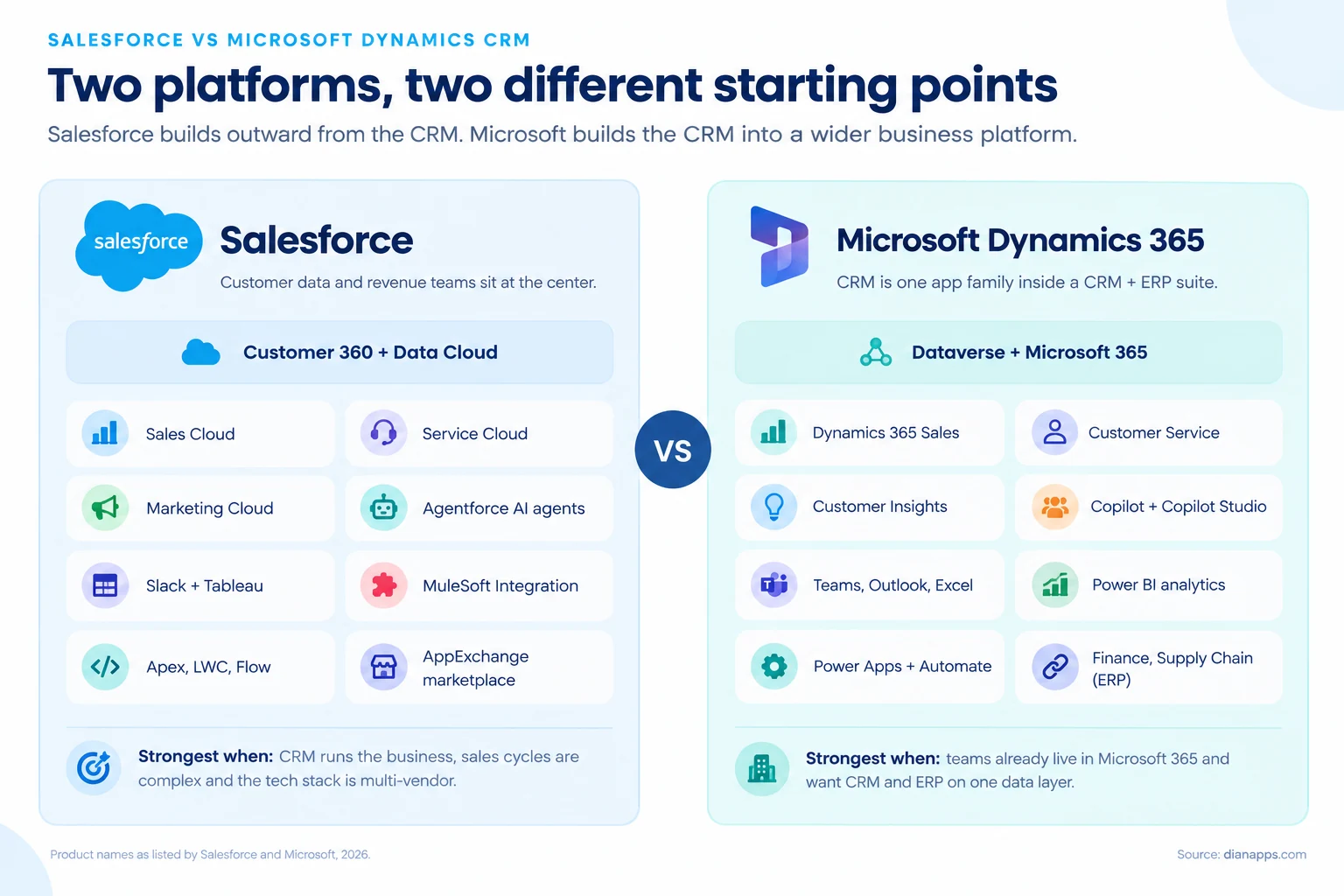
| Platform type | CRM-first cloud platform | CRM apps inside a CRM + ERP suite |
| Sales entry price | $25/user/mo (Starter Suite) | $65/user/mo (Sales Professional) |
| Enterprise sales tier | $175/user/mo | $105/user/mo |
| AI layer | Agentforce, Einstein, Data Cloud | Copilot, Copilot Studio, Dataverse |
| Marketplace | AppExchange (5,000+ integrations) | Microsoft AppSource |
| Analytics | Reports, CRM Analytics, Tableau | Native dashboards, Power BI |
| Deployment | Cloud only | Cloud, plus a more limited on-premises option |
| Best for | Complex sales, multi-vendor stacks | Microsoft 365 and Dynamics ERP customers |
The short version: Salesforce is costing less to start and more to scale; Dynamics 365 is costing more to start and less per seat at the enterprise tier.
Is Dynamics CRM the Same as Dynamics 365?
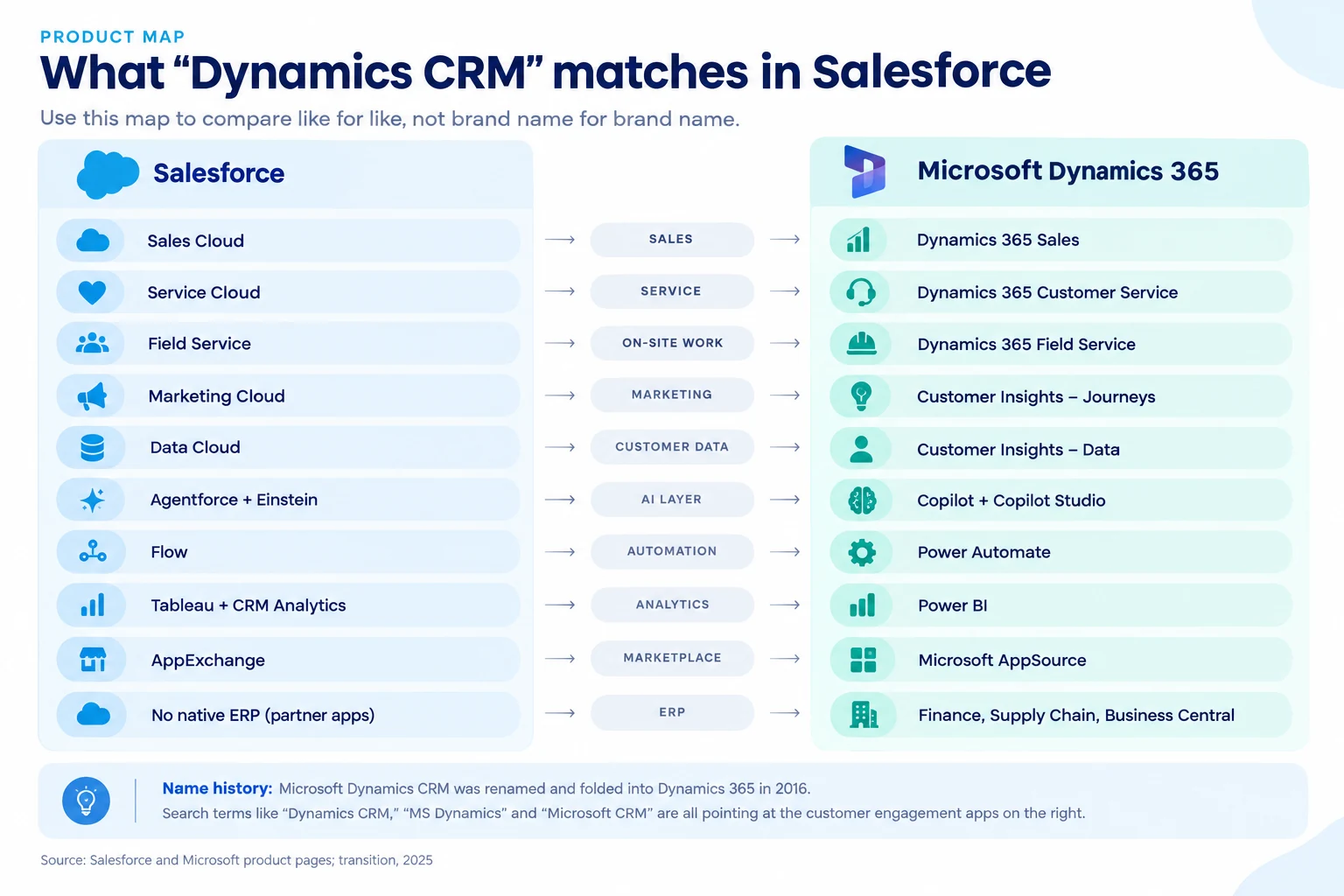
Yes, mostly. Microsoft Dynamics CRM was the product name until Microsoft folded it into Dynamics 365 in 2016. Today the old “CRM” is split into separate customer engagement apps: Dynamics 365 Sales, Customer Service, Field Service, and Customer Insights.
That is why searches like “dynamics crm vs salesforce”, “ms dynamics vs salesforce” and “microsoft crm vs salesforce” are all asking the same question. They are just using names from different years.
The bigger difference is scope. Dynamics 365 also includes ERP apps like Finance, Supply Chain Management, and Business Central, while Salesforce is a traditional CRM that is relying on partners for ERP (Itransition, 2025). If your finance team is already on Dynamics ERP, that single fact is often deciding the whole comparison.
How Much Does Salesforce Cost Compared to Dynamics 365 in 2026?
Salesforce Sales Cloud is listing five paid tiers at $25, $100, $175, $350, and $550 per user per month, and Dynamics 365 Sales is listing three at $65, $105, and $150 (Salesforce and Microsoft pricing pages, 2026). Everything above Salesforce Starter is billed annually on both sides.
| Tier level | Salesforce Sales Cloud | Dynamics 365 Sales |
|---|---|---|
| Free | Free Suite, 2 users | Not available (30-day trial) |
| Entry | Starter Suite, $25 | Not available |
| Professional | Pro Suite, $100 | Sales Professional, $65 |
| Enterprise | Enterprise, $175 | Sales Enterprise, $105 |
| Top tier | Unlimited, $350 | Sales Premium, $150 |
| AI bundle | Agentforce 1 Sales, $550 | Not available (Copilot included from Enterprise) |
Prices are per user per month, list price, billed annually except Starter Suite. Sources: salesforce.com and microsoft.com pricing pages as reported July to August 2026.
Tiers are not feature-identical, so compare the tier you actually need, not the tier with the same name. For most mid-market teams, Salesforce Enterprise is the practical floor because it is the first tier with full API access.
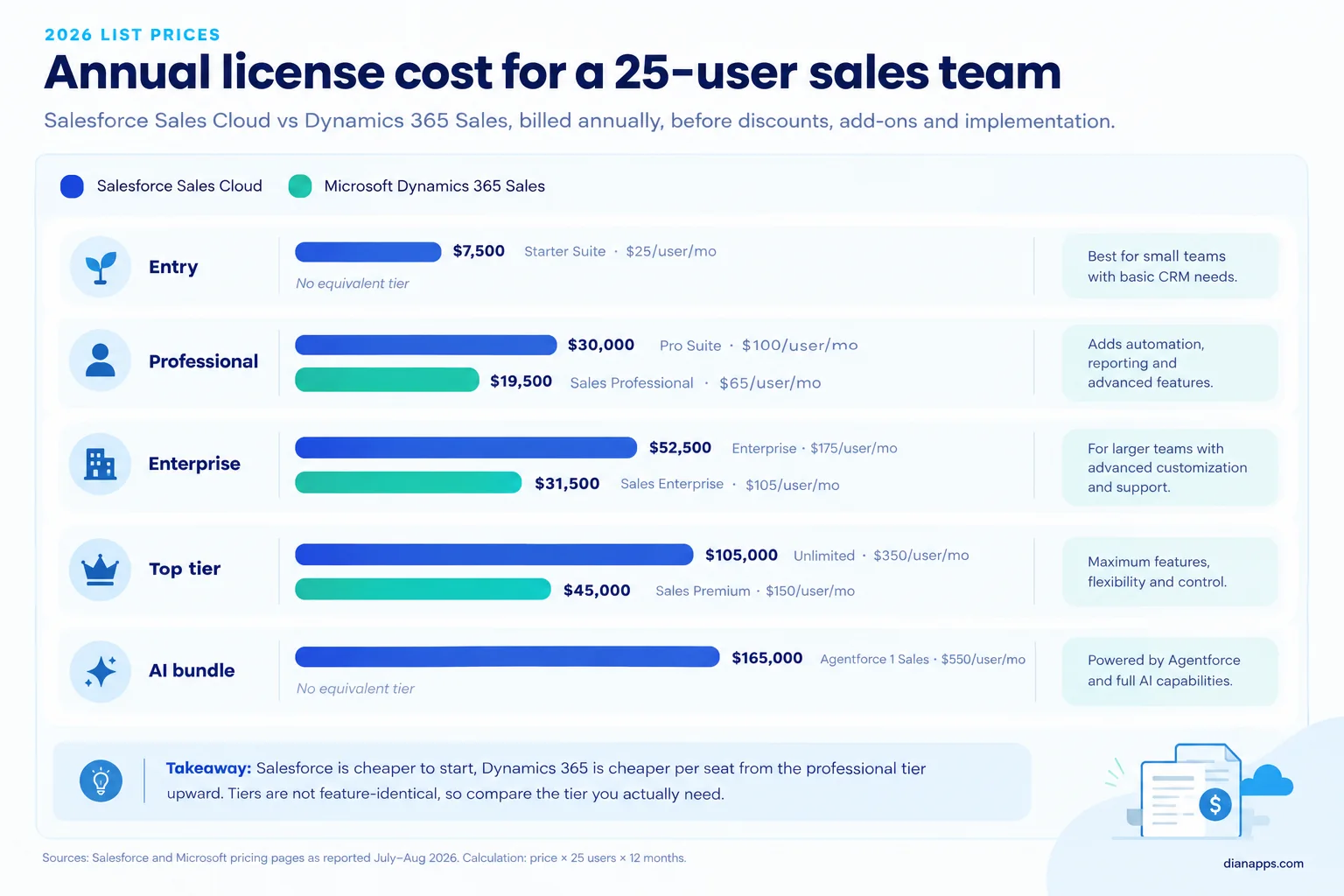
At list price, a 25-user team on Salesforce Enterprise is paying $52,500 a year in licenses; the same team on Dynamics 365 Sales Enterprise is paying $31,500.
License price is only part of the bill. These are the costs we are seeing buyers miss most often:
- Salesforce price rise: Salesforce raised prices by about 6% in August 2025, its first broad increase in seven years (SalesTechSpace, 2026).
- Salesforce support and API: Premier Success is costing 30% of net license fees, and lower tiers are paying extra for Web Services API access (PulseSignal, 2026).
- Salesforce AI add-ons: Agentforce for Sales is starting at $125 per user per month on top of Enterprise or Unlimited (Salesforce, 2026).
- Microsoft agent usage: Copilot Studio agents are consuming Copilot Credits, and an Azure subscription is required to run them (Microsoft, 2026).
- Microsoft 365 Copilot: Copilot across Word, Excel, and Outlook is a separate $30 per user per month enterprise license (Velosio, 2026).
- Both platforms: implementation, data migration, integrations, and a named admin often cost as much as year-one licenses.
Want a deeper breakdown of every Salesforce edition and add-on? Our Salesforce CRM challenges guide covers where budgets usually slip.
Agentforce vs Copilot: Which CRM Has Stronger AI?
Salesforce is ranked #2 in IDC’s new Agent Build and Deploy market with a 17.5% share, and it is the fastest-growing vendor in that category (IDC, 2026). Microsoft is taking a different route, putting Copilot inside the tools your team already opens every morning.
Salesforce AI: Agentforce, Einstein and Data Cloud
Agentforce is Salesforce’s autonomous agent layer. Agents are qualifying leads, researching accounts, answering service cases, and coaching reps, and they are running on customer data unified in Data Cloud. Gartner is naming Salesforce’s strategic focus on agentic AI as a chief reason it is leading the 2025 SFA Magic Quadrant (CX Today, 2025).
The trade-off is cost. Agentforce is either a $125 add-on or bundled unmetered in the $550 Agentforce 1 Sales tier, and usage-based credits are sitting on top in many setups.
Microsoft AI: Copilot and Copilot Studio
Copilot in Dynamics 365 Sales is drafting emails, summarizing meetings, preparing account briefs, and coaching reps during Teams calls. Embedded Copilot is included with Sales Enterprise and Premium licenses, and Sales Premium is adding 1,000 Copilot Credits per license for agent work (Microsoft, 2026).
For custom agents, Microsoft is pointing teams to Copilot Studio, which is billed by consumption.
Verdict: Salesforce is ahead on autonomous agents that act across sales, service, and marketing. Microsoft is ahead on AI that is included in the seat price and shows up inside Outlook, Teams, and Excel.
If your AI goal is “reps spend less time on admin”, Copilot is often enough. If it is “agents handle work end to end”, Agentforce is the more mature bet. You can read more on where this is heading in our Salesforce CRM trends for 2026.
Which Platform Is Better for Sales Automation?
Both are handling leads, opportunities, pipelines, forecasting, and activity tracking well. The difference is showing up once the sales process gets complicated.
- Salesforce Sales Cloud: territory management, sales engagement cadences, advanced forecasting, CPQ through Revenue Cloud, and deal insights. Gartner is citing its customization and extensibility as a core strength.
- Dynamics 365 Sales: sequences, predictive lead and opportunity scoring, forecasting, and native Outlook and Teams activity capture. Microsoft Relationship Sales is also bundling Sales Enterprise with LinkedIn Sales Navigator (TechnologyAdvice, 2026).
Verdict: Salesforce is winning for complex, multi-region or partner-led sales. Dynamics 365 is winning when adoption is the main risk, because reps never leave Outlook. Teams choosing Salesforce here are usually getting the most value from a properly configured Sales Cloud implementation.
Customer Service and Support Workflows
Both platforms cover case management, routing, knowledge bases, chatbots, field service, and self-service portals. Service is where the gap is narrowest.
Salesforce Service Cloud is strong on omni-channel routing, contact center tooling, and AI service agents. Dynamics 365 Customer Service is using Copilot to route cases, draft replies, and suggest knowledge articles, and it is adding Remote Assist for mixed-reality video support (Itransition, 2025).
Verdict: Salesforce is the safer pick for high-volume, multi-channel contact centers. Dynamics 365 is excellent when agents are collaborating on cases inside Teams. For Salesforce teams, Service Cloud configuration is where most of that routing value is coming from.
Customization and Development
Salesforce and Dynamics 365 are comparable in customization potential. What changes is the toolset and the talent you need. Businesses looking to extend Microsoft’s ecosystem can explore trusted Microsoft Dynamics 365 solutions to customize workflows, automate processes, and connect business applications.
- Salesforce: Flow and Lightning App Builder for no-code work, Apex and Lightning Web Components for code, plus full sandboxes on higher tiers.
- Dynamics 365:Power Apps, Power Automate and Dataverse for low-code work, C# plug-ins and Azure services for heavier logic.
Verdict: this one is a tie, and your existing team is the tiebreaker. A .NET shop is moving faster on Dynamics. A company with Salesforce admins or access to the large Salesforce developer pool is moving faster on Salesforce, especially with support from Salesforce customization services.
Integrations: AppExchange vs AppSource
Salesforce AppExchange is listing more than 5,000 integrations (Forbes Advisor, 2026), while Microsoft AppSource is offering hundreds of certified apps that plug into Dynamics 365 (Rand Group, 2026).
Salesforce is also bringing MuleSoft for API-led integration, Salesforce Connect for reading external data without copying it, plus native Slack and Tableau. Microsoft is bringing native Microsoft 365, Teams, and Power BI connections, Power Automate connectors, and Azure Logic Apps.
Can Salesforce integrate with Microsoft Teams and Outlook?
Yes. Salesforce is offering direct integrations with Outlook and Teams, so users can view and update CRM records without switching apps (Itransition, 2025). For workflow automation between the two, teams are usually using the Salesforce app for Teams or Power Automate’s Salesforce connector.
What about Salesforce and Azure data sync?
The right tool depends on whether you need reporting copies or live operational data:
- Azure Data Factory: its Salesforce connector is batch-loading records into Azure Data Lake or Azure Synapse for analytics and Power BI.
- Azure Logic Apps or Power Automate: their Salesforce connectors are triggering flows on record changes, which suits lighter, event-based sync.
- MuleSoft: the better fit for near real-time, bidirectional sync across many systems with governed APIs.
Verdict: Salesforce is winning for multi-vendor stacks; Dynamics 365 is winning for Microsoft-first stacks. Our Salesforce integration services team is building both patterns, including Salesforce to Teams, Outlook and Azure.
Reporting and Analytics
Both are offering real-time dashboards, pipeline reports, and forecasting, and Forbes Advisor is rating their reporting functionality as essentially equal in its 2026 test.
Salesforce is pairing native reports with CRM Analytics and Tableau, often as add-ons. Dynamics 365 is pairing native dashboards with Power BI, which many Microsoft customers already own.
Verdict: a tie on capability, with a cost edge for Dynamics 365 if Power BI is already licensed across your company.
Security, Deployment and Mobile Access
Both platforms are encrypting data at rest with AES-256 and supporting granular permissions, MFA and SSO (Forbes Advisor, 2026). Salesforce is adding Shield for platform encryption, event monitoring, and field audit trail when compliance needs go further.
Deployment is a real difference. Salesforce is cloud-only, while Dynamics 365 is available in the cloud and on-premises, although the on-premises option offers more limited functionality (Itransition, 2025).
On mobile, Salesforce is offering one app covering all its mobile capabilities, while Microsoft is splitting mobile into separate apps per product (Itransition, 2025). Dynamics 365 Sales is supporting offline work in its mobile app (Rand Group, 2026).
Verdict: Dynamics 365 is winning on deployment flexibility; Salesforce is winning on a simpler mobile experience.
Salesforce vs Microsoft Dynamics: The Category Scorecard
Here is every verdict from this guide in one place, so you can weight the categories that matter to your business.
| Category | Winner | Why |
|---|---|---|
| Starting price | Salesforce | $25 Starter Suite and a free 2-user plan |
| Per-seat cost at enterprise tier | Dynamics 365 | $105 vs $175 per user per month |
| Sales automation depth | Salesforce | Territories, CPQ, deeper forecasting |
| Customer service | Salesforce (narrow) | Stronger omni-channel contact center tooling |
| AI agents | Salesforce | Agentforce is further along on autonomous agents |
| AI included in seat price | Dynamics 365 | Copilot included from Sales Enterprise |
| Microsoft 365 integration | Dynamics 365 | Native Outlook, Teams, Excel and Power BI |
| Third-party integrations | Salesforce | 5,000+ AppExchange integrations plus MuleSoft |
| Customization | Tie | Comparable, depends on in-house skills |
| Reporting | Tie | Equal capability, Power BI cost edge for Microsoft shops |
| ERP scope and deployment | Dynamics 365 | Native ERP apps and an on-premises option |
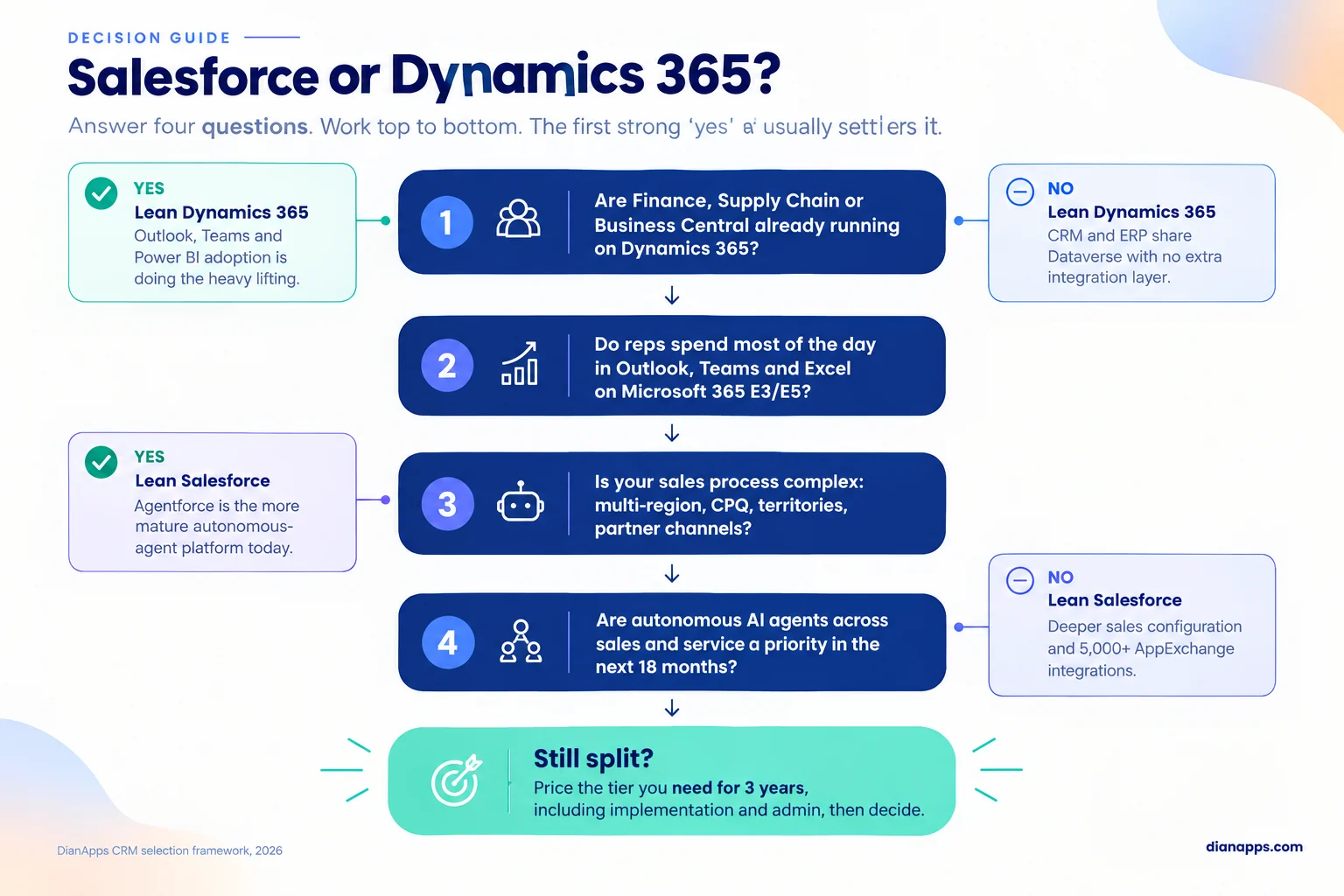
Salesforce is winning five categories, and Dynamics 365 is winning four, but the four Dynamics wins are often the ones that decide a Microsoft-heavy company.
Can You Migrate from Salesforce to Dynamics 365, or the Other Way?
Yes, in both directions, but no tool is moving an org in one click. Every migration is a two-part job: rebuild the structure in the target platform first, then move the data into it.
Here is how a well-run migration usually sequences the work:
- Audit and clean: remove duplicates, dead fields, and stale records before anything moves. Dirty data is the most common reason migrations fail.
- Map the schema: Salesforce objects are becoming Dataverse tables and vice versa. Custom objects and custom fields must be created in the target first, which answers the common question about migrating custom fields.
- Rebuild automation: Flows, Apex, Power Automate flows, and plug-ins do not transfer. They are being redesigned, not copied.
- Move data in dependency order: accounts, then contacts, opportunities, cases, activities, and finally files and attachments, which are usually the slowest part.
- Test and run in parallel: validate record counts and relationships, and keep the old system read-only during cutover.
- Train and adopt: plan role-based training, because a clean migration with poor adoption is still a failed project.
Common tooling includes KingswaySoft for SSIS, Azure Data Factory and Dataflows when moving into Dynamics 365, and Salesforce Data Loader or MuleSoft when moving into Salesforce. API limits on the source platform are often setting the pace for large data volumes.
Timelines depend on record volume, custom objects, integrations, and how much automation needs rebuilding. A small org on standard objects is moving far faster than an enterprise org with years of custom code. Our Salesforce implementation services team is scoping migrations with a data audit first, so the estimate is based on your org rather than a guess.
Can Salesforce and Dynamics 365 Run Together?
Yes, and more companies are doing it than you might think. The two platforms are not natively connected, so interoperability is coming from third-party tools, AppExchange integrations, or custom APIs that share leads, opportunities, and customer data (Itransition, 2025).
The most common pattern we are seeing is Salesforce for CRM with Dynamics 365 Business Central or Finance for ERP. Mergers are another trigger when one company is on each platform, and a full migration is not worth it yet.
The rule that is keeping these setups sane: decide which system owns each record type before you build a single sync.
What Teams Are Actually Asking
We are reviewing community threads and verified user reviews to see what buyers weighing Salesforce vs. Microsoft Dynamics are really worried about. Three questions keep coming back.
“Salesforce works, but it is expensive. Is Dynamics worth switching to?” A recurring thread on a professional forum is asking exactly this, and the most useful reply is pointing back to goals: cost is one lever, not the whole decision. Our answer: Dynamics 365 is cheaper per seat at enterprise tiers, but switching adds migration and retraining costs, so the savings need a three-year view.
“We switched, and now our data is a mess. What went wrong?” One widely discussed post describes a Salesforce-to-Dynamics move where the team is unable to pull a clean customer list, and the author is admitting the data was old and incomplete before the move. The platform is rarely the root cause. Migrating dirty data is simply moving the problem.
“Why do teams switch in the first place?” In verified Capterra reviews, one reviewer is explaining their switch from Salesforce by pointing to Dynamics 365’s integration with Office 365, Teams, and Power BI, while another is blaming a mixed experience on poor implementation partners. Both reviews are telling the same story: ecosystem fit and partner quality are deciding outcomes more than feature lists.
How DianApps Approaches the Salesforce vs Dynamics Decision
DianApps, an AI-first product development company, is a Salesforce Consulting Partner with 150+ engineers, 350+ clients across 25+ countries, and a 4.8/5 Clutch rating from 81+ reviews as a Premier Verified company. Our U.S. team is based in St. Petersburg, Florida.
We are building on Salesforce, so here is our honest position. When a client is running Dynamics 365 Finance or Business Central, and their sales team lives in Teams, we are telling them Dynamics 365 is probably the better fit. When revenue operations are complex, the stack is multi-vendor, or AI agents are a priority, we are recommending Salesforce and scoping it properly.
After go-live, our Salesforce managed services team is handling admin, releases, performance tuning, and security reviews, which is where most CRM value is either protected or lost.
Conclusion
The Salesforce vs Microsoft Dynamics decision is rarely about which CRM has more features. Both are Gartner Leaders, both are investing heavily in AI, and both can scale to thousands of users.
What is separating them is your starting point. Salesforce is the stronger CRM-first platform, with deeper sales tooling, 5,000+ integrations, and the more advanced agent roadmap. Dynamics 365 is the better fit when Microsoft 365 and Dynamics ERP are already running your business, and it is cheaper per seat at enterprise tiers.
Price the tier you really need over three years, including implementation and admin, before you sign. If Salesforce is your answer, our team is ready to help you scope it properly.
 0 comments












Leave a Comment
Your email address will not be published. Required fields are marked *